
Unable to extend partition on storage drive

redsox985

New member
Local time
6:28 AM
Messages
13
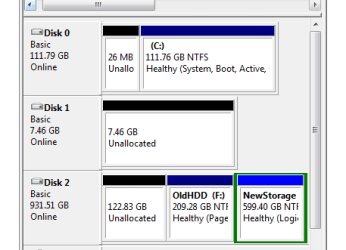
I have W7U on a Samsung 7 Series (S01UB) with a primary 120 GB Kingston SSD and then the factory 1 tb drive in the DVD drive slot. I use the tb as my storage, and still have old windows stuff on it, as I did a clean install to my SSD. You can see from the screenshot that it's broken into old and new. I shrunk the "old" area by the unallocated 122 GB as I moved crap off or deleted what I didn't want. I'm trying to reassign the unallocated to the "new" area, but I am failing miserably here. I've tried using both the windows disk manager as well as EaseUs Partition Master, to no avail. Can anyone point me down the right road? Thanks!
 

Attachments
  • NotWorking.PNG
    NotWorking.PNG
    6.8 KB · Views: 17

My Computer My Computer

At a glance

Windows 7 Ultimatei7 2675QM8GBAMD Radeon HD 6490M
Computer Manufacturer/Model Number
Samsung 7 Series NP700Z5B-SO1UB
OS
Windows 7 Ultimate
CPU
i7 2675QM
Memory
8GB
Graphics Card(s)
AMD Radeon HD 6490M
Screen Resolution
1600x900
Hard Drives
1TB
Three Options

Option 1
I have used GParted (on a Live Ubuntu CD) to successfully perform this operation.

However it took a ridiculous amount of time and it also issues a scary warning about potential data loss.
IIRC, I merged a 500 GB partition with another smaller one and it took 16 hours to complete the operation.

Option 2
I would suggest that the simplest way would be to copy everything from to an external HDD and then delete and rebuild the 2 partitions into one (that is what I do these days).
This has the bonus that if anything goes wrong, you should still have a backup copy of your data.

Option 3
Since gregrocker posted before I could finish my post, you could try his suggestion (he is one of the experts on SevenForums).
 

My Computer My Computer

At a glance

W7 Ultimate SP1, LM19.2 MATE, W10 Home 1703, ...AMD Phenom II x6 1100T, 3.3 GHz12GB DDR3 1333 G-Skill (4GB x 2), G-Skill (2G...NVIDIA GeForce GTX 660
Computer type
PC/Desktop
Computer Manufacturer/Model Number
n/a
OS
W7 Ultimate SP1, LM19.2 MATE, W10 Home 1703, W10 Pro 1703 VM, #All 64 bit
CPU
AMD Phenom II x6 1100T, 3.3 GHz
Motherboard
ASUS M4A88T-M/USB3 (AM3)
Memory
12GB DDR3 1333 G-Skill (4GB x 2), G-Skill (2GB x 2)
Graphics Card(s)
NVIDIA GeForce GTX 660
Sound Card
Realtek?
Monitor(s) Displays
Samsung S23B350
Screen Resolution
1920x1080
Hard Drives
WD Green 2TB (SATA), WD Green 3TB (SATA), WD Blue 4TB (SATA), WD Blue 6TB (SATA)
PSU
Cooler Master
Case
Antec GX300 Tower
Cooling
3x Antec TRICOOL 120mm Fans
Mouse
Wired Optical
Internet Speed
DSL
Antivirus
Avast
Browser
Pale Moon (64 bit)
Other Info
2018-12-27 Upgraded HDDs
2015-12-10 Upgraded case, graphics card, storage
2015-08-15 Upgraded motherboard & RAM
2015-07-15 Upgraded LM17.1 to LM17.2
Greg and 2000, thanks for the suggestions. If I have enough HDD space scattered throughout my desk, I'd prefer to go the back up, format, and rebuild route because it's the cleanest, plus there's redundancy built in. If I can't find the space, I'll go the partition wizard route. I'll update when I get time to do this amidst midterms. Thanks!
 

My Computer My Computer

At a glance

Windows 7 Ultimatei7 2675QM8GBAMD Radeon HD 6490M
Computer Manufacturer/Model Number
Samsung 7 Series NP700Z5B-SO1UB
OS
Windows 7 Ultimate
CPU
i7 2675QM
Memory
8GB
Graphics Card(s)
AMD Radeon HD 6490M
Screen Resolution
1600x900
Hard Drives
1TB
Back
Top