Homegroup Functionality Is Broken

happinessiseasy

Vista Skipper
Alright. This problem is really baffling me. I'm running Windows 7 RC Build 7100 (32-bit). I was attempting to set up a Homegroup on my computer, and I noticed it said I was already connected to a Homegroup. Strange, because I don't remember doing that. I didn't know the password for the group, so I thought I'll just reset it.

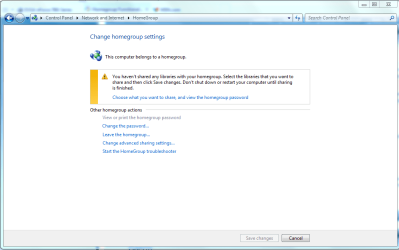
Unfortunately, it wouldn't let me change the password. It also won't let me view the current password or even LEAVE the Homegroup on my computer. Here are the things I try and the errors I get:

View or print the homegroup password
[No response]. The computer does absolutely nothing. No CPL pops up or anything.

Change the password...
This brings up the Change Password window. I can type whatever I want, but when I click Change, I get the error "Windows could not create the homegroup."

Leave the homegroup
"Windows couldn't remove your computer from the Homegroup."


Does this sound like anything someone else has encountered? Even Googling these errors comes up with zilch. I really don't want to reinstall, but it's looking more and more like I'm gonna have to.
 

My Computer

Computer Manufacturer/Model Number
Home-Built and has been slowly upgraded since 1999
OS
Windows 7 RC (Build 7100)
CPU
AMD Athlon XP 2400+
Motherboard
ECS L7S7A2
Memory
1.25 GB
Graphics Card(s)
ATI Radeon
Sound Card
SoundBlaster Live! Platinum (w/ Live! Drive)
Monitor(s) Displays
ViewSonic 19" LCD
Screen Resolution
1440x900
Hard Drives
320GB PATA
250GB external USB Backup
PSU
500W
Case
Generic Beige Box
Cooling
A bunch of Fans
Keyboard
Old one with the keys pried off that I don't use
Mouse
Microsoft Optical Mouse I found at Unclaimed baggage for $10
Internet Speed
Knology Cable Internet (~6-7Mbps)
I have this very same issue. I have a release copy of 7 Professional and I can not it to realize I have never set up a homegroup.
 

My Computer

OS
Windows 7 proffesional

My Computer

Computer Manufacturer/Model Number
Tx2500z Tablet Pc/Homemade Server
OS
Windows 7 Ult x64(x2), HomePrem x32(x4), Server 08 (+VM), 08 R2 (VM) , SuSe 11.2 (VM), XP 32 (VM)
CPU
Turion X2 ultra (oh well came with laptop)/P4 @3.2 (yes P4)
Motherboard
IDK HP Motherboard / Intel DG965SS
Memory
OCZ Dual Channel 4GB kit/ 1gb Dual Channel
Graphics Card(s)
HD 3200 graphics /GMA x3100 (yay for intergrated!!)
Sound Card
Realtek HD Audio(mic working, well sort of)/Siig IC-70012
Monitor(s) Displays
built-in Hp 12" laptop screen/ Acer 19"
Screen Resolution
1280x800 /1440x900
Cooling
All Air Cooled
Mouse
Logi MX Rev. /MS Wheel Optical 1.1A /Logitech Optical Mouse
Internet Speed
College baby but its still routed through vpn to 1536k...
Other Info
love my wacom pen and pressure sensitivity...
wished it worked in 7, SUSE for that matter though
Ok, HomeGroup Provider is running, but HomeGroup Listener is not. When I try to start it, I get the error:

"Windows could not start the HomeGroup Listener on Local Computer. For more information, review the System Event Log. If this is a non-Microsoft service, contact the service vendor, and refer to service-specific error code -2147023143."

Also, of the two paths, C:\Windows\ServiceProfiles\NetworkService\AppData\Roaming\PeerNetworking did not exist (There was only one folder in "Roaming" and it was "Microsoft"). "C:\Windows\ServiceProfiles\LocalService\AppData\Roaming\PeerNetworking" was there, but I could not delete all of the files because they were in use. I will try rebooting, then try deleting more of those files if possible, and let you know if that helps.

Edit: Here is the error log entry for the HomeGroup Listener service not starting:

Log Name: System
Source: Service Control Manager
Date: 9/16/2009 12:53:56 AM
Event ID: 7024
Task Category: None
Level: Error
Keywords: Classic
User: N/A
Computer: Aang
Description:
The HomeGroup Listener service terminated with service-specific error %%-2147023143.
Event Xml:
<Event xmlns="http://schemas.microsoft.com/win/2004/08/events/event">
<System>
<Provider Name="Service Control Manager" Guid="{555908d1-a6d7-4695-8e1e-26931d2012f4}" EventSourceName="Service Control Manager" />
<EventID Qualifiers="49152">7024</EventID>
<Version>0</Version>
<Level>2</Level>
<Task>0</Task>
<Opcode>0</Opcode>
<Keywords>0x8080000000000000</Keywords>
<TimeCreated SystemTime="2009-09-16T05:53:56.800781300Z" />
<EventRecordID>17838</EventRecordID>
<Correlation />
<Execution ProcessID="480" ThreadID="276" />
<Channel>System</Channel>
<Computer>Aang</Computer>
<Security />
</System>
<EventData>
<Data Name="param1">HomeGroup Listener</Data>
<Data Name="param2">%%-2147023143</Data>
</EventData>
</Event>
 
Last edited:

My Computer

Computer Manufacturer/Model Number
Home-Built and has been slowly upgraded since 1999
OS
Windows 7 RC (Build 7100)
CPU
AMD Athlon XP 2400+
Motherboard
ECS L7S7A2
Memory
1.25 GB
Graphics Card(s)
ATI Radeon
Sound Card
SoundBlaster Live! Platinum (w/ Live! Drive)
Monitor(s) Displays
ViewSonic 19" LCD
Screen Resolution
1440x900
Hard Drives
320GB PATA
250GB external USB Backup
PSU
500W
Case
Generic Beige Box
Cooling
A bunch of Fans
Keyboard
Old one with the keys pried off that I don't use
Mouse
Microsoft Optical Mouse I found at Unclaimed baggage for $10
Internet Speed
Knology Cable Internet (~6-7Mbps)
I have both Homegroup Listener and Homegroup Provider running. I tried to go and delete the PeerNetworking file but I do not have a file labeled that to delete.
 

My Computer

OS
Windows 7 proffesional
Homegroup settings

You should be able too use the homegroup trouble shooter, view the password, or even leave the homegroup from here. If it doesn't work then it's probably time to punt the Op system and reinstall.
 

Attachments

  • homegroup settings.PNG
    homegroup settings.PNG
    108.2 KB · Views: 3,050

My Computer

Computer type
PC/Desktop
Computer Manufacturer/Model Number
Home built
OS
Windows 7 Ult, Windows 8.1 Pro,
CPU
Q9650-4.275GHz, E8600 4.5GHz, E6750-3.8GHz
Motherboard
Evga 780i FTW
Memory
G.Skill PC2 9600 1200Mhz 5 5 5 15 2T
Graphics Card(s)
GTX480
Sound Card
Asus Xonar D2
Monitor(s) Displays
HannsG
Screen Resolution
1680X1050
Hard Drives
GSkill Phoenix Pro 120GB SSD
PSU
ThermalTake Toughpower 1000Watt modular
Case
ThermalTake XaserV
Cooling
Xigmatek S1283
Keyboard
Logitech G15
Mouse
Logitech G9
Internet Speed
T1
Think maybe repair would work? I would hate to reinstall....

And no the troubleshooter doesnt let me do anything.
 

My Computer

OS
Windows 7 proffesional
Ok, HomeGroup Provider is running, but HomeGroup Listener is not. When I try to start it, I get the error:

"Windows could not start the HomeGroup Listener on Local Computer. For more information, review the System Event Log. If this is a non-Microsoft service, contact the service vendor, and refer to service-specific error code -2147023143."

Also, of the two paths, C:\Windows\ServiceProfiles\NetworkService\AppData\Roaming\PeerNetworking did not exist (There was only one folder in "Roaming" and it was "Microsoft"). "C:\Windows\ServiceProfiles\LocalService\AppData\Roaming\PeerNetworking" was there, but I could not delete all of the files because they were in use. I will try rebooting, then try deleting more of those files if possible, and let you know if that helps.

Edit: Here is the error log entry for the HomeGroup Listener service not starting:

Code:
Log Name:      System
Source:        Service Control Manager
Date:          9/16/2009 12:53:56 AM
Event ID:      7024
Task Category: None
Level:         Error
Keywords:      Classic
User:          N/A
Computer:      Aang
Description:
The HomeGroup Listener service terminated with service-specific error %%-2147023143.
Event Xml:
<Event xmlns="http://schemas.microsoft.com/win/2004/08/events/event">
  <System>
    <Provider Name="Service Control Manager" Guid="{555908d1-a6d7-4695-8e1e-26931d2012f4}" EventSourceName="Service Control Manager" />
    <EventID Qualifiers="49152">7024</EventID>
    <Version>0</Version>
    <Level>2</Level>
    <Task>0</Task>
    <Opcode>0</Opcode>
    <Keywords>0x8080000000000000</Keywords>
    <TimeCreated SystemTime="2009-09-16T05:53:56.800781300Z" />
    <EventRecordID>17838</EventRecordID>
    <Correlation />
    <Execution ProcessID="480" ThreadID="276" />
    <Channel>System</Channel>
    <Computer>Aang</Computer>
    <Security />
  </System>
  <EventData>
    <Data Name="param1">HomeGroup Listener</Data>
    <Data Name="param2">%%-2147023143</Data>
  </EventData>
</Event>
interesting
try to delete the files in safe mode....
in sf mode
go here first
C:\Windows\ServiceProfiles\LocalService
there say yes to the permissions prompt and there you should see the folders
then go through to find the folder and delete those files from both computers if possible
also go and check whether ipv6 is on your adapter....
 

My Computer

Computer Manufacturer/Model Number
Tx2500z Tablet Pc/Homemade Server
OS
Windows 7 Ult x64(x2), HomePrem x32(x4), Server 08 (+VM), 08 R2 (VM) , SuSe 11.2 (VM), XP 32 (VM)
CPU
Turion X2 ultra (oh well came with laptop)/P4 @3.2 (yes P4)
Motherboard
IDK HP Motherboard / Intel DG965SS
Memory
OCZ Dual Channel 4GB kit/ 1gb Dual Channel
Graphics Card(s)
HD 3200 graphics /GMA x3100 (yay for intergrated!!)
Sound Card
Realtek HD Audio(mic working, well sort of)/Siig IC-70012
Monitor(s) Displays
built-in Hp 12" laptop screen/ Acer 19"
Screen Resolution
1280x800 /1440x900
Cooling
All Air Cooled
Mouse
Logi MX Rev. /MS Wheel Optical 1.1A /Logitech Optical Mouse
Internet Speed
College baby but its still routed through vpn to 1536k...
Other Info
love my wacom pen and pressure sensitivity...
wished it worked in 7, SUSE for that matter though
I found that if Windows Firewall service is disabled and a 3rd party Firewall is not found, Windows will not allow the HomeGroup Listener to run and gives you the 2147023143 error. If the above is true for you, re-enable Windows Firewall service or try set it at least to manual then attempt to start the Listener.

In my case, I was able to restart the Homegroup Listener after doing this. I had disabled the firewall and hadn't installed my preferred 3rd party app yet.

I have 4 PCs correctly in my Homegroup, a 5th Laptop is giving me the error you have, but I am not locked out from joining or leaving homegroup on the mis-configured PC, only from access to the other PCs. Also on the 4 homegroup configured PCs; I checked the Windows/ServiceProfiles folder and none of those PCs do not have the folders noted above.

Restarting the listener has not repaired my issues with the Homegroup yet but I feel I am one step closer.
 

My Computer

Computer Manufacturer/Model Number
Personal nvader nv-008
OS
Se7en 7600 15399 x64 & Vista Ultimate x64 SP2
CPU
Phenom II 920
Motherboard
Gigabyte MA790GP-DS4H
Memory
8 GB ocz Platinum DDR2 1033
Graphics Card(s)
Sapphire Radeon HD4830 512 DDR3
Sound Card
onboard hd
Monitor(s) Displays
Two Asus 24" VH222H
Screen Resolution
1920X1080 1920X1080
Hard Drives
WD Black 1 TB
WD Black 750 GB (Boot)
Seagate 1.5 TB
PSU
Ocz 750
Case
CM CM690
Cooling
Air
Keyboard
Logitech S520 wireless
Mouse
Logitech LX8 wireless
Internet Speed
DSL 5mbs down 756kbs up
Other Info
Dual Boot
I found that if Windows Firewall service is disabled and a 3rd party Firewall is not found, Windows will not allow the HomeGroup Listener to run and gives you the 2147023143 error. If the above is true for you, re-enable Windows Firewall service or try set it at least to manual then attempt to start the Listener.

We have a winner! Worked perfectly thanks. Black Viper's site strangely did list the Firewall as a dependent.
 

My Computer

OS
Windows 7 64bit
Ok, HomeGroup Provider is running, but HomeGroup Listener is not. When I try to start it, I get the error:

"Windows could not start the HomeGroup Listener on Local Computer. For more information, review the System Event Log. If this is a non-Microsoft service, contact the service vendor, and refer to service-specific error code -2147023143."

Also, of the two paths, C:\Windows\ServiceProfiles\NetworkService\AppData\Roaming\PeerNetworking did not exist (There was only one folder in "Roaming" and it was "Microsoft"). "C:\Windows\ServiceProfiles\LocalService\AppData\Roaming\PeerNetworking" was there, but I could not delete all of the files because they were in use. I will try rebooting, then try deleting more of those files if possible, and let you know if that helps.

Edit: Here is the error log entry for the HomeGroup Listener service not starting:

Log Name: System
Source: Service Control Manager
Date: 9/16/2009 12:53:56 AM
Event ID: 7024
Task Category: None
Level: Error
Keywords: Classic
User: N/A
Computer: Aang
Description:
The HomeGroup Listener service terminated with service-specific error %%-2147023143.
Event Xml:
<Event xmlns="http://schemas.microsoft.com/win/2004/08/events/event">
<System>
<Provider Name="Service Control Manager" Guid="{555908d1-a6d7-4695-8e1e-26931d2012f4}" EventSourceName="Service Control Manager" />
<EventID Qualifiers="49152">7024</EventID>
<Version>0</Version>
<Level>2</Level>
<Task>0</Task>
<Opcode>0</Opcode>
<Keywords>0x8080000000000000</Keywords>
<TimeCreated SystemTime="2009-09-16T05:53:56.800781300Z" />
<EventRecordID>17838</EventRecordID>
<Correlation />
<Execution ProcessID="480" ThreadID="276" />
<Channel>System</Channel>
<Computer>Aang</Computer>
<Security />
</System>
<EventData>
<Data Name="param1">HomeGroup Listener</Data>
<Data Name="param2">%%-2147023143</Data>
</EventData>
</Event>

===============================================================
Hy
I had the same problem, i made somme diagnosis and found "error 0x80630801" from the "PNRP" (Peer Name Resolution Protoco) , then i made somme google search and found this page ( Common Return Codes (Windows) ) where they say that the file "idstore.sst " is corrupted and to delete it
"The Identity Store has been corrupted. Delete idstore.sst from the %appdata%\peernetworking folder.
Value: 0x80630801"
the problem is i had no idea where is the folder but thats where you helped me
C:\Windows\ServiceProfiles\LocalService\AppData\Roaming\PeerNetworking and i deleted the file idstore.sst .I restarted the pc then i was able to start the service PNRP and also started "Peer-to-Peer Grouping" that was depending on the PNRP to start and leave my homegroup and since then i made a new network homegroup and my other pc joined it , for the credentials i use "homegroupuser$" on the permisions tab and everything is good i can now acces my shared folders.
Thank you
 

My Computer

Computer Manufacturer/Model Number
asus
OS
windows 7
CPU
intel q6600 quad
Motherboard
asus
Graphics Card(s)
g forece 9600
Sound Card
creative x-fi
Monitor(s) Displays
acer
Hard Drives
western digital 500 gb
Problem solved!

Hi, I'm sure this will help many of you as I was getting exactly the same problems as a lot of you.

Firstly, I decided to address the problem when my computer was constantly resetting itself and the problem seemed to be getting more frequent.

So, I checked my event log (Computer(rightclick) > Manage > Event Viewer > Windows Logs > System). It showed me a whole bunch of errors containing two services. Either Peer Networking Grouping or Peer Name Resolution Protocol. I checked out Services (type services in the search bar on start) and found that I could not start these two services manually either. I disabled them which stopped my computer restarting itself and cleared the event log of any errors I was receiving before.

I now, however, couldn't see any other computers in my Homegroup and couldn't leave it, change what I was sharing or view the password, which are many of the symptoms you guys were receiving.

How I fixed the problem

Go to C:\Windows\ServiceProfiles\LocalService\AppData\Roaming\PeerNetworking and delete all of the files in this folder. Now restart the computer.

Go to Services again and you should be able to start 'Peer Networking Grouping' and 'Peer Name Resolution Protocol'. Restart the computer again.

When you log on this time, check the event log again, to ensure no errors concerning the two services are present and also check Services to ensure the two services concerned are running.

You should now have full functionality restored to your homegroup.

I hope this helps, let me know if it works.

Nick
 

My Computer

OS
Windows 7 x64
I had the same problem as metioned here before, the prnp services are not working and i can get them running.
I wanted to try the solution offered here, by deleting the Idfile in the Appdata folder, but when i go there, there are a lot of folders but no Appdata, anybody got any thoughts on this?
 

My Computer

OS
windows 7
I had the same problem as metioned here before, the prnp services are not working and i can get them running.
I wanted to try the solution offered here, by deleting the Idfile in the Appdata folder, but when i go there, there are a lot of folders but no Appdata, anybody got any thoughts on this?

do you have hide hidden files and folders on and/or Hide OS files?
there's a tut here to turn both off so you can go and delete the files you need to:
http://www.sevenforums.com/tutorials/394-hidden-files-folders-show-hide.html
 

My Computer

Computer Manufacturer/Model Number
Tx2500z Tablet Pc/Homemade Server
OS
Windows 7 Ult x64(x2), HomePrem x32(x4), Server 08 (+VM), 08 R2 (VM) , SuSe 11.2 (VM), XP 32 (VM)
CPU
Turion X2 ultra (oh well came with laptop)/P4 @3.2 (yes P4)
Motherboard
IDK HP Motherboard / Intel DG965SS
Memory
OCZ Dual Channel 4GB kit/ 1gb Dual Channel
Graphics Card(s)
HD 3200 graphics /GMA x3100 (yay for intergrated!!)
Sound Card
Realtek HD Audio(mic working, well sort of)/Siig IC-70012
Monitor(s) Displays
built-in Hp 12" laptop screen/ Acer 19"
Screen Resolution
1280x800 /1440x900
Cooling
All Air Cooled
Mouse
Logi MX Rev. /MS Wheel Optical 1.1A /Logitech Optical Mouse
Internet Speed
College baby but its still routed through vpn to 1536k...
Other Info
love my wacom pen and pressure sensitivity...
wished it worked in 7, SUSE for that matter though
I read something about the file being hidden indeed. But i thought the Appdata folder was visible all the time? But you're saying that folder might be invis? I'll check it out when i get home tonight.
 

My Computer

OS
windows 7
I read something about the file being hidden indeed. But i thought the Appdata folder was visible all the time? But you're saying that folder might be invis? I'll check it out when i get home tonight.

nope appdata is a hidden folder and if you do have hide hidden files and folders enable then it would not show...;)
its the only folder that has that hidden attribute now that i think about it...:huh:
 

My Computer

Computer Manufacturer/Model Number
Tx2500z Tablet Pc/Homemade Server
OS
Windows 7 Ult x64(x2), HomePrem x32(x4), Server 08 (+VM), 08 R2 (VM) , SuSe 11.2 (VM), XP 32 (VM)
CPU
Turion X2 ultra (oh well came with laptop)/P4 @3.2 (yes P4)
Motherboard
IDK HP Motherboard / Intel DG965SS
Memory
OCZ Dual Channel 4GB kit/ 1gb Dual Channel
Graphics Card(s)
HD 3200 graphics /GMA x3100 (yay for intergrated!!)
Sound Card
Realtek HD Audio(mic working, well sort of)/Siig IC-70012
Monitor(s) Displays
built-in Hp 12" laptop screen/ Acer 19"
Screen Resolution
1280x800 /1440x900
Cooling
All Air Cooled
Mouse
Logi MX Rev. /MS Wheel Optical 1.1A /Logitech Optical Mouse
Internet Speed
College baby but its still routed through vpn to 1536k...
Other Info
love my wacom pen and pressure sensitivity...
wished it worked in 7, SUSE for that matter though
Ah thanks a bunch. I'll try it out tonight.
Strange though, home group worked perfectly before, now my laptop is replaced and all of a sudden the services on my desktop are disabled.

Do you also have any idea what causes this? So i can prevent it in the future?
 

My Computer

OS
windows 7
Ah thanks a bunch. I'll try it out tonight.
Strange though, home group worked perfectly before, now my laptop is replaced and all of a sudden the services on my desktop are disabled.

Do you also have any idea what causes this? So i can prevent it in the future?

most probably file corruption or a very rare bug (although it doesnt seem that rare from what im seeing...;))

i might be fixed if this is a bug or if its file corruption then cant be prevented per say...;)
 

My Computer

Computer Manufacturer/Model Number
Tx2500z Tablet Pc/Homemade Server
OS
Windows 7 Ult x64(x2), HomePrem x32(x4), Server 08 (+VM), 08 R2 (VM) , SuSe 11.2 (VM), XP 32 (VM)
CPU
Turion X2 ultra (oh well came with laptop)/P4 @3.2 (yes P4)
Motherboard
IDK HP Motherboard / Intel DG965SS
Memory
OCZ Dual Channel 4GB kit/ 1gb Dual Channel
Graphics Card(s)
HD 3200 graphics /GMA x3100 (yay for intergrated!!)
Sound Card
Realtek HD Audio(mic working, well sort of)/Siig IC-70012
Monitor(s) Displays
built-in Hp 12" laptop screen/ Acer 19"
Screen Resolution
1280x800 /1440x900
Cooling
All Air Cooled
Mouse
Logi MX Rev. /MS Wheel Optical 1.1A /Logitech Optical Mouse
Internet Speed
College baby but its still routed through vpn to 1536k...
Other Info
love my wacom pen and pressure sensitivity...
wished it worked in 7, SUSE for that matter though
And it workes like a charm. The folder was invis indeed. When i deleted i went back to services and all the services needed were running again. I was able to leave homegroup and create a new.

Thinking about setting it to a workgroup now, since i read here somewhere that the transfer speeds between workstations might increase then.

Thanks for the help.
 

My Computer

OS
windows 7
Back
Top