Has anyone ever got homegroup function to work?

sleepless

New member
Local time
9:12 PM
Messages
84
No matter what i do homegroup doesn't work for me.

-i have 2 pc's on my home network - 1 laptop, 1 desktop
-both homegroup passwords are entered
-folders are shared to homegroup read/write on both pc's
-nothing detected on laptop - nothing listed in network or homegroup
-laptop does appear in explorer on the desktop, but it says i don't have access to the files (this is an admin account)

I'd really appreciate some help here. Windows has me extremely frustrated. Troubleshooter is useless.:(

*i don't mean streaming, i mean sharing folders, thx.
 

My Computer

Computer type
Laptop
Computer Manufacturer/Model Number
Asus K52N
OS
Windows 7 Ultimate x64 SP1
CPU
AMD Turion II P540
Motherboard
Asus
Memory
6 GB
Graphics Card(s)
ATI Radeon HD 4200
Antivirus
Avast
Browser
Chrome
Your question.

Has anyone ever got homegroup function to work?

No I have never got it to work and I spent days, weeks and the help from many members here.

So I will be watching to see if I can learn something to solve my problem.
 

My Computer

Computer type
PC/Desktop
Computer Manufacturer/Model Number
Home made Desktop
OS
Windows 10 Pro. 64/ version 1709 Windows 7 Pro/64
CPU
Intel i7-6800K @ 4.3
Motherboard
ASUS X-99 Deluxe II
Memory
Corsair Platinum 16 gig @2400
Graphics Card(s)
EVGA GTX 1070 OC
Monitor(s) Displays
Asus 27" LED LCD/VE278Q
Screen Resolution
1920-1080 or 1280-720 HDMI
Hard Drives
INTEL SSD 730-240 Gb Sata 3.0/
PSU
EVGA Platium 1200W
Case
Phanteks Luxe Tempered Glass 8 fans/ one radiator
Cooling
XSPC/ Water Cooled CPU
Keyboard
Das 4 Professional
Mouse
Logitech M705/MX Anywhere 2-S
Internet Speed
100 mbits
Antivirus
Microsoft Security Essentials/ Malwarebytes Premium 3.0/ SAS
Browser
I.E. 11 default/Firefox/ ISP Time Warner Cable/Spectrum
Other Info
LG BluRay Burner/
Sound system-KLipsch-THX/
Icy Dock ssd Hot Swap bays.
Hi,
I use home group and have no issues sharing folders,
But then again it depends on what you mean by sharing,
I simply copy and paste over from which ever machine I want the files on,

If I want files from the desktop machine to my laptop I access the desktop with the laptop and copy and paste to it.
Documents folders are not checked by default but can be which I have checked all folders,

The only place that can not be accessed is each others desktop otherwise all of the "My" folders can be accessed,
If your files are on a separate partition or not on C-drive with the os there might be an issue with that I've never tried to access a external on my laptop besides creating a system image to one.

Another place that can not be accessed is the Public folders area
I believe that's because the Public folders are only for other user accounts on the same machine.

For the record there should only be 1 home group password created by one machine and entered into the other.
 

My Computer

Computer type
PC/Desktop
Computer Manufacturer/Model Number
Custom assembled by me :}
OS
Win-7-Pro64bit 7-H-Prem-64bit
CPU
i7-5930K 2nd i9-9940x both water blocked VRM's too
Motherboard
ASUS SABERTOOTH X99 2nd ASUS x299 Apex
Memory
Trident-z 3200C14 2nd Trident-z 3600C16
Graphics Card(s)
EVGA 1080ti ftw3 2nd Titan Xp both water blocked
Sound Card
Built-in Realtek
Monitor(s) Displays
1-AOC G2460PG 24"G-Sync 144Hz/ 2nd 1-ASUS VG248QE 24" 144Hz
Screen Resolution
1920 x 1080 144Hz
Hard Drives
2-Samsung M.2 Evo & Evo Plus
2-Samsung 850 EVO 500GB SSD's/ 3-2.5 W.D. Black 1tb-&3-1tb/3-3.5 WD Black 1tb hdd's
PSU
EVGA SuperNOVA 1000-P2 2nd 1200-P2
Case
2-Corsair Obsidian Series 450D Black ATX Mid Tower
Cooling
Custom water loops
Keyboard
Logitech G710+/ 2nd Logitech G910
Mouse
2-RedDragon M901 Perdition 16400 dpi Gaming mouse = wired
Internet Speed
Comcast Ping 19ms 89.31mbps download speed 6.12mbps upload
Antivirus
Malwarebytes Pro/ Superantispyware Pro
Browser
FireFox & Pale moon
Other Info
2nd ASUS X299 Apex/Intel i9-9940x with Custom water loop/7H-Prem-x64/Corsair 450D case/Ram Trident-z 3600C16 4x8gb / Samsung970Evo plus 500gb SSD/Dual ssd EZ swap evo/PSU EVGA SuperNova 1200w-P2 80+Platinum/GPU Titan Xp /8-ML-140 on push-pull on 2-280GTX rads
...
-both homegroup passwords are entered
...
There should only be 1 Homegroup password. Did you mean the password was entered on both machines?
 

My Computer

Computer type
PC/Desktop
Computer Manufacturer/Model Number
Home Built desktop, Dell G15 5511 Gaming laptop,MS Surface Pro 7 tablet
OS
W10 Pro desktop, W11 laptop, W11 Pro tablet (all 64-bit)
CPU
3.7Ghz 8700K i7, i7-11800H, i7-1065G7
Motherboard
ASUS TUF Z370-Pro Gaming in desktop
Memory
16G desktop, 16G laptop, 4G tablet
Graphics Card(s)
AMD Radeon RX580, RTX 3060, Intel Iris Plus
Sound Card
High Definition Audio (Built-in to mobo)
Monitor(s) Displays
Samsung U32J59 32" (2x), 15.6", 12"
Screen Resolution
3840x2160, 3840x2160, 1920x1080, 2160x1440
Hard Drives
500G SSD for OS; 2T, 10T & 15T HDDs for Data on Desktop, 1TB SSD laptop, 128G SSD tablet.
PSU
Corsair CX 750M
Case
Antec 100
Cooling
CM 212+
Keyboard
IBM Model M - used continuously since 1986
Mouse
Microsoft Pro IntelliMouse
Internet Speed
400M down 8M up
Antivirus
Windows Defender
Browser
FireFox
Other Info
Built my first computer (8Mhz 8088cpu, 640K RAM, 20MB HDD, 2 360K floppy drives) in 1985 and have been building them for myself, relatives and friends ever since.
have you set the advance network sharing in w7?

turn on sharing so everyone...
turn on file and printer sharing
turn off password protected sharing

or

set share your folder to 'everyone'
 

My Computer

Computer type
PC/Desktop
OS
Windows 7 Home Premium 64bit
There should only be 1 Homegroup password. Did you mean the password was entered on both machines?
Yes of course - 1 password, 2 machines.

have you set the advance network sharing in w7?

turn on sharing so everyone...
turn on file and printer sharing
turn off password protected sharing

or

set share your folder to 'everyone'
Yes all those settings on both machines.

Here are some specifics:

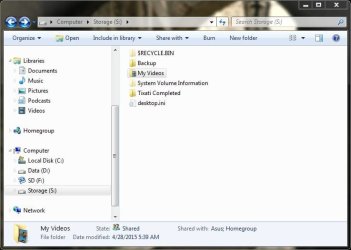
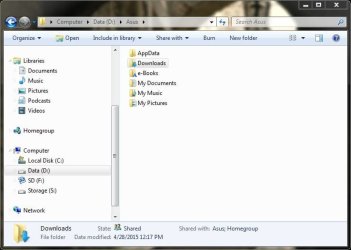
Screenshots from my laptop where these 2 folders are shared with homegroup read/write:
MyVideos.JPG
Downloads.JPG

-Now on the desktop, I have access to the 'My Videos' folder via homegroup in explorer. However the 'Downloads' folder isn't there. In the 'Network' Location there are many folders listed, all of which state 'no access' except the 2 folders I have shared. So I can access under 'Network' but not 'Homegroup'.

-On the laptop, none of my shared folders from the desktop are listed under 'Homegroup' or 'Network'. Again, settings are the same on both pc's.
 

My Computer

Computer type
Laptop
Computer Manufacturer/Model Number
Asus K52N
OS
Windows 7 Ultimate x64 SP1
CPU
AMD Turion II P540
Motherboard
Asus
Memory
6 GB
Graphics Card(s)
ATI Radeon HD 4200
Antivirus
Avast
Browser
Chrome
I do not get the big picture that simplifies for dummies how sharing works anymore. Until windows 8 and Windows 10 showed up this concept got lost in my mind. Prior to that it was network discovery and any folders that needed to be shared across the three PC's; Vista and two Win 7's worked just fine. In Explorer "Network" I could see the 3 PC's and auto sharing took place with "public" folders and the other folders that had read write permissions for "everyone".
Now I have win 10, Win 8.1, Win 7 Pro and I have a hard time seeing all three on each PC . On Win 7 I am asked to provide a network password, but not on the others. On the Win 10 I keep getting "you do not have permission" to access the folder.

Is there a tutorial that lays out the steps to ensure that I do not have to get the feeling that on my home network, as if I am trying to visit the Kremlin or the White House? I have no interest in passwords between my wife and myself. When the kids come over, they have a secondary WiFi access point that does not allow them access to our 3 pc's.

Help!

Thanks
 

My Computer

Computer type
PC/Desktop
Computer Manufacturer/Model Number
HP Media Center PC m7760n
OS
Windows 7 Professional 32 bit
CPU
Intel Core 2 Duo E6400
Motherboard
Asus Leonite
Memory
DDR2 2 G
Graphics Card(s)
Intel 82852
Hard Drives
Western Digital 2 x 250 G
Antivirus
Avast Free
Browser
Chrome
Just a pointer, if you are sharing a normally restrictive folder (inside your own user folder) then also give NTFS permissions to first everyone (security tab of shared folder). Then if it works, move to the exact account you wish to use. I have no trouble accessing a share on 8.1 with 7 and XP machines at friend's work place. What could be happening is that the firewall/security software can be interfering.

I find the classic networking to be much more reliable than HomeGroup though. Right now, my laptop can not be seen from my desktop but can see the desktop itself. Services seem to be running. All I can think of at the moment is leave and re-enter the HomeGroup. But I won't bother for now :)
 

My Computer

Computer type
PC/Desktop
Computer Manufacturer/Model Number
Custom Build
OS
Windows 7 Ultimate x64 SP1
CPU
AMD Phenom 2 1090T
Motherboard
Gigabyte GA-890FXA-UD5
Memory
2x8GB Kingston HyperX Fury Black 1600Mhz Unganged
Graphics Card(s)
MSI GTX 970 Gaming 4G
Sound Card
Realtek On-Board HD 7.1 Audio / Logitech G35
Monitor(s) Displays
3xAcer GD245HQ
Screen Resolution
1920x1080
Hard Drives
Samsung 850 Pro 512GB SSD - OS /
WD Caviar Black SATA 3 - 1 TBx2 - Dynamic RAID 0 /
WD Caviar Green SATA 2 - 640GBx2 - Dynamic RAID 0 /
WD Caviar Green SATA 2 - 640GB - Internal Backup /
Seagate Barracude SATA 3 - 3TB - External Backup/ Sync
PSU
HighPower 1000W
Case
Cooler Master HAF 932
Cooling
Noctua NH-D14
Keyboard
Logitech G19
Mouse
Logitech G500
Internet Speed
100/4 Mbit Cable (100GB quota)
Antivirus
ZoneAlarm Extreme Security / MBAM Pro / MBAE Free / SAS Free
Browser
IE 11 - Firefox - Chrome
Other Info
Logitech F710/ G27/ G940/ Z5500 // TrackIR 5 // Nvidia 3D Surround Vision
Back
Top