Installed Ubuntu 9.10 after windows 7 and Can't boot-

RileyRandom

New member
Local time
12:28 AM
Messages
80
Into windows 7 now, it says windows 7 is compressed or something.
So i gotta get back the windows 7 boot loader? I tried but when i put the disk in it loads and where its suppose to ask where you have windows 7 installed, nothing gets showed there. It's just blank.
Any help?
 

My Computer My Computer

At a glance

Ubuntu 9.10 and Seven Ultimate OEM 32 bitAMD Athlon 64 x2 Mobile2gb (2x1024) DDR2HD Radeon 1270 integrated.
OS
Ubuntu 9.10 and Seven Ultimate OEM 32 bit
CPU
AMD Athlon 64 x2 Mobile
Memory
2gb (2x1024) DDR2
Graphics Card(s)
HD Radeon 1270 integrated.
Sound Card
integrated.
Monitor(s) Displays
15" laptop display and 15" external monitor
Screen Resolution
1280x768
Hard Drives
120gb WD 2.5 internal
1tb WD external.
Cooling
Fan
Hello RileyRandom,
When booting from the install dvd, are you able to reach the "System recovery Options" window which has the "Load Drivers" button at the bottom? If yes, then click on "Load Drivers" and use the mini Explorer to right-click on the boot-drive and deselect "Compress this Drive" and choose Apply to sub-folders and files. Then close all windows and reboot.
 

My Computer My Computer

At a glance

Windows 7 x64 pro/ Windows 7 x86 Pro/ XP SP3 x86
Computer Manufacturer/Model Number
Too many to describe...
OS
Windows 7 x64 pro/ Windows 7 x86 Pro/ XP SP3 x86
Hello RileyRandom,
When booting from the install dvd, are you able to reach the "System recovery Options" window which has the "Load Drivers" button at the bottom? If yes, then click on "Load Drivers" and use the mini Explorer to right-click on the boot-drive and deselect "Compress this Drive" and choose Apply to sub-folders and files. Then close all windows and reboot.

Now when i try to enter Windows 7 it says "a recent hardware or software change....."

It says the file is /boot/bcd

Also i tried the bootrec.exe /fixboot stuff but it says that the drivers are not loaded (doesnt give me an option to) or the drive is corrupted.
 

My Computer My Computer

At a glance

Ubuntu 9.10 and Seven Ultimate OEM 32 bitAMD Athlon 64 x2 Mobile2gb (2x1024) DDR2HD Radeon 1270 integrated.
OS
Ubuntu 9.10 and Seven Ultimate OEM 32 bit
CPU
AMD Athlon 64 x2 Mobile
Memory
2gb (2x1024) DDR2
Graphics Card(s)
HD Radeon 1270 integrated.
Sound Card
integrated.
Monitor(s) Displays
15" laptop display and 15" external monitor
Screen Resolution
1280x768
Hard Drives
120gb WD 2.5 internal
1tb WD external.
Cooling
Fan
Hello RileyRandom,
When booting from the install dvd, are you able to reach the "System recovery Options" window which has the "Load Drivers" button at the bottom? If yes, then click on "Load Drivers" and use the mini Explorer to right-click on the boot-drive and deselect "Compress this Drive" and choose Apply to sub-folders and files. Then close all windows and reboot.

Now when i try to enter Windows 7 it says "a recent hardware or software change....."

It says the file is /boot/bcd

Also i tried the bootrec.exe /fixboot stuff but it says that the drivers are not loaded (doesnt give me an option to) or the drive is corrupted.
Hello RileyRandom;

We could use some more info. Can you post a screen shot of your Disk Management Drive Map?

Did you install Ubuntu on the same hard drive with 7? Did you install the Grub boot loader? Do want to use the Windows 7 boot menu for both Windows and Ubuntu?

Please check out the links here at the bottom of my post to see if they answer any of your questions?

Cheers!
Robert
 

My Computer My Computer

At a glance

...
OS
...
Hello RileyRandom,
When booting from the install dvd, are you able to reach the "System recovery Options" window which has the "Load Drivers" button at the bottom? If yes, then click on "Load Drivers" and use the mini Explorer to right-click on the boot-drive and deselect "Compress this Drive" and choose Apply to sub-folders and files. Then close all windows and reboot.

Now when i try to enter Windows 7 it says "a recent hardware or software change....."

It says the file is /boot/bcd

Also i tried the bootrec.exe /fixboot stuff but it says that the drivers are not loaded (doesnt give me an option to) or the drive is corrupted.
Hello RileyRandom;

We could use some more info. Can you post a screen shot of your Disk Management Drive Map?

Did you install Ubuntu on the same hard drive with 7? Did you install the Grub boot loader? Do want to use the Windows 7 boot menu for both Windows and Ubuntu?

Please check out the links here at the bottom of my post to see if they answer any of your questions?

Cheers!
Robert
I installed Ubuntu on the same drive that i had Windows 7 on, i already had it partitioned from when i had it dual booted with XP. Yes i did install the the Grub boot loader, and Yes i want the Windows 7 boot menu back for both.
 

My Computer My Computer

At a glance

Ubuntu 9.10 and Seven Ultimate OEM 32 bitAMD Athlon 64 x2 Mobile2gb (2x1024) DDR2HD Radeon 1270 integrated.
OS
Ubuntu 9.10 and Seven Ultimate OEM 32 bit
CPU
AMD Athlon 64 x2 Mobile
Memory
2gb (2x1024) DDR2
Graphics Card(s)
HD Radeon 1270 integrated.
Sound Card
integrated.
Monitor(s) Displays
15" laptop display and 15" external monitor
Screen Resolution
1280x768
Hard Drives
120gb WD 2.5 internal
1tb WD external.
Cooling
Fan
Now when i try to enter Windows 7 it says "a recent hardware or software change....."

It says the file is /boot/bcd

Also i tried the bootrec.exe /fixboot stuff but it says that the drivers are not loaded (doesnt give me an option to) or the drive is corrupted.
Hello RileyRandom;

We could use some more info. Can you post a screen shot of your Disk Management Drive Map?

Did you install Ubuntu on the same hard drive with 7? Did you install the Grub boot loader? Do want to use the Windows 7 boot menu for both Windows and Ubuntu?

Please check out the links here at the bottom of my post to see if they answer any of your questions?

Cheers!
Robert
I installed Ubuntu on the same drive that i had Windows 7 on, i already had it partitioned from when i had it dual booted with XP. Yes i did install the the Grub boot loader, and Yes i want the Windows 7 boot menu back for both.
Forgive me I you have already tried any of these ... the first choice is to use the Windows 7 DVD and run the "Startup Repair" http://www.sevenforums.com/tutorials/681-startup-repair.html

You can also use the DVD for this fix: http://www.sevenforums.com/tutorials/20864-mbr-restore-windows-7-master-boot-record.html

Once you have the Windows bootmgr restored, you can use the free utility EasyBCD2 to create the Ubuntu menu entry in your Windows boot menu.

I could be more helpful I could find out how you hard drive and partitions are arranged?

Cheers!
Robert
 

My Computer My Computer

At a glance

...
OS
...
Hello RileyRandom;

We could use some more info. Can you post a screen shot of your Disk Management Drive Map?

Did you install Ubuntu on the same hard drive with 7? Did you install the Grub boot loader? Do want to use the Windows 7 boot menu for both Windows and Ubuntu?

Please check out the links here at the bottom of my post to see if they answer any of your questions?

Cheers!
Robert
I installed Ubuntu on the same drive that i had Windows 7 on, i already had it partitioned from when i had it dual booted with XP. Yes i did install the the Grub boot loader, and Yes i want the Windows 7 boot menu back for both.
Forgive me I you have already tried any of these ... the first choice is to use the Windows 7 DVD and run the "Startup Repair" http://www.sevenforums.com/tutorials/681-startup-repair.html

You can also use the DVD for this fix: http://www.sevenforums.com/tutorials/20864-mbr-restore-windows-7-master-boot-record.html

Once you have the Windows bootmgr restored, you can use the free utility EasyBCD2 to create the Ubuntu menu entry in your Windows boot menu.

I could be more helpful I could find out how you hard drive and partitions are arranged?

Cheers!
Robert
I have the dvd but it wont let me do it, where you're suppose to select what OS you want to fix, its all blank.
 

My Computer My Computer

At a glance

Ubuntu 9.10 and Seven Ultimate OEM 32 bitAMD Athlon 64 x2 Mobile2gb (2x1024) DDR2HD Radeon 1270 integrated.
OS
Ubuntu 9.10 and Seven Ultimate OEM 32 bit
CPU
AMD Athlon 64 x2 Mobile
Memory
2gb (2x1024) DDR2
Graphics Card(s)
HD Radeon 1270 integrated.
Sound Card
integrated.
Monitor(s) Displays
15" laptop display and 15" external monitor
Screen Resolution
1280x768
Hard Drives
120gb WD 2.5 internal
1tb WD external.
Cooling
Fan
I have the dvd but it wont let me do it, where you're suppose to select what OS you want to fix, its all blank.
In this tutorial: http://www.sevenforums.com/tutorials/681-startup-repair.html you are told to ignore the fact there is no Windows 7 visible there, and move on the the next step.

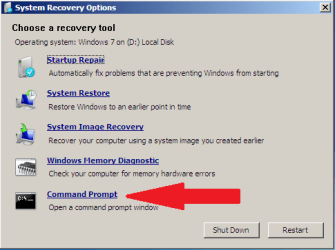
When you do, you will see this window:

mbr_05.png

which gives you the option of doing the "Startup Repair" or selecting the "Command Prompt" option to restore the Windows 7 boot code.

http://www.sevenforums.com/tutorials/20864-mbr-restore-windows-7-master-boot-record.html
 

My Computer My Computer

At a glance

...
OS
...
I have the dvd but it wont let me do it, where you're suppose to select what OS you want to fix, its all blank.
In this tutorial: http://www.sevenforums.com/tutorials/681-startup-repair.html you are told to ignore the fact there is no Windows 7 visible there, and move on the the next step.

When you do, you will see this window:

View attachment 62940

which gives you the option of doing the "Startup Repair" or selecting the "Command Prompt" option to restore the Windows 7 boot code.

http://www.sevenforums.com/tutorials/20864-mbr-restore-windows-7-master-boot-record.html

Already tried that, it says something like this " The drivers are not loaded or the drive is corrupted."
 

My Computer My Computer

At a glance

Ubuntu 9.10 and Seven Ultimate OEM 32 bitAMD Athlon 64 x2 Mobile2gb (2x1024) DDR2HD Radeon 1270 integrated.
OS
Ubuntu 9.10 and Seven Ultimate OEM 32 bit
CPU
AMD Athlon 64 x2 Mobile
Memory
2gb (2x1024) DDR2
Graphics Card(s)
HD Radeon 1270 integrated.
Sound Card
integrated.
Monitor(s) Displays
15" laptop display and 15" external monitor
Screen Resolution
1280x768
Hard Drives
120gb WD 2.5 internal
1tb WD external.
Cooling
Fan
I installed Ubuntu on the same drive that i had Windows 7 on, i already had it partitioned from when i had it dual booted with XP. Yes i did install the the Grub boot loader, and Yes i want the Windows 7 boot menu back for both.
Well ... as I have already asked twice for your hard drive partition information without success, this will be my last try to help you.

When I read the post quoted above it made me wonder if you deleted your XP partition and then installed Ubuntu in its place. Then if XP was the first OS installed and was the "Active" partition when you installed Windows 7, that would mean 7 put its boot code in the XP partition. So if I have guessed correctly so far, when you deleted XP you deleted all your Windows 7 boot code. Windows 7 will never boot now until this is corrected. If this is so and you would like my help fixing it, please provide the info requested.

Cheers!
Robert
 

My Computer My Computer

At a glance

...
OS
...
I installed Ubuntu on the same drive that i had Windows 7 on, i already had it partitioned from when i had it dual booted with XP. Yes i did install the the Grub boot loader, and Yes i want the Windows 7 boot menu back for both.
Well ... as I have already asked twice for your hard drive partition information without success, this will be my last try to help you.

When I read the post quoted above it made me wonder if you deleted your XP partition and then installed Ubuntu in its place. Then if XP was the first OS installed and was the "Active" partition when you installed Windows 7, that would mean 7 put its boot code in the XP partition. So if I have guessed correctly so far, when you deleted XP you deleted all your Windows 7 boot code. Windows 7 will never boot now until this is corrected. If this is so and you would like my help fixing it, please provide the info requested.

Cheers!
Robert

How do i get the boot information on ubuntu? I'm a newbie at it.
 

My Computer My Computer

At a glance

Ubuntu 9.10 and Seven Ultimate OEM 32 bitAMD Athlon 64 x2 Mobile2gb (2x1024) DDR2HD Radeon 1270 integrated.
OS
Ubuntu 9.10 and Seven Ultimate OEM 32 bit
CPU
AMD Athlon 64 x2 Mobile
Memory
2gb (2x1024) DDR2
Graphics Card(s)
HD Radeon 1270 integrated.
Sound Card
integrated.
Monitor(s) Displays
15" laptop display and 15" external monitor
Screen Resolution
1280x768
Hard Drives
120gb WD 2.5 internal
1tb WD external.
Cooling
Fan

My Computer My Computer

At a glance

...
OS
...
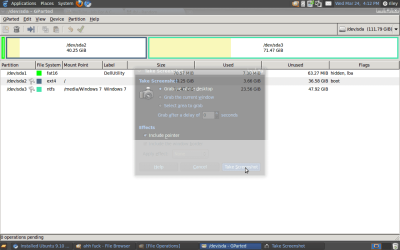
attachment.php


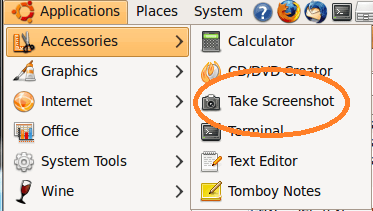
Lol, it kinda has the screen shot box in there, but it does the job.

sda2 is Ubuntu and sda3 is Win 7.
 

Attachments

  • Partitions.png
    Partitions.png
    38.9 KB · Views: 180

My Computer My Computer

At a glance

Ubuntu 9.10 and Seven Ultimate OEM 32 bitAMD Athlon 64 x2 Mobile2gb (2x1024) DDR2HD Radeon 1270 integrated.
OS
Ubuntu 9.10 and Seven Ultimate OEM 32 bit
CPU
AMD Athlon 64 x2 Mobile
Memory
2gb (2x1024) DDR2
Graphics Card(s)
HD Radeon 1270 integrated.
Sound Card
integrated.
Monitor(s) Displays
15" laptop display and 15" external monitor
Screen Resolution
1280x768
Hard Drives
120gb WD 2.5 internal
1tb WD external.
Cooling
Fan
It works for me. What I would suggest now, is to use GParted, right click on the Windows 7 partition and make sure it is marked or flagged as "Active". Then reboot, boot to the DVD and attempt again to do the startup repair or the MBR restore.

Cheers!
Robert
 

My Computer My Computer

At a glance

...
OS
...
Okay, I just did that, ill be back with the results.
 

My Computer My Computer

At a glance

Ubuntu 9.10 and Seven Ultimate OEM 32 bitAMD Athlon 64 x2 Mobile2gb (2x1024) DDR2HD Radeon 1270 integrated.
OS
Ubuntu 9.10 and Seven Ultimate OEM 32 bit
CPU
AMD Athlon 64 x2 Mobile
Memory
2gb (2x1024) DDR2
Graphics Card(s)
HD Radeon 1270 integrated.
Sound Card
integrated.
Monitor(s) Displays
15" laptop display and 15" external monitor
Screen Resolution
1280x768
Hard Drives
120gb WD 2.5 internal
1tb WD external.
Cooling
Fan
All you need to do is go into the command prompt using the DVD and type "fixmbr".
 

My Computer My Computer

At a glance

Windows 7 Enterprise 64-bitAMD Phenom II X4 3.0GHz8GB G-Skill Ripjaws DDR3 1333PNY GeForce 460 GTX 1GB OC - Enthusiast Edition
OS
Windows 7 Enterprise 64-bit
CPU
AMD Phenom II X4 3.0GHz
Motherboard
ASUS M5A97
Memory
8GB G-Skill Ripjaws DDR3 1333
Graphics Card(s)
PNY GeForce 460 GTX 1GB OC - Enthusiast Edition
Sound Card
VIA High Definition Audio
Monitor(s) Displays
Dell 19"
Screen Resolution
1280x1024
Hard Drives
1TB - Primary
160GB - Secondary
250GB - External backup for important files
PSU
OCZ Fata1ty 700W Modular PSU
Case
ASUS
Keyboard
Microsoft Wireless Keyboard 2000
Mouse
Microsoft Wireless Mouse 2000
Internet Speed
3 Mbps/768 kbps
All you need to do is go into the command prompt using the DVD and type "fixmbr".
Actually Fred, since he deleted all his boot code and overwrote the mbr with Grub, he needs to do more than just fix the mbr. He would need to first rebuild the BCD, then fix the mbr. One can do this in several steps with different commands but the DVD "Startup Repair" does them all. Sometimes it needs to be run more than once, but it will get the job done.
 

My Computer My Computer

At a glance

...
OS
...
Sorry, I was thinking when removing Ubuntu. But yes, you're right :)
 

My Computer My Computer

At a glance

Windows 7 Enterprise 64-bitAMD Phenom II X4 3.0GHz8GB G-Skill Ripjaws DDR3 1333PNY GeForce 460 GTX 1GB OC - Enthusiast Edition
OS
Windows 7 Enterprise 64-bit
CPU
AMD Phenom II X4 3.0GHz
Motherboard
ASUS M5A97
Memory
8GB G-Skill Ripjaws DDR3 1333
Graphics Card(s)
PNY GeForce 460 GTX 1GB OC - Enthusiast Edition
Sound Card
VIA High Definition Audio
Monitor(s) Displays
Dell 19"
Screen Resolution
1280x1024
Hard Drives
1TB - Primary
160GB - Secondary
250GB - External backup for important files
PSU
OCZ Fata1ty 700W Modular PSU
Case
ASUS
Keyboard
Microsoft Wireless Keyboard 2000
Mouse
Microsoft Wireless Mouse 2000
Internet Speed
3 Mbps/768 kbps
Alright so now Windows 7 will start and all, it asks me for my password and then it says "Preparing your desktop" for about 5 minutes, and goes to a dull blue colored with an XP style cursor. No icons, taskbar, or anything pops up.
 

My Computer My Computer

At a glance

Ubuntu 9.10 and Seven Ultimate OEM 32 bitAMD Athlon 64 x2 Mobile2gb (2x1024) DDR2HD Radeon 1270 integrated.
OS
Ubuntu 9.10 and Seven Ultimate OEM 32 bit
CPU
AMD Athlon 64 x2 Mobile
Memory
2gb (2x1024) DDR2
Graphics Card(s)
HD Radeon 1270 integrated.
Sound Card
integrated.
Monitor(s) Displays
15" laptop display and 15" external monitor
Screen Resolution
1280x768
Hard Drives
120gb WD 2.5 internal
1tb WD external.
Cooling
Fan
Alright so now Windows 7 will start and all, it asks me for my password and then it says "Preparing your desktop" for about 5 minutes, and goes to a dull blue colored with an XP style cursor. No icons, taskbar, or anything pops up.
When XP was installed, it was the C partition correct? And Windows 7 was what?
 

My Computer My Computer

At a glance

...
OS
...
Back
Top