
Log On Screen - Change or Remove Text Branding

   Information
Hey all I think everybody knows how to change the logon screen background according to Brinks tutorial:

http://www.sevenforums.com/tutorials/5382-log-screen-change.html

Well, this tutorial will help show you how to change or remove the log on screen text branding in Windows 7.
   Note
You can remove after install, but I don't know if you can edit/replace it after installation. I did managed to replace it before installation modifying the install.wim file.

EXAMPLE: Log On Screen
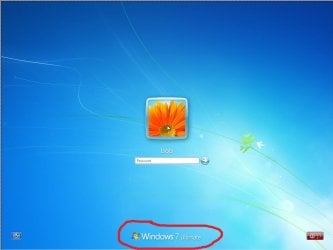
win7b-login.jpg


Here's How:
1. In Windows Explorer, go to C:\Windows\Branding\Basebrd and take ownership of the basebrd.dll file.


2. If you do not already have reshacker or restorator installed, then download and install one of them or a program like them.
3. In Windows Explorer, go to C:\Windows\Branding\Basebrd and open the basebrd.dll file with reshacker, restorator, or etc.
4. Navigate to the bitmap folder and delete it.
NOTE: You can also edit or replace this BMP file as well to change the log on screen text branding.
123456.PNG
5. When you restart the computer next time, the text branding will be gone on the log on screen.
edited.png
And DONE Hope you guys like it


Last edited by a moderator:
Dridzz, i was about to change mine and forgot where it was located so came here to double check and noticed. Maybe might want to add in the tut to add / rename the default one to basebrd-BACKUP.dll
or whoops, really mean even better like the branding folder to branding-backup

Just incase they want to go back or need to etc.. Plus incase of mess up, testing or whatever.. etc etc...

Right?

oohh forgot. Anybody that has done it so far ...

Which exact number is the one we need to change to custom the .bmp to our own brand ? All of them or 2120 ??

How can i EDIT the Text ???? am not able to edit.

I was able to upload the default resource BMP and tried Editing. I just cleared the text and changed the background to black. Hence, i replaced with a Black BMP of the same size with no text. Now the color of the default text changed to Black and the text as not affected.

So how do i change the text ???

Did you create a new bmp image with the text you want on it ? and also did you redo/create all of them or just one ?

Yes, I created new BMP with the same Image size, But it did not change. :(
 

My Computer My Computer

Computer Manufacturer/Model Number
Dell Inspiron N5010
OS
Windows 7 Ultimate x64 SP1
CPU
Intel Core i3
Memory
4 GB DDR3
Screen Resolution
1366 X 768
Hard Drives
Seagate 500 GB
Internet Speed
4 MBPS
Dridzz, i was about to change mine and forgot where it was located so came here to double check and noticed. Maybe might want to add in the tut to add / rename the default one to basebrd-BACKUP.dll
or whoops, really mean even better like the branding folder to branding-backup

Just incase they want to go back or need to etc.. Plus incase of mess up, testing or whatever.. etc etc...

Right?

oohh forgot. Anybody that has done it so far ...

Which exact number is the one we need to change to custom the .bmp to our own brand ? All of them or 2120 ??

How can i EDIT the Text ???? am not able to edit.

I was able to upload the default resource BMP and tried Editing. I just cleared the text and changed the background to black. Hence, i replaced with a Black BMP of the same size with no text. Now the color of the default text changed to Black and the text as not affected.

So how do i change the text ???

Did you create a new bmp image with the text you want on it ? and also did you redo/create all of them or just one ?

Yes, I created new BMP with the same Image size, But it did not change. :(

No i mean as asked, did you change the "text" on it? As you asked how to change the text part. Which would need to be done on the image itself. It's not plan text.
 

My Computer My Computer

Computer Manufacturer/Model Number
HP's, Dell's
OS
Win-7HP, VistaHP, XP
CPU
AMD Athlon II 240 dual-core processor 5050E 2,6 GHz
Memory
6GB
Graphics Card(s)
1GB NVIDIA GeForce GT 220 [DVI, HDMI, VGA adapter]
Sound Card
Asus Xonar Essence STX
Monitor(s) Displays
HP 2159m 21.5-inch 16:9 Full LCD HD Widescreen
Screen Resolution
1920x1080
Hard Drives
500GB 7200 rpm SATA 3Gb/s hard drive
Seagate EHD 250gb
Seagate EHD 1T
Internet Speed
16mb
   Information

Not sure if you just posted that cause last time i looked here i believe there was threads inbetween the last time you quoted and double posted this like this above but..


Sorry but that does not help us at all.

I have read the thing 5 times.

So... Can you PLEASE help us with our questions since it's YOUR tutorial. ?? Instead of just keep quoting that.

Not to mention so others will see the answers to, since obviously it's not writen right in the tutorial.. That way can help them to of course knowing they are going to ask the same questions as well.

Thank you.
 

My Computer My Computer

Computer Manufacturer/Model Number
HP's, Dell's
OS
Win-7HP, VistaHP, XP
CPU
AMD Athlon II 240 dual-core processor 5050E 2,6 GHz
Memory
6GB
Graphics Card(s)
1GB NVIDIA GeForce GT 220 [DVI, HDMI, VGA adapter]
Sound Card
Asus Xonar Essence STX
Monitor(s) Displays
HP 2159m 21.5-inch 16:9 Full LCD HD Widescreen
Screen Resolution
1920x1080
Hard Drives
500GB 7200 rpm SATA 3Gb/s hard drive
Seagate EHD 250gb
Seagate EHD 1T
Internet Speed
16mb
Yeah, I added the text too and created wholly as a BMP image... may be RC versions don't allow ? :sarc:
 

My Computer My Computer

Computer Manufacturer/Model Number
Dell Inspiron N5010
OS
Windows 7 Ultimate x64 SP1
CPU
Intel Core i3
Memory
4 GB DDR3
Screen Resolution
1366 X 768
Hard Drives
Seagate 500 GB
Internet Speed
4 MBPS
I don't have RC ver and also is not working.
 

My Computer My Computer

OS
Se7en
I have just joined up i know, I only aquired a windows 7 computer recently, and I have been following several great tutorials on here concentrating on appearance from a business stand point.
I have managed to get themes and logon screen image.
But I am wanting to get our email address as the logo here, 120
Reshacker is not opening, so restorer is what I am using, but I can't insert the image I want.

Has anyone managed to do so?
It could be because I am not familiar with the program but I can't afford to mess about with this netbook too much, so I don't wanna go messing really. I kinda would only I forgot to back up today...oops.
 
Last edited:

My Computer My Computer

Computer Manufacturer/Model Number
ASUS UL30A
OS
Windows 7
CPU
ULV SU2300
Memory
3GB
Graphics Card(s)
GMA 4500MHD
Sound Card
ALTEC
Monitor(s) Displays
13.3 LED
Hard Drives
5400X 320GB
wow lots of things I can get from this forum :D. such as this one, i was succeed to remove the branding, but not with the edit/replace the brand with my own picture.
it seems has a masking layer. when I replace all the bmp files with my own picture (same resolution and type) it shows behind the masking layer that shown "Windows 7 starter". I don't know how to edit the masking layer. :cry:

http://img12.imageshack.us/i/img00124201003111341res.jpg/
 

My Computer My Computer

Computer Manufacturer/Model Number
Dell inspiron mini 10
OS
win 7 starter
CPU
Intel atom N450
Memory
1GB
Still no luck

I have tried this numerous times now in all the configurations I can think of.
Using photoshop to edit the original file, keeping apha channels, deleting alpha channels, copy and pasting as new resource just eeps telling me the BMP is not a supported file type.
I tried saving as a .BITMAP And that had no effect.

Please help
 

My Computer My Computer

Computer Manufacturer/Model Number
ASUS UL30A
OS
Windows 7
CPU
ULV SU2300
Memory
3GB
Graphics Card(s)
GMA 4500MHD
Sound Card
ALTEC
Monitor(s) Displays
13.3 LED
Hard Drives
5400X 320GB
The Resource Hacker freeware is a little bit outdated especiallly for the 64bit Windows mentioned in the guide there.

It incorporates an internal resource script compiler and decompiler and works on Win95, Win98, WinME, WinNT, Win2000 and WinXP operating systems.
Resource Hacker

The Restorator shows Vista support on the shareware version at Downloads - Restorator - Bome Software - Restorator - the resource editor for customization, localization, and translation. Edit .exe and .dll files directly - restorator - localization - translation - editor - windows resources - skins

Once you have edited the base.dll by removing the bmp files or making a swap you then click on the menu bar>File and select the "save as" option to have the altered file overwrite the original. You will be prompted about that for permission.
 

My Computers My Computers

System One System Two

  • Computer type
    PC/Desktop
    Computer Manufacturer/Model Number
    Custom builds = 2
    OS
    W7 Ultimate x64/W10 Pro x64/W11 Pro Triple Boot - Main PC W7 Remote PC Micro ATX W7 Pro x64/W11 Pro
    CPU
    AMD Phenom II X4 975 Deneb 3.6ghz - 965 2nd remote pc
    Motherboard
    Gigabyte GA-790XTA-UD4-Gigabyte GA-880GM-D2H remote pc
    Memory
    Kingston Hyper X DDR3 1600 1.5v 16gb - Hyper X Fury 8gb 2nd
    Graphics Card(s)
    MSI HD Radeon 5750 1gb - MSI HD Radeon 6450 on mini tower
    Sound Card
    Creative Labs X-Fi Xtreme Audio P - Realtek onooard 2nd case
    Monitor(s) Displays
    ASUS VW199T-P 19" HP 2082a Main-HP 2082a 20" remote pc
    Screen Resolution
    Asus 1440x900 - HP 1600x900
    Hard Drives
    WD Black 1TB HD per OS W7, W10, and pending W11 presently on 500gb OS Drive - Pending Triple 1TB HDs for Spanned Storage/backup volume
    Single 2TB external USB enclosure, single 1TB System 7 Host/Boot drive, Pending 8TB external HD for system image b
    PSU
    Corsair 750TX - primary / Corsair CX600 - second
    Case
    Antec 900-2 - SSD compatible / NZXT Vulcan mini tower
    Cooling
    Zalman CNPS9900A
    Keyboard
    AZIO L70 Backlit Letters Gaming - ONN Cordless/USB
    Mouse
    MSI DS200 Programmable, Logitech Cordless
    Internet Speed
    30mbps upgrade - primary hard wired - mini tower usb WiFi
    Antivirus
    GFI VIPRE Internet Security 2014 on W7 2016 beta on W10,
    Browser
    Cyberfox, WaterFox 64bit FF variants, FireFox x64, Pale Moon
    Other Info
    Accomdata fan cooled usb 2.0 PIDE/Sata II, III external enclosure.
    Sambient usb/eSata PATA/Sata II, III external enclosure.
  • Computer type
    PC/Desktop
    System Manufacturer/Model Number
    CUSTOM ASSEMBLY
    OS
    W7 Pro x64/W11 Pro
    CPU
    AMD Deneb 3.6ghz - 965
    Motherboard
    Gigabyte GA-880GM-D2H remote pc
    Memory
    Kingston Hyper X Fury 8gb
    Graphics Card(s)
    MSI HD Radeon 6450 DVI Output
    Sound Card
    Realtek onooard Creative or Other separate PENDING
    Monitor(s) Displays
    VIZIO 32" LCD TV Separate LCD Pending
    Screen Resolution
    1600x1080
    Hard Drives
    WD 500GB OS Host/Boot WD Green 1TB Storage/Backup
    PSU
    Corsair 600W - THERMALTAKE 600W spare case
    Case
    NZXT Vulcan mini tower
    Cooling
    Twin 120mm Top Fans - 240mm Side Cover
    Keyboard
    ONN Cordless/USB Logitech Cordless
    Mouse
    ONN USB/Cordless - Logitech Cordless
    Internet Speed
    DSL 5G
    Browser
    MS Edge, FireFox, WaterFox x64, FireFox Nightly
    Other Info
    OS Testing-Remote Access to Main TeamViewer
The Resource Hacker freeware is a little bit outdated especiallly for the 64bit Windows mentioned in the guide there.

It incorporates an internal resource script compiler and decompiler and works on Win95, Win98, WinME, WinNT, Win2000 and WinXP operating systems.
Resource Hacker

The Restorator shows Vista support on the shareware version at Downloads - Restorator - Bome Software - Restorator - the resource editor for customization, localization, and translation. Edit .exe and .dll files directly - restorator - localization - translation - editor - windows resources - skins

Once you have edited the base.dll by removing the bmp files or making a swap you then click on the menu bar>File and select the "save as" option to have the altered file overwrite the original. You will be prompted about that for permission.

did all of that it's says requires trusted installer to make changes to this file

got it to work.
 
Last edited:

My Computer My Computer

OS
Windows 7 Ultimate
text on logon not showing up need help
 

My Computer My Computer

OS
Windows 7 Ultimate
Do what I ended up doin gin the end to make things much easier, add your brand or logo to the actual logon image your using...Much easier
 

My Computer My Computer

Computer Manufacturer/Model Number
ASUS UL30A
OS
Windows 7
CPU
ULV SU2300
Memory
3GB
Graphics Card(s)
GMA 4500MHD
Sound Card
ALTEC
Monitor(s) Displays
13.3 LED
Hard Drives
5400X 320GB
I triend replacing the windows logo with an Alienware one.. but it didnt work.... i still get the windows logo with an overlay of my Alienware on top of the Windows logo but with 50% opacity
 
Last edited by a moderator:

My Computer My Computer

OS
Windows 7 Home Premium SP1 64-bit
CPU
Intel™ Core™ i7 920 2.66 ghz
Motherboard
Asus P6T Deluxe V2
Memory
OCZ 6gb (triple 2gb) ddr3-1333 (Gold Edition)
Graphics Card(s)
Nvidia 9800 GT 1GB - x2 SLI
Sound Card
On board
Monitor(s) Displays
19" LCD Wide Screen / Built-in TV Tuner
Screen Resolution
1440x900
Hard Drives
250 GB Maxtor
+
1 TB Seagate
PSU
Corsair GX 800 (800watts)
Case
Thermaltake Level 10 GT
Cooling
Antec Kuhler 920
Mouse
CM Storm Sentinel Advanced
Internet Speed
1MBps
Nice works bro,
ThNnx yew :P
 

My Computer My Computer

OS
Windows 7 Ultimate x86
CPU
Intel Dual Core E2200 2.20GHz
Motherboard
Gigabyte
Memory
3GB DDR2
Graphics Card(s)
ATI Radeon HD 2400 Pro 256MB
Sound Card
Realtek HD Audio
Monitor(s) Displays
LG 17'' WIDESCREEN, FLATRON L177WSB
Screen Resolution
1440 x 900 (Recommended)
Hard Drives
160GB SATA WDC WD1600AAJS-00WAA0 /80GB IDE WDC WD800BB-00JHC0
Internet Speed
0KB lol
still access denied !!!!!!!!!!!!!!!
i took ownership and also log into adminstrator
 

My Computer My Computer

OS
windows7
I triend replacing the windows logo with an Alienware one.. but it didnt work.... i still get the windows logo with an overlay of my Alienware on top of the Windows logo but with 50% opacity
1) can't use mspaint to edit the image
2) its the alpha channel basely it tells the software what part of the image to show.

I have edited mine and its working 100%

Adobe Photoshop is the way to go for editing any image with an alpha channel

If you do edit the file keep the width of the original images but the height can be any thing u want. just don't make them super big.
 

My Computer My Computer

Computer Manufacturer/Model Number
None
OS
Windows 7 Professional x64
CPU
Intel(R) Core(TM) 2 Duo 2.53GHz
Motherboard
ASUA P5N-D
Memory
6GB 2x2GB 2x1GB
Graphics Card(s)
8800GT
Sound Card
Realtek HD
Keyboard
Z-MERC
Mouse
Razer Deathadder
Internet Speed
7MB
Hi,

..like I spent quite a long time.... Would you be so kind to explain how exactly did you managed to use:

a/ Restorator 2007
b/ bmp's alpha channel (like there is one there....?) and then embeded it in the dll file
c/ I replaced my file with boot disc for those who are still on that part.

Please Shugo, explain which of all six files did you updated with your version.

Perhaps even a short image-edit tutorial could be highly appreciated.

Thanks! ;-)
 

My Computer My Computer

OS
Windows 7
I found this tutorial to remove the branding form the logging page but it only seems to work on 32bits sytems.

I'm still trying to make it work on my 64bits OS but so far all I got is a black screen, forcing me to restore the old files.
 

My Computer My Computer

OS
Windows 7 Pro x64
Ok, I got this working. My question relate to its use in a corporate environment. Can we change this dll through group policy?
 

My Computer My Computer

Computer Manufacturer/Model Number
HP
OS
Windows 7 64bit
CPU
Intel Cire i7
Memory
4GB
Back
Top