Photographers - what equipment do you use?

nate42nd

Learning every day
Guru
Gold Member
VIP
Local time
2:49 PM
Messages
2,036
Location
The Wild West
I looked around a little for a thread on photography. It seems to me computers and photography go hand in hand. I would like to know what you use and how long you've been into photography. I have a Canon T1i Digital / 500D. (digital DSLR) and also a Canon 780 IS. I have been into photography for about 30 years. I am in my mid 30s and got my 1st film camera when I was very young.

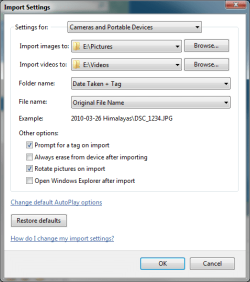
Also, I noticed my import settings on Pro 64 bit OEM Windows 7 were set to name the pictures starting at 001 every time I imported. It created it's own folder I had many, many, 001-120 duplicates. It was set like this by default. If you are having this problem...here is how to fix it. Just change the import settings....if you know a different way to get to the import settings besides plugging your camera into the USB port....let me know.
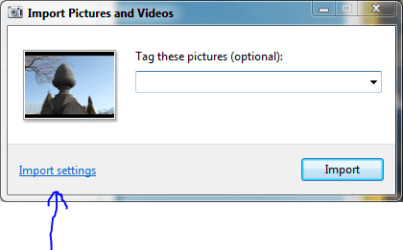
import.PNG
importsettings.PNG

Anyway, are you serious hobbyist or just like to mess around?

Here's a night shot I took this morning at 3:30 AM of the valley where I live. I had to expose it for 13 seconds. It didn't turn out very good but next time I know the changes I need to make.....It's a lot of fun.
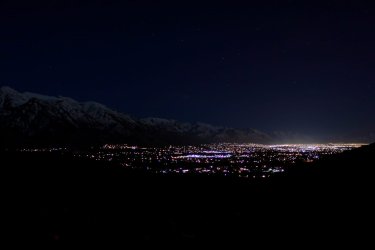
IMG_1209R.JPG
 

My Computer My Computer

At a glance

Windows 7 Professional x64Intel Core i7 8604GB DDR3 Mushkin 1600Mhz @ 7-8-7-20MSI GTS250 1GB DDR3 Twin Frozr
Computer Manufacturer/Model Number
Keeps changing - (Custom)
OS
Windows 7 Professional x64
CPU
Intel Core i7 860
Motherboard
Gigabyte GA-P55-UD4P
Memory
4GB DDR3 Mushkin 1600Mhz @ 7-8-7-20
Graphics Card(s)
MSI GTS250 1GB DDR3 Twin Frozr
Sound Card
Onboard realtek
Monitor(s) Displays
Samsung SyncMaster 24" P2450 + Samsung 20" 2033
Screen Resolution
1920 X 1080 and 1600 X 900 (#2 system 1440 X 900)
Hard Drives
Patriot Inferno 120GB SSD + 3 WD Blue 640GB drives
PSU
Corsair 750 HX Modular
Case
Lancool PC-K62
Cooling
Cooler Master TX3 CPU cooler and 4-140mm and 1-120mm case
Keyboard
Gigabyte USB keyboard
Mouse
Microsoft wireless laser mouse 5000
Internet Speed
7 Mb down 1.5 up
Other Info
System #2: AMD Phenom II X6 1055T (Freezer 7 Pro cooler) - Gigabyte 880GMA-UD2H - WD 500GB Black - 9500GT (1GB) 500W OCZ modular PSU - Antec 200 case. System #3 (LapTop) Core 2 Duo T6670 - 320GB 7200RPM HD - 4GB DDR3 RAM.
Hi Nate. I'm into photography, primarily as a hobby although I do the occasional wedding with a friend.
I use a Canon 40D DSLR with a Canon 18-75 IS zoom lens, a Sigma 10-20 wide zoom, a Sigma 105 Macro and a Sigma 200-300 APO zoom.
In terms of the computer I always shoot RAW and use Adobe Lightroom to process/edit the images followed by PS Elements 7.
I also use Google's free Picasa software which I think is an excellent product and ideal if the images do not require much post capture treatment.
It's been a hobby for thirty years and I used to have my own darkroom etc.

The best thing about having photography as a hobby, I think, is that, whether you have a camera with you or not, you always see things in terms of image and composition.
It makes you look for beauty or statement wherever you look and changes the way you view of the world around you.
Great hobby:D
 

My Computer My Computer

At a glance

Windows 7 Home Premium 64 biti7 [email protected]2x4GB Corsair Vegeance DDR3XFX GTX 260 Black Edition
Computer Manufacturer/Model Number
The Monolith. 3.1
OS
Windows 7 Home Premium 64 bit
CPU
i7 [email protected]
Motherboard
Gigabyte Z77-D3H
Memory
2x4GB Corsair Vegeance DDR3
Graphics Card(s)
XFX GTX 260 Black Edition
Sound Card
none-through large stereo hi fi
Monitor(s) Displays
Croosover 27MDP LED IPS Dell 2408 WFP
Screen Resolution
2560x1440 1920x1200
Hard Drives
1x Samsung 840Pro 128GB SSD
1x Samsung Spinpoint F1 1TB
PSU
Corsair AX 850 Watt
Case
Cooler Master ACTS 840
Cooling
Be Quiet! Dark Rock Pro
Keyboard
Enermax Aurora
Mouse
Logitech Ballmouse
Internet Speed
20MBPS
Hi Nate. I'm into photography, primarily as a hobby although I do the occasional wedding with a friend.
I use a Canon 40D DSLR with a Canon 18-75 IS zoom lens, a Sigma 10-20 wide zoom, a Sigma 105 Macro and a Sigma 200-300 APO zoom.
In terms of the computer I always shoot RAW and use Adobe Lightroom to process/edit the images followed by PS Elements 7.
I also use Google's free Picasa software which I think is an excellent product and ideal if the images do not require much post capture treatment.
It's been a hobby for thirty years and I used to have my own darkroom etc.

The best thing about having photography as a hobby, I think, is that, whether you have a camera with you or not, you always see things in terms of image and composition.
It makes you look for beauty or statement wherever you look and changes the way you view of the world around you.
Great hobby:D

Very nice johnwillyums. I am sitting here right now trying to decide what lens to get (for about $500 or less)

I too have been shooting RAW with my G9 for the last 3 years. I too use Picasa, it's very handy. I have always used Canon's bundled software to edit the RAW images. The latest DPP (Digital photo Pro) is pretty good, but Adobe would be nice.

That 40D is a nice camera.

I had 35mm film cameras back in the day. It's a lot of fun. I have been neglecting my duties here at the forum because I have been busy shooting and precessing pictures.

You're right about it changing the way you look at the world. It's a great thing.
 

My Computer My Computer

At a glance

Windows 7 Professional x64Intel Core i7 8604GB DDR3 Mushkin 1600Mhz @ 7-8-7-20MSI GTS250 1GB DDR3 Twin Frozr
Computer Manufacturer/Model Number
Keeps changing - (Custom)
OS
Windows 7 Professional x64
CPU
Intel Core i7 860
Motherboard
Gigabyte GA-P55-UD4P
Memory
4GB DDR3 Mushkin 1600Mhz @ 7-8-7-20
Graphics Card(s)
MSI GTS250 1GB DDR3 Twin Frozr
Sound Card
Onboard realtek
Monitor(s) Displays
Samsung SyncMaster 24" P2450 + Samsung 20" 2033
Screen Resolution
1920 X 1080 and 1600 X 900 (#2 system 1440 X 900)
Hard Drives
Patriot Inferno 120GB SSD + 3 WD Blue 640GB drives
PSU
Corsair 750 HX Modular
Case
Lancool PC-K62
Cooling
Cooler Master TX3 CPU cooler and 4-140mm and 1-120mm case
Keyboard
Gigabyte USB keyboard
Mouse
Microsoft wireless laser mouse 5000
Internet Speed
7 Mb down 1.5 up
Other Info
System #2: AMD Phenom II X6 1055T (Freezer 7 Pro cooler) - Gigabyte 880GMA-UD2H - WD 500GB Black - 9500GT (1GB) 500W OCZ modular PSU - Antec 200 case. System #3 (LapTop) Core 2 Duo T6670 - 320GB 7200RPM HD - 4GB DDR3 RAM.
Hi Nate,

I have had cameras around for many years but at the moment am using a fuji Bridge camera, s5700 UK

you may want to check out the downloader I use, which can build the filename fron exif and IPTC metadata. teh options for freeware are amazing :D

http://www.nabocorp.com/cam2pc/freeware.php
 

My Computers My Computers

  • At a glance

    Windows 11 Pro x64 [Latest Release and Releas...Ryzen 9 5950X, 3.8 - 5.2 MHz64GB [2 x 32GB] DDR4 3200MHz4GB NVIDIA GEFORCE GTX 1650 Ti
    Computer type
    PC/Desktop
    Computer Manufacturer/Model Number
    ChillBlast - Custom to my design
    OS
    Windows 11 Pro x64 [Latest Release and Release Preview]
    CPU
    Ryzen 9 5950X, 3.8 - 5.2 MHz
    Motherboard
    Asus Prime X570-Pro
    Memory
    64GB [2 x 32GB] DDR4 3200MHz
    Graphics Card(s)
    4GB NVIDIA GEFORCE GTX 1650 Ti
    Sound Card
    On-board SPDIF to 5.1 System + HDMI [5.1 system]
    Monitor(s) Displays
    32" UHD 32 Bit HDR Monitor + 43" UHD 4K 32Bit HDR TV
    Screen Resolution
    2 x 3840 x 2160 @60Hz
    Hard Drives
    1TB M2 SSD OS, 500GB Fast Access SSD, 2 x 8TB Data + Various Externals from 1TB to 4TB, 10TB NAS
    PSU
    NZXT C750 80 PLUS Gold 750W Modular PSU
    Case
    Workstation Case [Matt Black]
    Cooling
    NZXT Kraken X63 280mm CPU Cooler +2x Quiet Case fans
    Keyboard
    Logitech Wireless MX Keys & K400 + others
    Mouse
    Logitech Wireless MX Master 3S
    Internet Speed
    920 MB Down 50 MB Up
    Antivirus
    BitDefender Total Security Pro
    Browser
    Chrome (always run latest Non-Beta)
    Other Info
    Also run ...
    Laptop - Quad 8GB - Windows 10 Pro x64
    Nexus 7 Android tablet x2
    Samsung 10.2" tablet
    Blackview TAB 8 4G Android Tablet c/w Keyboard
    Wacom Intuos Pro Medium Pen Pad
    Wacom Intuos Pro Small Pen Pad
    Wacom Expresskeys Remote
    Loopdeck+ Graphics Controller
    Shuttle Pro v2 Control
  • At a glance

    Windows 11 Pro x64 Latest RPIntel I7 10750H 5.0GHz32GB [2x16GB] DDR4 2933 MHznVidia GTX1650Ti 4 GB GDDR6
    Computer type
    Laptop
    System Manufacturer/Model Number
    Dell XPS 17 10750H
    OS
    Windows 11 Pro x64 Latest RP
    CPU
    Intel I7 10750H 5.0GHz
    Motherboard
    Dell XPS
    Memory
    32GB [2x16GB] DDR4 2933 MHz
    Graphics Card(s)
    nVidia GTX1650Ti 4 GB GDDR6
    Sound Card
    Stock [Realtek] 4 Speaker
    Monitor(s) Displays
    17" IPS UHD+ Infinity Edge Touchscreen
    Screen Resolution
    3840 x 2400
    Hard Drives
    2TB M2 NVMe, 4TB External + various 500GB & 1TB External NVMe (also have access to spinner HDD from
    PSU
    Stock
    Case
    Stock XPS Aluminium & Carbon Fibre
    Cooling
    Stock - Active Fan Control
    Keyboard
    Backlit + Various Logitech
    Mouse
    Stock Track Pad + Logitech MX Trackball
    Internet Speed
    72 MB Down 18MB Up
    Browser
    Chrome
    Other Info
    Also run ...
    Laptop - Quad 8GB - Windows 10 Pro x64
    Nexus 7 Android tablet x2
    10.2" tablet
    Sony Z3 Android Smartphone
    Wacom Intuos Pro Medium Pen Pad
    Wacom Intuos Pro Small Pen Pad
    Wacom Expresskeys Remote
    Loopdeck+ Graphics Controller
    Shuttle Pro v2 Control Pad
    10TB NAS

My Computer My Computer

At a glance

Windows 7 Professional x64Intel Core i7 8604GB DDR3 Mushkin 1600Mhz @ 7-8-7-20MSI GTS250 1GB DDR3 Twin Frozr
Computer Manufacturer/Model Number
Keeps changing - (Custom)
OS
Windows 7 Professional x64
CPU
Intel Core i7 860
Motherboard
Gigabyte GA-P55-UD4P
Memory
4GB DDR3 Mushkin 1600Mhz @ 7-8-7-20
Graphics Card(s)
MSI GTS250 1GB DDR3 Twin Frozr
Sound Card
Onboard realtek
Monitor(s) Displays
Samsung SyncMaster 24" P2450 + Samsung 20" 2033
Screen Resolution
1920 X 1080 and 1600 X 900 (#2 system 1440 X 900)
Hard Drives
Patriot Inferno 120GB SSD + 3 WD Blue 640GB drives
PSU
Corsair 750 HX Modular
Case
Lancool PC-K62
Cooling
Cooler Master TX3 CPU cooler and 4-140mm and 1-120mm case
Keyboard
Gigabyte USB keyboard
Mouse
Microsoft wireless laser mouse 5000
Internet Speed
7 Mb down 1.5 up
Other Info
System #2: AMD Phenom II X6 1055T (Freezer 7 Pro cooler) - Gigabyte 880GMA-UD2H - WD 500GB Black - 9500GT (1GB) 500W OCZ modular PSU - Antec 200 case. System #3 (LapTop) Core 2 Duo T6670 - 320GB 7200RPM HD - 4GB DDR3 RAM.
I'm an enthusiastic amateur who never seems to have the time to take the hobby seriously enough.

I always used Nikon 35mm back in the days of film. Now I use Fuji - I've got 3 of them. An F31fd - a Z35 and a S9500 DSLR. I've just ordered the new S200EXR which should arrive this coming week and will replace the aging S9500.

I would love to have the time, patience and skill to master the dark art of Photoshop manipulation of images. I can just about use Paint Shop Pro - badly :cry:

My main problem is getting the printer output to match the screen image. The print always comes out much darker. Ah well, one day......:confused:
 

My Computer My Computer

At a glance

Windows 7 64 bitAthlon X4 955 Black edition8GB DDR21x Radeon 4890
Computer Manufacturer/Model Number
Mesh 955 XGS
OS
Windows 7 64 bit
CPU
Athlon X4 955 Black edition
Motherboard
ASUS M4A78 Pro
Memory
8GB DDR2
Graphics Card(s)
1x Radeon 4890
Monitor(s) Displays
IIyama ProLite E2208HDS
Screen Resolution
1920X1080p
Hard Drives
2x 1TB Samsung SATA2
1x 320GB IDE
PSU
600 watt
Cooling
Standard
Keyboard
MS wireless 6000
Mouse
MS wireless laser 7000
Internet Speed
Not as fast as it should be......
I'm an enthusiastic amateur who never seems to have the time to take the hobby seriously enough.

I always used Nikon 35mm back in the days of film. Now I use Fuji - I've got 3 of them. An F31fd - a Z35 and a S9500 DSLR. I've just ordered the new S200EXR which should arrive this coming week and will replace the aging S9500.

I would love to have the time, patience and skill to master the dark art of Photoshop manipulation of images. I can just about use Paint Shop Pro - badly :cry:

My main problem is getting the printer output to match the screen image. The print always comes out much darker. Ah well, one day......:confused:

It can get complicated. Try shooting in RAW id you cameras allow it. It gives you a lot of freedom to essentially change shot settings after you shoot....on your computer. I'm surprised more computers enthusiasts are not digital photographers. I know there are many, but serious hobbyists. Time is a limited resource. That's true.

As far as your image on the monitor matching the printed image. That's probably a monitor setting issue. You could fix it.
 

My Computer My Computer

At a glance

Windows 7 Professional x64Intel Core i7 8604GB DDR3 Mushkin 1600Mhz @ 7-8-7-20MSI GTS250 1GB DDR3 Twin Frozr
Computer Manufacturer/Model Number
Keeps changing - (Custom)
OS
Windows 7 Professional x64
CPU
Intel Core i7 860
Motherboard
Gigabyte GA-P55-UD4P
Memory
4GB DDR3 Mushkin 1600Mhz @ 7-8-7-20
Graphics Card(s)
MSI GTS250 1GB DDR3 Twin Frozr
Sound Card
Onboard realtek
Monitor(s) Displays
Samsung SyncMaster 24" P2450 + Samsung 20" 2033
Screen Resolution
1920 X 1080 and 1600 X 900 (#2 system 1440 X 900)
Hard Drives
Patriot Inferno 120GB SSD + 3 WD Blue 640GB drives
PSU
Corsair 750 HX Modular
Case
Lancool PC-K62
Cooling
Cooler Master TX3 CPU cooler and 4-140mm and 1-120mm case
Keyboard
Gigabyte USB keyboard
Mouse
Microsoft wireless laser mouse 5000
Internet Speed
7 Mb down 1.5 up
Other Info
System #2: AMD Phenom II X6 1055T (Freezer 7 Pro cooler) - Gigabyte 880GMA-UD2H - WD 500GB Black - 9500GT (1GB) 500W OCZ modular PSU - Antec 200 case. System #3 (LapTop) Core 2 Duo T6670 - 320GB 7200RPM HD - 4GB DDR3 RAM.
Canon 40D with a Tamron 17-50 f/2.8

this is one of the first shots I took with the Tamron lens, this is straight out of the camera, just resized.
79ta.jpg
 

My Computer My Computer

At a glance

Windows 7 Ultimate 64bitIntel i7 3770K16GB DDR3 1333 Corsair XMS3XFX HD6950 2GB EyeFinity
Computer Manufacturer/Model Number
HAL-9000
OS
Windows 7 Ultimate 64bit
CPU
Intel i7 3770K
Motherboard
Asus Sabertooth Z77
Memory
16GB DDR3 1333 Corsair XMS3
Graphics Card(s)
XFX HD6950 2GB EyeFinity
Sound Card
Logitech G35 & Sennheiser PC135 & VIA HD
Monitor(s) Displays
23" HP 2310e, 23" Samsung B2230, 21.5" Viewsonic
Screen Resolution
5760x1080
Hard Drives
16TB of Storage
128GB & 256GB Crucial M4 SSD's, 2X 1TB WD Black, 3x 2TB WD, 3x 2TB Samsung F4, 1.5TB Seagate, WD 500GB,
PSU
Antec True Power New 650watt
Case
Cooler Master HAF-932
Cooling
Corsair H60 Hydro Cooler, 3x 230mm Fans, 2x120mm Fan
Keyboard
Logitech G15 and G13
Mouse
Logitech G700 Gaming Mouse
Internet Speed
50/10 Mbit
Other Info
Speakers : Alesis M1 Active Mk2 Studio Monitors , APC RS 1200 UPS, HP 4500DN Color Laser, HP P1006 mono Laser, Kodak 8500 Dye-Sub, Epson 1280 inkjet, Epson Worforce 610 MFC
Hi Photographers:)

I thought there'd be a few of us. More will come along I bet.
That downloader looks interesting Nigel. However, I'm very happy with Lightroom which downloads and catalogues pictures, allows you to organise them in folders, rename them etc. and then you can edit RAW files in a non destructive way so you always have the original.
I just looked and it's a £160 which is more than I thought but still a lot less than 8 or 9 hundred for Photoshop.
I got really lucky. About 6 years ago I bought a RAW converter online. It was a free version and then go pro for 20+ pounds and it was so good I did. Adobe bought it and turned it into Lightroom. I got Lightroom 2 for free plus continuing upgrades:D

I sympathise beauparc. I was "gifted" PS CS2 and even did a short course on how to use it. I found some of it very useful but the guy teaching us the course kept showing us tricks like putting different heads on animals bodies or making people's expression change.
I suppose he was trying to demonstrate what photoshop could do but I'm mainly landscape and abstract in my interests and didn't find it that useful. Also bloody hard. Working with layers was mind boggling.
I can now see the virtue in some of those tricks. The friend who I do weddings with is very skilled in Photoshop. When you take group shots there's always someone with one eye shut or pulling a funny face etc and it's always the best shot in every other way.
He can transpose a smiling face onto the grimacer and you can't see the join:)

I've tried the Gimp but that is just as complex. Paint.net is a good freebie.
However for most of the kind of pics I take all I need is a little contrast boost or colour temperature alteration. I can do that in Picasa.
The problem with printer output not matching what you see on your screen is something you can fix as Nate says but if it's only slight just make allowances for it.
Here's a landscape from last year that I was pleased with. Hmmn. Forget that it's 46MB
and I don't have time to convert it from a tif. right now so here's something else. This is a pretty straight shot but I did spend time removinf floating bugs etc from the surface of the water to make the illusion work:)
 

Attachments

  • skyweeds copy.jpg
    skyweeds copy.jpg
    225 KB · Views: 328

My Computer My Computer

At a glance

Windows 7 Home Premium 64 biti7 [email protected]2x4GB Corsair Vegeance DDR3XFX GTX 260 Black Edition
Computer Manufacturer/Model Number
The Monolith. 3.1
OS
Windows 7 Home Premium 64 bit
CPU
i7 [email protected]
Motherboard
Gigabyte Z77-D3H
Memory
2x4GB Corsair Vegeance DDR3
Graphics Card(s)
XFX GTX 260 Black Edition
Sound Card
none-through large stereo hi fi
Monitor(s) Displays
Croosover 27MDP LED IPS Dell 2408 WFP
Screen Resolution
2560x1440 1920x1200
Hard Drives
1x Samsung 840Pro 128GB SSD
1x Samsung Spinpoint F1 1TB
PSU
Corsair AX 850 Watt
Case
Cooler Master ACTS 840
Cooling
Be Quiet! Dark Rock Pro
Keyboard
Enermax Aurora
Mouse
Logitech Ballmouse
Internet Speed
20MBPS
I love the pictures guys!

You guys bring up photo editing software...I have to agree with most of you. These "good" programs are hard to use. If someone shows me how to use it, then I remember. YouTube is a great resource. If you can find the right person, they will show you how to use certain programs. I have learned tons from YouTube. I have Sony Vegas for video editing. Talk about complicated. I like shooting video too. Todays cameras have great HD video modes. Try those out too.
 

My Computer My Computer

At a glance

Windows 7 Professional x64Intel Core i7 8604GB DDR3 Mushkin 1600Mhz @ 7-8-7-20MSI GTS250 1GB DDR3 Twin Frozr
Computer Manufacturer/Model Number
Keeps changing - (Custom)
OS
Windows 7 Professional x64
CPU
Intel Core i7 860
Motherboard
Gigabyte GA-P55-UD4P
Memory
4GB DDR3 Mushkin 1600Mhz @ 7-8-7-20
Graphics Card(s)
MSI GTS250 1GB DDR3 Twin Frozr
Sound Card
Onboard realtek
Monitor(s) Displays
Samsung SyncMaster 24" P2450 + Samsung 20" 2033
Screen Resolution
1920 X 1080 and 1600 X 900 (#2 system 1440 X 900)
Hard Drives
Patriot Inferno 120GB SSD + 3 WD Blue 640GB drives
PSU
Corsair 750 HX Modular
Case
Lancool PC-K62
Cooling
Cooler Master TX3 CPU cooler and 4-140mm and 1-120mm case
Keyboard
Gigabyte USB keyboard
Mouse
Microsoft wireless laser mouse 5000
Internet Speed
7 Mb down 1.5 up
Other Info
System #2: AMD Phenom II X6 1055T (Freezer 7 Pro cooler) - Gigabyte 880GMA-UD2H - WD 500GB Black - 9500GT (1GB) 500W OCZ modular PSU - Antec 200 case. System #3 (LapTop) Core 2 Duo T6670 - 320GB 7200RPM HD - 4GB DDR3 RAM.
Hello John,

I use lightroom myself, and it handles most of the normal tweaks to images without having to even open an editor :D

I find that cam2pc allows me to set the filename and folder automatically - I rename the camera generated name to one in the form of Full Date and Time - 2010-03-29.11-45-30.jpg and the folder structure follows similar lines Month - Date - Day. Cam2PC allows me to do all this in one click :D

I then use geosetter ( GeoSetter ) to manually add geotag and other metadata ( i have predefined templates for most of it ), once all this is done I import into lightroom for day to day management and tweaks

It's a bit long winded but it works for me
 

My Computers My Computers

  • At a glance

    Windows 11 Pro x64 [Latest Release and Releas...Ryzen 9 5950X, 3.8 - 5.2 MHz64GB [2 x 32GB] DDR4 3200MHz4GB NVIDIA GEFORCE GTX 1650 Ti
    Computer type
    PC/Desktop
    Computer Manufacturer/Model Number
    ChillBlast - Custom to my design
    OS
    Windows 11 Pro x64 [Latest Release and Release Preview]
    CPU
    Ryzen 9 5950X, 3.8 - 5.2 MHz
    Motherboard
    Asus Prime X570-Pro
    Memory
    64GB [2 x 32GB] DDR4 3200MHz
    Graphics Card(s)
    4GB NVIDIA GEFORCE GTX 1650 Ti
    Sound Card
    On-board SPDIF to 5.1 System + HDMI [5.1 system]
    Monitor(s) Displays
    32" UHD 32 Bit HDR Monitor + 43" UHD 4K 32Bit HDR TV
    Screen Resolution
    2 x 3840 x 2160 @60Hz
    Hard Drives
    1TB M2 SSD OS, 500GB Fast Access SSD, 2 x 8TB Data + Various Externals from 1TB to 4TB, 10TB NAS
    PSU
    NZXT C750 80 PLUS Gold 750W Modular PSU
    Case
    Workstation Case [Matt Black]
    Cooling
    NZXT Kraken X63 280mm CPU Cooler +2x Quiet Case fans
    Keyboard
    Logitech Wireless MX Keys & K400 + others
    Mouse
    Logitech Wireless MX Master 3S
    Internet Speed
    920 MB Down 50 MB Up
    Antivirus
    BitDefender Total Security Pro
    Browser
    Chrome (always run latest Non-Beta)
    Other Info
    Also run ...
    Laptop - Quad 8GB - Windows 10 Pro x64
    Nexus 7 Android tablet x2
    Samsung 10.2" tablet
    Blackview TAB 8 4G Android Tablet c/w Keyboard
    Wacom Intuos Pro Medium Pen Pad
    Wacom Intuos Pro Small Pen Pad
    Wacom Expresskeys Remote
    Loopdeck+ Graphics Controller
    Shuttle Pro v2 Control
  • At a glance

    Windows 11 Pro x64 Latest RPIntel I7 10750H 5.0GHz32GB [2x16GB] DDR4 2933 MHznVidia GTX1650Ti 4 GB GDDR6
    Computer type
    Laptop
    System Manufacturer/Model Number
    Dell XPS 17 10750H
    OS
    Windows 11 Pro x64 Latest RP
    CPU
    Intel I7 10750H 5.0GHz
    Motherboard
    Dell XPS
    Memory
    32GB [2x16GB] DDR4 2933 MHz
    Graphics Card(s)
    nVidia GTX1650Ti 4 GB GDDR6
    Sound Card
    Stock [Realtek] 4 Speaker
    Monitor(s) Displays
    17" IPS UHD+ Infinity Edge Touchscreen
    Screen Resolution
    3840 x 2400
    Hard Drives
    2TB M2 NVMe, 4TB External + various 500GB & 1TB External NVMe (also have access to spinner HDD from
    PSU
    Stock
    Case
    Stock XPS Aluminium & Carbon Fibre
    Cooling
    Stock - Active Fan Control
    Keyboard
    Backlit + Various Logitech
    Mouse
    Stock Track Pad + Logitech MX Trackball
    Internet Speed
    72 MB Down 18MB Up
    Browser
    Chrome
    Other Info
    Also run ...
    Laptop - Quad 8GB - Windows 10 Pro x64
    Nexus 7 Android tablet x2
    10.2" tablet
    Sony Z3 Android Smartphone
    Wacom Intuos Pro Medium Pen Pad
    Wacom Intuos Pro Small Pen Pad
    Wacom Expresskeys Remote
    Loopdeck+ Graphics Controller
    Shuttle Pro v2 Control Pad
    10TB NAS
Here is my current equipment list all Canon:

[5DII+grip][7D+Grip][XSI+grip] Primes: EF 85 F1.2L, EF 135 F2L, EF 200 F2.8L, EF 300 F4L IS, EF 50 F1.4, Ext EF 1.4 MK11 Flash: 530EX, 430EX- Zooms: Tok 11-16 F2.8, EF 24-70 F2.8L, EF 24-105 F4L IS, EF 70-200 F2.8L IS, EF 100-400 F4.5-5.6L IS

My systrem specs are already listed and I use the CS4 master suite and and Lightroom.

Here is my ModelMayhem profile NSFW:
http://www.modelmayhem.com/JamesSnaps
 

My Computer My Computer

At a glance

Win 7 64 Ultimate- Win 7 Home premium 64- XP-...Intel I7 920 OC'd 3.812 gigs Dominator 16002ea Nvidia 280's SLI superclocked version
Computer Manufacturer/Model Number
HomeBuilt
OS
Win 7 64 Ultimate- Win 7 Home premium 64- XP- Adndroid 3.1 and 2.3 Ubantu- Vista Ultimate 64
CPU
Intel I7 920 OC'd 3.8
Motherboard
Asus Rampage Extreme 11
Memory
12 gigs Dominator 1600
Graphics Card(s)
2ea Nvidia 280's SLI superclocked version
Sound Card
XFI
Monitor(s) Displays
Twin HP 2745's
Hard Drives
2ea 1 TB internal Drives - 6 TB External NAS
PSU
Thermaltake toughpower 1200 watt
Case
Lain Li A70b
Cooling
Air Cooled
Internet Speed
15 down 3 up Comcast
Johnwillyums

I envy you for having a friend who shows you how PS works. I find that it's all very well watching tutorials, but there comes a point in most where the instructor does something and I think "Why did you do that?" and of course you can't ask so the whole thing falls down.

I just wish I had the time to be able to sit down and really learn to use Paint Shop Pro. I was given it as a present a few months ago. I certainly would not have bought it. Probably a good investment for someone who can use all it's features but for me - since I only use about 5% of it's power I guess I should pay about 5% of it's price ;)
 

My Computer My Computer

At a glance

Windows 7 64 bitAthlon X4 955 Black edition8GB DDR21x Radeon 4890
Computer Manufacturer/Model Number
Mesh 955 XGS
OS
Windows 7 64 bit
CPU
Athlon X4 955 Black edition
Motherboard
ASUS M4A78 Pro
Memory
8GB DDR2
Graphics Card(s)
1x Radeon 4890
Monitor(s) Displays
IIyama ProLite E2208HDS
Screen Resolution
1920X1080p
Hard Drives
2x 1TB Samsung SATA2
1x 320GB IDE
PSU
600 watt
Cooling
Standard
Keyboard
MS wireless 6000
Mouse
MS wireless laser 7000
Internet Speed
Not as fast as it should be......
As Nigel said earlier Lightroom is usually enough for me and I don't use that to the extent it could be used.
I want to take pictures not to try and grasp software that people do long courses at college to learn how to use.
That's my opinion anyway. When I had PS2 I barely used a fraction of what it could do. Largely because I didn't know how but also I try to take them as I would like them to be anyway.
Most of my stuff doesn't take much post processing, hopefully just a few tweaks to contrast or shadow levels to give it some oomph.
That's not to say I am a master of exposure but that most of my shots are outside in good light on a heavy tripod and I bracket a lot. So I've no excuses.
I honestly think I could make do with Picasa if I had to, if only to spot dust on the sensor.

More adventurously I have been planning some night shots of our local hero, Wallace Hartley, the band leader on the Titanic (I know). There is a bust of him (lit from either side by sodium lights) by the war memorial. I think these will be immensely long exposures and I could enter frame quickly, remain stationary for ten seconds then exit frame swiftly. Hopefully I would be an ambiguous figure in this tableaux of Wallace, me and the sodium light, like a ghost. This is a new direction for me.
Problem is it's on the main road with loads of crazed drunks reeling from pub to pub so I keep putting it off for fear of unwanted attention.

I could ramble on here. I'll tell you about my "shedheads" project another time,'night, john:)
 

My Computer My Computer

At a glance

Windows 7 Home Premium 64 biti7 [email protected]2x4GB Corsair Vegeance DDR3XFX GTX 260 Black Edition
Computer Manufacturer/Model Number
The Monolith. 3.1
OS
Windows 7 Home Premium 64 bit
CPU
i7 [email protected]
Motherboard
Gigabyte Z77-D3H
Memory
2x4GB Corsair Vegeance DDR3
Graphics Card(s)
XFX GTX 260 Black Edition
Sound Card
none-through large stereo hi fi
Monitor(s) Displays
Croosover 27MDP LED IPS Dell 2408 WFP
Screen Resolution
2560x1440 1920x1200
Hard Drives
1x Samsung 840Pro 128GB SSD
1x Samsung Spinpoint F1 1TB
PSU
Corsair AX 850 Watt
Case
Cooler Master ACTS 840
Cooling
Be Quiet! Dark Rock Pro
Keyboard
Enermax Aurora
Mouse
Logitech Ballmouse
Internet Speed
20MBPS
Nikon shooter here! I have a D300 and a couple of lenses and a flash. Purely an amateur. I do have a Canon G9 as the small camera though. I also use
Lightroom and shoot in raw as it gives the most flexibility.
 

My Computer My Computer

At a glance

Windows 7 ProfessionalIntel Duo 2.44 GbNvidia Quadro FX1600M
Computer Manufacturer/Model Number
Dell M6300
OS
Windows 7 Professional
CPU
Intel Duo 2.4
Motherboard
Dell
Memory
4 Gb
Graphics Card(s)
Nvidia Quadro FX1600M
Monitor(s) Displays
integrated 17 inch
Screen Resolution
1920x1200
Hard Drives
Seagate 320Gb
Mouse
Logitec VX nano
Internet Speed
DSL
Nikon D40.
Nikon Software Suite (primarily Nikon Transfer and ViewNX )

CaptureNX - Installed but never used.
Photoshop and other imaging software are foreign language to me :D
 

My Computer My Computer

At a glance

Win7 HP (x64)/Win7 Ultimate (x64)Core i7 9206 x 2GB Corsair XMS3CF HD4890
Computer Manufacturer/Model Number
Custom
OS
Win7 HP (x64)/Win7 Ultimate (x64)
CPU
Core i7 920
Motherboard
Intel X58
Memory
6 x 2GB Corsair XMS3
Graphics Card(s)
CF HD4890
Sound Card
Asus Xonar
Monitor(s) Displays
Dell 2408WFP
Screen Resolution
1920 x 1200
Hard Drives
2 x 150GB WDC Velociraptors (Raid 0)
1 x 1TB Seagate
1 x 1.5TB Seagate
PSU
Corsair HX1000W
Case
Antec 1200
Keyboard
Razer Lycosa/N52te
Mouse
Razer Lachesis
Here is my current equipment list all Canon:

[5DII+grip][7D+Grip][XSI+grip] Primes: EF 85 F1.2L, EF 135 F2L, EF 200 F2.8L, EF 300 F4L IS, EF 50 F1.4, Ext EF 1.4 MK11 Flash: 530EX, 430EX- Zooms: Tok 11-16 F2.8, EF 24-70 F2.8L, EF 24-105 F4L IS, EF 70-200 F2.8L IS, EF 100-400 F4.5-5.6L IS]

WOW! That's quite the collection! I would like to have some of those lenses.
 

My Computer My Computer

At a glance

Windows 7 Professional x64Intel Core i7 8604GB DDR3 Mushkin 1600Mhz @ 7-8-7-20MSI GTS250 1GB DDR3 Twin Frozr
Computer Manufacturer/Model Number
Keeps changing - (Custom)
OS
Windows 7 Professional x64
CPU
Intel Core i7 860
Motherboard
Gigabyte GA-P55-UD4P
Memory
4GB DDR3 Mushkin 1600Mhz @ 7-8-7-20
Graphics Card(s)
MSI GTS250 1GB DDR3 Twin Frozr
Sound Card
Onboard realtek
Monitor(s) Displays
Samsung SyncMaster 24" P2450 + Samsung 20" 2033
Screen Resolution
1920 X 1080 and 1600 X 900 (#2 system 1440 X 900)
Hard Drives
Patriot Inferno 120GB SSD + 3 WD Blue 640GB drives
PSU
Corsair 750 HX Modular
Case
Lancool PC-K62
Cooling
Cooler Master TX3 CPU cooler and 4-140mm and 1-120mm case
Keyboard
Gigabyte USB keyboard
Mouse
Microsoft wireless laser mouse 5000
Internet Speed
7 Mb down 1.5 up
Other Info
System #2: AMD Phenom II X6 1055T (Freezer 7 Pro cooler) - Gigabyte 880GMA-UD2H - WD 500GB Black - 9500GT (1GB) 500W OCZ modular PSU - Antec 200 case. System #3 (LapTop) Core 2 Duo T6670 - 320GB 7200RPM HD - 4GB DDR3 RAM.
Hi Lomai:)

Try Picasa. It's a free download Google product and is very easy to use. It catalogues all your pictures by date taken, you can do some basic editing but it is extremely simple.
For example: you take a shot, it's a bit dark and you've managed to include your car bumper in the corner of the shot, also there's a dark spot on the image because there's a bit of dust on your sensor.
In Picasa you can lighten it slightly, crop it so you loose the car bumper and make the composition better and finally use the magic eraser to get rid of the spot.
You can then print it from Picasa, make a slide show or even send a small version direct from Picasa by email to a friend.
It really is good for a freebie in fact I think it's better and easier to use than some of the paid for editing software.
Also, it doesn't alter your original image. That remains in My Pictures, if you want to keep your Picasa edited version you export it back to My Pictures in its own folder.
You really can't go wrong. I've saved loads of shots simply by cropping them or straightening the horizon.

Anyway, those are my thoughts (I don't work for Google)
I notice you're from Fiji. I have a friend/colleague from Fiji who is also a keen photographer and he has taken some wonderful shots out there. It looks lovely. I'm sat here in Britain, it's Easter and it's snowing!

Best wishes, John:D
 

My Computer My Computer

At a glance

Windows 7 Home Premium 64 biti7 [email protected]2x4GB Corsair Vegeance DDR3XFX GTX 260 Black Edition
Computer Manufacturer/Model Number
The Monolith. 3.1
OS
Windows 7 Home Premium 64 bit
CPU
i7 [email protected]
Motherboard
Gigabyte Z77-D3H
Memory
2x4GB Corsair Vegeance DDR3
Graphics Card(s)
XFX GTX 260 Black Edition
Sound Card
none-through large stereo hi fi
Monitor(s) Displays
Croosover 27MDP LED IPS Dell 2408 WFP
Screen Resolution
2560x1440 1920x1200
Hard Drives
1x Samsung 840Pro 128GB SSD
1x Samsung Spinpoint F1 1TB
PSU
Corsair AX 850 Watt
Case
Cooler Master ACTS 840
Cooling
Be Quiet! Dark Rock Pro
Keyboard
Enermax Aurora
Mouse
Logitech Ballmouse
Internet Speed
20MBPS
Hey James Lens Pirate.

Not only do you have an enviable set of equipment as Nate mentioned but I just had a look at your portfolio and you have some lovely shots there.
There's some beautiful use of light in some of the shots and you have some great compositions.
Very well done, thanks for sharing, John:)
 

My Computer My Computer

At a glance

Windows 7 Home Premium 64 biti7 [email protected]2x4GB Corsair Vegeance DDR3XFX GTX 260 Black Edition
Computer Manufacturer/Model Number
The Monolith. 3.1
OS
Windows 7 Home Premium 64 bit
CPU
i7 [email protected]
Motherboard
Gigabyte Z77-D3H
Memory
2x4GB Corsair Vegeance DDR3
Graphics Card(s)
XFX GTX 260 Black Edition
Sound Card
none-through large stereo hi fi
Monitor(s) Displays
Croosover 27MDP LED IPS Dell 2408 WFP
Screen Resolution
2560x1440 1920x1200
Hard Drives
1x Samsung 840Pro 128GB SSD
1x Samsung Spinpoint F1 1TB
PSU
Corsair AX 850 Watt
Case
Cooler Master ACTS 840
Cooling
Be Quiet! Dark Rock Pro
Keyboard
Enermax Aurora
Mouse
Logitech Ballmouse
Internet Speed
20MBPS
THANKS!
 

My Computer My Computer

At a glance

Win 7 64 Ultimate- Win 7 Home premium 64- XP-...Intel I7 920 OC'd 3.812 gigs Dominator 16002ea Nvidia 280's SLI superclocked version
Computer Manufacturer/Model Number
HomeBuilt
OS
Win 7 64 Ultimate- Win 7 Home premium 64- XP- Adndroid 3.1 and 2.3 Ubantu- Vista Ultimate 64
CPU
Intel I7 920 OC'd 3.8
Motherboard
Asus Rampage Extreme 11
Memory
12 gigs Dominator 1600
Graphics Card(s)
2ea Nvidia 280's SLI superclocked version
Sound Card
XFI
Monitor(s) Displays
Twin HP 2745's
Hard Drives
2ea 1 TB internal Drives - 6 TB External NAS
PSU
Thermaltake toughpower 1200 watt
Case
Lain Li A70b
Cooling
Air Cooled
Internet Speed
15 down 3 up Comcast
Back
Top