Little Noise When I Am Recording

Solock

New member
Local time
8:25 AM
Messages
18
Location
Nevada
Hi everybody, I have at least 10 hours of searching for some solution but Google could not help me. :cry:

Please listen my audio example, just ignore my spanish but listen carefully.

What's the problem?

I recorded with Samson C01U.
Windows 7.
An a new Dell 1545 Laptop.

Thanks.
 

Attachments

My Computer My Computer

At a glance

Windows 73GB
Computer Manufacturer/Model Number
Inspiron 1545
OS
Windows 7
Memory
3GB
Internet Speed
Unknown
Hi everybody, I have at least 10 hours of searching for some solution but Google could not help me. :cry:

Please listen my audio example, just ignore my spanish but listen carefully.

What's the problem?

Explain exactly what you're hearing on your system when you playback this file.

Ap
 

My Computer My Computer

At a glance

Windows 7 Home PremiumIntel Core 2 Duo @ 3.00gHz4 GBATI Radeon HD 2600 XT
Computer Manufacturer/Model Number
Assembled in my workshop
OS
Windows 7 Home Premium
CPU
Intel Core 2 Duo @ 3.00gHz
Motherboard
Gigabyte GA-P35-S3G
Memory
4 GB
Graphics Card(s)
ATI Radeon HD 2600 XT
Sound Card
RME 24/96 Card, Realtek Internal Audio PreSonus FireStudio
Monitor(s) Displays
Acer 1917 (x2)
Screen Resolution
1280 x 1024 on both monitors
Hard Drives
Three 250GB Seagate SATA Barracuda 7200rpm
PSU
Rosewill 500-watt
Case
Rosewill mid-tower
Cooling
Noctua NH-U9B (CPU), PwrSupply fan + single large case Fan
Keyboard
Macally w/2/USB ports.
Mouse
Trackman Wheel
Other Info
Event 20/20 bas studio monitors, Yamaha sub.
Rackmount Korg/Roland/Yamaha synthesizers,
Cubase MIDI/audio recording. Sony Soundforge audio/mastering software. CD Architect Mastering. RME & Presonus audio interfaces.
Just listen my example, I hear some strange sounds like paper or something like that.:cry:
 

My Computer My Computer

At a glance

Windows 73GB
Computer Manufacturer/Model Number
Inspiron 1545
OS
Windows 7
Memory
3GB
Internet Speed
Unknown
Just listen my example, I hear some strange sounds like paper or something like that.:cry:

Ok, that's what I thought you were hearing, you have one, possibly two problems.

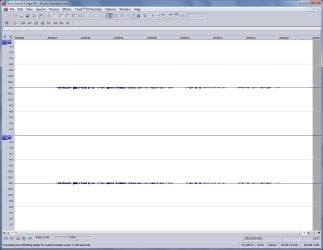
First, your mic signal level is very low. What this does is let normal background noise be heard, your voice level (see first example) is not much louder than the normal background hiss. You end up turning the volume up to hear the voice... unfortunately, you're also turning the noise up.

Second, depending on your playback device... if the enhancements are active, specifically, "Loudness Equalization" the noise will be even more pronounced.
What audio device does your computer have?

So, you need to increase the recording level on the Mic.

Ap

Here's Ex1.
Ex1-LowVoiceLevel.jpg


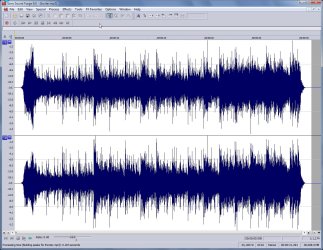
Ex2. is a Music example at full level.
MusicExample.jpg
 

My Computer My Computer

At a glance

Windows 7 Home PremiumIntel Core 2 Duo @ 3.00gHz4 GBATI Radeon HD 2600 XT
Computer Manufacturer/Model Number
Assembled in my workshop
OS
Windows 7 Home Premium
CPU
Intel Core 2 Duo @ 3.00gHz
Motherboard
Gigabyte GA-P35-S3G
Memory
4 GB
Graphics Card(s)
ATI Radeon HD 2600 XT
Sound Card
RME 24/96 Card, Realtek Internal Audio PreSonus FireStudio
Monitor(s) Displays
Acer 1917 (x2)
Screen Resolution
1280 x 1024 on both monitors
Hard Drives
Three 250GB Seagate SATA Barracuda 7200rpm
PSU
Rosewill 500-watt
Case
Rosewill mid-tower
Cooling
Noctua NH-U9B (CPU), PwrSupply fan + single large case Fan
Keyboard
Macally w/2/USB ports.
Mouse
Trackman Wheel
Other Info
Event 20/20 bas studio monitors, Yamaha sub.
Rackmount Korg/Roland/Yamaha synthesizers,
Cubase MIDI/audio recording. Sony Soundforge audio/mastering software. CD Architect Mastering. RME & Presonus audio interfaces.
I have IDT High Definition CODEC, I think is not the background and the mic, is some other configuration that I should know, because I used my integrate laptop microphone and It has the same noise.

I want to sing so I can not edit with that little noise, I talked quietly and loud but still the same, I played with volume levels too.:(
 

My Computer My Computer

At a glance

Windows 73GB
Computer Manufacturer/Model Number
Inspiron 1545
OS
Windows 7
Memory
3GB
Internet Speed
Unknown
I have IDT High Definition CODEC, I think is not the background and the mic, is some other configuration that I should know, because I used my integrate laptop microphone and It has the same noise.

I want to sing so I can not edit with that little noise, I talked quietly and loud but still the same, I played with volume levels too.:(

Well... ok, I have many years experience recording audio, honestly, I don't hear that much wrong with the recording except it's very weak, because the audio is weak I can hear the background noise which sounds like quiet ocean waves. There is some sibilance, but that is normal and not too bad.

Perhaps your playback system is not set up correctly and the sound you're hearing is not on the recording but only added by the playback system. I've seen that happen before.

Do you have the Microsoft speaker icon in your taskbar.

Right click on it and select playback devices, then select your default output device and click on the "Properties" button. Do you have a tab called enhancements? How are they set?

Ap
 

My Computer My Computer

At a glance

Windows 7 Home PremiumIntel Core 2 Duo @ 3.00gHz4 GBATI Radeon HD 2600 XT
Computer Manufacturer/Model Number
Assembled in my workshop
OS
Windows 7 Home Premium
CPU
Intel Core 2 Duo @ 3.00gHz
Motherboard
Gigabyte GA-P35-S3G
Memory
4 GB
Graphics Card(s)
ATI Radeon HD 2600 XT
Sound Card
RME 24/96 Card, Realtek Internal Audio PreSonus FireStudio
Monitor(s) Displays
Acer 1917 (x2)
Screen Resolution
1280 x 1024 on both monitors
Hard Drives
Three 250GB Seagate SATA Barracuda 7200rpm
PSU
Rosewill 500-watt
Case
Rosewill mid-tower
Cooling
Noctua NH-U9B (CPU), PwrSupply fan + single large case Fan
Keyboard
Macally w/2/USB ports.
Mouse
Trackman Wheel
Other Info
Event 20/20 bas studio monitors, Yamaha sub.
Rackmount Korg/Roland/Yamaha synthesizers,
Cubase MIDI/audio recording. Sony Soundforge audio/mastering software. CD Architect Mastering. RME & Presonus audio interfaces.
Many microphones that are built-in to computers and other AV devices are what is known as omnidirectional devices. This means that they are sensitive to noise coming from all around them. In a laptop, for instance, this can also include the noise made by the rotation of the HDD.

The best way to avoid this is to use an external microphone. These will be of higher quality, and will give you much better results. You will probably need either a cardioid or an unidirectional type.

Microphones Etc. — Understanding Microphone Pickup Patterns
 

My Computer My Computer

At a glance

Windows 8.1 Pro RTM x64Intel Core-i5-3570K 4-core @ 3.4GHz (Ivy Brid...4 x 4GB DDR3-1600 Corsair Vengeance CMZ8GX3M2...MSI GeForce GTX770 Gaming OC 2GB
Computer type
PC/Desktop
Computer Manufacturer/Model Number
Dwarf Dwf/11/2012 r09/2013
OS
Windows 8.1 Pro RTM x64
CPU
Intel Core-i5-3570K 4-core @ 3.4GHz (Ivy Bridge) (OC 4.4GHz)
Motherboard
ASRock Z77 Extreme4-M
Memory
4 x 4GB DDR3-1600 Corsair Vengeance CMZ8GX3M2A1600C9B (16GB)
Graphics Card(s)
MSI GeForce GTX770 Gaming OC 2GB
Sound Card
Realtek High Definition on board solution (ALC 898)
Monitor(s) Displays
ViewSonic VA1912w Widescreen (VGA)
Screen Resolution
1440x900
Hard Drives
OCZ Agility 3 SSD 120GB SATA III x2 (RAID 0)
Samsung HD501LJ 500GB SATA II x2
Hitachi HDS721010CLA332 1TB SATA II
Iomega 1.5TB Ext USB 2.0
WD 2.0TB Ext USB 3.0
PSU
XFX Pro Series 850W Semi-Modular
Case
Gigabyte IF233
Cooling
1 x 120mm Front Inlet 1 x 120mm Rear Exhaust
Keyboard
Microsoft Comfort Curve Keyboard 3000 (USB)
Mouse
Microsoft Comfort Mouse 3000 for Business (USB)
Internet Speed
NetGear DG834Gv3 ADSL Modem/Router (Ethernet) ~4.0 Mb/s (O2)
Antivirus
Avast! 8.0.1497
Browser
IE 11
Other Info
Optical Drive: HL-DT-ST BD-RE BH10LS30 SATA Bluray
Lexmark S305 Printer/Scanner/Copier (USB)
WEI Score: 8.1/8.1/8.5/8.5/8.25
Asus Eee PC 1011PX Netbook (Windows 7 x86 Starter)
I would have to look this up but I think he is recording with an external USB mic.

"I recorded with Samson C01U"

Ap
 

My Computer My Computer

At a glance

Windows 7 Home PremiumIntel Core 2 Duo @ 3.00gHz4 GBATI Radeon HD 2600 XT
Computer Manufacturer/Model Number
Assembled in my workshop
OS
Windows 7 Home Premium
CPU
Intel Core 2 Duo @ 3.00gHz
Motherboard
Gigabyte GA-P35-S3G
Memory
4 GB
Graphics Card(s)
ATI Radeon HD 2600 XT
Sound Card
RME 24/96 Card, Realtek Internal Audio PreSonus FireStudio
Monitor(s) Displays
Acer 1917 (x2)
Screen Resolution
1280 x 1024 on both monitors
Hard Drives
Three 250GB Seagate SATA Barracuda 7200rpm
PSU
Rosewill 500-watt
Case
Rosewill mid-tower
Cooling
Noctua NH-U9B (CPU), PwrSupply fan + single large case Fan
Keyboard
Macally w/2/USB ports.
Mouse
Trackman Wheel
Other Info
Event 20/20 bas studio monitors, Yamaha sub.
Rackmount Korg/Roland/Yamaha synthesizers,
Cubase MIDI/audio recording. Sony Soundforge audio/mastering software. CD Architect Mastering. RME & Presonus audio interfaces.
Yes I have a Samson USB Condenser Microphone, and you are right Aphelion the sound is not coming from my Microphone is a configuration problem.

See this picture please:
capturefsx.png


Thanks!
 

My Computer My Computer

At a glance

Windows 73GB
Computer Manufacturer/Model Number
Inspiron 1545
OS
Windows 7
Memory
3GB
Internet Speed
Unknown
Yes I have a Samson USB Condenser Microphone, and you are right Aphelion the sound is not coming from my Microphone is a configuration problem.

Thanks!

Ok, all enhancements off... good.

Do you have the latest drivers? Does IDT have Windows 7 drivers, if not, use the latest Vista drivers.

Ap
 

My Computer My Computer

At a glance

Windows 7 Home PremiumIntel Core 2 Duo @ 3.00gHz4 GBATI Radeon HD 2600 XT
Computer Manufacturer/Model Number
Assembled in my workshop
OS
Windows 7 Home Premium
CPU
Intel Core 2 Duo @ 3.00gHz
Motherboard
Gigabyte GA-P35-S3G
Memory
4 GB
Graphics Card(s)
ATI Radeon HD 2600 XT
Sound Card
RME 24/96 Card, Realtek Internal Audio PreSonus FireStudio
Monitor(s) Displays
Acer 1917 (x2)
Screen Resolution
1280 x 1024 on both monitors
Hard Drives
Three 250GB Seagate SATA Barracuda 7200rpm
PSU
Rosewill 500-watt
Case
Rosewill mid-tower
Cooling
Noctua NH-U9B (CPU), PwrSupply fan + single large case Fan
Keyboard
Macally w/2/USB ports.
Mouse
Trackman Wheel
Other Info
Event 20/20 bas studio monitors, Yamaha sub.
Rackmount Korg/Roland/Yamaha synthesizers,
Cubase MIDI/audio recording. Sony Soundforge audio/mastering software. CD Architect Mastering. RME & Presonus audio interfaces.
I guess it does, I tried update those drivers but are already updated. I'm gonna try record with disable all enhancements. I found that the driver it's the same as Windows Vista.
 

My Computer My Computer

At a glance

Windows 73GB
Computer Manufacturer/Model Number
Inspiron 1545
OS
Windows 7
Memory
3GB
Internet Speed
Unknown
I guess it does, I tried update those drivers but are already updated. I'm gonna try record with disable all enhancements. I found that the driver it's the same as Windows Vista.

In Control Panel, go to "Power Options" then "Change Plan Settings" then "Change Advanced Power Settings". Scroll down to "Processor Management" It probably has two settings, one for when the laptop is plugged in, the other for when it's running on battery. For the plugged in setting, set both Minimum and Maximum to 100%.

If not that... try these.

It may also be a background process that's causing the distortion you're hearing.
A program running in the background might be using excessive resources.
To test if it's software... right click on the taskbar and select Start Task Manager.

Here you can see if any process is using CPU, you can also quit a process for testing. If you decide to quit the virus program process, you might want to disconnect from the Internet.

When you reboot, all processes will be back and running.

It can also be a conflict with hardware, such as wireless Internet or cable Ethernet. You can temporarily disable some hardware in Device Manager for testing.


Ap
 

My Computer My Computer

At a glance

Windows 7 Home PremiumIntel Core 2 Duo @ 3.00gHz4 GBATI Radeon HD 2600 XT
Computer Manufacturer/Model Number
Assembled in my workshop
OS
Windows 7 Home Premium
CPU
Intel Core 2 Duo @ 3.00gHz
Motherboard
Gigabyte GA-P35-S3G
Memory
4 GB
Graphics Card(s)
ATI Radeon HD 2600 XT
Sound Card
RME 24/96 Card, Realtek Internal Audio PreSonus FireStudio
Monitor(s) Displays
Acer 1917 (x2)
Screen Resolution
1280 x 1024 on both monitors
Hard Drives
Three 250GB Seagate SATA Barracuda 7200rpm
PSU
Rosewill 500-watt
Case
Rosewill mid-tower
Cooling
Noctua NH-U9B (CPU), PwrSupply fan + single large case Fan
Keyboard
Macally w/2/USB ports.
Mouse
Trackman Wheel
Other Info
Event 20/20 bas studio monitors, Yamaha sub.
Rackmount Korg/Roland/Yamaha synthesizers,
Cubase MIDI/audio recording. Sony Soundforge audio/mastering software. CD Architect Mastering. RME & Presonus audio interfaces.
i honestly don't know if that counts, but i had the same problem some years ago in XP and my solution was to uninstall the latest driver and install an earlier version of the driver ( from the manufacturer's site ) which made my sound at 100% not to be that loud as with the latest driver but i didn't have the problem with the noise.
 

My Computer My Computer

At a glance

Windows 7 Enterprise x64AMD Athlon™ 64 X2 Dual Core Processor 6000+2x 2GB Apacer DDR2 @ 335.1 5-5-5-15 @ 1.8vATI Radeon HD 2600 XT 512MB OC @ 890/1090
Computer Manufacturer/Model Number
Winfast N570SM2AA
OS
Windows 7 Enterprise x64
CPU
AMD Athlon™ 64 X2 Dual Core Processor 6000+
Motherboard
Winfast N570SM2AA
Memory
2x 2GB Apacer DDR2 @ 335.1 5-5-5-15 @ 1.8v
Graphics Card(s)
ATI Radeon HD 2600 XT 512MB OC @ 890/1090
Sound Card
OnBoard High Definition Audio Device
Monitor(s) Displays
Proview 17" CRT
Screen Resolution
1600x1200 @ 75 Hz
Hard Drives
WD750
PSU
EnLight 280W
Case
Pepper Custom Made
Cooling
stock.
Keyboard
Generic
Mouse
Logitech G9
Internet Speed
5MbpsU/0.4MbpsD
Other Info
things i want to upgrade: Cooling System, GPU, PSU, Motherboard
i honestly don't know if that counts, but i had the same problem some years ago in XP and my solution was to uninstall the latest driver and install an earlier version of the driver ( from the manufacturer's site ) which made my sound at 100% not to be that loud as with the latest driver but i didn't have the problem with the noise.

I saw that solution before but I could not found an IDT Older Driver.

I guess it does, I tried update those drivers but are already updated. I'm gonna try record with disable all enhancements. I found that the driver it's the same as Windows Vista.

In Control Panel, go to "Power Options" then "Change Plan Settings" then "Change Advanced Power Settings". Scroll down to "Processor Management" It probably has two settings, one for when the laptop is plugged in, the other for when it's running on battery. For the plugged in setting, set both Minimum and Maximum to 100%.

If not that... try these.

It may also be a background process that's causing the distortion you're hearing.
A program running in the background might be using excessive resources.
To test if it's software... right click on the taskbar and select Start Task Manager.

Here you can see if any process is using CPU, you can also quit a process for testing. If you decide to quit the virus program process, you might want to disconnect from the Internet.

When you reboot, all processes will be back and running.

It can also be a conflict with hardware, such as wireless Internet or cable Ethernet. You can temporarily disable some hardware in Device Manager for testing.


Ap
I did exaclty what you wrote Aphelion and I still with the problem.:cry:

I have to record a demo this summer and I need a solution. I thought that maybe my headphone is making the trouble because it has a dumb structure but I tried record with and without and still de same noise. I am thinking sell this laptop and buy a new one maybe a HP with Realtek Drivers but I do not know yet, I want to quit my problem right know if I can.

Please listen a brief example of me "singing" and you can listen the little sound more accurate.

I identify a noise sound in my next picture, I am really sad. Please help me, I am so frustated!

I think that the little noise sound happen just when I am talking.

capturech.png
 

My Computer My Computer

At a glance

Windows 73GB
Computer Manufacturer/Model Number
Inspiron 1545
OS
Windows 7
Memory
3GB
Internet Speed
Unknown
did exaclty what you wrote Aphelion and I still with the problem.:cry:

I have to record a demo this summer and I need a solution. I thought that maybe my headphone is making the trouble because it has a dumb structure but I tried record with and without and still de same noise. I am thinking sell this laptop and buy a new one maybe a HP with Realtek Drivers but I do not know yet, I want to quit my problem right know if I can.

Please listen a brief example of me "singing" and you can listen the little sound more accurate.


Oh yeah... that sound, it's a glitch and can be caused by several things...

1. The hard drive being busy while recording...
2. Other USB peroiphreals plugged in. (unplug all USB devices except the Samson)
3. Software running in the background using the CPU or hard drive.

Software could include, but not limited to, Virus/Malware software that's scanning the drive. You have to use Task Manager to quit non system background processes and keep testing.

Ap
 

My Computer My Computer

At a glance

Windows 7 Home PremiumIntel Core 2 Duo @ 3.00gHz4 GBATI Radeon HD 2600 XT
Computer Manufacturer/Model Number
Assembled in my workshop
OS
Windows 7 Home Premium
CPU
Intel Core 2 Duo @ 3.00gHz
Motherboard
Gigabyte GA-P35-S3G
Memory
4 GB
Graphics Card(s)
ATI Radeon HD 2600 XT
Sound Card
RME 24/96 Card, Realtek Internal Audio PreSonus FireStudio
Monitor(s) Displays
Acer 1917 (x2)
Screen Resolution
1280 x 1024 on both monitors
Hard Drives
Three 250GB Seagate SATA Barracuda 7200rpm
PSU
Rosewill 500-watt
Case
Rosewill mid-tower
Cooling
Noctua NH-U9B (CPU), PwrSupply fan + single large case Fan
Keyboard
Macally w/2/USB ports.
Mouse
Trackman Wheel
Other Info
Event 20/20 bas studio monitors, Yamaha sub.
Rackmount Korg/Roland/Yamaha synthesizers,
Cubase MIDI/audio recording. Sony Soundforge audio/mastering software. CD Architect Mastering. RME & Presonus audio interfaces.
I tried delete processes and I unplugged my USB Mouse and nothing good yet. Do you have another alternative to resolve the problem? Change SO can help? Some hack?
 

My Computer My Computer

At a glance

Windows 73GB
Computer Manufacturer/Model Number
Inspiron 1545
OS
Windows 7
Memory
3GB
Internet Speed
Unknown
I tried delete processes and I unplugged my USB Mouse and nothing good yet. Do you have another alternative to resolve the problem? Change SO can help? Some hack?


Sorry, I guess not. I've heard that sound before and I know there can be several possibilites... so it's difficult to tell.

Have you tried the mic in all available USB ports?

Ap
 

My Computer My Computer

At a glance

Windows 7 Home PremiumIntel Core 2 Duo @ 3.00gHz4 GBATI Radeon HD 2600 XT
Computer Manufacturer/Model Number
Assembled in my workshop
OS
Windows 7 Home Premium
CPU
Intel Core 2 Duo @ 3.00gHz
Motherboard
Gigabyte GA-P35-S3G
Memory
4 GB
Graphics Card(s)
ATI Radeon HD 2600 XT
Sound Card
RME 24/96 Card, Realtek Internal Audio PreSonus FireStudio
Monitor(s) Displays
Acer 1917 (x2)
Screen Resolution
1280 x 1024 on both monitors
Hard Drives
Three 250GB Seagate SATA Barracuda 7200rpm
PSU
Rosewill 500-watt
Case
Rosewill mid-tower
Cooling
Noctua NH-U9B (CPU), PwrSupply fan + single large case Fan
Keyboard
Macally w/2/USB ports.
Mouse
Trackman Wheel
Other Info
Event 20/20 bas studio monitors, Yamaha sub.
Rackmount Korg/Roland/Yamaha synthesizers,
Cubase MIDI/audio recording. Sony Soundforge audio/mastering software. CD Architect Mastering. RME & Presonus audio interfaces.
Yes, I did.

Remember that the noise happen also with my laptop microphone (included) so It can't be the USB Condenser one.
 

My Computer My Computer

At a glance

Windows 73GB
Computer Manufacturer/Model Number
Inspiron 1545
OS
Windows 7
Memory
3GB
Internet Speed
Unknown
Yes, I did.

Remember that the noise happen also with my laptop microphone (included) so It can't be the USB Condenser one.


One last question(s)... what video chipset is in the Dell?

Also, are you running any Peer to Peer network applications?

Can you open task manger a screen grab a picture of all running processes?

Ap

Ap
 

My Computer My Computer

At a glance

Windows 7 Home PremiumIntel Core 2 Duo @ 3.00gHz4 GBATI Radeon HD 2600 XT
Computer Manufacturer/Model Number
Assembled in my workshop
OS
Windows 7 Home Premium
CPU
Intel Core 2 Duo @ 3.00gHz
Motherboard
Gigabyte GA-P35-S3G
Memory
4 GB
Graphics Card(s)
ATI Radeon HD 2600 XT
Sound Card
RME 24/96 Card, Realtek Internal Audio PreSonus FireStudio
Monitor(s) Displays
Acer 1917 (x2)
Screen Resolution
1280 x 1024 on both monitors
Hard Drives
Three 250GB Seagate SATA Barracuda 7200rpm
PSU
Rosewill 500-watt
Case
Rosewill mid-tower
Cooling
Noctua NH-U9B (CPU), PwrSupply fan + single large case Fan
Keyboard
Macally w/2/USB ports.
Mouse
Trackman Wheel
Other Info
Event 20/20 bas studio monitors, Yamaha sub.
Rackmount Korg/Roland/Yamaha synthesizers,
Cubase MIDI/audio recording. Sony Soundforge audio/mastering software. CD Architect Mastering. RME & Presonus audio interfaces.
I have an Intel Graphics Media Accelerator X4500HD and I am not running a Peer-To-Peer aplication. See the Task Manager please.

capturezz.png

Thanks!
 
Last edited:

My Computer My Computer

At a glance

Windows 73GB
Computer Manufacturer/Model Number
Inspiron 1545
OS
Windows 7
Memory
3GB
Internet Speed
Unknown
Back
Top