
Network Adapter Not Shown in Network and Sharing Center

jbeck22

New member
Local time
11:48 AM
Messages
8
I have windows 7 Ultimate installed (was originally installed as a clean install) and have ever since it was RTM. Everything has been running flawlessly and still is except for one thing. My network cards don't show up under Network and Sharing Center, but they do show normally under device manager and my network connection is rock solid. Currenly I'm plugged into a 10/100mb At&t U-Verse Residential Gateway (router). Because of this I can't manage either of my NICs and I can't join my homegroup.

The NICs are intergrated into the motherboard. The NICs are Nvidia nForce adapters.

Does anyone know how I can fix this? Or at least know where I can go to figure this out?

Thank you!!
 

My Computer My Computer

At a glance

windows 7 Ultimate
OS
windows 7 Ultimate
Yes I installed the latest drivers earlier today, rebooted and same problem persisted.
 

My Computer My Computer

At a glance

windows 7 Ultimate
OS
windows 7 Ultimate
Have you tried uninstalling the NIC(s) in device manager?

This will then prompt a re-install from the system which may correct the issue.
 

My Computer My Computer

At a glance

Windows 7 Ultimate
OS
Windows 7 Ultimate
Have you tried uninstalling the NIC(s) in device manager?

This will then prompt a re-install from the system which may correct the issue.

I tried this as well and when windows finds the hardware again it fails to install the devices. When I do it a 2nd time it works...but still doesn't show up under Network and Sharing.
 

My Computer My Computer

At a glance

windows 7 Ultimate
OS
windows 7 Ultimate
Did you get an error message when the install failed?

Do you run AntiVirus on your PC? If so you could try disabling it and trying the NIC un-install/install again. Then check Network and Sharing before re-enabling the AntiVirus.
 

My Computer My Computer

At a glance

Windows 7 Ultimate
OS
Windows 7 Ultimate
Did you get an error message when the install failed?

Do you run AntiVirus on your PC? If so you could try disabling it and trying the NIC un-install/install again. Then check Network and Sharing before re-enabling the AntiVirus.

I was running Kaspersky 2010, but I removed it when all of this started thinking that maybe it had something to do with my problems, but it didn't change anything.

I don't remember if I get an error or if I did what that error is...I'll repeat the steps and post the results later today.
 

My Computer My Computer

At a glance

windows 7 Ultimate
OS
windows 7 Ultimate
Did you get an error message when the install failed?

Do you run AntiVirus on your PC? If so you could try disabling it and trying the NIC un-install/install again. Then check Network and Sharing before re-enabling the AntiVirus.

I was running Kaspersky 2010, but I removed it when all of this started thinking that maybe it had something to do with my problems, but it didn't change anything.

I don't remember if I get an error or if I did what that error is...I'll repeat the steps and post the results later today.

There are errors presented when I did the uninstall / reinstall. I took screenshots, but I am unable to upload them as now the NICs won't install at all. I keep getting "Incorrect Parameter" when I try to install the driver from nvidia.

Does anyone think that a system repair using the windows 7 CD would work for any of this?

Thanks!
 

My Computer My Computer

At a glance

windows 7 Ultimate
OS
windows 7 Ultimate
Hello jbeck22;

The only time I ever had, or needed, more than one NIC was on a server. Server software may support more than one active NIC at a time, but since Windows 7 is not server class software I am wondering how well it will accept more than one active NIC?

I would suggest going to the BIOS and disabling one of the on-board NICs and trying to configure just the one NIC? Perhaps you will have normal laptop networking with just the one NIC?

Cheers!
Robert
 

My Computer My Computer

At a glance

...
OS
...
I only have 1 cable plugged in at a time. This is a desktop that we are taking about...not laptop. I'm currently researching the most recent BIOS version for my motherboard....Abit KN9-SLI
 

My Computer My Computer

At a glance

windows 7 Ultimate
OS
windows 7 Ultimate
I only have 1 cable plugged in at a time. This is a desktop that we are taking about...not laptop. I'm currently researching the most recent BIOS version for my motherboard....Abit KN9-SLI
Sorry, my bad ... I don't know how I got "laptop" from your original post or system specs? :( :shock: Just getting too old, I guess ...
As long as both NICs are enabled in the BIOS they will both be consuming computer resources. See if you can disable one of them.

Cheers!
Robert
 

My Computer My Computer

At a glance

...
OS
...
No worries. I checked and there hasn't been a BIOS update for my board since 2007 :(
I'll try to disable the other NIC when I get home this afternoon. If that doesn't do the trick I guess I'll try the windows CD and see if a system repair will work. :mad2:
 

My Computer My Computer

At a glance

windows 7 Ultimate
OS
windows 7 Ultimate
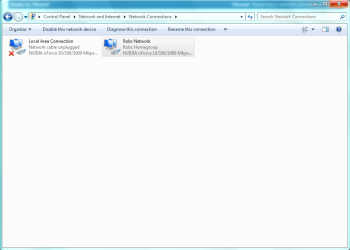
Are you saying they don't show up like in the picture below? I never needed to adjust any settings there in order to get Homegroups working.
 

Attachments

  • LOCAL AREA CONNECTION 2.PNG
    LOCAL AREA CONNECTION 2.PNG
    23.3 KB · Views: 34

My Computer My Computer

At a glance

Windows 7 Ult, Windows 8.1 Pro,Q9650-4.275GHz, E8600 4.5GHz, E6750-3.8GHzG.Skill PC2 9600 1200Mhz 5 5 5 15 2TGTX480
Computer type
PC/Desktop
Computer Manufacturer/Model Number
Home built
OS
Windows 7 Ult, Windows 8.1 Pro,
CPU
Q9650-4.275GHz, E8600 4.5GHz, E6750-3.8GHz
Motherboard
Evga 780i FTW
Memory
G.Skill PC2 9600 1200Mhz 5 5 5 15 2T
Graphics Card(s)
GTX480
Sound Card
Asus Xonar D2
Monitor(s) Displays
HannsG
Screen Resolution
1680X1050
Hard Drives
GSkill Phoenix Pro 120GB SSD
PSU
ThermalTake Toughpower 1000Watt modular
Case
ThermalTake XaserV
Cooling
Xigmatek S1283
Keyboard
Logitech G15
Mouse
Logitech G9
Internet Speed
T1
That's right. Mine doesn't show anything but a Bluetooth connection there.
 

My Computer My Computer

At a glance

windows 7 Ultimate
OS
windows 7 Ultimate
Back
Top