does w7 updater check every boots or every day?

drugo

New member
Member
VIP
Local time
11:27 PM
Messages
476
Hi
i have a question
i installed windows 7 32bit

but i did not understand well the updater

i setup
notify but not download , let me download them

i don't know if windows 7 checks for update at every boots or every day for new update

i did a clean install
my w7 is registered and activated
thanks
best regards
 

My Computer My Computer

At a glance

windows 7 ultimate 64bit
Computer type
PC/Desktop
OS
windows 7 ultimate 64bit
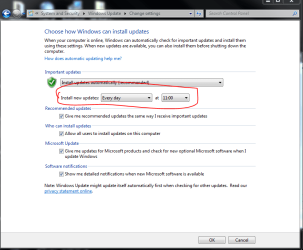
Windows Update checks for new updates at the time you specify.

Capture.PNG

If you're computer is off when that time rolls around, it will check as soon as you turn it back on.
 

My Computer My Computer

At a glance

Windows 7 Professional x64Intel i7 2600K OC'd @ 4620 MHz16GB GSkill Sniper 2133 Mhz (4x4GB)EVGA GeForce GTX 480 SuperClocked+
Computer Manufacturer/Model Number
Custom
OS
Windows 7 Professional x64
CPU
Intel i7 2600K OC'd @ 4620 MHz
Motherboard
Asus P8Z68-V Pro
Memory
16GB GSkill Sniper 2133 Mhz (4x4GB)
Graphics Card(s)
EVGA GeForce GTX 480 SuperClocked+
Sound Card
Realtek High Definition Audio
Monitor(s) Displays
2x Acer S273HLbmii 27"
Screen Resolution
2 x 1920x1080
Hard Drives
64GB Crucial M4 SSD

Storage: Hitachi 1TB 5400RPM, Samsung 1.5TB 5400RPM
PSU
Corsair HW Series 750w (modular)
Case
Cooler Master HAF 932 Advanced Blue Edition
Cooling
CM Hyper 212+ CPU cooler, 3x 230mm + 1x 140mm case fans
Keyboard
Logitech MK320 (wireless)
Mouse
Logitech MK320 (wireless)
Internet Speed
30 Mb/s : 2 Mb/s
Hi
i have a question
i installed windows 7 32bit

but i did not understand well the updater

i setup
notify but not download , let me download them

i don't know if windows 7 checks for update at every boots or every day for new update

i did a clean install
my w7 is registered and activated
thanks
best regards

I think that you made a wise choice when it comes to install yourself. Allow me to give you some unasked for advice.

Sometimes, after the update you are asked if the download should reboot the computer. I said yes, once. Well I had to force a shutdown after a freeze. I do not know if the update caused the problem, but now I always say now and restart, myself.

Once a month, you will get several updates. Dont install all at once, do only one or two at a time. This avoids many problmes that I have seen posted and in addition, if an update causes a problem, you will know which one to unistall.
 

My Computer My Computer

At a glance

Windows 10, Home Clean InstallIntel Core2 processsor Q8200(2.33Ghz 1333FSB)...6 gbATI Radeon 256MB HD3650
Computer type
PC/Desktop
Computer Manufacturer/Model Number
Dell XPS 420
OS
Windows 10, Home Clean Install
CPU
Intel Core2 processsor Q8200(2.33Ghz 1333FSB) Quad Core Tech
Motherboard
Dell
Memory
6 gb
Graphics Card(s)
ATI Radeon 256MB HD3650
Sound Card
Intergrated 7.1 Channel Audio
Monitor(s) Displays
Dell SP2009W 20"
Hard Drives
640 GB Serial ATA Hard drive
Cooling
Fan
Keyboard
Dell USB Keyboard
Mouse
Dell Premium Optical USB
Internet Speed
DSL 2.85
Hi
i have a question
i installed windows 7 32bit

but i did not understand well the updater

i setup
notify but not download , let me download them
i don't know if windows 7 checks for update at every boots or every day for new update

i did a clean install
my w7 is registered and activated
thanks
best regards

I think that you made a wise choice when it comes to install yourself. Allow me to give you some unasked for advice.

Sometimes, after the update you are asked if the download should reboot the computer. I said yes, once. Well I had to force a shutdown after a freeze. I do not know if the update caused the problem, but now I always say now and restart, myself.

Once a month, you will get several updates. Dont install all at once, do only one or two at a time. This avoids many problmes that I have seen posted and in addition, if an update causes a problem, you will know which one to unistall.

thanks
for the advises
i would like to know my question answer
i mean with my setting does w7 checks for update at every boot or at every day?

because i guess my w7 automatic update doesn't check for update at every boot


thanks
 

My Computer My Computer

At a glance

windows 7 ultimate 64bit
Computer type
PC/Desktop
OS
windows 7 ultimate 64bit
Look at Jons answer. You set the sechedule, it checks the way you have set it up.
 

My Computer My Computer

At a glance

Windows 10, Home Clean InstallIntel Core2 processsor Q8200(2.33Ghz 1333FSB)...6 gbATI Radeon 256MB HD3650
Computer type
PC/Desktop
Computer Manufacturer/Model Number
Dell XPS 420
OS
Windows 10, Home Clean Install
CPU
Intel Core2 processsor Q8200(2.33Ghz 1333FSB) Quad Core Tech
Motherboard
Dell
Memory
6 gb
Graphics Card(s)
ATI Radeon 256MB HD3650
Sound Card
Intergrated 7.1 Channel Audio
Monitor(s) Displays
Dell SP2009W 20"
Hard Drives
640 GB Serial ATA Hard drive
Cooling
Fan
Keyboard
Dell USB Keyboard
Mouse
Dell Premium Optical USB
Internet Speed
DSL 2.85
Go to search. Type windows update. Then change settings. Mine is set every day at 3. So it is at 3 not at boot etc.
 

My Computer My Computer

At a glance

Windows 10, Home Clean InstallIntel Core2 processsor Q8200(2.33Ghz 1333FSB)...6 gbATI Radeon 256MB HD3650
Computer type
PC/Desktop
Computer Manufacturer/Model Number
Dell XPS 420
OS
Windows 10, Home Clean Install
CPU
Intel Core2 processsor Q8200(2.33Ghz 1333FSB) Quad Core Tech
Motherboard
Dell
Memory
6 gb
Graphics Card(s)
ATI Radeon 256MB HD3650
Sound Card
Intergrated 7.1 Channel Audio
Monitor(s) Displays
Dell SP2009W 20"
Hard Drives
640 GB Serial ATA Hard drive
Cooling
Fan
Keyboard
Dell USB Keyboard
Mouse
Dell Premium Optical USB
Internet Speed
DSL 2.85
Look at Jons answer. You set the sechedule, it checks the way you have set it up.

thanks
but i want to use these settings

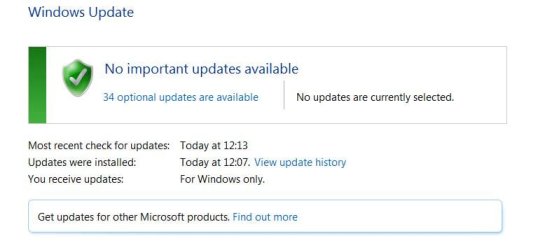
i did boot w7 many times but the date of the last check is 12.13
now it's 19.25

it does seem that the autoupdate check doesn't work at every boot
 

Attachments

  • Capture.PNG
    Capture.PNG
    13.9 KB · Views: 11
  • Capture2.JPG
    Capture2.JPG
    29.8 KB · Views: 12

My Computer My Computer

At a glance

windows 7 ultimate 64bit
Computer type
PC/Desktop
OS
windows 7 ultimate 64bit
That is the time. It says that it installed at one time and a few minutes later itchecked.

It does not check at every boot. If I can find the schedule I will post.
 

My Computer My Computer

At a glance

Windows 10, Home Clean InstallIntel Core2 processsor Q8200(2.33Ghz 1333FSB)...6 gbATI Radeon 256MB HD3650
Computer type
PC/Desktop
Computer Manufacturer/Model Number
Dell XPS 420
OS
Windows 10, Home Clean Install
CPU
Intel Core2 processsor Q8200(2.33Ghz 1333FSB) Quad Core Tech
Motherboard
Dell
Memory
6 gb
Graphics Card(s)
ATI Radeon 256MB HD3650
Sound Card
Intergrated 7.1 Channel Audio
Monitor(s) Displays
Dell SP2009W 20"
Hard Drives
640 GB Serial ATA Hard drive
Cooling
Fan
Keyboard
Dell USB Keyboard
Mouse
Dell Premium Optical USB
Internet Speed
DSL 2.85
That is the time. It says that it installed at one time and a few minutes later itchecked.

maybe my english is not good ,sorry for that

in the screenshot there is most recent check for update 12:13
->this morning ,before have lunch

now it's 19:36 (7:36 pm) evening

after many reboots after the 12:13 ,w7 did not perform a check

i mean now it's 7:36, should do it a check ,should not it?
i mean in the more recent check should be 19:36 (7.36pm)
thanks
 

My Computer My Computer

At a glance

windows 7 ultimate 64bit
Computer type
PC/Desktop
OS
windows 7 ultimate 64bit
Give me a while, I will try to find out what kind of schedule the updater is on. It is about once a day. Mine is anyway.
 

My Computer My Computer

At a glance

Windows 10, Home Clean InstallIntel Core2 processsor Q8200(2.33Ghz 1333FSB)...6 gbATI Radeon 256MB HD3650
Computer type
PC/Desktop
Computer Manufacturer/Model Number
Dell XPS 420
OS
Windows 10, Home Clean Install
CPU
Intel Core2 processsor Q8200(2.33Ghz 1333FSB) Quad Core Tech
Motherboard
Dell
Memory
6 gb
Graphics Card(s)
ATI Radeon 256MB HD3650
Sound Card
Intergrated 7.1 Channel Audio
Monitor(s) Displays
Dell SP2009W 20"
Hard Drives
640 GB Serial ATA Hard drive
Cooling
Fan
Keyboard
Dell USB Keyboard
Mouse
Dell Premium Optical USB
Internet Speed
DSL 2.85
I have found that that the updater checks once a day, based upon certain conditions.Verify the time of the last check and then check again in 48 hours, If the upadater checked at least once you are ok. It has nothing to do with boot.

With the release of Windows Me in 2000, Microsoft introduced Automatic Updates as a replacement for the Critical Update Notification tool. Unlike its predecessor, Automatic Updates includes the ability to download and install updates without using a web browser. Instead of the five minute schedule used by its predecessor, the Automatic Updates client checks the Windows Update servers once a day. The user is given the option to download available updates then prompt the user to install them, or to notify the user prior to downloading any available updates. After Windows Me is installed, the user is prompted via a notification balloon to configure the Automatic Updates client.
 

My Computer My Computer

At a glance

Windows 10, Home Clean InstallIntel Core2 processsor Q8200(2.33Ghz 1333FSB)...6 gbATI Radeon 256MB HD3650
Computer type
PC/Desktop
Computer Manufacturer/Model Number
Dell XPS 420
OS
Windows 10, Home Clean Install
CPU
Intel Core2 processsor Q8200(2.33Ghz 1333FSB) Quad Core Tech
Motherboard
Dell
Memory
6 gb
Graphics Card(s)
ATI Radeon 256MB HD3650
Sound Card
Intergrated 7.1 Channel Audio
Monitor(s) Displays
Dell SP2009W 20"
Hard Drives
640 GB Serial ATA Hard drive
Cooling
Fan
Keyboard
Dell USB Keyboard
Mouse
Dell Premium Optical USB
Internet Speed
DSL 2.85
Ty so much for the rep. It is appreciated.
 

My Computer My Computer

At a glance

Windows 10, Home Clean InstallIntel Core2 processsor Q8200(2.33Ghz 1333FSB)...6 gbATI Radeon 256MB HD3650
Computer type
PC/Desktop
Computer Manufacturer/Model Number
Dell XPS 420
OS
Windows 10, Home Clean Install
CPU
Intel Core2 processsor Q8200(2.33Ghz 1333FSB) Quad Core Tech
Motherboard
Dell
Memory
6 gb
Graphics Card(s)
ATI Radeon 256MB HD3650
Sound Card
Intergrated 7.1 Channel Audio
Monitor(s) Displays
Dell SP2009W 20"
Hard Drives
640 GB Serial ATA Hard drive
Cooling
Fan
Keyboard
Dell USB Keyboard
Mouse
Dell Premium Optical USB
Internet Speed
DSL 2.85
I have found that that the updater checks once a day, based upon certain conditions.Verify the time of the last check and then check again in 48 hours, If the upadater checked at least once you are ok. It has nothing to do with boot.

With the release of Windows Me in 2000, Microsoft introduced Automatic Updates as a replacement for the Critical Update Notification tool. Unlike its predecessor, Automatic Updates includes the ability to download and install updates without using a web browser. Instead of the five minute schedule used by its predecessor, the Automatic Updates client checks the Windows Update servers once a day. The user is given the option to download available updates then prompt the user to install them, or to notify the user prior to downloading any available updates. After Windows Me is installed, the user is prompted via a notification balloon to configure the Automatic Updates client.
thanks
my xp checks every boots for updates
i will check my w7 tomorrow and i willl tell you
thanks again
have a great day
 

My Computer My Computer

At a glance

windows 7 ultimate 64bit
Computer type
PC/Desktop
OS
windows 7 ultimate 64bit
Based upon what I read, and what I have seen on my computer it has nothing to do with boot. Wait 48 hours to check. Based upon what I read, the schedule is set for every 24 hours, but may be less depending on cirucmstances. One circumstance is if the machine is off. So wait 48 hours. If the update checked once you are ok.
 

My Computer My Computer

At a glance

Windows 10, Home Clean InstallIntel Core2 processsor Q8200(2.33Ghz 1333FSB)...6 gbATI Radeon 256MB HD3650
Computer type
PC/Desktop
Computer Manufacturer/Model Number
Dell XPS 420
OS
Windows 10, Home Clean Install
CPU
Intel Core2 processsor Q8200(2.33Ghz 1333FSB) Quad Core Tech
Motherboard
Dell
Memory
6 gb
Graphics Card(s)
ATI Radeon 256MB HD3650
Sound Card
Intergrated 7.1 Channel Audio
Monitor(s) Displays
Dell SP2009W 20"
Hard Drives
640 GB Serial ATA Hard drive
Cooling
Fan
Keyboard
Dell USB Keyboard
Mouse
Dell Premium Optical USB
Internet Speed
DSL 2.85
Based upon what I read, and what I have seen on my computer it has nothing to do with boot. Wait 48 hours to check. Based upon what I read, the schedule is set for every 24 hours, but may be less depending on cirucmstances. One circumstance is if the machine is off. So wait 48 hours. If the update checked once you are ok.
maybe i should install Dettagli download: Strumento di analisi della conformità agli aggiornamenti di sistema per Windows 7 (KB947821) [gennaio 2010] ?
 

My Computer My Computer

At a glance

windows 7 ultimate 64bit
Computer type
PC/Desktop
OS
windows 7 ultimate 64bit
Based upon what I read, and what I have seen on my computer it has nothing to do with boot. Wait 48 hours to check. Based upon what I read, the schedule is set for every 24 hours, but may be less depending on cirucmstances. One circumstance is if the machine is off. So wait 48 hours. If the update checked once you are ok.
maybe i should install Dettagli download: Strumento di analisi della conformità agli aggiornamenti di sistema per Windows 7 (KB947821) [gennaio 2010] ?

I do not know what that download is, due to language. But as I said yesterday wait 48 hours. Circumstances can cause a delay in the updates. Its once a day, depending on circumstances. Mine is not every 24 hours, sometimes 24 hours sometimes 35 etc. Post tomorrow.
 

My Computer My Computer

At a glance

Windows 10, Home Clean InstallIntel Core2 processsor Q8200(2.33Ghz 1333FSB)...6 gbATI Radeon 256MB HD3650
Computer type
PC/Desktop
Computer Manufacturer/Model Number
Dell XPS 420
OS
Windows 10, Home Clean Install
CPU
Intel Core2 processsor Q8200(2.33Ghz 1333FSB) Quad Core Tech
Motherboard
Dell
Memory
6 gb
Graphics Card(s)
ATI Radeon 256MB HD3650
Sound Card
Intergrated 7.1 Channel Audio
Monitor(s) Displays
Dell SP2009W 20"
Hard Drives
640 GB Serial ATA Hard drive
Cooling
Fan
Keyboard
Dell USB Keyboard
Mouse
Dell Premium Optical USB
Internet Speed
DSL 2.85
Based upon what I read, and what I have seen on my computer it has nothing to do with boot. Wait 48 hours to check. Based upon what I read, the schedule is set for every 24 hours, but may be less depending on cirucmstances. One circumstance is if the machine is off. So wait 48 hours. If the update checked once you are ok.
maybe i should install Dettagli download: Strumento di analisi della conformità agli aggiornamenti di sistema per Windows 7 (KB947821) [gennaio 2010] ?

I do not know what that download is, due to language. But as I said yesterday wait 48 hours. Circumstances can cause a delay in the updates. Its once a day, depending on circumstances. Mine is not every 24 hours, sometimes 24 hours sometimes 35 etc. Post tomorrow.
sorry that's in english Download details: System Update Readiness Tool for Windows 7 (KB947821) [January 2010]
 

My Computer My Computer

At a glance

windows 7 ultimate 64bit
Computer type
PC/Desktop
OS
windows 7 ultimate 64bit
There is no right and no wrong, but I can tell you what I would do.

First I would wait until tomorrow to see if you really have a problem with updates. Do not keep checking that may cause delays. If you do not have a update check, by tomorrow, at this time, I would still wait a bit. I do not like making changes, like the one you showed me, unless truly necessary. If there is no update check, by this time tomorrow plus 12 hours, I would make a system restore point and then perform the install.
 

My Computer My Computer

At a glance

Windows 10, Home Clean InstallIntel Core2 processsor Q8200(2.33Ghz 1333FSB)...6 gbATI Radeon 256MB HD3650
Computer type
PC/Desktop
Computer Manufacturer/Model Number
Dell XPS 420
OS
Windows 10, Home Clean Install
CPU
Intel Core2 processsor Q8200(2.33Ghz 1333FSB) Quad Core Tech
Motherboard
Dell
Memory
6 gb
Graphics Card(s)
ATI Radeon 256MB HD3650
Sound Card
Intergrated 7.1 Channel Audio
Monitor(s) Displays
Dell SP2009W 20"
Hard Drives
640 GB Serial ATA Hard drive
Cooling
Fan
Keyboard
Dell USB Keyboard
Mouse
Dell Premium Optical USB
Internet Speed
DSL 2.85
There is no right and no wrong, but I can tell you what I would do.

First I would wait until tomorrow to see if you really have a problem with updates. Do not keep checking that may cause delays. If you do not have a update check, by tomorrow, at this time, I would still wait a bit. I do not like making changes, like the one you showed me, unless truly necessary. If there is no update check, by this time tomorrow plus 12 hours, I would make a system restore point and then perform the install.
you are right!
every day
i did check and w7 checks for update every day

i would like to know if there is a possibility to tweak and force w7 to check to every boots like xp

thanks a lot:)

ps i tried to give you another reputation point for the perfect support
but the forum answer is
You must spread some Reputation around before giving it to richc46 again.
what's the meaning?
 

My Computer My Computer

At a glance

windows 7 ultimate 64bit
Computer type
PC/Desktop
OS
windows 7 ultimate 64bit
TY for reporting back. I am sure there is a way to tweek the system to force update to check at boot, but I do not have that knowledge. I suggest that you try to bring the question to the attention to someone who may know. Start a new thread, give it a subject that says. Can Windows Update Install At Every Boot. Someone will help you.

The message that you received about the rep means. That you have to give rep to 10 other people before you give it to me, again. The people who are in charge of this Forum do not want friends just to give rep to each other all day and they are right. That being said, your appreiciation and desire to rep me again is all that I really need to make me very, very glad that I could help you.
 

My Computer My Computer

At a glance

Windows 10, Home Clean InstallIntel Core2 processsor Q8200(2.33Ghz 1333FSB)...6 gbATI Radeon 256MB HD3650
Computer type
PC/Desktop
Computer Manufacturer/Model Number
Dell XPS 420
OS
Windows 10, Home Clean Install
CPU
Intel Core2 processsor Q8200(2.33Ghz 1333FSB) Quad Core Tech
Motherboard
Dell
Memory
6 gb
Graphics Card(s)
ATI Radeon 256MB HD3650
Sound Card
Intergrated 7.1 Channel Audio
Monitor(s) Displays
Dell SP2009W 20"
Hard Drives
640 GB Serial ATA Hard drive
Cooling
Fan
Keyboard
Dell USB Keyboard
Mouse
Dell Premium Optical USB
Internet Speed
DSL 2.85
Back
Top