Hard Drive Always Corrupted

4m4z1ng

New member
Local time
1:01 PM
Messages
18
So my hard drive is always corrupted. Specifically, it's my "Videos" folder. It's still corrupted after Windown 7 runs the disk check at startup, as it insists it should.
 

My Computer

Computer Manufacturer/Model Number
Thinkpad T400
OS
Window 7
Memory
4 gig
So my hard drive is always corrupted. Specifically, it's my "Videos" folder. It's still corrupted after Windown 7 runs the disk check at startup, as it insists it should.

You can try this...

Open a command prompt (Windows key + R) and type in this command:

chkdsk X: /F

(Substitute the real drive letter for the X).

This will run a file system check on your hard disk partition. If it's the boot partition ( C: ) it will schedule it for the next reboot... If that's the case reboot and let it run. This can take some time so be patient with it.
 

My Computer

Computer Manufacturer/Model Number
Homebrew
OS
XP Pro SP3 X86 / Win7 Pro X86
CPU
Amd 64 x2 4200 (2.4ghz)
Motherboard
Asus M2N-MX SE Plus
Memory
Kingston DDR2 800 2gb
Graphics Card(s)
Nvidia GF-8400
Sound Card
Realtek on Motherboard
Monitor(s) Displays
Acer x-193bw
Screen Resolution
1440 x 900
Hard Drives
Western Digital 500g
PSU
350watt In-Win
Case
In-Win
Cooling
Air
Keyboard
yes
Mouse
yes
Internet Speed
5mpbs
Other Info
Also ASRock ION 330 as HTPC (on XP).
Acer Aspire as GP netbook (on XP).
It runs a disk check already every couple of times I restart, before Windows loads. Would this just be the same thing again?
 

My Computer

Computer Manufacturer/Model Number
Thinkpad T400
OS
Window 7
Memory
4 gig
What did the chkdsk final report say, did it report any problems?
 

My Computer

Computer Manufacturer/Model Number
HP, Dell, Gateway, Toshiba - 4 laptops and 2 desktops
OS
Vista, Windows7, Mint Mate, Zorin, Windows 8
CPU
from 1.6GHz Duo to i7
Monitor(s) Displays
2x HP w2207
Hard Drives
5x HDD, 7x SSD, 12x Externals
Keyboard
with trackball - no mices
Mouse
Trackball mice
Internet Speed
DSL 6000
It runs a disk check already every couple of times I restart, before Windows loads. Would this just be the same thing again?

Probably not... The boot time check is not as comprehensive as with the /F switch specified. /F means "Fix"... otherwise it just reports.

Run chkdsk /? to see a complete list of options.

You may also want to try the utility i uploaded here :

http://www.sevenforums.com/hardware-devices/75519-dvd-drive-doesnt-read-disks.html#post660590

This won't fix the errors but it will tell you which files the errors are in.
 

My Computer

Computer Manufacturer/Model Number
Homebrew
OS
XP Pro SP3 X86 / Win7 Pro X86
CPU
Amd 64 x2 4200 (2.4ghz)
Motherboard
Asus M2N-MX SE Plus
Memory
Kingston DDR2 800 2gb
Graphics Card(s)
Nvidia GF-8400
Sound Card
Realtek on Motherboard
Monitor(s) Displays
Acer x-193bw
Screen Resolution
1440 x 900
Hard Drives
Western Digital 500g
PSU
350watt In-Win
Case
In-Win
Cooling
Air
Keyboard
yes
Mouse
yes
Internet Speed
5mpbs
Other Info
Also ASRock ION 330 as HTPC (on XP).
Acer Aspire as GP netbook (on XP).
Thanks CommonTater!

Just did that, and my Videos folder is still corrupted. I'm getting the idea that it's a physical disk issue. Any ideas? Thoughts?

FSScan gave me this output:

Scan started at: 01/04/2010 21:31:34
Start Path : C:\
Buffer size : 262144

C:\\hiberfil.sys
00000020 : The process cannot access the file because it is being used by another process.

C:\\pagefile.sys
00000020 : The process cannot access the file because it is being used by another process.

Scan Completed at: 01/04/2010 21:31:34
Errors Reported: 2
Scanned 1 Folders, 11 Files, 1 Mbytes
Time: 1 sec, Avg. Speed: 1744 K/sec.

Retrying with subfolders enabled, and got this output.
Code:
Scan started at: 01/04/2010 21:32:55
Start Path  : C:\
Buffer size : 262144

C:\$WINDOWS.~Q\DATA\Users\Bill\Music\Michael's Music Library Aug 2009\old tunebite\Powerman 5000
00000002 : The system cannot find the file specified. 

C:\Documents and Settings\(null)
00000005 : Access is denied. 

C:\Documents and Settings\hiberfil.sys
00000002 : The system cannot find the file specified. 

C:\Documents and Settings\hiberfil.sys
00000002 : The system cannot find the file specified. 

C:\Documents and Settings\hiberfil.sys
C:\Docum : C:\Documents and Settings

00000002 : The system cannot find the file specified. 

C:\Docum : C:\Documents and Settings

C:\Documents and Settings\hiberfil.sys
00000002 : The system cannot find the file specified. 

C:\Documents and Settings\Icons
00000002 : The system cannot find the file specified. 

C:\Documents and Settings\msdia80.dll
00000002 : The system cannot find the file specified. 

C:\Documents and Settings\msdia80.dll
00000002 : The system cannot find the file specified. 

C:\Documents and Settings\msdia80.dll
00000002 : The system cannot find the file specified. 

00000002 : The system cannot find the file specified. 

00000002 : The system cannot find the file specified. 

C:\Documents and Settings\msdia80.dll
00000002 : The system cannot find the file specified. 

C:\Documents and Settings\msdia80.dll
00000002 : The system cannot find the file specified. 

C:\Documents and Settings\pagefile.sys
00000002 : The system cannot find the file specified. 

C:\Documents and Settings\pagefile.sys
00000002 : The system cannot find the file specified. 

C:\Documents and Settings\pagefile.sys
00000002 : The system cannot find the file specified. 

00000002 : The system cannot find the file specified. 

C:\Documents and Settings\pagefile.sys
00000002 : The system cannot find the file specified. 

C:\Documents and Settings\pagefile.sys
00000002 : The system cannot find the file specified. 

C:\Documents and Settings\setup.log
00000002 : The system cannot find the file specified. 

C:\Documents and Settings\setup.log
00000002 : The system cannot find the file specified. 

C:\Documents and Settings\setup.log
00000002 : The system cannot find the file specified. 

00000002 : The system cannot find the file specified. 

C:\Documents and Settings\setup.log
00000002 : The system cannot find the file specified. 

C:\Documents and Settings\setup.log
00000002 : The system cannot find the file specified. 

C:\Documents and Settings\sysiclog.txt
00000002 : The system cannot find the file specified. 

C:\Documents and Settings\sysiclog.txt
00000002 : The system cannot find the file specified. 

C:\Documents and Settings\sysiclog.txt
00000002 : The system cannot find the file specified. 

00000002 : The system cannot find the file specified. 

C:\Documents and Settings\tvtpktfilter.dat
00000002 : The system cannot find the file specified. 

C:\Documents and Settings\tvtpktfilter.dat
00000002 : The system cannot find the file specified. 

C:\Documents and Settings\tvtpwm_message_hook.dll
00000002 : The system cannot find the file specified. 

C:\Documents and Settings\WirelessDiagLog.csv
00000002 : The system cannot find the file specified. 

C:\Documents and Settings\WirelessDiagLog.csv
00000002 : The system cannot find the file specified. 

C:\Documents and Settings\WirelessDiagLog.csv
00000002 : The system cannot find the file specified. 

C:\Documents and Settings\wubildr
00000002 : The system cannot find the file specified. 

C:\Documents and Settings\wubildr.mbr
00000002 : The system cannot find the file specified. 

Scan Completed at: 01/04/2010 21:35:31
Errors Reported:  38
Scanned  1728 Folders,  4609 Files,  1243 Mbytes
Time: 155 sec,  Avg. Speed: 8212 K/sec.
 

My Computer

Computer Manufacturer/Model Number
Thinkpad T400
OS
Window 7
Memory
4 gig
That output makes me wonder why it thinks "pagefile.sys" is in the Documents and Settings folder.

Also, it saying it scanned 1243 Mbytes seems odd, because my C: partition is 204.08 GB.

My other question is thus: shouldn't CHKDSK C: /f have found those and fixed them?
 

My Computer

Computer Manufacturer/Model Number
Thinkpad T400
OS
Window 7
Memory
4 gig
Little problem - CHKDSK: C /f should be CHKDSK C: /f
 

My Computer

Computer Manufacturer/Model Number
HP, Dell, Gateway, Toshiba - 4 laptops and 2 desktops
OS
Vista, Windows7, Mint Mate, Zorin, Windows 8
CPU
from 1.6GHz Duo to i7
Monitor(s) Displays
2x HP w2207
Hard Drives
5x HDD, 7x SSD, 12x Externals
Keyboard
with trackball - no mices
Mouse
Trackball mice
Internet Speed
DSL 6000
Little problem - CHKDSK: C /f should be CHKDSK C: /f

That was just me not remembering it. When I ran it i copy and pasted it. Fixing post now.
 

My Computer

Computer Manufacturer/Model Number
Thinkpad T400
OS
Window 7
Memory
4 gig
OK, I figured that but wanted to make sure.
 

My Computer

Computer Manufacturer/Model Number
HP, Dell, Gateway, Toshiba - 4 laptops and 2 desktops
OS
Vista, Windows7, Mint Mate, Zorin, Windows 8
CPU
from 1.6GHz Duo to i7
Monitor(s) Displays
2x HP w2207
Hard Drives
5x HDD, 7x SSD, 12x Externals
Keyboard
with trackball - no mices
Mouse
Trackball mice
Internet Speed
DSL 6000
That output makes me wonder why it thinks "pagefile.sys" is in the Documents and Settings folder.

Also, it saying it scanned 1243 Mbytes seems odd, because my C: partition is 204.08 GB.

My other question is thus: shouldn't CHKDSK: C /f have found those and fixed them?

You don't necessarily have to start at the root of the drive. If you use the Start in dialog you can go right to your Video folder and scan it...

Capture.JPG


But I don't like what I saw in your report... "The system cannot find the file specified" means there is a directory entry for a file that doesn't exist. Chkdsk should be able to fix that...

My videos are on another machine so scanning them is a bit of a problem... and mine's about 300gigs. Here's a report taken from my Software Archive disk just to show you what a good disk looks like....

Code:
Scan started at: 01/04/2010 21:51:46
Start Path  : E:\
Buffer size : 262144
E:\\System Volume Information
00000005 : Access is denied. 
Scan Completed at: 01/04/2010 21:56:30
Errors Reported:  1
Scanned  2583 Folders,  59044 Files,  17083 Mbytes
Time: 283 sec,  Avg. Speed: 61813 K/sec.

System volume information returns an error because it is locked by Windows.
But, note the speed....
 

My Computer

Computer Manufacturer/Model Number
Homebrew
OS
XP Pro SP3 X86 / Win7 Pro X86
CPU
Amd 64 x2 4200 (2.4ghz)
Motherboard
Asus M2N-MX SE Plus
Memory
Kingston DDR2 800 2gb
Graphics Card(s)
Nvidia GF-8400
Sound Card
Realtek on Motherboard
Monitor(s) Displays
Acer x-193bw
Screen Resolution
1440 x 900
Hard Drives
Western Digital 500g
PSU
350watt In-Win
Case
In-Win
Cooling
Air
Keyboard
yes
Mouse
yes
Internet Speed
5mpbs
Other Info
Also ASRock ION 330 as HTPC (on XP).
Acer Aspire as GP netbook (on XP).
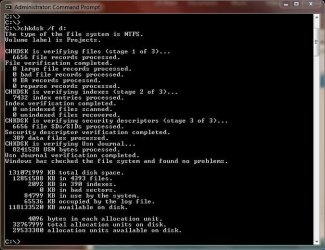
This what I am always looking for

chkdsk.png
 

My Computer

Computer Manufacturer/Model Number
HP, Dell, Gateway, Toshiba - 4 laptops and 2 desktops
OS
Vista, Windows7, Mint Mate, Zorin, Windows 8
CPU
from 1.6GHz Duo to i7
Monitor(s) Displays
2x HP w2207
Hard Drives
5x HDD, 7x SSD, 12x Externals
Keyboard
with trackball - no mices
Mouse
Trackball mice
Internet Speed
DSL 6000
This what I am always looking for

chkdsk.png

But you know what? Just because there are no bad sectors doesn't mean his File Allocation Tables and Directories aren't all screwed up... The problem here seems to be that something has corrupted his directory files... but we'll have to see what FSScan says about his Video folder since that's the one being reported...
 

My Computer

Computer Manufacturer/Model Number
Homebrew
OS
XP Pro SP3 X86 / Win7 Pro X86
CPU
Amd 64 x2 4200 (2.4ghz)
Motherboard
Asus M2N-MX SE Plus
Memory
Kingston DDR2 800 2gb
Graphics Card(s)
Nvidia GF-8400
Sound Card
Realtek on Motherboard
Monitor(s) Displays
Acer x-193bw
Screen Resolution
1440 x 900
Hard Drives
Western Digital 500g
PSU
350watt In-Win
Case
In-Win
Cooling
Air
Keyboard
yes
Mouse
yes
Internet Speed
5mpbs
Other Info
Also ASRock ION 330 as HTPC (on XP).
Acer Aspire as GP netbook (on XP).
By all means, I do not disagree. I usually focus more on the hardware part - never had a faulty MFT etc.
 

My Computer

Computer Manufacturer/Model Number
HP, Dell, Gateway, Toshiba - 4 laptops and 2 desktops
OS
Vista, Windows7, Mint Mate, Zorin, Windows 8
CPU
from 1.6GHz Duo to i7
Monitor(s) Displays
2x HP w2207
Hard Drives
5x HDD, 7x SSD, 12x Externals
Keyboard
with trackball - no mices
Mouse
Trackball mice
Internet Speed
DSL 6000
By all means, I do not disagree. I usually focus more on the hardware part - never had a faulty MFT etc.

LOL... until now, that is.

I've seen stuff like this only a couple of times and almost always it's because of something stupid like a defrag crash or File System updates...

Still waiting for him to get back with his FSScan results from the video folder....
 

My Computer

Computer Manufacturer/Model Number
Homebrew
OS
XP Pro SP3 X86 / Win7 Pro X86
CPU
Amd 64 x2 4200 (2.4ghz)
Motherboard
Asus M2N-MX SE Plus
Memory
Kingston DDR2 800 2gb
Graphics Card(s)
Nvidia GF-8400
Sound Card
Realtek on Motherboard
Monitor(s) Displays
Acer x-193bw
Screen Resolution
1440 x 900
Hard Drives
Western Digital 500g
PSU
350watt In-Win
Case
In-Win
Cooling
Air
Keyboard
yes
Mouse
yes
Internet Speed
5mpbs
Other Info
Also ASRock ION 330 as HTPC (on XP).
Acer Aspire as GP netbook (on XP).
never had a faulty MFT etc.
Me either.

This could be one of three things.

1.) Bad HDD cable [replace it].

2.) HDD needs some sectors repaired [I use MaxBlast for that, and repair them in DOS].

3.) Virus [scan immediately]

If your directories are corrupted, you need to find the root cause of the corruption. Just attempting to repair the MFT will most likely be fruitless. Or at least, they will be corrupted again shortly, if you don't address the cause.
 

My Computer

Computer Manufacturer/Model Number
NVIDIA
OS
Windows 7 Enterprise x64
CPU
AMD Athlon 64X2 Dual Core 3800+
Motherboard
GeForce 6100-M9
Memory
OCZ Platinum Dual Channel - 4x1Gb
Graphics Card(s)
NVIDIA GeForce 8800 GT PCI Express x16
Sound Card
Creative Audigy Sound Blaster Extreme PCI
Monitor(s) Displays
Compaq 7500
Screen Resolution
1024x768
Hard Drives
C: Seagate ST3250318AS SataII - 250Gb

D: Seagate ST3500418AS SataII - 500Gb
PSU
OCZ 600w Dual 12v Rails
Case
Thermaltake
Cooling
OCZ Heatsinks, Fans, and Thermal Paste on CPU & Chipsets
Keyboard
Logitech
Mouse
Radio Shack PS2
Internet Speed
Cable
Other Info
Dual Pioneer DVD/RW optical drives. LG CD/RW optical drive.
Just for everyone's information here's the output of CHKDSK /f on a normal drive...
Capture.JPG
 

My Computer

Computer Manufacturer/Model Number
Homebrew
OS
XP Pro SP3 X86 / Win7 Pro X86
CPU
Amd 64 x2 4200 (2.4ghz)
Motherboard
Asus M2N-MX SE Plus
Memory
Kingston DDR2 800 2gb
Graphics Card(s)
Nvidia GF-8400
Sound Card
Realtek on Motherboard
Monitor(s) Displays
Acer x-193bw
Screen Resolution
1440 x 900
Hard Drives
Western Digital 500g
PSU
350watt In-Win
Case
In-Win
Cooling
Air
Keyboard
yes
Mouse
yes
Internet Speed
5mpbs
Other Info
Also ASRock ION 330 as HTPC (on XP).
Acer Aspire as GP netbook (on XP).
never had a faulty MFT etc.
Me either.

This could be one of three things.

1.) Bad HDD cable [replace it].

2.) HDD needs some sectors repaired [I use MaxBlast for that, and repair them in DOS].

3.) Virus [scan immediately]

If your directories are corrupted, you need to find the root cause of the corruption. Just attempting to repair the MFT will most likely be fruitless. Or at least, they will be corrupted again shortly, if you don't address the cause.

Agreed... What I was hoping to do was to get his files in a condition where he could back them up first...

chkdsk /f /r X: will repair bad sectors and write the affected files to the root of the drive where you can look at them and decide what to do...

I've never used MaxBlast.... got a screenshot?
 

My Computer

Computer Manufacturer/Model Number
Homebrew
OS
XP Pro SP3 X86 / Win7 Pro X86
CPU
Amd 64 x2 4200 (2.4ghz)
Motherboard
Asus M2N-MX SE Plus
Memory
Kingston DDR2 800 2gb
Graphics Card(s)
Nvidia GF-8400
Sound Card
Realtek on Motherboard
Monitor(s) Displays
Acer x-193bw
Screen Resolution
1440 x 900
Hard Drives
Western Digital 500g
PSU
350watt In-Win
Case
In-Win
Cooling
Air
Keyboard
yes
Mouse
yes
Internet Speed
5mpbs
Other Info
Also ASRock ION 330 as HTPC (on XP).
Acer Aspire as GP netbook (on XP).
Agreed... What I was hoping to do was to get his files in a condition where he could back them up first...
Absolutely. I knew where you were headed. Definately don't want to lose video's.

I've never used MaxBlast.... got a screenshot?
Nope. I use it in DOS, and my web cam cable is too short to capture it [and I'm not about to go rooting around the cables behind my desk...LOL]. I do have a thread about the Ultimate Boot Disc in the sotware section though. I'll go hunt it up, and provide the link.

Here you go, that thread got buried I guess: http://www.ultimatebootcd.com/
 

My Computer

Computer Manufacturer/Model Number
NVIDIA
OS
Windows 7 Enterprise x64
CPU
AMD Athlon 64X2 Dual Core 3800+
Motherboard
GeForce 6100-M9
Memory
OCZ Platinum Dual Channel - 4x1Gb
Graphics Card(s)
NVIDIA GeForce 8800 GT PCI Express x16
Sound Card
Creative Audigy Sound Blaster Extreme PCI
Monitor(s) Displays
Compaq 7500
Screen Resolution
1024x768
Hard Drives
C: Seagate ST3250318AS SataII - 250Gb

D: Seagate ST3500418AS SataII - 500Gb
PSU
OCZ 600w Dual 12v Rails
Case
Thermaltake
Cooling
OCZ Heatsinks, Fans, and Thermal Paste on CPU & Chipsets
Keyboard
Logitech
Mouse
Radio Shack PS2
Internet Speed
Cable
Other Info
Dual Pioneer DVD/RW optical drives. LG CD/RW optical drive.

My Computer

Computer Manufacturer/Model Number
Homebrew
OS
XP Pro SP3 X86 / Win7 Pro X86
CPU
Amd 64 x2 4200 (2.4ghz)
Motherboard
Asus M2N-MX SE Plus
Memory
Kingston DDR2 800 2gb
Graphics Card(s)
Nvidia GF-8400
Sound Card
Realtek on Motherboard
Monitor(s) Displays
Acer x-193bw
Screen Resolution
1440 x 900
Hard Drives
Western Digital 500g
PSU
350watt In-Win
Case
In-Win
Cooling
Air
Keyboard
yes
Mouse
yes
Internet Speed
5mpbs
Other Info
Also ASRock ION 330 as HTPC (on XP).
Acer Aspire as GP netbook (on XP).
Back
Top