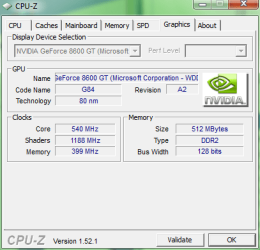
Hi... Sevenforum members.
this thread will give you the means to find what Hardware is contained within your machine... this will help others to help you.
once you confirm what components you have....
!! PLEASE FILL OUT YOUR SYSTEM SPECS !!
OK....
for your ...CPU, RAM, Motherboard, use this app.
[URL="http://www.cpuid.com/download/cpuz/cpuz_153_setup.exe"]CPUZ
[/URL]
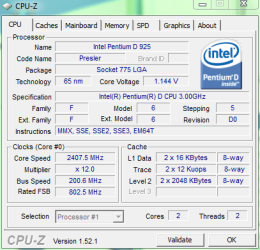
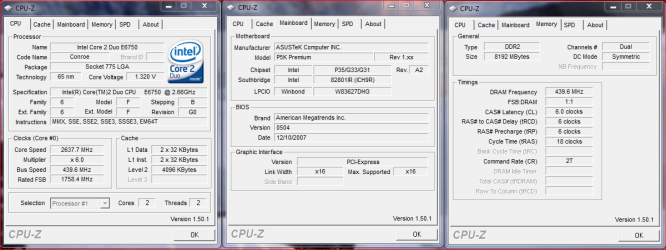
upon opening this app it will show you .....CPU make & model, current speed, voltage.
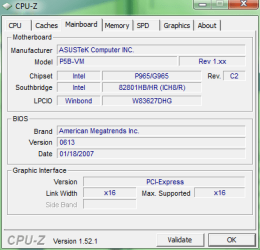
the ''Mainboard'' tab will give you...... Motherboard make & model, PCIE bandwidth, BIOS version
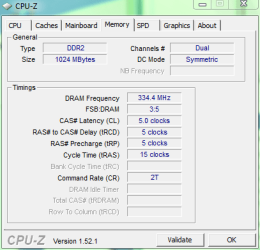
the ''memory'' tab will give you...... , amount of installed RAM, current speed, current timings.
the ''spd'' tab will give you....... RAM make & model, standard ''JEDEC'' timings (these are the timings your sticks run at out of the box)
you can either run 1 instance of the app, or more (as shown in pic)
for you GFX card use this app.......
[URL="http://www.techpowerup.com/downloads/1709/TechPowerUp_GPU-Z_v0.3.8.html"]GPUZ
[/URL]
upon opening this app it will show you...... GPU make & model, current speed, driver version.
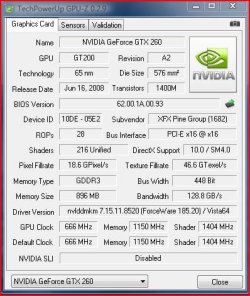
it also contains its own ''sensor'' for detecting card temperatures.

with the information from these 2 applications you can practically fill out all ''internal'' PC specs, alternatively when posting a problem these are very handy to snip & post.... a picture speaks a thousand words...
hope this helps.....
this thread will give you the means to find what Hardware is contained within your machine... this will help others to help you.
once you confirm what components you have....
!! PLEASE FILL OUT YOUR SYSTEM SPECS !!
OK....
for your ...CPU, RAM, Motherboard, use this app.
[URL="http://www.cpuid.com/download/cpuz/cpuz_153_setup.exe"]CPUZ
[/URL]
upon opening this app it will show you .....CPU make & model, current speed, voltage.
the ''Mainboard'' tab will give you...... Motherboard make & model, PCIE bandwidth, BIOS version
the ''memory'' tab will give you...... , amount of installed RAM, current speed, current timings.
the ''spd'' tab will give you....... RAM make & model, standard ''JEDEC'' timings (these are the timings your sticks run at out of the box)
you can either run 1 instance of the app, or more (as shown in pic)
for you GFX card use this app.......
[URL="http://www.techpowerup.com/downloads/1709/TechPowerUp_GPU-Z_v0.3.8.html"]GPUZ
[/URL]
upon opening this app it will show you...... GPU make & model, current speed, driver version.
it also contains its own ''sensor'' for detecting card temperatures.
with the information from these 2 applications you can practically fill out all ''internal'' PC specs, alternatively when posting a problem these are very handy to snip & post.... a picture speaks a thousand words...
hope this helps.....
Last edited:
My Computer
- Computer Manufacturer/Model Number
- myself
- OS
- SEVEN x64
- CPU
- Q9450 @ 3.6GHZ 1.34v
- Motherboard
- ASUS P5K PREMIUM P35
- Memory
- 8GB 1066 buffalo firestix @ 1152mhz CL5
- Graphics Card(s)
- Sapphire HD 5970 + GTX260 (physX)
- Sound Card
- Creative X-FI Xtreme Gamer
- Monitor(s) Displays
- SAMSUNG 20'' & SAMSUNG 23'' (dual screens)
- Screen Resolution
- 2048x1152 & 1680x1050
- Hard Drives
- 1x seagate 160gb IDE & 1x seagate 160gb SATA
- PSU
- XCILIO 850w (78A)
- Case
- CM590 1x 120x38mm & 2x92x38mm / 4x 120x25mm
- Cooling
- AC7 PRO @ 92x38mm blower, Lamptron military bus bay controll
- Keyboard
- LOGITECH E110
- Mouse
- logitech NX5
- Internet Speed
- 2MB
- Other Info
- its a continual ''work in progress''....

 i guess i thought htis was common knowledge