
Sony VAIO CS17G - Drivers Assistance

Yup, did install the Vaio Launcher too, this was the sequence:
Sony Shared Library
Battery Checker
Setting Utility Series
VAIO Control Center
VAIO Event Services
VAIO Launcher
 

My Computer My Computer

At a glance

XP Pro SP3 | Vista Home Premium x86 | Windows...
OS
XP Pro SP3 | Vista Home Premium x86 | Windows 7 Pro x86
Bluetooth Adapter Driver installed, its okay in the device manager now. :)
What about the Vaio Launcher?
I had installed VAIO Launcher 3.0.0.07150 from Sony Support. Now, when I clicked the Vaio Launcher's Settings/ Advanced from the Vaio Control Center; got this, pls help:
 

Attachments

  • VAIO Launcher.jpg
    VAIO Launcher.jpg
    49.2 KB · Views: 104

My Computer My Computer

At a glance

XP Pro SP3 | Vista Home Premium x86 | Windows...
OS
XP Pro SP3 | Vista Home Premium x86 | Windows 7 Pro x86
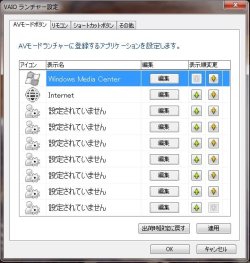
Vaio Launcher's Settings/ Advanced from the Vaio Control Center; got this, pls help:
Strange, what language was it when you ran the installer?
 

My Computer My Computer

At a glance

Windows 7 Ultimate x64 ®™Intel Core 2 Duo (2.2 GHz)2x 2GB Corsair (667 MHz)NVIDIA 8600M GS (256MB)
Computer Manufacturer/Model Number
Sony Vaio FZ21Z
OS
Windows 7 Ultimate x64 ®™
CPU
Intel Core 2 Duo (2.2 GHz)
Motherboard
Sony (Intel Chipset)
Memory
2x 2GB Corsair (667 MHz)
Graphics Card(s)
NVIDIA 8600M GS (256MB)
Sound Card
Sigmatel
Monitor(s) Displays
15.4" TFT X-Black
Screen Resolution
1280x800
Hard Drives
Western Digital 300GB Scorpio Black (7200rpm)
Mouse
Logitech Anywhere MX
Internet Speed
Sky 5MB
Also, today I played some songs WMP & tried pressing the buttons of the Touch Panel. They were working but not as designated. Like pressing either of Play/Pause or Forward or Previous buttons was making the WMP column showing the files come & go. Also, the AV Mode button was reacting but not as per its function and the LED's which used to glow underneath this panel on touch were also not working. I hope I am able explain or else will update with screenshots.

what language was it when you ran the installer?
English.
 

My Computer My Computer

At a glance

XP Pro SP3 | Vista Home Premium x86 | Windows...
OS
XP Pro SP3 | Vista Home Premium x86 | Windows 7 Pro x86
Also, today I played some songs WMP & tried pressing the buttons of the Touch Panel. They were working but not as designated. Like pressing either of Play/Pause or Forward or Previous buttons was making the WMP column showing the files come & go. Also, the AV Mode button was reacting but not as per its function and the LED's which used to glow underneath this panel on touch were also not working. I hope I am able explain or else will update with screenshots.

what language was it when you ran the installer?
English.

Not quite sure where to go from here, so I'm going to P.M you.
 

My Computer My Computer

At a glance

Windows 7 Ultimate x64 ®™Intel Core 2 Duo (2.2 GHz)2x 2GB Corsair (667 MHz)NVIDIA 8600M GS (256MB)
Computer Manufacturer/Model Number
Sony Vaio FZ21Z
OS
Windows 7 Ultimate x64 ®™
CPU
Intel Core 2 Duo (2.2 GHz)
Motherboard
Sony (Intel Chipset)
Memory
2x 2GB Corsair (667 MHz)
Graphics Card(s)
NVIDIA 8600M GS (256MB)
Sound Card
Sigmatel
Monitor(s) Displays
15.4" TFT X-Black
Screen Resolution
1280x800
Hard Drives
Western Digital 300GB Scorpio Black (7200rpm)
Mouse
Logitech Anywhere MX
Internet Speed
Sky 5MB
Not quite sure where to go from here

Should we try installing VAIO Launcher from some where else?
Will be okay to do that without going through that serial order of installing utilities?
 

My Computer My Computer

At a glance

XP Pro SP3 | Vista Home Premium x86 | Windows...
OS
XP Pro SP3 | Vista Home Premium x86 | Windows 7 Pro x86
My Computer My Computer

At a glance

Windows 7 Ultimate x64 ®™Intel Core 2 Duo (2.2 GHz)2x 2GB Corsair (667 MHz)NVIDIA 8600M GS (256MB)
Computer Manufacturer/Model Number
Sony Vaio FZ21Z
OS
Windows 7 Ultimate x64 ®™
CPU
Intel Core 2 Duo (2.2 GHz)
Motherboard
Sony (Intel Chipset)
Memory
2x 2GB Corsair (667 MHz)
Graphics Card(s)
NVIDIA 8600M GS (256MB)
Sound Card
Sigmatel
Monitor(s) Displays
15.4" TFT X-Black
Screen Resolution
1280x800
Hard Drives
Western Digital 300GB Scorpio Black (7200rpm)
Mouse
Logitech Anywhere MX
Internet Speed
Sky 5MB
Now just to sum up, post installation we are facing the following issues;
1) Touch Panel not working.
2) FN Zoom Keys not working.
3) Vaio Launcher in some other language.
4) Battery Checker (which for now has been taken care by disabling ISB Utility)

Are these worth trying a shot of re-installing Vista & then upgrading it?
What's your call FZ21Z?
 

My Computer My Computer

At a glance

XP Pro SP3 | Vista Home Premium x86 | Windows...
OS
XP Pro SP3 | Vista Home Premium x86 | Windows 7 Pro x86
What's your call FZ21Z?
I'm going to say yes in this instance, because it's been nothing but trouble which is surprising considering the support site's support for putting Windows 7 on it.

Don't do anything just yet, I'll start a thread at NBR and see if we can get any further.
 

My Computer My Computer

At a glance

Windows 7 Ultimate x64 ®™Intel Core 2 Duo (2.2 GHz)2x 2GB Corsair (667 MHz)NVIDIA 8600M GS (256MB)
Computer Manufacturer/Model Number
Sony Vaio FZ21Z
OS
Windows 7 Ultimate x64 ®™
CPU
Intel Core 2 Duo (2.2 GHz)
Motherboard
Sony (Intel Chipset)
Memory
2x 2GB Corsair (667 MHz)
Graphics Card(s)
NVIDIA 8600M GS (256MB)
Sound Card
Sigmatel
Monitor(s) Displays
15.4" TFT X-Black
Screen Resolution
1280x800
Hard Drives
Western Digital 300GB Scorpio Black (7200rpm)
Mouse
Logitech Anywhere MX
Internet Speed
Sky 5MB
Don't do anything just yet, I'll start a thread at NBR and see if we can get any further.

Okay Boss, we go by your call. Just for info;
1) In May '09, the touch panel stopped working & the LED's underneath were also not glowing. At that time Sony Support, asked me to re-install the 15, 16 & 17 Drivers given in the Original Drivers HERE, they are;

Driver No. 15: Sony Shared Library
Driver No. 16: VAIO Event Services
Driver No. 17: Setting Utility Series

Though the next day the issue got resolved by making some changes in the msconfig settings with the help of Sony Support itself.

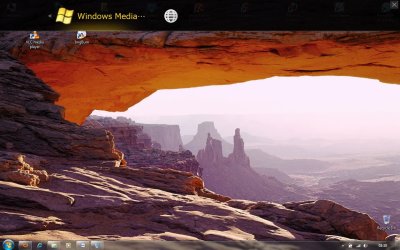
2) On pressing the AV Mode button from the touch panel, i get this (screenshot1) on top of the screen.

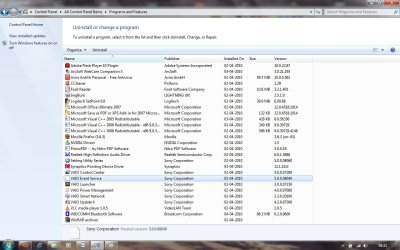
3) In Control Panel/ Program & Features, the Vaio Event Services is being shown without any reference icon in front of it. Does it mean anything? (screenshot2)
 

Attachments

  • Touch Panel - AV Mode.jpg
    Touch Panel - AV Mode.jpg
    137.8 KB · Views: 80
  • Program and Features.jpg
    Program and Features.jpg
    120.3 KB · Views: 86

My Computer My Computer

At a glance

XP Pro SP3 | Vista Home Premium x86 | Windows...
OS
XP Pro SP3 | Vista Home Premium x86 | Windows 7 Pro x86
Does it mean anything? (screenshot2)
I don't think it does, but you could try removing and reinstalling to see if it changes anything.

And this should be an English version - Vaio Launcher
 

My Computer My Computer

At a glance

Windows 7 Ultimate x64 ®™Intel Core 2 Duo (2.2 GHz)2x 2GB Corsair (667 MHz)NVIDIA 8600M GS (256MB)
Computer Manufacturer/Model Number
Sony Vaio FZ21Z
OS
Windows 7 Ultimate x64 ®™
CPU
Intel Core 2 Duo (2.2 GHz)
Motherboard
Sony (Intel Chipset)
Memory
2x 2GB Corsair (667 MHz)
Graphics Card(s)
NVIDIA 8600M GS (256MB)
Sound Card
Sigmatel
Monitor(s) Displays
15.4" TFT X-Black
Screen Resolution
1280x800
Hard Drives
Western Digital 300GB Scorpio Black (7200rpm)
Mouse
Logitech Anywhere MX
Internet Speed
Sky 5MB
Wow, you are working real hard on your avatar & siggie's. Nice Ones! :thumbsup:
Now back to work, thanks for the link to VAIO Launcher. An observation;
The sequence in which these utilities are recommended for installation on the support page actually differs from the sequence they are given for download.

In the recommendation they are given as;
16. Sony Shared Library
17. Setting Utility Series
18. VAIO Event Service
19. VAIO Control Center
20. Battery Checker
21. VAIO Launcher

But for download they are given as; (the way installed them)
17. Sony Shared Library
18. Battery Checker 4.0.0.05260
19. Setting Utility Series 5.0.0.08060
20. VAIO Control Center 4.0.0.07280
21. VAIO Event Service 5.0.0.08040
22. VAIO Launcher 3.0.0.07150

I installed them as per they were given for download. Could this be a reason of conflict?
 

My Computer My Computer

At a glance

XP Pro SP3 | Vista Home Premium x86 | Windows...
OS
XP Pro SP3 | Vista Home Premium x86 | Windows 7 Pro x86
Wow, you are working real hard on your avatar & siggie's. Nice Ones! :thumbsup:
Thanks. :D

I installed them as per they were given for download. Could this be a reason of conflict?
Quite possibly. given the order is quite important with Vaios, and just to add if you're reinstalling, make sure to reboot after each one.
 

My Computer My Computer

At a glance

Windows 7 Ultimate x64 ®™Intel Core 2 Duo (2.2 GHz)2x 2GB Corsair (667 MHz)NVIDIA 8600M GS (256MB)
Computer Manufacturer/Model Number
Sony Vaio FZ21Z
OS
Windows 7 Ultimate x64 ®™
CPU
Intel Core 2 Duo (2.2 GHz)
Motherboard
Sony (Intel Chipset)
Memory
2x 2GB Corsair (667 MHz)
Graphics Card(s)
NVIDIA 8600M GS (256MB)
Sound Card
Sigmatel
Monitor(s) Displays
15.4" TFT X-Black
Screen Resolution
1280x800
Hard Drives
Western Digital 300GB Scorpio Black (7200rpm)
Mouse
Logitech Anywhere MX
Internet Speed
Sky 5MB
Quite possibly. given the order is quite important with Vaios, and just to add if you're reinstalling, make sure to reboot after each one.

So should I start with uninstalling them first from the Control Panel or simply reinstall?
In my control panel I can only see;

Setting Utility Series
VAIO Control Center
VAIO Event Service
VAIO Launcher

but not Sony Shared Library, what about that? Will surely take care to reboot.
Also, is there any way else we can re-assure ourselves of the sequence?
 

My Computer My Computer

At a glance

XP Pro SP3 | Vista Home Premium x86 | Windows...
OS
XP Pro SP3 | Vista Home Premium x86 | Windows 7 Pro x86
but not Sony Shared Library, what about that? Will surely take care to reboot.
Also, is there any way else we can re-assure ourselves of the sequence?
The shared library won't show, but as it's the first on the list I don't think it matters, try that combo and see. Fingers crossed.
 

My Computer My Computer

At a glance

Windows 7 Ultimate x64 ®™Intel Core 2 Duo (2.2 GHz)2x 2GB Corsair (667 MHz)NVIDIA 8600M GS (256MB)
Computer Manufacturer/Model Number
Sony Vaio FZ21Z
OS
Windows 7 Ultimate x64 ®™
CPU
Intel Core 2 Duo (2.2 GHz)
Motherboard
Sony (Intel Chipset)
Memory
2x 2GB Corsair (667 MHz)
Graphics Card(s)
NVIDIA 8600M GS (256MB)
Sound Card
Sigmatel
Monitor(s) Displays
15.4" TFT X-Black
Screen Resolution
1280x800
Hard Drives
Western Digital 300GB Scorpio Black (7200rpm)
Mouse
Logitech Anywhere MX
Internet Speed
Sky 5MB
Okay. So should I just re-install or first uninstall them from the Control Panel?
Have created a restore point for the system, in case things don't work for better can we restore?
 

My Computer My Computer

At a glance

XP Pro SP3 | Vista Home Premium x86 | Windows...
OS
XP Pro SP3 | Vista Home Premium x86 | Windows 7 Pro x86
Okay. So should I just re-install or first uninstall them from the Control Panel?

I'd uninstall them first and try.
 

My Computer My Computer

At a glance

Windows 7 Ultimate x64 ®™Intel Core 2 Duo (2.2 GHz)2x 2GB Corsair (667 MHz)NVIDIA 8600M GS (256MB)
Computer Manufacturer/Model Number
Sony Vaio FZ21Z
OS
Windows 7 Ultimate x64 ®™
CPU
Intel Core 2 Duo (2.2 GHz)
Motherboard
Sony (Intel Chipset)
Memory
2x 2GB Corsair (667 MHz)
Graphics Card(s)
NVIDIA 8600M GS (256MB)
Sound Card
Sigmatel
Monitor(s) Displays
15.4" TFT X-Black
Screen Resolution
1280x800
Hard Drives
Western Digital 300GB Scorpio Black (7200rpm)
Mouse
Logitech Anywhere MX
Internet Speed
Sky 5MB
I'd uninstall them first and try.

Did but nothing changed apart from VAIO Launcher in English language. :( This was the order;
Setting Utility Series
VAIO Control Center
VAIO Event Service
VAIO Launcher

Also, noticed that the 'Right Click' key on the keyboard is not working.
 

My Computer My Computer

At a glance

XP Pro SP3 | Vista Home Premium x86 | Windows...
OS
XP Pro SP3 | Vista Home Premium x86 | Windows 7 Pro x86
Could this driver be the cause of this issue: SFEP Driver for 32 Bit

I did'nt install this (as recommended by Sony Support).
 

My Computer My Computer

At a glance

XP Pro SP3 | Vista Home Premium x86 | Windows...
OS
XP Pro SP3 | Vista Home Premium x86 | Windows 7 Pro x86
Hi Parry,

I have the same vaio model and am facing the same problem. Did you get any other solution?

Regarding graphics driver I updated it using vaio update and it works properly.

Thanks.
Abhishek
 

My Computer My Computer

At a glance

Windows 7 Ultimate3GBNVIDIA GeForce 9300M GS (128MB)
Computer Manufacturer/Model Number
Sony Vaio CS17G
OS
Windows 7 Ultimate
Memory
3GB
Graphics Card(s)
NVIDIA GeForce 9300M GS (128MB)
Hard Drives
250GB
Back
Top