Formatting Vista partition after installing Seven

The AudGuy

New member
Local time
2:36 PM
Messages
11
Hi all,

I know there are many threads revolving around this subject, but I couldn't find answer to my problem.

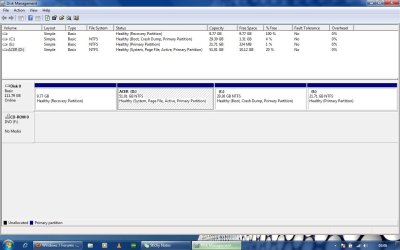
I have 4 partitions in the only disk I have. Please find the snapshot attached. I have also attached a disk info which I got using windows diskpart tool. I had formatted a previous data partition (partition 3, volume 2) to install windows 7 in it using a DVD. Now that I'm happy with 7, I want to format the Vista partition (partition 2, volume 1) and use the space, and if possible, combine it with the last partition (partition 4, volume 3). I also want to keep in mind that I don't want to delete the recovery partition (partition 1, volume 4) because I have not been able to make recovery disks due to some issues (which I have not been able to resolve). BTW I would also like you to help me on this thread regarding MBR issues in Disk2Disk recovery (probably happened while installing 7). Also, I have backed up data from Vista drive to 7 drive and I don't have any external medium to backup my data to. But if extremely necessary, I can arrange one. So I would prefer not to clean install everything. I really need some very good tips on this one. Thanks!
 

Attachments
  • Disk Mgmt.jpg
    Disk Mgmt.jpg
    81.8 KB · Views: 44
  • disk info.jpg
    disk info.jpg
    123.8 KB · Views: 53

My Computer My Computer

Computer Manufacturer/Model Number
Acer Aspire 4715z
OS
Vista and Seven dual boot
CPU
Intel Pentium Dual Core T2370 1.73GHz
Memory
3GB DDR2 600MHz
Graphics Card(s)
Intel x3100
Hard Drives
Hitachi 120GB
Hi all,

I know there are many threads revolving around this subject, but I couldn't find answer to my problem.

I have 4 partitions in the only disk I have. Please find the snapshot attached. I have also attached a disk info which I got using windows diskpart tool. I had formatted a previous data partition (partition 3, volume 2) to install windows 7 in it using a DVD. Now that I'm happy with 7, I want to format the Vista partition (partition 2, volume 1) and use the space, and if possible, combine it with the last partition (partition 4, volume 3). I also want to keep in mind that I don't want to delete the recovery partition (partition 1, volume 4) because I have not been able to make recovery disks due to some issues (which I have not been able to resolve). BTW I would also like you to help me on this thread regarding MBR issues in Disk2Disk recovery (probably happened while installing 7). Also, I have backed up data from Vista drive to 7 drive and I don't have any external medium to backup my data to. But if extremely necessary, I can arrange one. So I would prefer not to clean install everything. I really need some very good tips on this one. Thanks!

Your goals are admirable, but.

First recovery will only help you if you wish to go back to vista.
Second you can have but 5 partitions, and only one active.


So what besides the above do you want to do?
Stay with vista?
Go to win 7?
Dual boot (vista and win 7)?
or some variant. Im confused

Ken
 

My Computer My Computer

Computer Manufacturer/Model Number
HP Pavillion dv-7 1005 Tx
OS
Win 8 Release candidate 8400
CPU
[email protected]
Memory
4 gigs
Graphics Card(s)
Nvidia 9600M
Sound Card
HD built-in
Monitor(s) Displays
17" Wxga
Screen Resolution
1440x900
Cooling
none
Internet Speed
45Mb down 5Mb up
Heh. I'll take that as a compliment. :) Well, I want to keep the recovery partition to keep the option to switch to vista open. And as I currently have dual boot (vista and 7), I want to uninstall vista and stay with 7. So finally, my dream :) is to have 3 partitions, one each for recovery (as it's already there), windows 7 (which is there too), and the last one for data (combining the current vista drive with E:\ drive. Thanks.
 

My Computer My Computer

Computer Manufacturer/Model Number
Acer Aspire 4715z
OS
Vista and Seven dual boot
CPU
Intel Pentium Dual Core T2370 1.73GHz
Memory
3GB DDR2 600MHz
Graphics Card(s)
Intel x3100
Hard Drives
Hitachi 120GB
Hi,

You can d/l this: View attachment sisparV5.zip

Rt click and run as admin on sispar.cmd - select C when asked for partition and select N to adding existing boot menu entries.

Restart and C will be the "system" partition.

Boot the free Partition Wizard Bootable CD .

Rt click D ( vista) and delete. Ok and Apply.

Rt click the 7 partition, select Move/Resize . Grab the CENTRE of 7 partition and drag LEFT so the unallocated ( grey ) space you just created is on the RIGHT of 7 partition. OK and Apply.

Will take a few mins as the data on 7 partition needs to be moved.

You can then incorproate the unallocated space into E using Move/Resize.

That's it.

You may find if you mark Recovery partition Active, you will boot up the Acer recovery program.

You could also unhide the recov partition , give it a drive letter and add it to 7 boot menu.
 

My Computers My Computers

System One System Two

  • Computer type
    PC/Desktop
    OS
    7 X64
    CPU
    i5 8400
    Motherboard
    gigabyte b365m ds3h
    Memory
    2x8gb 3200mhz
    Hard Drives
    various
    PSU
    pure power 11 400w cm
    Case
    Coolermaster
    Cooling
    cryorig m9i
  • Computer type
    PC/Desktop
    OS
    7x64
    CPU
    g5400
    Motherboard
    ga b365m ds3h
    Memory
    8gb ddr4 2400
    PSU
    xfx pro 450w
As mentioned, your best bet is going to be Partition Wizard. However, I don't know if what you're talking about is feasible, but you can resize, convert, delete, and add partitions.
 

My Computer My Computer

Computer Manufacturer/Model Number
Apple Macbook Pro (April 2009)
OS
W7 Ult. x64 | OS X
CPU
Intel Mobile Core 2 Duo 2.93Ghz [T9800 Penryn]
Motherboard
NVIDIA nForce 730i Rev. B1 [Mac-F2268EC8 (U2E1)]
Memory
4096MB Samsung DDR3 Dual Channel [PC3-8500F 1066Mhz]
Graphics Card(s)
NVIDIA GeForce 9600M GT 512MB [G96M Rev. C1]
Sound Card
SB X-Fi Surround 5.1 USB | Onboard Realtek (Disabled)
Monitor(s) Displays
Acer x223wbd 22" | Apple Anti-Glare 17" (Disabled)
Screen Resolution
{Current} 1440x900 {Acer} 1680x1050 {Apple} 1920x1200
Hard Drives
{Internal}
Seagate Momentus 320GB 2.5" 7200RPM [ST9320421AS]

{Externals}
LaCie 320GB USB 2.0 HDD [301284UR]
LaCie 750GB USB 2.0 FW400 eSATA HDD [301314U]
LaCie 1TB USB 2.0 HDD [301304UR]
PSU
Magsafe
Case
Aluminum/Unibody (MBP52)
Cooling
2 x 6000 RPM Fans
Keyboard
Logitech G-15v2 [PN 920-000379]
Mouse
Logitech G-9 [PN 910-000338]
Internet Speed
12Mbps/2.5Mbps w/ 24Mbps Speed Boost [Comcast]
Other Info
Logitech X-540 Speakers [PN 970223-0122]
Sennheiser PC-151 Headset
How do you mean you're not sure if it's feasible?

I just gave the steps to do it. LOL.
 

My Computers My Computers

System One System Two

  • Computer type
    PC/Desktop
    OS
    7 X64
    CPU
    i5 8400
    Motherboard
    gigabyte b365m ds3h
    Memory
    2x8gb 3200mhz
    Hard Drives
    various
    PSU
    pure power 11 400w cm
    Case
    Coolermaster
    Cooling
    cryorig m9i
  • Computer type
    PC/Desktop
    OS
    7x64
    CPU
    g5400
    Motherboard
    ga b365m ds3h
    Memory
    8gb ddr4 2400
    PSU
    xfx pro 450w
The Aud Guy,
One thing good about this forum (amongst many good points) is that you will get several solutions and opinions.

Personally, I'm a fanatic about using only Microsoft software to accomplish my objective where possible.

I've never used any of the partitioning software-only the partitioning software built into to Win 7.

Now you are going to need, for many reasons, to get yourself an external drive to use for backup purposes. On that one, you need to bite the bullet and make the purchase.

Another personal opinion is--never look back. In other words, forget for now and forever Vista. I can conceive of no reasons why one would hang that albatross around their neck.

Now when you decide which partitions you want to delete, then I and many others can give you solutions.

After the deletion and after you've decided what you want to do with that new found space, then once again several of us can provide you with a solution.

Nearly always, the proposal will be valid. Simply there are many roads that lead to Rome.

Here's what I'd do:
I'd wipe the disk 100% clean using DISKPART's clean command.
Then install Windows 7.

Of course, you will want to first backup any data which is dear to your heart, e.g., pics, music, videos, documents.
 

My Computer My Computer

Computer Manufacturer/Model Number
Toshiba Satellite S875D-S7239 laptop
OS
MS Windows 7 Ultimate SP1 64-bit
CPU
AMD A10-4600M
Motherboard
AMD Pumori (Socket FT1)
Memory
6.00 GB Dual-Channel DDR3 @ 798MHz (11-11-12-28)
Graphics Card(s)
AMD Radeon HD 7660G
Sound Card
High Definition Audio Device
Monitor(s) Displays
Generic PnP Monitor (1600x900@60Hz)
Screen Resolution
1600x900@60Hz
Hard Drives
SSD 119GB Corsair CSSD-V128GB2 ATA Device
Keyboard
Standard PS/2 Keyboard
Mouse
HP Wireless Optical Mobile Mouse Model FHA-3410
Internet Speed
What the local pub, local coffee shop offers.
Other Info
Optical Drive:MATSHITA BD-CMB UJ160B ATA Device


Also have an Asus ha1002xp netbook with Win 7 Ultimate installed.
SIW2 is the supreme expert on dual boot removals. I love learning from him.

Any resizing operation can fail, although we haven't had one fail in 100+ we have helped with here using free Partition Wizard CD. However, you might still want to back up your data and a Win7 backup image so you could start over if necessary.

It would be worth buying an external drive, as a backup image is something you want to keep permanently since it makes reinstalls never again necessary -just reimage the HD (or a replacement) in 15 minutes.
 
You certainly have enough help by the experts. But let me throw in one additional suggestion. Rather than sticking to the Vista recovery partition, I would take an image of your todays Vista and store that on a few DVDs. The advantage is that you do not have to go thru hundreds of updates when you want to revive Vista. Here are some basic instructions how to do that and here is a detailed video tutorial that explains the whole imaging cycle.
 

My Computer My Computer

Computer Manufacturer/Model Number
HP, Dell, Gateway, Toshiba - 4 laptops and 2 desktops
OS
Vista, Windows7, Mint Mate, Zorin, Windows 8
CPU
from 1.6GHz Duo to i7
Monitor(s) Displays
2x HP w2207
Hard Drives
5x HDD, 7x SSD, 12x Externals
Keyboard
with trackball - no mices
Mouse
Trackball mice
Internet Speed
DSL 6000
If it's a straightforward type 0x17, Partition Wizard can unhide it .

Otherwise, very easy with Paragon:

Rt click the oem partition and select Unhide>Apply.

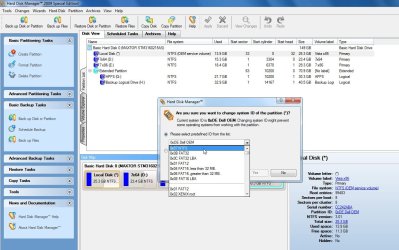
Rt click it again and select change partition ID to 0x07 ntfs then Yes and Apply, like this:

BOOT-CORRECT-3-2010-04-06_054800.jpg

That function is on Free Backup Software: Paragon Backup & Recovery Free Edition ...
 
Last edited:

My Computers My Computers

System One System Two

  • Computer type
    PC/Desktop
    OS
    7 X64
    CPU
    i5 8400
    Motherboard
    gigabyte b365m ds3h
    Memory
    2x8gb 3200mhz
    Hard Drives
    various
    PSU
    pure power 11 400w cm
    Case
    Coolermaster
    Cooling
    cryorig m9i
  • Computer type
    PC/Desktop
    OS
    7x64
    CPU
    g5400
    Motherboard
    ga b365m ds3h
    Memory
    8gb ddr4 2400
    PSU
    xfx pro 450w
Perfect

Hi,

You can d/l this: View attachment 65355

Rt click and run as admin on sispar.cmd - select C when asked for partition and select N to adding existing boot menu entries.

Restart and C will be the "system" partition.

Boot the free Partition Wizard Bootable CD .

Rt click D ( vista) and delete. Ok and Apply.

Rt click the 7 partition, select Move/Resize . Grab the CENTRE of 7 partition and drag LEFT so the unallocated ( grey ) space you just created is on the RIGHT of 7 partition. OK and Apply.

Will take a few mins as the data on 7 partition needs to be moved.

You can then incorproate the unallocated space into E using Move/Resize.

That's it.

You may find if you mark Recovery partition Active, you will boot up the Acer recovery program.

You could also unhide the recov partition , give it a drive letter and add it to 7 boot menu.

Looks like a perfect solution. I'll try it when I get a portable hard drive tomorrow. Thanks, I'll get back after I perform the tasks.
 

My Computer My Computer

Computer Manufacturer/Model Number
Acer Aspire 4715z
OS
Vista and Seven dual boot
CPU
Intel Pentium Dual Core T2370 1.73GHz
Memory
3GB DDR2 600MHz
Graphics Card(s)
Intel x3100
Hard Drives
Hitachi 120GB
Looks good

The Aud Guy,
One thing good about this forum (amongst many good points) is that you will get several solutions and opinions.

Personally, I'm a fanatic about using only Microsoft software to accomplish my objective where possible.

I've never used any of the partitioning software-only the partitioning software built into to Win 7.

Now you are going to need, for many reasons, to get yourself an external drive to use for backup purposes. On that one, you need to bite the bullet and make the purchase.

Another personal opinion is--never look back. In other words, forget for now and forever Vista. I can conceive of no reasons why one would hang that albatross around their neck.

Now when you decide which partitions you want to delete, then I and many others can give you solutions.

After the deletion and after you've decided what you want to do with that new found space, then once again several of us can provide you with a solution.

Nearly always, the proposal will be valid. Simply there are many roads that lead to Rome.

Here's what I'd do:
I'd wipe the disk 100% clean using DISKPART's clean command.
Then install Windows 7.

Of course, you will want to first backup any data which is dear to your heart, e.g., pics, music, videos, documents.

I thoroughly get your point. And I will indeed get a portable drive in a few days (there's no Amazon here in India :)). But the thing is that I won't mind creating a recovery DVD and then deleting the partition, to be safe than sorry. :) I love your solution of clean sweeping, once I'm able to backup the recovery partition, which currently I'm not able to. Thanks a lot.
 

My Computer My Computer

Computer Manufacturer/Model Number
Acer Aspire 4715z
OS
Vista and Seven dual boot
CPU
Intel Pentium Dual Core T2370 1.73GHz
Memory
3GB DDR2 600MHz
Graphics Card(s)
Intel x3100
Hard Drives
Hitachi 120GB
The AudGuy,

Hope all goes well and definitely keep us posted as to progress, results, joys and sorrows (hope those are few and far between).
 

My Computer My Computer

Computer Manufacturer/Model Number
Toshiba Satellite S875D-S7239 laptop
OS
MS Windows 7 Ultimate SP1 64-bit
CPU
AMD A10-4600M
Motherboard
AMD Pumori (Socket FT1)
Memory
6.00 GB Dual-Channel DDR3 @ 798MHz (11-11-12-28)
Graphics Card(s)
AMD Radeon HD 7660G
Sound Card
High Definition Audio Device
Monitor(s) Displays
Generic PnP Monitor (1600x900@60Hz)
Screen Resolution
1600x900@60Hz
Hard Drives
SSD 119GB Corsair CSSD-V128GB2 ATA Device
Keyboard
Standard PS/2 Keyboard
Mouse
HP Wireless Optical Mobile Mouse Model FHA-3410
Internet Speed
What the local pub, local coffee shop offers.
Other Info
Optical Drive:MATSHITA BD-CMB UJ160B ATA Device


Also have an Asus ha1002xp netbook with Win 7 Ultimate installed.
@whs A good idea. I'll have to check whether I'd have to backup whole of 50GB partition or not.

@ gregrocker I just used PW to check out the partitions, and the hidden recovery partition still has data (which I thought was lost when I installed 7). Is there a way I can create recovery DVDs using the data in this partition ?
 

My Computer My Computer

Computer Manufacturer/Model Number
Acer Aspire 4715z
OS
Vista and Seven dual boot
CPU
Intel Pentium Dual Core T2370 1.73GHz
Memory
3GB DDR2 600MHz
Graphics Card(s)
Intel x3100
Hard Drives
Hitachi 120GB
The AudGuy,

Hope all goes well and definitely keep us posted as to progress, results, joys and sorrows (hope those are few and far between).

You got it. Thanks for the wishes.
 

My Computer My Computer

Computer Manufacturer/Model Number
Acer Aspire 4715z
OS
Vista and Seven dual boot
CPU
Intel Pentium Dual Core T2370 1.73GHz
Memory
3GB DDR2 600MHz
Graphics Card(s)
Intel x3100
Hard Drives
Hitachi 120GB

My Computers My Computers

System One System Two

  • Computer type
    PC/Desktop
    OS
    7 X64
    CPU
    i5 8400
    Motherboard
    gigabyte b365m ds3h
    Memory
    2x8gb 3200mhz
    Hard Drives
    various
    PSU
    pure power 11 400w cm
    Case
    Coolermaster
    Cooling
    cryorig m9i
  • Computer type
    PC/Desktop
    OS
    7x64
    CPU
    g5400
    Motherboard
    ga b365m ds3h
    Memory
    8gb ddr4 2400
    PSU
    xfx pro 450w
The AudGuy,

If you decide you would rather use Microsoft tools to "recover" the recovery partition, then let us know.

You can also change partition types using DISKPART.
 

My Computer My Computer

Computer Manufacturer/Model Number
Toshiba Satellite S875D-S7239 laptop
OS
MS Windows 7 Ultimate SP1 64-bit
CPU
AMD A10-4600M
Motherboard
AMD Pumori (Socket FT1)
Memory
6.00 GB Dual-Channel DDR3 @ 798MHz (11-11-12-28)
Graphics Card(s)
AMD Radeon HD 7660G
Sound Card
High Definition Audio Device
Monitor(s) Displays
Generic PnP Monitor (1600x900@60Hz)
Screen Resolution
1600x900@60Hz
Hard Drives
SSD 119GB Corsair CSSD-V128GB2 ATA Device
Keyboard
Standard PS/2 Keyboard
Mouse
HP Wireless Optical Mobile Mouse Model FHA-3410
Internet Speed
What the local pub, local coffee shop offers.
Other Info
Optical Drive:MATSHITA BD-CMB UJ160B ATA Device


Also have an Asus ha1002xp netbook with Win 7 Ultimate installed.
Screenshots

It's very likely you can .

Is there a way I can create recovery DVDs using the data in this partition ?

Post a screenie of what is in it.

To use the contents to create recovery media, you probably need to change it to a "normal" partition type ( use Paragon Backup and recovery free edition if PW can't do it)

Free Backup Software: Paragon Backup & Recovery Free Edition ...

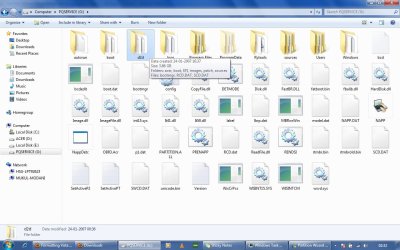
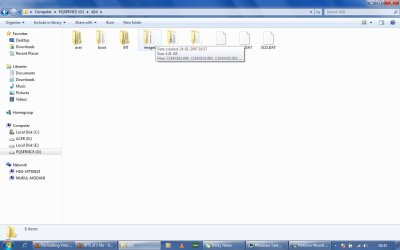
I just set the recovery partition active through PW and now it shows up just like any other drive, although the FS is FAT32. I have posted the screenshots of the files in it. D2D seems to be the folder which facilitates disk-2-disk recovery on boot. Any hints on how I can create a recovery disk ?
 

Attachments

  • PQSERVICE.jpg
    PQSERVICE.jpg
    110.1 KB · Views: 74
  • D2D.jpg
    D2D.jpg
    53.1 KB · Views: 11

My Computer My Computer

Computer Manufacturer/Model Number
Acer Aspire 4715z
OS
Vista and Seven dual boot
CPU
Intel Pentium Dual Core T2370 1.73GHz
Memory
3GB DDR2 600MHz
Graphics Card(s)
Intel x3100
Hard Drives
Hitachi 120GB
It looks very promising.

Have a look inside D2D, there maybe a.wim file. Post a screenie of the entire contents of D2D folder.

We need to see what is in the 2 folders obscured in your screenie on the right above.

Also , what is inside the Sources folder in the left screenshot above.

Pretty sure it can be done.

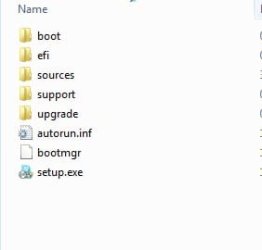
This is what the installation files typically look like.

WINFILES-2010-04-07_223206.jpg
 
Last edited:

My Computers My Computers

System One System Two

  • Computer type
    PC/Desktop
    OS
    7 X64
    CPU
    i5 8400
    Motherboard
    gigabyte b365m ds3h
    Memory
    2x8gb 3200mhz
    Hard Drives
    various
    PSU
    pure power 11 400w cm
    Case
    Coolermaster
    Cooling
    cryorig m9i
  • Computer type
    PC/Desktop
    OS
    7x64
    CPU
    g5400
    Motherboard
    ga b365m ds3h
    Memory
    8gb ddr4 2400
    PSU
    xfx pro 450w
Back
Top