Best browser for Windows 7 64-bit

You cannot remove or move the close min max butons top right on title bar.
Not entirely true, you can remove the entire bar, at least sometimes. Haven't tested it in all cases, but with the skin that I use, if only the tab and address bars are selected to show, when also selecting not to show the menu bar, the bar with those buttons will also disappear. However, for some reason, this works on one of my computers, but not the other. Not sure of why, except that the one that it doesn't work on has a lower resolution, due to the size of the screen.
 

My Computer My Computer

Computer Manufacturer/Model Number
DIY
OS
W7x64 Pro, SuSe 12.1/** W7 x64 Pro, XP MCE
CPU
Phenom II 1090T w/Noctua NH-D14 /**4400+ X2 w/CM Hyper TX 3
Motherboard
ASRock 890FX Deluxe 4/**A8N-SLI
Memory
2 x 2GB Patriot PGS34g1600LLKA/**4x1GB Corsair VS
Graphics Card(s)
EVGA GTX460 SC/**EVGA 8800GTS
Sound Card
Asus Xonar D2X/**Xonar D1
Monitor(s) Displays
Acer X233H, Dell E152FPc /**LG M237-WD
Screen Resolution
1920x1080 & 1024x768/**1980x1080
Hard Drives
WDC 2TB, 1.5TB, 1TB, 500GB,Seagate 500GB , Maxtor 80GB /**500GB Seagate & WDC 1TB Black
PSU
CM RS600 w/ APC BX1000G/**Antec 500 TP w/ APC BX1000
Case
HAF922/**Antec 1040IIB
Cooling
3x200mm, 1x140 and 1x120mm/**5x80mm fans
Keyboard
Logitech Media USB/**Saitek Eclipse
Mouse
Cordless Trackman Wheel/**Ditto
Internet Speed
3.3Mbps
Other Info
SB 560 5.1 w/ Sennheiser RS140/**Creative T20 speakers, Dvico FusionHDTV7 Gold RT, Cisco E3000, HP 5510V AIO, Linksys E3000, Belkin F5U237 hub and **F5D8055 adapter
(** = 2nd rig)
I only use Alt for the menu & I always have those buttons showing unless I am in Full Screen my monitor is 26" resolution 1920x1200 I would love to lose those buttons permanently its not like I ever use the dam things. It's not a big problem as I'm in full screen mode nearly all the time if I want to see the task bar there's the windows key & i can toggle any toolbar with a single click using custom buttons I got from
Opera Browser Wiki :: Custom Buttons to Drag'n'Drop into your Opera
Some of the buttons have been on that page for years when Opera called some of its toolbars by different names.
The Tab bar is called the Page bar so if you want to change the name drag the button into bookmarks & edit the properties & then drag it onto a toolbar.
 

My Computer My Computer

Computer type
PC/Desktop
Computer Manufacturer/Model Number
self build
OS
Windows 7 Ultimate 64 bit
CPU
Intel Core i7 4770K overclocked to 4.7GHz Quad Core Haswell
Motherboard
Asus Z87 Pro (Socket 1150) ATX Motherboard
Memory
16GB Team Group Vulcan Gold 2133MHz
Graphics Card(s)
ATI Radeon HD 7880 Series Display adapter
Monitor(s) Displays
NEC LCD2690WUXi2
Screen Resolution
26" 1920 x 1200
Hard Drives
Samsung 500GB SSD 840 EVO SATA 6Gb/s
Samsung 250GB SSD 840 EVO SATA 6Gb/s
PSU
Corsair AX760 Platinum
Case
Cooler Master HAF X Gaming Tower
Cooling
XSPC RayStorm 750 RS360 Water cooling
Mouse
Razer Death Adder left handed
Internet Speed
126Mb download 11.5Mb up
Antivirus
Avast free
Browser
Opera
Other Info
Main Browser is Opera
Favorite software Adobe Lightroom & Photoshop
best plugins Nik software
Firewall : Private firewall 7
Thanks, I understood in general the fashion of your configuration, I just thought that you might find mine useful.

EDIT: I need to correct myself in my previous post. The configuration that I use only causes the bar that originally contained those buttons to disappear, they are moved down to the far right side of the tab bar.
 

My Computer My Computer

Computer Manufacturer/Model Number
DIY
OS
W7x64 Pro, SuSe 12.1/** W7 x64 Pro, XP MCE
CPU
Phenom II 1090T w/Noctua NH-D14 /**4400+ X2 w/CM Hyper TX 3
Motherboard
ASRock 890FX Deluxe 4/**A8N-SLI
Memory
2 x 2GB Patriot PGS34g1600LLKA/**4x1GB Corsair VS
Graphics Card(s)
EVGA GTX460 SC/**EVGA 8800GTS
Sound Card
Asus Xonar D2X/**Xonar D1
Monitor(s) Displays
Acer X233H, Dell E152FPc /**LG M237-WD
Screen Resolution
1920x1080 & 1024x768/**1980x1080
Hard Drives
WDC 2TB, 1.5TB, 1TB, 500GB,Seagate 500GB , Maxtor 80GB /**500GB Seagate & WDC 1TB Black
PSU
CM RS600 w/ APC BX1000G/**Antec 500 TP w/ APC BX1000
Case
HAF922/**Antec 1040IIB
Cooling
3x200mm, 1x140 and 1x120mm/**5x80mm fans
Keyboard
Logitech Media USB/**Saitek Eclipse
Mouse
Cordless Trackman Wheel/**Ditto
Internet Speed
3.3Mbps
Other Info
SB 560 5.1 w/ Sennheiser RS140/**Creative T20 speakers, Dvico FusionHDTV7 Gold RT, Cisco E3000, HP 5510V AIO, Linksys E3000, Belkin F5U237 hub and **F5D8055 adapter
(** = 2nd rig)
I prefer the middle click option to open from a bookkmark folder as well but its easy to right click & drag down with the mouse to open a new tab first

It is still an extra step that highlights Opera quirkiness. The rest of your post... Ever hear of the paragraph or white-space?

Another thing when I was trying 10.51. One of the forums I posted on, the style buttons didn't work. If I wrote some text, then highlighted something to bold it like I just did, nothing happened ( I think it was on mac rumors). So I had to fire up firefox to format my text.

I really think Operas days as a desktop browser are numbered. I uninstalled it and have no plans to try it again for a long time.

Firefox and Chrome are better alternatives with less glitches.

Of those two Firefox wins for me with much greater range of extensions and more effective ones at that. I also don't like that google call home process that hangs around for Chrome even when it isn't running.
 

My Computer My Computer

OS
Windows 7 x64 Home Premium
CPU
Intel Q9400 @ 3.2 GHz
Motherboard
Gigabyte DS3L
Memory
6GB PC 6400
Graphics Card(s)
Nvidia 8800GT
Screen Resolution
1920x1200
Hard Drives
Dual WD Green 1TB
Internet Speed
10 Mb/s
Having the Main bar & Personnel Bar vertical on the right I've had problems with buttons & bookmarks overflowing onto the close & maximise buttons the main bar was easy to fix by dragging a spacer to the top the bookmark bar has a bookmark showing over the maximise button most of the time. Apart from being ugly it's not a problem.
All the browsers have problems I use Opera because it annoys me the least & Turbo mode is very handy when my bandwidth is being throttled by Virginmedia because I've exceeded my cap.
 

My Computer My Computer

Computer type
PC/Desktop
Computer Manufacturer/Model Number
self build
OS
Windows 7 Ultimate 64 bit
CPU
Intel Core i7 4770K overclocked to 4.7GHz Quad Core Haswell
Motherboard
Asus Z87 Pro (Socket 1150) ATX Motherboard
Memory
16GB Team Group Vulcan Gold 2133MHz
Graphics Card(s)
ATI Radeon HD 7880 Series Display adapter
Monitor(s) Displays
NEC LCD2690WUXi2
Screen Resolution
26" 1920 x 1200
Hard Drives
Samsung 500GB SSD 840 EVO SATA 6Gb/s
Samsung 250GB SSD 840 EVO SATA 6Gb/s
PSU
Corsair AX760 Platinum
Case
Cooler Master HAF X Gaming Tower
Cooling
XSPC RayStorm 750 RS360 Water cooling
Mouse
Razer Death Adder left handed
Internet Speed
126Mb download 11.5Mb up
Antivirus
Avast free
Browser
Opera
Other Info
Main Browser is Opera
Favorite software Adobe Lightroom & Photoshop
best plugins Nik software
Firewall : Private firewall 7
I prefer the middle click option to open from a bookmark folder as well but its easy to right click & drag down with the mouse to open a new tab first
It is still an extra step that highlights Opera quirkiness. The rest of your post... Ever hear of the paragraph or white-space?
Another thing when I was trying 10.51. One of the forums I posted on, the style buttons didn't work. If I wrote some text, then highlighted something to bold it like I just did, nothing happened ( I think it was on mac rumors). So I had to fire up firefox to format my text.
"I hate the "show on toolbar" setting when other broweser just let you drag things around."
Please accept my apologies regarding the lack of a paragraph in my post, I guess I should have paid more attention to English lessons when I was attending school 45 years ago, at least Opera now has a spell checker if I was still using Opera 9 you'd have had something far worse to complain about.
Regarding bold text it's working fine on this site and if I need to open a page in another browser Opera makes it very easy, just right click & select open with & I get to choose from FF, Chrome,IE & Safari.
I'm still confused about " the "show on toolbar setting" when other broweser just let you drag things around"?
I've tried dragging things around in FireFox it lets you drag a tab to the home button to become your new home page & you can drag for example a print button to the bookmarks bar .That's two things you cannot do in Opera.
Some things I cannot do in FireFox : press shift & drag to reorder buttons on any toolbar or drag them to another toolbar or drag a bookmark to another toolbar.
You cannot have a toolbar on the sides or bottom of the screen (maybe possible with extension's ?)
Opera has around 175 buttons in the appearance panel you can drag to any toolbar
FireFox has 19 buttons in the Customise Toolbar panel.
I went to Mac Rumors & bold is working fine with Opera 10.51
Opera Submits Browser App to Apple, Starts Countdown - Page 10 - Mac Forums
 

My Computer My Computer

Computer type
PC/Desktop
Computer Manufacturer/Model Number
self build
OS
Windows 7 Ultimate 64 bit
CPU
Intel Core i7 4770K overclocked to 4.7GHz Quad Core Haswell
Motherboard
Asus Z87 Pro (Socket 1150) ATX Motherboard
Memory
16GB Team Group Vulcan Gold 2133MHz
Graphics Card(s)
ATI Radeon HD 7880 Series Display adapter
Monitor(s) Displays
NEC LCD2690WUXi2
Screen Resolution
26" 1920 x 1200
Hard Drives
Samsung 500GB SSD 840 EVO SATA 6Gb/s
Samsung 250GB SSD 840 EVO SATA 6Gb/s
PSU
Corsair AX760 Platinum
Case
Cooler Master HAF X Gaming Tower
Cooling
XSPC RayStorm 750 RS360 Water cooling
Mouse
Razer Death Adder left handed
Internet Speed
126Mb download 11.5Mb up
Antivirus
Avast free
Browser
Opera
Other Info
Main Browser is Opera
Favorite software Adobe Lightroom & Photoshop
best plugins Nik software
Firewall : Private firewall 7
stve.

I am going from memory. It may have been mac rumors or another site. It wasn't just bold, none of the of the formatting buttons were registering in Opera. I couldn't insert a link either. I am not going to install again, just to try to find where. I wasted way too much time setting it up and trying to get it working everywhere again with the poor import capabilities. I gave it a good solid chance as my primary for a week. It just didn't cut it for me. To extent that it doesn't earn a secondary role to stay installed (Chrome does).

I tried every version of Opera since near the beginning(I went from Netscape to Opera, back in the Ad window days). But since I switched to Firefox, Opera has always come up short. Quirky behavior and glitches.

Operas time has passed. If they had been more proactive when they were leading on features, they might not have shrunk to irrelevance.

Right now anyone switching from FF is going to go chrome. You instantly get full import of all settings and things work very consistent.
 

My Computer My Computer

OS
Windows 7 x64 Home Premium
CPU
Intel Q9400 @ 3.2 GHz
Motherboard
Gigabyte DS3L
Memory
6GB PC 6400
Graphics Card(s)
Nvidia 8800GT
Screen Resolution
1920x1200
Hard Drives
Dual WD Green 1TB
Internet Speed
10 Mb/s
When I first changed from IE, it was to chrome, google did a good job of advertising it on their home page :)
 

My Computer My Computer

OS
Windows 7 x64
Memory
4 GB
Screen Resolution
1366*768
stve.
Operas time has passed. If they had been more proactive when they were leading on features, they might not have shrunk to irrelevance.

I would still like to know what you meant by
"I hate the "show on toolbar" setting when other broweser just let you drag things around."

Every browser, every program has users who install them & have problems.
It could be Opera has buggy code or your PC has virus or spyware or more likely Windows itself has problems. The longest I've ever gone without reinstalling Windows because of problems is about 2 years.
If you run Windows some of them get broken over time it's a fact of life.

You seem to be implying that Opera is not still leading in features, why don't you download all the browsers and count all the features each one has.
Or maybe just count the unique features each browser has either way Opera comes out on top & it is only a 9.4MB download only Firefox out of the top 5 browsers has a smaller download at 7.8MB
Opera has a mail client built in so Firefox users might want to download Thunderbird 3 at another 8.4MB

So you think Opera is in decline perhaps you could provide us with links to sites that show this to be fact ?
Opera has always had a small market share on the desktop browser at around 2% worldwide, 2% is a nice slice of the pie for a small Norwegian company & it is the Worlds leading Mobile Browser having a 26.1% share.

From Wikipedia on Opera "Opera is the only commercial web browser available for the Nintendo DS and Wii gaming systems. Some television set-top boxes use Opera. Adobe Systems has licensed Opera technology for use in the Adobe Creative Suite"

Here are some more links to checkout Operas decline & remember the Internet pie is much bigger now than it was 10 years ago even if it's share had shrunk to 0.5% its number of users would have more than doubled.

Browser Statistics month by month 2002 to 2010
Browser Statistics World

Tamil - Opera Community Member Statistics for 2009

StatCounter Global Stats - Browser, OS, Search Engine including Mobile Market Share Europe

Quote from Wiipedia
"At 17,075,400 square kilometres (6,592,800 sq mi), Russia is by far the largest country in the world, covering more than a ninth of the Earth's land area. Russia is also the ninth most populous nation in the world with 142 million people."
StatCounter Global Stats - Browser, OS, Search Engine including Mobile Market Share Russia

StatCounter Global Stats - Browser, OS, Search Engine including Mobile Market Share Worldwide Mobile Browser share

Alexa rank About.com at 65 in The top 500 sites on the web
2010 About.com Reader's Choice Awards Winners - About Web Browsers - Best Web Browsers
Opera won best browser, Opera Won best mobile browser with
Opera Mini , Opera was also 2nd with Opera Mobile
Opera is trying to get Apple to approve Opera Mini for the iPhone there is a count up at My Opera - When do you think Opera Mini will be available on the iPhone? guess when Apple approve it & if you are nearest you could win a iPhone:geek:

"http://en.wikipedia.org/wiki/List_of_premature_obituaries"
"Where a calculator on the ENIAC is equipped with 18 000 vacuum tubes and weighs 30 tons, computers of the future may have only 1 000 vacuum tubes and perhaps weigh 1½ tons." — Popular Mechanics, March 1949.

I would still like to know what you meant by
"I hate the "show on toolbar" setting when other broweser just let you drag things around."
 

My Computer My Computer

Computer type
PC/Desktop
Computer Manufacturer/Model Number
self build
OS
Windows 7 Ultimate 64 bit
CPU
Intel Core i7 4770K overclocked to 4.7GHz Quad Core Haswell
Motherboard
Asus Z87 Pro (Socket 1150) ATX Motherboard
Memory
16GB Team Group Vulcan Gold 2133MHz
Graphics Card(s)
ATI Radeon HD 7880 Series Display adapter
Monitor(s) Displays
NEC LCD2690WUXi2
Screen Resolution
26" 1920 x 1200
Hard Drives
Samsung 500GB SSD 840 EVO SATA 6Gb/s
Samsung 250GB SSD 840 EVO SATA 6Gb/s
PSU
Corsair AX760 Platinum
Case
Cooler Master HAF X Gaming Tower
Cooling
XSPC RayStorm 750 RS360 Water cooling
Mouse
Razer Death Adder left handed
Internet Speed
126Mb download 11.5Mb up
Antivirus
Avast free
Browser
Opera
Other Info
Main Browser is Opera
Favorite software Adobe Lightroom & Photoshop
best plugins Nik software
Firewall : Private firewall 7
I would still like to know what you meant by
"I hate the "show on toolbar" setting when other broweser just let you drag things around."

Wow you are awful serious about this. Are you an Opera developer or something?

What I don't like is when you go to "organize bookmarks" or equivalent. There is no linkbar location that you can just drag to. If you want your bookmarks to appear on the linkbar you instead, go into properties for it, and click a box called "show on linkbar".

All the other browsers have this as a location to drag into while in "organize bookmarks", so again one of those quirky Opera things.

Anyway I have nothing else to add.
 

My Computer My Computer

OS
Windows 7 x64 Home Premium
CPU
Intel Q9400 @ 3.2 GHz
Motherboard
Gigabyte DS3L
Memory
6GB PC 6400
Graphics Card(s)
Nvidia 8800GT
Screen Resolution
1920x1200
Hard Drives
Dual WD Green 1TB
Internet Speed
10 Mb/s
I think you two (stve, Snowdog) should take a break from this thread. :)
 

My Computer My Computer

Computer Manufacturer/Model Number
Custom | Whitebox
OS
Windows 7 Ultimate, OS X 10.7, Ubuntu 11.04
CPU
Intel E6750 @ 3.80GHz
Motherboard
Gigabyte GA-EP45-UD3L (Revision 1.1)
Memory
2x2GB & 2x1GB (6GB) OCZ Reaper 1066MHz @ 1080MHz
Graphics Card(s)
EVGA nVidia GTX 260 896mb (216 Core) FTW Edition
Sound Card
Realtek ALC888
Monitor(s) Displays
21" VIZIO TV
Screen Resolution
1680x1050 @ 60Hz
Hard Drives
Western Digital WD6401AALS - 640GB
Hitachi HDP725016GLA380 - 160GB
PSU
Corsair 750W
Case
NZXT Nemesis Elite
Cooling
Thermaltake SpinQ
Keyboard
Logitech Wireless S520
Mouse
Logitech Wireless S520 - Microsoft Wireless Arc Mouse
Internet Speed
Download: 20mbps, Upload: 3mbps
stve,

I'm glad that you found that stat. I was looking for it, but only found a piecemeal map giving percentages by only select countries:

Mobile browser market share map - iCrossing

India, Brazil and Nigeria apparently like it more than some. In the USA Iphone is the leader. Not having a cell phone, I didn't know that some phones have their own browsers, but that accounts for the usage here, because when most people buy one, they just use what is there.
 

My Computer My Computer

Computer Manufacturer/Model Number
DIY
OS
W7x64 Pro, SuSe 12.1/** W7 x64 Pro, XP MCE
CPU
Phenom II 1090T w/Noctua NH-D14 /**4400+ X2 w/CM Hyper TX 3
Motherboard
ASRock 890FX Deluxe 4/**A8N-SLI
Memory
2 x 2GB Patriot PGS34g1600LLKA/**4x1GB Corsair VS
Graphics Card(s)
EVGA GTX460 SC/**EVGA 8800GTS
Sound Card
Asus Xonar D2X/**Xonar D1
Monitor(s) Displays
Acer X233H, Dell E152FPc /**LG M237-WD
Screen Resolution
1920x1080 & 1024x768/**1980x1080
Hard Drives
WDC 2TB, 1.5TB, 1TB, 500GB,Seagate 500GB , Maxtor 80GB /**500GB Seagate & WDC 1TB Black
PSU
CM RS600 w/ APC BX1000G/**Antec 500 TP w/ APC BX1000
Case
HAF922/**Antec 1040IIB
Cooling
3x200mm, 1x140 and 1x120mm/**5x80mm fans
Keyboard
Logitech Media USB/**Saitek Eclipse
Mouse
Cordless Trackman Wheel/**Ditto
Internet Speed
3.3Mbps
Other Info
SB 560 5.1 w/ Sennheiser RS140/**Creative T20 speakers, Dvico FusionHDTV7 Gold RT, Cisco E3000, HP 5510V AIO, Linksys E3000, Belkin F5U237 hub and **F5D8055 adapter
(** = 2nd rig)
Wow you are awful serious about this. Are you an Opera developer or something?

No I'm nobody special just an old guy with a lot of spare time who is sceptical about most things so I go digging with the help of Google.

When you tried Opera did you discover the Panels that appear when you click the left of the screen or just Ctrl B & you're in the bookmarks panel, now just drag a tab to any folder you want or you could drag it to the personnel bar ( Firefox call it the bookmark bar) instead. You can also drag a bookmark to any toolbar before dropping the bookmark on the toolbar press shift & the black circle with a slash changes to an insertion point.
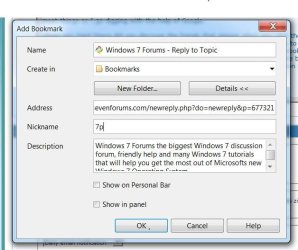
Perhaps the easiest way to save a bookmark is Ctrl D which brings up the Add bookmark box & you can add a nickname like 7p whenever I want to open that bookmark I type 7p in the address bar or F2 7p
@seekermeister if you are an Opera fan & want to depress yourself check out Opera the desktop browser at statcounter in the USA 0.51% or England 0.9% it does badly in any English speaking country but they love it in Russia & Belarus where it has 44% of the browser market.
:confused:
 

Attachments

  • Ctrl D bookmark.JPG
    Ctrl D bookmark.JPG
    51.4 KB · Views: 8

My Computer My Computer

Computer type
PC/Desktop
Computer Manufacturer/Model Number
self build
OS
Windows 7 Ultimate 64 bit
CPU
Intel Core i7 4770K overclocked to 4.7GHz Quad Core Haswell
Motherboard
Asus Z87 Pro (Socket 1150) ATX Motherboard
Memory
16GB Team Group Vulcan Gold 2133MHz
Graphics Card(s)
ATI Radeon HD 7880 Series Display adapter
Monitor(s) Displays
NEC LCD2690WUXi2
Screen Resolution
26" 1920 x 1200
Hard Drives
Samsung 500GB SSD 840 EVO SATA 6Gb/s
Samsung 250GB SSD 840 EVO SATA 6Gb/s
PSU
Corsair AX760 Platinum
Case
Cooler Master HAF X Gaming Tower
Cooling
XSPC RayStorm 750 RS360 Water cooling
Mouse
Razer Death Adder left handed
Internet Speed
126Mb download 11.5Mb up
Antivirus
Avast free
Browser
Opera
Other Info
Main Browser is Opera
Favorite software Adobe Lightroom & Photoshop
best plugins Nik software
Firewall : Private firewall 7
stve,

@seekermeister if you are an Opera fan & want to depress yourself check out Opera the desktop browser at statcounter in the USA 0.51% or England 0.9% it does badly in any English speaking country but they love it in Russia & Belarus where it has 44% of the browser market.
This is the way that it has always been, it seems that Opera has never attempted to promote it's browser much in the USA, even back when it was a paid program. I have a friend who is an agent for Opera, or was, cause I haven't spoken with him for some time. In fact the last time was right after the war in Iraq. I remember him talking about his trips there. Yet, I don't think that they have any agents in the USA...I don't know about Europe. Opera has never done things the way that one would expect them to. It's as though they have their own world and rules to go by.
 

My Computer My Computer

Computer Manufacturer/Model Number
DIY
OS
W7x64 Pro, SuSe 12.1/** W7 x64 Pro, XP MCE
CPU
Phenom II 1090T w/Noctua NH-D14 /**4400+ X2 w/CM Hyper TX 3
Motherboard
ASRock 890FX Deluxe 4/**A8N-SLI
Memory
2 x 2GB Patriot PGS34g1600LLKA/**4x1GB Corsair VS
Graphics Card(s)
EVGA GTX460 SC/**EVGA 8800GTS
Sound Card
Asus Xonar D2X/**Xonar D1
Monitor(s) Displays
Acer X233H, Dell E152FPc /**LG M237-WD
Screen Resolution
1920x1080 & 1024x768/**1980x1080
Hard Drives
WDC 2TB, 1.5TB, 1TB, 500GB,Seagate 500GB , Maxtor 80GB /**500GB Seagate & WDC 1TB Black
PSU
CM RS600 w/ APC BX1000G/**Antec 500 TP w/ APC BX1000
Case
HAF922/**Antec 1040IIB
Cooling
3x200mm, 1x140 and 1x120mm/**5x80mm fans
Keyboard
Logitech Media USB/**Saitek Eclipse
Mouse
Cordless Trackman Wheel/**Ditto
Internet Speed
3.3Mbps
Other Info
SB 560 5.1 w/ Sennheiser RS140/**Creative T20 speakers, Dvico FusionHDTV7 Gold RT, Cisco E3000, HP 5510V AIO, Linksys E3000, Belkin F5U237 hub and **F5D8055 adapter
(** = 2nd rig)
Is Opera any easier now to tweak the interface? I tried it out a couple of years ago and the lack of information on setting up was terrible, although I did manage eventually to get it looking like Firefox LOL.
 

My Computer My Computer

OS
Windows 7
It has always been easy to configure Opera. Either you didn't ask, or you asked the wrong person. Of course, there may not be exactly what you want, but chances are that there is, because Opera is highly configurable...more than any other browser.
 

My Computer My Computer

Computer Manufacturer/Model Number
DIY
OS
W7x64 Pro, SuSe 12.1/** W7 x64 Pro, XP MCE
CPU
Phenom II 1090T w/Noctua NH-D14 /**4400+ X2 w/CM Hyper TX 3
Motherboard
ASRock 890FX Deluxe 4/**A8N-SLI
Memory
2 x 2GB Patriot PGS34g1600LLKA/**4x1GB Corsair VS
Graphics Card(s)
EVGA GTX460 SC/**EVGA 8800GTS
Sound Card
Asus Xonar D2X/**Xonar D1
Monitor(s) Displays
Acer X233H, Dell E152FPc /**LG M237-WD
Screen Resolution
1920x1080 & 1024x768/**1980x1080
Hard Drives
WDC 2TB, 1.5TB, 1TB, 500GB,Seagate 500GB , Maxtor 80GB /**500GB Seagate & WDC 1TB Black
PSU
CM RS600 w/ APC BX1000G/**Antec 500 TP w/ APC BX1000
Case
HAF922/**Antec 1040IIB
Cooling
3x200mm, 1x140 and 1x120mm/**5x80mm fans
Keyboard
Logitech Media USB/**Saitek Eclipse
Mouse
Cordless Trackman Wheel/**Ditto
Internet Speed
3.3Mbps
Other Info
SB 560 5.1 w/ Sennheiser RS140/**Creative T20 speakers, Dvico FusionHDTV7 Gold RT, Cisco E3000, HP 5510V AIO, Linksys E3000, Belkin F5U237 hub and **F5D8055 adapter
(** = 2nd rig)
@sbrads
You won't go far wrong if you right click with the mouse on the page ,tab ,toolbar etc. to check out the options
learn a few keyboard shortcuts Alt, Alt + P , F2, Ctrl B, F4 , Ctrl D, F12 & of course F1 for help.
Right click on a page and drag down a little & Opera will ask you if you want to turn on mouse gestures you only need to learn 3 or 4 to really speed up browsing.

The first thing you should do on installing Opera is Shift F12 to bring up the appearance panel click on Panels & make sure the Show panel toggle at edge of window is ticked exit the appearance panel & click on the left of the screen to show the panels click again to close.
The main panel for most people is bookmarks then notes select some text on a page right click & copy to note (double clicking a note in the notes panel opens the page it came from in the current tab, it acts like a bookmark) the windows panel is very handy if you have lots of tabs open.
Open the Appearance Panel again & select skin, check find more skins & they appear in the panel it is very easy to download a skin & install it.
Check out the toolbar options placement & style, obviously the address bar is not suited to the sides of the screen. Same with the buttons you can drag & drop a copy from any toolbar onto any toolbar apart from the personal bar which is reserved for bookmarks.
With the status tool bar & address bar open try dragging the address field button from the address bar to the status bar. If the Appearance panel is closed you need to hold down the shift key first.
I recommend getting rid of the menu button the Alt key is better as all the options are underlined i.e. pressing Alt e is the quickest way to show the Appearance panel.

The usual way of removing a button is to right click it /Customize/remove from toolbar.
This works with the menu button as well but because it is a toolbar it reappears when you restart Opera . To remove the menu bar button Alt e to show the Appearance panel/ toolbars then click on the menu button & set its placement to off .
To get the menu button back it's Alt w to turn on the menu bar then File/show menu button.
If you have a bitorrent client that you use like utorrent you should type opera:config into the address bar goto Bittorent & make sure the enable button is unticked.
Most of the customization options in opera:config come under user prefs there is a long list but i advise caution especially as the help files are missing.
You might want to google opera custom buttons for more options as well.
Then it's Alt P for the preferences panel choose the startup type that suits your browsing habits & fill in the basic info in the forms for auto complete to work.
Once you've licked Opera into shape you should enable Opera Synchronization it's the button far left on the status bar called Opera Link or Alt S you'll have to set up an Opera page so you can log in from different computers.
It's worth doing even if you only ever use Opera at home. Your PC crashes & you are forced to reinstall Windows if you've synchronized with Opera reinstall Opera login & your bookmarks, notes, speed dial settings are restored it only takes a couple of minutes to arrange the toolbars to your liking.
One warning only use turbo mode if your connection is slow or you are trying to save bandwidth ( it might help in some countries to access sites that are normally restricted ? just a guess) and I find the Auto mode for Turbo to be patchy so I either have it on or disabled , if you have a fast connection it will slow you down. I love Turbo mode but you have to know when to use it.
Apologies if I've sent you into Information overload :geek:
 

My Computer My Computer

Computer type
PC/Desktop
Computer Manufacturer/Model Number
self build
OS
Windows 7 Ultimate 64 bit
CPU
Intel Core i7 4770K overclocked to 4.7GHz Quad Core Haswell
Motherboard
Asus Z87 Pro (Socket 1150) ATX Motherboard
Memory
16GB Team Group Vulcan Gold 2133MHz
Graphics Card(s)
ATI Radeon HD 7880 Series Display adapter
Monitor(s) Displays
NEC LCD2690WUXi2
Screen Resolution
26" 1920 x 1200
Hard Drives
Samsung 500GB SSD 840 EVO SATA 6Gb/s
Samsung 250GB SSD 840 EVO SATA 6Gb/s
PSU
Corsair AX760 Platinum
Case
Cooler Master HAF X Gaming Tower
Cooling
XSPC RayStorm 750 RS360 Water cooling
Mouse
Razer Death Adder left handed
Internet Speed
126Mb download 11.5Mb up
Antivirus
Avast free
Browser
Opera
Other Info
Main Browser is Opera
Favorite software Adobe Lightroom & Photoshop
best plugins Nik software
Firewall : Private firewall 7
firefox is the way to go.

I used to think so too. I've been on Mozilla's side since Fx 2.0. Changed my mind immediately when I used Chrome the first time! Firefox feels so cluttered and bulky compared to Chrome. But that's just personal taste.

Same story here. Even on a technological level, Chrome is neater, splitting up tabs, extensions, and plugins into multiple processes rather than a single process. So if something crashes, it's isolated, and the whole browser doesn't need to close.
 

My Computer My Computer

OS
Windows 7 Enterprise 64-bit
CPU
AMD Phenom II X4 3.0GHz
Motherboard
ASUS M5A97
Memory
8GB G-Skill Ripjaws DDR3 1333
Graphics Card(s)
PNY GeForce 460 GTX 1GB OC - Enthusiast Edition
Sound Card
VIA High Definition Audio
Monitor(s) Displays
Dell 19"
Screen Resolution
1280x1024
Hard Drives
1TB - Primary
160GB - Secondary
250GB - External backup for important files
PSU
OCZ Fata1ty 700W Modular PSU
Case
ASUS
Keyboard
Microsoft Wireless Keyboard 2000
Mouse
Microsoft Wireless Mouse 2000
Internet Speed
3 Mbps/768 kbps
firefox is the way to go.

I used to think so too. I've been on Mozilla's side since Fx 2.0. Changed my mind immediately when I used Chrome the first time! Firefox feels so cluttered and bulky compared to Chrome. But that's just personal taste.

Same story here. Even on a technological level, Chrome is neater, splitting up tabs, extensions, and plugins into multiple processes rather than a single process. So if something crashes, it's isolated, and the whole browser doesn't need to close.

Well, as a counterbalance argument to all that, the only browser I've had multiple crashes on in the last year is Chrome (it seems OK now though), and Firefox has a nice simple layout if you press F11.
 

My Computer My Computer

OS
Windows 7
Back
Top