How to edit the Hosts file in 7

...I do have some experience ...
When I tried to edit it by adding another entry, it saved my work to Hosts.txt and not the main Hosts file itself. Hmmmmm!

My solution was to rename the main HOSTS file to HOSTS.bac and then rename the hosts.txt file to HOSTS (NO Extension).
That worked like a treat.
Chuckle.

Your solution, while clever, was unnecessary. Your HOSTS file did not save or rename anything. The text editor that you used had the default text file extension selected. You can Save As... All Files (*.*), Any File (*.*) in some editors, and assign the extension - or no extension - during the save process.

The HostsMan app is suitable enough. All users who introduce themselves to HostsMan are advised - thoroughly examine the contents of HOSTS after any and all updates. HostsMan updates will include many popular sites for blocking - MySpace, FaceBook, HomeStead, et cetera.

I happen to like blocking sites like those for some customers, but they are not, in and of themselves, malicious sites.
 
Sorry, I didn't mean to rant or ramble.

Cheers Mates!
The Doctor :geek:

It's a good topic to rant on.
A well managed host file can make browsig the interweb a little less of a hassle. (It can screw up a few sites too tho...ymmv.)

I use the host file from here on all my pc's. (mvps.org)

I also add some google analytics references cuz, as terrific as many google products are, they just make me feel uncomfortable...one company with alllll that data.
 

My Computer My Computer

At a glance

WIN7Intel i7 9206GB DDR3 Triple ChannelNvidia 250 GTS
Computer Manufacturer/Model Number
Bumpus Did it!
OS
WIN7
CPU
Intel i7 920
Motherboard
Gigabyte EX58-UDR
Memory
6GB DDR3 Triple Channel
Graphics Card(s)
Nvidia 250 GTS
Sound Card
Realtek onboard
Monitor(s) Displays
Samsung 192n & 204b
Hard Drives
37gb WD Velociraptors (2) Raid 1 -
Seagate SATAII 1 tb -
WD SATAII 1tb -
WD SATAII Green 1.5tb
PSU
OCZ ModXStream Pro 600W
Case
Lian-Li V1000
Cooling
3 x 120mm
Keyboard
crap
Mouse
MS Intelimouse
Internet Speed
Uverse 12mbps
Other Info
TV (via Slingbox), Data backup & game box.

Hope it never blows up ;)
Well, one neat trick I've found with Hosts Manager, if you find that your hosts file may be blocking some site that you want to go to, you can just click the big green "H" in the Hosts window to turn off the hosts file. The "H" then turns RED while the hosts file is disabled.
Then browse away!
No problemo!

Doc B)
 

My Computer My Computer

At a glance

Windows XP-Pro-SP3, Windows 7AMD, 2X, Dual Core 5200+6 gig DDR2, Super TalentWinfast
Computer Manufacturer/Model Number
Home Made
OS
Windows XP-Pro-SP3, Windows 7
CPU
AMD, 2X, Dual Core 5200+
Motherboard
MSI K9N Platinum
Memory
6 gig DDR2, Super Talent
Graphics Card(s)
Winfast
Sound Card
On Board AC97
Monitor(s) Displays
19" Envision LCD
Screen Resolution
1024x768
Hard Drives
3x , Maxtor/Seagate SATA2 (160, 160, 200gig)
PSU
Antec Earthwatts 650
Case
Pac Man Mid-Tower
Cooling
11 fans
Keyboard
Generic
Mouse
MS digital
Internet Speed
5 Meg Cable
You said you had experience with the HOSTS file.

To anyone learning how to use the HOSTS file:

To disable an entry in the HOSTS file,
delete the line(s) containing the entry
or
insert a # as the first character in the offending line(s).

The Green H/Red H method suggested will leave your computer without the protection and other functions provided by HOSTS.

Please note: many HOSTS files found online are provided solely for the blocking of ad servers. Others provide blocking of malware. Others provide both.

Furthermore, a simple batch file can toggle the name of the HOSTS file - creating an On/Off effect. The same batch file can also rename the link used to call the batch file, providing an instant status report of the HOSTS file status - no additional software required.

The sample provided here does not include the shortcut rename trick.
Is it possible to make Firefox ignore the Hosts file without closing it down? - mozilla.support.firefox | Google Groups
 
The batch command referenced below with the shortcut rename included. Please note the path will not work on your PC. Modify as needed.

@echo off
cls
goto toggleRename

:toggleRename
If Not %winbootdir%'==' Set HostsOff=%windir%\NOHOSTS
If %OS%'==Windows_NT' Set HostsOff=%SystemRoot%\system32\drivers\etc\NOHOSTS
If %HostsOff%'==' goto noIdeaOfOS
If Not %winbootdir%'==' Set HostsOn=%windir%\HOSTS
If %OS%'==Windows_NT' Set HostsOn=%SystemRoot%\system32\drivers\etc\HOSTS
If %HostsOn%'==' goto noIdeaOfOS
If Not Exist %HostsOff% goto deActivate
goto Activate
goto end

:deActivate
if not exist %HostsOn% goto noHostsFile
ren %HostsOn% NOHOSTS
ren "D:\XPbin\Antman\Application Data\Microsoft\Internet Explorer\Quick Launch\Toggle Hosts ON.lnk" "Toggle Hosts OFF.lnk"
echo.
echo ÜÜÜÜÜÜÜÜÜÜÜÜÜÜÜÜÜÜÜÜÜÜÜÜÜÜÜÜÜÜÜÜÜÜÜÜÜÜÜÜÜÜÜÜÜÜÜÜÜ
echo Ý ÚÄÄÄ¿Þ
echo Ý HOSTS FILE BLOCKING IS NOW DE-ACTIVATED ³ X ³Þ
echo Ý ÀÄÄÄÙÞ
echo. ßßßßßßßßßßßßßßßßßßßßßßßßßßßßßßßßßßßßßßßßßßßßßßßßß
echo.
echo. Advertising will be visible; Parasite protection off!
echo Renamed from HOSTS to NOHOSTS
echo.
goto end

:Activate
if not exist %HostsOff% goto noHostsFile
ren %HostsOff% HOSTS
ren "D:\XPbin\Antman\Application Data\Microsoft\Internet Explorer\Quick Launch\Toggle Hosts OFF.lnk" "Toggle Hosts ON.lnk"
echo.
echo ÜÜÜÜÜÜÜÜÜÜÜÜÜÜÜÜÜÜÜÜÜÜÜÜÜÜÜÜÜÜÜÜÜÜÜÜÜÜÜÜÜÜÜÜÜÜÜÜÜ
echo Ý ÚÄÄÄ¿Þ
echo Ý HOSTS FILE BLOCKING IS NOW ACTIVATED ³ û ³Þ
echo Ý ÀÄÄÄÙÞ
echo. ßßßßßßßßßßßßßßßßßßßßßßßßßßßßßßßßßßßßßßßßßßßßßßßßß
echo.
echo. Advertising will be hidden; Parasite protection on!
echo Renamed from NOHOSTS to HOSTS
echo.
goto end

:noIdeaOfOS
echo Sorry Unsupported OS.
goto end

:noHostsFile
cls
echo.
echo ÜÜÜÜÜÜÜÜÜÜÜÜÜÜÜÜÜÜÜÜÜÜÜÜÜÜÜÜÜÜÜÜÜÜÜÜÜÜÜÜÜÜÜÜÜÜÜÜÜ
echo Ý ÚÄÄÄ¿Þ
echo Ý ERROR NO HOST FILES FOUND ! ³ ! ³Þ
echo Ý ÀÄÄÄÙÞ
echo. ßßßßßßßßßßßßßßßßßßßßßßßßßßßßßßßßßßßßßßßßßßßßßßßßß
echo .
echo Couldn't find "HOSTS" or "NOHOSTS" in the folder
echo.
echo please check that the HOSTS file is in this folder
echo thanks..

:end
set HostsOff=
set HostsOn=
pause
exit
 

My Computer My Computer

At a glance

W 7 64-bit UltimateIntel Q9550 Yorkfield8GB Dominator 8500C5DATI : XFX 5870
Computer Manufacturer/Model Number
* BFK Customs *
OS
W 7 64-bit Ultimate
CPU
Intel Q9550 Yorkfield
Motherboard
ASUS P5Q Pro
Memory
8GB Dominator 8500C5D
Graphics Card(s)
ATI : XFX 5870
Sound Card
Realtek HD Audio 7-1
Monitor(s) Displays
1x 47" LCD HDMI & 3x 26" LCD HDMI
Screen Resolution
1920x1080P & 1920x1200
Hard Drives
1x 80GB Intel X25-M G2 SSD : 1x 500GB & 1x 640GB WD Caviar Black(s)
PSU
Corsair 620HX
Case
Cooler Master RC-690
Cooling
Tuniq Tower 120, 2x 140mm and 3x 120mm case fans
Keyboard
Microsoft 500
Mouse
Razer Diamondback 3G
Internet Speed
14 Mb/s
Other Info
1x Koutech 3Gb/s SATA HDD Hot Swap Rack

My Computer My Computer

At a glance

W 7 64-bit UltimateIntel Q9550 Yorkfield8GB Dominator 8500C5DATI : XFX 5870
Computer Manufacturer/Model Number
* BFK Customs *
OS
W 7 64-bit Ultimate
CPU
Intel Q9550 Yorkfield
Motherboard
ASUS P5Q Pro
Memory
8GB Dominator 8500C5D
Graphics Card(s)
ATI : XFX 5870
Sound Card
Realtek HD Audio 7-1
Monitor(s) Displays
1x 47" LCD HDMI & 3x 26" LCD HDMI
Screen Resolution
1920x1080P & 1920x1200
Hard Drives
1x 80GB Intel X25-M G2 SSD : 1x 500GB & 1x 640GB WD Caviar Black(s)
PSU
Corsair 620HX
Case
Cooler Master RC-690
Cooling
Tuniq Tower 120, 2x 140mm and 3x 120mm case fans
Keyboard
Microsoft 500
Mouse
Razer Diamondback 3G
Internet Speed
14 Mb/s
Other Info
1x Koutech 3Gb/s SATA HDD Hot Swap Rack
Please, don't anyone think that I'm promoting myself as a HOSTS expert, but I do have some experience with it.;)

I first ran into using the HOSTS file some time (years) ago when I needed to change the Server designation for my Anti-Virus program, to use the Professional Server instead of the FREE server.

Anyway, I just opened Win-7 and accessed my HOSTS file.
When I tried to edit it by adding another entry, it saved my work to Hosts.txt and not the main Hosts file itself. Hmmmmm!:huh:

My solution was to rename the main HOSTS file to HOSTS.bac and then rename the hosts.txt file to HOSTS (NO Extension).
That worked like a treat.

However, all this was only an effort to verify, for myself, what's being said here in this thread.
Actually, I never really needed to go through all those acrobatics to work with my hosts file. I use the "Hosts Manager" program from "abelhadigital(dot)com" and I use it weekly to keep my HOSTS file up to date. It lets me view and edit my hosts file at will.

I've been doing this for quite some time now and I share the HOSTS Manager program with many of my customers, so they can keep their own HOSTS file up to date. It's a great protection against your browser being redirected to a porn site, or worse.:mad:

HOSTS Manager is almost a "Must Have" when children are using the home PC. I won't set up a PC without it. It's just one more level of security.

Sorry, I didn't mean to rant or ramble.

Cheers Mates!
The Doctor :geek:

THANK YOU! I tried everything, renaming it to BAK and it said I didn't have permissions! I even tried changing permissions before that, and it worked with any other file besides the hosts file. Thank you, that program did the trick :)

Oh yeah sorry for 1 and a half year bump...OOPS! :O
 

My Computer My Computer

At a glance

Windows 7 Home Premium x64
OS
Windows 7 Home Premium x64
Start Orb, in search box, type cmd (press CTRL-SHIFT-ENTER) to run as admin

notepad C:\windows\system32\drivers\etc\hosts.

Make changes

File, Save.


Couldn't be easier.
 

My Computer My Computer

At a glance

Windows 7 Ultimate x64Intel Q9550 2.83Ghz OC'd to 3.40Ghz8GB G.Skill PI DDR2-800, 4-4-4-12 timingsEVGA 1280MB Nvidia GeForce GTX570
Computer Manufacturer/Model Number
Self-Built in July 2009
OS
Windows 7 Ultimate x64
CPU
Intel Q9550 2.83Ghz OC'd to 3.40Ghz
Motherboard
Gigabyte GA-EP45-UD3R rev. 1.1, F12 BIOS
Memory
8GB G.Skill PI DDR2-800, 4-4-4-12 timings
Graphics Card(s)
EVGA 1280MB Nvidia GeForce GTX570
Sound Card
Realtek ALC899A 8 channel onboard audio
Monitor(s) Displays
23" Acer x233H
Screen Resolution
1920x1080
Hard Drives
Intel X25-M 80GB Gen 2 SSD
Western Digital 1TB Caviar Black, 32MB cache. WD1001FALS
PSU
Corsair 620HX modular
Case
Antec P182
Cooling
stock
Keyboard
ABS M1 Mechanical
Mouse
Logitech G9 Laser Mouse
Internet Speed
15/2 cable modem
Other Info
Windows and Linux enthusiast. Logitech G35 Headset.
Start Orb, in search box, type cmd (press CTRL-SHIFT-ENTER) to run as admin

notepad C:\windows\system32\drivers\etc\hosts.

Make changes

File, Save.

)
Couldn't be easier.

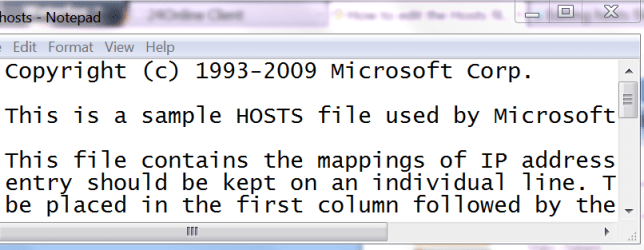
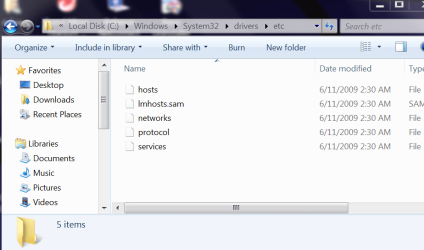
Did as advised and this opened up (i/ve resized it to fit) : snap-1 which shows the "sample" Hosts File. If this is the actual and not the sample Hosts File, then what is the second entry "imhosts.sam"file? (view the second snap)
 

Attachments

  • hosts - Notepad_2012-03-07_11-37-13.png
    hosts - Notepad_2012-03-07_11-37-13.png
    21 KB · Views: 14
  • etc_2012-03-07_11-46-05.png
    etc_2012-03-07_11-46-05.png
    35.9 KB · Views: 15

My Computer My Computer

At a glance

MS Windows 7 Home Premium 64-bit SP1IntelCore [email protected]; Sandy Bridge 32nm Tech.4096Mb RAM; Single ChannelDDR3@665MHz; DRAM F...AMD Radeon HD 6630M; GPU:Whistler;BIOS Core&m...
Computer Manufacturer/Model Number
Sony Vaio C series VPCCB35FN laptop
OS
MS Windows 7 Home Premium 64-bit SP1
CPU
IntelCore [email protected]; Sandy Bridge 32nm Tech.
Motherboard
Sony Vaio Version:C609NJYJ
Memory
4096Mb RAM; Single ChannelDDR3@665MHz; DRAM Freq:662MHz
Graphics Card(s)
AMD Radeon HD 6630M; GPU:Whistler;BIOS Core&mem Clock:123.36
Sound Card
REALTEK High Definition Audio Device; INTEL Display Card
Monitor(s) Displays
Generic PnP Intel HD;Resolution:1920*1040 Pixels; BPP:32bits
Screen Resolution
Current Resolution:1920*1080 Pixels; Monitor Frequency:60Hz
Hard Drives
Internal HD:TOSHIBA MK5061GSY; Real Size:488 GB;NTFS; 3 Partitions; SATA; HEADS:16

External HDD: WD Elements 1023 PORTABLE; Estimated Size: 1TB; NTFS; 3 Partitions
Cooling
Lateral Exhaust with a Cooling Pad Placed Beneath.
Keyboard
Logitech Bluetooth+ Generic Integrated K-B
Mouse
Logitech Bluetooth
Internet Speed
2MBPS
Other Info
1)Trend Micro Titanium Maximum Security Suite Version:3
2)SAS-PRO

3)MBAM--PRO


4)WATERFOX+IE9 +WOT+LINKEXTEND+ DRWEBCUREIT LINK CHECKER

5)SPYWAREBLASTER

6) WINPATROL PLUS

7) SANDBOXIE and
8) A BIT OF COMMON SENSE.
Back
Top