Windows 7 awkward feel, missing WinXP, need advice

*Migrating...*

zzz2496
 

My Computer My Computer

At a glance

Windows7 Ultimate 64bitIntel Core 2 Quad Q6600DDR2 Adata 4GBNvidia GeForce GTX 285 1024 and Nvidia GeForc...
Computer Manufacturer/Model Number
Self Built
OS
Windows7 Ultimate 64bit
CPU
Intel Core 2 Quad Q6600
Motherboard
Abit IN9-32X-MMAX
Memory
DDR2 Adata 4GB
Graphics Card(s)
Nvidia GeForce GTX 285 1024 and Nvidia GeForce 8800GT 512
Sound Card
Asus Xonar HDAV 1.3
Monitor(s) Displays
Dell 2407WFP and BenQ 2400v and Philips 150v3
Screen Resolution
3840x1200 and 1024x768
Hard Drives
2 WDC 1TB
1 WDC 1.5TB
1 WDC 640GB
1 WDC 320GB
1 Seagate 200GB
PSU
Corsair TX 850W
Case
Cooler Master HAF932
Cooling
Arctic Cooling Freezer Extreme and plenty of fans...
Keyboard
MicrosoftNaturalKeyboard 4000/Apple Alu keyboard/Dinovo mini
Mouse
Logitech G5/MarbleMouseTrackball/PerformanceMX/SpacePilotPRO
Internet Speed
1.5Mbps down/384Kbps up
Other Info
APC SURT 1000XL
Logitech Z-560
Wiimote
Mikrotik Router
Linksys (now Cisco) SD2008 8 port Gigabit switch
Linksys WRT54G (acting as AP)
Apple wireless Aluminium keyboard
Apple Magic Mouse
Xbox360 wired controller
Nick, You may show up again. The UAC discussion has been diverted. We can focus on your problem again. Sorry for the UAC "bloat" in your thread.
 

My Computer My Computer

At a glance

Vista, Windows7, Mint Mate, Zorin, Windows 8from 1.6GHz Duo to i7
Computer Manufacturer/Model Number
HP, Dell, Gateway, Toshiba - 4 laptops and 2 desktops
OS
Vista, Windows7, Mint Mate, Zorin, Windows 8
CPU
from 1.6GHz Duo to i7
Monitor(s) Displays
2x HP w2207
Hard Drives
5x HDD, 7x SSD, 12x Externals
Keyboard
with trackball - no mices
Mouse
Trackball mice
Internet Speed
DSL 6000
I am NOT recommending pirated software, but by far the best user interface for Win7 is Tiny7 (32 bit). Rather than spend weeks reinventing the wheel, down load it, install, use easy transfer when you get your 64 bit up and running. I have the settings on a USB stick now and deleted the Tiny7 file.

This method saves you an incredible amount of time.
If you do like I did and read the volumes of threads here you will find a lot of RAH RAH RAH - you gotta learn it! But precious little actual testing. And even more tips that take more time to implement than they will ever save. Skip the posts with just text, they are opinions. Read the ones with links carefully.

If you don't want to seem to support piracy by downloading Tiny7, start with
http://www.sevenforums.com/tutorials/77626-convert-windows-xp-style.html#post678927

Tiny 7 adds
On the right click of "Computer" added:
- Advanced System Properties
- Device Manager
- Edit Registry
- MSCONFIG
- Services
- It is the fastest most XP like UI I can find + Win7 additions
 

My Computer My Computer

At a glance

Win7 32 / 64 and XP 32 / 64 (on various other...Intel 920's @ 3.6 and 4.0 GHz3Gb / 6GbATI 4850 / ATI 4970
Computer Manufacturer/Model Number
Alinor Engineering
OS
Win7 32 / 64 and XP 32 / 64 (on various other computers as well)
CPU
Intel 920's @ 3.6 and 4.0 GHz
Motherboard
Asus P6T
Memory
3Gb / 6Gb
Graphics Card(s)
ATI 4850 / ATI 4970
Sound Card
onboard
Monitor(s) Displays
24 / 27"
Hard Drives
SSD, 1Tb WD
SSD, 3 Raptors raid, 2Tb WD
PSU
PC Power & Cooling 1K
Case
Antec 900 (modded)
Cooling
air / Danger Den water
Keyboard
Logitech G15
Mouse
Logitech Performance MX
Internet Speed
ATT UVerse
Skip the posts with just text, they are opinions. Read the ones with links carefully.

Odd you would bring this up... I was just sitting here thinking about how very easy it would be to virus up a couple of dozen computers by linking to malitious software...
 

My Computer My Computer

At a glance

XP Pro SP3 X86 / Win7 Pro X86Amd 64 x2 4200 (2.4ghz)Kingston DDR2 800 2gbNvidia GF-8400
Computer Manufacturer/Model Number
Homebrew
OS
XP Pro SP3 X86 / Win7 Pro X86
CPU
Amd 64 x2 4200 (2.4ghz)
Motherboard
Asus M2N-MX SE Plus
Memory
Kingston DDR2 800 2gb
Graphics Card(s)
Nvidia GF-8400
Sound Card
Realtek on Motherboard
Monitor(s) Displays
Acer x-193bw
Screen Resolution
1440 x 900
Hard Drives
Western Digital 500g
PSU
350watt In-Win
Case
In-Win
Cooling
Air
Keyboard
yes
Mouse
yes
Internet Speed
5mpbs
Other Info
Also ASRock ION 330 as HTPC (on XP).
Acer Aspire as GP netbook (on XP).
Whew! Nick2, your head must be spinning with all this information. I'm going to add another bit of reading for you -- something I think will help you in the transition from XP to Windows 7. Andre DaCosta, recently awarded Microsoft MVP, prepared a quick guide with side-by-side image comparisons to help new Windows 7 users become familiar with some of the changes and benefits of Windows 7. See Andre's article in For the 'former' Windows XP User - Welcome to Windows 7!

I'm certain between the tutorials here and all the Windows 7 converts, you will get any questions answered -- and then some!

Good luck and enjoy your new computer.

Indeed I'm spinning! :)

I have an exam today, but this week I'll read/respond to all of the questions.


Many thanks to all of you who have supported me.
 

My Computer My Computer

At a glance

Windows 7 Professional x64
OS
Windows 7 Professional x64
Nick2, the fact is Windows 7's default UI is BY FAR better than Windows XP's. Use Windows 7 the proper way for a couple of weeks and you will never want to use the fugly XP UI ever again.

Most of the problems that you are facing will disappear if you start using Windows 7's greates feature -- Search. Learn to use the Start Search Box for EVERYTHING -- from running programs to Control Panel items to finding text within documents. You will be surprised how great the Search feature is.
 

My Computer My Computer

At a glance

Windows 7 RTM x86
OS
Windows 7 RTM x86
Nick2, the fact is Windows 7's default UI is BY FAR better than Windows XP's. Use Windows 7 the proper way for a couple of weeks and you will never want to use the fugly XP UI ever again.

Most of the problems that you are facing will disappear if you start using Windows 7's greates feature -- Search. Learn to use the Start Search Box for EVERYTHING -- from running programs to Control Panel items to finding text within documents. You will be surprised how great the Search feature is.

+1 Very well said.
 

My Computer My Computer

At a glance

Windows 7 Ultimate 32 bitIntel(R) Pentium(R) 4 CPU 3.00GHz2.50 GB RAMNVIDIA GeForce 7600 GS
Computer Manufacturer/Model Number
Home built
OS
Windows 7 Ultimate 32 bit
CPU
Intel(R) Pentium(R) 4 CPU 3.00GHz
Motherboard
ASUS P4P800-VM Motherboard Chipset: Intel 865G + ICH5
Memory
2.50 GB RAM
Graphics Card(s)
NVIDIA GeForce 7600 GS
Sound Card
SoundMax Integrated Digital Audio (Chip)
Monitor(s) Displays
ViewSonic VX 1962 wm
Screen Resolution
1680 X 1050
Hard Drives
Seagate Barracuda 7200.10 80 GB
ST380215A ATA Device 18.6 GB
Western Digital "My Book" external hard drive 750 GB
Cooling
Fan based
Keyboard
Microsoft Comfort Curve Keyboard 2000 v10 USB
Mouse
Logitec optic USB
Internet Speed
3.01 Mb/s download 0.64 Mb/s upload
Wow, this really is a warm welcome. It means a lot to me, guys.
Some of the things that bother me seem to have solutions and I'll apply them as soon as possible, but IMHO it would have been better if Microsoft had included the original XP theme(using the same layout,icons, buttons, etc).

That'd be too easy. No, I hear ya. The pleasing aesthetics of Win7 is , I think, one of it's key features, but it's hard to see it when it's not what your'e used to.

Like being on a long road-trip, looking at beautiful scenery and houses, but nothing compares to the sight of your own front door, no matter how old it might be.
The problem is that I don't like these aesthetics, I find them to tiring. The menus/text/icons distract me from what I want to do. Everything seems blurry due to cleartype.
There's no privacy, there are previews for every window or folder.
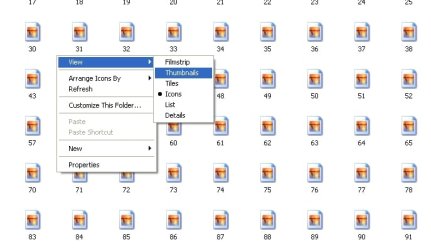
There's no option for fast switching from icons to thumbnails for pictures like XP had.


Corrine said:
Whew! Nick2, your head must be spinning with all this information. I'm going to add another bit of reading for you -- something I think will help you in the transition from XP to Windows 7. Andre DaCosta, recently awarded Microsoft MVP, prepared a quick guide with side-by-side image comparisons to help new Windows 7 users become familiar with some of the changes and benefits of Windows 7. See Andre's article in For the 'former' Windows XP User - Welcome to Windows 7!

I'm certain between the tutorials here and all the Windows 7 converts, you will get any questions answered -- and then some!

Good luck and enjoy your new computer.
SIW2 said:
This may be of interest .

You can choose during install to have either the start menu, or the Explorer enhancements, or both.

Classic Shell: Features

Wow, thank you for the link. This is one of the things that I really need.


Duke of Alinor said:
I am NOT recommending pirated software, but by far the best user interface for Windows 7 is Tiny7 (32 bit). Rather than spend weeks reinventing the wheel, down load it, install, use easy transfer when you get your 64 bit up and running. I have the settings on a USB stick now and deleted the Tiny7 file.

This method saves you an incredible amount of time.
If you do like I did and read the volumes of threads here you will find a lot of RAH RAH RAH - you gotta learn it! But precious little actual testing. And even more tips that take more time to implement than they will ever save. Skip the posts with just text, they are opinions. Read the ones with links carefully.

If you don't want to seem to support piracy by downloading Tiny7, start with
Convert to Windows XP Style

Tiny 7 adds
On the right click of "Computer" added:
- Advanced System Properties
- Device Manager
- Edit Registry
- MSCONFIG
- Services
- It is the fastest most XP like UI I can find + Windows 7 additions
What's Tiny7? An Win7 stripped down OS?(I need 64bit)
Rather than spend weeks reinventing the wheel, down load it, install, use easy transfer when you get your 64 bit up and running. I have the settings on a USB stick now and deleted the Tiny7 file.
What do you mean here?


Thanks for the link. :)

Nick2, the fact is Windows 7's default UI is BY FAR better than Windows XP's. Use Windows 7 the proper way for a couple of weeks and you will never want to use the fugly XP UI ever again.

Most of the problems that you are facing will disappear if you start using Windows 7's greates feature -- Search. Learn to use the Start Search Box for EVERYTHING -- from running programs to Control Panel items to finding text within documents. You will be surprised how great the Search feature is.
It might be better, but I don't feel comfortable with it.
There are many radical changes that aren't necessarily faster. In some cases they are slower, for example using labels(on the taskbar) with multiple instances of the same program. It takes more time to identify the instance that you need.


Offtopic: I did not figure out how to edit permissions for emule(in order to access its own config folder).
 

My Computer My Computer

At a glance

Windows 7 Professional x64
OS
Windows 7 Professional x64
Nick2, open an explorer window, go to a folder full of pictures, now with that window active - hold ctrl -> then scroll your mouse... See what happen...

zzz2496
 

My Computer My Computer

At a glance

Windows7 Ultimate 64bitIntel Core 2 Quad Q6600DDR2 Adata 4GBNvidia GeForce GTX 285 1024 and Nvidia GeForc...
Computer Manufacturer/Model Number
Self Built
OS
Windows7 Ultimate 64bit
CPU
Intel Core 2 Quad Q6600
Motherboard
Abit IN9-32X-MMAX
Memory
DDR2 Adata 4GB
Graphics Card(s)
Nvidia GeForce GTX 285 1024 and Nvidia GeForce 8800GT 512
Sound Card
Asus Xonar HDAV 1.3
Monitor(s) Displays
Dell 2407WFP and BenQ 2400v and Philips 150v3
Screen Resolution
3840x1200 and 1024x768
Hard Drives
2 WDC 1TB
1 WDC 1.5TB
1 WDC 640GB
1 WDC 320GB
1 Seagate 200GB
PSU
Corsair TX 850W
Case
Cooler Master HAF932
Cooling
Arctic Cooling Freezer Extreme and plenty of fans...
Keyboard
MicrosoftNaturalKeyboard 4000/Apple Alu keyboard/Dinovo mini
Mouse
Logitech G5/MarbleMouseTrackball/PerformanceMX/SpacePilotPRO
Internet Speed
1.5Mbps down/384Kbps up
Other Info
APC SURT 1000XL
Logitech Z-560
Wiimote
Mikrotik Router
Linksys (now Cisco) SD2008 8 port Gigabit switch
Linksys WRT54G (acting as AP)
Apple wireless Aluminium keyboard
Apple Magic Mouse
Xbox360 wired controller
[
The problem is that I don't like these aesthetics, I find them to tiring. The menus/text/icons distract me from what I want to do. Everything seems blurry due to cleartype.
There's no privacy, there are previews for every window or folder.
There's no option for fast switching from icons to thumbnails for pictures like XP had.

Nick... if you go to Control Panel -> System -> Advanced -> Performance There are quite a few visual options you can mess with, you can even go all the way back (almost) to the windows 2000 look and feel. A lot of the stuff that seems to be annoying you can simply be turned off.

Also for your problem with pictures folders... Win7 allows you to customize each folder (and it's kids) in several different ways... If you go to your home folder, right click on Pictures, select properties and customize it for images, you'll get your previews. To switch betwee preview and icon modes just right click in the folder and select View then Details

Clear Type can be turned off... in the display properties dialog.


Methinks a little time going through all the settings... deliberately looking for them... just might help you out quite a bit.
 

My Computer My Computer

At a glance

XP Pro SP3 X86 / Win7 Pro X86Amd 64 x2 4200 (2.4ghz)Kingston DDR2 800 2gbNvidia GF-8400
Computer Manufacturer/Model Number
Homebrew
OS
XP Pro SP3 X86 / Win7 Pro X86
CPU
Amd 64 x2 4200 (2.4ghz)
Motherboard
Asus M2N-MX SE Plus
Memory
Kingston DDR2 800 2gb
Graphics Card(s)
Nvidia GF-8400
Sound Card
Realtek on Motherboard
Monitor(s) Displays
Acer x-193bw
Screen Resolution
1440 x 900
Hard Drives
Western Digital 500g
PSU
350watt In-Win
Case
In-Win
Cooling
Air
Keyboard
yes
Mouse
yes
Internet Speed
5mpbs
Other Info
Also ASRock ION 330 as HTPC (on XP).
Acer Aspire as GP netbook (on XP).
I want a fast way to switch from icons to thumbnails and viceversa, just like XP had. I've attached a picture.

I want to stop the previews that folders have when they store pictures, in fact I want to completely change the icon, to the one that XP has for folders.
I want to change the fonts to the ones that XP uses.
They are better suited for me. http://pix.defcon5.biz/files/33532792111776630271.png

I want to stop all those previews for taskbar/alt+tab, I don't need them.

I'm installing the classic shell at the moment.
 

Attachments

  • Clipboard-1.jpg
    Clipboard-1.jpg
    34.4 KB · Views: 3

My Computer My Computer

At a glance

Windows 7 Professional x64
OS
Windows 7 Professional x64
I want a fast way to switch from icons to thumbnails and viceversa, just like XP had. I've attached a picture.

I want to stop the previews that folders have when they store pictures, in fact I want to completely change the icon, to the one that XP has for folders.
I want to change the fonts to the ones that XP uses.
They are better suited for me. http://pix.defcon5.biz/files/33532792111776630271.png

I want to stop all those previews for taskbar/alt+tab, I don't need them.

I'm installing the classic shell at the moment.

The View option you want is still there, it just got expanded a little bit... I usually hold control and scroll to change View settings

Added: To change Font settings, right click desktop -> personalize -> Window color -> Advanced appearance settings...
go crazy in there...


zzz2496
 

My Computer My Computer

At a glance

Windows7 Ultimate 64bitIntel Core 2 Quad Q6600DDR2 Adata 4GBNvidia GeForce GTX 285 1024 and Nvidia GeForc...
Computer Manufacturer/Model Number
Self Built
OS
Windows7 Ultimate 64bit
CPU
Intel Core 2 Quad Q6600
Motherboard
Abit IN9-32X-MMAX
Memory
DDR2 Adata 4GB
Graphics Card(s)
Nvidia GeForce GTX 285 1024 and Nvidia GeForce 8800GT 512
Sound Card
Asus Xonar HDAV 1.3
Monitor(s) Displays
Dell 2407WFP and BenQ 2400v and Philips 150v3
Screen Resolution
3840x1200 and 1024x768
Hard Drives
2 WDC 1TB
1 WDC 1.5TB
1 WDC 640GB
1 WDC 320GB
1 Seagate 200GB
PSU
Corsair TX 850W
Case
Cooler Master HAF932
Cooling
Arctic Cooling Freezer Extreme and plenty of fans...
Keyboard
MicrosoftNaturalKeyboard 4000/Apple Alu keyboard/Dinovo mini
Mouse
Logitech G5/MarbleMouseTrackball/PerformanceMX/SpacePilotPRO
Internet Speed
1.5Mbps down/384Kbps up
Other Info
APC SURT 1000XL
Logitech Z-560
Wiimote
Mikrotik Router
Linksys (now Cisco) SD2008 8 port Gigabit switch
Linksys WRT54G (acting as AP)
Apple wireless Aluminium keyboard
Apple Magic Mouse
Xbox360 wired controller
Control+scroll shrinks my files up to "list". I don't want this. I want to maintain the size to medium icons and stop the preview.
 

My Computer My Computer

At a glance

Windows 7 Professional x64
OS
Windows 7 Professional x64
Control+scroll shrinks my files up to "list". I don't want this. I want to maintain the size to medium icons and stop the preview.

In an explorer window -> Organize -> Folder and search options -> view tab -> Always show icons, never thumbnails <-- check that.

zzz2496
 

My Computer My Computer

At a glance

Windows7 Ultimate 64bitIntel Core 2 Quad Q6600DDR2 Adata 4GBNvidia GeForce GTX 285 1024 and Nvidia GeForc...
Computer Manufacturer/Model Number
Self Built
OS
Windows7 Ultimate 64bit
CPU
Intel Core 2 Quad Q6600
Motherboard
Abit IN9-32X-MMAX
Memory
DDR2 Adata 4GB
Graphics Card(s)
Nvidia GeForce GTX 285 1024 and Nvidia GeForce 8800GT 512
Sound Card
Asus Xonar HDAV 1.3
Monitor(s) Displays
Dell 2407WFP and BenQ 2400v and Philips 150v3
Screen Resolution
3840x1200 and 1024x768
Hard Drives
2 WDC 1TB
1 WDC 1.5TB
1 WDC 640GB
1 WDC 320GB
1 Seagate 200GB
PSU
Corsair TX 850W
Case
Cooler Master HAF932
Cooling
Arctic Cooling Freezer Extreme and plenty of fans...
Keyboard
MicrosoftNaturalKeyboard 4000/Apple Alu keyboard/Dinovo mini
Mouse
Logitech G5/MarbleMouseTrackball/PerformanceMX/SpacePilotPRO
Internet Speed
1.5Mbps down/384Kbps up
Other Info
APC SURT 1000XL
Logitech Z-560
Wiimote
Mikrotik Router
Linksys (now Cisco) SD2008 8 port Gigabit switch
Linksys WRT54G (acting as AP)
Apple wireless Aluminium keyboard
Apple Magic Mouse
Xbox360 wired controller
Nick, I have read thru all your posts and think that you will never be happy with Windows7. By the time you have applied all the tweaks that have been suggested, your Windows7 may be disfunctional. What you want is a VW of the 50's or a Ford Model T that you can deal with using a pair of pliers and a hammer. But what you got is a 2010 BMW with all the electronic gizmos that will just not live up to your expectations because it has too many basic functions that you dislike.
I suggest you stay on XP. I have a neighbor that is still on Windows ME and he is happy. No reason that you could not operate with XP for the forthcomng years. Then you have the system environment that you like. Good luck.
 

My Computer My Computer

At a glance

Vista, Windows7, Mint Mate, Zorin, Windows 8from 1.6GHz Duo to i7
Computer Manufacturer/Model Number
HP, Dell, Gateway, Toshiba - 4 laptops and 2 desktops
OS
Vista, Windows7, Mint Mate, Zorin, Windows 8
CPU
from 1.6GHz Duo to i7
Monitor(s) Displays
2x HP w2207
Hard Drives
5x HDD, 7x SSD, 12x Externals
Keyboard
with trackball - no mices
Mouse
Trackball mice
Internet Speed
DSL 6000
Nick, I have read thru all your posts and think that you will never be happy with Windows7. By the time you have applied all the tweaks that have been suggested, your Windows7 may be disfunctional. What you want is a VW of the 50's or a Ford Model T that you can deal with using a pair of pliers and a hammer. But what you got is a 2010 BMW with all the electronic gizmos that will just not live up to your expectations because it has too many basic functions that you dislike.
I suggest you stay on XP. I have a neighbor that is still on Windows ME and he is happy. No reason that you could not operate with XP for the forthcomng years. Then you have the system environment that you like. Good luck.
WHS's advice is spot on. Nick, you have a mindset against learning and using Win 7 as it is. If XP works for you, stay with it. You will continually be frustrated if you try to make Win 7 like XP. Win7 is not XP and you cannot make it into XP. It is what it is. Learn it, learn to use it or stay with XP.

I am not flaming you in anyway. I like XP, too and my wife is very happy with her XP. It works for her and she has no reason to change and learn Win 7.
 

My Computer My Computer

At a glance

Windows 7 Ultimate 32 bitIntel(R) Pentium(R) 4 CPU 3.00GHz2.50 GB RAMNVIDIA GeForce 7600 GS
Computer Manufacturer/Model Number
Home built
OS
Windows 7 Ultimate 32 bit
CPU
Intel(R) Pentium(R) 4 CPU 3.00GHz
Motherboard
ASUS P4P800-VM Motherboard Chipset: Intel 865G + ICH5
Memory
2.50 GB RAM
Graphics Card(s)
NVIDIA GeForce 7600 GS
Sound Card
SoundMax Integrated Digital Audio (Chip)
Monitor(s) Displays
ViewSonic VX 1962 wm
Screen Resolution
1680 X 1050
Hard Drives
Seagate Barracuda 7200.10 80 GB
ST380215A ATA Device 18.6 GB
Western Digital "My Book" external hard drive 750 GB
Cooling
Fan based
Keyboard
Microsoft Comfort Curve Keyboard 2000 v10 USB
Mouse
Logitec optic USB
Internet Speed
3.01 Mb/s download 0.64 Mb/s upload
Nick,

I too would agree. Just stick with XP..it has critical update support for 4 more years I believe...
 

My Computer My Computer

At a glance

Windows 7 Ultimate x64Intel Q9550 2.83Ghz OC'd to 3.40Ghz8GB G.Skill PI DDR2-800, 4-4-4-12 timingsEVGA 1280MB Nvidia GeForce GTX570
Computer Manufacturer/Model Number
Self-Built in July 2009
OS
Windows 7 Ultimate x64
CPU
Intel Q9550 2.83Ghz OC'd to 3.40Ghz
Motherboard
Gigabyte GA-EP45-UD3R rev. 1.1, F12 BIOS
Memory
8GB G.Skill PI DDR2-800, 4-4-4-12 timings
Graphics Card(s)
EVGA 1280MB Nvidia GeForce GTX570
Sound Card
Realtek ALC899A 8 channel onboard audio
Monitor(s) Displays
23" Acer x233H
Screen Resolution
1920x1080
Hard Drives
Intel X25-M 80GB Gen 2 SSD
Western Digital 1TB Caviar Black, 32MB cache. WD1001FALS
PSU
Corsair 620HX modular
Case
Antec P182
Cooling
stock
Keyboard
ABS M1 Mechanical
Mouse
Logitech G9 Laser Mouse
Internet Speed
15/2 cable modem
Other Info
Windows and Linux enthusiast. Logitech G35 Headset.
I can't stay with XP because I need 64bit. If only Microsoft had done XP x64 as they should. But no, why would they have done that? They would have ruined the sales for Vista/7 x64.

I have to tweak the 7 until I'll find an acceptable compromise.

I just can't understand what were they thinking when they ditched the XP's shell. Why?
Why don't they care about their customers?
 

My Computer My Computer

At a glance

Windows 7 Professional x64
OS
Windows 7 Professional x64
They ditched the XP shell because that was not nice - and very homely. At least in my book.
 

My Computer My Computer

At a glance

Vista, Windows7, Mint Mate, Zorin, Windows 8from 1.6GHz Duo to i7
Computer Manufacturer/Model Number
HP, Dell, Gateway, Toshiba - 4 laptops and 2 desktops
OS
Vista, Windows7, Mint Mate, Zorin, Windows 8
CPU
from 1.6GHz Duo to i7
Monitor(s) Displays
2x HP w2207
Hard Drives
5x HDD, 7x SSD, 12x Externals
Keyboard
with trackball - no mices
Mouse
Trackball mice
Internet Speed
DSL 6000
I can't stay with XP because I need 64bit. If only Microsoft had done XP x64 as they should. But no, why would they have done that? They would have ruined the sales for Vista/7 x64.

I have to tweak the 7 until I'll find an acceptable compromise.

I just can't understand what were they thinking when they ditched the XP's shell. Why?
Why don't they care about their customers?

This isn't meant as a criticism but I think you are in the minority as far as wanting windows 7 to look and feel like XP. There are people that want that but I think the vast majority (myself included) like the new look and functionality of windows 7. It's not so much that Microsoft doesn't care its just that at some point you have to move on. I consider myself pretty tech savvy but I did struggle a little bit at first with where things were and the new way of doing some things. The more I use 7 though the more I realize I could never go back to XP. Just my 2 cents. :)
 

My Computer My Computer

At a glance

Windows 10 Education 64 bitAMD Phenom II X4 980 Black Edition Deneb 3.7GHz8GB 4GBx2 Kingston PC10600 DDR3 1333 MemoryZotac NVIDIA Geforce GT640 2 Gig DDR3 PCIe
Computer type
PC/Desktop
Computer Manufacturer/Model Number
Home Built
OS
Windows 10 Education 64 bit
CPU
AMD Phenom II X4 980 Black Edition Deneb 3.7GHz
Motherboard
Asus M4N68T-M V2 µATX Motherboard
Memory
8GB 4GBx2 Kingston PC10600 DDR3 1333 Memory
Graphics Card(s)
Zotac NVIDIA Geforce GT640 2 Gig DDR3 PCIe
Sound Card
VIA VT1708s High Definition Audio 8-channel Onboard
Monitor(s) Displays
22" LG E2242 1080p and 2 19" I-INC AG191D
Screen Resolution
1280x1024 - 1920x1080 - 1280x1024
Hard Drives
Crucial M100 256 GB SSD and 500 GB WD Blue SATA
PSU
Thermaltake TR 620
Case
Power Up Black ATX Mid-Tower Case
Cooling
Stock heatsink and fan
Keyboard
Logitech Wireless K350 Wave
Mouse
Logitech Wireless M570 Trackman Wheel
Internet Speed
80 Mbps Down 30 Mbps Up
Antivirus
Windows Defender
Browser
Internet Explorer 11
Other Info
HP DVD1040e Lightscribe - External USB2
Back
Top