Hard disk always active and computer is very slow

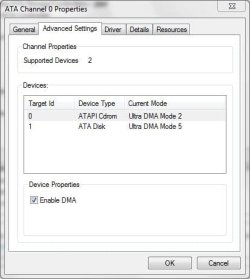
Its in the properties for the ATA Channels.

Under Device Manager, Right-click on the SATA controllers it doesn't show anything about what you mentioned.
 

My Computer My Computer

At a glance

Windows 7 x64Core i7 3770K @ 4.5Ghz4x4 Corsair Vengence 1600Sepphire HD 6970
Computer type
PC/Desktop
OS
Windows 7 x64
CPU
Core i7 3770K @ 4.5Ghz
Motherboard
Asus P8Z77-V-Deluxe
Memory
4x4 Corsair Vengence 1600
Graphics Card(s)
Sepphire HD 6970
Hard Drives
Intel 520 SSD 240GB
PSU
Thermaltake 750W
Case
Antec P2
Cooling
Corsair H100i
Keyboard
Razer blackwidow 2012
Mouse
Roccat Kone XTD
Antivirus
Bitdefender
Browser
Chrome
Right click aqnd select Properties. Click on the Advanced Settings tab. It should look something like this:

ATACH0Prop.jpg
 

My Computer My Computer

At a glance

Windows 10 Pro X64Intel Quad Core i7-4770 @ 3.4Ghz16.0GB PC3-12800 DDR3 SDRAM 1600 MHzIntel Integrated HD Graphics
Computer type
PC/Desktop
Computer Manufacturer/Model Number
Lenovo IdeaCenter 450
OS
Windows 10 Pro X64
CPU
Intel Quad Core i7-4770 @ 3.4Ghz
Memory
16.0GB PC3-12800 DDR3 SDRAM 1600 MHz
Graphics Card(s)
Intel Integrated HD Graphics
Sound Card
Realtek HD Audio
Monitor(s) Displays
HP 22" LCD
Screen Resolution
1680 x 1050
Hard Drives
250GB Samsung EVO SATA-3 SSD
2TB Seagate ST2000DM001 SATA-2
1.5TB Seagate ST3150041AS SATA
Keyboard
Dell USB
Mouse
Lenovo USB
Internet Speed
Cable via Road Runner 3MB Upload, 30MB Download
Antivirus
Windows Defender, MBAM Pro, MBAE
Browser
Seamonkey
Other Info
UEFI/GPT
PLDS DVD-RW DH16AERSH

My Computer My Computer

At a glance

Windows 7 x64Core i7 3770K @ 4.5Ghz4x4 Corsair Vengence 1600Sepphire HD 6970
Computer type
PC/Desktop
OS
Windows 7 x64
CPU
Core i7 3770K @ 4.5Ghz
Motherboard
Asus P8Z77-V-Deluxe
Memory
4x4 Corsair Vengence 1600
Graphics Card(s)
Sepphire HD 6970
Hard Drives
Intel 520 SSD 240GB
PSU
Thermaltake 750W
Case
Antec P2
Cooling
Corsair H100i
Keyboard
Razer blackwidow 2012
Mouse
Roccat Kone XTD
Antivirus
Bitdefender
Browser
Chrome

My Computer My Computer

At a glance

Windows 7Core i7 920 D0Corsair Dominator 1600Geforce GTX 275
OS
Windows 7
CPU
Core i7 920 D0
Motherboard
Rampage II Gene
Memory
Corsair Dominator 1600
Graphics Card(s)
Geforce GTX 275
Sound Card
Auzentech Prelude
Monitor(s) Displays
BenQ G2400WD
Screen Resolution
1920x1200
Hard Drives
WD AAKS 500GB
WD 1TB
Seagate 160GB
PSU
Corsair HX620
Case
NZXT Rogue
Cooling
TRUE Copper
Keyboard
Logitech G15
Internet Speed
Anywhere from 2.5 to 3.5mb

My Computer My Computer

At a glance

Windows 7 x64Core i7 3770K @ 4.5Ghz4x4 Corsair Vengence 1600Sepphire HD 6970
Computer type
PC/Desktop
OS
Windows 7 x64
CPU
Core i7 3770K @ 4.5Ghz
Motherboard
Asus P8Z77-V-Deluxe
Memory
4x4 Corsair Vengence 1600
Graphics Card(s)
Sepphire HD 6970
Hard Drives
Intel 520 SSD 240GB
PSU
Thermaltake 750W
Case
Antec P2
Cooling
Corsair H100i
Keyboard
Razer blackwidow 2012
Mouse
Roccat Kone XTD
Antivirus
Bitdefender
Browser
Chrome
until it can be determined as to what is causing the slowness, its a suspect, and issues like this will require removing any application which uses a disk filter driver.
 

My Computer My Computer

At a glance

Windows 7Core i7 920 D0Corsair Dominator 1600Geforce GTX 275
OS
Windows 7
CPU
Core i7 920 D0
Motherboard
Rampage II Gene
Memory
Corsair Dominator 1600
Graphics Card(s)
Geforce GTX 275
Sound Card
Auzentech Prelude
Monitor(s) Displays
BenQ G2400WD
Screen Resolution
1920x1200
Hard Drives
WD AAKS 500GB
WD 1TB
Seagate 160GB
PSU
Corsair HX620
Case
NZXT Rogue
Cooling
TRUE Copper
Keyboard
Logitech G15
Internet Speed
Anywhere from 2.5 to 3.5mb
until it can be determined as to what is causing the slowness, its a suspect, and issues like this will require removing any application which uses a disk filter driver.

Ok. I disabled NOD32 real time protection and also disabled with ccleaner it's registry value when it automatically loads. I've installed microsoft anti-virus. The HDD is still working extra time.

image 1 is few seconds after boot without NOD32:


Image 2 is about 1 minute after image 1:


What I don't understand is why some photoshop elements are being read by the system on boot. I have nothing of photoshop on boot.
 

My Computer My Computer

At a glance

Windows 7 x64Core i7 3770K @ 4.5Ghz4x4 Corsair Vengence 1600Sepphire HD 6970
Computer type
PC/Desktop
OS
Windows 7 x64
CPU
Core i7 3770K @ 4.5Ghz
Motherboard
Asus P8Z77-V-Deluxe
Memory
4x4 Corsair Vengence 1600
Graphics Card(s)
Sepphire HD 6970
Hard Drives
Intel 520 SSD 240GB
PSU
Thermaltake 750W
Case
Antec P2
Cooling
Corsair H100i
Keyboard
Razer blackwidow 2012
Mouse
Roccat Kone XTD
Antivirus
Bitdefender
Browser
Chrome
disabling the realtime protection does not remove the Nod32 NPNP Filter.
 

My Computer My Computer

At a glance

Windows 7Core i7 920 D0Corsair Dominator 1600Geforce GTX 275
OS
Windows 7
CPU
Core i7 920 D0
Motherboard
Rampage II Gene
Memory
Corsair Dominator 1600
Graphics Card(s)
Geforce GTX 275
Sound Card
Auzentech Prelude
Monitor(s) Displays
BenQ G2400WD
Screen Resolution
1920x1200
Hard Drives
WD AAKS 500GB
WD 1TB
Seagate 160GB
PSU
Corsair HX620
Case
NZXT Rogue
Cooling
TRUE Copper
Keyboard
Logitech G15
Internet Speed
Anywhere from 2.5 to 3.5mb

My Computer My Computer

At a glance

Windows 7 x64Core i7 3770K @ 4.5Ghz4x4 Corsair Vengence 1600Sepphire HD 6970
Computer type
PC/Desktop
OS
Windows 7 x64
CPU
Core i7 3770K @ 4.5Ghz
Motherboard
Asus P8Z77-V-Deluxe
Memory
4x4 Corsair Vengence 1600
Graphics Card(s)
Sepphire HD 6970
Hard Drives
Intel 520 SSD 240GB
PSU
Thermaltake 750W
Case
Antec P2
Cooling
Corsair H100i
Keyboard
Razer blackwidow 2012
Mouse
Roccat Kone XTD
Antivirus
Bitdefender
Browser
Chrome
Ok, get sysinternals Process Monitor and drop a shortcut to it into the startup folder.

you'll wanna watch the processes that Read and Write until the activity slows normalises.
 

My Computer My Computer

At a glance

Windows 7Core i7 920 D0Corsair Dominator 1600Geforce GTX 275
OS
Windows 7
CPU
Core i7 920 D0
Motherboard
Rampage II Gene
Memory
Corsair Dominator 1600
Graphics Card(s)
Geforce GTX 275
Sound Card
Auzentech Prelude
Monitor(s) Displays
BenQ G2400WD
Screen Resolution
1920x1200
Hard Drives
WD AAKS 500GB
WD 1TB
Seagate 160GB
PSU
Corsair HX620
Case
NZXT Rogue
Cooling
TRUE Copper
Keyboard
Logitech G15
Internet Speed
Anywhere from 2.5 to 3.5mb
Ok, get sysinternals Process Monitor and drop a shortcut to it into the startup folder.

you'll wanna watch the processes that Read and Write until the activity slows normalises.

you mean press Ctrl+Shift+Esc and then resource monitor and watch the hard disk activity?
 

My Computer My Computer

At a glance

Windows 7 x64Core i7 3770K @ 4.5Ghz4x4 Corsair Vengence 1600Sepphire HD 6970
Computer type
PC/Desktop
OS
Windows 7 x64
CPU
Core i7 3770K @ 4.5Ghz
Motherboard
Asus P8Z77-V-Deluxe
Memory
4x4 Corsair Vengence 1600
Graphics Card(s)
Sepphire HD 6970
Hard Drives
Intel 520 SSD 240GB
PSU
Thermaltake 750W
Case
Antec P2
Cooling
Corsair H100i
Keyboard
Razer blackwidow 2012
Mouse
Roccat Kone XTD
Antivirus
Bitdefender
Browser
Chrome

My Computer My Computer

At a glance

Windows 7Core i7 920 D0Corsair Dominator 1600Geforce GTX 275
OS
Windows 7
CPU
Core i7 920 D0
Motherboard
Rampage II Gene
Memory
Corsair Dominator 1600
Graphics Card(s)
Geforce GTX 275
Sound Card
Auzentech Prelude
Monitor(s) Displays
BenQ G2400WD
Screen Resolution
1920x1200
Hard Drives
WD AAKS 500GB
WD 1TB
Seagate 160GB
PSU
Corsair HX620
Case
NZXT Rogue
Cooling
TRUE Copper
Keyboard
Logitech G15
Internet Speed
Anywhere from 2.5 to 3.5mb
Back
Top