Win7codecs

Thanks for the info - all is well & newest versions installed :thumbsup:
 

My Computer My Computer

At a glance

Windows 8.1 Professional x64Intel Core i7-3930K 3.2 gHz Hex-Core (Turbo B...8GB Corsair Vengeance DDR3-1600MHz 8-8-8-24EVGA Superclocked GeForce GTX-580 1536MB
Computer type
PC/Desktop
Computer Manufacturer/Model Number
CyberPower PC / Custom Intel X79 PC
OS
Windows 8.1 Professional x64
CPU
Intel Core i7-3930K 3.2 gHz Hex-Core (Turbo Boost 3.8 gHz)
Motherboard
ASUS P9X79 Pro (BIOS rev 4801)
Memory
8GB Corsair Vengeance DDR3-1600MHz 8-8-8-24
Graphics Card(s)
EVGA Superclocked GeForce GTX-580 1536MB
Sound Card
On-board 7.1 Realtek ALC898 HD Audio
Monitor(s) Displays
ASUS 27" 1080p MT276E
Screen Resolution
1920 x 1080
Hard Drives
Intel Cherryville 520 SSD 120GB (Main drive for OS)
WD Caviar Black 1TB 7200RPM 64MB Cache SATA 6
WD Caviar Blue 1TB 7200RPM 64MB Cache SATA 6
PSU
Corsair Professional Series AX850 80+ Gold
Case
Corsair Carbide 400R
Cooling
Corsair Hydro Series H60 / 9 x 120mm Thunderblade case fans
Keyboard
Microsoft Wireless Keyboard 3000 v2
Mouse
Microsoft Wireless Mouse 5000 - BlueTrack
Internet Speed
TWC Road Runner 30 Mbps
Antivirus
MS Security Essentials / Malwarebytes
Browser
IE 11
Other Info
LG Black 12X SATA BD-RW
Sony Optiarc Black 24X SATA DVD Burner
Logitech Web Cam Pro 9000
Panasonic 5.1 Surround System
Epson XP-310 Color Printer
Xbox One Controller
Xbox 360 PC Controller
If so, I'm curious about any general x86 settings I might want to adjust based on our talks back and forth.

suggested deviations from a default installation for x86...

Help TAB, associate filetypes
SWAP TAB, Disable the DMO video codecs
SWAP TAB, choose ffdshow for xvid etc.
SWAP TAB, disable the Microsoft Audio decoder (unless you use LiveTV, then leave it alone)
H264 TAB, select the divx codec
Audio TAB, match your hardware
Config TAB, lower boxes, match your hardware

None of this is set as defaults because most new users coming to the shark codecs like the idea that i do not deviate from the Microsoft settings by default. These are the same users that do not fully investigate the possibilities my interface offers and then can't understand why things still arent workin well.

Once you do have a working setup with 99% of your media playback as you wish it, PLEASE use the provided 'save settings' feature of the Misc TAB. Since I force uninstalls and do not allow upgrades, using the restore feature after a re-install will have you set back up in the wink of an eye.

Just installed the latest codecs with suggested settings and my LiveTV in WMC x64 wouldn't work until I unchecked "Disable DMO codecs".

Some FLV's don't have thumbnails, either, but I'm not really sure what that's attributed to.
 

My Computer My Computer

At a glance

XP / Win7 x64 ProIntel Quad-Core Q9450 @ 3.2GHz2x2GB GSkill DDR2NVIDIA GeForce 8600 GTS (EVGA)
OS
XP / Win7 x64 Pro
CPU
Intel Quad-Core Q9450 @ 3.2GHz
Motherboard
Asus P5-E
Memory
2x2GB GSkill DDR2
Graphics Card(s)
NVIDIA GeForce 8600 GTS (EVGA)
Monitor(s) Displays
Dell 2408WFP
Screen Resolution
1920x1200
Hey Shark,
I am having a problem accessing the settings application to uninstall and update.

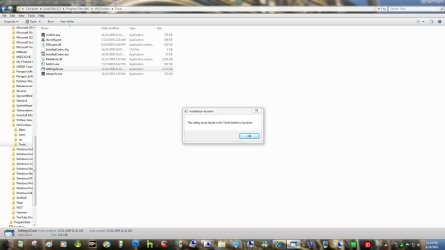
I'm being told that the utility must reside in the tools folder to function, As you can see from the screenshot below it is in the tools folder. obviously something has gotten corrupted somewhere, I was hoping you could shed some light on what I can do to fix this.
Thanks,
Derek
 

Attachments

  • shark.jpg
    shark.jpg
    107.9 KB · Views: 49

My Computer My Computer

At a glance

Win 10 Pro x64Intel I5-2500K @3.3GHz16GB G.Skill Ripjaws X (4x4GB)EVGA GeForce 750 Ti SC 2GB
Computer type
PC/Desktop
Computer Manufacturer/Model Number
Self Built
OS
Win 10 Pro x64
CPU
Intel I5-2500K @3.3GHz
Motherboard
Asrock P67 Extreme4
Memory
16GB G.Skill Ripjaws X (4x4GB)
Graphics Card(s)
EVGA GeForce 750 Ti SC 2GB
Sound Card
ASUS Xonar DG 5.1 Channels 24-bit 96KHz PCI Interface Sound
Monitor(s) Displays
auria eq2367
Screen Resolution
1920 x 1080
Hard Drives
250GB Samsung 850 EVO SSD
1TB WD Blue
1TB Hitachi
PSU
SeaSonic X 650W 80 Plus Gold
Case
Corsair Obsidian 750D
Cooling
Corsair H60, Three 140mm case fans
Keyboard
Logitech Wireless Keyboard K520
Mouse
Logitech Wireless Mouse M310
Internet Speed
Wave Broadband ~ 100 dn 5 up
Antivirus
Windows Defender, Malwarebytes Premium
Browser
Edge, IE11, Chrome
Other Info
Laptop specs: HP g7-1365dx /
CPU: AMD A6-3420M APU with Radeon(tm) HD Graphics /
RAM: Crucial 8Gb (2x4Gb) /
SSD: Crucial M4-CT128M4SSD2 ATA Device/ FW 000F /
GFX: AMD Radeon HD 6520G /
OS: Windows 10 Pro x64
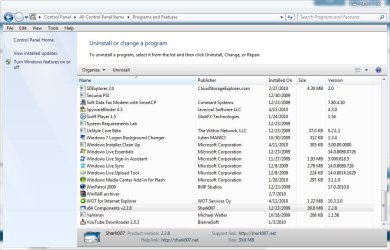
This situation is most likely caused by your use of a registry cleaner. From Control Panel | Programs and Features ... choose to Repair the Win7codecs. Now you will be able to open the settings application and uninstall from the button on the Help TAB.
 

My Computer My Computer

At a glance

Windows 7 Ultimate 64biti7 2600k16GB (4x4) corsair vengeanceIntel HD3000 iGPU / AMD HD6870 1024MB
Computer Manufacturer/Model Number
Selfbuilt
OS
Windows 7 Ultimate 64bit
CPU
i7 2600k
Motherboard
asus P8Z68-V LE
Memory
16GB (4x4) corsair vengeance
Graphics Card(s)
Intel HD3000 iGPU / AMD HD6870 1024MB
Sound Card
bitstreamed to an Onkyo 609
Monitor(s) Displays
Asus VE278 27" LED / Bravia EX7 60" LED
Screen Resolution
native 1080p x2
Hard Drives
4x 2TB int. + 2x 2TB external and a SSD for the boot drive.
PSU
650w Antec
Case
NZXT tempest evo
Cooling
air/stock
Keyboard
Dell
Mouse
logitech m505
Internet Speed
dual: cable/blackberry tether for travel use
Other Info
BD re-writer //
asus notebook G73Jw
For some reason it is not there, only the x64 addon.
 

Attachments

  • shark 2.JPG
    shark 2.JPG
    103.5 KB · Views: 33

My Computer My Computer

At a glance

Win 10 Pro x64Intel I5-2500K @3.3GHz16GB G.Skill Ripjaws X (4x4GB)EVGA GeForce 750 Ti SC 2GB
Computer type
PC/Desktop
Computer Manufacturer/Model Number
Self Built
OS
Win 10 Pro x64
CPU
Intel I5-2500K @3.3GHz
Motherboard
Asrock P67 Extreme4
Memory
16GB G.Skill Ripjaws X (4x4GB)
Graphics Card(s)
EVGA GeForce 750 Ti SC 2GB
Sound Card
ASUS Xonar DG 5.1 Channels 24-bit 96KHz PCI Interface Sound
Monitor(s) Displays
auria eq2367
Screen Resolution
1920 x 1080
Hard Drives
250GB Samsung 850 EVO SSD
1TB WD Blue
1TB Hitachi
PSU
SeaSonic X 650W 80 Plus Gold
Case
Corsair Obsidian 750D
Cooling
Corsair H60, Three 140mm case fans
Keyboard
Logitech Wireless Keyboard K520
Mouse
Logitech Wireless Mouse M310
Internet Speed
Wave Broadband ~ 100 dn 5 up
Antivirus
Windows Defender, Malwarebytes Premium
Browser
Edge, IE11, Chrome
Other Info
Laptop specs: HP g7-1365dx /
CPU: AMD A6-3420M APU with Radeon(tm) HD Graphics /
RAM: Crucial 8Gb (2x4Gb) /
SSD: Crucial M4-CT128M4SSD2 ATA Device/ FW 000F /
GFX: AMD Radeon HD 6520G /
OS: Windows 10 Pro x64
That is a very efficient registry cleaner you have. Please trash it sooner rather than later. Go to C:\ProgramData\Win7codecs, enter the newest folder, rightclick the MSI file and choose repair, if it doesnt work, go to the 2nd newest folder and try again.
 

My Computer My Computer

At a glance

Windows 7 Ultimate 64biti7 2600k16GB (4x4) corsair vengeanceIntel HD3000 iGPU / AMD HD6870 1024MB
Computer Manufacturer/Model Number
Selfbuilt
OS
Windows 7 Ultimate 64bit
CPU
i7 2600k
Motherboard
asus P8Z68-V LE
Memory
16GB (4x4) corsair vengeance
Graphics Card(s)
Intel HD3000 iGPU / AMD HD6870 1024MB
Sound Card
bitstreamed to an Onkyo 609
Monitor(s) Displays
Asus VE278 27" LED / Bravia EX7 60" LED
Screen Resolution
native 1080p x2
Hard Drives
4x 2TB int. + 2x 2TB external and a SSD for the boot drive.
PSU
650w Antec
Case
NZXT tempest evo
Cooling
air/stock
Keyboard
Dell
Mouse
logitech m505
Internet Speed
dual: cable/blackberry tether for travel use
Other Info
BD re-writer //
asus notebook G73Jw
That is a very efficient registry cleaner you have. Please trash it sooner rather than later. Go to C:\ProgramData\Win7codecs, enter the newest folder, rightclick the MSI file and choose repair, if it doesnt work, go to the 2nd newest folder and try again.

It must be cause I don't even have an msi file there just 2 ini entries.

I've got a couple images I can fall back on I'll try those and If that don't work, Well it's getting about time for a clean install. Lesson learned.:o
I appreciate your help,
Derek
 

My Computer My Computer

At a glance

Win 10 Pro x64Intel I5-2500K @3.3GHz16GB G.Skill Ripjaws X (4x4GB)EVGA GeForce 750 Ti SC 2GB
Computer type
PC/Desktop
Computer Manufacturer/Model Number
Self Built
OS
Win 10 Pro x64
CPU
Intel I5-2500K @3.3GHz
Motherboard
Asrock P67 Extreme4
Memory
16GB G.Skill Ripjaws X (4x4GB)
Graphics Card(s)
EVGA GeForce 750 Ti SC 2GB
Sound Card
ASUS Xonar DG 5.1 Channels 24-bit 96KHz PCI Interface Sound
Monitor(s) Displays
auria eq2367
Screen Resolution
1920 x 1080
Hard Drives
250GB Samsung 850 EVO SSD
1TB WD Blue
1TB Hitachi
PSU
SeaSonic X 650W 80 Plus Gold
Case
Corsair Obsidian 750D
Cooling
Corsair H60, Three 140mm case fans
Keyboard
Logitech Wireless Keyboard K520
Mouse
Logitech Wireless Mouse M310
Internet Speed
Wave Broadband ~ 100 dn 5 up
Antivirus
Windows Defender, Malwarebytes Premium
Browser
Edge, IE11, Chrome
Other Info
Laptop specs: HP g7-1365dx /
CPU: AMD A6-3420M APU with Radeon(tm) HD Graphics /
RAM: Crucial 8Gb (2x4Gb) /
SSD: Crucial M4-CT128M4SSD2 ATA Device/ FW 000F /
GFX: AMD Radeon HD 6520G /
OS: Windows 10 Pro x64
Next time you feel your system is in need of a cleaning, open it up, grab a vaccum and clean the dust out. At least this cleaning will have a real advantage.

Your last hope for recovery from the 'cleaning' you thought your system needed, is to use the same version installer to repair the installation. If you browse to the Tools folder, you can check the version of Settings32.exe for the version number then search google for thar version installer. replace the x's with the correct version. Win7codecs_vXXX.exe
 

My Computer My Computer

At a glance

Windows 7 Ultimate 64biti7 2600k16GB (4x4) corsair vengeanceIntel HD3000 iGPU / AMD HD6870 1024MB
Computer Manufacturer/Model Number
Selfbuilt
OS
Windows 7 Ultimate 64bit
CPU
i7 2600k
Motherboard
asus P8Z68-V LE
Memory
16GB (4x4) corsair vengeance
Graphics Card(s)
Intel HD3000 iGPU / AMD HD6870 1024MB
Sound Card
bitstreamed to an Onkyo 609
Monitor(s) Displays
Asus VE278 27" LED / Bravia EX7 60" LED
Screen Resolution
native 1080p x2
Hard Drives
4x 2TB int. + 2x 2TB external and a SSD for the boot drive.
PSU
650w Antec
Case
NZXT tempest evo
Cooling
air/stock
Keyboard
Dell
Mouse
logitech m505
Internet Speed
dual: cable/blackberry tether for travel use
Other Info
BD re-writer //
asus notebook G73Jw
Next time you feel your system is in need of a cleaning, open it up, grab a vaccum and clean the dust out. At least this cleaning will have a real advantage.
heh every now and then (after uninstalling/removing software) i use registry cleaning app and it doesn't mess up K-Lite codec pack.
 

My Computer My Computer

At a glance

Windows 7 Professional x64 SP1AMD Phenom II X6 1100T BE12GB (Kingston 4GB & 8GB DDR3 1333MHz Kits)MSI GeForce N560GTX-Ti Twin Frozr II
OS
Windows 7 Professional x64 SP1
CPU
AMD Phenom II X6 1100T BE
Motherboard
ASUS M5A99X EVO
Memory
12GB (Kingston 4GB & 8GB DDR3 1333MHz Kits)
Graphics Card(s)
MSI GeForce N560GTX-Ti Twin Frozr II
Sound Card
ALC892, SB Audigy ES
Monitor(s) Displays
ViewSonic 24"
Screen Resolution
1920x1080
Hard Drives
OCZ Vertex 3 240GB SATA III, Seagate Barracuda 500GB SATA II, Seagate Barracuda Green 2TB SATA III, Seagate Barracuda LP 2TB SATA II
PSU
Corsair Professional Series Gold AX850
Case
Cooler Master HAF 932
Cooling
Zalman CNPS10X Performa, CM 230mm, Titan 140mm PWM
Keyboard
Logitech Illuminated
Mouse
Logitech G400 on SteelSeries 4HD
Other Info
M-Audio Oxygen 25, Xbox 360 Wired Controller
Bad reg. cleaner you have there.:D
I'm using them for 5 years without any problems of that sort.
 

My Computer My Computer

At a glance

Windows 7 SP1 x64Intel E8400 3.0 GHz4x1 Trascend DDR2 800 MhzGainward 8800GT 512 Mb
Computer type
PC/Desktop
Computer Manufacturer/Model Number
Custom
OS
Windows 7 SP1 x64
CPU
Intel E8400 3.0 GHz
Motherboard
Gigabyte EP45-DS3R
Memory
4x1 Trascend DDR2 800 Mhz
Graphics Card(s)
Gainward 8800GT 512 Mb
Sound Card
Realtek HD Audio 889A
Monitor(s) Displays
LG L204WS
Screen Resolution
1680x1050
Hard Drives
Intel 520 Series 120Gb SSD (System)
Western Digital 6400AAKS 640Gb (Data)
PSU
Cooler Master 650W
Case
Cooler Master Centurion 532
Cooling
2x 12 cm fans
Keyboard
Logitech Wave
Mouse
Logitech G5
Internet Speed
10 Mbit Cable Flat
Antivirus
NOD32 Smart Security
Browser
Google Chrome
Recently, windows Explorer has started crashing randomly in a video/picture folder with the "COM surrogate not responding" error, naming libmplayer.dll. as the culprit.

Any idea what this could be? I'm using just the suggested settings on both the x64 and x32 controls.
 

My Computer My Computer

At a glance

XP / Win7 x64 ProIntel Quad-Core Q9450 @ 3.2GHz2x2GB GSkill DDR2NVIDIA GeForce 8600 GTS (EVGA)
OS
XP / Win7 x64 Pro
CPU
Intel Quad-Core Q9450 @ 3.2GHz
Motherboard
Asus P5-E
Memory
2x2GB GSkill DDR2
Graphics Card(s)
NVIDIA GeForce 8600 GTS (EVGA)
Monitor(s) Displays
Dell 2408WFP
Screen Resolution
1920x1200
Recently, windows Explorer has started crashing randomly in a video/picture folder with the "COM surrogate not responding" error, naming libmplayer.dll. as the culprit.

Any idea what this could be? I'm using just the suggested settings on both the x64 and x32 controls.

libmplayer.dll is part of FFDshow.
I would guess it is trying to thumbnail a video when it occurs.

Open the x64 app and on the Misc TAB, disable FFDshow. Does this action cure the crash?
 

My Computer My Computer

At a glance

Windows 7 Ultimate 64biti7 2600k16GB (4x4) corsair vengeanceIntel HD3000 iGPU / AMD HD6870 1024MB
Computer Manufacturer/Model Number
Selfbuilt
OS
Windows 7 Ultimate 64bit
CPU
i7 2600k
Motherboard
asus P8Z68-V LE
Memory
16GB (4x4) corsair vengeance
Graphics Card(s)
Intel HD3000 iGPU / AMD HD6870 1024MB
Sound Card
bitstreamed to an Onkyo 609
Monitor(s) Displays
Asus VE278 27" LED / Bravia EX7 60" LED
Screen Resolution
native 1080p x2
Hard Drives
4x 2TB int. + 2x 2TB external and a SSD for the boot drive.
PSU
650w Antec
Case
NZXT tempest evo
Cooling
air/stock
Keyboard
Dell
Mouse
logitech m505
Internet Speed
dual: cable/blackberry tether for travel use
Other Info
BD re-writer //
asus notebook G73Jw
ALAC?

It appears that ALAC support is missing from this codec pack. Any plans to add it?
Thanks,
RA
 

My Computer My Computer

At a glance

Windows 7, Vista, Ubuntu
OS
Windows 7, Vista, Ubuntu
It appears that ALAC support is missing from this codec pack. Any plans to add it?
Thanks,
RA

ALAC within M4A files is supported (not drm protected files)
see the Audio TAB - bottom checkbox on the right. 32bit playback support only.

If the ALAC audio is in a MOV container you will need to install QT-Lite.
 

My Computer My Computer

At a glance

Windows 7 Ultimate 64biti7 2600k16GB (4x4) corsair vengeanceIntel HD3000 iGPU / AMD HD6870 1024MB
Computer Manufacturer/Model Number
Selfbuilt
OS
Windows 7 Ultimate 64bit
CPU
i7 2600k
Motherboard
asus P8Z68-V LE
Memory
16GB (4x4) corsair vengeance
Graphics Card(s)
Intel HD3000 iGPU / AMD HD6870 1024MB
Sound Card
bitstreamed to an Onkyo 609
Monitor(s) Displays
Asus VE278 27" LED / Bravia EX7 60" LED
Screen Resolution
native 1080p x2
Hard Drives
4x 2TB int. + 2x 2TB external and a SSD for the boot drive.
PSU
650w Antec
Case
NZXT tempest evo
Cooling
air/stock
Keyboard
Dell
Mouse
logitech m505
Internet Speed
dual: cable/blackberry tether for travel use
Other Info
BD re-writer //
asus notebook G73Jw
Recently, windows Explorer has started crashing randomly in a video/picture folder with the "COM surrogate not responding" error, naming libmplayer.dll. as the culprit.

Any idea what this could be? I'm using just the suggested settings on both the x64 and x32 controls.

libmplayer.dll is part of FFDshow.
I would guess it is trying to thumbnail a video when it occurs.

Open the x64 app and on the Misc TAB, disable FFDshow. Does this action cure the crash?

I believe you are correct in that it's trying to thumbnail when it occurs. I will disable FFDShow (any adverse effects of this?), delete the thumbnail cache, and have it rebuild them.

On something possibly related, when I first start up my WMC x64 and go to LiveTV, it gives me an error message that "files are missing that are needed to play LiveTV". I can either go back to the main start page and then back into LiveTV and it works, or I can restart the app and it works. I'm not sure what's going on there either, but I suppose it could be FFDshow related as well since it seems to be using that when I play LiveTV (FFDshow icons in the system tray).
 

My Computer My Computer

At a glance

XP / Win7 x64 ProIntel Quad-Core Q9450 @ 3.2GHz2x2GB GSkill DDR2NVIDIA GeForce 8600 GTS (EVGA)
OS
XP / Win7 x64 Pro
CPU
Intel Quad-Core Q9450 @ 3.2GHz
Motherboard
Asus P5-E
Memory
2x2GB GSkill DDR2
Graphics Card(s)
NVIDIA GeForce 8600 GTS (EVGA)
Monitor(s) Displays
Dell 2408WFP
Screen Resolution
1920x1200
It appears that ALAC support is missing from this codec pack. Any plans to add it?
Thanks,
RA

ALAC within M4A files is supported (not drm protected files)
see the Audio TAB - bottom checkbox on the right. 32bit playback support only.

If the ALAC audio is in a MOV container you will need to install QT-Lite.

This sounds awesome! Since my ALAC's are just my CD's ripped by iTunes in Apple Lossless would they be wrapped in an MOV container? I had never heard that term before.
Thanks,
RA
 

My Computer My Computer

At a glance

Windows 7, Vista, Ubuntu
OS
Windows 7, Vista, Ubuntu
It appears that ALAC support is missing from this codec pack. Any plans to add it?
Thanks,
RA

ALAC within M4A files is supported (not drm protected files)
see the Audio TAB - bottom checkbox on the right. 32bit playback support only.

If the ALAC audio is in a MOV container you will need to install QT-Lite.

Shark,
Thanks so much!!! Your codec pack is magic... Finally I can use WMP (if I want to). Install was easy and setup perfect. Thanks for your efforts putting this together.
Rich
 

My Computer My Computer

At a glance

Windows 7, Vista, Ubuntu
OS
Windows 7, Vista, Ubuntu
Recently, windows Explorer has started crashing randomly in a video/picture folder with the "COM surrogate not responding" error, naming libmplayer.dll. as the culprit.

Any idea what this could be? I'm using just the suggested settings on both the x64 and x32 controls.

libmplayer.dll is part of FFDshow.
I would guess it is trying to thumbnail a video when it occurs.

Open the x64 app and on the Misc TAB, disable FFDshow. Does this action cure the crash?

I believe you are correct in that it's trying to thumbnail when it occurs. I will disable FFDShow (any adverse effects of this?), delete the thumbnail cache, and have it rebuild them.

On something possibly related, when I first start up my WMC x64 and go to LiveTV, it gives me an error message that "files are missing that are needed to play LiveTV". I can either go back to the main start page and then back into LiveTV and it works, or I can restart the app and it works. I'm not sure what's going on there either, but I suppose it could be FFDshow related as well since it seems to be using that when I play LiveTV (FFDshow icons in the system tray).

I just did a fresh install with the latest codecs and WMC crashes upon launching livetv with the "ffdshow.ax" component being considered the problem. I disabled ffdshow as described above in the Misc tab on the x64 settings and now I get a decoder error every time I try to play livetv in WMC. So, then I unchecked suggested settings, then re-checked it again to back to where I was and get a video error that files needed to play video are missing or not installed.
 

My Computer My Computer

At a glance

XP / Win7 x64 ProIntel Quad-Core Q9450 @ 3.2GHz2x2GB GSkill DDR2NVIDIA GeForce 8600 GTS (EVGA)
OS
XP / Win7 x64 Pro
CPU
Intel Quad-Core Q9450 @ 3.2GHz
Motherboard
Asus P5-E
Memory
2x2GB GSkill DDR2
Graphics Card(s)
NVIDIA GeForce 8600 GTS (EVGA)
Monitor(s) Displays
Dell 2408WFP
Screen Resolution
1920x1200
The suggested settings are known to break digital LiveTV. If using the suggested settings and LiveTV is broken, go to the swap tab and de-select Items under the 'The HACKS below MAY break LiveTV' - Most likely the Microsoft Audio decoder is needed.
 

My Computer My Computer

At a glance

Windows 7 Ultimate 64biti7 2600k16GB (4x4) corsair vengeanceIntel HD3000 iGPU / AMD HD6870 1024MB
Computer Manufacturer/Model Number
Selfbuilt
OS
Windows 7 Ultimate 64bit
CPU
i7 2600k
Motherboard
asus P8Z68-V LE
Memory
16GB (4x4) corsair vengeance
Graphics Card(s)
Intel HD3000 iGPU / AMD HD6870 1024MB
Sound Card
bitstreamed to an Onkyo 609
Monitor(s) Displays
Asus VE278 27" LED / Bravia EX7 60" LED
Screen Resolution
native 1080p x2
Hard Drives
4x 2TB int. + 2x 2TB external and a SSD for the boot drive.
PSU
650w Antec
Case
NZXT tempest evo
Cooling
air/stock
Keyboard
Dell
Mouse
logitech m505
Internet Speed
dual: cable/blackberry tether for travel use
Other Info
BD re-writer //
asus notebook G73Jw
I undid all suggested on the x64 in the meantime, but will go back and do those.
 

My Computer My Computer

At a glance

XP / Win7 x64 ProIntel Quad-Core Q9450 @ 3.2GHz2x2GB GSkill DDR2NVIDIA GeForce 8600 GTS (EVGA)
OS
XP / Win7 x64 Pro
CPU
Intel Quad-Core Q9450 @ 3.2GHz
Motherboard
Asus P5-E
Memory
2x2GB GSkill DDR2
Graphics Card(s)
NVIDIA GeForce 8600 GTS (EVGA)
Monitor(s) Displays
Dell 2408WFP
Screen Resolution
1920x1200
Back
Top