Log On Screen - Change

How to Change Log On Screen Background in Windows 7


   Information
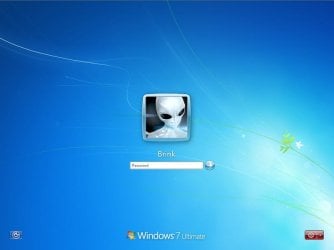
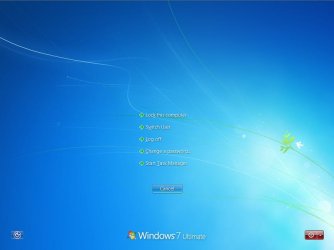
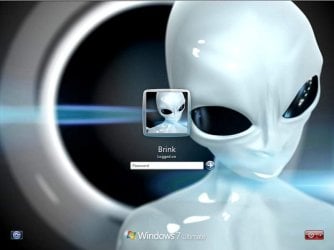
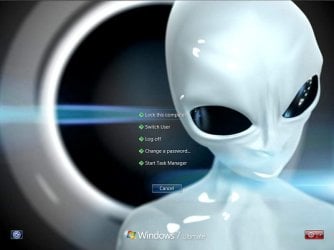
This will show you how to change the default Windows 7 log on screen background to a custom image of your choice. The log on screen consists of the Welcome, Ctrl+Alt+Del, Shutdown, Lock Computer, Switch User, Log On, and Log Off screens.
   Tip
If you need or want the default Windows 7 log on screen background image, then you can click on the Download button below to get it. It is normally located at C:\Windows\System32\oobe\background.bmp by default in Windows 7. While this is the looks like the log on screen background image, it is not the location to change the log on screen background image of.
Download


   Warning
The custom image that you use must be a .jpg image less than 256 KB in size, or this will not work.

EXAMPLE: Default Log On and Ctrl+Alt+Del screensLog_On_Screen.jpg

CTRL_ALT_DEL_Screen.jpg


EXAMPLE: Custom Log On and Ctrl+Alt+Del screensCustom_Log_On_Screen.jpg

Custom_CTRL_ALT_DEL_Screen.jpg


OPTION ONE

Using the "Windows 7 Logon Background Changer" Program


NOTE: This will let you easily change the default Windows 7 log on screen automatically with a stand-alone exe program called by our member Julien (aka: link8583). You can use OPTION FOUR below to restore the default Windows 7 log on screen, or just select the image using this program.1. If you have not already, download the latest version of Windows 7 Logon Background Changer.

2. Extract (drag and drop) the Win7LogonBackgroundChanger folder to your desktop, and run the Win7LogonBackgroundChanger.exe file in it.
NOTE: This is only a standalone EXE file, and does not install on your computer.

3. Click on Run in the Open File - Security Warning dialog box.

   Tip
If you click on the Settings button, you could click on the Prevent other users from changing the background option to prevent standard users from being able to run this program to change the log on screen until the next time you change it. This option will give them a UAC prompt for them to have to type in an administrator's password before being able to run the program.
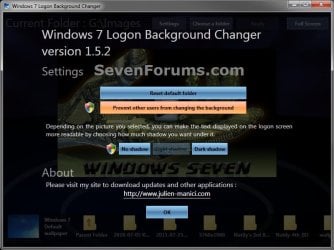
Settings.jpg


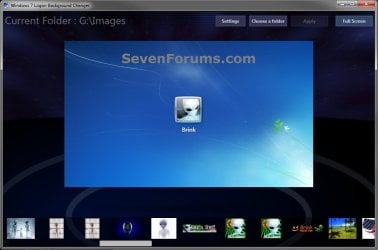
4. Click on the Choose a folder button at the top. (see screenshot below)Logon-Main.jpg

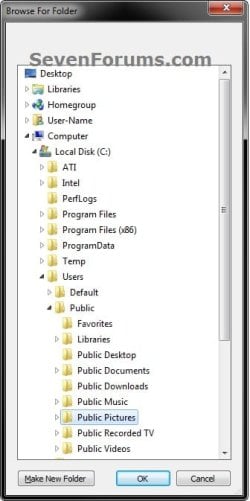
5. Navigate to and select the folder that contains the image you want to use for your log on screen background, and click on OK. (see screenshot below)Select.jpg

6. Select the image you want to use in the bottom row to have it displayed in the main window of the program, then click on the Apply button at the top. (see screenshot below step 4)
NOTE: You can click on the arrows boxed in red below to scroll through the available images. If you select an image that is over 256KB in size, it will automatically be reduced in size to be below 256KB.

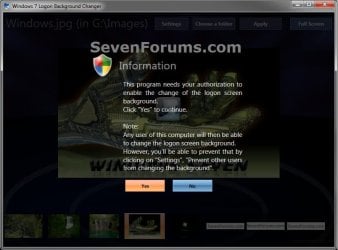
7. If prompted, click on Yes to apply. (see screenshot below)Change-Confirm.jpg

A) If prompted by UAC, then click on Yes.

8. When it's finished, your log on screen has now been changed. You can press Ctrl+Alt+Del to test it. Click on Cancel to return to the desktop.

9. When finished, you can close the Windows 7 Logon Background Changer program.
WARNING: It is important to wait until the program has completely finished creating the images and applying the background before closing the program or testing it.

10. Depending on how light or dark your background image is, you may want to change the log on screen text shadow to make it look better as well.


OPTION TWO

Using the "Tweaks.com Logon Changer for Windows 7" Program


NOTE: This will let you easily change and restore the default Windows 7 log on screen automatically with another stand-alone exe program. 1. If you have not already, download the latest version of the Tweaks.com Logon Changer for Windows 7 program, and save it to your desktop.

2. Open the downloaded tweakslogon.zip file, extract (drag and drop) the TweaksLogon.exe file to your desktop, and run the program.

3. Click on Run in the Open File - Security Warning dialog box.

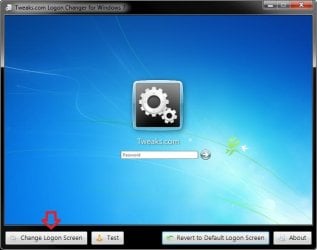
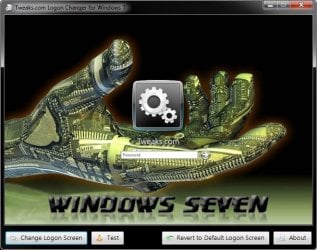
4. To Change the Log On Screen in Windows 7A) Click on the Change Logon Screen button. (see screenshot below)Tweaks-1.jpg

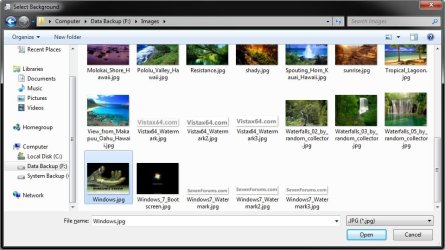
B) Navigate to and select the JPG image that you want to have as the new log on screen background, then click on Open. (see screenshot below)Tweaks-2.jpg

   Note
If the selected image is to large, then click on OK after clicking on Open to have it automatically resized for you.

Note.jpg


C) Go to step 6.

5. To Restore the Default Log On Screen in Windows 7
NOTE: I find that this step doesn't work to well in this program. If you find the same, then you can use OPTION FOUR below to restore the default Windows 7 log on screen. A) Click on the Restore to Default Logon Screen button. (see screenshot below)Tweaks-4.jpg


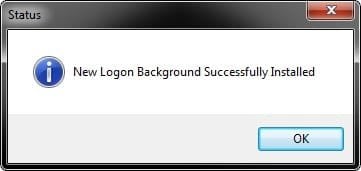
6. Click on OK. The log on screen has now been changed. (see screenshot below)Tweaks-3.jpg

7. If you would like, click on the Test button to see how the new logon screen looks in case you change your mind and wish to change it again.
NOTE: This will take you to the Lock screen. You can log on again to your user account to be right back where you were without anything being closed.

8. When finished, close the program.


OPTION THREE

To Manually Change the Log On Screen in Windows 7


NOTE: This was discovered by Rafael Rivera at Within Windows. You should also visit his website for more detailed information on this.1. Unhide file type extensions.

2. Click on the Download button to download the file below.Use_Custom_Log_On_Screen.reg


Download


3. Save the .reg file to the desktop.

4. Right click on the extracted .reg file and click on Merge.

5. Click on Run, Yes (UAC), Yes, and OK when prompted.

6. Save the custom .jpg image you want to use to the desktop with the name backgroundDefault.jpg.
WARNING: The custom image that you use must be a .jpg image less than 256 KB in size, or this will not work.

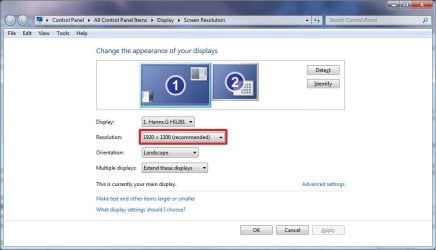
7. Check to see what your primary display screen resolution is. (See screenshot below)
NOTE: For example, mine is 1920 x 1280.Screen_Resolution.jpg

8. Open Paint, and click on the File icon (top left corner), Open, and navigate to and select the .jpg image from step 6.
NOTE: You can open Paint by typing mspaint.exe in the Start menu search line and pressing enter.

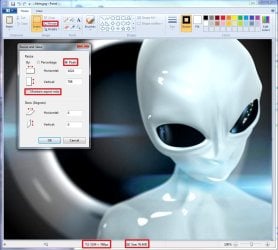
9. In Paint, click on Resize, dot Pixels, uncheck Maintain aspect ratio, then resize the .jpg image to the screen resolution size in step 7. (See screenshot below)Paint.jpg

10. In Paint, click on the File icon (top left corner), Save as, then save the new .jpg file to the desktop with the exact file name below with the screen resolution size of the image.
NOTE: For example, since by screen resolution is 1920 x 1280, I will resize the image to this size and save it with the name background1920×1200.jpg.
   Warning
The custom image that you use must be a .jpg image less than 256 KB in size, or this will not work. The backgroundDefault.jpg (step 6) image will be Streched to Fit and used by default if Windows 7 cannot find or use the correct screen resolution image file created in this step. These are the only sizes supported by the log on screen.
  • background768×1280.jpg
  • background960×1280.jpg
  • background900×1440.jpg
  • background1024×768.jpg
  • background1024×1280.jpg
  • background1280×768.jpg
  • background1280×960.jpg
  • background1280×1024.jpg
  • background1360×768.jpg
  • background1440×900.jpg
  • background1600×1200.jpg
  • background1920×1200.jpg


11. When done, close Paint.

12. In Windows Explorer, navigate to
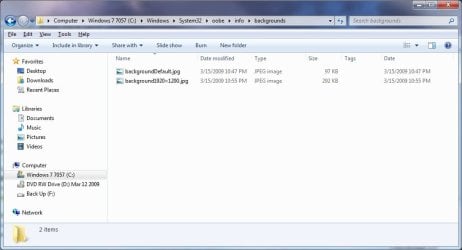
C:\Windows\System32\oobe\info\backgrounds. (See screenshot below step 13)
NOTE: If you do not have any of these folders (ex: info and backgrounds usually), then create a new folder for the missing folder and rename it to the missing folder's name. If you are prompted by UAC when creating and renaming the folders, just click on Yes to approve.

13. Copy and Paste the .jpg files from step 10, and from step 6 into the C:\Windows\system32\oobe\info\backgrounds folder, then close the window. (See screenshot below)backgrounds_Folder.jpg

14. You're logon screen is now changed. You can press Ctrl+Alt+Del to test it. Click on Cancel to return to the desktop.
NOTE: You can now delete the .reg and .zip files on the desktop if you like.

15. You can now hide the file extensions again if you like.

16. Depending on how light or dark your background image is, you may want to change the log on screen text shadow to make it look better as well.


OPTION FOUR

To Restore the Default Log On Screen


NOTE: This will restore the default Windows 7 log on screen if it was changed from either OPTION ONE, OPTION TWO, or OPTION THREE above.1. Click on the Download button to download the file below.Use_Default_Log_On_Screen.reg


Download


2. Save, and the .reg file to the desktop.

3. Right click on the extracted .reg file and click on Merge.

4. Click on Run, Yes (UAC), Yes, and OK when prompted.

5. You're logon screen is now changed back to the default one. You can press Ctrl+Alt+Del to test it. Click on Cancel to return to the desktop.
NOTE: You can now delete the downloaded .reg and .zip files if you like.

That's it,
Shawn


Attachments

Last edited:
I can also confirm this works, you could try using the Background wallpapers I uploaded to see if they work, I just put it in the windows directory and used Shawns Reg fix and it worked perfectly.


Log on Backgroud.zip
 

My Computer

Computer Manufacturer/Model Number
Home Brew
OS
Windows 7 Ultimate Vista Ultimate x64
CPU
Core 2 Duo E8500 3.16Ghz @ 3.8Ghz
Motherboard
eVGA 750i FTW
Memory
2x2Gigs Patriot PC2-6400 LL
Graphics Card(s)
Inno3D GeForce GTX260 216 SP
Monitor(s) Displays
ASUS VW222U 22" 2ms Response time
Screen Resolution
1680x1050
Hard Drives
SATA 150GB
SATA II 250GB
USB IDE 750GB Ext.
PSU
HYTEC 600W & Thermaltake 650W Toughpower Power Exp
Case
Thermaltake Armor LCS (Liquid Cooling System)
Cooling
Liquid Cooling System
Keyboard
Logitech G15 Gaming Keyboard
Mouse
Logitech G9 Gaming Mouse
Thanks Grim. I will try them. Meanwhile I went into windows old in explorer and grabed the screens I had used in my 7068 install. Stuck them into my backgrounds folder and it worked just fine. I must have done something wrong when I resized. Anyway I will try yours too. lm
 

My Computer

Computer Manufacturer/Model Number
Gateway GT5692
OS
Windows 7 Ulti. x64
CPU
AMD Phenom 8450 triple-core 2.10 ghz
Memory
4GB
Graphics Card(s)
ATI Radion HD 3200
Monitor(s) Displays
Gateway FPD1775W
Screen Resolution
1280x720
Hard Drives
465.6613 Gibibytes
I can also confirm this works, you could try using the Background wallpapers I uploaded to see if they work, I just put it in the windows directory and used Shawns Reg fix and it worked perfectly.


Log on Backgroud.zip

Thanks Mr Grim
I dropped them into my bacgrounds folder and bang....it works. Must be something I have done when re-sizing my pic. I guess I need to go back and size them all the same as yours and see what happens.
Cheers
Andy
 

My Computer

Computer Manufacturer/Model Number
Home Build
OS
Windows 7 RTM Ultimate - Activated (Technet)
CPU
Athlon 4800+
Motherboard
Gigabyte M56S-S3
Memory
2 gig
Graphics Card(s)
ATI Radeon 2400+
Sound Card
On board
Monitor(s) Displays
Samsung 22" LCD
Screen Resolution
1680 x 1050
Hard Drives
WD 250 gig Sata
PSU
550 w
Case
Antec LS100
Keyboard
Logitech MX5000 BT
Mouse
Logitech MX 5000 BT
Internet Speed
ADSL 2+
Not only does it work in the 7057 on up the 7077 it also worked for the 7000 build with a manual entry made in the registry as well as creating the two sub folders.
 

My Computers

System One System Two

  • Computer type
    PC/Desktop
    Computer Manufacturer/Model Number
    Custom builds = 2
    OS
    W7 Ultimate x64/W10 Pro x64/W11 Pro Triple Boot - Main PC W7 Remote PC Micro ATX W7 Pro x64/W11 Pro
    CPU
    AMD Phenom II X4 975 Deneb 3.6ghz - 965 2nd remote pc
    Motherboard
    Gigabyte GA-790XTA-UD4-Gigabyte GA-880GM-D2H remote pc
    Memory
    Kingston Hyper X DDR3 1600 1.5v 16gb - Hyper X Fury 8gb 2nd
    Graphics Card(s)
    MSI HD Radeon 5750 1gb - MSI HD Radeon 6450 on mini tower
    Sound Card
    Creative Labs X-Fi Xtreme Audio P - Realtek onooard 2nd case
    Monitor(s) Displays
    ASUS VW199T-P 19" HP 2082a Main-HP 2082a 20" remote pc
    Screen Resolution
    Asus 1440x900 - HP 1600x900
    Hard Drives
    WD Black 1TB HD per OS W7, W10, and pending W11 presently on 500gb OS Drive - Pending Triple 1TB HDs for Spanned Storage/backup volume
    Single 2TB external USB enclosure, single 1TB System 7 Host/Boot drive, Pending 8TB external HD for system image b
    PSU
    Corsair 750TX - primary / Corsair CX600 - second
    Case
    Antec 900-2 - SSD compatible / NZXT Vulcan mini tower
    Cooling
    Zalman CNPS9900A
    Keyboard
    AZIO L70 Backlit Letters Gaming - ONN Cordless/USB
    Mouse
    MSI DS200 Programmable, Logitech Cordless
    Internet Speed
    30mbps upgrade - primary hard wired - mini tower usb WiFi
    Antivirus
    GFI VIPRE Internet Security 2014 on W7 2016 beta on W10,
    Browser
    Cyberfox, WaterFox 64bit FF variants, FireFox x64, Pale Moon
    Other Info
    Accomdata fan cooled usb 2.0 PIDE/Sata II, III external enclosure.
    Sambient usb/eSata PATA/Sata II, III external enclosure.
  • Computer type
    PC/Desktop
    System Manufacturer/Model Number
    CUSTOM ASSEMBLY
    OS
    W7 Pro x64/W11 Pro
    CPU
    AMD Deneb 3.6ghz - 965
    Motherboard
    Gigabyte GA-880GM-D2H remote pc
    Memory
    Kingston Hyper X Fury 8gb
    Graphics Card(s)
    MSI HD Radeon 6450 DVI Output
    Sound Card
    Realtek onooard Creative or Other separate PENDING
    Monitor(s) Displays
    VIZIO 32" LCD TV Separate LCD Pending
    Screen Resolution
    1600x1080
    Hard Drives
    WD 500GB OS Host/Boot WD Green 1TB Storage/Backup
    PSU
    Corsair 600W - THERMALTAKE 600W spare case
    Case
    NZXT Vulcan mini tower
    Cooling
    Twin 120mm Top Fans - 240mm Side Cover
    Keyboard
    ONN Cordless/USB Logitech Cordless
    Mouse
    ONN USB/Cordless - Logitech Cordless
    Internet Speed
    DSL 5G
    Browser
    MS Edge, FireFox, WaterFox x64, FireFox Nightly
    Other Info
    OS Testing-Remote Access to Main TeamViewer
OK....when comparing my file names against the ones from Mr Grim I can see that the x is different so I am not sure what I am doing wrong there.....
No doubt it will be simple but it is eluding me for the moment. Anyone want to help me with a Doh.....experience...lol
 

My Computer

Computer Manufacturer/Model Number
Home Build
OS
Windows 7 RTM Ultimate - Activated (Technet)
CPU
Athlon 4800+
Motherboard
Gigabyte M56S-S3
Memory
2 gig
Graphics Card(s)
ATI Radeon 2400+
Sound Card
On board
Monitor(s) Displays
Samsung 22" LCD
Screen Resolution
1680 x 1050
Hard Drives
WD 250 gig Sata
PSU
550 w
Case
Antec LS100
Keyboard
Logitech MX5000 BT
Mouse
Logitech MX 5000 BT
Internet Speed
ADSL 2+
Not only does it work in the 7057 on up the 7077 it also worked for the 7000 build with a manual entry made in the registry as well as creating the two sub folders.
I read back in this thread and found the path in the reg that was on another web site. All that needs to be done is to make 7000 reg look like 7077 and then create the two missing folders and I can have whatever I want on 7000. Nice! I will give that a try. Thanks Night Hawk
 

My Computer

Computer Manufacturer/Model Number
Gateway GT5692
OS
Windows 7 Ulti. x64
CPU
AMD Phenom 8450 triple-core 2.10 ghz
Memory
4GB
Graphics Card(s)
ATI Radion HD 3200
Monitor(s) Displays
Gateway FPD1775W
Screen Resolution
1280x720
Hard Drives
465.6613 Gibibytes
OK....when comparing my file names against the ones from Mr Grim I can see that the x is different so I am not sure what I am doing wrong there.....
No doubt it will be simple but it is eluding me for the moment. Anyone want to help me with a Doh.....experience...lol

Not to worry....I gave myself the Doh....experience. I just used copy and past for the filenames from the Tutorial and dadah.....I have my own log-on screen...
 

Attachments

  • background1600x1200.jpg
    background1600x1200.jpg
    81.3 KB · Views: 1,334

My Computer

Computer Manufacturer/Model Number
Home Build
OS
Windows 7 RTM Ultimate - Activated (Technet)
CPU
Athlon 4800+
Motherboard
Gigabyte M56S-S3
Memory
2 gig
Graphics Card(s)
ATI Radeon 2400+
Sound Card
On board
Monitor(s) Displays
Samsung 22" LCD
Screen Resolution
1680 x 1050
Hard Drives
WD 250 gig Sata
PSU
550 w
Case
Antec LS100
Keyboard
Logitech MX5000 BT
Mouse
Logitech MX 5000 BT
Internet Speed
ADSL 2+
My that works good Night Hawk. Thanks Now have new logon screen on 7000x64
 

My Computer

Computer Manufacturer/Model Number
Gateway GT5692
OS
Windows 7 Ulti. x64
CPU
AMD Phenom 8450 triple-core 2.10 ghz
Memory
4GB
Graphics Card(s)
ATI Radion HD 3200
Monitor(s) Displays
Gateway FPD1775W
Screen Resolution
1280x720
Hard Drives
465.6613 Gibibytes
For a look at what you need for the new entry in the 7000 build I grabbed an image of that when first going to try it out.


The one thing I found when using paint on the first attempts was seeing the image pushed into one corner leaving 3/4ths of the rest blank white. The simple copy + paste into the new sub folder had later proven to be the best way to place one there or replace the existing by an overwrite.

You simply have to follow the size rule to see that one done however. Most of the wall papers and other screen captures in jpg files are less then 200kb in size accomidating that option.
 

My Computers

System One System Two

  • Computer type
    PC/Desktop
    Computer Manufacturer/Model Number
    Custom builds = 2
    OS
    W7 Ultimate x64/W10 Pro x64/W11 Pro Triple Boot - Main PC W7 Remote PC Micro ATX W7 Pro x64/W11 Pro
    CPU
    AMD Phenom II X4 975 Deneb 3.6ghz - 965 2nd remote pc
    Motherboard
    Gigabyte GA-790XTA-UD4-Gigabyte GA-880GM-D2H remote pc
    Memory
    Kingston Hyper X DDR3 1600 1.5v 16gb - Hyper X Fury 8gb 2nd
    Graphics Card(s)
    MSI HD Radeon 5750 1gb - MSI HD Radeon 6450 on mini tower
    Sound Card
    Creative Labs X-Fi Xtreme Audio P - Realtek onooard 2nd case
    Monitor(s) Displays
    ASUS VW199T-P 19" HP 2082a Main-HP 2082a 20" remote pc
    Screen Resolution
    Asus 1440x900 - HP 1600x900
    Hard Drives
    WD Black 1TB HD per OS W7, W10, and pending W11 presently on 500gb OS Drive - Pending Triple 1TB HDs for Spanned Storage/backup volume
    Single 2TB external USB enclosure, single 1TB System 7 Host/Boot drive, Pending 8TB external HD for system image b
    PSU
    Corsair 750TX - primary / Corsair CX600 - second
    Case
    Antec 900-2 - SSD compatible / NZXT Vulcan mini tower
    Cooling
    Zalman CNPS9900A
    Keyboard
    AZIO L70 Backlit Letters Gaming - ONN Cordless/USB
    Mouse
    MSI DS200 Programmable, Logitech Cordless
    Internet Speed
    30mbps upgrade - primary hard wired - mini tower usb WiFi
    Antivirus
    GFI VIPRE Internet Security 2014 on W7 2016 beta on W10,
    Browser
    Cyberfox, WaterFox 64bit FF variants, FireFox x64, Pale Moon
    Other Info
    Accomdata fan cooled usb 2.0 PIDE/Sata II, III external enclosure.
    Sambient usb/eSata PATA/Sata II, III external enclosure.
  • Computer type
    PC/Desktop
    System Manufacturer/Model Number
    CUSTOM ASSEMBLY
    OS
    W7 Pro x64/W11 Pro
    CPU
    AMD Deneb 3.6ghz - 965
    Motherboard
    Gigabyte GA-880GM-D2H remote pc
    Memory
    Kingston Hyper X Fury 8gb
    Graphics Card(s)
    MSI HD Radeon 6450 DVI Output
    Sound Card
    Realtek onooard Creative or Other separate PENDING
    Monitor(s) Displays
    VIZIO 32" LCD TV Separate LCD Pending
    Screen Resolution
    1600x1080
    Hard Drives
    WD 500GB OS Host/Boot WD Green 1TB Storage/Backup
    PSU
    Corsair 600W - THERMALTAKE 600W spare case
    Case
    NZXT Vulcan mini tower
    Cooling
    Twin 120mm Top Fans - 240mm Side Cover
    Keyboard
    ONN Cordless/USB Logitech Cordless
    Mouse
    ONN USB/Cordless - Logitech Cordless
    Internet Speed
    DSL 5G
    Browser
    MS Edge, FireFox, WaterFox x64, FireFox Nightly
    Other Info
    OS Testing-Remote Access to Main TeamViewer
it worked perfect thanks but i did want to take a screenshot and upload it to show my results,but i dont know how in windows7?
in xp i would hit print screen key on my keyboard fire up paint and ctrl+v and then save the image,but stumped in windows7.lol
 

My Computer

OS
windows7 7100 x64
CPU
amd athlon 64 3500+
Motherboard
asus a8n sli deluxe
Memory
2gb
Graphics Card(s)
nvidia 7800gt
Screen Resolution
1280x1024

My Computer

Computer Manufacturer/Model Number
* BFK Customs *
OS
W 7 64-bit Ultimate
CPU
Intel Q9550 Yorkfield
Motherboard
ASUS P5Q Pro
Memory
8GB Dominator 8500C5D
Graphics Card(s)
ATI : XFX 5870
Sound Card
Realtek HD Audio 7-1
Monitor(s) Displays
1x 47" LCD HDMI & 3x 26" LCD HDMI
Screen Resolution
1920x1080P & 1920x1200
Hard Drives
1x 80GB Intel X25-M G2 SSD : 1x 500GB & 1x 640GB WD Caviar Black(s)
PSU
Corsair 620HX
Case
Cooler Master RC-690
Cooling
Tuniq Tower 120, 2x 140mm and 3x 120mm case fans
Keyboard
Microsoft 500
Mouse
Razer Diamondback 3G
Internet Speed
14 Mb/s
Other Info
1x Koutech 3Gb/s SATA HDD Hot Swap Rack
thanks for that but how do i use the snipping tool while at my logon screen it must be possible as ive seen a few screens of peoples logon?
the print screen and ctrl+v works when im logged onto windows 7 but not while im at the logon screen,so i need to know how to access the snipping tool while at my logon.
oh and thanks again for your help.
 

My Computer

OS
windows7 7100 x64
CPU
amd athlon 64 3500+
Motherboard
asus a8n sli deluxe
Memory
2gb
Graphics Card(s)
nvidia 7800gt
Screen Resolution
1280x1024

My Computer

Computer Manufacturer/Model Number
* BFK Customs *
OS
W 7 64-bit Ultimate
CPU
Intel Q9550 Yorkfield
Motherboard
ASUS P5Q Pro
Memory
8GB Dominator 8500C5D
Graphics Card(s)
ATI : XFX 5870
Sound Card
Realtek HD Audio 7-1
Monitor(s) Displays
1x 47" LCD HDMI & 3x 26" LCD HDMI
Screen Resolution
1920x1080P & 1920x1200
Hard Drives
1x 80GB Intel X25-M G2 SSD : 1x 500GB & 1x 640GB WD Caviar Black(s)
PSU
Corsair 620HX
Case
Cooler Master RC-690
Cooling
Tuniq Tower 120, 2x 140mm and 3x 120mm case fans
Keyboard
Microsoft 500
Mouse
Razer Diamondback 3G
Internet Speed
14 Mb/s
Other Info
1x Koutech 3Gb/s SATA HDD Hot Swap Rack
Hello Murphy, and welcome to Seven Forums.

It's the same way in Windows 7 to. You can also just upload the background image itself to. :)

However, the Log on screenshots or images should be posted here instead to keep this thread on topic though. ;)
 
Last edited:

My Computer

Computer type
PC/Desktop
Computer Manufacturer/Model Number
Self built custom
OS
64-bit Windows 11 Pro for Workstations
CPU
Intel i7-8700K OC'd to 5 GHz
Motherboard
ASUS ROG Maximus XI Formula Z390
Memory
64 GB (4x16GB) G.SKILL TridentZ RGB DDR4 3600 MHz
Graphics Card(s)
ASUS ROG-STRIX-GTX1080TI-O11G-GAMING
Sound Card
Integrated
Monitor(s) Displays
2 x Samsung Odyssey G7 27"
Screen Resolution
2560x1440
Hard Drives
1TB Samsung 990 PRO M.2,
4TB Samsung 990 PRO PRO M.2,
TerraMaster F8 SSD Plus NAS
PSU
Seasonic Prime Titanium 850W
Case
Thermaltake Core P3
Cooling
Corsair Hydro H115i
Keyboard
Logitech wireless K800
Mouse
Logitech MX Master 4
Internet Speed
2 Gb/s Download and 100 Mb/s Upload
Antivirus
Malwarebyte Anti-Malware Premium
Browser
Google Chrome
Other Info
Logitech Z625 speaker system,
Logitech BRIO 4K Pro webcam,
HP Color LaserJet Pro MFP M477fdn,
APC SMART-UPS RT 1000 XL - SURT1000XLI,
Galaxy S23 Plus phone
The bulk of the screens here show how and where to see things done like the sub folders that are needed as well as the manual method for seeing the new registry value added in. What Brink is pointing out there is this is a tutorial not a general discussion type thread in the customization section where you can post personal results and show any other changes made later.
 

My Computers

System One System Two

  • Computer type
    PC/Desktop
    Computer Manufacturer/Model Number
    Custom builds = 2
    OS
    W7 Ultimate x64/W10 Pro x64/W11 Pro Triple Boot - Main PC W7 Remote PC Micro ATX W7 Pro x64/W11 Pro
    CPU
    AMD Phenom II X4 975 Deneb 3.6ghz - 965 2nd remote pc
    Motherboard
    Gigabyte GA-790XTA-UD4-Gigabyte GA-880GM-D2H remote pc
    Memory
    Kingston Hyper X DDR3 1600 1.5v 16gb - Hyper X Fury 8gb 2nd
    Graphics Card(s)
    MSI HD Radeon 5750 1gb - MSI HD Radeon 6450 on mini tower
    Sound Card
    Creative Labs X-Fi Xtreme Audio P - Realtek onooard 2nd case
    Monitor(s) Displays
    ASUS VW199T-P 19" HP 2082a Main-HP 2082a 20" remote pc
    Screen Resolution
    Asus 1440x900 - HP 1600x900
    Hard Drives
    WD Black 1TB HD per OS W7, W10, and pending W11 presently on 500gb OS Drive - Pending Triple 1TB HDs for Spanned Storage/backup volume
    Single 2TB external USB enclosure, single 1TB System 7 Host/Boot drive, Pending 8TB external HD for system image b
    PSU
    Corsair 750TX - primary / Corsair CX600 - second
    Case
    Antec 900-2 - SSD compatible / NZXT Vulcan mini tower
    Cooling
    Zalman CNPS9900A
    Keyboard
    AZIO L70 Backlit Letters Gaming - ONN Cordless/USB
    Mouse
    MSI DS200 Programmable, Logitech Cordless
    Internet Speed
    30mbps upgrade - primary hard wired - mini tower usb WiFi
    Antivirus
    GFI VIPRE Internet Security 2014 on W7 2016 beta on W10,
    Browser
    Cyberfox, WaterFox 64bit FF variants, FireFox x64, Pale Moon
    Other Info
    Accomdata fan cooled usb 2.0 PIDE/Sata II, III external enclosure.
    Sambient usb/eSata PATA/Sata II, III external enclosure.
  • Computer type
    PC/Desktop
    System Manufacturer/Model Number
    CUSTOM ASSEMBLY
    OS
    W7 Pro x64/W11 Pro
    CPU
    AMD Deneb 3.6ghz - 965
    Motherboard
    Gigabyte GA-880GM-D2H remote pc
    Memory
    Kingston Hyper X Fury 8gb
    Graphics Card(s)
    MSI HD Radeon 6450 DVI Output
    Sound Card
    Realtek onooard Creative or Other separate PENDING
    Monitor(s) Displays
    VIZIO 32" LCD TV Separate LCD Pending
    Screen Resolution
    1600x1080
    Hard Drives
    WD 500GB OS Host/Boot WD Green 1TB Storage/Backup
    PSU
    Corsair 600W - THERMALTAKE 600W spare case
    Case
    NZXT Vulcan mini tower
    Cooling
    Twin 120mm Top Fans - 240mm Side Cover
    Keyboard
    ONN Cordless/USB Logitech Cordless
    Mouse
    ONN USB/Cordless - Logitech Cordless
    Internet Speed
    DSL 5G
    Browser
    MS Edge, FireFox, WaterFox x64, FireFox Nightly
    Other Info
    OS Testing-Remote Access to Main TeamViewer
For those that would prefer not to go the manual route (what's the fun in that? You learn better that way... okay, lazy? I can live with that) you can try the Logon Changer on tweaks.com. I've used it on 7057 and 7077 successfully and it autoresized the file and dimensions as necessary.
 

My Computer

Computer Manufacturer/Model Number
Custom Built
OS
Windows 7 Ultimate x64 RC1 (7100), Vista Ultimate x64 SP1
CPU
Intel Core i7 920
Motherboard
EVGA X58 3x SLI
Memory
Corsair Dominator 6GB DDR3 1600 8-8-8-24 T1
Graphics Card(s)
Dual EVGA GTX280 SLI
Sound Card
On board Realtek HD Audio
Monitor(s) Displays
BenQ V2400W 24" LCD Panel
Screen Resolution
1920x1200
Hard Drives
WD Velociraptor 300GB 10k RPM Sata
WD Caviar Black 1TB 7200 RPM Sata
PSU
Corsair 750TX
Case
Antec P182 Gun Metal finish
Cooling
Noctua NH-U12P SE1366
Keyboard
Microsoft Natural Ergo 4000
Mouse
Logitech LX7 Cordless Optical Mouse
Internet Speed
10MB Cable
Hello HKeleher,

True, but I believe that when you change the theme using that one there instead, the log on screen will go back to the default W7 log on screen afterwards. :(
 

My Computer

Computer type
PC/Desktop
Computer Manufacturer/Model Number
Self built custom
OS
64-bit Windows 11 Pro for Workstations
CPU
Intel i7-8700K OC'd to 5 GHz
Motherboard
ASUS ROG Maximus XI Formula Z390
Memory
64 GB (4x16GB) G.SKILL TridentZ RGB DDR4 3600 MHz
Graphics Card(s)
ASUS ROG-STRIX-GTX1080TI-O11G-GAMING
Sound Card
Integrated
Monitor(s) Displays
2 x Samsung Odyssey G7 27"
Screen Resolution
2560x1440
Hard Drives
1TB Samsung 990 PRO M.2,
4TB Samsung 990 PRO PRO M.2,
TerraMaster F8 SSD Plus NAS
PSU
Seasonic Prime Titanium 850W
Case
Thermaltake Core P3
Cooling
Corsair Hydro H115i
Keyboard
Logitech wireless K800
Mouse
Logitech MX Master 4
Internet Speed
2 Gb/s Download and 100 Mb/s Upload
Antivirus
Malwarebyte Anti-Malware Premium
Browser
Google Chrome
Other Info
Logitech Z625 speaker system,
Logitech BRIO 4K Pro webcam,
HP Color LaserJet Pro MFP M477fdn,
APC SMART-UPS RT 1000 XL - SURT1000XLI,
Galaxy S23 Plus phone
I wouldn't even bother with that either after having used StudioLogon for Vista and getting that one. Most of the tweak tools found are intended to make XP look like Vista or simply a Windows mod that works on both.

With the change here you are working with Windows itself and no change of adwares or need to join anything often a gimic to get you to look at something being sold! With the simple reg edit or mod Brink prepared and seeing the two subs created you're all set in no time.
 

My Computers

System One System Two

  • Computer type
    PC/Desktop
    Computer Manufacturer/Model Number
    Custom builds = 2
    OS
    W7 Ultimate x64/W10 Pro x64/W11 Pro Triple Boot - Main PC W7 Remote PC Micro ATX W7 Pro x64/W11 Pro
    CPU
    AMD Phenom II X4 975 Deneb 3.6ghz - 965 2nd remote pc
    Motherboard
    Gigabyte GA-790XTA-UD4-Gigabyte GA-880GM-D2H remote pc
    Memory
    Kingston Hyper X DDR3 1600 1.5v 16gb - Hyper X Fury 8gb 2nd
    Graphics Card(s)
    MSI HD Radeon 5750 1gb - MSI HD Radeon 6450 on mini tower
    Sound Card
    Creative Labs X-Fi Xtreme Audio P - Realtek onooard 2nd case
    Monitor(s) Displays
    ASUS VW199T-P 19" HP 2082a Main-HP 2082a 20" remote pc
    Screen Resolution
    Asus 1440x900 - HP 1600x900
    Hard Drives
    WD Black 1TB HD per OS W7, W10, and pending W11 presently on 500gb OS Drive - Pending Triple 1TB HDs for Spanned Storage/backup volume
    Single 2TB external USB enclosure, single 1TB System 7 Host/Boot drive, Pending 8TB external HD for system image b
    PSU
    Corsair 750TX - primary / Corsair CX600 - second
    Case
    Antec 900-2 - SSD compatible / NZXT Vulcan mini tower
    Cooling
    Zalman CNPS9900A
    Keyboard
    AZIO L70 Backlit Letters Gaming - ONN Cordless/USB
    Mouse
    MSI DS200 Programmable, Logitech Cordless
    Internet Speed
    30mbps upgrade - primary hard wired - mini tower usb WiFi
    Antivirus
    GFI VIPRE Internet Security 2014 on W7 2016 beta on W10,
    Browser
    Cyberfox, WaterFox 64bit FF variants, FireFox x64, Pale Moon
    Other Info
    Accomdata fan cooled usb 2.0 PIDE/Sata II, III external enclosure.
    Sambient usb/eSata PATA/Sata II, III external enclosure.
  • Computer type
    PC/Desktop
    System Manufacturer/Model Number
    CUSTOM ASSEMBLY
    OS
    W7 Pro x64/W11 Pro
    CPU
    AMD Deneb 3.6ghz - 965
    Motherboard
    Gigabyte GA-880GM-D2H remote pc
    Memory
    Kingston Hyper X Fury 8gb
    Graphics Card(s)
    MSI HD Radeon 6450 DVI Output
    Sound Card
    Realtek onooard Creative or Other separate PENDING
    Monitor(s) Displays
    VIZIO 32" LCD TV Separate LCD Pending
    Screen Resolution
    1600x1080
    Hard Drives
    WD 500GB OS Host/Boot WD Green 1TB Storage/Backup
    PSU
    Corsair 600W - THERMALTAKE 600W spare case
    Case
    NZXT Vulcan mini tower
    Cooling
    Twin 120mm Top Fans - 240mm Side Cover
    Keyboard
    ONN Cordless/USB Logitech Cordless
    Mouse
    ONN USB/Cordless - Logitech Cordless
    Internet Speed
    DSL 5G
    Browser
    MS Edge, FireFox, WaterFox x64, FireFox Nightly
    Other Info
    OS Testing-Remote Access to Main TeamViewer
You are correct Brink, I didn't know that. However it's easy to put back (just run the tool again and change it back.) I don't change my themes often... if ever, so it's not a big deal to me but if I did change themes alot this would not be viable and I would prefer a more permanent change. It's possible they will make changes to the app that will make it more permanent, who knows? Only they do I guess, heheh.

And yeah, StudioLogon... I never was a fan.
 

My Computer

Computer Manufacturer/Model Number
Custom Built
OS
Windows 7 Ultimate x64 RC1 (7100), Vista Ultimate x64 SP1
CPU
Intel Core i7 920
Motherboard
EVGA X58 3x SLI
Memory
Corsair Dominator 6GB DDR3 1600 8-8-8-24 T1
Graphics Card(s)
Dual EVGA GTX280 SLI
Sound Card
On board Realtek HD Audio
Monitor(s) Displays
BenQ V2400W 24" LCD Panel
Screen Resolution
1920x1200
Hard Drives
WD Velociraptor 300GB 10k RPM Sata
WD Caviar Black 1TB 7200 RPM Sata
PSU
Corsair 750TX
Case
Antec P182 Gun Metal finish
Cooling
Noctua NH-U12P SE1366
Keyboard
Microsoft Natural Ergo 4000
Mouse
Logitech LX7 Cordless Optical Mouse
Internet Speed
10MB Cable
sorry about the questions.
and i agree this method is best ive had trouble with logon changers before but this worked flawlessly.
 

My Computer

OS
windows7 7100 x64
CPU
amd athlon 64 3500+
Motherboard
asus a8n sli deluxe
Memory
2gb
Graphics Card(s)
nvidia 7800gt
Screen Resolution
1280x1024
Back
Top