Sheilds Up...?

Can i still change these settings without installing software? by going to the routers "default page"?

Frankly, I'd suggest you not install the router's software. Use the HTTP interface where you can get at ALL the settings.
Some routers use a client program (like my Mikrotik). Usually those with administration clients will have only basic configuration presented in it's web interface.

zzz2496

Ahhh... ok. My D-Link is just the opposite. The setup client for it is the "Routers for Dummies" version and the real smarts are on the HTTP port...

See that... you learn something new every day...;)
 

My Computer

Computer Manufacturer/Model Number
Homebrew
OS
XP Pro SP3 X86 / Win7 Pro X86
CPU
Amd 64 x2 4200 (2.4ghz)
Motherboard
Asus M2N-MX SE Plus
Memory
Kingston DDR2 800 2gb
Graphics Card(s)
Nvidia GF-8400
Sound Card
Realtek on Motherboard
Monitor(s) Displays
Acer x-193bw
Screen Resolution
1440 x 900
Hard Drives
Western Digital 500g
PSU
350watt In-Win
Case
In-Win
Cooling
Air
Keyboard
yes
Mouse
yes
Internet Speed
5mpbs
Other Info
Also ASRock ION 330 as HTPC (on XP).
Acer Aspire as GP netbook (on XP).
FWIW:

FWIW.JPG

Stock 7 firewall + router Firewall
 

My Computer

Computer type
PC/Desktop
Computer Manufacturer/Model Number
Systems by SmartEyeball
OS
8 Pro x64
CPU
i7 3770K 4.6GHz
Motherboard
ASUS P8Z77 WS
Memory
16GB G.Skill Trident X 2666mhz
Graphics Card(s)
x2 EVGA 780 Ti Superclocked SLI
Sound Card
SB X-FI Surround 5.1 PRO USB / ATH-AD900 Headphones
Monitor(s) Displays
x3 Dell U2410 / 58" Samsung
Screen Resolution
5760*1200/ 1920*1200
Hard Drives
2x Intel 520 240GB (RAID 0) * 2x WD Caviar Blacks 2TB (RAID 0) * 2TB WD Caviar Black * Sony Optirac DVD
PSU
Silverstone Strider Evolution 1200W
Case
Thermaltake Level 10 GT Snow Edition
Cooling
Noctua NH-D14
Keyboard
Topre Realforce // Ducky Shine MX Black // Filco Ninja TKL
Mouse
Thermaltake Theron (Highly Recommended) + Razer Imperator
Antivirus
MSE
Browser
IE, FF, WaterFox
Other Info
GT Extreme V2 Sim Racing Cockpit + 40" LCD and K/B Mouse stand ▼
Fanatec CSR Elite Wheel + Clubsport V1 Pedals + CSR shifter/7G-H ▼Saitek X52 Pro ▼ TrackIR 5 Pro
Buttkicker v2 Seat Rumbler with Dedicated 5.1 and Sub Woofer attached to frame ▼
=
Bloody Big Grin

My Computer

Computer Manufacturer/Model Number
Self Built
OS
Windows7 Ultimate 64bit
CPU
Intel Core 2 Quad Q6600
Motherboard
Abit IN9-32X-MMAX
Memory
DDR2 Adata 4GB
Graphics Card(s)
Nvidia GeForce GTX 285 1024 and Nvidia GeForce 8800GT 512
Sound Card
Asus Xonar HDAV 1.3
Monitor(s) Displays
Dell 2407WFP and BenQ 2400v and Philips 150v3
Screen Resolution
3840x1200 and 1024x768
Hard Drives
2 WDC 1TB
1 WDC 1.5TB
1 WDC 640GB
1 WDC 320GB
1 Seagate 200GB
PSU
Corsair TX 850W
Case
Cooler Master HAF932
Cooling
Arctic Cooling Freezer Extreme and plenty of fans...
Keyboard
MicrosoftNaturalKeyboard 4000/Apple Alu keyboard/Dinovo mini
Mouse
Logitech G5/MarbleMouseTrackball/PerformanceMX/SpacePilotPRO
Internet Speed
1.5Mbps down/384Kbps up
Other Info
APC SURT 1000XL
Logitech Z-560
Wiimote
Mikrotik Router
Linksys (now Cisco) SD2008 8 port Gigabit switch
Linksys WRT54G (acting as AP)
Apple wireless Aluminium keyboard
Apple Magic Mouse
Xbox360 wired controller
FWIW:

View attachment 69162

Stock 7 firewall + router Firewall

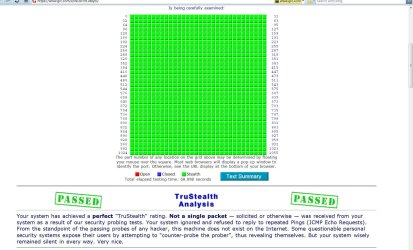
I got all green, "Passed" status just using router's firewall...

zzz2496

TBH completely honest, I've always been a little blasé when it comes to security and out of coincidence, only just bothered enabling my routers firewall today :o

I just disabled the Win firewall and passed all tests as well, so I guess the routers Firewall is good enough.

(I haven't had an infection since XP so that's why even though I have an a/v installed, I don't bother with resident scanners/ real-time scanners etc - famous last arrogant words :p )
 

My Computer

Computer type
PC/Desktop
Computer Manufacturer/Model Number
Systems by SmartEyeball
OS
8 Pro x64
CPU
i7 3770K 4.6GHz
Motherboard
ASUS P8Z77 WS
Memory
16GB G.Skill Trident X 2666mhz
Graphics Card(s)
x2 EVGA 780 Ti Superclocked SLI
Sound Card
SB X-FI Surround 5.1 PRO USB / ATH-AD900 Headphones
Monitor(s) Displays
x3 Dell U2410 / 58" Samsung
Screen Resolution
5760*1200/ 1920*1200
Hard Drives
2x Intel 520 240GB (RAID 0) * 2x WD Caviar Blacks 2TB (RAID 0) * 2TB WD Caviar Black * Sony Optirac DVD
PSU
Silverstone Strider Evolution 1200W
Case
Thermaltake Level 10 GT Snow Edition
Cooling
Noctua NH-D14
Keyboard
Topre Realforce // Ducky Shine MX Black // Filco Ninja TKL
Mouse
Thermaltake Theron (Highly Recommended) + Razer Imperator
Antivirus
MSE
Browser
IE, FF, WaterFox
Other Info
GT Extreme V2 Sim Racing Cockpit + 40" LCD and K/B Mouse stand ▼
Fanatec CSR Elite Wheel + Clubsport V1 Pedals + CSR shifter/7G-H ▼Saitek X52 Pro ▼ TrackIR 5 Pro
Buttkicker v2 Seat Rumbler with Dedicated 5.1 and Sub Woofer attached to frame ▼
=
Bloody Big Grin
Smarteyball, if you ran the test with both the router firewall and Windows firewall running, it just tested the hardware firewall. Nothing got through it as your second test showed. Disable your hardware firewall and run the test using only Windows firewall. Then you will not how secure each is.
 

My Computer

Computer Manufacturer/Model Number
Home built
OS
Windows 7 Ultimate 32 bit
CPU
Intel(R) Pentium(R) 4 CPU 3.00GHz
Motherboard
ASUS P4P800-VM Motherboard Chipset: Intel 865G + ICH5
Memory
2.50 GB RAM
Graphics Card(s)
NVIDIA GeForce 7600 GS
Sound Card
SoundMax Integrated Digital Audio (Chip)
Monitor(s) Displays
ViewSonic VX 1962 wm
Screen Resolution
1680 X 1050
Hard Drives
Seagate Barracuda 7200.10 80 GB
ST380215A ATA Device 18.6 GB
Western Digital "My Book" external hard drive 750 GB
Cooling
Fan based
Keyboard
Microsoft Comfort Curve Keyboard 2000 v10 USB
Mouse
Logitec optic USB
Internet Speed
3.01 Mb/s download 0.64 Mb/s upload
With router firewall disabled + block WAN request enabled + W7 firewall, complete passes on all tests.

Block WAN request disabled = Ping Failure is the only thing it loses on. Passes the stealth.

With router + block WAN + W7 firewall all disabled I still only fail the ping test. All the other ports are still stealthed...

*NB I didn't power cycle my router between tests.

So either I am being shielded by my ISP or it was because the router firewall wasn't 'fully' disabled. Interesting results nevertheless....
 

My Computer

Computer type
PC/Desktop
Computer Manufacturer/Model Number
Systems by SmartEyeball
OS
8 Pro x64
CPU
i7 3770K 4.6GHz
Motherboard
ASUS P8Z77 WS
Memory
16GB G.Skill Trident X 2666mhz
Graphics Card(s)
x2 EVGA 780 Ti Superclocked SLI
Sound Card
SB X-FI Surround 5.1 PRO USB / ATH-AD900 Headphones
Monitor(s) Displays
x3 Dell U2410 / 58" Samsung
Screen Resolution
5760*1200/ 1920*1200
Hard Drives
2x Intel 520 240GB (RAID 0) * 2x WD Caviar Blacks 2TB (RAID 0) * 2TB WD Caviar Black * Sony Optirac DVD
PSU
Silverstone Strider Evolution 1200W
Case
Thermaltake Level 10 GT Snow Edition
Cooling
Noctua NH-D14
Keyboard
Topre Realforce // Ducky Shine MX Black // Filco Ninja TKL
Mouse
Thermaltake Theron (Highly Recommended) + Razer Imperator
Antivirus
MSE
Browser
IE, FF, WaterFox
Other Info
GT Extreme V2 Sim Racing Cockpit + 40" LCD and K/B Mouse stand ▼
Fanatec CSR Elite Wheel + Clubsport V1 Pedals + CSR shifter/7G-H ▼Saitek X52 Pro ▼ TrackIR 5 Pro
Buttkicker v2 Seat Rumbler with Dedicated 5.1 and Sub Woofer attached to frame ▼
=
Bloody Big Grin
Yes, the results are interested. The bottom line is that you know you are secure with the router firewall, which is all you really need.
 

My Computer

Computer Manufacturer/Model Number
Home built
OS
Windows 7 Ultimate 32 bit
CPU
Intel(R) Pentium(R) 4 CPU 3.00GHz
Motherboard
ASUS P4P800-VM Motherboard Chipset: Intel 865G + ICH5
Memory
2.50 GB RAM
Graphics Card(s)
NVIDIA GeForce 7600 GS
Sound Card
SoundMax Integrated Digital Audio (Chip)
Monitor(s) Displays
ViewSonic VX 1962 wm
Screen Resolution
1680 X 1050
Hard Drives
Seagate Barracuda 7200.10 80 GB
ST380215A ATA Device 18.6 GB
Western Digital "My Book" external hard drive 750 GB
Cooling
Fan based
Keyboard
Microsoft Comfort Curve Keyboard 2000 v10 USB
Mouse
Logitec optic USB
Internet Speed
3.01 Mb/s download 0.64 Mb/s upload
Yes, the results are interested. The bottom line is that you know you are secure with the router firewall, which is all you really need.

But the odd thing is that even with zero firewall - software or router, I'm only failing the ping test :confused:

I even tested 3 different browsers in two OS'es ( 7 & Mint) and the results are the same.

I can only summarily concluded that my ISP are stealthing ports at their level :huh:

Not that I'm complaining mind you - I'm just surprised :confused:
 

My Computer

Computer type
PC/Desktop
Computer Manufacturer/Model Number
Systems by SmartEyeball
OS
8 Pro x64
CPU
i7 3770K 4.6GHz
Motherboard
ASUS P8Z77 WS
Memory
16GB G.Skill Trident X 2666mhz
Graphics Card(s)
x2 EVGA 780 Ti Superclocked SLI
Sound Card
SB X-FI Surround 5.1 PRO USB / ATH-AD900 Headphones
Monitor(s) Displays
x3 Dell U2410 / 58" Samsung
Screen Resolution
5760*1200/ 1920*1200
Hard Drives
2x Intel 520 240GB (RAID 0) * 2x WD Caviar Blacks 2TB (RAID 0) * 2TB WD Caviar Black * Sony Optirac DVD
PSU
Silverstone Strider Evolution 1200W
Case
Thermaltake Level 10 GT Snow Edition
Cooling
Noctua NH-D14
Keyboard
Topre Realforce // Ducky Shine MX Black // Filco Ninja TKL
Mouse
Thermaltake Theron (Highly Recommended) + Razer Imperator
Antivirus
MSE
Browser
IE, FF, WaterFox
Other Info
GT Extreme V2 Sim Racing Cockpit + 40" LCD and K/B Mouse stand ▼
Fanatec CSR Elite Wheel + Clubsport V1 Pedals + CSR shifter/7G-H ▼Saitek X52 Pro ▼ TrackIR 5 Pro
Buttkicker v2 Seat Rumbler with Dedicated 5.1 and Sub Woofer attached to frame ▼
=
Bloody Big Grin
That could well be the case or your hardware firewall does not completely inactivate. Either way is pretty darn good.
 

My Computer

Computer Manufacturer/Model Number
Home built
OS
Windows 7 Ultimate 32 bit
CPU
Intel(R) Pentium(R) 4 CPU 3.00GHz
Motherboard
ASUS P4P800-VM Motherboard Chipset: Intel 865G + ICH5
Memory
2.50 GB RAM
Graphics Card(s)
NVIDIA GeForce 7600 GS
Sound Card
SoundMax Integrated Digital Audio (Chip)
Monitor(s) Displays
ViewSonic VX 1962 wm
Screen Resolution
1680 X 1050
Hard Drives
Seagate Barracuda 7200.10 80 GB
ST380215A ATA Device 18.6 GB
Western Digital "My Book" external hard drive 750 GB
Cooling
Fan based
Keyboard
Microsoft Comfort Curve Keyboard 2000 v10 USB
Mouse
Logitec optic USB
Internet Speed
3.01 Mb/s download 0.64 Mb/s upload
FWIW:

View attachment 69162

Stock 7 firewall + router Firewall

stock 7 firewall? where can i download it?

Read this:
http://ask-leo.com/i_cant_pass_a_firewall_test_what_should_i_do.html

Yes, the results are interested. The bottom line is that you know you are secure with the router firewall, which is all you really need.

But the odd thing is that even with zero firewall - software or router, I'm only failing the ping test :confused:

I even tested 3 different browsers in two OS'es ( 7 & Mint) and the results are the same.

I can only summarily concluded that my ISP are stealthing ports at their level :huh:

Not that I'm complaining mind you - I'm just surprised :confused:

Check your router firewall options


this is very important info regarding the shieldsup test:
http://onlinearmorpersonalfirewall.blogspot.com/2008/03/what-is-shields-up-test.html

failed doesn't necessarily means bad in many cases.
 
Last edited:

My Computer

Computer type
PC/Desktop
Computer Manufacturer/Model Number
Custom Build
OS
Microsoft Windows 7 Ultimate 64 bits 7601 Multiprocessor Free Service Pack 1
CPU
Intel(R) Core(TM) i7-3770K CPU @ 3.50GHz
Motherboard
ASUSTeK Computer INC. P8Z68-V PRO GEN3
Memory
8.00 GB
Graphics Card(s)
NVIDIA GeForce GTX 670
Sound Card
Omega Striker
Monitor(s) Displays
Viewsonic vx2250wm
Screen Resolution
1920 x 1080 x 32 bits (4294967296 colors) @ 60 Hz
Hard Drives
V9CPETXT
Seagate 1TB.
PSU
Corsair Gold Series AX850
Case
nvidia 690 advanced II
Cooling
Air

My Computer

Computer Manufacturer/Model Number
Homebrew
OS
XP Pro SP3 X86 / Win7 Pro X86
CPU
Amd 64 x2 4200 (2.4ghz)
Motherboard
Asus M2N-MX SE Plus
Memory
Kingston DDR2 800 2gb
Graphics Card(s)
Nvidia GF-8400
Sound Card
Realtek on Motherboard
Monitor(s) Displays
Acer x-193bw
Screen Resolution
1440 x 900
Hard Drives
Western Digital 500g
PSU
350watt In-Win
Case
In-Win
Cooling
Air
Keyboard
yes
Mouse
yes
Internet Speed
5mpbs
Other Info
Also ASRock ION 330 as HTPC (on XP).
Acer Aspire as GP netbook (on XP).
He did that in his second test and, yes, you are right.
 

My Computer

Computer Manufacturer/Model Number
Home built
OS
Windows 7 Ultimate 32 bit
CPU
Intel(R) Pentium(R) 4 CPU 3.00GHz
Motherboard
ASUS P4P800-VM Motherboard Chipset: Intel 865G + ICH5
Memory
2.50 GB RAM
Graphics Card(s)
NVIDIA GeForce 7600 GS
Sound Card
SoundMax Integrated Digital Audio (Chip)
Monitor(s) Displays
ViewSonic VX 1962 wm
Screen Resolution
1680 X 1050
Hard Drives
Seagate Barracuda 7200.10 80 GB
ST380215A ATA Device 18.6 GB
Western Digital "My Book" external hard drive 750 GB
Cooling
Fan based
Keyboard
Microsoft Comfort Curve Keyboard 2000 v10 USB
Mouse
Logitec optic USB
Internet Speed
3.01 Mb/s download 0.64 Mb/s upload
He did that in his second test and, yes, you are right.

As I saw right after posting the comment...
Hey it's the weekend, nobody's paying me to think...
 

My Computer

Computer Manufacturer/Model Number
Homebrew
OS
XP Pro SP3 X86 / Win7 Pro X86
CPU
Amd 64 x2 4200 (2.4ghz)
Motherboard
Asus M2N-MX SE Plus
Memory
Kingston DDR2 800 2gb
Graphics Card(s)
Nvidia GF-8400
Sound Card
Realtek on Motherboard
Monitor(s) Displays
Acer x-193bw
Screen Resolution
1440 x 900
Hard Drives
Western Digital 500g
PSU
350watt In-Win
Case
In-Win
Cooling
Air
Keyboard
yes
Mouse
yes
Internet Speed
5mpbs
Other Info
Also ASRock ION 330 as HTPC (on XP).
Acer Aspire as GP netbook (on XP).

My Computer

Computer Manufacturer/Model Number
Home built
OS
Windows 7 Ultimate 32 bit
CPU
Intel(R) Pentium(R) 4 CPU 3.00GHz
Motherboard
ASUS P4P800-VM Motherboard Chipset: Intel 865G + ICH5
Memory
2.50 GB RAM
Graphics Card(s)
NVIDIA GeForce 7600 GS
Sound Card
SoundMax Integrated Digital Audio (Chip)
Monitor(s) Displays
ViewSonic VX 1962 wm
Screen Resolution
1680 X 1050
Hard Drives
Seagate Barracuda 7200.10 80 GB
ST380215A ATA Device 18.6 GB
Western Digital "My Book" external hard drive 750 GB
Cooling
Fan based
Keyboard
Microsoft Comfort Curve Keyboard 2000 v10 USB
Mouse
Logitec optic USB
Internet Speed
3.01 Mb/s download 0.64 Mb/s upload
He did that in his second test and, yes, you are right.

As I saw right after posting the comment...
Hey it's the weekend, nobody's paying me to think...

LOL Exactly! :D

We get paid to think on forums? Whom do I send the bill to? ;)

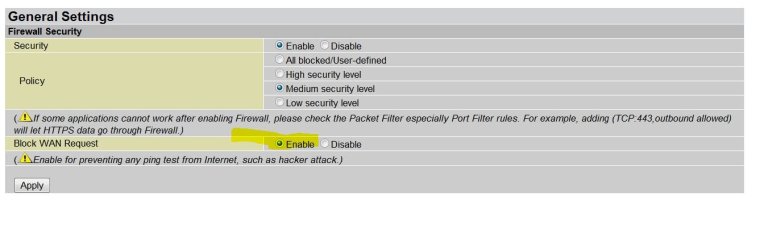
As for the aberrant results, I'm still unsure of whether the router itself retains some settings after a power cycle (not a full reset) or if it's ISP level intervention.

As it stands, the only difference between 100% success and Ping Failure is enabling the Block WAN request on my router:

nopingforyou.JPG

With Sevens firewall, mint's firewall and the routers firewall all turned off - I'm still stealthed, even though by rights, I should be wide open to the world.

The other 'fun' little side effect of all this enabling/disabling firewalls is that one of my µtorrent instances is now completely blocked, even with all it's former working settings back in place. (I have two instances running simultaneously)

One is fine, yet the other claims it's blocked by a disabled Windows Firewall. I do not think my router likes to be turned off... :rolleyes:

Essentially, I'm well off without being 100% sure why :huh:


So, that's inbound covered. Where are the tests for testing outbound connections? ;)
 

My Computer

Computer type
PC/Desktop
Computer Manufacturer/Model Number
Systems by SmartEyeball
OS
8 Pro x64
CPU
i7 3770K 4.6GHz
Motherboard
ASUS P8Z77 WS
Memory
16GB G.Skill Trident X 2666mhz
Graphics Card(s)
x2 EVGA 780 Ti Superclocked SLI
Sound Card
SB X-FI Surround 5.1 PRO USB / ATH-AD900 Headphones
Monitor(s) Displays
x3 Dell U2410 / 58" Samsung
Screen Resolution
5760*1200/ 1920*1200
Hard Drives
2x Intel 520 240GB (RAID 0) * 2x WD Caviar Blacks 2TB (RAID 0) * 2TB WD Caviar Black * Sony Optirac DVD
PSU
Silverstone Strider Evolution 1200W
Case
Thermaltake Level 10 GT Snow Edition
Cooling
Noctua NH-D14
Keyboard
Topre Realforce // Ducky Shine MX Black // Filco Ninja TKL
Mouse
Thermaltake Theron (Highly Recommended) + Razer Imperator
Antivirus
MSE
Browser
IE, FF, WaterFox
Other Info
GT Extreme V2 Sim Racing Cockpit + 40" LCD and K/B Mouse stand ▼
Fanatec CSR Elite Wheel + Clubsport V1 Pedals + CSR shifter/7G-H ▼Saitek X52 Pro ▼ TrackIR 5 Pro
Buttkicker v2 Seat Rumbler with Dedicated 5.1 and Sub Woofer attached to frame ▼
=
Bloody Big Grin
As I saw right after posting the comment...
Hey it's the weekend, nobody's paying me to think...

LOL Exactly! :D

We get paid to think on forums? Whom do I send the bill to? ;)

As for the aberrant results, I'm still unsure of whether the router itself retains some settings after a power cycle (not a full reset) or if it's ISP level intervention.

As it stands, the only difference between 100% success and Ping Failure is enabling the Block WAN request on my router:

View attachment 69197

With Sevens firewall, mint's firewall and the routers firewall all turned off - I'm still stealthed, even though by rights, I should be wide open to the world.

The other 'fun' little side effect of all this enabling/disabling firewalls is that one of my µtorrent instances is now completely blocked, even with all it's former working settings back in place. (I have two instances running simultaneously)

One is fine, yet the other claims it's blocked by a disabled Windows Firewall. I do not think my router likes to be turned off... :rolleyes:

Essentially, I'm well off without being 100% sure why :huh:


So, that's inbound covered. Where are the tests for testing outbound connections? ;)

I use my software firewall to monitor outgoing. :D
 

My Computer

Computer Manufacturer/Model Number
Home built
OS
Windows 7 Ultimate 32 bit
CPU
Intel(R) Pentium(R) 4 CPU 3.00GHz
Motherboard
ASUS P4P800-VM Motherboard Chipset: Intel 865G + ICH5
Memory
2.50 GB RAM
Graphics Card(s)
NVIDIA GeForce 7600 GS
Sound Card
SoundMax Integrated Digital Audio (Chip)
Monitor(s) Displays
ViewSonic VX 1962 wm
Screen Resolution
1680 X 1050
Hard Drives
Seagate Barracuda 7200.10 80 GB
ST380215A ATA Device 18.6 GB
Western Digital "My Book" external hard drive 750 GB
Cooling
Fan based
Keyboard
Microsoft Comfort Curve Keyboard 2000 v10 USB
Mouse
Logitec optic USB
Internet Speed
3.01 Mb/s download 0.64 Mb/s upload
As I saw right after posting the comment...
Hey it's the weekend, nobody's paying me to think...

LOL Exactly! :D

We get paid to think on forums? Whom do I send the bill to? ;)

As for the aberrant results, I'm still unsure of whether the router itself retains some settings after a power cycle (not a full reset) or if it's ISP level intervention.

As it stands, the only difference between 100% success and Ping Failure is enabling the Block WAN request on my router:

View attachment 69197

With Sevens firewall, mint's firewall and the routers firewall all turned off - I'm still stealthed, even though by rights, I should be wide open to the world.

The other 'fun' little side effect of all this enabling/disabling firewalls is that one of my µtorrent instances is now completely blocked, even with all it's former working settings back in place. (I have two instances running simultaneously)

One is fine, yet the other claims it's blocked by a disabled Windows Firewall. I do not think my router likes to be turned off... :rolleyes:

Essentially, I'm well off without being 100% sure why :huh:


So, that's inbound covered. Where are the tests for testing outbound connections? ;)
See, basic "firewall" technique we usually use are called NAT, NAT = Network Address Translation. What does it mean? How does that affect your supposedly naked PC... See, the world see "you" from the internet is only by your public IP address, the IP address your DSL modem/Broadband router (DOCSIS cable connection) got from your ISP. From the internet your "network" looked like one host, because it only see one IP address. Now, how did NAT protects you? It's very simple... NAT, which technically do "translations" and keeps records of what goes where.

Example, you browsed to yahoo.com through firefox - take note, every packet in this example will have number '80' it's "target port" tag (it's the standard listen port on HTTP servers), the "sender port" tag most of the time will be filled with random port number.Ok, let's continue... What happen is, your computer with private IP (let's say 192.168.0.100) contacted your router (192.168.0.1) asking to be routed to "yahoo.com". Let's say your IP public IP address that you got from your ISP is '60.10.10.5'. Now here's where the NAT magic begins - every packet your computer send supposedly to yahoo has destination tag filled with "yahoo.com", these packets are destined to "yahoo.com", but each packet has it's sender tag also, so that when "yahoo.com" got your packet, it knows where to send the reply packets (the website data). Now, the magic process is, every packet that leaves your computer will have it's sender tag filled with '192.168.0.100', this IP address is not route-able, so your router will switch the sender tag IP address with it's PUBLIC IP (60.10.10.5). When the packet leaves your computer, the sender tag is '60.10.10.5', which results when "yahoo.com" replies, the replies will get sent to your router/broadband modem/broadband router (your gateway). Now, when the replies arrived at your gateway, the packets will get dissected once more, changing the sender tag from '60.10.10.5' to '192.168.0.100' so that your computer doesn't confuse or reject the packet. All of this is done for every packets that's coming to and going from your router to each of it's destinations. Now how can this simple mechanism protects you? It's easy... Since your router keeps a list of what your computer(s) requests to what/where/when, it also knows what is NOT requested, see the logic? If say some kid from china has your IP and try to send something to your public IP - which then arrived at your router, the packets will be checked against a list of hosts that you previously asked for, and this Chinese IP address is not one of them... So, by default the packets from the Chinese IP gets dropped off just like that, as if nothing happens. See, this is the basic principal of how NAT works. The rogue packets won't even be able to reach your computer, regardless if your computer has firewall or not.

Now about the PING test. In computer networks there are several protocols, some of them are TCP, UDP, ICMP, BGP, and many more. For data exchange, we usually use TCP or UDP, in my example just now - everything runs on TCP. Now that is for data exchange, computer network also have the "troubleshooting" purposes protocol, that is ICMP. PING is an ICMP message, the "echo". If a host is online, it should reply a PING request (with a PONG). This protocol is working on another level, it doesn't go through the NAT, it only arrives at your router and that's it. To protect you, some routers have the capability to "ignore" these ICMP "echo" messages so that if there's anyone on the net that's trying a PING sweep, your router won't answer - thus the host on your IP address is presumed offline, saving you.

Now, after everything done, you are safe to browse the net, watch youtube, update your status in facebook, read the news, listen to last.fm, and so on... But then you bumped to an issue. As you understand, NAT will drop everything that's not in it's list as if it's a rogue packet. If you play an online game, and you're hosting a session, your computer will "listen" to requests off of the Internet. Now... this is getting frustrating - IF your router doesn't have the list requests and your computer doesn't request anything (it's on "listening" mode), you won't be able to create any game session, your friends won't be able to join your game, because every attempt they make will be dropped by your router. HOLY CRAP !!! But wait, there's a way to "poke a hole" in NAT, it's called "Port Forwarding". In a sense, "Port Forwarding" will forward EVERY packets that arrived at the router that has specific port number in them. When you host a game, usually the game will tell you that it will be using one or more ports (say you're playing CoD:MW2, it uses 1500, 3005, 3101, 27000-27050, 28960 ports). So, to make a hole in your NAT or effectively saying to your router that every packets that are arrived at those ports are to be sent (and translated of course) directly to your PC, you need to make a "Port forwarding rule". Usually in modern routers it has UPnP, it's the magical protocol that will make a hole in your firewall without you making any changes to it (automatically generates a "Port forwarding rule" by it self), sometimes without your consent. In a more conventional router (Cisco business/cloud class routers), usually you need to create your own port forwarding rule, it doesn't have UPnP or UPnP is disabled by default because of security reasons. In some routers it's called "Virtual server". Now, if you're a security concise person, you don't want UPnP running... but on the other hand, it will save your time in configuring port forwarding. I personally disable UPnP because of the security reasons. Imagine you got infected by some new undetected malware botnet client, and it uses UPnP to poke a hole in your firewall and contacted it's master server, the whole NAT firewall technique cannot save you, because the request are made from inside, and what's inside poke a hole to your defense so that what's from outside can go in... That is terrible... But, you know... consumers - they want it easy and secure, which is almost impossible...

Enough ramblings for now, close to 5 AM over here...

zzz2496

P.s: I can no longer hold back... Somethings are need to be straighten out about firewalls :doh:
 

My Computer

Computer Manufacturer/Model Number
Self Built
OS
Windows7 Ultimate 64bit
CPU
Intel Core 2 Quad Q6600
Motherboard
Abit IN9-32X-MMAX
Memory
DDR2 Adata 4GB
Graphics Card(s)
Nvidia GeForce GTX 285 1024 and Nvidia GeForce 8800GT 512
Sound Card
Asus Xonar HDAV 1.3
Monitor(s) Displays
Dell 2407WFP and BenQ 2400v and Philips 150v3
Screen Resolution
3840x1200 and 1024x768
Hard Drives
2 WDC 1TB
1 WDC 1.5TB
1 WDC 640GB
1 WDC 320GB
1 Seagate 200GB
PSU
Corsair TX 850W
Case
Cooler Master HAF932
Cooling
Arctic Cooling Freezer Extreme and plenty of fans...
Keyboard
MicrosoftNaturalKeyboard 4000/Apple Alu keyboard/Dinovo mini
Mouse
Logitech G5/MarbleMouseTrackball/PerformanceMX/SpacePilotPRO
Internet Speed
1.5Mbps down/384Kbps up
Other Info
APC SURT 1000XL
Logitech Z-560
Wiimote
Mikrotik Router
Linksys (now Cisco) SD2008 8 port Gigabit switch
Linksys WRT54G (acting as AP)
Apple wireless Aluminium keyboard
Apple Magic Mouse
Xbox360 wired controller
A very good and informative post. I learned. Thanks.
 

My Computer

Computer Manufacturer/Model Number
Home built
OS
Windows 7 Ultimate 32 bit
CPU
Intel(R) Pentium(R) 4 CPU 3.00GHz
Motherboard
ASUS P4P800-VM Motherboard Chipset: Intel 865G + ICH5
Memory
2.50 GB RAM
Graphics Card(s)
NVIDIA GeForce 7600 GS
Sound Card
SoundMax Integrated Digital Audio (Chip)
Monitor(s) Displays
ViewSonic VX 1962 wm
Screen Resolution
1680 X 1050
Hard Drives
Seagate Barracuda 7200.10 80 GB
ST380215A ATA Device 18.6 GB
Western Digital "My Book" external hard drive 750 GB
Cooling
Fan based
Keyboard
Microsoft Comfort Curve Keyboard 2000 v10 USB
Mouse
Logitec optic USB
Internet Speed
3.01 Mb/s download 0.64 Mb/s upload
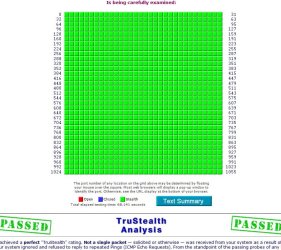
I like what I see :D
 

Attachments

  • Stealth.jpg
    Stealth.jpg
    118.9 KB · Views: 9

My Computer

Computer type
PC/Desktop
Computer Manufacturer/Model Number
Bruce ... somewhere in his 40's
OS
Windows 7 Ultimate 32bit SP1
CPU
Intel(R) Core(TM)2 Quad CPU @ 2.40GHz, 2400 MHz
Motherboard
INTEL/D975XBX2
Memory
4 GB
Graphics Card(s)
ATI Radeon HD 2600 Pro
Monitor(s) Displays
Samsung SyncMaster 914v
Screen Resolution
1280 x 1024
Hard Drives
2/500GB each ... ST3500630AS ATA Device.
One is not connected
PSU
Rocketfish 700 W
Case
G.Skill Gigabyte Chassis
Keyboard
Standard PS/2 Keyboard
Mouse
Microsoft PS/2 Mouse
Internet Speed
DSL
Antivirus
Avira Internet Security
Browser
IE 11
Other Info
ATI HDMI Audio
I haven't looked at GRC for a few years, with a prior computer and OS and passed perfectly.
With this computer and Win 7 and Comodo Firewall I fail: all ports are closed and ping is allowed.
Tried different settings both on my router/modem (motorola 3347) and Comodo but just can't find where to fix the settings.
Any thoughts?
TIA
 

My Computer

Computer Manufacturer/Model Number
N/A
OS
Win 7 Professional 64bit
CPU
intel i7-860
Motherboard
Asus P7P55D-E
Memory
4GB Corsair XMS3 DHX DDR3 1333/PC3-10666
Graphics Card(s)
ATI Radeon HD5670 512MB
Sound Card
onboard Via HD
Monitor(s) Displays
Dell 2408WFP
Screen Resolution
1920x1200
Hard Drives
(1) 500GB Samsung F3
(2) 500GB Seagate
PSU
OCZ Modstream 600watt
Case
CM Centurion 534+
Cooling
(3) 120mm fans
Keyboard
MS Natural 4000
Mouse
Logitech Performance Mouse MX
Internet Speed
20Meg Fiber
Back
Top