windows live Messenger

Ballie

New member
Member
Local time
2:31 PM
Messages
76
Location
Norfolk
How do I stop messenger from opening everytime windows starts ??? I have tried disabling (un ticking) it in msconfig but it just keeps enables itself (putting the tick back) ????

thanks
Ballie's son age-13
 

My Computer

OS
windows 7 home pre 64 bit
CPU
AMD quad 4
Motherboard
Asus
Memory
Kingston
Graphics Card(s)
On board
Sound Card
On board
Monitor(s) Displays
Samsung
Screen Resolution
1280 x 1024
Hard Drives
Samsung 1TB
WD 300GB
Hello, Welcome!

Feel free to get your own account, we will not bite you.

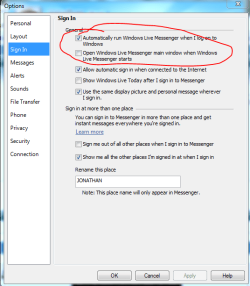
There is a setting in Messenger that enables/disables auto-start.

messenger.PNG

Hope this helps,
~Jonathan
 

My Computer

Computer Manufacturer/Model Number
Custom
OS
Windows 7 Professional x64
CPU
Intel i7 2600K OC'd @ 4620 MHz
Motherboard
Asus P8Z68-V Pro
Memory
16GB GSkill Sniper 2133 Mhz (4x4GB)
Graphics Card(s)
EVGA GeForce GTX 480 SuperClocked+
Sound Card
Realtek High Definition Audio
Monitor(s) Displays
2x Acer S273HLbmii 27"
Screen Resolution
2 x 1920x1080
Hard Drives
64GB Crucial M4 SSD

Storage: Hitachi 1TB 5400RPM, Samsung 1.5TB 5400RPM
PSU
Corsair HW Series 750w (modular)
Case
Cooler Master HAF 932 Advanced Blue Edition
Cooling
CM Hyper 212+ CPU cooler, 3x 230mm + 1x 140mm case fans
Keyboard
Logitech MK320 (wireless)
Mouse
Logitech MK320 (wireless)
Internet Speed
30 Mb/s : 2 Mb/s
  • Like
Reactions: Dom
For running at startup but not opening the window:
1. Sign in to messenger.
2. Next to the search bar near the top of the window, click on the 'Show menu' icon.
3. Tools.
4. Options.
5. Left hand pane, Sign In.
6.Second option down, untick.
Don't run Messenger at startup
1. Follow all steps above apart from 6.
2. Untick the second option, then the first.


Hope this helps, Dom.
 

My Computer

Computer type
PC/Desktop
Computer Manufacturer/Model Number
The Dominator?
OS
Windows Seven Ultimate
CPU
AMD Piledriver FX 8320 @ 3.5GHz
Motherboard
ASUS M5A97 EVO R2.0
Memory
Crucial Ballistix 8GB 1600 MHz DDR3
Graphics Card(s)
ASUS GeForce GTX 970 Strix Edition @ 1.114 GHz
Sound Card
Integrated
Monitor(s) Displays
LG 23EA63V 23" IPS 1080p Monitor
Screen Resolution
1920x1080
Hard Drives
Samsung SSD 840 EVO 120 GB
1x WD GreenPower 500GB 7200RPM
1 External HDD 1TB
PSU
Corsair CX500
Case
Zalman Z9 Plus
Cooling
CPU - Corsair Hydro H80i, Case - 3x Aerocool Shark Edition
Keyboard
Xenta Backlit Keyboard (Not very good!)
Mouse
Logitech G400
Internet Speed
Download: 7 mb/s Upload: 0.76 mb/s
Antivirus
Microsoft Security Essentials
Browser
Google Chrome
Other Info
Overclockers UK Desk Pad 89 x 45 cm
1200x730x600mm Desk
Using Virtual Audio Cable to split stereo sound into Audio Technica ATH-M50 headphones and Logitech X-530 speakers.
Woops, Jon was there first :p
 

My Computer

Computer type
PC/Desktop
Computer Manufacturer/Model Number
The Dominator?
OS
Windows Seven Ultimate
CPU
AMD Piledriver FX 8320 @ 3.5GHz
Motherboard
ASUS M5A97 EVO R2.0
Memory
Crucial Ballistix 8GB 1600 MHz DDR3
Graphics Card(s)
ASUS GeForce GTX 970 Strix Edition @ 1.114 GHz
Sound Card
Integrated
Monitor(s) Displays
LG 23EA63V 23" IPS 1080p Monitor
Screen Resolution
1920x1080
Hard Drives
Samsung SSD 840 EVO 120 GB
1x WD GreenPower 500GB 7200RPM
1 External HDD 1TB
PSU
Corsair CX500
Case
Zalman Z9 Plus
Cooling
CPU - Corsair Hydro H80i, Case - 3x Aerocool Shark Edition
Keyboard
Xenta Backlit Keyboard (Not very good!)
Mouse
Logitech G400
Internet Speed
Download: 7 mb/s Upload: 0.76 mb/s
Antivirus
Microsoft Security Essentials
Browser
Google Chrome
Other Info
Overclockers UK Desk Pad 89 x 45 cm
1200x730x600mm Desk
Using Virtual Audio Cable to split stereo sound into Audio Technica ATH-M50 headphones and Logitech X-530 speakers.

My Computer

OS
windows 7 home pre 64 bit
CPU
AMD quad 4
Motherboard
Asus
Memory
Kingston
Graphics Card(s)
On board
Sound Card
On board
Monitor(s) Displays
Samsung
Screen Resolution
1280 x 1024
Hard Drives
Samsung 1TB
WD 300GB

My Computer

Computer type
PC/Desktop
Computer Manufacturer/Model Number
The Dominator?
OS
Windows Seven Ultimate
CPU
AMD Piledriver FX 8320 @ 3.5GHz
Motherboard
ASUS M5A97 EVO R2.0
Memory
Crucial Ballistix 8GB 1600 MHz DDR3
Graphics Card(s)
ASUS GeForce GTX 970 Strix Edition @ 1.114 GHz
Sound Card
Integrated
Monitor(s) Displays
LG 23EA63V 23" IPS 1080p Monitor
Screen Resolution
1920x1080
Hard Drives
Samsung SSD 840 EVO 120 GB
1x WD GreenPower 500GB 7200RPM
1 External HDD 1TB
PSU
Corsair CX500
Case
Zalman Z9 Plus
Cooling
CPU - Corsair Hydro H80i, Case - 3x Aerocool Shark Edition
Keyboard
Xenta Backlit Keyboard (Not very good!)
Mouse
Logitech G400
Internet Speed
Download: 7 mb/s Upload: 0.76 mb/s
Antivirus
Microsoft Security Essentials
Browser
Google Chrome
Other Info
Overclockers UK Desk Pad 89 x 45 cm
1200x730x600mm Desk
Using Virtual Audio Cable to split stereo sound into Audio Technica ATH-M50 headphones and Logitech X-530 speakers.
Clearly, I'm missing something.

So, I gotta go APPLY for an ID for some crazy thing, so that I can sign in once,
just so I can then disable it (and then never use it again)?

No, I'm just trying to DISABLE itl. I shouldn't have to USE it first to be able to disable it.

[Sounds pretty goofy to me.]

???
 

My Computer

Computer Manufacturer/Model Number
Lenovo laptop
OS
Windows-7 Home Premium 64-bit
Memory
4GB
You can uninstall Windows Live Essentials if you don't use it. Alternatively, you can just uninstall Messenger.

Sorry, I assumed you used Messenger.
 

My Computer

Computer Manufacturer/Model Number
Custom
OS
Windows 7 Professional x64
CPU
Intel i7 2600K OC'd @ 4620 MHz
Motherboard
Asus P8Z68-V Pro
Memory
16GB GSkill Sniper 2133 Mhz (4x4GB)
Graphics Card(s)
EVGA GeForce GTX 480 SuperClocked+
Sound Card
Realtek High Definition Audio
Monitor(s) Displays
2x Acer S273HLbmii 27"
Screen Resolution
2 x 1920x1080
Hard Drives
64GB Crucial M4 SSD

Storage: Hitachi 1TB 5400RPM, Samsung 1.5TB 5400RPM
PSU
Corsair HW Series 750w (modular)
Case
Cooler Master HAF 932 Advanced Blue Edition
Cooling
CM Hyper 212+ CPU cooler, 3x 230mm + 1x 140mm case fans
Keyboard
Logitech MK320 (wireless)
Mouse
Logitech MK320 (wireless)
Internet Speed
30 Mb/s : 2 Mb/s
Yes, as Jonathan said, if you don't want to use it, you don't have to use it. Just uninstall the Live Essentials, as Jon said.
 

My Computer

Computer type
PC/Desktop
Computer Manufacturer/Model Number
The Dominator?
OS
Windows Seven Ultimate
CPU
AMD Piledriver FX 8320 @ 3.5GHz
Motherboard
ASUS M5A97 EVO R2.0
Memory
Crucial Ballistix 8GB 1600 MHz DDR3
Graphics Card(s)
ASUS GeForce GTX 970 Strix Edition @ 1.114 GHz
Sound Card
Integrated
Monitor(s) Displays
LG 23EA63V 23" IPS 1080p Monitor
Screen Resolution
1920x1080
Hard Drives
Samsung SSD 840 EVO 120 GB
1x WD GreenPower 500GB 7200RPM
1 External HDD 1TB
PSU
Corsair CX500
Case
Zalman Z9 Plus
Cooling
CPU - Corsair Hydro H80i, Case - 3x Aerocool Shark Edition
Keyboard
Xenta Backlit Keyboard (Not very good!)
Mouse
Logitech G400
Internet Speed
Download: 7 mb/s Upload: 0.76 mb/s
Antivirus
Microsoft Security Essentials
Browser
Google Chrome
Other Info
Overclockers UK Desk Pad 89 x 45 cm
1200x730x600mm Desk
Using Virtual Audio Cable to split stereo sound into Audio Technica ATH-M50 headphones and Logitech X-530 speakers.
You can uninstall Windows Live Essentials if you don't use it. Alternatively, you can just uninstall Messenger.

Sorry, I assumed you used Messenger.

I see where I can uninstall Windows Live Essentials in the control panel "Programs and Features" but I am hesitant to go on from there because I use some of the Windows Live mail features. If I click on Uninstall will I have a choice of what I uninstall or will it uninstall all of Windows Live Components?

I have Win7 on a new computer and Windows Live Messenger bugs me all the time. It starts automatically if I go to the hotmail page or the Windows Live Mail page and then it places Windows Messenger in my startup items. I disable it using msconfig and it stays disabled unless I go to the Windows live Mail or Hotmail page. Reason enough to stay away from those pages. Or better yet if I use my Mac to go to Hotmail or Windows Live Mail I don't get invaded with Messenger.
 

My Computer

Computer Manufacturer/Model Number
Anything but HP
OS
win7 Starter x32
You can uninstall Windows Live Essentials if you don't use it. Alternatively, you can just uninstall Messenger.

Sorry, I assumed you used Messenger.

I see where I can uninstall Windows Live Essentials in the control panel "Programs and Features" but I am hesitant to go on from there because I use some of the Windows Live mail features. If I click on Uninstall will I have a choice of what I uninstall or will it uninstall all of Windows Live Components?

I have Win7 on a new computer and Windows Live Messenger bugs me all the time. It starts automatically if I go to the hotmail page or the Windows Live Mail page and then it places Windows Messenger in my startup items. I disable it using msconfig and it stays disabled unless I go to the Windows live Mail or Hotmail page. Reason enough to stay away from those pages. Or better yet if I use my Mac to go to Hotmail or Windows Live Mail I don't get invaded with Messenger.
Hello,

Yes, you will get a screen of components to uninstall. You can leave Mail, if you like.
 

My Computer

Computer Manufacturer/Model Number
Custom
OS
Windows 7 Professional x64
CPU
Intel i7 2600K OC'd @ 4620 MHz
Motherboard
Asus P8Z68-V Pro
Memory
16GB GSkill Sniper 2133 Mhz (4x4GB)
Graphics Card(s)
EVGA GeForce GTX 480 SuperClocked+
Sound Card
Realtek High Definition Audio
Monitor(s) Displays
2x Acer S273HLbmii 27"
Screen Resolution
2 x 1920x1080
Hard Drives
64GB Crucial M4 SSD

Storage: Hitachi 1TB 5400RPM, Samsung 1.5TB 5400RPM
PSU
Corsair HW Series 750w (modular)
Case
Cooler Master HAF 932 Advanced Blue Edition
Cooling
CM Hyper 212+ CPU cooler, 3x 230mm + 1x 140mm case fans
Keyboard
Logitech MK320 (wireless)
Mouse
Logitech MK320 (wireless)
Internet Speed
30 Mb/s : 2 Mb/s
I followed the instructions of Jonathan King.

However there was no thing happens when I clicked on the program to uninstall/change. If I clicked again, I was told to wait for the the program uninstall of chance. The wait is forever.

I don't want to have the Windows Live Messenger pops up evry time I go to my hotmail.com email as I never use the Messenger.

My system is Dell XPS Studio with Win 7 Home Premium.

Please help.

Many thanks for your prompt response.

Ichi
 

My Computer

OS
Win 7

My Computer

Computer type
PC/Desktop
Computer Manufacturer/Model Number
The Dominator?
OS
Windows Seven Ultimate
CPU
AMD Piledriver FX 8320 @ 3.5GHz
Motherboard
ASUS M5A97 EVO R2.0
Memory
Crucial Ballistix 8GB 1600 MHz DDR3
Graphics Card(s)
ASUS GeForce GTX 970 Strix Edition @ 1.114 GHz
Sound Card
Integrated
Monitor(s) Displays
LG 23EA63V 23" IPS 1080p Monitor
Screen Resolution
1920x1080
Hard Drives
Samsung SSD 840 EVO 120 GB
1x WD GreenPower 500GB 7200RPM
1 External HDD 1TB
PSU
Corsair CX500
Case
Zalman Z9 Plus
Cooling
CPU - Corsair Hydro H80i, Case - 3x Aerocool Shark Edition
Keyboard
Xenta Backlit Keyboard (Not very good!)
Mouse
Logitech G400
Internet Speed
Download: 7 mb/s Upload: 0.76 mb/s
Antivirus
Microsoft Security Essentials
Browser
Google Chrome
Other Info
Overclockers UK Desk Pad 89 x 45 cm
1200x730x600mm Desk
Using Virtual Audio Cable to split stereo sound into Audio Technica ATH-M50 headphones and Logitech X-530 speakers.
I'm having the same problems with wanting to uninstall Windows Live Messaging. I don't use it, and I don't want to; I just want to get rid of it. I've tried Uninstall Programs, but I don't see it on the list of programs. I see Windows Live Essentials, but I'm concerned about uninstalling it because I have no idea what it does. I use Thunderbird and Firefox instead of the MS products, so perhaps I don't need Live Essentials at all?
 

My Computer

OS
Windows 7
I'm having the same problems with wanting to uninstall Windows Live Messaging. I don't use it, and I don't want to; I just want to get rid of it. I've tried Uninstall Programs, but I don't see it on the list of programs. I see Windows Live Essentials, but I'm concerned about uninstalling it because I have no idea what it does. I use Thunderbird and Firefox instead of the MS products, so perhaps I don't need Live Essentials at all?
In Programs and Features, uninstall Windows Live Essentials. When it comes up, select Messenger to uninstall.

Windows Live Essentials is a collection of programs. Messenger and Mail are two components. You do not need to uninstall the whole program just to remove Messenger.
 

My Computer

Computer Manufacturer/Model Number
Custom
OS
Windows 7 Professional x64
CPU
Intel i7 2600K OC'd @ 4620 MHz
Motherboard
Asus P8Z68-V Pro
Memory
16GB GSkill Sniper 2133 Mhz (4x4GB)
Graphics Card(s)
EVGA GeForce GTX 480 SuperClocked+
Sound Card
Realtek High Definition Audio
Monitor(s) Displays
2x Acer S273HLbmii 27"
Screen Resolution
2 x 1920x1080
Hard Drives
64GB Crucial M4 SSD

Storage: Hitachi 1TB 5400RPM, Samsung 1.5TB 5400RPM
PSU
Corsair HW Series 750w (modular)
Case
Cooler Master HAF 932 Advanced Blue Edition
Cooling
CM Hyper 212+ CPU cooler, 3x 230mm + 1x 140mm case fans
Keyboard
Logitech MK320 (wireless)
Mouse
Logitech MK320 (wireless)
Internet Speed
30 Mb/s : 2 Mb/s
I'm having the same problems with wanting to uninstall Windows Live Messaging. I don't use it, and I don't want to; I just want to get rid of it. I've tried Uninstall Programs, but I don't see it on the list of programs. I see Windows Live Essentials, but I'm concerned about uninstalling it because I have no idea what it does. I use Thunderbird and Firefox instead of the MS products, so perhaps I don't need Live Essentials at all?
In Programs and Features, uninstall Windows Live Essentials. When it comes up, select Messenger to uninstall.

Windows Live Essentials is a collection of programs. Messenger and Mail are two components. You do not need to uninstall the whole program just to remove Messenger.

Adding to this method, when messenger starts up you can do it without having to sign in.
In the top right of the sign-in window, there should be a 'help' icon (question mark) click on it and select 'Show menu bar'.
Once the menu bar at the top is shown, go to Tools --> Options.
Now, from there follow my first post at Step 5.
 

My Computer

Computer type
PC/Desktop
Computer Manufacturer/Model Number
The Dominator?
OS
Windows Seven Ultimate
CPU
AMD Piledriver FX 8320 @ 3.5GHz
Motherboard
ASUS M5A97 EVO R2.0
Memory
Crucial Ballistix 8GB 1600 MHz DDR3
Graphics Card(s)
ASUS GeForce GTX 970 Strix Edition @ 1.114 GHz
Sound Card
Integrated
Monitor(s) Displays
LG 23EA63V 23" IPS 1080p Monitor
Screen Resolution
1920x1080
Hard Drives
Samsung SSD 840 EVO 120 GB
1x WD GreenPower 500GB 7200RPM
1 External HDD 1TB
PSU
Corsair CX500
Case
Zalman Z9 Plus
Cooling
CPU - Corsair Hydro H80i, Case - 3x Aerocool Shark Edition
Keyboard
Xenta Backlit Keyboard (Not very good!)
Mouse
Logitech G400
Internet Speed
Download: 7 mb/s Upload: 0.76 mb/s
Antivirus
Microsoft Security Essentials
Browser
Google Chrome
Other Info
Overclockers UK Desk Pad 89 x 45 cm
1200x730x600mm Desk
Using Virtual Audio Cable to split stereo sound into Audio Technica ATH-M50 headphones and Logitech X-530 speakers.

My Computer

Computer type
PC/Desktop
Computer Manufacturer/Model Number
The Dominator?
OS
Windows Seven Ultimate
CPU
AMD Piledriver FX 8320 @ 3.5GHz
Motherboard
ASUS M5A97 EVO R2.0
Memory
Crucial Ballistix 8GB 1600 MHz DDR3
Graphics Card(s)
ASUS GeForce GTX 970 Strix Edition @ 1.114 GHz
Sound Card
Integrated
Monitor(s) Displays
LG 23EA63V 23" IPS 1080p Monitor
Screen Resolution
1920x1080
Hard Drives
Samsung SSD 840 EVO 120 GB
1x WD GreenPower 500GB 7200RPM
1 External HDD 1TB
PSU
Corsair CX500
Case
Zalman Z9 Plus
Cooling
CPU - Corsair Hydro H80i, Case - 3x Aerocool Shark Edition
Keyboard
Xenta Backlit Keyboard (Not very good!)
Mouse
Logitech G400
Internet Speed
Download: 7 mb/s Upload: 0.76 mb/s
Antivirus
Microsoft Security Essentials
Browser
Google Chrome
Other Info
Overclockers UK Desk Pad 89 x 45 cm
1200x730x600mm Desk
Using Virtual Audio Cable to split stereo sound into Audio Technica ATH-M50 headphones and Logitech X-530 speakers.
Back
Top