Is it possible to recover dual boot Menu?

Yankee6

New member
Local time
8:37 AM
Messages
14
I had a working dual boot WinXP installed 1st on 1 partition and then Win7 installed 2nd on the other partition of same HD. I had to ghost my XP partition, but since the ghost was created before I made the dual boot the dual boot menu is gone and I can no longer boot into Win7. Is there a way to fix it so the menu returns?
 

My Computer My Computer

At a glance

Windows 7/Windows XP
OS
Windows 7/Windows XP
Install EasyBCD 2.0 beta in XP after doing quick registration to use beta. You'll need to install Net Framework 2.0 first to run it.

Add Win7 on the Add/remove tab by Name, Type and Drive letter, Save and restart computer.

If this fails, mark Win7 active in Disk Management, boot Win7 DVD Repair console, click through to Recovery Tools list to run Startup Repair up to 3 separate times with reboots to write MBR to Win7. When 7 starts, if necessary install EasyBCD 2.0 to Add XP, accepting offered boot files, Save, restart.
 
Install EasyBCD 2.0 beta in XP after doing quick registration to use beta. You'll need to install Net Framework 2.0 first to run it.

Add Win7 on the Add/remove tab by Name, Type and Drive letter, Save and restart computer.

If this fails, mark Win7 active in Disk Management, boot Win7 DVD Repair console, click through to Recovery Tools list to run Startup Repair up to 3 separate times with reboots to write MBR to Win7. When 7 starts, if necessary install EasyBCD 2.0 to Add XP, accepting offered boot files, Save, restart.

I already tried EasyBCD 2 and when it first starts up it says the boot configuration data store could not be opened, the system could not find the system specified. Would you like to manually load a BCD Registry?

I click no and the program opens but theres no tap for Add/Remove, only Add New Entry and everything is greyed out so I cant edit it.
 

My Computer My Computer

At a glance

Windows 7/Windows XP
OS
Windows 7/Windows XP

My Computer My Computer

At a glance

Windows 7/Windows XP
OS
Windows 7/Windows XP
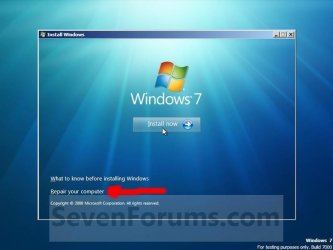
Click on repair my computer.
 

Attachments

  • Step4.jpg
    Step4.jpg
    34.9 KB · Views: 20

My Computer My Computer

At a glance

ME/XP/Vista/Win7
OS
ME/XP/Vista/Win7
Click on repair my computer.

Mine only says Check Compatability online or install now. At the bottom it says what you need to know before installing windows.
 

My Computer My Computer

At a glance

Windows 7/Windows XP
OS
Windows 7/Windows XP
Boot from CD - How to Boot your Computer from a Bootable CD or DVD - Boot to CD

Make sure you are following the steps in link above to boot DVD.

Select Repair on second screen, see if it finds an installation to repair, accept repair. If this fails to start Win7, boot back in, click through to Recovery Tools list to run Startup Repair repeatedly to see if it will repair Dual Boot and/or Start Win7.

If not, you'll need to see that Win7 is marked active using a 3rd party bootable Disk manager like free Partition Wizard CD, or Diskpart from DVD Command Line, then run Startup Repair up to 3 separate times with reboots to write MBR to Win7 which can be done once it is marked Active.

Once Win7 is started - likely without Dual Boot menu - install EasyBCD 2.0 to add XP, accept boot files offered, let it autocomplete, Save, Restart.
 
Someone from the EasyBCD forum said in EasyBCD 2 under MBR Configuration Options I can click "Install Windows7/Vista Bootloader" Reinstall the W7 boot, then add an XP entry, letting 2.0 auto-configure. It will recreate your dual boot automatically. I want a second opinion because im a little worried having never used EasyBCD before.

Do you think this would work?
 

My Computer My Computer

At a glance

Windows 7/Windows XP
OS
Windows 7/Windows XP
If EasyBCD forums says you can use 2.0 in XP to recover the Win7 boot, then add XP, it is worth a try.

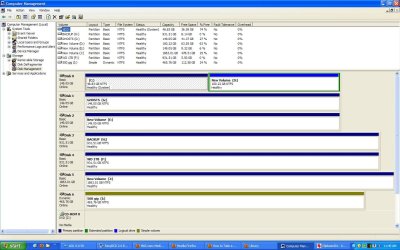
Before doing that can you post back a screenshot of your full Disk management drive map, as we need to see what the exact config is to advise you.

How did you lose your Dual Boot due to ghosting XP?
 
Ok I went ahead and booted the win7 dvd and first it said it could repair, but then it booted into Winxp. I tried 5 more times and each time it said it couldnt repair it automatically, but now my Ireboot Menu in the taskbar shows windows7 recovered. When I click to boot to it all it does is bring me right back to WinXP.
 
Last edited:

My Computer My Computer

At a glance

Windows 7/Windows XP
OS
Windows 7/Windows XP
Since you haven't posted the requested screenshot we can't advise you with any certainty.

You need to mark Win7 active, then boot the Win7 DVD Repair conosle or Repair CD, click through to Recovery Tools list to run Startup Repair up to 3 separate times with reboots until Win7 starts.

Then install EasyBCD 2.0 and add XP, accepting boot files, let it autocomplete, Save, restart.
 
If EasyBCD forums says you can use 2.0 in XP to recover the Win7 boot, then add XP, it is worth a try.

Before doing that can you post back a screenshot of your full Disk management drive map, as we need to see what the exact config is to advise you.

How did you lose your Dual Boot due to ghosting XP?

I lost my dual boot because the ghost I used to restore my C drive was made prior to having dual boot so it wiped it out. Im not sure if this is screenshot you want, but you can let me know.

Another thing is that after I tried the win7 repair now my EasyBCD says something totally different when I start it up. It listed the Win7 in the bootloader. I tried adding my XP to it and this is what it now says.

There are a total of 2 entries listed in the bootloader.

Default: Microsoft Windows XP
Timeout: 30 seconds.
Boot Drive: C:\

Entry #1
Name: Microsoft Windows XP
BCD ID: {default}
Device: boot
Bootloader Path: \NTLDR

Entry #2
Name: Windows 7 Ultimate (recovered)
BCD ID: {3ab64be2-54f1-11df-a299-f1b9aa3a99d0}
Drive: D:\
Bootloader Path: \Windows\system32\winload.exe


Do you think this will work? Is it safe to reboot and try it? My XP is on C drive and the Win7 is on my D drive.
 

Attachments

  • Disk Management.jpg
    Disk Management.jpg
    149.8 KB · Views: 19

My Computer My Computer

At a glance

Windows 7/Windows XP
OS
Windows 7/Windows XP
Which OS starts up now? Do you have a dual boot?

You can't recover the MBR into Win7 until it is converted to Primary using free Partition Wizard bootable CD.

But it might not be necessary if the repair reconstructed your Dual Boot with the System MBR remaining on XP. Try it.

The Easy listings look correct, while the Disk Mgmt screenshot is lacking Active flag on XP.


Get separate drive images using free Macrium Reflect, or Win7 Backup imaging will image them together while XP holds System MBR.
 
Which OS starts up now?

Do you have a dual boot?

You can't recover the MBR into Win7 until it is converted to Primary using free Partition Wizard bootable CD.

But it might not be necessary if the repair reconstructed your Dual Boot with the System MBR remaining on XP. Try it.

XP boots up now. I dont have dual boot because the boot menu is gone, but I do have Win7 installed on another partition which did work fine before I lost my boot menu. If I make Win7 primary then wont that stop XP from booting? Im not sure how to proceed. After I make Win7 primary then just reboot and see what happens? When you said try it do u mean just try to reboot now and see if the EasyBCD repaired my MBR properly?
 

My Computer My Computer

At a glance

Windows 7/Windows XP
OS
Windows 7/Windows XP
Yes, of course try to see if you have a Dual Boot.

If you don't then the reason you would use free Partition Wizard bootable CD to convert Win7 from Logical to Primary is so that the System Active MBR can be written back into it, then start Win7 to add XP using Easy 2.0 which is an easier approach. A Logical partition cannot be marked active.

But first, confirm you have no dual boot now after the changes you made in Easy which look correct. If not, try removing Win7 in Easy 2.0 Add/Remove then Adding it back making sure you are using Easy BCD version 2.0 beta.

IF this fails, we will give you the steps to start up Win7 to try adding XP.
 
Yes, of course try to see if you have a Dual Boot.

If you don't then the reason you would use free Partition Wizard bootable CD to convert Win7 from Logical to Primary is so that the System Active MBR can be written back into it, then start Win7 to add XP using Easy 2.0 which is an easier approach. A Logical partition cannot be marked active.

But first, confirm you have no dual boot now after the changes you made in Easy which look correct. If not, try removing Win7 in Easy 2.0 Add/Remove then Adding it back making sure you are using Easy BCD version 2.0 beta.

IF this fails, we will give you the steps to start up Win7 to try adding XP.

It failed, still just booted to XP. I changed Win7 to primary also, but dont see why that would matter because I didnt change anything in my Win7 partition and it was working fine before.

When I tried to reboot after making Win7 primary I got BOOT DISK FAILURE. Im guessing its because you cant have 2 primary partitions. Lucky I had Hirens boot CD or else I would have been locked out of my system and unable to bootup.
 
Last edited:

My Computer My Computer

At a glance

Windows 7/Windows XP
OS
Windows 7/Windows XP
Back
Top