Show us your SSD performance

Status
Not open for further replies.
Why do you think this is bad - it is actually pretty good. And how come you cannot update the F/W (not that you need to do that).

Thought the finer the line was the more stable the drive was, still in learning mode with my new SSD..
Yeah, Intel sad it was eighter the lack of ACHI mode in BIOS or the fact that I have a nvidia chipset :(
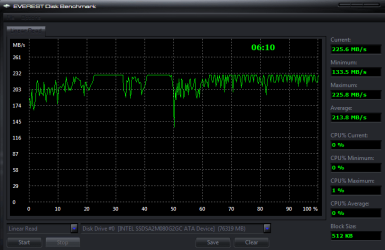
No, the ups and downs are from some processes running on your system. Stop all applications on your system and run it again. Your line will be flatter.
 

My Computer My Computer

Computer Manufacturer/Model Number
HP, Dell, Gateway, Toshiba - 4 laptops and 2 desktops
OS
Vista, Windows7, Mint Mate, Zorin, Windows 8
CPU
from 1.6GHz Duo to i7
Monitor(s) Displays
2x HP w2207
Hard Drives
5x HDD, 7x SSD, 12x Externals
Keyboard
with trackball - no mices
Mouse
Trackball mice
Internet Speed
DSL 6000
If you ran your OS on another drive and had the SSD as a secondary drive, with nothing happening on it...it would be flat. But if the machine is doing anything (indexing, prefetching, copying a file, etc)...that will cause the dips and such on the graph that you are seeing. See my above HDtune results, my line isn't completely flat when the OS is running.
 

My Computer My Computer

Computer Manufacturer/Model Number
Self-Built in July 2009
OS
Windows 7 Ultimate x64
CPU
Intel Q9550 2.83Ghz OC'd to 3.40Ghz
Motherboard
Gigabyte GA-EP45-UD3R rev. 1.1, F12 BIOS
Memory
8GB G.Skill PI DDR2-800, 4-4-4-12 timings
Graphics Card(s)
EVGA 1280MB Nvidia GeForce GTX570
Sound Card
Realtek ALC899A 8 channel onboard audio
Monitor(s) Displays
23" Acer x233H
Screen Resolution
1920x1080
Hard Drives
Intel X25-M 80GB Gen 2 SSD
Western Digital 1TB Caviar Black, 32MB cache. WD1001FALS
PSU
Corsair 620HX modular
Case
Antec P182
Cooling
stock
Keyboard
ABS M1 Mechanical
Mouse
Logitech G9 Laser Mouse
Internet Speed
15/2 cable modem
Other Info
Windows and Linux enthusiast. Logitech G35 Headset.
Yeah, makes sense really..
pparks1, did you update yours? see any preformance increase after doing that Intel maintenance tool?
 

My Computer My Computer

Computer Manufacturer/Model Number
Took the blue pill and built this one while Trinity was getting me coffee..
OS
Win7 Professional x64
CPU
i7-930
Motherboard
Asus Rampage Extreme 2
Memory
3*Corsair XMS3 DDR3 1600MHz 6GB CL9
Graphics Card(s)
XFX Radeon HD 5870 CrossfireX
Sound Card
SupremeFX X-Fi
Monitor(s) Displays
BENQ 22" FullHD
Screen Resolution
1920*1080
Hard Drives
Corsair SSD Extreme X64 2,5" 64GB || WD VelociRaptor® 300GB
PSU
Corsair HX 1000W PSU
Case
Antec 1200
Cooling
Windtunnel effect
Keyboard
Logitech G15 gen.2
Mouse
Roccat KONE
Internet Speed
12,5mb/3mb
I just reinstalled my OS after a BIOS upgrade and switched over to using AHCI rather than IDE. I don't have any Intel maintenance tools installed....I stuck 100% with the built-in Windows 7 drivers.
 

My Computer My Computer

Computer Manufacturer/Model Number
Self-Built in July 2009
OS
Windows 7 Ultimate x64
CPU
Intel Q9550 2.83Ghz OC'd to 3.40Ghz
Motherboard
Gigabyte GA-EP45-UD3R rev. 1.1, F12 BIOS
Memory
8GB G.Skill PI DDR2-800, 4-4-4-12 timings
Graphics Card(s)
EVGA 1280MB Nvidia GeForce GTX570
Sound Card
Realtek ALC899A 8 channel onboard audio
Monitor(s) Displays
23" Acer x233H
Screen Resolution
1920x1080
Hard Drives
Intel X25-M 80GB Gen 2 SSD
Western Digital 1TB Caviar Black, 32MB cache. WD1001FALS
PSU
Corsair 620HX modular
Case
Antec P182
Cooling
stock
Keyboard
ABS M1 Mechanical
Mouse
Logitech G9 Laser Mouse
Internet Speed
15/2 cable modem
Other Info
Windows and Linux enthusiast. Logitech G35 Headset.
I just reinstalled my OS after a BIOS upgrade and switched over to using AHCI rather than IDE. I don't have any Intel maintenance tools installed....I stuck 100% with the built-in Windows 7 drivers.

Did the switch to AHCI yield any better performance?
 

My Computer My Computer

Computer Manufacturer/Model Number
HP, Dell, Gateway, Toshiba - 4 laptops and 2 desktops
OS
Vista, Windows7, Mint Mate, Zorin, Windows 8
CPU
from 1.6GHz Duo to i7
Monitor(s) Displays
2x HP w2207
Hard Drives
5x HDD, 7x SSD, 12x Externals
Keyboard
with trackball - no mices
Mouse
Trackball mice
Internet Speed
DSL 6000
While I understand that SSD's are great with read speeds and almost non-existent access times.....there is no denying that their write speeds are staggeringly bad.
Staggeringly bad wrandom write speeds in real life use plauge a lot of SSDs it's true, but Intel and OCZ have seen the light and they both post random write speeds as good as a single high perfoamance hard drives at the cost of a slight reduction in "overall" write speeds in benchmarks.

Many drives when brand new post great sequential write speeds out of the gate and that's what the manufacturers tout and most people never look further from, but then fail to almost useless when they start to fill up or use random write block sizes. Not so with the latest offerings with latest firmware from Intel and OCZ.

Intel and OCZ had rough starts with this but have clered up dramatically in the last few months. I finally was willing to actually buy an SSD for myself after months of seeing them fail miserably when put to real use.

Toms and Anandtech have some pretty in depth articles on the subject.

[Edit]
I got the 160 gig X-25M, not really benchmarked it yet but in a test install of 7100 I got a WEI score of 7.6 for the drive :) The harddrive is no longer by far the slowest thing in my mahcine but is now by far the fastest.

Saving pennies to get a 2nd X-25M 160GB and then put it in RAID 0. That'll be a screamer.:)
 

My Computer My Computer

Computer Manufacturer/Model Number
Custom build
OS
Win7 Pro 64
CPU
Intel Core i7 x980
Motherboard
Asus P6X58D Premium
Memory
24 GB Corsair Dominator
Graphics Card(s)
GeForce 8800 GTS
Sound Card
Asus Xonar D2X
Monitor(s) Displays
Dell 2709W
Screen Resolution
1920x1200
Hard Drives
Intel x25M G2 160GB SSD,
OCZ Vertex Turbo 64GB SSD,
WD 2 TB
WD Caviar Black 1TB,
WD 500GB,
WD 500GB,
Win HS (self made) WD 2TB, WD 2TB
PSU
Corsair HX1000W
Case
Corsair Obsidian 800
Cooling
Corsair H50 Push-Pull Mod
Internet Speed
Down 61Mbps, Up 12Mbps
Other Info
My first build. Huge sense of satisfaction from it.
Did the switch to AHCI yield any better performance?
I'm not entirely sure. My results in Crystal Disk 3.0 benchmarking did improve a bit..especially the last 4k number. I went from about 21 to 159 or something like that. Although, how that translate into real world performance I haven't been able to quantify.

It does seem like apps are loading up faster and snappier now. But that could also be due to the fact that everything is neat and clean and very little has been installed to slow it down. I'd say performance gains are around 10% possibly.

Saving pennies to get a 2nd X-25M 160GB and then put it in RAID 0. That'll be a screamer.:)
Yes, on benchmarks it will look wonderful. However, since a single SSD provides almost instantaneous access to files and that's what really makes the OS perform....going the RAID route here won't make the difference that it used to make with mechanical drives.
 

My Computer My Computer

Computer Manufacturer/Model Number
Self-Built in July 2009
OS
Windows 7 Ultimate x64
CPU
Intel Q9550 2.83Ghz OC'd to 3.40Ghz
Motherboard
Gigabyte GA-EP45-UD3R rev. 1.1, F12 BIOS
Memory
8GB G.Skill PI DDR2-800, 4-4-4-12 timings
Graphics Card(s)
EVGA 1280MB Nvidia GeForce GTX570
Sound Card
Realtek ALC899A 8 channel onboard audio
Monitor(s) Displays
23" Acer x233H
Screen Resolution
1920x1080
Hard Drives
Intel X25-M 80GB Gen 2 SSD
Western Digital 1TB Caviar Black, 32MB cache. WD1001FALS
PSU
Corsair 620HX modular
Case
Antec P182
Cooling
stock
Keyboard
ABS M1 Mechanical
Mouse
Logitech G9 Laser Mouse
Internet Speed
15/2 cable modem
Other Info
Windows and Linux enthusiast. Logitech G35 Headset.
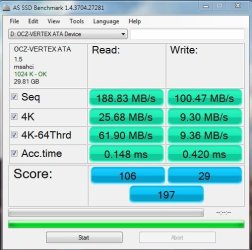
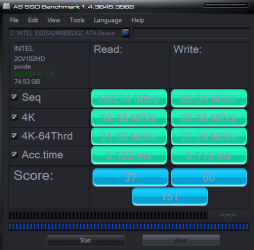
For those wanting to get into the SSD world, without spending alot to do so, 30GB Vertex and Intels 40Gb X25-V.

Granted, some others shown here are faster, but these are value drives at just over $100 mark.

IMO, they Intel is the better bargan as it has 37.1GB useable space VS the Vertex 29.8. and seem slightly faster for the OS.
Non-the-less, they are both good drives.

Heres a look at both side by side:
 

Attachments

  • x25-v.JPG
    x25-v.JPG
    49.8 KB · Views: 5
  • OCZ Vertex.JPG
    OCZ Vertex.JPG
    47.4 KB · Views: 1

My Computer My Computer

Computer Manufacturer/Model Number
Custom (Self Build)
OS
Windows 7 Home Premium 64bit
CPU
Intel Core i7 2700k
Motherboard
eVGA P67 SLI
Memory
8GB Mushkin Redline Ridgebacks @1866
Graphics Card(s)
EVGA GTX570 SC
Sound Card
XiFi Titanium HD
Monitor(s) Displays
LG W2453V
Screen Resolution
1920x1080
Hard Drives
Intel 320 80GB -- Intel X25-V 40GB --WD Black 1TB x2 -- WD Blue 640GB
PSU
Seasonic x750
Case
Corsair 600T SE White
Cooling
eVGA Superclocked CPU Cooler
Keyboard
Saitek Cyborg
Antivirus
Kaspersky
Browser
IE
Other Info
LG BD/DVD
Given those numbers, I would say the Intel is the better deal - even at a few Dollars more. If I remember right you could get one for around $130 and the Vertex was offered at $89 - both with MIR.
 

My Computer My Computer

Computer Manufacturer/Model Number
HP, Dell, Gateway, Toshiba - 4 laptops and 2 desktops
OS
Vista, Windows7, Mint Mate, Zorin, Windows 8
CPU
from 1.6GHz Duo to i7
Monitor(s) Displays
2x HP w2207
Hard Drives
5x HDD, 7x SSD, 12x Externals
Keyboard
with trackball - no mices
Mouse
Trackball mice
Internet Speed
DSL 6000
there were initial problems running TRIM in RAID arrays, but intel have just released a new driver:
Intel release TRIM for RAID | bit-tech.net

-quote:
"There are caveats to the driver, of course: your operating system needs in-built TRIM support, and all drives in the array must be TRIM-compatible. You're also out of luck if you're running RAID 5, for some reason – although the home-use scenarios of RAID 0 or RAID 1 are well covered."
 

My Computer My Computer

Computer type
PC/Desktop
Computer Manufacturer/Model Number
benchtec, built to personal specs
OS
Windows10 Pro - 64Bit vs.10547
CPU
i7-965 Extreme Edition (8 Cores) at 3.3GHz (no OC)
Motherboard
BloodRageX58 (Socket1366)
Memory
12G Corsair Dominator DDR3 - tripled
Graphics Card(s)
2xAMD SapphireNITRO R9 380(4G) crossfire
Sound Card
Sonar(SB)X-Fi onboard
Monitor(s) Displays
SyncMaster P2050 20"
Screen Resolution
1600x900 (widescreen)
Hard Drives
480G\OCZSolid3SSD, 64G\OCZVertex3SSD,60G\OCZVertex2SSD, 1TB\spinpointF1SATAHDD
PSU
1200w Power Station Gold
Case
ANTEC 900/2 all blue lights, etc..
Cooling
Noctua SE1366 NH-U12P - a tight fit, but a monster cooler!!
Keyboard
Logitech G19 (wired)
Mouse
Logitech G9 Laser (wired)
Internet Speed
150mb unlimited
Browser
IE11(RP)
Other Info
Xbox One, Nokia735 Windows10 mobile, LG HD/DVD/Blu-Ray r/w, CyberlinkPowerDVD15, LogitechZ5500-SS(5.1), LogitechG35Phones-SS(7.1),MSOffice 2007,CorelDrawX7,Painter2016, Wacom Intuos Pro-SE
although the home-use scenarios of RAID 0 or RAID 1 are well covered

Intel retracted that statement.


Is there TRIM support for RAID configurations?

Intel® Rapid Storage Technology 9.6 supports TRIM in AHCI mode and in RAID mode for drives that are not part of a RAID volume.

A defect was filed to correct the information in the Help file that states that TRIM is supported on RAID volumes.

This is reportedly from Intel

It will support TRIM with SSDs in an AHCI configuration, or with the RAID controller enabled and the SSD is used as a pass through device. An example of this use case is for users that want to use the SSD as a boot drive but still be able to RAID multiple HDDs together to allow for large protect data storage – a great use for the home theater PC. TRIM support for SSDs in a RAID configuration is under investigation and is not included in Intel® RST 9.6.

Is Trim working?
The Win7 command "fsutil behaviour query DisableDeleteNotify" command only shows, if TRIM actually is supported by the OS, but does not certify, that TRIM really is working.

This is suppose to tell you if Trim is actually working.
A free Trial Version of the hIOmon File I/O Performance Monitor

EDIT:
I found a MS Windows 7 article on SSD support. It's kinda long but the FAQ sections answers a lot of questions about the SSD setup defaults in Windows 7.

Engineering Windows 7 - Support and Q&A for Solid-State Drives

There’s a lot of excitement around the potential for the widespread adoption of solid-state drives (SSD) for primary storage, particularly on laptops and also among many folks in the server world. As with any new technology, as it is introduced we often need to revisit the assumptions baked into the overall system (OS, device support, applications) as a result of the performance characteristics of the technologies in use. This post looks at the way we have tuned Windows 7 to the current generation of SSDs. This is a rapidly moving area and we expect that there will continue to be ways we will tune Windows and we also expect the technology to continue to evolve, perhaps introducing new tradeoffs or challenging other underlying assumptions. Michael Fortin authored this post with help from many folks across the storage and fundamentals teams.

In Windows 7, we’ve focused a number of our engineering efforts with SSD operating characteristics in mind. As a result, Windows 7’s default behavior is to operate efficiently on SSDs without requiring any customer intervention. Before delving into how Windows 7’s behavior is automatically tuned to work efficiently on SSDs, a brief overview of SSD operating characteristics is warranted.
 
Last edited:

My Computer My Computer

Computer type
PC/Desktop
Computer Manufacturer/Model Number
76~2.0
OS
Windows 7 Ult x64 - SP1/ Windows 8 Pro x64
CPU
Intel Core i5-3570K 4.6GHz
Motherboard
Gigabyte GA-Z77X UD3H, f18
Memory
8GB (2X4GB) DDR3 1600 Corsair Vengeance CL8 1.5v
Graphics Card(s)
Sapphire HD 7770 Vapor-X OC 1GB DDR5
Sound Card
Onboard VIA VT2021
Monitor(s) Displays
22" LCD Dell
Screen Resolution
1680x1050
Hard Drives
Samsung 840Pro 128GB SSD,
Seagate Barracuda 500GB SATA2 7200rpm 32MB cache, Seagate Barracuda 1TB SATA2 7200rpm 32MB cache,
PSU
Corsair HX650W
Case
Cooler Master Storm Scout
Cooling
Corsair H80 2x12cm Noctua NF P12 , 2x14cm case fans
Keyboard
Logitech Wave
Mouse
CM Sentinel
Internet Speed
Dismal
Antivirus
Avast
Browser
Opera Next
Other Info
Haswell laptop: HP Envy 17t-j, i7-4700MQ, GeForce 740M 2GB DDR3, 17.3" Full HD 1920x1080, 16GB RAM, Samsung 840 Pro 128GB, 1TB Hitachi 7200 HDD,
Desktop: eSATA ports,
External eSATA Seagate 500GB SATA2 7200rpm,
External WD USB 500GB
I just purchased a new Dell Studio17, and have purchased a new Kingston 128G SSDNow V+ drive to use as the OS. The laptop holds 2 hard drives, so will use the 500 gig for storage. If someone wants to recomend benchmark software here, we can all use it as the standard for testing. And I would be happy to post my results when I get my system next week. My understanding is that the drive shipping now should have the "Trim" function that works with Windows7 to prevent the slow down problems. And the specs on the Kingston V+ look good. So.... I will let you all know.
So what software would be good for testing?
Malibu
 

My Computer My Computer

OS
Windows 7

My Computer My Computer

Computer Manufacturer/Model Number
Rig 1
OS
Windows 7 Ultimate x64
CPU
AMD Phenom II X4 940 Black Edition @ 3.4GHz (AM2+)
Motherboard
Gigabyte GA-MA790X-UD4P (AM2+)
Memory
Corsair CM2X4096-8500C5 (4 X 2GB)
Graphics Card(s)
XFX Radeon HD 5770 / Diamond Radeon HD 5770 CrossFireX
Sound Card
Asus Xonar DS (PCI)
Monitor(s) Displays
Samsung SyncMaster 932bw+ (3)
Screen Resolution
4320x900
Hard Drives
OCZ Vertex 2 80 GB - Windows 7 System --
WD Caviar Black 1TB - Music, Movies, Vids, Pics --
WD Caviar Black 640GB - User Profiles & Games --
WD My Book 320GB external
PSU
Corsair CMPSU-750TX
Case
Cooler Master HAF 932
Cooling
Corsair Hydro Series H50
Keyboard
Logitech Desktop Wave
Mouse
Logitech LX8 Laser
Internet Speed
20 down / 2 up
Other Info
LG GGC-H20L Blu-Ray / HDDVD combo --
Hauppauge HVR-1250 --
Silverstone MFP-51 --
Logitech Webcam C600
ATTO Disk Benchmark v2.46 is the latest version. It looks pretty good. I will use this. I should be able to run my test next week once I have my laptop.
Thanks for the info!
 

My Computer My Computer

OS
Windows 7
No problem. I was told that the AS SSD Benchmark is specifically for SSDs though. I have both.
 

My Computer My Computer

Computer Manufacturer/Model Number
Rig 1
OS
Windows 7 Ultimate x64
CPU
AMD Phenom II X4 940 Black Edition @ 3.4GHz (AM2+)
Motherboard
Gigabyte GA-MA790X-UD4P (AM2+)
Memory
Corsair CM2X4096-8500C5 (4 X 2GB)
Graphics Card(s)
XFX Radeon HD 5770 / Diamond Radeon HD 5770 CrossFireX
Sound Card
Asus Xonar DS (PCI)
Monitor(s) Displays
Samsung SyncMaster 932bw+ (3)
Screen Resolution
4320x900
Hard Drives
OCZ Vertex 2 80 GB - Windows 7 System --
WD Caviar Black 1TB - Music, Movies, Vids, Pics --
WD Caviar Black 640GB - User Profiles & Games --
WD My Book 320GB external
PSU
Corsair CMPSU-750TX
Case
Cooler Master HAF 932
Cooling
Corsair Hydro Series H50
Keyboard
Logitech Desktop Wave
Mouse
Logitech LX8 Laser
Internet Speed
20 down / 2 up
Other Info
LG GGC-H20L Blu-Ray / HDDVD combo --
Hauppauge HVR-1250 --
Silverstone MFP-51 --
Logitech Webcam C600

My Computer My Computer

Computer Manufacturer/Model Number
HP, Dell, Gateway, Toshiba - 4 laptops and 2 desktops
OS
Vista, Windows7, Mint Mate, Zorin, Windows 8
CPU
from 1.6GHz Duo to i7
Monitor(s) Displays
2x HP w2207
Hard Drives
5x HDD, 7x SSD, 12x Externals
Keyboard
with trackball - no mices
Mouse
Trackball mice
Internet Speed
DSL 6000
Anandtech has some very good reviews and articles, my Brother told me about his site a couple of years ago.

Good review series on SSDs.

Hadn't read the Vertex 2 review yet, Thanks.

Looks like the SandForce drives are the top dog now, subject to the longevity testing. Intel is going to have to come up with something new.
 

My Computer My Computer

Computer type
PC/Desktop
Computer Manufacturer/Model Number
76~2.0
OS
Windows 7 Ult x64 - SP1/ Windows 8 Pro x64
CPU
Intel Core i5-3570K 4.6GHz
Motherboard
Gigabyte GA-Z77X UD3H, f18
Memory
8GB (2X4GB) DDR3 1600 Corsair Vengeance CL8 1.5v
Graphics Card(s)
Sapphire HD 7770 Vapor-X OC 1GB DDR5
Sound Card
Onboard VIA VT2021
Monitor(s) Displays
22" LCD Dell
Screen Resolution
1680x1050
Hard Drives
Samsung 840Pro 128GB SSD,
Seagate Barracuda 500GB SATA2 7200rpm 32MB cache, Seagate Barracuda 1TB SATA2 7200rpm 32MB cache,
PSU
Corsair HX650W
Case
Cooler Master Storm Scout
Cooling
Corsair H80 2x12cm Noctua NF P12 , 2x14cm case fans
Keyboard
Logitech Wave
Mouse
CM Sentinel
Internet Speed
Dismal
Antivirus
Avast
Browser
Opera Next
Other Info
Haswell laptop: HP Envy 17t-j, i7-4700MQ, GeForce 740M 2GB DDR3, 17.3" Full HD 1920x1080, 16GB RAM, Samsung 840 Pro 128GB, 1TB Hitachi 7200 HDD,
Desktop: eSATA ports,
External eSATA Seagate 500GB SATA2 7200rpm,
External WD USB 500GB

My Computer My Computer

Computer Manufacturer/Model Number
Keeps changing - (Custom)
OS
Windows 7 Professional x64
CPU
Intel Core i7 860
Motherboard
Gigabyte GA-P55-UD4P
Memory
4GB DDR3 Mushkin 1600Mhz @ 7-8-7-20
Graphics Card(s)
MSI GTS250 1GB DDR3 Twin Frozr
Sound Card
Onboard realtek
Monitor(s) Displays
Samsung SyncMaster 24" P2450 + Samsung 20" 2033
Screen Resolution
1920 X 1080 and 1600 X 900 (#2 system 1440 X 900)
Hard Drives
Patriot Inferno 120GB SSD + 3 WD Blue 640GB drives
PSU
Corsair 750 HX Modular
Case
Lancool PC-K62
Cooling
Cooler Master TX3 CPU cooler and 4-140mm and 1-120mm case
Keyboard
Gigabyte USB keyboard
Mouse
Microsoft wireless laser mouse 5000
Internet Speed
7 Mb down 1.5 up
Other Info
System #2: AMD Phenom II X6 1055T (Freezer 7 Pro cooler) - Gigabyte 880GMA-UD2H - WD 500GB Black - 9500GT (1GB) 500W OCZ modular PSU - Antec 200 case. System #3 (LapTop) Core 2 Duo T6670 - 320GB 7200RPM HD - 4GB DDR3 RAM.
Thought I'd run some more benchmarks now that the drive's a few months old..
 

Attachments

  • SSD_30_04_2010(2).PNG
    SSD_30_04_2010(2).PNG
    15.4 KB · Views: 6
  • SSD_30_04_2010.PNG
    SSD_30_04_2010.PNG
    20.2 KB · Views: 15

My Computer My Computer

Computer Manufacturer/Model Number
tw33k
OS
Windows 7 Ultimate (x64) SP1
CPU
Intel 3770k 4.6GHz
Motherboard
ASUS Maximus V Formula
Memory
8GB (2x 4GB) Crucial Ballistix
Graphics Card(s)
Sapphire 7950 (1060/1600)
Sound Card
On Board Realtek HD Audio
Monitor(s) Displays
27" Acer B273HU (via HDMI)
Screen Resolution
2048 x 1152
Hard Drives
Crucial M4 128GB
2TB WD Black
1TB Samsung F3 SATA
1TB WD Elite External
2TB WD USB 3.0
PSU
Corsair AX750 Gold
Case
Corsair Obsidian 800DW
Cooling
Corsair H100 (2x AP-121/2x UK-3000 push/pull)
Keyboard
Microsoft Wireless 5000
Mouse
Microsoft Wireless 5000
Internet Speed
5mb/s
Other Info
Logitech z-2300 2.1 speakers
Lamptron FC-5 v2
The AS SSD looks like it's slowing down a bit, the Everest looks good though.

Anything noticeable?

What drivers are you using?
 

My Computer My Computer

Computer type
PC/Desktop
Computer Manufacturer/Model Number
76~2.0
OS
Windows 7 Ult x64 - SP1/ Windows 8 Pro x64
CPU
Intel Core i5-3570K 4.6GHz
Motherboard
Gigabyte GA-Z77X UD3H, f18
Memory
8GB (2X4GB) DDR3 1600 Corsair Vengeance CL8 1.5v
Graphics Card(s)
Sapphire HD 7770 Vapor-X OC 1GB DDR5
Sound Card
Onboard VIA VT2021
Monitor(s) Displays
22" LCD Dell
Screen Resolution
1680x1050
Hard Drives
Samsung 840Pro 128GB SSD,
Seagate Barracuda 500GB SATA2 7200rpm 32MB cache, Seagate Barracuda 1TB SATA2 7200rpm 32MB cache,
PSU
Corsair HX650W
Case
Cooler Master Storm Scout
Cooling
Corsair H80 2x12cm Noctua NF P12 , 2x14cm case fans
Keyboard
Logitech Wave
Mouse
CM Sentinel
Internet Speed
Dismal
Antivirus
Avast
Browser
Opera Next
Other Info
Haswell laptop: HP Envy 17t-j, i7-4700MQ, GeForce 740M 2GB DDR3, 17.3" Full HD 1920x1080, 16GB RAM, Samsung 840 Pro 128GB, 1TB Hitachi 7200 HDD,
Desktop: eSATA ports,
External eSATA Seagate 500GB SATA2 7200rpm,
External WD USB 500GB
Status
Not open for further replies.
Back
Top