Acer Aspire 5942g powersmart management problem.

g47

New member
Local time
2:09 PM
Messages
12
Hello guys....
Great forum here, great job.
Unfortunately, my first post is about a problem i am having.
I have this acer Aspire 5942g.
The power management button on the upper right or the program or both (?) does not seem to work.
I have of course launch manager and power management programs installed.
When i press the button, it does light up green, but i have no indication on the screen like i have when i activate wlan or bluetooth.
When the drivers of the powersmart manager are uninstalled the button does not light up green when i press it, so it seems that the drivers partially work.
Also, nothing changes in my power settings nor the screen brightens down, no sign that it works.
Actions i took so far:
I uninstalled and installed both programs, and i run them as admin.
I installed first the launch manager and then the power management and the opposite.
Nothing changed.
I go to c: program files:acer:acer powersmart manager and try to open the right exe file which i think is ePowerMsg but then i get an error message saying that the element ePowerMsg stopped working.
The window is this: http://img219.imageshack.us/img219/7852/16279115.png
Is this the right exe?
I tried with ac only, ac and battery, battery only, same results.
What can i do now?
Please some help...
 

My Computer My Computer

At a glance

Windows 7 Ultimate720qm6gbati mobility radeo 5650hd
Computer Manufacturer/Model Number
Acer 5942g
OS
Windows 7 Ultimate
CPU
720qm
Memory
6gb
Graphics Card(s)
ati mobility radeo 5650hd
Welcome to Seven Forums. If you get a stop error I think it's an error code 10, you might want to zip up the minidump file so those members that are really good at reading them might be able to help. At this point my only other suggestion is to contact Acer support and see if they have any ideas. Fabe
 

My Computer My Computer

At a glance

Windows 7 ultimate 64 bit / XP Home sp3intel Core 2 Duo E8400 3.0ghz8 gigs 1066 OCZ Fata1tyEVGA GTX 580 Call of Duty Black Ops Edition
Computer Manufacturer/Model Number
Self Built
OS
Windows 7 ultimate 64 bit / XP Home sp3
CPU
intel Core 2 Duo E8400 3.0ghz
Motherboard
Asus P5ND bios 1401
Memory
8 gigs 1066 OCZ Fata1ty
Graphics Card(s)
EVGA GTX 580 Call of Duty Black Ops Edition
Sound Card
Creative Soundblaster Audigy 2zs
Monitor(s) Displays
Asus 24in LCD's 2MS X2
Screen Resolution
1920x1080p @60Hz
Hard Drives
WD Caviar 500 Black/ WD Caviar 200 Blue
PSU
OCZ 700W GameXtreme
Case
NZXT Apollo
Cooling
Corsair H50 CPU/120mm x3 /60mm x2 /Corsair Dominator Ram
Keyboard
Logitech Bluetooth Wireless MX5000
Mouse
Logitech Bluetooth Wireless MX1000
Internet Speed
Download 19.83 Upload 0.97
Other Info
Logitech Z2300 Speakers/ Bose Noise Cancelling Headphones/Avermedia PCI-e Hybrid TV Bravo/Epson NX415 all in one/ 4 Port Powered USB Hub/ LG 10x Bluray Burner /TSST Corp DVDRW External
Thank you for your answer.
How can i take the minidump file to zip it?
I really dont have the knowledge.
 

My Computer My Computer

At a glance

Windows 7 Ultimate720qm6gbati mobility radeo 5650hd
Computer Manufacturer/Model Number
Acer 5942g
OS
Windows 7 Ultimate
CPU
720qm
Memory
6gb
Graphics Card(s)
ati mobility radeo 5650hd
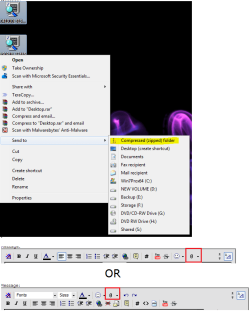
Right click on the dump file>select send to> zip (compressed) folder>click on the paper clip icon above>browse your computer for where you put the zipped folder and select it> then upload> then atttach it.paperclip.PNG
 

My Computer My Computer

At a glance

Windows 7 ultimate 64 bit / XP Home sp3intel Core 2 Duo E8400 3.0ghz8 gigs 1066 OCZ Fata1tyEVGA GTX 580 Call of Duty Black Ops Edition
Computer Manufacturer/Model Number
Self Built
OS
Windows 7 ultimate 64 bit / XP Home sp3
CPU
intel Core 2 Duo E8400 3.0ghz
Motherboard
Asus P5ND bios 1401
Memory
8 gigs 1066 OCZ Fata1ty
Graphics Card(s)
EVGA GTX 580 Call of Duty Black Ops Edition
Sound Card
Creative Soundblaster Audigy 2zs
Monitor(s) Displays
Asus 24in LCD's 2MS X2
Screen Resolution
1920x1080p @60Hz
Hard Drives
WD Caviar 500 Black/ WD Caviar 200 Blue
PSU
OCZ 700W GameXtreme
Case
NZXT Apollo
Cooling
Corsair H50 CPU/120mm x3 /60mm x2 /Corsair Dominator Ram
Keyboard
Logitech Bluetooth Wireless MX5000
Mouse
Logitech Bluetooth Wireless MX1000
Internet Speed
Download 19.83 Upload 0.97
Other Info
Logitech Z2300 Speakers/ Bose Noise Cancelling Headphones/Avermedia PCI-e Hybrid TV Bravo/Epson NX415 all in one/ 4 Port Powered USB Hub/ LG 10x Bluray Burner /TSST Corp DVDRW External
I am sorry but i can not see the option dump file.
Should i have any special program to have this option?
I dont know how to create one file like this.

Also, something new.
I found something that may help members that have the knowledge.
I go to c: ProgramData: OEM: Power Management: Log
There i found a notepad file which had these written:

04122010_141310 | DefaultPowerOption | info | CheckTrayReg() - BEGIN
04122010_141310 | DefaultPowerOption | info | CheckTrayReg() - END
04122010_141310 | DefaultPowerOption | info | Battery button supported
04122010_141312 | DefaultPowerOption | error | PowerWriteACValueIndex(NULL,&GUID_MIN_POWER_SAVINGS,&GUID_SEARCH_INDEX_SUBGROUP,&GUID_SEARCH_INDEXER_SETTING, DEFAULT_MIN_AC_SEARCH_INDEXER_SETTING),The operation completed successfully.


04122010_141312 | DefaultPowerOption | error | PowerWriteDCValueIndex(NULL,&GUID_MIN_POWER_SAVINGS,&GUID_SEARCH_INDEX_SUBGROUP,&GUID_SEARCH_INDEXER_SETTING, DEFAULT_MIN_DC_SEARCH_INDEXER_SETTING),The operation completed successfully.


04122010_141312 | DefaultPowerOption | error | PowerWriteACValueIndex(NULL,&GUID_TYPICAL_POWER_SAVINGS,&GUID_SEARCH_INDEX_SUBGROUP,&GUID_SEARCH_INDEXER_SETTING, DEFAULT_TYPICAL_AC_SEARCH_INDEXER_SETTING),The operation completed successfully.


04122010_141312 | DefaultPowerOption | error | PowerWriteDCValueIndex(NULL,&GUID_TYPICAL_POWER_SAVINGS,&GUID_SEARCH_INDEX_SUBGROUP,&GUID_SEARCH_INDEXER_SETTING, DEFAULT_TYPICAL_DC_SEARCH_INDEXER_SETTING),The operation completed successfully.


04122010_141312 | DefaultPowerOption | error | PowerWriteACValueIndex(NULL,&GUID_MAX_POWER_SAVINGS,&GUID_SEARCH_INDEX_SUBGROUP,&GUID_SEARCH_INDEXER_SETTING, DEFAULT_MAX_AC_SEARCH_INDEXER_SETTING),The operation completed successfully.


04122010_141312 | DefaultPowerOption | error | PowerWriteDCValueIndex(NULL,&GUID_MAX_POWER_SAVINGS,&GUID_SEARCH_INDEX_SUBGROUP,&GUID_SEARCH_INDEXER_SETTING, DEFAULT_MAX_DC_SEARCH_INDEXER_SETTING),The operation completed successfully.


04122010_141312 | DefaultPowerOption | info | Intel VGA
05052010_131559 | DefaultPowerOption | info | CheckTrayReg() - BEGIN
05052010_131559 | DefaultPowerOption | info | CheckTrayReg() - END
05052010_131559 | DefaultPowerOption | info | Battery button supported
05052010_131600 | DefaultPowerOption | error | PowerWriteACValueIndex(NULL,&GUID_MIN_POWER_SAVINGS,&GUID_SEARCH_INDEX_SUBGROUP,&GUID_SEARCH_INDEXER_SETTING, DEFAULT_MIN_AC_SEARCH_INDEXER_SETTING),05052010_132854 | DefaultPowerOption | info | CheckTrayReg() - BEGIN
05052010_132854 | DefaultPowerOption | info | CheckTrayReg() - END
05052010_132854 | DefaultPowerOption | info | Battery button supported
05052010_132855 | DefaultPowerOption | error | PowerWriteACValueIndex(NULL,&GUID_MIN_POWER_SAVINGS,&GUID_SEARCH_INDEX_SUBGROUP,&GUID_SEARCH_INDEXER_SETTING, DEFAULT_MIN_AC_SEARCH_INDEXER_SETTING),05052010_164137 | DefaultPowerOption | info | CheckTrayReg() - BEGIN
05052010_164137 | DefaultPowerOption | info | CheckTrayReg() - END
05052010_164137 | DefaultPowerOption | info | Battery button supported
05052010_164138 | DefaultPowerOption | error | PowerWriteACValueIndex(NULL,&GUID_MIN_POWER_SAVINGS,&GUID_SEARCH_INDEX_SUBGROUP,&GUID_SEARCH_INDEXER_SETTING, DEFAULT_MIN_AC_SEARCH_INDEXER_SETTING),05052010_175926 | DefaultPowerOption | info | CheckTrayReg() - BEGIN
05052010_175926 | DefaultPowerOption | info | CheckTrayReg() - END
05052010_175926 | DefaultPowerOption | info | Battery button supported
05052010_175927 | DefaultPowerOption | error | PowerWriteACValueIndex(NULL,&GUID_MIN_POWER_SAVINGS,&GUID_SEARCH_INDEX_SUBGROUP,&GUID_SEARCH_INDEXER_SETTING, DEFAULT_MIN_AC_SEARCH_INDEXER_SETTING),05052010_183625 | DefaultPowerOption | info | CheckTrayReg() - BEGIN
05052010_183625 | DefaultPowerOption | info | CheckTrayReg() - END
05052010_183625 | DefaultPowerOption | info | Battery button supported
05052010_183626 | DefaultPowerOption | error | PowerWriteACValueIndex(NULL,&GUID_MIN_POWER_SAVINGS,&GUID_SEARCH_INDEX_SUBGROUP,&GUID_SEARCH_INDEXER_SETTING, DEFAULT_MIN_AC_SEARCH_INDEXER_SETTING),05052010_185323 | DefaultPowerOption | info | CheckTrayReg() - BEGIN
05052010_185323 | DefaultPowerOption | info | CheckTrayReg() - END
05052010_185323 | DefaultPowerOption | info | Battery button supported
05052010_185324 | DefaultPowerOption | error | PowerWriteACValueIndex(NULL,&GUID_MIN_POWER_SAVINGS,&GUID_SEARCH_INDEX_SUBGROUP,&GUID_SEARCH_INDEXER_SETTING, DEFAULT_MIN_AC_SEARCH_INDEXER_SETTING),05052010_192045 | DefaultPowerOption | info | Battery button NOT supported
05052010_192046 | DefaultPowerOption | error | PowerWriteACValueIndex(NULL,&GUID_MIN_POWER_SAVINGS,&GUID_SEARCH_INDEX_SUBGROUP,&GUID_SEARCH_INDEXER_SETTING, DEFAULT_MIN_AC_SEARCH_INDEXER_SETTING),05052010_192926 | DefaultPowerOption | info | CheckTrayReg() - BEGIN
05052010_192926 | DefaultPowerOption | info | CheckTrayReg() - END
05052010_192926 | DefaultPowerOption | info | Battery button supported
05052010_192927 | DefaultPowerOption | error | PowerWriteACValueIndex(NULL,&GUID_MIN_POWER_SAVINGS,&GUID_SEARCH_INDEX_SUBGROUP,&GUID_SEARCH_INDEXER_SETTING, DEFAULT_MIN_AC_SEARCH_INDEXER_SETTING),05052010_203551 | DefaultPowerOption | info | CheckTrayReg() - BEGIN
05052010_203552 | DefaultPowerOption | info | CheckTrayReg() - END
05052010_203552 | DefaultPowerOption | info | Battery button supported
05052010_203553 | DefaultPowerOption | error | PowerWriteACValueIndex(NULL,&GUID_MIN_POWER_SAVINGS,&GUID_SEARCH_INDEX_SUBGROUP,&GUID_SEARCH_INDEXER_SETTING, DEFAULT_MIN_AC_SEARCH_INDEXER_SETTING),05052010_225224 | DefaultPowerOption | info | CheckTrayReg() - BEGIN
05052010_225224 | DefaultPowerOption | info | CheckTrayReg() - END
05052010_225224 | DefaultPowerOption | info | Battery button supported
05052010_225225 | DefaultPowerOption | error | PowerWriteACValueIndex(NULL,&GUID_MIN_POWER_SAVINGS,&GUID_SEARCH_INDEX_SUBGROUP,&GUID_SEARCH_INDEXER_SETTING, DEFAULT_MIN_AC_SEARCH_INDEXER_SETTING),05062010_004748 | DefaultPowerOption | info | CheckTrayReg() - BEGIN
05062010_004748 | DefaultPowerOption | info | CheckTrayReg() - END
05062010_004748 | DefaultPowerOption | info | Battery button supported
05062010_004749 | DefaultPowerOption | error | PowerWriteACValueIndex(NULL,&GUID_MIN_POWER_SAVINGS,&GUID_SEARCH_INDEX_SUBGROUP,&GUID_SEARCH_INDEXER_SETTING, DEFAULT_MIN_AC_SEARCH_INDEXER_SETTING),05062010_163716 | DefaultPowerOption | info | CheckTrayReg() - BEGIN
05062010_163716 | DefaultPowerOption | info | CheckTrayReg() - END
05062010_163716 | DefaultPowerOption | info | Battery button supported
05062010_163717 | DefaultPowerOption | error | PowerWriteACValueIndex(NULL,&GUID_MIN_POWER_SAVINGS,&GUID_SEARCH_INDEX_SUBGROUP,&GUID_SEARCH_INDEXER_SETTING, DEFAULT_MIN_AC_SEARCH_INDEXER_SETTING),


And here is a print screen because it is not very well written in the post.
kjhcz.png


If someone knows what to do....:(
 

My Computer My Computer

At a glance

Windows 7 Ultimate720qm6gbati mobility radeo 5650hd
Computer Manufacturer/Model Number
Acer 5942g
OS
Windows 7 Ultimate
CPU
720qm
Memory
6gb
Graphics Card(s)
ati mobility radeo 5650hd
Let me see if I can find you some help. Fabe
 

My Computer My Computer

At a glance

Windows 7 ultimate 64 bit / XP Home sp3intel Core 2 Duo E8400 3.0ghz8 gigs 1066 OCZ Fata1tyEVGA GTX 580 Call of Duty Black Ops Edition
Computer Manufacturer/Model Number
Self Built
OS
Windows 7 ultimate 64 bit / XP Home sp3
CPU
intel Core 2 Duo E8400 3.0ghz
Motherboard
Asus P5ND bios 1401
Memory
8 gigs 1066 OCZ Fata1ty
Graphics Card(s)
EVGA GTX 580 Call of Duty Black Ops Edition
Sound Card
Creative Soundblaster Audigy 2zs
Monitor(s) Displays
Asus 24in LCD's 2MS X2
Screen Resolution
1920x1080p @60Hz
Hard Drives
WD Caviar 500 Black/ WD Caviar 200 Blue
PSU
OCZ 700W GameXtreme
Case
NZXT Apollo
Cooling
Corsair H50 CPU/120mm x3 /60mm x2 /Corsair Dominator Ram
Keyboard
Logitech Bluetooth Wireless MX5000
Mouse
Logitech Bluetooth Wireless MX1000
Internet Speed
Download 19.83 Upload 0.97
Other Info
Logitech Z2300 Speakers/ Bose Noise Cancelling Headphones/Avermedia PCI-e Hybrid TV Bravo/Epson NX415 all in one/ 4 Port Powered USB Hub/ LG 10x Bluray Burner /TSST Corp DVDRW External
I really appreciate it.
I am fighting to see how dump files work to give you the info.
I dont know nothing about these files.
I downladed microsoft debugger and i think i created a file.
I will see.


edit: I got it i think
But i am having difficulties to create the dump file.
 

My Computer My Computer

At a glance

Windows 7 Ultimate720qm6gbati mobility radeo 5650hd
Computer Manufacturer/Model Number
Acer 5942g
OS
Windows 7 Ultimate
CPU
720qm
Memory
6gb
Graphics Card(s)
ati mobility radeo 5650hd
You should be able to type in the search box C:\ Windows\Minidump and if a dump file was created it should show up their. Fabe
 

My Computer My Computer

At a glance

Windows 7 ultimate 64 bit / XP Home sp3intel Core 2 Duo E8400 3.0ghz8 gigs 1066 OCZ Fata1tyEVGA GTX 580 Call of Duty Black Ops Edition
Computer Manufacturer/Model Number
Self Built
OS
Windows 7 ultimate 64 bit / XP Home sp3
CPU
intel Core 2 Duo E8400 3.0ghz
Motherboard
Asus P5ND bios 1401
Memory
8 gigs 1066 OCZ Fata1ty
Graphics Card(s)
EVGA GTX 580 Call of Duty Black Ops Edition
Sound Card
Creative Soundblaster Audigy 2zs
Monitor(s) Displays
Asus 24in LCD's 2MS X2
Screen Resolution
1920x1080p @60Hz
Hard Drives
WD Caviar 500 Black/ WD Caviar 200 Blue
PSU
OCZ 700W GameXtreme
Case
NZXT Apollo
Cooling
Corsair H50 CPU/120mm x3 /60mm x2 /Corsair Dominator Ram
Keyboard
Logitech Bluetooth Wireless MX5000
Mouse
Logitech Bluetooth Wireless MX1000
Internet Speed
Download 19.83 Upload 0.97
Other Info
Logitech Z2300 Speakers/ Bose Noise Cancelling Headphones/Avermedia PCI-e Hybrid TV Bravo/Epson NX415 all in one/ 4 Port Powered USB Hub/ LG 10x Bluray Burner /TSST Corp DVDRW External
Here are instructions for uploading the dmp file: http://www.sevenforums.com/crash-lockup-debug-how/34900-1-novice-how-ask-help-bsod-problem.html

Go ahead and just upload the zip folder to this thread.

I'm not sure how much we need it though. It is obvious the problem is with the Acer ePower Management program. If you have uninstalled and reinstalled the program from Acer (Direct link here), I wonder if it is a hardware problem.

Tell us more about the problem. When did this arise? Could a system restore possibly help? I see the machine must be pretty new; if it's still under warranty, you may consider sending the machine into be repaired or replaced.
 

My Computer My Computer

At a glance

Windows 7 Professional x64Intel i7 2600K OC'd @ 4620 MHz16GB GSkill Sniper 2133 Mhz (4x4GB)EVGA GeForce GTX 480 SuperClocked+
Computer Manufacturer/Model Number
Custom
OS
Windows 7 Professional x64
CPU
Intel i7 2600K OC'd @ 4620 MHz
Motherboard
Asus P8Z68-V Pro
Memory
16GB GSkill Sniper 2133 Mhz (4x4GB)
Graphics Card(s)
EVGA GeForce GTX 480 SuperClocked+
Sound Card
Realtek High Definition Audio
Monitor(s) Displays
2x Acer S273HLbmii 27"
Screen Resolution
2 x 1920x1080
Hard Drives
64GB Crucial M4 SSD

Storage: Hitachi 1TB 5400RPM, Samsung 1.5TB 5400RPM
PSU
Corsair HW Series 750w (modular)
Case
Cooler Master HAF 932 Advanced Blue Edition
Cooling
CM Hyper 212+ CPU cooler, 3x 230mm + 1x 140mm case fans
Keyboard
Logitech MK320 (wireless)
Mouse
Logitech MK320 (wireless)
Internet Speed
30 Mb/s : 2 Mb/s
I did it but i get an error:

Symbols can not be loaded because symbol path is not initialized. *
* *
* The Symbol Path can be set by: *
* using the _NT_SYMBOL_PATH environment variable. *
* using the -y <symbol_path> argument when starting the debugger. *
* using .sympath and .sympath+ *
*********************************************************************
Unable to load image \SystemRoot\system32\ntoskrnl.exe, Win32 error 0n2
*** WARNING: Unable to verify timestamp for ntoskrnl.exe
*** ERROR: Module load completed but symbols could not be loaded for ntoskrnl.exe
Windows 7 Kernel Version 7600 MP (8 procs) Free x64
Product: WinNt, suite: TerminalServer SingleUserTS
Built by: 7600.16539.amd64fre.win7_gdr.100226-1909
Machine Name:
Kernel base = 0xfffff800`0305e000 PsLoadedModuleList = 0xfffff800`0329be50
Debug session time: Tue May 4 19:04:43.429 2010 (UTC + 3:00)
System Uptime: 0 days 0:10:34.615


If i just upload the file here, can you open it?
 

My Computer My Computer

At a glance

Windows 7 Ultimate720qm6gbati mobility radeo 5650hd
Computer Manufacturer/Model Number
Acer 5942g
OS
Windows 7 Ultimate
CPU
720qm
Memory
6gb
Graphics Card(s)
ati mobility radeo 5650hd
I'm not sure how much we need it though. It is obvious the problem is with the Acer ePower Management program. If you have uninstalled and reinstalled the program from Acer (Direct link here), I wonder if it is a hardware problem.

Tell us more about the problem. When did this arise? Could a system restore possibly help? I see the machine must be pretty new; if it's still under warranty, you may consider sending the machine into be repaired or replaced.

Yes, i think this too.
The laptop is just a few days old, but i changed the hdd with a better one and i dont think that warranty is going to cover me.
So i would like to see that as my last option.
It did arise from day one.
I just made a fresh install of windows and i installed all the programs.
I pressed the macro buttons and that one only did not work.
The direct link you gave me is about intel turboboost monitor, what it has to do with the epower utility?
 

My Computer My Computer

At a glance

Windows 7 Ultimate720qm6gbati mobility radeo 5650hd
Computer Manufacturer/Model Number
Acer 5942g
OS
Windows 7 Ultimate
CPU
720qm
Memory
6gb
Graphics Card(s)
ati mobility radeo 5650hd
Don't worry about debugging it yourself. Just copy the dmp(s) to the desktop, and select all of them. Right-click on one>send to>new compressed folder.

Then upload it to this site.

uploading dmp.PNG
 

My Computer My Computer

At a glance

Windows 7 Professional x64Intel i7 2600K OC'd @ 4620 MHz16GB GSkill Sniper 2133 Mhz (4x4GB)EVGA GeForce GTX 480 SuperClocked+
Computer Manufacturer/Model Number
Custom
OS
Windows 7 Professional x64
CPU
Intel i7 2600K OC'd @ 4620 MHz
Motherboard
Asus P8Z68-V Pro
Memory
16GB GSkill Sniper 2133 Mhz (4x4GB)
Graphics Card(s)
EVGA GeForce GTX 480 SuperClocked+
Sound Card
Realtek High Definition Audio
Monitor(s) Displays
2x Acer S273HLbmii 27"
Screen Resolution
2 x 1920x1080
Hard Drives
64GB Crucial M4 SSD

Storage: Hitachi 1TB 5400RPM, Samsung 1.5TB 5400RPM
PSU
Corsair HW Series 750w (modular)
Case
Cooler Master HAF 932 Advanced Blue Edition
Cooling
CM Hyper 212+ CPU cooler, 3x 230mm + 1x 140mm case fans
Keyboard
Logitech MK320 (wireless)
Mouse
Logitech MK320 (wireless)
Internet Speed
30 Mb/s : 2 Mb/s
Well its only one file, here it is.


I have contacted Acer, but here in Greece you just cant believe how stupid they are.
More than me that i dont have a good relationship with laptops and pc's.
I am still waiting for an answer.
But sending it to Athens (i live in another town), paying my self for going and coming justo for a software thing is...too much.
If i do not have anything to do, i will format it and set the system up again.
But it is too much work.
I use acronis for taking an image of my system but because the problem was there from day one, a restore is not going to solve it.
 

Attachments

My Computer My Computer

At a glance

Windows 7 Ultimate720qm6gbati mobility radeo 5650hd
Computer Manufacturer/Model Number
Acer 5942g
OS
Windows 7 Ultimate
CPU
720qm
Memory
6gb
Graphics Card(s)
ati mobility radeo 5650hd
You may want to do a memory test just for the heck of it.

Code:
Microsoft (R) Windows Debugger Version 6.11.0001.404 AMD64
Copyright (c) Microsoft Corporation. All rights reserved.


Loading Dump File [C:\Users\Jonathan\AppData\Local\Temp\Temp1_050410-28532-01(2).zip\050410-28532-01.dmp]
Mini Kernel Dump File: Only registers and stack trace are available

Symbol search path is: SRV*c:\symbols*http://msdl.microsoft.com/download/symbols
Executable search path is: 
Windows 7 Kernel Version 7600 MP (8 procs) Free x64
Product: WinNt, suite: TerminalServer SingleUserTS
Built by: 7600.16539.amd64fre.win7_gdr.100226-1909
Machine Name:
Kernel base = 0xfffff800`0305e000 PsLoadedModuleList = 0xfffff800`0329be50
Debug session time: Tue May  4 12:04:43.429 2010 (GMT-4)
System Uptime: 0 days 0:10:34.615
Loading Kernel Symbols
......................................................Unable to load image Unknown_Module_00000000`00000000, Win32 error 0n2
*** WARNING: Unable to verify timestamp for Unknown_Module_00000000`00000000
Unable to add module at 00000000`00000000

Loading User Symbols
Loading unloaded module list
.........
*******************************************************************************
*                                                                             *
*                        Bugcheck Analysis                                    *
*                                                                             *
*******************************************************************************

Use !analyze -v to get detailed debugging information.

BugCheck 19, {3, fffffa8005724d80, 0, fffffa8005724d80}

Probably caused by : Pool_Corruption ( nt!ExFreePool+75b )

Followup: Pool_corruption
---------

Download a copy of Memtest86 and burn the ISO to a CD using Iso Recorder. Boot from the CD, and run at least 5 passes.
 

My Computer My Computer

At a glance

Windows 7 Professional x64Intel i7 2600K OC'd @ 4620 MHz16GB GSkill Sniper 2133 Mhz (4x4GB)EVGA GeForce GTX 480 SuperClocked+
Computer Manufacturer/Model Number
Custom
OS
Windows 7 Professional x64
CPU
Intel i7 2600K OC'd @ 4620 MHz
Motherboard
Asus P8Z68-V Pro
Memory
16GB GSkill Sniper 2133 Mhz (4x4GB)
Graphics Card(s)
EVGA GeForce GTX 480 SuperClocked+
Sound Card
Realtek High Definition Audio
Monitor(s) Displays
2x Acer S273HLbmii 27"
Screen Resolution
2 x 1920x1080
Hard Drives
64GB Crucial M4 SSD

Storage: Hitachi 1TB 5400RPM, Samsung 1.5TB 5400RPM
PSU
Corsair HW Series 750w (modular)
Case
Cooler Master HAF 932 Advanced Blue Edition
Cooling
CM Hyper 212+ CPU cooler, 3x 230mm + 1x 140mm case fans
Keyboard
Logitech MK320 (wireless)
Mouse
Logitech MK320 (wireless)
Internet Speed
30 Mb/s : 2 Mb/s
It just finished, no errors. :)
Did the dump file showed about the programs error?
Is there anything else i can do?


I found out also that these two .exe files of the program that does not work are running in the background.

hgfx.png

I dont know why or what does that mean, but here is a screen-shot.
59075244.png


Also, here:
64505886.png

There is the notification options for that utility.
I chose to be always on the little image and the notifications.
When i chose that, there was a message saying that it is inactive and there will be an image next time it will be active.
 
Last edited:

My Computer My Computer

At a glance

Windows 7 Ultimate720qm6gbati mobility radeo 5650hd
Computer Manufacturer/Model Number
Acer 5942g
OS
Windows 7 Ultimate
CPU
720qm
Memory
6gb
Graphics Card(s)
ati mobility radeo 5650hd
So basically, what's happening is that everything appears to be running and working, but the button doesn't work?
 

My Computer My Computer

At a glance

Windows 7 Professional x64Intel i7 2600K OC'd @ 4620 MHz16GB GSkill Sniper 2133 Mhz (4x4GB)EVGA GeForce GTX 480 SuperClocked+
Computer Manufacturer/Model Number
Custom
OS
Windows 7 Professional x64
CPU
Intel i7 2600K OC'd @ 4620 MHz
Motherboard
Asus P8Z68-V Pro
Memory
16GB GSkill Sniper 2133 Mhz (4x4GB)
Graphics Card(s)
EVGA GeForce GTX 480 SuperClocked+
Sound Card
Realtek High Definition Audio
Monitor(s) Displays
2x Acer S273HLbmii 27"
Screen Resolution
2 x 1920x1080
Hard Drives
64GB Crucial M4 SSD

Storage: Hitachi 1TB 5400RPM, Samsung 1.5TB 5400RPM
PSU
Corsair HW Series 750w (modular)
Case
Cooler Master HAF 932 Advanced Blue Edition
Cooling
CM Hyper 212+ CPU cooler, 3x 230mm + 1x 140mm case fans
Keyboard
Logitech MK320 (wireless)
Mouse
Logitech MK320 (wireless)
Internet Speed
30 Mb/s : 2 Mb/s
Yes but not exactly, as when i press the button the screen should be dimmed and the windows aero should be removed, to save the battery.
Nothing of these happens.

I guess i can not avoid the format and a fresh install of windows.
And just for a utility is too much...but i can not have a new laptop not fully working.
There is nothing else to do, right?
 

My Computer My Computer

At a glance

Windows 7 Ultimate720qm6gbati mobility radeo 5650hd
Computer Manufacturer/Model Number
Acer 5942g
OS
Windows 7 Ultimate
CPU
720qm
Memory
6gb
Graphics Card(s)
ati mobility radeo 5650hd
Yes but not exactly, as when i press the button the screen should be dimmed and the windows aero should be removed, to save the battery.
Nothing of these happens.

I guess i can not avoid the format and a fresh install of windows.
And just for a utility is too much...but i can not have a new laptop not fully working.
There is nothing else to do, right?
There may be a way you could fix it, but it is beyond my skill. If the clean install doesn't fix it, we can determine that it is a hardware issue.
 

My Computer My Computer

At a glance

Windows 7 Professional x64Intel i7 2600K OC'd @ 4620 MHz16GB GSkill Sniper 2133 Mhz (4x4GB)EVGA GeForce GTX 480 SuperClocked+
Computer Manufacturer/Model Number
Custom
OS
Windows 7 Professional x64
CPU
Intel i7 2600K OC'd @ 4620 MHz
Motherboard
Asus P8Z68-V Pro
Memory
16GB GSkill Sniper 2133 Mhz (4x4GB)
Graphics Card(s)
EVGA GeForce GTX 480 SuperClocked+
Sound Card
Realtek High Definition Audio
Monitor(s) Displays
2x Acer S273HLbmii 27"
Screen Resolution
2 x 1920x1080
Hard Drives
64GB Crucial M4 SSD

Storage: Hitachi 1TB 5400RPM, Samsung 1.5TB 5400RPM
PSU
Corsair HW Series 750w (modular)
Case
Cooler Master HAF 932 Advanced Blue Edition
Cooling
CM Hyper 212+ CPU cooler, 3x 230mm + 1x 140mm case fans
Keyboard
Logitech MK320 (wireless)
Mouse
Logitech MK320 (wireless)
Internet Speed
30 Mb/s : 2 Mb/s
Yes but not exactly, as when i press the button the screen should be dimmed and the windows aero should be removed, to save the battery.
Nothing of these happens.

I guess i can not avoid the format and a fresh install of windows.
And just for a utility is too much...but i can not have a new laptop not fully working.
There is nothing else to do, right?

Hey there!
I've update my Acer power management without any probs few days ago...I did uninstall before, then reinstall the all set after a reboot.

It is normal that the button doesn't work while powered on battery, you should have a pop-up window telling you, once pressed the button it will not work due to wired powered or battery powered.

When you're on battery powered, no need to press this button because it looks like you have a switchable graphic card...just go in the power plan management in the control panel and do your own parameters considering the normal setting, i mean just adjust to your needs.

If you want to be able to use this button on keyboard, i think you should have to set in your bios options (F2 key) to NOT ALLOW Switchable Graphic. But why bother if it's working fine & it could confusing you.

For the Acer Launch management (keyboard shorcuts), it does update fine, and works fine aswell...but the only thing that had never work "since day one", is the keyboard key shorcut "P" when you launch it from the programs...
 
Last edited:

My Computer My Computer

At a glance

Windows 7 Professional SP1 - x64 [Non-UEFI Boot]Ivy Bridge Core i5 3570K (Delidded)G.Skill "Ares" DDR3 PC3-12800 - 1600MHz (16Gb)Asus Dual-RX480-O4G
Computer type
PC/Desktop
Computer Manufacturer/Model Number
Custom Build
OS
Windows 7 Professional SP1 - x64 [Non-UEFI Boot]
CPU
Ivy Bridge Core i5 3570K (Delidded)
Motherboard
Asus P8Z77-V LE PLUS
Memory
G.Skill "Ares" DDR3 PC3-12800 - 1600MHz (16Gb)
Graphics Card(s)
Asus Dual-RX480-O4G
Sound Card
Creative Sound Blaster Z w/5.1 sound system
Monitor(s) Displays
Asus IPS 23"
Screen Resolution
16/9
Hard Drives
Internal:
500Go Sata 6Gb/s (x2)
500Go Sata 3Gb/s (x2)
SSD 60Go Sata 6Gb/s
PSU
In Win C 900W Series 80+ Platinum
Case
Thermaltake Chaser A71
Cooling
Custom Water Cooling Loop
Keyboard
Cooler Master QuickFire XTi
Mouse
Razer Imperator 2012 (4G)
Antivirus
MSE
Browser
IE 11.0.xxx Rtm
Other Info
"Raid0" with Intel Smart Response Technology (HDD/SSD)
Unfortunately the key does not work at all whatever i do.
I do not have any message and i've seen that even if i am on battery with a lot of power remaining, when i press the button it should brighten down the screen.
I am sure about it because i've seen how it work on an another aspire 5942.
Unfortunately the laptop is on its way to the service now.
 

My Computer My Computer

At a glance

Windows 7 Ultimate720qm6gbati mobility radeo 5650hd
Computer Manufacturer/Model Number
Acer 5942g
OS
Windows 7 Ultimate
CPU
720qm
Memory
6gb
Graphics Card(s)
ati mobility radeo 5650hd
Back
Top