Realtek, Windows 7 64RTM Crackle/static/popping

@Barthelemy Our systems are almost the same, I ran this board under Vista 64 with no sound issues whatsoever. A few months ago it was running Windows 7 with no sound problems. I'm convinced it's software, probably a driver conflict of some sort.
 

My Computer My Computer

At a glance

Windows 7 Ultimate x64Q6600 2.4 GHz4 GBnvidea Quadro FX 540
Computer Manufacturer/Model Number
Gigabyte GA-EP45-DS3
OS
Windows 7 Ultimate x64
CPU
Q6600 2.4 GHz
Motherboard
Gigabyte GA-EP45-DS3
Memory
4 GB
Graphics Card(s)
nvidea Quadro FX 540
Sound Card
Realtek HD Audio rolled back to driver 1.0.64.9
Monitor(s) Displays
Hanns-G and Acer
Screen Resolution
1920 x 1080 and 1680 x 1050
Keyboard
IBM PS/2 !
A few months ago it was running Windows 7 with no sound problems.

@Optical

Same story here, Windows worked fine until I had to reinstall it (due to malicious software). It's seems just illogical that for no apparent reason suddenly something doesn't work like it's supposed to.

Testing sound on Ubuntu didn't result with crackling noise (few hours of testing).

If that's really the case all we can do now is to wait until either Microsoft or Realtek(?) realeses proper drivers.
 

My Computer My Computer

At a glance

Windows 7Q66002 x 2 GB DDR2Gigabyte GV-N28-1GH-B, 1 GB GDDR3
OS
Windows 7
CPU
Q6600
Motherboard
Gigabyte GA-EP45-DS3R
Memory
2 x 2 GB DDR2
Graphics Card(s)
Gigabyte GV-N28-1GH-B, 1 GB GDDR3
Sound Card
Realtek ALC889A
Monitor(s) Displays
Samsung SyncMaster 2493HM
I fixed an issue that sounds pretty much like OP described by changing bit and Hz rates.
 

My Computer My Computer

At a glance

Microsoft Windows 7 Home Premium 64-bit 7601 ...Intel(R) Core(TM) i5-3570K CPU @ 3.40GHz16,00 GBAMD Radeon HD 7900 Series
OS
Microsoft Windows 7 Home Premium 64-bit 7601 Multiprocessor Free Service Pack 1
CPU
Intel(R) Core(TM) i5-3570K CPU @ 3.40GHz
Motherboard
ASUSTeK COMPUTER INC. P8Z77-V PRO
Memory
16,00 GB
Graphics Card(s)
AMD Radeon HD 7900 Series
Sound Card
(1) Creative Audigy Audio Processor (WDM) (2) USB Audio De
Screen Resolution
1920 x 1080 x 32 bits (4294967296 colors) @ 60 Hz
Hard Drives
(1) KINGSTON SH100S3120G (2) WDC WD1002FAEX-00Y9A0 (3) WDC WD25EZRS-00J99B0 (4) WDC WD25EZRS-00J99B0
Just looking at people's system specs, lot of us with Gigabyte and Asus motherboards. Is there a particular hardware component that these manufacturers use on their boards (Realtek LAN!) that doesn't get used on boards from other manufacturers such as Dell?

Is this a Realtek problem?

Who's having the problem but doesn't have a Realtek network chip?


Interestingly, I have both a Realtek audio and Realtek onboard Lan and don't have any problems.

The only static I had was after the first install and it involved replugging my speakers in (several times) as the jack almost seemed like it wasn't making a good connection. I also disabled some of the Realtek auto sensing features and pop-up notices. Also, the Realtek audio would start to corrupt after the computer woke from sleep or hibernate mode. There was an optional update from MS that addressed this issue, that, the latest drivers and a mainboard BIOS update has everything running smooth. Don't forget the BIOS update, I think manufacturers are tweaking their BIOS to accommodate Win-7.

Ap
 

My Computer My Computer

At a glance

Windows 7 Home PremiumIntel Core 2 Duo @ 3.00gHz4 GBATI Radeon HD 2600 XT
Computer Manufacturer/Model Number
Assembled in my workshop
OS
Windows 7 Home Premium
CPU
Intel Core 2 Duo @ 3.00gHz
Motherboard
Gigabyte GA-P35-S3G
Memory
4 GB
Graphics Card(s)
ATI Radeon HD 2600 XT
Sound Card
RME 24/96 Card, Realtek Internal Audio PreSonus FireStudio
Monitor(s) Displays
Acer 1917 (x2)
Screen Resolution
1280 x 1024 on both monitors
Hard Drives
Three 250GB Seagate SATA Barracuda 7200rpm
PSU
Rosewill 500-watt
Case
Rosewill mid-tower
Cooling
Noctua NH-U9B (CPU), PwrSupply fan + single large case Fan
Keyboard
Macally w/2/USB ports.
Mouse
Trackman Wheel
Other Info
Event 20/20 bas studio monitors, Yamaha sub.
Rackmount Korg/Roland/Yamaha synthesizers,
Cubase MIDI/audio recording. Sony Soundforge audio/mastering software. CD Architect Mastering. RME & Presonus audio interfaces.
I think I may have found a solution for some of you.

I have a VIA HD Audio card, which is in reality a Realtek card because it uses a Realtek chipset or something like that.

Anyway, I've tried Realtek's and VIA's drivers and none of them made a difference with the crackle/static/popping problem.

Then I decided to try the updated drivers on my PC manufacturer's site. I've had my computer on for 3 days straight, and haven't heard so much as a pop.

I uploaded the driver I'm using so that you guys can try it out and see if it fixes your problem.

EDIT: Don't install it unless you are absolutely sure of what you are doing! Your computer most likely needs to have a Via chipset for this to actually work.

MEGAUPLOAD - The leading online storage and file delivery service
 
Last edited:

My Computer My Computer

At a glance

Windows 7AMD Phenom(tm) II X4 945 Processor8 GB DDR3NVIDIA GeForce 9400 GT
Computer Manufacturer/Model Number
Zt Systems
OS
Windows 7
CPU
AMD Phenom(tm) II X4 945 Processor
Motherboard
ASUS
Memory
8 GB DDR3
Graphics Card(s)
NVIDIA GeForce 9400 GT
Sound Card
Realtek High Definition Audio Device
Monitor(s) Displays
2
I think I may have found a solution for some of you.

I have a VIA HD Audio card, which is in reality a Realtek card because it uses a Realtek chipset or something like that.

Anyway, I've tried Realtek's and VIA's drivers and none of them made a difference with the crackle/static/popping problem.

Then I decided to try the updated drivers on my PC manufacturer's site. I've had my computer on for 3 days straight, and haven't heard so much as a pop.

I uploaded the driver I'm using so that you guys can try it out and see if it fixes your problem.

MEGAUPLOAD - The leading online storage and file delivery service

Anyone who downloads that driver better damn well have the same chipset he has, or else you'll take a good chance at at least temporarily messing up your hardware.

Not all motherboards have a Via Chipset feeding the RealTek HD Audio, dude. Be careful what you post.
 

My Computers My Computers

  • At a glance

    Windows 11 21H2 Current buildAMD Ryzen 9 3950X4 * 32 GB - Corsair Vengeance 3600 MHzEVGA GeForce RTX 3080 Ti XC3 ULTRA GAMING (12...
    Computer type
    PC/Desktop
    Computer Manufacturer/Model Number
    The Beast Model A (homebrew)
    OS
    Windows 11 21H2 Current build
    CPU
    AMD Ryzen 9 3950X
    Motherboard
    MSI MEG X570 GODLIKE
    Memory
    4 * 32 GB - Corsair Vengeance 3600 MHz
    Graphics Card(s)
    EVGA GeForce RTX 3080 Ti XC3 ULTRA GAMING (12G-P5-3955-KR)
    Sound Card
    Realtek® ALC1220 Codec
    Monitor(s) Displays
    2x Eve Spectrum ES07D03 4K Gaming Monitor (Matte) | Eve Spec
    Screen Resolution
    3x 3840 x 2160
    Hard Drives
    3x Samsung 980 Pro NVMe PCIe 4 M.2 2 TB SSD (MZ-V8P2T0B/AM) } 3x Sabrent Rocket NVMe 4.0 1 TB SSD
    PSU
    PC Power & Cooling’s Silencer Series 1050 Watt, 80 Plus Plat
    Case
    Fractal Design Define 7 XL Dark ATX Full Tower Case
    Cooling
    SteelSeries Apex Pro Wired Gaming Keyboard
    Keyboard
    SteelSeries Apex Pro
    Mouse
    Logitech MX Master 3S | MX Master 3 for business
    Internet Speed
    AT&T LightSpeed Gigabit Duplex Ftth
    Antivirus
    Windows Defender + MB 3
    Browser
    Nightly (default) + Firefox (stable),Chrome, Edge
  • At a glance

    ChromeOS Flex Dev Channel (current)Intel(R) Core(TM) i5-6300U CPU @ 2.40GHz, 250...16 GBIntel(R) HD Graphics 520
    Computer type
    PC/Desktop
    System Manufacturer/Model Number
    Dell Latitude E5470
    OS
    ChromeOS Flex Dev Channel (current)
    CPU
    Intel(R) Core(TM) i5-6300U CPU @ 2.40GHz, 2501 Mhz, 2 Core(s), 4 Logical Processor(s)
    Motherboard
    Dell
    Memory
    16 GB
    Graphics Card(s)
    Intel(R) HD Graphics 520
    Sound Card
    Intel(R) HD Graphics 520 + RealTek Audio
    Monitor(s) Displays
    Dell laptop display 15"
    Screen Resolution
    1920 * 1080
    Hard Drives
    Toshiba 128GB M.2 22300 drive
    INTEL Cherryville 520 Series SSDSC2CW180A 180 GB SATA III SSD
    PSU
    Dell
    Case
    Dell
    Cooling
    Dell
    Keyboard
    Dell
    Mouse
    Logitech MX Master 3S (shared w. Sys 1) | Dell TouchPad
    Internet Speed
    AT&T LightSpeed Gigabit Duplex Ftth
I think I may have found a solution for some of you.

I have a VIA HD Audio card, which is in reality a Realtek card because it uses a Realtek chipset or something like that.

Anyway, I've tried Realtek's and VIA's drivers and none of them made a difference with the crackle/static/popping problem.

Then I decided to try the updated drivers on my PC manufacturer's site. I've had my computer on for 3 days straight, and haven't heard so much as a pop.

I uploaded the driver I'm using so that you guys can try it out and see if it fixes your problem.

MEGAUPLOAD - The leading online storage and file delivery service

Anyone who downloads that driver better damn well have the same chipset he has, or else you'll take a good chance at at least temporarily messing up your hardware.

Not all motherboards have a Via Chipset feeding the RealTek HD Audio, dude. Be careful what you post.

Ah yes, thanks for that warning. I share the same sentiment. Don't download and install the drivers unless you know what you're doing!
 

My Computer My Computer

At a glance

Windows 7AMD Phenom(tm) II X4 945 Processor8 GB DDR3NVIDIA GeForce 9400 GT
Computer Manufacturer/Model Number
Zt Systems
OS
Windows 7
CPU
AMD Phenom(tm) II X4 945 Processor
Motherboard
ASUS
Memory
8 GB DDR3
Graphics Card(s)
NVIDIA GeForce 9400 GT
Sound Card
Realtek High Definition Audio Device
Monitor(s) Displays
2
My system hasn't crackled for over a week - yet I've not updated any drivers.

Looking at Windows Update > View update history I can see during that time there was an "Update for Windows 7 for x64-based Systems (KB980408)"

It's a general stability and reliability update.

The details don't mention sound or LAN, so it's maybe just a coincidence.
 

My Computer My Computer

At a glance

Windows 7 Ultimate x64Q6600 2.4 GHz4 GBnvidea Quadro FX 540
Computer Manufacturer/Model Number
Gigabyte GA-EP45-DS3
OS
Windows 7 Ultimate x64
CPU
Q6600 2.4 GHz
Motherboard
Gigabyte GA-EP45-DS3
Memory
4 GB
Graphics Card(s)
nvidea Quadro FX 540
Sound Card
Realtek HD Audio rolled back to driver 1.0.64.9
Monitor(s) Displays
Hanns-G and Acer
Screen Resolution
1920 x 1080 and 1680 x 1050
Keyboard
IBM PS/2 !
same thing here

Hi All,

When playing audio on my Windows 7 64bit RTM using my onboard Realtek ALC888 I get those weird popping/static/grating noises every 30 seconds or so.
When actively using the computer the problem intensifies.
I've installed numerous versions of the Realtek official Windows 7 64bit drivers - no improvement.

After scouring the Internet, I've also tried messing around with the HPET setting in the BIOS (setting it to 32bit/64bit/disabled) - again, no improvement.

I've also went through the posts in this forum, while some people post pretty similar problems, I saw no conclusive solutions - if at all.

Let me state that otherwise, everything appears to be in excellent working order, all -devices are recognized, the speakers are correctly recognized in the "Sound" AND the "Realtek HD Audio Manager" Control Panel applets.

This is slowly driving me nuts as you can imagine - listening to music and getting a loud "Crack!" all the time is, to put it mildly, annoying.

Any help/hint/pointer/advise will be greatly appreciated!

Many Thanks
LZ

I hear you LZ. I'm running Win7x64 Enterprise on a Gigabyte GA-EP45-UD3LR mb with onboard Realtek ALC888. Having the same popping, crackling issue. I'm currently dual-booting with Vista (32bit) and it works fine when running Vista. I have also tried many older versions of the ALC888 driver with no luck. Latest version (R2.48) from the Realtek site did not help. Not sure what else to do at this point.

I'll let you know if I find any answers.

MD
 

My Computer My Computer

At a glance

Win 7 Ent x64Intel Core 2 Quad (Q9550)4GBATI Radeon HD 4670
OS
Win 7 Ent x64
CPU
Intel Core 2 Quad (Q9550)
Motherboard
Gigabyte GA-EP45-UD3LR
Memory
4GB
Graphics Card(s)
ATI Radeon HD 4670
Sound Card
Realtek HD onboard (ALC888)
And I was foolish enough to think M$ actually had solved their driver issue with this OS! The sound is barely usable - it's only a matter of time before I throw out this system, and go back to XP (AGAIN!)... but more likely Ubuntu.

They're repeating the Vista-mistake, by releasing an OS without proper drivers. Do we really need to wait for Sp1 for a potential fix?!
 

My Computer My Computer

At a glance

Windows Seven - Ultimate (x64)
Computer type
PC/Desktop
OS
Windows Seven - Ultimate (x64)
And I was foolish enough to think M$ actually had solved their driver issue with this OS! QUOTE]

And how have you concluded that this is a Microsoft driver issue? It's too to easy to blame MS for any problem that occurs with a computer that is comprised of many components built by many manufacturers. But it's the Microsoft name that appears when the computer starts, so we should blame Microsoft for everything we can't resolve?

I had the same issue, and after trying everything (and I can assure you I tried everything), the problem turned out to be an Asus Motherboard. The problem disappeared after the Mobo was replaced.

An Asus tech explained the issue as follows:


The problem you are seeing could be caused by what we call a grounding/emi interference problem, start by taking the motherboard out of the case you have it in. Next set the motherboard up on top of the cardboard box it came in, straight to the cardboard(do not use the anti-static plastic, foam, or an antistatic mat as these have been known to keep a board from posting.) if you do not have the box that the board came in then use some newspaper a phonebook or some other non-conductive material. Connect to the board just the bare minimums needed to verify the problem you are having i.e.: cpu(w/heatsink and fan), memory, video card and power supply. Power the system up outside the case if the problem then seems to have resolved itself then all you need to do when mounting the board back into the case is use some added grounding/emi protection, the simplest way to resolve this type of problem is to get you some standard electrical tape and make a cross over the brass or metal stand-offs you are mounting the board into. This will do 2 things, first it will insure that we do not have a metal to metal ground and second it will lift the board up away from the case so that if you had a solder point sitting to close to the case generating an emi field the distance added between the 2 should keep this from happening. If this does not resolve the problem you are having then please contact either our tech support office at 812-282-2787 or our RMA dept. at 510-739-3777 option #2 and we will have the board sent in for repair/replacement.

 

My Computer My Computer

At a glance

Windows 7Intel Core2 Quad 23308 GBGeForce GT 220 1024 PCI-E
Computer Manufacturer/Model Number
Custom
OS
Windows 7
CPU
Intel Core2 Quad 2330
Motherboard
P5QL PRO
Memory
8 GB
Graphics Card(s)
GeForce GT 220 1024 PCI-E
Sound Card
Realtek High def
Ground

The problem occurs when the earth is connected in a loop between screens and computer, for example, if you use a grounding strip in an ungrounded outlet. As I understand it Windows 7 sync sound and image, crackle is ground potential that goes in a loop.

Try using an ungrounded outlet and branching or connect your computer to a grounded wall outlet.

The reason why crackle disappears when you reboot your computer is that you "reset" electronics / capacitors on the motherboard.


**Google Translate**

~CheErs~
 
Last edited:

My Computer My Computer

At a glance

7
OS
7
I am certain this is all a M$ driver issue, for three reasons:

A) I didn't have this problem with XP.
B) When I run Ubuntu (Linux) I don't get it.
C) Motherboard is Windows 7 ready, and in fine shape.
 

My Computer My Computer

At a glance

Windows Seven - Ultimate (x64)
Computer type
PC/Desktop
OS
Windows Seven - Ultimate (x64)
People talking about grounding:
IT'S NOT A GROUNDING ISSUE


Read the thread and you'll see it's a software issue :confused:
 

My Computer My Computer

At a glance

Windows 7 Ultimate x64Q6600 2.4 GHz4 GBnvidea Quadro FX 540
Computer Manufacturer/Model Number
Gigabyte GA-EP45-DS3
OS
Windows 7 Ultimate x64
CPU
Q6600 2.4 GHz
Motherboard
Gigabyte GA-EP45-DS3
Memory
4 GB
Graphics Card(s)
nvidea Quadro FX 540
Sound Card
Realtek HD Audio rolled back to driver 1.0.64.9
Monitor(s) Displays
Hanns-G and Acer
Screen Resolution
1920 x 1080 and 1680 x 1050
Keyboard
IBM PS/2 !
Yeah, I'm with Tpiom and Optical. The original post and most others that have chimed in were running or are running (in a dual boot setup) their hardware without any sound issues. To me, that would rule out hardware or grounding issues. Unfortunately, it doesn't sound like any of us has had any luck so far.
 

My Computer My Computer

At a glance

Win 7 Ent x64Intel Core 2 Quad (Q9550)4GBATI Radeon HD 4670
OS
Win 7 Ent x64
CPU
Intel Core 2 Quad (Q9550)
Motherboard
Gigabyte GA-EP45-UD3LR
Memory
4GB
Graphics Card(s)
ATI Radeon HD 4670
Sound Card
Realtek HD onboard (ALC888)
I recently installed Windows 7 Ultimate x64 and had the same issues, static noise. However, I didn't have any Realtek drivers installed, I had the basic ones that windows provided. After installing the latest drivers from the realtek website, the noise got even worse. Then, after browsing through this topic, I had the idea of installing K-Lite Codecs and the static noise reduced, even though it's not completely gone. But, at least, I'm using the latest drivers. Any other options didn't work, but I seriously think that Realtek fails to provide decent drivers for Windows 7. I wonder when they will come out with a new release that will fix our issues once for all. What I don't understand is why they haven't done it already.
 

My Computer My Computer

At a glance

Windows 7
OS
Windows 7
Anybody tried the DPC Latency checker tool? Most of the time, this happens when your Audio device is sharing an IRQ with some high bandwidth low latency device, like NICs or GFX cards...

zzz2496
 

My Computer My Computer

At a glance

Windows7 Ultimate 64bitIntel Core 2 Quad Q6600DDR2 Adata 4GBNvidia GeForce GTX 285 1024 and Nvidia GeForc...
Computer Manufacturer/Model Number
Self Built
OS
Windows7 Ultimate 64bit
CPU
Intel Core 2 Quad Q6600
Motherboard
Abit IN9-32X-MMAX
Memory
DDR2 Adata 4GB
Graphics Card(s)
Nvidia GeForce GTX 285 1024 and Nvidia GeForce 8800GT 512
Sound Card
Asus Xonar HDAV 1.3
Monitor(s) Displays
Dell 2407WFP and BenQ 2400v and Philips 150v3
Screen Resolution
3840x1200 and 1024x768
Hard Drives
2 WDC 1TB
1 WDC 1.5TB
1 WDC 640GB
1 WDC 320GB
1 Seagate 200GB
PSU
Corsair TX 850W
Case
Cooler Master HAF932
Cooling
Arctic Cooling Freezer Extreme and plenty of fans...
Keyboard
MicrosoftNaturalKeyboard 4000/Apple Alu keyboard/Dinovo mini
Mouse
Logitech G5/MarbleMouseTrackball/PerformanceMX/SpacePilotPRO
Internet Speed
1.5Mbps down/384Kbps up
Other Info
APC SURT 1000XL
Logitech Z-560
Wiimote
Mikrotik Router
Linksys (now Cisco) SD2008 8 port Gigabit switch
Linksys WRT54G (acting as AP)
Apple wireless Aluminium keyboard
Apple Magic Mouse
Xbox360 wired controller
Without posting your full system specs everyone here is playing a guessing game trying to help.

It means just what it says, you have a device driver that's causing an intermittent severe spike which probably causes a bit of static. It could be a wireless driver, or network adapter driver, it could be caused by a real-time virus checker, or one of the nVidia utilities....etc. MS Security Essentials has caused audio problems on some computers... it's a cr@pshoot from one system to the next. It's difficult to pinpoint a direct cause as there's been several different fixes that work on various systems. What works on one machine doesn't work on the next.

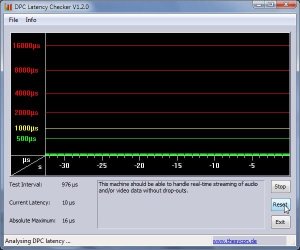
I can't say if it's the Realtek drivers or not as Realtek audio is working very well here, From hanging around here the past few months I can say that Windows-7 is somewhat "fragile" when it comes to dealing with events that most be performed real-time, this includes both video and audio, I had to disable quite a few services/devices and background programs to get my DPC latency down to this level. (including a BIOS update)

DPCLatency.jpg

There's more info here... (I'm setup to get 10 posts per page, my post should be at the top of page four where this link takes you) Of course not everyone agrees that you should have to jump through so many hoops, but I'm used to optimizing systems so it seems almost normal...still, I hope a W7 service pack would soon be released with some fixes for the poor operation out of the box.

http://www.sevenforums.com/performance-maintenance/81432-10-windows-speed-tips-dont-work-4.html

Ap

p.s. I should add that for some, using older drivers for Vista works.
In this case I think the older driver may shift the IRQ used by the audio system.
I thought we were way past the IRQ game!
 

My Computer My Computer

At a glance

Windows 7 Home PremiumIntel Core 2 Duo @ 3.00gHz4 GBATI Radeon HD 2600 XT
Computer Manufacturer/Model Number
Assembled in my workshop
OS
Windows 7 Home Premium
CPU
Intel Core 2 Duo @ 3.00gHz
Motherboard
Gigabyte GA-P35-S3G
Memory
4 GB
Graphics Card(s)
ATI Radeon HD 2600 XT
Sound Card
RME 24/96 Card, Realtek Internal Audio PreSonus FireStudio
Monitor(s) Displays
Acer 1917 (x2)
Screen Resolution
1280 x 1024 on both monitors
Hard Drives
Three 250GB Seagate SATA Barracuda 7200rpm
PSU
Rosewill 500-watt
Case
Rosewill mid-tower
Cooling
Noctua NH-U9B (CPU), PwrSupply fan + single large case Fan
Keyboard
Macally w/2/USB ports.
Mouse
Trackman Wheel
Other Info
Event 20/20 bas studio monitors, Yamaha sub.
Rackmount Korg/Roland/Yamaha synthesizers,
Cubase MIDI/audio recording. Sony Soundforge audio/mastering software. CD Architect Mastering. RME & Presonus audio interfaces.

My Computer My Computer

At a glance

Windows7 Ultimate 64bitIntel Core 2 Quad Q6600DDR2 Adata 4GBNvidia GeForce GTX 285 1024 and Nvidia GeForc...
Computer Manufacturer/Model Number
Self Built
OS
Windows7 Ultimate 64bit
CPU
Intel Core 2 Quad Q6600
Motherboard
Abit IN9-32X-MMAX
Memory
DDR2 Adata 4GB
Graphics Card(s)
Nvidia GeForce GTX 285 1024 and Nvidia GeForce 8800GT 512
Sound Card
Asus Xonar HDAV 1.3
Monitor(s) Displays
Dell 2407WFP and BenQ 2400v and Philips 150v3
Screen Resolution
3840x1200 and 1024x768
Hard Drives
2 WDC 1TB
1 WDC 1.5TB
1 WDC 640GB
1 WDC 320GB
1 Seagate 200GB
PSU
Corsair TX 850W
Case
Cooler Master HAF932
Cooling
Arctic Cooling Freezer Extreme and plenty of fans...
Keyboard
MicrosoftNaturalKeyboard 4000/Apple Alu keyboard/Dinovo mini
Mouse
Logitech G5/MarbleMouseTrackball/PerformanceMX/SpacePilotPRO
Internet Speed
1.5Mbps down/384Kbps up
Other Info
APC SURT 1000XL
Logitech Z-560
Wiimote
Mikrotik Router
Linksys (now Cisco) SD2008 8 port Gigabit switch
Linksys WRT54G (acting as AP)
Apple wireless Aluminium keyboard
Apple Magic Mouse
Xbox360 wired controller
Back
Top