Realtek, Windows 7 64RTM Crackle/static/popping

Possible fix

Hey guys, it's been a while since I've posted here but I think I found a solution to this. I updated to both the newest Realtek drivers and also updated the drivers on my NVIDIA graphics card (GT 220 I believe). I'm guessing it wasn't the Realtek drivers but my audio has been seemingly fixed now. Also video from sites like Hulu, etc. play much better without glitching out. I don't know why the video card woudl be causing these issues, but updating to the newest versions from Nvidia seemed to help. Thanks to all the theories posted on here about this annoying problem.
 

My Computer My Computer

At a glance

Windows 7Intel Quad 2.66 Ghz4 GBNVIDIA
Computer Manufacturer/Model Number
Dell
OS
Windows 7
CPU
Intel Quad 2.66 Ghz
Memory
4 GB
Graphics Card(s)
NVIDIA
Sound Card
Realtek
Hard Drives
540 GB
HI

It is nice to see someone got rid of the issue but I personaly think it is not the driver issue just a few days ago I updated the new Nvidia Geforce 9800 GT driver but that did not solve the problem.
I have Intel duo core quad Q9400 2.7 , 4 Gb ram, nvidia geforce 9800 Gt 512 ram and Realtek High definition ALC 883 sound card all that running on 64 bit windows 7 ultimate.Everything is update to the latest drivers but no solution so far.I did not have this problem under 64 bit Xp but turning to Win 7 started this problems.
I have no problems while listening to music it runs smooth but when media player is minimized it gives a crackling sound when I toggle to full screen otherwise the sound is exellent but only if I only use media player alone if I try to list my pics or wallpapers at the same time at fullscreen with every click theres a crackling and popping sound as if it's slowing the system (which is exactly what's happening).
A lot of people here mentioned having problems while watching youtube (or similar) videos but only in fullscreen and that's what's happening in my case too,games too, no matter if it's a simple point and click game with a minimal requirements or it is Crysis or far cry with max requirements it distorts the sound even in a comercial part of the game (at very start) and slows down the Pc and somethimes is so unbearable it hurts...So I've tried disabling network, I've tried disabling antivirus and firewall (eset smart security 4 64 bit) updated latest drivers, reinstall windows,registry fixes, disc clean up and everything there is but no result so far,so I think it is windows issue (incompatibility with drivers or maybe codecs, I'm using the latest K-lite codec 32 and 64 bit).
this is really frustrating but we are born and all we are doing is waiting to die one day so in meantime all we can do is let go sit back and wait for the solution listening to our wonderful crappy distorted sounds from hell :D
 

My Computer My Computer

At a glance

windows 7 ultimate 64 bitIntel Core 2 Quad CPU Q9400 @ 2.66GHz (4 CPUs...4094MB RAM ddr2NVIDIA GeForce 9800 GT 512 ram
Computer Manufacturer/Model Number
OEM 64-bit operating system
OS
windows 7 ultimate 64 bit
CPU
Intel Core 2 Quad CPU Q9400 @ 2.66GHz (4 CPUs), ~2.7Ghz
Motherboard
J&W JW IP35Pro
Memory
4094MB RAM ddr2
Graphics Card(s)
NVIDIA GeForce 9800 GT 512 ram
Sound Card
Realtek High Definition Audio ALC883
Monitor(s) Displays
SyncMaster 2243NW/2243NWX
Screen Resolution
1680 x 1050
Hard Drives
WDC WD5000AACS-00ZUB0
WDC WD2500AAKS-22L6A0
Mac Mini win 7

i didnt start having this issue till i started using my wireless connection for something. I disabled the wireless connection and the problem stopped. I tested many times by enabling and disabling the wireless network connection (Atheros AR5006EXS ) and the problem would come and go accordingly. hope this helps anyone as I know how annoying this issue is.

good luck
 

My Computer My Computer

At a glance

win 7
OS
win 7
I never had this issue up until I installed Win7 64bit RTM on to my notebook - then suddenly I started to get popping and crackling. My notebook has a Realtek HD audio chipset, SIS671 chipset + SIS968 southbridge, and an nVidia G 105M graphics card: it's a Clevo M770SUN notebook chassis.
Anyhoo, I updated all the drivers, ran all the tweaks that I could find. After I exhausted all avneues (including the ones in this thread) I started to suspected that the issue might require a BIOS update to fix it and so I emailed Clevo. They sent me the latest BIOS update and as soon as I applied the update the issue went away. So if any of you have a similar issue then I would recommend contacting the chassis manufacturer of your notebook/motherboard.
 

My Computer My Computer

At a glance

Windows 7 64bit RetailIntel E8400 dual core 3GHz per core4GB Geil Black Dragon DDR2 1066MHzBFG nVidia 285GTX PCI-Express x16 1GB
Computer Manufacturer/Model Number
Self build
OS
Windows 7 64bit Retail
CPU
Intel E8400 dual core 3GHz per core
Motherboard
MSI P45 Neo
Memory
4GB Geil Black Dragon DDR2 1066MHz
Graphics Card(s)
BFG nVidia 285GTX PCI-Express x16 1GB
Sound Card
Creative XFI Gamer PCI
Monitor(s) Displays
22 inch Samsung SyncMaster
Hard Drives
2x Samsung 30GB SolidStates
1x 150GB WD Raptor 10,000rpm
1x 300GB WD Velociraptor 10,000rpm
2x 400GB Seagate 7,200rpm
1x 1TB WD Black 7,200RPM
PSU
Hyper 800W PSU
Case
Antec P180
Cooling
Thermaltake MiniTyphoon
Helpfull info (hopefully)? and temp fix?

Heya

Found this thread after googling the same issue.


My experience...
I recently updated my asus notebook (a f50sf, gt220m graphics) to win 7 64 from the 32bit factory vista. I had installed all the esentual drivers (including the nvidia) asside from realtech hd audio. I noticed some very rare poping through the audio, tho seemingly unrelated to the gpu/processor use. anyway, to try and fix this small issue, i installed the realtech drivers, and sudernly the issue became massively worse! playing music was terrible, contstant poping like a poorly tuned radio.

This became noticably worse when gaming. and the more demand i put on the processor/gpu the worse the feedback got.

My fix (kinda)...
So i went to ad/remove programs and uninstalled realtech. im back to how it was before, occasional cracks and pops, that seem to be unrelated to what im doing. not great, but bareable untill (hopefully) a real solution is found. I dont know if this will help anyone much, but i thought id throw it in just in case. It does seem to be a problem between realtech and nvidia drivers, as the hardware worked fine under windows Vista32. I still get increasingly bad feedback as i raise the sample rate and bit depth via the defult windows sound manager however. :cry:

My question...
Ive read a few people saying that a bios update solved their issues, how would i go about this? asus live update doesnt seem to think its nessasary, even tho looking on the asus site sows bios updates from well after the purchase of this laptop. thanks!


EDIT...
found this and i am FIXED

http://vip.asus.com/forum/view.aspx...SLanguage=en-us&page=1&board_id=3&model=F50SF

this fix may only be usefull for people with the same laptop, but if so hopefully someone more geeky than myself can be inspired by this fix and come up with something for everyone.
 
Last edited:

My Computer My Computer

At a glance

win7-64gt 220m
Computer Manufacturer/Model Number
asus f50sf
OS
win7-64
Graphics Card(s)
gt 220m
Like so many others I have been having this super annoying sound issue. While reading through the world of post on the issue I found one metioning DPC Latency Checker so i figured why not give it a try. When I ran it as expected i got lots of red and yellow spikes so i started to go through the process of disabling things in device manager one by one. Luckly I started with the two most likely culprits sound and Lan. Disabling my sound card had no effect but as soon as i disabled my lan card everything went green. I also have a wireless lan card on this pc so I tryed turning it on instead but as soon as it was enabled the red spikes came right back. So the issue seemed to not be in the device itself but something using that device. Since I saw another post that was pointing the finger (possibly the middle one) at Utorrent I exited Utorrent and Incredibly enough every thing went green. I restartted Utorrent and so far it has stayed all in the green although I expect this will reoccur. I'm not sure why this occurs but any further help would be appreciated and if this helps anyone else I'm glad to have helped. For now at least it looks like i can stop rebooting every tim the sound issue occurs and i can just restart Utorrent.
 

My Computer My Computer

At a glance

Windows 7 64bit EnterpriseAMD Phenom 9500 Quad-Core 2.200 GHz8GB CorsairNvida GeForce 9600GT 2GB
OS
Windows 7 64bit Enterprise
CPU
AMD Phenom 9500 Quad-Core 2.200 GHz
Motherboard
Asus M3N78-Pro
Memory
8GB Corsair
Graphics Card(s)
Nvida GeForce 9600GT 2GB
Sound Card
Realteck HD
My solution

FINALLY FIXED

I would never ever thought this was the problem for me!!

My speakers was plugged to my rear BLACK audio panel.
So decided to play around with my speakers connection, i unplugged my speaker and plugged it to my rear GREEN audio panel from the BLACK panel.
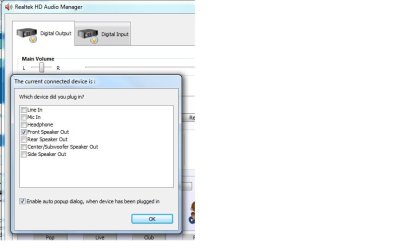
Once i connected my speaker to the GREEN audio panel, from the Realtek Audio Manager it will pop up sayin "which device did you plug in'
I TICKED the 'FRONT SPEAKER OUT' and clicked ok.
MY SOUND FINALLY WORKS NORMAL NOW!

So my problem all this time was that my speaker was connected to the wrong audio panel... weird...coz when i was using windows xp, it was connected to the BLACK audio panel. When i installed windows 7 x32 my sound was all distorted and couldnt get proper sound when playin WMP. So by installing windows 7, somehow now i must plug it in the GREEN audio panel for it to work.

If this doesnt work for you, try playin around...try the different colour audio panel you have on your pc.
NOTE* when i had it on "REAR SPEAKER OUT' my sound wouldnt work at all. So say my speaker is plugged to the green panel and i selected "Rear speaker out" my sound wouldnt work even if its plugged to the rear panel. it will only work if its plugged into the green panel and i selected 'Front speaker out" even though it wasnt in my front panel.

frontspreakerout.jpg

I also downloaded the latest driver from Realtek site
Im currently using the Vista, Windows7 Driver (32/64 bits) Driver only (ZIP file) R2.47
I downloaded the ZIP extension instead of the EXE

i tried almost every single driver version for realtek dating back to as early as vista 2.19 driver from real tek. i pretty much tried everything that has been posted here and none of the theories work, i was going give up and reinstall XP again.

hope this is the solutions for some of you people out there


Last edited:

My Computer My Computer

At a glance

windows 7
OS
windows 7
Rolling back the Realtek audio driver worked for me, but only temporarily.

I can get the same effect by unplugging my network cable. Sound is fine when I put it back in, but within half an hour the SP-DIF audio will start to crackle and stutter.

The more network activity the more crackle.

In desperation I've bought an M-Audio external 24/96 sound card. Even then I'm not confident that it will solve the problem.
 

My Computer My Computer

At a glance

Windows 7 Ultimate x64Q6600 2.4 GHz4 GBnvidea Quadro FX 540
Computer Manufacturer/Model Number
Gigabyte GA-EP45-DS3
OS
Windows 7 Ultimate x64
CPU
Q6600 2.4 GHz
Motherboard
Gigabyte GA-EP45-DS3
Memory
4 GB
Graphics Card(s)
nvidea Quadro FX 540
Sound Card
Realtek HD Audio rolled back to driver 1.0.64.9
Monitor(s) Displays
Hanns-G and Acer
Screen Resolution
1920 x 1080 and 1680 x 1050
Keyboard
IBM PS/2 !
Heya

Found this thread after googling the same issue.


My experience...
I recently updated my asus notebook (a f50sf, gt220m graphics) to win 7 64 from the 32bit factory vista. I had installed all the esentual drivers (including the nvidia) asside from realtech hd audio.

One other thing you can do on a laptop. (if you haven't already)

Control Panel/Power Options - Change Plan Settings - Change Advanced Power Settings.

Scroll down to "Processor management", make sure Min/Max is set to 100% when running off external power supply.

Ap
 

My Computer My Computer

At a glance

Windows 7 Home PremiumIntel Core 2 Duo @ 3.00gHz4 GBATI Radeon HD 2600 XT
Computer Manufacturer/Model Number
Assembled in my workshop
OS
Windows 7 Home Premium
CPU
Intel Core 2 Duo @ 3.00gHz
Motherboard
Gigabyte GA-P35-S3G
Memory
4 GB
Graphics Card(s)
ATI Radeon HD 2600 XT
Sound Card
RME 24/96 Card, Realtek Internal Audio PreSonus FireStudio
Monitor(s) Displays
Acer 1917 (x2)
Screen Resolution
1280 x 1024 on both monitors
Hard Drives
Three 250GB Seagate SATA Barracuda 7200rpm
PSU
Rosewill 500-watt
Case
Rosewill mid-tower
Cooling
Noctua NH-U9B (CPU), PwrSupply fan + single large case Fan
Keyboard
Macally w/2/USB ports.
Mouse
Trackman Wheel
Other Info
Event 20/20 bas studio monitors, Yamaha sub.
Rackmount Korg/Roland/Yamaha synthesizers,
Cubase MIDI/audio recording. Sony Soundforge audio/mastering software. CD Architect Mastering. RME & Presonus audio interfaces.
Heya

EDIT...
found this and i am FIXED

ASUSTeK Computer Inc.-Forum- Windows 7 Audio Crackling Issues Resolved

this fix may only be usefull for people with the same laptop, but if so hopefully someone more geeky than myself can be inspired by this fix and come up with something for everyone.


I have an HP workstation and have had this crackling issue for over a month. I have read multiple threads and tried just about everything there is with no luck until NOW.

I did as stated above, could not find the Realtek v2.22 but did find v2.23. Glad to report that after 24 hours running with numerous restarts, no crackling - sound is smooth!

I have loaded down the CPU with over a dozen active apps, no crackle. So I have to conclude that there is something in W7 that r2,47 does not like (or vice versa).
 

My Computer My Computer

At a glance

Windows 7 Ultimate x64, Vista Ultimate x64AMD Opteron 222216 GB, 9 bit
Computer Manufacturer/Model Number
HP xw9400
OS
Windows 7 Ultimate x64, Vista Ultimate x64
CPU
AMD Opteron 2222
Motherboard
HP
Memory
16 GB, 9 bit
Glad for those who resolve their problem but obviously we aren't having the same problem and it can be seen from various posts. I for example do not have the audio sound problem, my sound is just great when I listen to the music or watch a movie, I see some have issues with the sound while listening to music (distorted sound) that is not the case with me, it happens only when I watch streaming video youtube and only in fullscren and fullscreen games and when I play a dvd file through power dvd the sound crackles while playing 5.1 audio and not if it is a 2.0 stereo sound (strange). The 2.22 realtek driver did not solve the issue but as I said before I do not have a sound problem my sound card sounds great but crackles only when I work something like toggling media player from minimized to fullscreen or listing my wallpapers (probably depends on the resolution of the pics, the higher the resolution the higher popping sound).After going through every possible solution in this thread I think that it has to be a windows 7 problem compatibility with Vga and audio drivers but I must outline once again that we do not experience the same issue,some are having their sound distorted while just listening to music and some (like me) are having great sound but crackling and popping and system slowing down while working with fullscreen videos,games,listing pics etc.
 

My Computer My Computer

At a glance

windows 7 ultimate 64 bitIntel Core 2 Quad CPU Q9400 @ 2.66GHz (4 CPUs...4094MB RAM ddr2NVIDIA GeForce 9800 GT 512 ram
Computer Manufacturer/Model Number
OEM 64-bit operating system
OS
windows 7 ultimate 64 bit
CPU
Intel Core 2 Quad CPU Q9400 @ 2.66GHz (4 CPUs), ~2.7Ghz
Motherboard
J&W JW IP35Pro
Memory
4094MB RAM ddr2
Graphics Card(s)
NVIDIA GeForce 9800 GT 512 ram
Sound Card
Realtek High Definition Audio ALC883
Monitor(s) Displays
SyncMaster 2243NW/2243NWX
Screen Resolution
1680 x 1050
Hard Drives
WDC WD5000AACS-00ZUB0
WDC WD2500AAKS-22L6A0
Glad for those who resolve their problem but obviously we aren't having the same problem and it can be seen from various posts. windows


I agree, there are several different problems affecting users.

You might look and see if there's an nVidia background service (or) process running that's either causing or making the problem worse.

-----------------
In "Services": Stop any nVidia related service and set it to manual.

Use the Startup tab in msconfig to bypass any nVidia related startup programs.

Then reboot.
-----------------

If you like to experiment try bypassing different programs using msconfig/Startup.
Most of those don't need to run in the first place.

Ap
 

My Computer My Computer

At a glance

Windows 7 Home PremiumIntel Core 2 Duo @ 3.00gHz4 GBATI Radeon HD 2600 XT
Computer Manufacturer/Model Number
Assembled in my workshop
OS
Windows 7 Home Premium
CPU
Intel Core 2 Duo @ 3.00gHz
Motherboard
Gigabyte GA-P35-S3G
Memory
4 GB
Graphics Card(s)
ATI Radeon HD 2600 XT
Sound Card
RME 24/96 Card, Realtek Internal Audio PreSonus FireStudio
Monitor(s) Displays
Acer 1917 (x2)
Screen Resolution
1280 x 1024 on both monitors
Hard Drives
Three 250GB Seagate SATA Barracuda 7200rpm
PSU
Rosewill 500-watt
Case
Rosewill mid-tower
Cooling
Noctua NH-U9B (CPU), PwrSupply fan + single large case Fan
Keyboard
Macally w/2/USB ports.
Mouse
Trackman Wheel
Other Info
Event 20/20 bas studio monitors, Yamaha sub.
Rackmount Korg/Roland/Yamaha synthesizers,
Cubase MIDI/audio recording. Sony Soundforge audio/mastering software. CD Architect Mastering. RME & Presonus audio interfaces.
I have an HP workstation and have had this crackling issue for over a month. I have read multiple threads and tried just about everything there is with no luck until NOW.

I did as stated above, could not find the Realtek v2.22 but did find v2.23. Glad to report that after 24 hours running with numerous restarts, no crackling - sound is smooth!

I have loaded down the CPU with over a dozen active apps, no crackle. So I have to conclude that there is something in W7 that r2,47 does not like (or vice versa).

Well, so much for the exuberance. Today the crackle is back. Redid the procedure, to no avail. Will keep looking and reading. By the way, I have no latency problems while the crackle goes on.
 

My Computer My Computer

At a glance

Windows 7 Ultimate x64, Vista Ultimate x64AMD Opteron 222216 GB, 9 bit
Computer Manufacturer/Model Number
HP xw9400
OS
Windows 7 Ultimate x64, Vista Ultimate x64
CPU
AMD Opteron 2222
Motherboard
HP
Memory
16 GB, 9 bit
Well, so much for the exuberance. Today the crackle is back. Redid the procedure, to no avail. Will keep looking and reading. By the way, I have no latency problems while the crackle goes on.

No Latency problems... do you mean using the DPC latency checker?

What kind of Gragphics does the HP have? nVidia?

I had posted this in another thread.

---------------------------------------------------------------------
The most commons fixes/improvements (so far) have been:

-Updating to the most recent audio drivers.
-Updating Network adapter drivers.
-Updating Graphics card drivers.
-Updating motherboard BIOS
-Updating motherboard inf files.

-Conflicting background processes, usually secondary programs or services.
(ie: "powermizer" installed with nVidia mobile graphics drivers.)

-nVidia background programs/processes are notoriously inefficient and often cause conflicts/audio noise.

-Setting Power Options processor management to Min/Max 100%.

Etc...Etc...


We've been using this tool to find possible driver problems.

DPC Latency Checker

In my case spikes in the yellow and red zones were fixed by a mainboard BIOS update.

Ap
 

My Computer My Computer

At a glance

Windows 7 Home PremiumIntel Core 2 Duo @ 3.00gHz4 GBATI Radeon HD 2600 XT
Computer Manufacturer/Model Number
Assembled in my workshop
OS
Windows 7 Home Premium
CPU
Intel Core 2 Duo @ 3.00gHz
Motherboard
Gigabyte GA-P35-S3G
Memory
4 GB
Graphics Card(s)
ATI Radeon HD 2600 XT
Sound Card
RME 24/96 Card, Realtek Internal Audio PreSonus FireStudio
Monitor(s) Displays
Acer 1917 (x2)
Screen Resolution
1280 x 1024 on both monitors
Hard Drives
Three 250GB Seagate SATA Barracuda 7200rpm
PSU
Rosewill 500-watt
Case
Rosewill mid-tower
Cooling
Noctua NH-U9B (CPU), PwrSupply fan + single large case Fan
Keyboard
Macally w/2/USB ports.
Mouse
Trackman Wheel
Other Info
Event 20/20 bas studio monitors, Yamaha sub.
Rackmount Korg/Roland/Yamaha synthesizers,
Cubase MIDI/audio recording. Sony Soundforge audio/mastering software. CD Architect Mastering. RME & Presonus audio interfaces.
Well, so much for the exuberance. Today the crackle is back. Redid the procedure, to no avail. Will keep looking and reading. By the way, I have no latency problems while the crackle goes on.

No Latency problems... do you mean using the DPC latency checker?

What kind of Gragphics does the HP have? nVidia?

I had posted this in another thread.

---------------------------------------------------------------------
The most commons fixes/improvements (so far) have been:

-Updating to the most recent audio drivers.
-Updating Network adapter drivers.
-Updating Graphics card drivers.
-Updating motherboard BIOS
-Updating motherboard inf files.

-Conflicting background processes, usually secondary programs or services.
(ie: "powermizer" installed with nVidia mobile graphics drivers.)

-nVidia background programs/processes are notoriously inefficient and often cause conflicts/audio noise.

-Setting Power Options processor management to Min/Max 100%.

Etc...Etc...


We've been using this tool to find possible driver problems.

DPC Latency Checker

In my case spikes in the yellow and red zones were fixed by a mainboard BIOS update.

Ap

Yes I used DPC, no RED bars. This system has a bit of power, dual quad XEONs x5580 (Intel core i7s) with a fast SAS Raid0 disk array. The graphics is an nVidia Quadro fx4800 (I have all nVidia background 'helper' processes disabled). I also have the latest nVidia drivers installed (I have also tried rolling those back to no avail), audio drivers are Realtek R2.47 (latest), power set to 100%, network drivers up to date, etc. I have tried just about everything.

I have found that turning off the Intel TurboBoost option in the BIOS does reduce the noise signnificantly, but still there.

Tonight I am trying, so far noiseless, something I read in the Vista Forums (Sound skips snaps crackle and pop - Page 6 - Vista Forums). Turning off the AHCI (option ROM load in the BIOS) and reverting to the legacy IDE drivers has gotten me noiseless (crackle) free so far.

However, I still feel I am treating the symptom and not the cause. Up until a month ago I did not have a problem. Some driver or M$ update must be misbehaving. I do weekly ghosts of the system, so on the weekend I am going to start regressing in time to get back to a backup that does not have a problem. I will then compare the current and backup to identify the differences. It will take time, but so does this hit and miss method I have been using.
 

My Computer My Computer

At a glance

Windows 7 Ultimate x64, Vista Ultimate x64AMD Opteron 222216 GB, 9 bit
Computer Manufacturer/Model Number
HP xw9400
OS
Windows 7 Ultimate x64, Vista Ultimate x64
CPU
AMD Opteron 2222
Motherboard
HP
Memory
16 GB, 9 bit
Up until a month ago I did not have a problem. Some driver or M$ update must be misbehaving. I do weekly ghosts of the system, so on the weekend I am going to start regressing in time to get back to a backup that does not have a problem. I will then compare the current and backup to identify the differences. It will take time, but so does this hit and miss method I have been using.
I agree! But my last backup was 2 months ago. :mad:

Hope you can find out which update causes the problem and tell us... :(
 

My Computer My Computer

At a glance

Windows 7 Ultimate 64bit
Computer Manufacturer/Model Number
Thinkpad
OS
Windows 7 Ultimate 64bit
Mouse
Logitech MX518
Internet Speed
570kb/s :(

My Computer My Computer

At a glance

windows 7 ultimate 64 bitIntel Core 2 Quad CPU Q9400 @ 2.66GHz (4 CPUs...4094MB RAM ddr2NVIDIA GeForce 9800 GT 512 ram
Computer Manufacturer/Model Number
OEM 64-bit operating system
OS
windows 7 ultimate 64 bit
CPU
Intel Core 2 Quad CPU Q9400 @ 2.66GHz (4 CPUs), ~2.7Ghz
Motherboard
J&W JW IP35Pro
Memory
4094MB RAM ddr2
Graphics Card(s)
NVIDIA GeForce 9800 GT 512 ram
Sound Card
Realtek High Definition Audio ALC883
Monitor(s) Displays
SyncMaster 2243NW/2243NWX
Screen Resolution
1680 x 1050
Hard Drives
WDC WD5000AACS-00ZUB0
WDC WD2500AAKS-22L6A0
A suggestion - use Revo Uninstaller to uninstall anything on the computer that is not required. I think in some cases, the problem may be related to certain programs overwiting .dll and other system files.
 

My Computer My Computer

At a glance

Windows 7Intel Core2 Quad 23308 GBGeForce GT 220 1024 PCI-E
Computer Manufacturer/Model Number
Custom
OS
Windows 7
CPU
Intel Core2 Quad 2330
Motherboard
P5QL PRO
Memory
8 GB
Graphics Card(s)
GeForce GT 220 1024 PCI-E
Sound Card
Realtek High def
Like so many others I have been having this super annoying sound issue. While reading through the world of post on the issue I found one metioning DPC Latency Checker so i figured why not give it a try. When I ran it as expected i got lots of red and yellow spikes so i started to go through the process of disabling things in device manager one by one. Luckly I started with the two most likely culprits sound and Lan. Disabling my sound card had no effect but as soon as i disabled my lan card everything went green. I also have a wireless lan card on this pc so I tryed turning it on instead but as soon as it was enabled the red spikes came right back. So the issue seemed to not be in the device itself but something using that device. Since I saw another post that was pointing the finger (possibly the middle one) at Utorrent I exited Utorrent and Incredibly enough every thing went green. I restartted Utorrent and so far it has stayed all in the green although I expect this will reoccur. I'm not sure why this occurs but any further help would be appreciated and if this helps anyone else I'm glad to have helped. For now at least it looks like i can stop rebooting every time the sound issue occurs and i can just restart Utorrent.

So with a little more searching through the utorrent forums I found that the conflict is with Utorrent and Microsoft Security Essentials in my case. Once i took MSE off my pc and put on Avast no more pops and scratches. Hope this helps anyone else i am so happy to have this issue gone from my pc
 

My Computer My Computer

At a glance

Windows 7 64bit EnterpriseAMD Phenom 9500 Quad-Core 2.200 GHz8GB CorsairNvida GeForce 9600GT 2GB
OS
Windows 7 64bit Enterprise
CPU
AMD Phenom 9500 Quad-Core 2.200 GHz
Motherboard
Asus M3N78-Pro
Memory
8GB Corsair
Graphics Card(s)
Nvida GeForce 9600GT 2GB
Sound Card
Realteck HD
That makes sense. I've got Microsoft Security Essentials and I also run uTorrent. It would also explain why disconnecting the LAN cable would stop the crackle as uTorrent would no longer be downloading stuff which I'm guessing MSE is checking.

Rather than uninstall MSE I'm going to try reconfiguring it.

{EDITING TO UPDATE}
If I tell MSE to exclude uTorrent, or simply turn off Real Time Protection sound is better, but DPC Latency Checker still shows spikes.

With uTorrent fully closed and MSE turned off I can still cause spikes and the odd crackle by refreshing a webpage.

I think this is certainly network related, I don't think it's the Realtek network driver but some core Windows file(s) that was updated in the last couple of months.

Sound stutters with other sound devices, not just my Realtek HD.
 
Last edited:

My Computer My Computer

At a glance

Windows 7 Ultimate x64Q6600 2.4 GHz4 GBnvidea Quadro FX 540
Computer Manufacturer/Model Number
Gigabyte GA-EP45-DS3
OS
Windows 7 Ultimate x64
CPU
Q6600 2.4 GHz
Motherboard
Gigabyte GA-EP45-DS3
Memory
4 GB
Graphics Card(s)
nvidea Quadro FX 540
Sound Card
Realtek HD Audio rolled back to driver 1.0.64.9
Monitor(s) Displays
Hanns-G and Acer
Screen Resolution
1920 x 1080 and 1680 x 1050
Keyboard
IBM PS/2 !
Back
Top