Win7 x64 on notebook - two unresolved issues

GRoston

New member
Power User
VIP
Local time
7:11 PM
Messages
374
I just 'upgraded' my notebook to Win7 x64. 'Upgrade' is in quotes since I actually wiped the drive and started fresh. There are two issues that I have not been able to resolve - please offer comments/suggestions:

Issue 1 (major): The screen will not blank/the computer will not automatically go into standby mode.

I currently have the power option set to blank the screen after one minute of inactivity. After one minute, the screen blanks, but immediately unblanks. The system is also supposed to go into standby after 20 minutes, but this does not happen. However, when I close the lid, the system does go into standby. I have looked at the running processes and none jump out at me as being the cause. (I can post the list if that would help.)

Issue 2 (minor): There is a directory c:\boot with lots of files which cannot be deleted.

I find it hard to believe that these files are truly needed as my desktop machine does not have this directory and the same installation DVD was used. (For that matter, there are some OS-related processes running on the notebook which are not running on the desktop, e.g., sppsvc.exe, unsecapp.exe, which seems odd.)

Anyway, suggestions for dealing with these matters would be appreciated.
 

My Computer My Computer

Computer type
PC/Desktop
OS
Windows 7 x64 Pro
CPU
Core i7 860 @ 3.8 GHz
Motherboard
MSI P55-GD80
Memory
16 GB F3-12800CL7D (DDR3 1600 7-7-7-24)
Graphics Card(s)
Sapphire Vapor-X 100283VXL Radeon HD 5770
Monitor(s) Displays
NEC LCD3090WQXi-BK
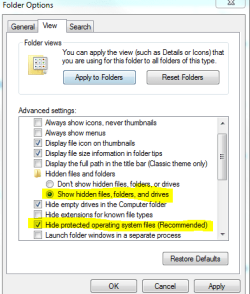
Issue 2: C:\Boot is a highly important folder. It is normally hidden, as it is a Protected OS folder. In Control Panel>Folder Options, hide OS files.

That is where the BCD and other critical boot data is.
 

My Computer My Computer

Computer Manufacturer/Model Number
Custom
OS
Windows 7 Professional x64
CPU
Intel i7 2600K OC'd @ 4620 MHz
Motherboard
Asus P8Z68-V Pro
Memory
16GB GSkill Sniper 2133 Mhz (4x4GB)
Graphics Card(s)
EVGA GeForce GTX 480 SuperClocked+
Sound Card
Realtek High Definition Audio
Monitor(s) Displays
2x Acer S273HLbmii 27"
Screen Resolution
2 x 1920x1080
Hard Drives
64GB Crucial M4 SSD

Storage: Hitachi 1TB 5400RPM, Samsung 1.5TB 5400RPM
PSU
Corsair HW Series 750w (modular)
Case
Cooler Master HAF 932 Advanced Blue Edition
Cooling
CM Hyper 212+ CPU cooler, 3x 230mm + 1x 140mm case fans
Keyboard
Logitech MK320 (wireless)
Mouse
Logitech MK320 (wireless)
Internet Speed
30 Mb/s : 2 Mb/s
That is what I had read elsewhere. However, my folder options are set to see hidden OS files, and I do not see c:\boot on this machine! (And, I do see other, normally hidden files/folders, e.g., c:\ProgramData)
 

My Computer My Computer

Computer type
PC/Desktop
OS
Windows 7 x64 Pro
CPU
Core i7 860 @ 3.8 GHz
Motherboard
MSI P55-GD80
Memory
16 GB F3-12800CL7D (DDR3 1600 7-7-7-24)
Graphics Card(s)
Sapphire Vapor-X 100283VXL Radeon HD 5770
Monitor(s) Displays
NEC LCD3090WQXi-BK
If you want to see the Boot folder, make sure both of these are set.

Capture.PNG
 

My Computer My Computer

Computer Manufacturer/Model Number
Custom
OS
Windows 7 Professional x64
CPU
Intel i7 2600K OC'd @ 4620 MHz
Motherboard
Asus P8Z68-V Pro
Memory
16GB GSkill Sniper 2133 Mhz (4x4GB)
Graphics Card(s)
EVGA GeForce GTX 480 SuperClocked+
Sound Card
Realtek High Definition Audio
Monitor(s) Displays
2x Acer S273HLbmii 27"
Screen Resolution
2 x 1920x1080
Hard Drives
64GB Crucial M4 SSD

Storage: Hitachi 1TB 5400RPM, Samsung 1.5TB 5400RPM
PSU
Corsair HW Series 750w (modular)
Case
Cooler Master HAF 932 Advanced Blue Edition
Cooling
CM Hyper 212+ CPU cooler, 3x 230mm + 1x 140mm case fans
Keyboard
Logitech MK320 (wireless)
Mouse
Logitech MK320 (wireless)
Internet Speed
30 Mb/s : 2 Mb/s
Jonathan,

I think you meant to show the second item (Hide protected) as not being checked. My folder options are configured properly to see hidden OS files... In fact, the Folder option settings are the same on both computers.
 

My Computer My Computer

Computer type
PC/Desktop
OS
Windows 7 x64 Pro
CPU
Core i7 860 @ 3.8 GHz
Motherboard
MSI P55-GD80
Memory
16 GB F3-12800CL7D (DDR3 1600 7-7-7-24)
Graphics Card(s)
Sapphire Vapor-X 100283VXL Radeon HD 5770
Monitor(s) Displays
NEC LCD3090WQXi-BK
I just 'upgraded' my notebook to Win7 x64. 'Upgrade' is in quotes since I actually wiped the drive and started fresh. There are two issues that I have not been able to resolve - please offer comments/suggestions:

Issue 1 (major): The screen will not blank/the computer will not automatically go into standby mode.

I currently have the power option set to blank the screen after one minute of inactivity. After one minute, the screen blanks, but immediately unblanks. The system is also supposed to go into standby after 20 minutes, but this does not happen. However, when I close the lid, the system does go into standby. I have looked at the running processes and none jump out at me as being the cause. (I can post the list if that would help.)

Issue 2 (minor): There is a directory c:\boot with lots of files which cannot be deleted.

I find it hard to believe that these files are truly needed as my desktop machine does not have this directory and the same installation DVD was used. (For that matter, there are some OS-related processes running on the notebook which are not running on the desktop, e.g., sppsvc.exe, unsecapp.exe, which seems odd.)

Anyway, suggestions for dealing with these matters would be appreciated.

-Issue 1: http://www.sevenforums.com/crashes-debugging/48955-hotfix-3-stop-errors-resuming-sleep-hiberate.html

Maybe you could find those Official MS Hotfix posted from Airbot and NoN, over there and see if it can helps you!

-Issue 2: As Jonathan showed you on screenshot you better not unhidde the (Recommended) system folders on both of your machines.

I own notebooks as you, and have this "boot" folder and is regular!
 

My Computer My Computer

Computer type
PC/Desktop
Computer Manufacturer/Model Number
Custom Build
OS
Windows 7 Professional SP1 - x64 [Non-UEFI Boot]
CPU
Ivy Bridge Core i5 3570K (Delidded)
Motherboard
Asus P8Z77-V LE PLUS
Memory
G.Skill "Ares" DDR3 PC3-12800 - 1600MHz (16Gb)
Graphics Card(s)
Asus Dual-RX480-O4G
Sound Card
Creative Sound Blaster Z w/5.1 sound system
Monitor(s) Displays
Asus IPS 23"
Screen Resolution
16/9
Hard Drives
Internal:
500Go Sata 6Gb/s (x2)
500Go Sata 3Gb/s (x2)
SSD 60Go Sata 6Gb/s
PSU
In Win C 900W Series 80+ Platinum
Case
Thermaltake Chaser A71
Cooling
Custom Water Cooling Loop
Keyboard
Cooler Master QuickFire XTi
Mouse
Razer Imperator 2012 (4G)
Antivirus
MSE
Browser
IE 11.0.xxx Rtm
Other Info
"Raid0" with Intel Smart Response Technology (HDD/SSD)
Non,

I always uncheck the box to see hidden system files. My comment is that on one of my Win7 machines, I do not see c:\boot. If this directory is critical, as some have suggested, then where is it?

With regard to the second point: my computer has a small hard drive and no problems coming out of standby. It will also go into standby - if it is coerced. However, the screen will not blank nor will if go into standby on its own. This means that some process must be keeping it 'awake', but tracking that done is tough. I was looking for suggestions to resolve the problem.
 

My Computer My Computer

Computer type
PC/Desktop
OS
Windows 7 x64 Pro
CPU
Core i7 860 @ 3.8 GHz
Motherboard
MSI P55-GD80
Memory
16 GB F3-12800CL7D (DDR3 1600 7-7-7-24)
Graphics Card(s)
Sapphire Vapor-X 100283VXL Radeon HD 5770
Monitor(s) Displays
NEC LCD3090WQXi-BK
Non,

I always uncheck the box to see hidden system files. My comment is that on one of my Win7 machines, I do not see c:\boot. If this directory is critical, as some have suggested, then where is it?

With regard to the second point: my computer has a small hard drive and no problems coming out of standby. It will also go into standby - if it is coerced. However, the screen will not blank nor will if go into standby on its own. This means that some process must be keeping it 'awake', but tracking that done is tough. I was looking for suggestions to resolve the problem.

-You might not need it on Desktop...might be because of some particular properties of a notebook.

-Check your "power plan" in the control panel, if you have set it to go on stanby whenever an app is running in the background...like a client torrent
 

My Computer My Computer

Computer type
PC/Desktop
Computer Manufacturer/Model Number
Custom Build
OS
Windows 7 Professional SP1 - x64 [Non-UEFI Boot]
CPU
Ivy Bridge Core i5 3570K (Delidded)
Motherboard
Asus P8Z77-V LE PLUS
Memory
G.Skill "Ares" DDR3 PC3-12800 - 1600MHz (16Gb)
Graphics Card(s)
Asus Dual-RX480-O4G
Sound Card
Creative Sound Blaster Z w/5.1 sound system
Monitor(s) Displays
Asus IPS 23"
Screen Resolution
16/9
Hard Drives
Internal:
500Go Sata 6Gb/s (x2)
500Go Sata 3Gb/s (x2)
SSD 60Go Sata 6Gb/s
PSU
In Win C 900W Series 80+ Platinum
Case
Thermaltake Chaser A71
Cooling
Custom Water Cooling Loop
Keyboard
Cooler Master QuickFire XTi
Mouse
Razer Imperator 2012 (4G)
Antivirus
MSE
Browser
IE 11.0.xxx Rtm
Other Info
"Raid0" with Intel Smart Response Technology (HDD/SSD)
You may find the boot files you are after in a hidden partition, recovery or system reserved.
 

My Computer My Computer

OS
Win7 7600 x64
Memory
8gig
Graphics Card(s)
Nvidia
Monitor(s) Displays
dual wide screen 22inch each
Hard Drives
2x 500gig
Non - Good suggestion regarding the power plan. I found a setting under advanced called Multimedia settings->When sharing media. I set this to 'Allow the computer to sleep', and it seemed to work. The screen dimmed after one minutes, but after another minute, it came back up again. Very frustrating.

ilesal - You might be right. On the desktop, there is a 'System Reserved' hidden partition which does not exist on the notebook. Perhaps the boot files are there.
 

My Computer My Computer

Computer type
PC/Desktop
OS
Windows 7 x64 Pro
CPU
Core i7 860 @ 3.8 GHz
Motherboard
MSI P55-GD80
Memory
16 GB F3-12800CL7D (DDR3 1600 7-7-7-24)
Graphics Card(s)
Sapphire Vapor-X 100283VXL Radeon HD 5770
Monitor(s) Displays
NEC LCD3090WQXi-BK
For issue 1, it's probably because Windows isn't communicating properly with the motherboard and processor. I suggest you download Intel's INF update utility if you're using an Intel Motherboard or whatever AMD's equivalent is. I'm not sure if there are other files responsible for this, but you should ensure that all things related to power like mobo, graphics, monitor, etc have all the proper drivers installed.
 

My Computer My Computer

Computer Manufacturer/Model Number
Dell E4300
OS
Windows 7 Ultimate
CPU
Intel C2D SP9400
Motherboard
Intel GS45
Memory
2GB DDR3
Graphics Card(s)
Integrated =(
Sound Card
Integrated =(
Monitor(s) Displays
Matte LCD
Screen Resolution
1280x800
Hard Drives
Intel X25-M Gen 2 SSD
WD Caviar Black
Mouse
MX 518, V470 - Logitech
fatedquest - good suggestion, but I downloaded and installed all of the latest drivers.
 

My Computer My Computer

Computer type
PC/Desktop
OS
Windows 7 x64 Pro
CPU
Core i7 860 @ 3.8 GHz
Motherboard
MSI P55-GD80
Memory
16 GB F3-12800CL7D (DDR3 1600 7-7-7-24)
Graphics Card(s)
Sapphire Vapor-X 100283VXL Radeon HD 5770
Monitor(s) Displays
NEC LCD3090WQXi-BK
To find out what is waking your computer up try this:

Start a command prompt, then use this command :

"powercfg -lastwake" (Will display what woke the machine the last time)

To get the most detailed info on the device that wakes your Windows up during sleep try:

" powercfg -devicequery wake_armed" (shows the devices that can wake windows up)
 
Last edited:

My Computer My Computer

Computer Manufacturer/Model Number
Systemax N2000 Gaming PC
OS
Windows 7 Ultimate x64
CPU
Q6600 @2.4ghz (G0 stepping)
Motherboard
XFX nforce 680i LT
Memory
8 gb OCZ vista essential sli PC-6400
Graphics Card(s)
Dual 9800gt in SLI mode
Sound Card
Integrated 8.1 High Definition Audio
Monitor(s) Displays
Dual Sceptre x246w 24 inch monitors
Screen Resolution
1920 x 1200 each monitor
Hard Drives
500 GB SATA II / 7500 rpm
PSU
Cooler Master Real Power Pro 1250W
Case
N2000 server tower
Cooling
Thermaltake Bigwater 760 is
Keyboard
MS Intelitype 6000 v2.0
Mouse
MS Intelipoint 6000
Internet Speed
Wi-power 1.5GB up / 512k down
Other Info
Windows 7 Ultimate x64, Windows 7 Pro x64, Windows Home Premium X86, Windows XP pro, Windows Home Server x86, Ubuntu 10.4 x86 and x64, Ubuntu server 10.4, SQL Server 2005, MySQL 5.0
bobtran,

Great suggestion. I tried 'powercfg -devicequery wake_armed' and found that the modem could wake up the computer. I disabled its ability to do so, but the system still will not go into standby on its own!
 

My Computer My Computer

Computer type
PC/Desktop
OS
Windows 7 x64 Pro
CPU
Core i7 860 @ 3.8 GHz
Motherboard
MSI P55-GD80
Memory
16 GB F3-12800CL7D (DDR3 1600 7-7-7-24)
Graphics Card(s)
Sapphire Vapor-X 100283VXL Radeon HD 5770
Monitor(s) Displays
NEC LCD3090WQXi-BK
bobtran,

Great suggestion. I tried 'powercfg -devicequery wake_armed' and found that the modem could wake up the computer. I disabled its ability to do so, but the system still will not go into standby on its own!

what results from "powercfg -lastwake" ?

what power schema are you using (balanced/power saver).....if you choose "change plan settings" what options do you see on the next page for:

turn off display: <30 min>
turn off machine: ? <--- here

Do you have a wireless mouse/keyboard....if so this can cause the computer to wake from sleep unexpectedly. Speaking of sleep, can you put it to sleep manually from the start button?
 

My Computer My Computer

Computer Manufacturer/Model Number
Systemax N2000 Gaming PC
OS
Windows 7 Ultimate x64
CPU
Q6600 @2.4ghz (G0 stepping)
Motherboard
XFX nforce 680i LT
Memory
8 gb OCZ vista essential sli PC-6400
Graphics Card(s)
Dual 9800gt in SLI mode
Sound Card
Integrated 8.1 High Definition Audio
Monitor(s) Displays
Dual Sceptre x246w 24 inch monitors
Screen Resolution
1920 x 1200 each monitor
Hard Drives
500 GB SATA II / 7500 rpm
PSU
Cooler Master Real Power Pro 1250W
Case
N2000 server tower
Cooling
Thermaltake Bigwater 760 is
Keyboard
MS Intelitype 6000 v2.0
Mouse
MS Intelipoint 6000
Internet Speed
Wi-power 1.5GB up / 512k down
Other Info
Windows 7 Ultimate x64, Windows 7 Pro x64, Windows Home Premium X86, Windows XP pro, Windows Home Server x86, Ubuntu 10.4 x86 and x64, Ubuntu server 10.4, SQL Server 2005, MySQL 5.0
Are you 100% sure you ran the INF update utility? This is the main thing that lets Windows identify your chipset. It's not a driver and 99% you won't find it on your manufacturer's driver page.
 

My Computer My Computer

Computer Manufacturer/Model Number
Dell E4300
OS
Windows 7 Ultimate
CPU
Intel C2D SP9400
Motherboard
Intel GS45
Memory
2GB DDR3
Graphics Card(s)
Integrated =(
Sound Card
Integrated =(
Monitor(s) Displays
Matte LCD
Screen Resolution
1280x800
Hard Drives
Intel X25-M Gen 2 SSD
WD Caviar Black
Mouse
MX 518, V470 - Logitech
bobtran,

Powercfg -lastwake showed the button push I used to wake the machine from standby. This did not change after it tried to sleep on its own (but failed).

I am using the balanced scheme. The settings I have been using for testing purposes are:
Display dim: 1 min
Display off: 2 min
Standby: 3 min

The display does dim after 1 min, but it never blanks and the computer never enters standby. It seems to 'try' to enter standby - the screen momentarily blanks, but then it comes right back (undimmed).
 

My Computer My Computer

Computer type
PC/Desktop
OS
Windows 7 x64 Pro
CPU
Core i7 860 @ 3.8 GHz
Motherboard
MSI P55-GD80
Memory
16 GB F3-12800CL7D (DDR3 1600 7-7-7-24)
Graphics Card(s)
Sapphire Vapor-X 100283VXL Radeon HD 5770
Monitor(s) Displays
NEC LCD3090WQXi-BK

My Computer My Computer

Computer type
PC/Desktop
OS
Windows 7 x64 Pro
CPU
Core i7 860 @ 3.8 GHz
Motherboard
MSI P55-GD80
Memory
16 GB F3-12800CL7D (DDR3 1600 7-7-7-24)
Graphics Card(s)
Sapphire Vapor-X 100283VXL Radeon HD 5770
Monitor(s) Displays
NEC LCD3090WQXi-BK
Here is some additional info in sleep disorders with Win7: Windows 7 does not go to sleep

Let us know....by the way, hows your bios....need to do any updates?
 

My Computer My Computer

Computer Manufacturer/Model Number
Systemax N2000 Gaming PC
OS
Windows 7 Ultimate x64
CPU
Q6600 @2.4ghz (G0 stepping)
Motherboard
XFX nforce 680i LT
Memory
8 gb OCZ vista essential sli PC-6400
Graphics Card(s)
Dual 9800gt in SLI mode
Sound Card
Integrated 8.1 High Definition Audio
Monitor(s) Displays
Dual Sceptre x246w 24 inch monitors
Screen Resolution
1920 x 1200 each monitor
Hard Drives
500 GB SATA II / 7500 rpm
PSU
Cooler Master Real Power Pro 1250W
Case
N2000 server tower
Cooling
Thermaltake Bigwater 760 is
Keyboard
MS Intelitype 6000 v2.0
Mouse
MS Intelipoint 6000
Internet Speed
Wi-power 1.5GB up / 512k down
Other Info
Windows 7 Ultimate x64, Windows 7 Pro x64, Windows Home Premium X86, Windows XP pro, Windows Home Server x86, Ubuntu 10.4 x86 and x64, Ubuntu server 10.4, SQL Server 2005, MySQL 5.0
Back
Top