50% of my themes won't install. WTF ???

DanFriday

New member
Local time
11:23 AM
Messages
103
Location
Buffasnow, New York
Can anyone offer any suggestions as to why I can't get half of the themes I download to install? everything stays the same except it will install the backgrounds on the ones I'm having troubles with. I'm doing exactly the same thing each time yet every other one or so won't install.
Here's a short list of the ones that will and won't install.

Will:
Blue ultimate, GNR7, Black Ice Dark and Lite, Konkaved Kobalt, Seechernaya, and more.
Wont:
Loter, Blood reign, Stealth,Mort de lemn , and more
 

My Computer My Computer

At a glance

Windows 7 (64bit)AMD Athlon II X4 630 2.8 GHz8.00GB DDR3-SDRAM (1333 MHz) ( Max allowed-16GB)ATI Radeon HD 4200
Computer Manufacturer/Model Number
HP Pavillion- p6331-p
OS
Windows 7 (64bit)
CPU
AMD Athlon II X4 630 2.8 GHz
Motherboard
Foxconn: H-Rs780-uATX
Memory
8.00GB DDR3-SDRAM (1333 MHz) ( Max allowed-16GB)
Graphics Card(s)
ATI Radeon HD 4200
Sound Card
Realtek High Def Audio
Monitor(s) Displays
HP 20" high Def Widescreen
Screen Resolution
1600x 900
Hard Drives
Seagate ST3750528AS- 700 GB
Keyboard
Logitech EX110 Cordless
Mouse
Logitech LX Laser Cordless
Internet Speed
25/25
Any clues anyone?
 

My Computer My Computer

At a glance

Windows 7 (64bit)AMD Athlon II X4 630 2.8 GHz8.00GB DDR3-SDRAM (1333 MHz) ( Max allowed-16GB)ATI Radeon HD 4200
Computer Manufacturer/Model Number
HP Pavillion- p6331-p
OS
Windows 7 (64bit)
CPU
AMD Athlon II X4 630 2.8 GHz
Motherboard
Foxconn: H-Rs780-uATX
Memory
8.00GB DDR3-SDRAM (1333 MHz) ( Max allowed-16GB)
Graphics Card(s)
ATI Radeon HD 4200
Sound Card
Realtek High Def Audio
Monitor(s) Displays
HP 20" high Def Widescreen
Screen Resolution
1600x 900
Hard Drives
Seagate ST3750528AS- 700 GB
Keyboard
Logitech EX110 Cordless
Mouse
Logitech LX Laser Cordless
Internet Speed
25/25
What do you mean they wont install? Can you specify it?
Also are we talking about themepacks or custom themes (visual styles) from deviantart?
 
Looked at some of the themes you named on DeviantArt and there's more involved than just downloading a file. You have to replace some dlls and cpls -- and once you do that, it's possible that other themes won't work.

The more complicated ones have instructions to be used for their installation.

Also, if you replace system files, don't be surprised if Win7 complains about that and "fixes" it.
 

My Computer My Computer

At a glance

Win7 Pro 32-bit, Win8 Pro 32-bitAMD Phenom II X6 1090T4GB ddr3 1300AMD HD 4290 onboard
Computer type
PC/Desktop
Computer Manufacturer/Model Number
Custom
OS
Win7 Pro 32-bit, Win8 Pro 32-bit
CPU
AMD Phenom II X6 1090T
Motherboard
Gigabyte
Memory
4GB ddr3 1300
Graphics Card(s)
AMD HD 4290 onboard
Sound Card
Builtin Realtek HD Audio
Monitor(s) Displays
Samsung 24" widescreen, LG 23" widescreen
Screen Resolution
1920x1200/1920x1080
Hard Drives
Kingston 256GB SSD
Keyboard
Logitech Illuminated Keyboard
Mouse
Logitech M705 wireless mouse
Antivirus
Norton Av 2013
Browser
IE v10
Mark:

This is not correct. Replacing dll's do not make some themes not able to be applied. Custom themes and custom dll's are not at all related, and wont effect each other, other than a visual effect maybe (like we see with longhorn themes with default explorerframe.dll, which looks bad, in that case many uses a custom longhorn explorerframe.dll)

Either way, this wouldnt make you unable to apply other themes ;)
 
What do you mean they wont install? Can you specify it?
Also are we talking about themepacks or custom themes (visual styles) from deviantart?

They don't change except for the background. I'm talking about custom themes from deviantart, Virtual Customs, and CreativX.
 

My Computer My Computer

At a glance

Windows 7 (64bit)AMD Athlon II X4 630 2.8 GHz8.00GB DDR3-SDRAM (1333 MHz) ( Max allowed-16GB)ATI Radeon HD 4200
Computer Manufacturer/Model Number
HP Pavillion- p6331-p
OS
Windows 7 (64bit)
CPU
AMD Athlon II X4 630 2.8 GHz
Motherboard
Foxconn: H-Rs780-uATX
Memory
8.00GB DDR3-SDRAM (1333 MHz) ( Max allowed-16GB)
Graphics Card(s)
ATI Radeon HD 4200
Sound Card
Realtek High Def Audio
Monitor(s) Displays
HP 20" high Def Widescreen
Screen Resolution
1600x 900
Hard Drives
Seagate ST3750528AS- 700 GB
Keyboard
Logitech EX110 Cordless
Mouse
Logitech LX Laser Cordless
Internet Speed
25/25
What do you mean they wont install? Can you specify it?
Also are we talking about themepacks or custom themes (visual styles) from deviantart?

They don't change except for the background. I'm talking about custom themes from deviantart, Virtual Customs, and CreativX.
Okay, so it's only the backgrounds that does not change?
Some themes comes without any custom backgrounds ;)
 
What do you mean they wont install? Can you specify it?
Also are we talking about themepacks or custom themes (visual styles) from deviantart?

They don't change except for the background. I'm talking about custom themes from deviantart, Virtual Customs, and CreativX.
Okay, so it's only the backgrounds that does not change?
Some themes comes without any custom backgrounds ;)

Only the background changes to the theme i try to install. Everything else stays the same from previous theme.
 

My Computer My Computer

At a glance

Windows 7 (64bit)AMD Athlon II X4 630 2.8 GHz8.00GB DDR3-SDRAM (1333 MHz) ( Max allowed-16GB)ATI Radeon HD 4200
Computer Manufacturer/Model Number
HP Pavillion- p6331-p
OS
Windows 7 (64bit)
CPU
AMD Athlon II X4 630 2.8 GHz
Motherboard
Foxconn: H-Rs780-uATX
Memory
8.00GB DDR3-SDRAM (1333 MHz) ( Max allowed-16GB)
Graphics Card(s)
ATI Radeon HD 4200
Sound Card
Realtek High Def Audio
Monitor(s) Displays
HP 20" high Def Widescreen
Screen Resolution
1600x 900
Hard Drives
Seagate ST3750528AS- 700 GB
Keyboard
Logitech EX110 Cordless
Mouse
Logitech LX Laser Cordless
Internet Speed
25/25
sergiogarcia9, speed reading does not work. Pay attention to what people actually write if you're going to offer advice. He twice said that ONLY the backgrounds get installed.

I am having the same problem. I think maybe whoever created those themes you mentioned didn't do them properly. There is no reason why a properly written theme should not install correctly. I've used Windows Theme Installer only to find that the supposed theme files I'm trying to work with are not even recognized as themes! I find that 90% of the ones I download are not, which indicates that most custom themes are just improperly written. You still get the pretty colors, but no sound and funky colored text in the side pane.

As for the text I just mentioned, I've noticed that Windows 7 screws up fonts (whiting them out) if it doesn't place custom themes in the so called "installed" category.


I've got a ton of Aero themes that have that behavior just because the aren't included in that category:


I have great difficulty implementing themes that aren't fully "installed".
 

My Computer My Computer

At a glance

Windows 7q66008GB Mushkin DDR2-800 DDR2 SDRAMNvidia GTX 280
OS
Windows 7
CPU
q6600
Motherboard
nVIDIA nForce 780i SLI FTW
Memory
8GB Mushkin DDR2-800 DDR2 SDRAM
Graphics Card(s)
Nvidia GTX 280
Sorry i misread the question. My bad.
Anyway, i have no clue why it is not working. Sorry, i can't help.
 
sergiogarcia9, speed reading does not work. Pay attention to what people actually write if you're going to offer advice. He twice said that ONLY the backgrounds get installed.

I am having the same problem. I think maybe whoever created those themes you mentioned didn't do them properly. There is no reason why a properly written theme should not install correctly. I've used Windows Theme Installer only to find that the supposed theme files I'm trying to work with are not even recognized as themes! I find that 90% of the ones I download are not, which indicates that most custom themes are just improperly written. You still get the pretty colors, but no sound and funky colored text in the side pane.

As for the text I just mentioned, I've noticed that Windows 7 screws up fonts (whiting them out) if it doesn't place custom themes in the so called "installed" category.


I've got a ton of Aero themes that have that behavior just because the aren't included in that category:


I have great difficulty implementing themes that aren't fully "installed".

Thanks . I thought something was wrong with my computer but now I see I'm not the only one with this problem. I also get the whiting out of fonts constantly.
 

My Computer My Computer

At a glance

Windows 7 (64bit)AMD Athlon II X4 630 2.8 GHz8.00GB DDR3-SDRAM (1333 MHz) ( Max allowed-16GB)ATI Radeon HD 4200
Computer Manufacturer/Model Number
HP Pavillion- p6331-p
OS
Windows 7 (64bit)
CPU
AMD Athlon II X4 630 2.8 GHz
Motherboard
Foxconn: H-Rs780-uATX
Memory
8.00GB DDR3-SDRAM (1333 MHz) ( Max allowed-16GB)
Graphics Card(s)
ATI Radeon HD 4200
Sound Card
Realtek High Def Audio
Monitor(s) Displays
HP 20" high Def Widescreen
Screen Resolution
1600x 900
Hard Drives
Seagate ST3750528AS- 700 GB
Keyboard
Logitech EX110 Cordless
Mouse
Logitech LX Laser Cordless
Internet Speed
25/25
custom themes usually need

uxtheme patcher Download Uxtheme Patch For Windows 7 RC build 7100
Uxtheme Patch for Windows 7 RTM 7600 - WinMatrix
fonts installed on the font directory
theme file/folder put on the theme directory
background pict if it also included in the file downloaded

stated on the post above, certain dll only will be needed

explorerframe.dll -change your windows arrow on the explorer bar
explorer.exe - common file used to change start button

however playing with those files might give you unexpected result such as
-black screen with only mouse hovering to nowhere because your explorer.exe was messed up


p/s ; correct me for any wrong info i added
 

My Computer My Computer

At a glance

window's 7core 2 quad2gb corsairati hd4850
OS
window's 7
CPU
core 2 quad
Motherboard
gigabyte
Memory
2gb corsair
Graphics Card(s)
ati hd4850
Monitor(s) Displays
lg
Screen Resolution
1600 X 900
Case
power logic
Other Info
none of the spec above is accurate
DF; Can you try linking me to one of the themes that doesn't work on your machine?
Also, did you follow this tutorials while installing them? Your problem might be that your forgot to put the themes folder, where the msstyles is, inside your themes directory ;)
http://www.sevenforums.com/tutorials/28377-theme-how-apply-custom-themes.html

We must have a language barrier here.
I'm doing exactly the same thing each time yet every other one or so won't install.
 

My Computer My Computer

At a glance

Windows 7 (64bit)AMD Athlon II X4 630 2.8 GHz8.00GB DDR3-SDRAM (1333 MHz) ( Max allowed-16GB)ATI Radeon HD 4200
Computer Manufacturer/Model Number
HP Pavillion- p6331-p
OS
Windows 7 (64bit)
CPU
AMD Athlon II X4 630 2.8 GHz
Motherboard
Foxconn: H-Rs780-uATX
Memory
8.00GB DDR3-SDRAM (1333 MHz) ( Max allowed-16GB)
Graphics Card(s)
ATI Radeon HD 4200
Sound Card
Realtek High Def Audio
Monitor(s) Displays
HP 20" high Def Widescreen
Screen Resolution
1600x 900
Hard Drives
Seagate ST3750528AS- 700 GB
Keyboard
Logitech EX110 Cordless
Mouse
Logitech LX Laser Cordless
Internet Speed
25/25
would you mind telling the name of the theme that you've failed to apply. i would like to test it out myself. thanx
 

My Computer My Computer

At a glance

window's 7core 2 quad2gb corsairati hd4850
OS
window's 7
CPU
core 2 quad
Motherboard
gigabyte
Memory
2gb corsair
Graphics Card(s)
ati hd4850
Monitor(s) Displays
lg
Screen Resolution
1600 X 900
Case
power logic
Other Info
none of the spec above is accurate
I had the same problem and found that some of the latest Windows Updates were causing the problem (I haven't narrowed it down yet). I suggest that if you have installed any Updates over the past couple of weeks, that you roll your system back to before (via System Restore) and see how you go.
Also, to get the left hand pane of the Control Panel window to change, you need to modify shell32.dll. No custom theme will change that. You have to do it yourself.
If you want to know how I can guide you thru it.
Have a read thru this and see if it helps your situation...http://www.sevenforums.com/customization/82298-shell32-dll.html
 

My Computer My Computer

At a glance

Windows 7 Ultimate (x64) SP1Intel 3770k 4.6GHz8GB (2x 4GB) Crucial BallistixSapphire 7950 (1060/1600)
Computer Manufacturer/Model Number
tw33k
OS
Windows 7 Ultimate (x64) SP1
CPU
Intel 3770k 4.6GHz
Motherboard
ASUS Maximus V Formula
Memory
8GB (2x 4GB) Crucial Ballistix
Graphics Card(s)
Sapphire 7950 (1060/1600)
Sound Card
On Board Realtek HD Audio
Monitor(s) Displays
27" Acer B273HU (via HDMI)
Screen Resolution
2048 x 1152
Hard Drives
Crucial M4 128GB
2TB WD Black
1TB Samsung F3 SATA
1TB WD Elite External
2TB WD USB 3.0
PSU
Corsair AX750 Gold
Case
Corsair Obsidian 800DW
Cooling
Corsair H100 (2x AP-121/2x UK-3000 push/pull)
Keyboard
Microsoft Wireless 5000
Mouse
Microsoft Wireless 5000
Internet Speed
5mb/s
Other Info
Logitech z-2300 2.1 speakers
Lamptron FC-5 v2
DF; Can you try linking me to one of the themes that doesn't work on your machine?
Also, did you follow this tutorials while installing them? Your problem might be that your forgot to put the themes folder, where the msstyles is, inside your themes directory ;)
http://www.sevenforums.com/tutorials/28377-theme-how-apply-custom-themes.html

We must have a language barrier here.
I'm doing exactly the same thing each time yet every other one or so won't install.
I know you said that, but you could be doing it with the wrong folders ;)
I simply asked you a question if you followed that tutorial, and what themes you had problems with. You could be just unpacking the rar/zip files inside your themes directory for all i know.

Some times the themes authors forget or edit wrong in the .theme files, which causes the themes to not change, while the background, sounds, screensaver etc. does ;)
 
im having a hard time finding those theme myself though.. LMAO
 

My Computer My Computer

At a glance

window's 7core 2 quad2gb corsairati hd4850
OS
window's 7
CPU
core 2 quad
Motherboard
gigabyte
Memory
2gb corsair
Graphics Card(s)
ati hd4850
Monitor(s) Displays
lg
Screen Resolution
1600 X 900
Case
power logic
Other Info
none of the spec above is accurate
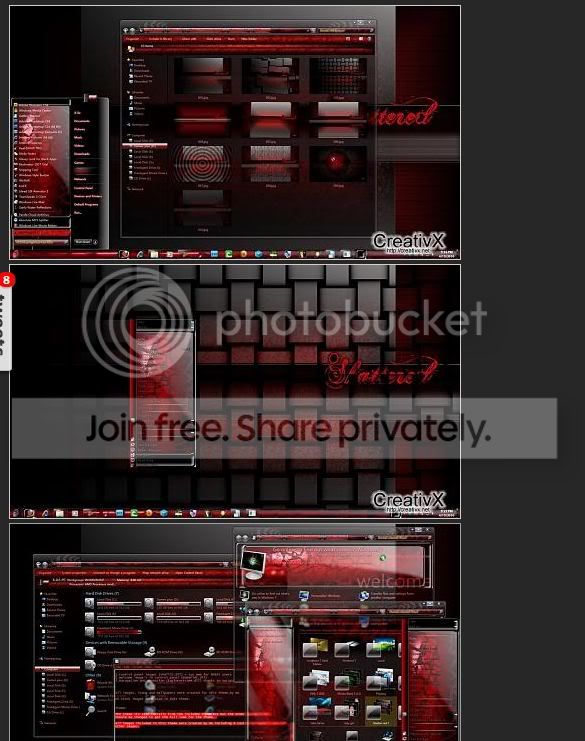
Here's one example. This is what the theme is suppose to look like.

creat.jpg


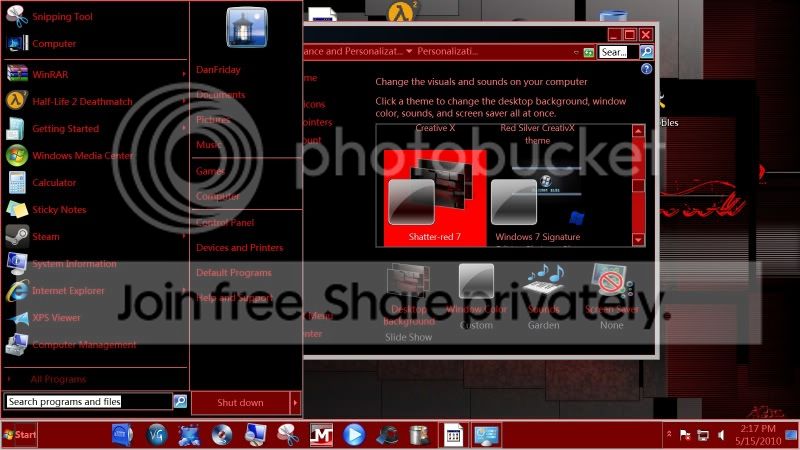
This is what I get when I install it:

shatred.jpg


Downloaded from here:
http://creativx.net/forums/dark-themes-x-ile/9758-shatter-red-7-theme-windows-7-a.html
 

My Computer My Computer

At a glance

Windows 7 (64bit)AMD Athlon II X4 630 2.8 GHz8.00GB DDR3-SDRAM (1333 MHz) ( Max allowed-16GB)ATI Radeon HD 4200
Computer Manufacturer/Model Number
HP Pavillion- p6331-p
OS
Windows 7 (64bit)
CPU
AMD Athlon II X4 630 2.8 GHz
Motherboard
Foxconn: H-Rs780-uATX
Memory
8.00GB DDR3-SDRAM (1333 MHz) ( Max allowed-16GB)
Graphics Card(s)
ATI Radeon HD 4200
Sound Card
Realtek High Def Audio
Monitor(s) Displays
HP 20" high Def Widescreen
Screen Resolution
1600x 900
Hard Drives
Seagate ST3750528AS- 700 GB
Keyboard
Logitech EX110 Cordless
Mouse
Logitech LX Laser Cordless
Internet Speed
25/25
Here's one example. This is what the theme is suppose to look like.

creat.jpg


This is what I get when I install it:

shatred.jpg


Downloaded from here:
Shatter-red 7 theme for windows 7 - CreativX
Okay, now we can get a bit sence out of this
What i think has happened here, is that your computer has applied a basic theme instead of the aero one.
Do you have Aero activated? and do you have the latest drivers for your graphics card?
 
Back
Top