Show Us Your Rig

Status
Not open for further replies.
One thing you should really know about computers....

You should never enclose things that prodouce heat... thats number one. Unless you have a open backing but it can still produce heat and still raise the temp.

Me personally.... I would get like a little stand.. to the right of your desk.. maybe with three or four open shelves and make one shelf electrical... another one nextwork and the other could be little things...or two might be fore your network...you can put your router on the top so it has no obstructions. then in the back you can either use velcro or zip ties and do it that way.

another thing you can do is use 1.5 to 3 foot patch cables... shorten the cable lenghts
 

My Computer My Computer

Computer Manufacturer/Model Number
HP Pavilion Elite HPE-410f
OS
Windows 7 Ultimate x64
CPU
AMD Phenom x6 1045t
Motherboard
N/A
Memory
8 GB
Graphics Card(s)
ATI Radeon HD 5570
Sound Card
Realtek Highdefinition Audio / 5.1 Dolby Setup
Monitor(s) Displays
HP w2207h Widescreen
Screen Resolution
1680*1050
Hard Drives
1 TB (fixed), 320 Portable maxtor, Server Hard drives
PSU
350 Watt
Case
HP CASE
Cooling
Bass
Keyboard
Logitech MX 5500
Mouse
Logitech MX 5500
Internet Speed
ROAD RUNNER 16MB D/512 U
One thing you should really know about computers....

You should never enclose things that prodouce heat... thats number one. Unless you have a open backing but it can still produce heat and still raise the temp.

Me personally.... I would get like a little stand.. to the right of your desk.. maybe with three or four open shelves and make one shelf electrical... another one nextwork and the other could be little things...or two might be fore your network...you can put your router on the top so it has no obstructions. then in the back you can either use velcro or zip ties and do it that way.

another thing you can do is use 1.5 to 3 foot patch cables... shorten the cable lenghts

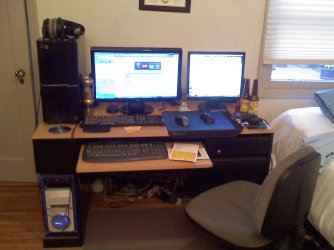
I thought about some A/V stand, but I don't think there's space for my tower. I'm definitely going to look around the internet for something. My monitor cables barely make it to the tower as is. I did notice my UPS is a little warmer, but I don't know if it's the rise in weather that's contributing to that. My computer isn't enclosed. That would be nuts. It heats up my room as is I definitely wouldn't put my tower in any enclosed space. I was also looking into A/V cabinet fans that I could cut out a hole in the back and mount. That's a lot of work though. LOL. I was also thinking some cheap clip on fan I could just direct into the enclosure.
 

My Computer My Computer

Computer type
PC/Desktop
Computer Manufacturer/Model Number
Custom Build
OS
Windows 7 Pro 64bit build 7601 SP1
CPU
Intel Core I5 3570K 3.4Ghz w/ Zalman CNPS9900NT RT
Motherboard
MSI Z77A-G45 Gaming
Memory
G.Skill F3-12800CL9D-8GbXL ; 4Gx2
Graphics Card(s)
EVGA Geforce GTX 770 Superclocked
Sound Card
Creative Sound Blaster Z
Monitor(s) Displays
Dual ViewSonic VX2770Smh-LED Black 27"IPS-Panel
Screen Resolution
1920x1080
Hard Drives
Kingston Hyper X 240GB SSD Win8 Pro 64bit 6GB/s Sata III
Intel 335 Series SSD 240GB Win8 Storage 6GB/s Sata III
Intel 320 Series SSD 600GB Storage 3GB/s Sata II
Western Digital Scorpio Black 1TB - Docked via Esata
PSU
Coolermaster GX 750W
Case
Corsair Vengence C70
Cooling
Coolermaster 120mm and Enermax 140mm
Keyboard
Corsair Vengence K70
Mouse
Logitech G500
Internet Speed
22mbps+
Browser
Firefox, Chrome, IE
Other Info
Swan M50W 2.1 speakers
APC UPS
Thermaltake BlacX HDD Dock
Samsung BD Optical Drive
Netgear WNDR4500
One thing you should really know about computers....

You should never enclose things that prodouce heat... thats number one. Unless you have a open backing but it can still produce heat and still raise the temp.

Me personally.... I would get like a little stand.. to the right of your desk.. maybe with three or four open shelves and make one shelf electrical... another one nextwork and the other could be little things...or two might be fore your network...you can put your router on the top so it has no obstructions. then in the back you can either use velcro or zip ties and do it that way.

another thing you can do is use 1.5 to 3 foot patch cables... shorten the cable lenghts

I thought about some A/V stand, but I don't think there's space for my tower. I'm definitely going to look around the internet for something. My monitor cables barely make it to the tower as is. I did notice my UPS is a little warmer, but I don't know if it's the rise in weather that's contributing to that. I was also looking into A/V cabinet fans that I could cut out a hole in the back and mount. That's a lot of work though. LOL. I was also thinking some cheap clip on fan I could just direct into the enclosure.

You are going to want to get it out of that enclosure.
Umm about your monitor, that is no problem, just get an extender for your VGA, HDMI, DVI whatever your using.

I would put the tower on top of your desk... make it easier for you to access it.. That is how I have mines as well... An A/V stand would be perfect!

You said something about the weather... the weather changes outside... not inside right. I mean my house is always kept at 68-70 degrees Farh reguardless of outside.
 

My Computer My Computer

Computer Manufacturer/Model Number
HP Pavilion Elite HPE-410f
OS
Windows 7 Ultimate x64
CPU
AMD Phenom x6 1045t
Motherboard
N/A
Memory
8 GB
Graphics Card(s)
ATI Radeon HD 5570
Sound Card
Realtek Highdefinition Audio / 5.1 Dolby Setup
Monitor(s) Displays
HP w2207h Widescreen
Screen Resolution
1680*1050
Hard Drives
1 TB (fixed), 320 Portable maxtor, Server Hard drives
PSU
350 Watt
Case
HP CASE
Cooling
Bass
Keyboard
Logitech MX 5500
Mouse
Logitech MX 5500
Internet Speed
ROAD RUNNER 16MB D/512 U
One thing you should really know about computers....

You should never enclose things that prodouce heat... thats number one. Unless you have a open backing but it can still produce heat and still raise the temp.

Me personally.... I would get like a little stand.. to the right of your desk.. maybe with three or four open shelves and make one shelf electrical... another one nextwork and the other could be little things...or two might be fore your network...you can put your router on the top so it has no obstructions. then in the back you can either use velcro or zip ties and do it that way.

another thing you can do is use 1.5 to 3 foot patch cables... shorten the cable lenghts

I thought about some A/V stand, but I don't think there's space for my tower. I'm definitely going to look around the internet for something. My monitor cables barely make it to the tower as is. I did notice my UPS is a little warmer, but I don't know if it's the rise in weather that's contributing to that. I was also looking into A/V cabinet fans that I could cut out a hole in the back and mount. That's a lot of work though. LOL. I was also thinking some cheap clip on fan I could just direct into the enclosure.

You are going to want to get it out of that enclosure.
Umm about your monitor, that is no problem, just get an extender for your VGA, HDMI, DVI whatever your using.

I would put the tower on top of your desk... make it easier for you to access it.. That is how I have mines as well... An A/V stand would be perfect!

You said something about the weather... the weather changes outside... not inside right. I mean my house is always kept at 68-70 degrees Farh reguardless of outside.

Yeah, I don't have room to put my tower on my desk. Right now it's sitting on top of my filing cabinet and it's within arms reach so I don't have any issue accessing it. I have a hutch to the left of me and with dual monitors as you can see from my pics doesn't really leave any room to the right of me. As to the weather. I don't pay the eletric bill so I don't have much control over the thermostat. I think attaching a fan towards the enclosure should keep things cool until I can get a stand that's suitable.
 

My Computer My Computer

Computer type
PC/Desktop
Computer Manufacturer/Model Number
Custom Build
OS
Windows 7 Pro 64bit build 7601 SP1
CPU
Intel Core I5 3570K 3.4Ghz w/ Zalman CNPS9900NT RT
Motherboard
MSI Z77A-G45 Gaming
Memory
G.Skill F3-12800CL9D-8GbXL ; 4Gx2
Graphics Card(s)
EVGA Geforce GTX 770 Superclocked
Sound Card
Creative Sound Blaster Z
Monitor(s) Displays
Dual ViewSonic VX2770Smh-LED Black 27"IPS-Panel
Screen Resolution
1920x1080
Hard Drives
Kingston Hyper X 240GB SSD Win8 Pro 64bit 6GB/s Sata III
Intel 335 Series SSD 240GB Win8 Storage 6GB/s Sata III
Intel 320 Series SSD 600GB Storage 3GB/s Sata II
Western Digital Scorpio Black 1TB - Docked via Esata
PSU
Coolermaster GX 750W
Case
Corsair Vengence C70
Cooling
Coolermaster 120mm and Enermax 140mm
Keyboard
Corsair Vengence K70
Mouse
Logitech G500
Internet Speed
22mbps+
Browser
Firefox, Chrome, IE
Other Info
Swan M50W 2.1 speakers
APC UPS
Thermaltake BlacX HDD Dock
Samsung BD Optical Drive
Netgear WNDR4500
I guess whatever you think that is best...

but the A/V stand once you find one that is stutable for you should work out well.

Then just get a whole bunch of velcro straps and make your wires look pretty
 

My Computer My Computer

Computer Manufacturer/Model Number
HP Pavilion Elite HPE-410f
OS
Windows 7 Ultimate x64
CPU
AMD Phenom x6 1045t
Motherboard
N/A
Memory
8 GB
Graphics Card(s)
ATI Radeon HD 5570
Sound Card
Realtek Highdefinition Audio / 5.1 Dolby Setup
Monitor(s) Displays
HP w2207h Widescreen
Screen Resolution
1680*1050
Hard Drives
1 TB (fixed), 320 Portable maxtor, Server Hard drives
PSU
350 Watt
Case
HP CASE
Cooling
Bass
Keyboard
Logitech MX 5500
Mouse
Logitech MX 5500
Internet Speed
ROAD RUNNER 16MB D/512 U
I guess whatever you think that is best...

but the A/V stand once you find one that is stutable for you should work out well.

Then just get a whole bunch of velcro straps and make your wires look pretty

Well, thanks for the banter back & forth. I'm definitely going to relocate my UPS, I just need to find something I can use to make it practical and maintain a neat appearance that I want.
 

My Computer My Computer

Computer type
PC/Desktop
Computer Manufacturer/Model Number
Custom Build
OS
Windows 7 Pro 64bit build 7601 SP1
CPU
Intel Core I5 3570K 3.4Ghz w/ Zalman CNPS9900NT RT
Motherboard
MSI Z77A-G45 Gaming
Memory
G.Skill F3-12800CL9D-8GbXL ; 4Gx2
Graphics Card(s)
EVGA Geforce GTX 770 Superclocked
Sound Card
Creative Sound Blaster Z
Monitor(s) Displays
Dual ViewSonic VX2770Smh-LED Black 27"IPS-Panel
Screen Resolution
1920x1080
Hard Drives
Kingston Hyper X 240GB SSD Win8 Pro 64bit 6GB/s Sata III
Intel 335 Series SSD 240GB Win8 Storage 6GB/s Sata III
Intel 320 Series SSD 600GB Storage 3GB/s Sata II
Western Digital Scorpio Black 1TB - Docked via Esata
PSU
Coolermaster GX 750W
Case
Corsair Vengence C70
Cooling
Coolermaster 120mm and Enermax 140mm
Keyboard
Corsair Vengence K70
Mouse
Logitech G500
Internet Speed
22mbps+
Browser
Firefox, Chrome, IE
Other Info
Swan M50W 2.1 speakers
APC UPS
Thermaltake BlacX HDD Dock
Samsung BD Optical Drive
Netgear WNDR4500
Purchased and self built last fall will show photos l8r

OS
windows7 64-bit
CPU
Core i7 920 D0 Quad Core 2.66GHZ Bloomfield 8MB
Motherboard
Asus P6T X58
Memory
G.Skill 6GB DDR3 3X2GB DDR3-1600 triple channel
Graphics Card(s)
EVGA NVIDIA GTX260
Sound Card
Onboard
Monitor(s) Displays
HP 2009m
Hard Drives
Seagate Barracuda 500GB SATA2 3.5IN
PSU
Corsair VX550W
Case
Antec Three Hundredd
Cooling
OCZ Vendetta 2
 

My Computer My Computer

Computer Manufacturer/Model Number
Asus
OS
windows7 64-bit
CPU
Core i7 920 D0 Quad Core 2.66GHZ Bloomfield 8MB
Motherboard
Asus P6T X58
Memory
G.Skill 6GB DDR3 3X2GB DDR3-1600 triple channel
Graphics Card(s)
EVGA NVIDIA GTX260
Sound Card
Onboard
Monitor(s) Displays
HP 2009m
Hard Drives
Seagate Barracuda 500GB SATA2 3.5IN
PSU
Corsair VX550W
Case
Antec Three Hundredd
Cooling
OCZ Vendetta 2
Even after 143 pages, this thread still seems to be going strong, so here's my setup:
The only addition from original build, is a pink cold cathode above mobo.
I also had a UV tube which I was gonna fit, but wife stepped on it and broke the glass - argh!
Wish I'd gone for a modular psu though - would've been neater. Bunches of unused cables are unsightly.

picture.php
picture.php
 
Last edited:

My Computer My Computer

Computer Manufacturer/Model Number
PCSpecialist.co.uk (custom build)
OS
Win7 (7600) Home Prem 64 bit
CPU
Intel Core i5-750
Motherboard
Asus P7H57D-EVO
Memory
8gb Corsair DDR3 1300MHz CMV4GX3M2A1333C9
Graphics Card(s)
Asus Nvidia GTX275
Sound Card
Asus Xonar D2X / Creative Inspire T7700 speakers
Monitor(s) Displays
Sharp Aquos 42" HDTV (via hdmi)
Screen Resolution
1920x1080
Hard Drives
Samsung SATA 1.5TB HD1541UI
PSU
Corsair TX850
Case
Antec 900
Cooling
Titan TTC-NK34TZ on CPU, 3x 120mm & 1x 200mm fans in case
Keyboard
Logitech Media Keyboard 600
Mouse
Logitech LX6 wireless
Internet Speed
4Mb/s landline, 7.2Mb/s mobile broadband (both Orange)
Other Info
Don't be fooled by the 'Junior' thing. I just don't post a lot.
I've been building/configuring/fault-finding PC's since Win3.11 and DOS6.2.2
I learned machine code on an 8086 & BASIC on a Commodore Pet, so I've been there from Early Days!
There's not much about PC's I'm unfamiliar with. I'm just here to find solutions to the problems Win7 presents. Not because I'm dumb or clueless.
Hello Vector90Ash, good setup mate.
 

My Computer My Computer

Computer Manufacturer/Model Number
* BFK Customs *
OS
W 7 64-bit Ultimate
CPU
Intel Q9550 Yorkfield
Motherboard
ASUS P5Q Pro
Memory
8GB Dominator 8500C5D
Graphics Card(s)
ATI : XFX 5870
Sound Card
Realtek HD Audio 7-1
Monitor(s) Displays
1x 47" LCD HDMI & 3x 26" LCD HDMI
Screen Resolution
1920x1080P & 1920x1200
Hard Drives
1x 80GB Intel X25-M G2 SSD : 1x 500GB & 1x 640GB WD Caviar Black(s)
PSU
Corsair 620HX
Case
Cooler Master RC-690
Cooling
Tuniq Tower 120, 2x 140mm and 3x 120mm case fans
Keyboard
Microsoft 500
Mouse
Razer Diamondback 3G
Internet Speed
14 Mb/s
Other Info
1x Koutech 3Gb/s SATA HDD Hot Swap Rack
Even after 143 pages, this thread still seems to be going strong, so here's my setup:
The only addition from original build, is a pink cold cathode above mobo.
I also had a UV tube which I was gonna fit, but wife stepped on it and broke the glass - argh!
Wish I'd gone for a modular psu though - would've been neater. Bunches of unused cables are unsightly.

picture.php
picture.php

Nice setup!
 

My Computer My Computer

Computer Manufacturer/Model Number
Home built
OS
Windows 7 Ultimate 32 bit
CPU
Intel(R) Pentium(R) 4 CPU 3.00GHz
Motherboard
ASUS P4P800-VM Motherboard Chipset: Intel 865G + ICH5
Memory
2.50 GB RAM
Graphics Card(s)
NVIDIA GeForce 7600 GS
Sound Card
SoundMax Integrated Digital Audio (Chip)
Monitor(s) Displays
ViewSonic VX 1962 wm
Screen Resolution
1680 X 1050
Hard Drives
Seagate Barracuda 7200.10 80 GB
ST380215A ATA Device 18.6 GB
Western Digital "My Book" external hard drive 750 GB
Cooling
Fan based
Keyboard
Microsoft Comfort Curve Keyboard 2000 v10 USB
Mouse
Logitec optic USB
Internet Speed
3.01 Mb/s download 0.64 Mb/s upload
Some really nice set ups over the last few pages chaps :thumbsup:
 

My Computer My Computer

Computer type
PC/Desktop
Computer Manufacturer/Model Number
Systems by SmartEyeball
OS
8 Pro x64
CPU
i7 3770K 4.6GHz
Motherboard
ASUS P8Z77 WS
Memory
16GB G.Skill Trident X 2666mhz
Graphics Card(s)
x2 EVGA 780 Ti Superclocked SLI
Sound Card
SB X-FI Surround 5.1 PRO USB / ATH-AD900 Headphones
Monitor(s) Displays
x3 Dell U2410 / 58" Samsung
Screen Resolution
5760*1200/ 1920*1200
Hard Drives
2x Intel 520 240GB (RAID 0) * 2x WD Caviar Blacks 2TB (RAID 0) * 2TB WD Caviar Black * Sony Optirac DVD
PSU
Silverstone Strider Evolution 1200W
Case
Thermaltake Level 10 GT Snow Edition
Cooling
Noctua NH-D14
Keyboard
Topre Realforce // Ducky Shine MX Black // Filco Ninja TKL
Mouse
Thermaltake Theron (Highly Recommended) + Razer Imperator
Antivirus
MSE
Browser
IE, FF, WaterFox
Other Info
GT Extreme V2 Sim Racing Cockpit + 40" LCD and K/B Mouse stand ▼
Fanatec CSR Elite Wheel + Clubsport V1 Pedals + CSR shifter/7G-H ▼Saitek X52 Pro ▼ TrackIR 5 Pro
Buttkicker v2 Seat Rumbler with Dedicated 5.1 and Sub Woofer attached to frame ▼
=
Bloody Big Grin
My rig!

Top computer (left monitor) is running Windows 7 Enterprise 64-bit. Bottom computer (right monitor) is running Mac OSX (hackint0sh).

:P
 

Attachments

  • 0518001933.jpg
    0518001933.jpg
    171.9 KB · Views: 18

My Computer My Computer

Computer Manufacturer/Model Number
Me
OS
Windows 7 Enterprise 64-bit
CPU
Intel Core2Quad Q9300 Yorkfield 2.5GHz (Running @ 3.23GHz)
Motherboard
ASUS P5Q
Memory
4GB (2GB x 2) G.Skill DDR2-1066
Graphics Card(s)
ASUS EAH5850 Direct CU 1GB DDR5
Sound Card
ASUS Xonar DX
Monitor(s) Displays
ASUS VH236H
Screen Resolution
1920 x 1080 (native)
Hard Drives
All Western Digital Caviar Drives (_BEST_ HDD brand):
OS Disk (C:): 160GB
Storage (D:): 500GB
Storage (E:): 250GB
External Storage (Firewire): 500GB
PSU
Ultra 800W Modular design
Case
Thermaltake Tsunami Dream
Cooling
Cooler Master GeminII S heatsink + 150mm fan
Keyboard
Saitek Cyborg
Mouse
Logitech G500
Internet Speed
3Mb down / 768Kb up
Other Info
I liek milk.

ASUS is the BOMB!
My rig!

Top computer (left monitor) is running Windows 7 Enterprise 64-bit. Bottom computer (right monitor) is running Mac OSX (hackint0sh).

:P
Nice looking setup there GheP, I see you're still using two keyboards and two mice though. Have you ever tried using Synergy instead..? Look like it has better support for Windows and Linux, but looks like it works on Macs as well.
 

My Computer My Computer

Computer type
PC/Desktop
OS
Win 10 x64 Pro x64 / Ubuntu 15.10 x64
CPU
Intel i7-4960X
Motherboard
Asus Rampage IV Black Edition
Memory
4x8GB Corsair Dominator Platinum @2400MHz 10-12-12-31
Graphics Card(s)
2x MSI GTX780Ti 3GB (SLI)
Sound Card
Onboard SupremeFX (Cirrus Logic CS4398)
Monitor(s) Displays
3x LG Cinema 27" IPS LED (27MP65)
Screen Resolution
[1920x1080]x3
Hard Drives
Crucial M500 120GB, Crucial M500 480GB, Toshiba DT01ACA200 2TB
PSU
CoolerMaster V1000
Case
Corsair Obsidian 750D
Cooling
ThermalTake Water 3.0 Extreme, 4xSP120, 3xAF120
Keyboard
Moshi Luna
Mouse
Logitech G700s / Roccat Tyon
Internet Speed
4Mb uncapped ADSL (Afrihost)
Antivirus
MS Security Essentials
Browser
Chrome... Duh. (:
Well Carl now I gotta have a monitor /TV like yours Sweet setup. Fabe
 

My Computer My Computer

Computer Manufacturer/Model Number
Self Built
OS
Windows 7 ultimate 64 bit / XP Home sp3
CPU
intel Core 2 Duo E8400 3.0ghz
Motherboard
Asus P5ND bios 1401
Memory
8 gigs 1066 OCZ Fata1ty
Graphics Card(s)
EVGA GTX 580 Call of Duty Black Ops Edition
Sound Card
Creative Soundblaster Audigy 2zs
Monitor(s) Displays
Asus 24in LCD's 2MS X2
Screen Resolution
1920x1080p @60Hz
Hard Drives
WD Caviar 500 Black/ WD Caviar 200 Blue
PSU
OCZ 700W GameXtreme
Case
NZXT Apollo
Cooling
Corsair H50 CPU/120mm x3 /60mm x2 /Corsair Dominator Ram
Keyboard
Logitech Bluetooth Wireless MX5000
Mouse
Logitech Bluetooth Wireless MX1000
Internet Speed
Download 19.83 Upload 0.97
Other Info
Logitech Z2300 Speakers/ Bose Noise Cancelling Headphones/Avermedia PCI-e Hybrid TV Bravo/Epson NX415 all in one/ 4 Port Powered USB Hub/ LG 10x Bluray Burner /TSST Corp DVDRW External
NEWSFLASH!!!

We need to take up a collection ASAP to help poor Vector90Ash get a larger LCD monitor... Goodness how are you supossed to get any work done on that tiny little thing???

Friends dont let friends drive mini monitors!

:roflmao::roflmao::roflmao::roflmao::roflmao::roflmao::roflmao::roflmao:

Even after 143 pages, this thread still seems to be going strong, so here's my setup:
The only addition from original build, is a pink cold cathode above mobo.
I also had a UV tube which I was gonna fit, but wife stepped on it and broke the glass - argh!
Wish I'd gone for a modular psu though - would've been neater. Bunches of unused cables are unsightly.

picture.php
picture.php
 

My Computer My Computer

Computer Manufacturer/Model Number
Homebrew PC - "Alpha_Dawg"
OS
Windows 7 Ultimate 64 bit Steve Ballmer Signature Edition
CPU
Intel Core 2 Quad - Q9550 - 2.83GHz stock - OC'd to 3.6GHz
Motherboard
Gigabyte EP45-UD3P
Memory
4GB DDR2 800MHz (PC6400) OCZ Reaper
Graphics Card(s)
Nvidia GE Force 8800 GTS
Sound Card
Asus Xonar DX
Monitor(s) Displays
Samsung SyncMaster 2333HD
Screen Resolution
1920 x 1080
Hard Drives
WD Caviar Black 750GB - 7200RPM - 32MB cache
WD Caviar Green 1.5TB - 5400RPM - 64MB cache
WD Caviar Green 2.0TB - 5400RPM - 64MB cache
PSU
PC Power & Cooling Silencer 750
Case
Gigabyte 3D Aurora
Cooling
Case is Air - 5ea. 120mm fans (mix of Arctic and Xigmatec)
Keyboard
MS Natural Wireless KB
Mouse
MS Wireless Mouse
Internet Speed
50 mbps down/5 mbps up
Other Info
AVerMedia - AVerTVHD G2 Dual Tuner Card
My rig!

Top computer (left monitor) is running Windows 7 Enterprise 64-bit. Bottom computer (right monitor) is running Mac OSX (hackint0sh).

:P
Nice looking setup there GheP, I see you're still using two keyboards and two mice though. Have you ever tried using Synergy instead..? Look like it has better support for Windows and Linux, but looks like it works on Macs as well.

This synergy sounds like a really good idea, but:

The Mac OS X port is incomplete. It does not synchronize the screen saver, only text clipboard data works (i.e. HTML and bitmap data do not work), the cursor won't hide when not on the screen, and there may be problems with mouse wheel acceleration.

I used to use a KVM switch, but ended up stopping use with it because it would mess up my mouse acceleration in Windows. I need zero-acceleration when I game. I might give it a try though.
 

My Computer My Computer

Computer Manufacturer/Model Number
Me
OS
Windows 7 Enterprise 64-bit
CPU
Intel Core2Quad Q9300 Yorkfield 2.5GHz (Running @ 3.23GHz)
Motherboard
ASUS P5Q
Memory
4GB (2GB x 2) G.Skill DDR2-1066
Graphics Card(s)
ASUS EAH5850 Direct CU 1GB DDR5
Sound Card
ASUS Xonar DX
Monitor(s) Displays
ASUS VH236H
Screen Resolution
1920 x 1080 (native)
Hard Drives
All Western Digital Caviar Drives (_BEST_ HDD brand):
OS Disk (C:): 160GB
Storage (D:): 500GB
Storage (E:): 250GB
External Storage (Firewire): 500GB
PSU
Ultra 800W Modular design
Case
Thermaltake Tsunami Dream
Cooling
Cooler Master GeminII S heatsink + 150mm fan
Keyboard
Saitek Cyborg
Mouse
Logitech G500
Internet Speed
3Mb down / 768Kb up
Other Info
I liek milk.

ASUS is the BOMB!
I/O is a bit of a problem.......

BigRig.jpg


Ap
 

My Computer My Computer

Computer Manufacturer/Model Number
Assembled in my workshop
OS
Windows 7 Home Premium
CPU
Intel Core 2 Duo @ 3.00gHz
Motherboard
Gigabyte GA-P35-S3G
Memory
4 GB
Graphics Card(s)
ATI Radeon HD 2600 XT
Sound Card
RME 24/96 Card, Realtek Internal Audio PreSonus FireStudio
Monitor(s) Displays
Acer 1917 (x2)
Screen Resolution
1280 x 1024 on both monitors
Hard Drives
Three 250GB Seagate SATA Barracuda 7200rpm
PSU
Rosewill 500-watt
Case
Rosewill mid-tower
Cooling
Noctua NH-U9B (CPU), PwrSupply fan + single large case Fan
Keyboard
Macally w/2/USB ports.
Mouse
Trackman Wheel
Other Info
Event 20/20 bas studio monitors, Yamaha sub.
Rackmount Korg/Roland/Yamaha synthesizers,
Cubase MIDI/audio recording. Sony Soundforge audio/mastering software. CD Architect Mastering. RME & Presonus audio interfaces.
This synergy sounds like a really good idea, but:

The Mac OS X port is incomplete. It does not synchronize the screen saver, only text clipboard data works (i.e. HTML and bitmap data do not work), the cursor won't hide when not on the screen, and there may be problems with mouse wheel acceleration.
I used to use a KVM switch, but ended up stopping use with it because it would mess up my mouse acceleration in Windows. I need zero-acceleration when I game. I might give it a try though.
Ah, I see.. Well, Synergy has been pretty steadily updated with fixes and features as far as I can tell, so perhaps if it doesn't work for you now, keep an eye on it and see if those issues get fixed. :) There are other apps similar to it, but I'm not sure of their cross-platform capabilities though..
 

My Computer My Computer

Computer type
PC/Desktop
OS
Win 10 x64 Pro x64 / Ubuntu 15.10 x64
CPU
Intel i7-4960X
Motherboard
Asus Rampage IV Black Edition
Memory
4x8GB Corsair Dominator Platinum @2400MHz 10-12-12-31
Graphics Card(s)
2x MSI GTX780Ti 3GB (SLI)
Sound Card
Onboard SupremeFX (Cirrus Logic CS4398)
Monitor(s) Displays
3x LG Cinema 27" IPS LED (27MP65)
Screen Resolution
[1920x1080]x3
Hard Drives
Crucial M500 120GB, Crucial M500 480GB, Toshiba DT01ACA200 2TB
PSU
CoolerMaster V1000
Case
Corsair Obsidian 750D
Cooling
ThermalTake Water 3.0 Extreme, 4xSP120, 3xAF120
Keyboard
Moshi Luna
Mouse
Logitech G700s / Roccat Tyon
Internet Speed
4Mb uncapped ADSL (Afrihost)
Antivirus
MS Security Essentials
Browser
Chrome... Duh. (:
my pc built by me

Windows XP X64 SP2,XP X86 SP3, Vista Home Premium X64 SP2, 7 Pro X64, Linux SuSe X64, Ubuntu

Intel Core i7 980X (6 Cores)(12 cores with HT)

GA-X58A-UD7 (rev. 1.0)

Corsair 12GB Kit (6x2GB), PC-12800 (1600MHz) DDR3, XMS3,

2x Geforce GTX480 SLI + my old Geforce GTX285 for Cuda

Soundblaster Xfi ExremeGamer

3x 24" LG Flatron W2452 1920x1200 + 30" Dell Ultrasharp 2560

2x WD RaptorX 160GB SATA
2x Seagate 500GB STA RAID-1 for steam/games
4x seagate 1TB SATA
+ 15TB via servers

Corsair TX850W GOLD

Antec 1200

V10 (CPU),3rd party for ram, and stock cooling for GPUs

Sidewinder X8 mouse and X5 keyboard

Telstra ADSL2+ 24Mbps down 10Mbps Up Billion Wifi (N)

i upgraded from an old AthlonX2 5600+ pc:party:

i play alot of games like 4 eve accounts, 6 wow accounts, 2 star trek online accounts

and i play games across 3 screens with SoftTH Beta DLL addons in games and also use Glidewrappers for my classics and VPC with windows 98se and DOS 6.11 for my dos games:D

this is my older setup ill update it l8r
2008
184.jpg

2009

Ill put newer ones up soon iv missplaced my cam LMAO:cry:
 
Last edited:

My Computer My Computer

Computer Manufacturer/Model Number
build it myself
OS
Windows 8 X64 M3 8102 / Windows 7 Ultimate X64
CPU
Core i7 2600K @3.7ghz
Motherboard
GA-Z68XP-UD3R
Memory
32GB DDR-3 1866mhz
Graphics Card(s)
AMD Radeon 6990 + Geforce GTX560
Sound Card
SB Xfi Fatality
Monitor(s) Displays
4x 23" + 30" Dell
Screen Resolution
4x 1920x1080 + Main 2560x1600 Dell
Hard Drives
2x OCZ Agility 3 120gb SATA3
1x Kingston 120gb SATA3
1x Corsair 120gb SATA3
1x Intel 512gb SATA3 (STEAM)
5x 3TB SATA 3 WD Black (Storage)
PSU
Antec 1300W HC
Case
HAF X (USB3)
Cooling
Swiftech H20-320 Edge Liquid Cooling Kit
Keyboard
Optimus Maximus replaced G19
Mouse
Saitek Cyborg R.A.T. 7 Replaced Sidewinder X5
Internet Speed
Internode 1TB Cap ADSL2+ (NBN Optic)
Sweet setup!:thumbsup:
 

My Computer My Computer

Computer type
PC/Desktop
Computer Manufacturer/Model Number
Self Built
OS
Win 10 Pro x64
CPU
Intel I5-2500K @3.3GHz
Motherboard
Asrock P67 Extreme4
Memory
16GB G.Skill Ripjaws X (4x4GB)
Graphics Card(s)
EVGA GeForce 750 Ti SC 2GB
Sound Card
ASUS Xonar DG 5.1 Channels 24-bit 96KHz PCI Interface Sound
Monitor(s) Displays
auria eq2367
Screen Resolution
1920 x 1080
Hard Drives
250GB Samsung 850 EVO SSD
1TB WD Blue
1TB Hitachi
PSU
SeaSonic X 650W 80 Plus Gold
Case
Corsair Obsidian 750D
Cooling
Corsair H60, Three 140mm case fans
Keyboard
Logitech Wireless Keyboard K520
Mouse
Logitech Wireless Mouse M310
Internet Speed
Wave Broadband ~ 100 dn 5 up
Antivirus
Windows Defender, Malwarebytes Premium
Browser
Edge, IE11, Chrome
Other Info
Laptop specs: HP g7-1365dx /
CPU: AMD A6-3420M APU with Radeon(tm) HD Graphics /
RAM: Crucial 8Gb (2x4Gb) /
SSD: Crucial M4-CT128M4SSD2 ATA Device/ FW 000F /
GFX: AMD Radeon HD 6520G /
OS: Windows 10 Pro x64
Status
Not open for further replies.
Back
Top