Problem Of connection over LAN.

arshadmahmood

New member
Member
VIP
Local time
11:09 PM
Messages
129
Dear Experts,

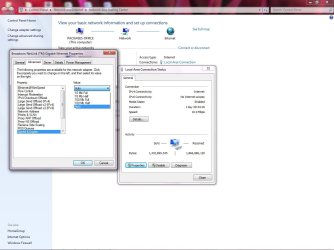
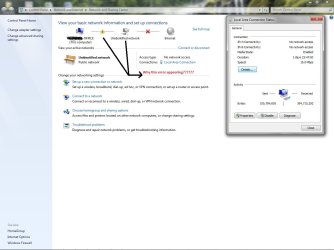
I have Dell Computer 380.My pc connect with LAN network with only 10mbps speed?? sencond problem is, when I left my office and come next day and login to my pc PC lan connection show me as attach picture.for remove this problem just tak out rj45 connector from lan card and again fix it then network status again worked on 10mbps.

Please help me for my problem.
 

Attachments
  • Lan Network Error.jpg
    Lan Network Error.jpg
    83 KB · Views: 184

My Computer My Computer

Computer Manufacturer/Model Number
Dell/GX380
OS
Windows Seven 32Bit
CPU
2.93GHz
Memory
2GB
Hard Drives
250Gb
Case
Tower
Dear Experts,

I have Dell Computer 380.My pc connect with LAN network with only 10mbps speed?? sencond problem is, when I left my office and come next day and login to my pc PC lan connection show me as attach picture.for remove this problem just tak out rj45 connector from lan card and again fix it then network status again worked on 10mbps.

Please help me for my problem.

what speed is it supposed to connect at?

Your network may be timing out the router or PC


We could use much more information about your PC and network

ken
 

My Computer My Computer

Computer Manufacturer/Model Number
HP Pavillion dv-7 1005 Tx
OS
Win 8 Release candidate 8400
CPU
[email protected]
Memory
4 gigs
Graphics Card(s)
Nvidia 9600M
Sound Card
HD built-in
Monitor(s) Displays
17" Wxga
Screen Resolution
1440x900
Cooling
none
Internet Speed
45Mb down 5Mb up
As per my PC specification.My LAN card supported on 1Gbps connection.
We are using SAP,Intranet,pop3 server email which is little bit slow working due to 10Mbps slow speed instead of 1Gbps.
If timing out problem occur then our other office PC should be create problem but others PCs are working fine.Only my PC create problem same as shown on my attach picture :(

My PC specification
Windows Seven
32 bit operating system
Core 2 duo CPU E7500 2.93Ghz
Ram 2GB
Network Built in Adapter
Broad com Net Link TM Gigabyte Ethernet

Approximately 300 PC connected with our network with different work group with my work group total 15 computers are showing.I personally check 5 computer no problem on those computer regarding connection drop problem.
 

My Computer My Computer

Computer Manufacturer/Model Number
Dell/GX380
OS
Windows Seven 32Bit
CPU
2.93GHz
Memory
2GB
Hard Drives
250Gb
Case
Tower
Make sure you don't Public network selected. Make sure you have Work Network or Home Network selected.
 

Attachments

  • Network7.jpg
    Network7.jpg
    35.7 KB · Views: 40

My Computer My Computer

Computer type
PC/Desktop
Computer Manufacturer/Model Number
Dell OP7010
OS
Windows 7 Enterprise (x64); Windows Server 2008 R2 (x64)
Memory
16GB
Monitor(s) Displays
4 Dell 24" LCD
Screen Resolution
1280x1024
Keyboard
Dell
Mouse
Dell Optical
Internet Speed
40meg
I see your attach picture.But kindly explain me how to make network 2 connection becouse I am initial user of windows seven.
1- How to create new connection.
2- Which setting need for new connection.

Please don't mind becouse I m new user of win 7
 

My Computer My Computer

Computer Manufacturer/Model Number
Dell/GX380
OS
Windows Seven 32Bit
CPU
2.93GHz
Memory
2GB
Hard Drives
250Gb
Case
Tower
When you connect to the network, you will be prompted with a screen telling that Windows has detected a new network. the options to choose are Home, Work and Public. You should select Home or Work network.

In your screenshot, under view your active networks, click on public network. The above prompt would be shown and select Home or Work network.
 

My Computer My Computer

Computer Manufacturer/Model Number
MacBook Pro
OS
Lion
CPU
i5
Memory
4GB
Graphics Card(s)
Intel
Screen Resolution
1200x800
Hard Drives
Seagate FreeAgent GO 250GB Ext. HDD
Maybe the Network Switch/Router does not support more than 10mbps. In other words, it doesn't support gigabit LAN.
 

My Computer My Computer

Computer Manufacturer/Model Number
Dell E4300
OS
Windows 7 Ultimate
CPU
Intel C2D SP9400
Motherboard
Intel GS45
Memory
2GB DDR3
Graphics Card(s)
Integrated =(
Sound Card
Integrated =(
Monitor(s) Displays
Matte LCD
Screen Resolution
1280x800
Hard Drives
Intel X25-M Gen 2 SSD
WD Caviar Black
Mouse
MX 518, V470 - Logitech
I see your attach picture.But kindly explain me how to make network 2 connection becouse I am initial user of windows seven.
1- How to create new connection.
2- Which setting need for new connection.

Please don't mind becouse I m new user of win 7

I guess I should have explained that better, sorry. It does not need to be named Network 2 that is the way my systems displays it because I connect to multiple networks. What I was trying to get you to do is to change from a public network which is very restrictive to a home network or work network were the networking, sharing, and access is more relaxed. Then you can test and see if things work better. Let us know.
 

My Computer My Computer

Computer type
PC/Desktop
Computer Manufacturer/Model Number
Dell OP7010
OS
Windows 7 Enterprise (x64); Windows Server 2008 R2 (x64)
Memory
16GB
Monitor(s) Displays
4 Dell 24" LCD
Screen Resolution
1280x1024
Keyboard
Dell
Mouse
Dell Optical
Internet Speed
40meg
Dear Sir,

I have changed my adapter speed setting AUTO to on 10Mbps.Now every thing is working fine.no any problem with connection.
But I have still one confusion that.When I connect my laptop with this RJ45 connector my laptop shoe me 100Mbps speed and when I connect my desktop pc with this same plug then its connection speed 10Mbps,
What is this problem.Kindly note that, I am using Win Xp on my laptop and Win Seven on my desktop pc.

Please give me your valuable assistance.
 

My Computer My Computer

Computer Manufacturer/Model Number
Dell/GX380
OS
Windows Seven 32Bit
CPU
2.93GHz
Memory
2GB
Hard Drives
250Gb
Case
Tower
Have you made sure you have the correct driver installed for your Pc LAN card?

What options are there in the LAN adapter speed & duplex?
 

My Computer My Computer

Computer Manufacturer/Model Number
Lenovo ThinkPad T60
OS
Windows 7 Ultimate 64Bit
CPU
GenuineIntel Intel(R) Core(TM) DuoCore T2400 @ 1.83GHz
Motherboard
Intel(R) 82801G (ICH7 Family)
Memory
2.00 GB
Graphics Card(s)
Mobile Intel(R) 945 Express Chipset
Sound Card
SoundMAX Integrated Digital HD Audio
Monitor(s) Displays
ThinkPad Display
Screen Resolution
1400x1050
Hard Drives
100Gb SATA
Keyboard
Standard Keyboard
Mouse
HID-compliant Mouse
Internet Speed
Cable Broadband - 54Mbps
Other Info
Intel(R) PRO/1000 PL Network Connection
11a/b/g Wireless LAN Mini PCI Express Adapter
Dear AEM,

Kindly check my attachment, which is showing all of your required details.I have correct driver download and install.
 

Attachments

  • Network Problem.jpg
    Network Problem.jpg
    87.5 KB · Views: 64

My Computer My Computer

Computer Manufacturer/Model Number
Dell/GX380
OS
Windows Seven 32Bit
CPU
2.93GHz
Memory
2GB
Hard Drives
250Gb
Case
Tower
I believe the speed is associated with the LAN adapters.
 

My Computer My Computer

Computer Manufacturer/Model Number
MacBook Pro
OS
Lion
CPU
i5
Memory
4GB
Graphics Card(s)
Intel
Screen Resolution
1200x800
Hard Drives
Seagate FreeAgent GO 250GB Ext. HDD
I'm sure it's the property of the adapter too, but if he's got the right driver, he should be able to get the best speeds.

arshadmahmood, try selecting 100Mbs Full and see if it changes.
 

My Computer My Computer

Computer Manufacturer/Model Number
Lenovo ThinkPad T60
OS
Windows 7 Ultimate 64Bit
CPU
GenuineIntel Intel(R) Core(TM) DuoCore T2400 @ 1.83GHz
Motherboard
Intel(R) 82801G (ICH7 Family)
Memory
2.00 GB
Graphics Card(s)
Mobile Intel(R) 945 Express Chipset
Sound Card
SoundMAX Integrated Digital HD Audio
Monitor(s) Displays
ThinkPad Display
Screen Resolution
1400x1050
Hard Drives
100Gb SATA
Keyboard
Standard Keyboard
Mouse
HID-compliant Mouse
Internet Speed
Cable Broadband - 54Mbps
Other Info
Intel(R) PRO/1000 PL Network Connection
11a/b/g Wireless LAN Mini PCI Express Adapter
If he can say the name of the adapter, then we can find what max speed it can support.
 

My Computer My Computer

Computer Manufacturer/Model Number
MacBook Pro
OS
Lion
CPU
i5
Memory
4GB
Graphics Card(s)
Intel
Screen Resolution
1200x800
Hard Drives
Seagate FreeAgent GO 250GB Ext. HDD
Dear Sir,
As per your reply my Lan Adapter name.
Broadcom NetLink (TM) Gigabit Ethernet Adapter
 

My Computer My Computer

Computer Manufacturer/Model Number
Dell/GX380
OS
Windows Seven 32Bit
CPU
2.93GHz
Memory
2GB
Hard Drives
250Gb
Case
Tower
Have you tried changing to 100mbps and if so did it indicated the change ie from 10mbps to 100mbps?
 

My Computer My Computer

Computer Manufacturer/Model Number
Lenovo ThinkPad T60
OS
Windows 7 Ultimate 64Bit
CPU
GenuineIntel Intel(R) Core(TM) DuoCore T2400 @ 1.83GHz
Motherboard
Intel(R) 82801G (ICH7 Family)
Memory
2.00 GB
Graphics Card(s)
Mobile Intel(R) 945 Express Chipset
Sound Card
SoundMAX Integrated Digital HD Audio
Monitor(s) Displays
ThinkPad Display
Screen Resolution
1400x1050
Hard Drives
100Gb SATA
Keyboard
Standard Keyboard
Mouse
HID-compliant Mouse
Internet Speed
Cable Broadband - 54Mbps
Other Info
Intel(R) PRO/1000 PL Network Connection
11a/b/g Wireless LAN Mini PCI Express Adapter
Mind providing the serial or part number??
 

My Computer My Computer

Computer Manufacturer/Model Number
MacBook Pro
OS
Lion
CPU
i5
Memory
4GB
Graphics Card(s)
Intel
Screen Resolution
1200x800
Hard Drives
Seagate FreeAgent GO 250GB Ext. HDD
Dear Sir,

When I changed speed setting from adapter setting from 10mbps to 100mbps then only show RED cross on network icon on task bar.????. then I again repeat this step to 10mbps network again show connected but only on 10mbps.
 

My Computer My Computer

Computer Manufacturer/Model Number
Dell/GX380
OS
Windows Seven 32Bit
CPU
2.93GHz
Memory
2GB
Hard Drives
250Gb
Case
Tower
Then it means ur adapter doesnt support 100mbps
 

My Computer My Computer

Computer Manufacturer/Model Number
MacBook Pro
OS
Lion
CPU
i5
Memory
4GB
Graphics Card(s)
Intel
Screen Resolution
1200x800
Hard Drives
Seagate FreeAgent GO 250GB Ext. HDD
Sir,
I am confuse :confused:and I think problem in my Ethernet 4 pair cable.I want to check this cable which coming from router which is 60mtr away.Have you any procedure to check this cable correctly??
 

My Computer My Computer

Computer Manufacturer/Model Number
Dell/GX380
OS
Windows Seven 32Bit
CPU
2.93GHz
Memory
2GB
Hard Drives
250Gb
Case
Tower
Back
Top