
You are using an out of date browser. It may not display this or other websites correctly.
You should upgrade or use an alternative browser.
You should upgrade or use an alternative browser.
Help - ATI Radeon 200M not detected
- Thread starter qwert123
- Start date

Hi qwert123 and welcome to Se7en Forums 
I think that you are getting a bit confused. Your ATI Radeon is your graphics card, and W7 (and other versions of Windows) will only detect your monitor as Generic PnP if you haven't installed the driver specific to your monitor. This is what I see in Device Manager (note that I have NVidia and that I have installed the monitor driver):
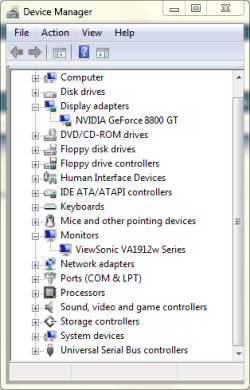
What does this show on your system?
I think that you are getting a bit confused. Your ATI Radeon is your graphics card, and W7 (and other versions of Windows) will only detect your monitor as Generic PnP if you haven't installed the driver specific to your monitor. This is what I see in Device Manager (note that I have NVidia and that I have installed the monitor driver):
What does this show on your system?
My Computer
At a glance
Windows 8.1 Pro RTM x64Intel Core-i5-3570K 4-core @ 3.4GHz (Ivy Brid...4 x 4GB DDR3-1600 Corsair Vengeance CMZ8GX3M2...MSI GeForce GTX770 Gaming OC 2GB
- Computer type
- PC/Desktop
- Computer Manufacturer/Model Number
- Dwarf Dwf/11/2012 r09/2013
- OS
- Windows 8.1 Pro RTM x64
- CPU
- Intel Core-i5-3570K 4-core @ 3.4GHz (Ivy Bridge) (OC 4.4GHz)
- Motherboard
- ASRock Z77 Extreme4-M
- Memory
- 4 x 4GB DDR3-1600 Corsair Vengeance CMZ8GX3M2A1600C9B (16GB)
- Graphics Card(s)
- MSI GeForce GTX770 Gaming OC 2GB
- Sound Card
- Realtek High Definition on board solution (ALC 898)
- Monitor(s) Displays
- ViewSonic VA1912w Widescreen (VGA)
- Screen Resolution
- 1440x900
- Hard Drives
- OCZ Agility 3 SSD 120GB SATA III x2 (RAID 0)
Samsung HD501LJ 500GB SATA II x2
Hitachi HDS721010CLA332 1TB SATA II
Iomega 1.5TB Ext USB 2.0
WD 2.0TB Ext USB 3.0
- PSU
- XFX Pro Series 850W Semi-Modular
- Case
- Gigabyte IF233
- Cooling
- 1 x 120mm Front Inlet 1 x 120mm Rear Exhaust
- Keyboard
- Microsoft Comfort Curve Keyboard 3000 (USB)
- Mouse
- Microsoft Comfort Mouse 3000 for Business (USB)
- Internet Speed
- NetGear DG834Gv3 ADSL Modem/Router (Ethernet) ~4.0 Mb/s (O2)
- Antivirus
- Avast! 8.0.1497
- Browser
- IE 11
- Other Info
- Optical Drive: HL-DT-ST BD-RE BH10LS30 SATA Bluray
Lexmark S305 Printer/Scanner/Copier (USB)
WEI Score: 8.1/8.1/8.5/8.5/8.25
Asus Eee PC 1011PX Netbook (Windows 7 x86 Starter)
Hi,
I'm also experiencing the same problem.
I've just installed Win7 32bit on a different partition of my hard drive. For your information I have a dell Inspiron 6400 Dual Core 1.73Gh, with 1,5 Gb Ram and an ATI Mobility Radeon X1400 256mb. The device manager does not detect the card on the mobo. On the display adapter it says STANDARD VGA ADAPTER and NOT Ati X1400.
I tried to disable the VGA adapter but it still does recognize the ATI GPU.
On my other partition running XP Pro, everything is running smoothly.
I would be grateful for a tip on how to solve this.
Thanks people!
I'm also experiencing the same problem.
I've just installed Win7 32bit on a different partition of my hard drive. For your information I have a dell Inspiron 6400 Dual Core 1.73Gh, with 1,5 Gb Ram and an ATI Mobility Radeon X1400 256mb. The device manager does not detect the card on the mobo. On the display adapter it says STANDARD VGA ADAPTER and NOT Ati X1400.
I tried to disable the VGA adapter but it still does recognize the ATI GPU.
On my other partition running XP Pro, everything is running smoothly.
I would be grateful for a tip on how to solve this.
Thanks people!
My Computer
At a glance
Windows XP SP3
- OS
- Windows XP SP3

I just did this yesterday using the Dell Vista driver for the X1400. It was not on a Dell machine, but I used the Dell driver. You have to force Windows to install the right driver. Go into Device Manager, or through Advanced Setting in the display setting applet to get to the display adapter driver. Press Update Driver and choose that you want to select the driver yourself. It will show only the VGA as compatible. Uncheck the box that says Show Compatible Only and you will then be able to navigate to the X1400 driver. If I remember, there was two identical entries. I chose the first one. Ignore the warning that this driver is not compatible, and press some OKs. After rebooting, you'll have the right driver. Mine gave a decent WEI for graphics and gaming - more than enough to run Aero and play HDTV smoothly.
Bye.
Bye.
Hi,
I'm also experiencing the same problem.
I've just installed Win7 32bit on a different partition of my hard drive. For your information I have a dell Inspiron 6400 Dual Core 1.73Gh, with 1,5 Gb Ram and an ATI Mobility Radeon X1400 256mb. The device manager does not detect the card on the mobo. On the display adapter it says STANDARD VGA ADAPTER and NOT Ati X1400.
I tried to disable the VGA adapter but it still does recognize the ATI GPU.
On my other partition running XP Pro, everything is running smoothly.
I would be grateful for a tip on how to solve this.
Thanks people!
My Computer
At a glance
Windows 7 Ultimate x64i7 9709 GB9600GT
- Computer Manufacturer/Model Number
- Home Brew
- OS
- Windows 7 Ultimate x64
- CPU
- i7 970
- Motherboard
- ASUS Rampage III GENE
- Memory
- 9 GB
- Graphics Card(s)
- 9600GT
- Monitor(s) Displays
- dual 24" Samsung
- Screen Resolution
- 1920x1200
- Hard Drives
- VelociRaptor and 4TB of Hitachi RAID 0
- PSU
- Thermaltake toughpower W0104RU 650W
- Case
- Thermaltake LANBOX Lite
- Internet Speed
- 30 Mbps Download 1 Mbps Upload (Speedtest.com)
sticketystick
New member
- Local time
- 8:31 PM
- Messages
- 2
Similar problem
Hi,
I've got the exact same issue as Damocrian, however I have the Radeon Xpress 200m graphics chipset which for some reason isn't in the manual install list of ATI drivers, so can't even install it manually. Any ideas???
Thanks!
Hi,
I've got the exact same issue as Damocrian, however I have the Radeon Xpress 200m graphics chipset which for some reason isn't in the manual install list of ATI drivers, so can't even install it manually. Any ideas???
Thanks!
My Computer
At a glance
Windows 7
- OS
- Windows 7
Hi Sticketystick,
What are your computer specs? AMD 64 or 32 bit?
If I understand your problem you can't find the right driver right?
Try googling it on other sites than ATI, I'll do the same but i just need your specs.
What are your computer specs? AMD 64 or 32 bit?
If I understand your problem you can't find the right driver right?
Try googling it on other sites than ATI, I'll do the same but i just need your specs.
My Computer
At a glance
Windows XP SP3
- OS
- Windows XP SP3
sticketystick
New member
- Local time
- 8:31 PM
- Messages
- 2
Solved
Sorted it finally thanks for the offer of help though. cheers
Sorted it finally
thanks for the offer of help though. cheersMy Computer
At a glance
Windows 7
- OS
- Windows 7
A thing to keep in mind is that from 9.3 up, legacy support was removed so older products won't be supported anymore.
Last legacy supported driver is Catalyst 9.2. But there's also the ini hacks... which I won't go into detail.
Also to answer qwert123's "7 is only detecting Generic PnP monitor..." issue... sometimes, the monitor detection doesn't work properly. The 780G that I have did that once in a while... right click on the PnP entry and Scan for new hardware might do the trick. If it's not, it might be actual hardware failure.
Last legacy supported driver is Catalyst 9.2. But there's also the ini hacks... which I won't go into detail.
Also to answer qwert123's "7 is only detecting Generic PnP monitor..." issue... sometimes, the monitor detection doesn't work properly. The 780G that I have did that once in a while... right click on the PnP entry and Scan for new hardware might do the trick. If it's not, it might be actual hardware failure.
My Computer
At a glance
Windows 7 x64 Build 7000
- OS
- Windows 7 x64 Build 7000
I just did this yesterday using the Dell Vista driver for the X1400. It was not on a Dell machine, but I used the Dell driver. You have to force Windows to install the right driver. Go into Device Manager, or through Advanced Setting in the display setting applet to get to the display adapter driver. Press Update Driver and choose that you want to select the driver yourself. It will show only the VGA as compatible. Uncheck the box that says Show Compatible Only and you will then be able to navigate to the X1400 driver. If I remember, there was two identical entries. I chose the first one. Ignore the warning that this driver is not compatible, and press some OKs. After rebooting, you'll have the right driver. Mine gave a decent WEI for graphics and gaming - more than enough to run Aero and play HDTV smoothly.
Bye.
Thanks Crunchy. This solved my problem - mostly. My graphics card is no longer defaulting to VGA. I now get 1280 x 800.
But when I run Windows Experience Index I only get a 1.0 on "Gaming Graphics" -- it says "Not Detected". And I only get a 1.9 on "Graphics". Under the details section it says "Total available graphics memory -> Not detected" and also shows 0 MB dedicated graphics memory, 0 MB dedicated system memory, and 0 MB shared system memory.
Now I know my laptop is a bit aged - 5 year old Compaq x1000 with a ATI Radeon Mobility 9200 (I think it has 64 mb dedicated graphics memory). So I expected a somewhat low score but not a 1.0 and did not expect it wouldn't detect any graphics memory.
Any thoughts on why it wouldn't see my graphics memory / why I'm only getting a score of 1.0? Any help is appreciated!
My Computer
At a glance
Win7 / XP
- OS
- Win7 / XP
A day or so ago I installed RC1 on that machine with an ATI X1400 and Windows Update had the genuine ATI driver again. I don't know if it will include yours, but it might.
Bye.
Bye.
Thanks Crunchy. This solved my problem - mostly. My graphics card is no longer defaulting to VGA. I now get 1280 x 800.
But when I run Windows Experience Index I only get a 1.0 on "Gaming Graphics" -- it says "Not Detected". And I only get a 1.9 on "Graphics". Under the details section it says "Total available graphics memory -> Not detected" and also shows 0 MB dedicated graphics memory, 0 MB dedicated system memory, and 0 MB shared system memory.
Now I know my laptop is a bit aged - 5 year old Compaq x1000 with a ATI Radeon Mobility 9200 (I think it has 64 mb dedicated graphics memory). So I expected a somewhat low score but not a 1.0 and did not expect it wouldn't detect any graphics memory.
Any thoughts on why it wouldn't see my graphics memory / why I'm only getting a score of 1.0? Any help is appreciated!
My Computer
At a glance
Windows 7 Ultimate x64i7 9709 GB9600GT
- Computer Manufacturer/Model Number
- Home Brew
- OS
- Windows 7 Ultimate x64
- CPU
- i7 970
- Motherboard
- ASUS Rampage III GENE
- Memory
- 9 GB
- Graphics Card(s)
- 9600GT
- Monitor(s) Displays
- dual 24" Samsung
- Screen Resolution
- 1920x1200
- Hard Drives
- VelociRaptor and 4TB of Hitachi RAID 0
- PSU
- Thermaltake toughpower W0104RU 650W
- Case
- Thermaltake LANBOX Lite
- Internet Speed
- 30 Mbps Download 1 Mbps Upload (Speedtest.com)
Thanx 100000000000 Times
You Are Awesome Man ..You Are Genius
Working 100% With Me on Acer Aspire 5100 (Graphic :Redeon Xpress 200M)
Thanks ..Thanks ..Thanks
i love this Forum so Much
I just did this yesterday using the Dell Vista driver for the X1400. It was not on a Dell machine, but I used the Dell driver. You have to force Windows to install the right driver. Go into Device Manager, or through Advanced Setting in the display setting applet to get to the display adapter driver. Press Update Driver and choose that you want to select the driver yourself. It will show only the VGA as compatible. Uncheck the box that says Show Compatible Only and you will then be able to navigate to the X1400 driver. If I remember, there was two identical entries. I chose the first one. Ignore the warning that this driver is not compatible, and press some OKs. After rebooting, you'll have the right driver. Mine gave a decent WEI for graphics and gaming - more than enough to run Aero and play HDTV smoothly.
Bye.
You Are Awesome Man ..You Are Genius
Working 100% With Me on Acer Aspire 5100 (Graphic :Redeon Xpress 200M)
Thanks ..Thanks ..Thanks
i love this Forum so Much
My Computer
At a glance
Windows7 x64
- OS
- Windows7 x64
I never quite got it to work right and then (unrelatedly) my machine died. Oh well. But glad Crunchy was able to help m1000!
My Computer
At a glance
Win7 / XP
- OS
- Win7 / XP
I have an 200M too and can't get it work properly since I introduce my MSI S420 notebook to Win 7. I can't update my driver manually nor online, actually there's no display adapter shown in Device Manager!! But there's an item with a yellow exclamation mark at System Devices category, it's title is "PCI standard PCI-to-PCI bridge" as I know Radeon 200M works on PCI so I doubt that this is my display adapter but it has some sort of problem I think. I added a screen shot of Device Manager. I hope you guys help me to find a solution and I won't have to go back to XP.


My Computer
At a glance
XP
- OS
- XP

emerald08
New member
I have an R51e that has an Intel motherboard and an ATI Radeon Xpress 200m. I've got 7100RC installed on it and let Windows auto-detect the drivers I needed.
I did the system interface, hotkeys, and power management on my own however.
Well. I'm wondering if there is an alternate driver available for my 200m? I know that ATI isn't supporting legacy cards for Windows 7 from what I can see.
Any ideas guys? TIA.
Edit:
My system specs show an R52. I use that for travel and have the R51e sitting on a desk at home. Just adding to not cause any confusion.
I did the system interface, hotkeys, and power management on my own however.
Well. I'm wondering if there is an alternate driver available for my 200m? I know that ATI isn't supporting legacy cards for Windows 7 from what I can see.
Any ideas guys? TIA.
Edit:
My system specs show an R52. I use that for travel and have the R51e sitting on a desk at home. Just adding to not cause any confusion.
My Computer
At a glance
W7 Professional X64Core i5-5204gbNVIDIA NVS3100M
- Computer Manufacturer/Model Number
- Dell Latitude e6510
- OS
- W7 Professional X64
- CPU
- Core i5-520
- Memory
- 4gb
- Graphics Card(s)
- NVIDIA NVS3100M
- Monitor(s) Displays
- 23" Samsung
- Screen Resolution
- 1920X1080
- Hard Drives
- Intel X-25M 80gb
pieterblackie
New member
- Local time
- 3:31 AM
- Messages
- 13
Hi Guys
I have read all the posts regarding the xpress 200m and how you guys fixed the issues but I do not seem to find a solution for my problems
I have a old Fujitsu Siemens Amilo Li1720 with a Radeon Xpress 200m graphics card It is running Windows 7 Build 7100 that I downloaded from Microsoft
When I look at the Display name it says Generic PnP monitor on Radeon Xpress 200M series
and if I look at the driver it says driver supplied by ATI Tech
OK now my problem is that I only get a 1.0 rating on the windows experiance Index and under the graphics heading it says graphics memory not detected
with the first beta version I did not have this problem
If there is anyone that has a solution please let me know
Thanks
Pieter
I have read all the posts regarding the xpress 200m and how you guys fixed the issues but I do not seem to find a solution for my problems
I have a old Fujitsu Siemens Amilo Li1720 with a Radeon Xpress 200m graphics card It is running Windows 7 Build 7100 that I downloaded from Microsoft
When I look at the Display name it says Generic PnP monitor on Radeon Xpress 200M series
and if I look at the driver it says driver supplied by ATI Tech
OK now my problem is that I only get a 1.0 rating on the windows experiance Index and under the graphics heading it says graphics memory not detected
with the first beta version I did not have this problem
If there is anyone that has a solution please let me know
Thanks
Pieter
My Computer
At a glance
Windows7 RCIntel Core I7 9204gig DDR3ATI Radeon HD 4850 512mb
- Computer Manufacturer/Model Number
- Dell studio XPS 435MT
- OS
- Windows7 RC
- CPU
- Intel Core I7 920
- Motherboard
- Dell Socket 1366 LGA
- Memory
- 4gig DDR3
- Graphics Card(s)
- ATI Radeon HD 4850 512mb
- Sound Card
- on board
- Monitor(s) Displays
- Dell 22"
- Screen Resolution
- 1920X1080
- Hard Drives
- Total size of hard disk(s) 671 GB
Disk partition (C:) 313 GB Free (581 GB Total)
Disk partition (D:) 14 GB Free (15 GB Total)
Disk partition (F:) 74 GB Free (75 GB Total)
- Keyboard
- Dell
- Mouse
- Dell
- Internet Speed
- line speed 11.62 Mbps / download speed 1.42 MB/s
pieterblackie
New member
- Local time
- 3:31 AM
- Messages
- 13
bump
My Computer
At a glance
Windows7 RCIntel Core I7 9204gig DDR3ATI Radeon HD 4850 512mb
- Computer Manufacturer/Model Number
- Dell studio XPS 435MT
- OS
- Windows7 RC
- CPU
- Intel Core I7 920
- Motherboard
- Dell Socket 1366 LGA
- Memory
- 4gig DDR3
- Graphics Card(s)
- ATI Radeon HD 4850 512mb
- Sound Card
- on board
- Monitor(s) Displays
- Dell 22"
- Screen Resolution
- 1920X1080
- Hard Drives
- Total size of hard disk(s) 671 GB
Disk partition (C:) 313 GB Free (581 GB Total)
Disk partition (D:) 14 GB Free (15 GB Total)
Disk partition (F:) 74 GB Free (75 GB Total)
- Keyboard
- Dell
- Mouse
- Dell
- Internet Speed
- line speed 11.62 Mbps / download speed 1.42 MB/s

- Local time
- 3:31 PM
- Messages
- 1,379
ATI did recently "update" their legacy drivers from Catalyst 9.3.1 to Catalyst 9.8., however, in looking through that info, I don't see anything older than the Xpress 300. So, their just might not be a driver for the Xpress 200.
And even if there is one, it's likely to be an XP driver which, while you will probably be able to load in in Compatibility mode, is likely to NOT provide AERO support of any kind. So, your WEI scores are not likely to improve much.
I'm running a tablet PC with an Intel 914 chipset, with XP drivers installed, and I get very low WEI scores -- and that's using the latest drivers friom Microsoft Update Catalog.
And even if there is one, it's likely to be an XP driver which, while you will probably be able to load in in Compatibility mode, is likely to NOT provide AERO support of any kind. So, your WEI scores are not likely to improve much.
I'm running a tablet PC with an Intel 914 chipset, with XP drivers installed, and I get very low WEI scores -- and that's using the latest drivers friom Microsoft Update Catalog.
My Computer
At a glance
Win7 Pro 32-bit, Win8 Pro 32-bitAMD Phenom II X6 1090T4GB ddr3 1300AMD HD 4290 onboard
- Computer type
- PC/Desktop
- Computer Manufacturer/Model Number
- Custom
- OS
- Win7 Pro 32-bit, Win8 Pro 32-bit
- CPU
- AMD Phenom II X6 1090T
- Motherboard
- Gigabyte
- Memory
- 4GB ddr3 1300
- Graphics Card(s)
- AMD HD 4290 onboard
- Sound Card
- Builtin Realtek HD Audio
- Monitor(s) Displays
- Samsung 24" widescreen, LG 23" widescreen
- Screen Resolution
- 1920x1200/1920x1080
- Hard Drives
- Kingston 256GB SSD
- Keyboard
- Logitech Illuminated Keyboard
- Mouse
- Logitech M705 wireless mouse
- Antivirus
- Norton Av 2013
- Browser
- IE v10
pieterblackie
New member
- Local time
- 3:31 AM
- Messages
- 13
Like I said before that on a previous install I did there was no problem
So I was just wondering if I am doing anything wrong or if someone knows of a shortcut to get past this
So I was just wondering if I am doing anything wrong or if someone knows of a shortcut to get past this
My Computer
At a glance
Windows7 RCIntel Core I7 9204gig DDR3ATI Radeon HD 4850 512mb
- Computer Manufacturer/Model Number
- Dell studio XPS 435MT
- OS
- Windows7 RC
- CPU
- Intel Core I7 920
- Motherboard
- Dell Socket 1366 LGA
- Memory
- 4gig DDR3
- Graphics Card(s)
- ATI Radeon HD 4850 512mb
- Sound Card
- on board
- Monitor(s) Displays
- Dell 22"
- Screen Resolution
- 1920X1080
- Hard Drives
- Total size of hard disk(s) 671 GB
Disk partition (C:) 313 GB Free (581 GB Total)
Disk partition (D:) 14 GB Free (15 GB Total)
Disk partition (F:) 74 GB Free (75 GB Total)
- Keyboard
- Dell
- Mouse
- Dell
- Internet Speed
- line speed 11.62 Mbps / download speed 1.42 MB/s
Similar threads

- Replies
- 5
- Views
- 5K

- Replies
- 6
- Views
- 3K

- Replies
- 23
- Views
- 6K

