Windows 7 Slow Startup/Sound not detected Until Restart

Kat777

New member
Local time
8:18 PM
Messages
10
Hi, I've been having this soundcard not working and slow startup issue, for 5 months now. When I start the computer it's slow and the soundcard is not detected at all. I go to playback devices and it's not even something I can select. Restarting the computer always corrects the problem. Once Windows starts everything is fine, but the initial startup is very slow. Occasionally the internet connection isn't detected either, but it's rare. Restart usually fixes that too but it's not everyday like the soundcard. It feels like when Windows is starting it hangs on something. I went through msconfig and checked everything I could, and nothing seems suspicious or unaccounted for. I'm not entirely sure though.

Things I did-
ccleaner
Malwarebytes

I've checked for viruses with Malwarebytes and Windows Security Essentials on a daily basis and they never detect anything and the computer does run well once everything is working after restarting. Things started to go downhill during that Windows 10 anytime upgrade. I'm unsure what drivers my soundcard uses. I think it was discontinued too - SB Recon3D PCIe. It feels like it may be related to that but I am unsure really. I could use some help.

If anyone can help with this problem I'd greatly appreciate it. I am getting a new pc in March, but I need this one for work so I have to make it last until March, when I can afford to get something new.
 
Last edited:

My Computer My Computer

At a glance

Windows 7 Pro 64Intel Core i7 3770K @ 3.50GHz16.0GBNVIDIA GeForce GTX 980 Ti
Computer type
PC/Desktop
Computer Manufacturer/Model Number
Origin PC
OS
Windows 7 Pro 64
CPU
Intel Core i7 3770K @ 3.50GHz
Motherboard
ASUSTeK COMPUTER INC. P8Z77-V DELUXE (LGA1155
Memory
16.0GB
Graphics Card(s)
NVIDIA GeForce GTX 980 Ti
Hard Drives
1863GB Seagate ST2000DM001-9YN164 ATA Device (SATA)
Antivirus
Microsoft Security Essentials
Browser
Firefox
Hello Kat mate have you tried just reseating the card - often a simple answer and I suppose you have updated the drivers??

Now as for your msconfig ticking everything will invariably slow down the boot I leave everything except CCleaner unchecked.

Now you have not listed the sound card in your specs - what is it? By the way the specs you have included look pretty nice to me and it should be running reasonably quickly.

Try running these please
SFC /SCANNOW Command - System File Checker
Disk Check < if necessary include the /f and /r in the command line as per Option2
Run these in safe mode and the sfc often best run for two to three runs – you can leave out the /r switch in ckdsk if you feel it not necessary
NB SFC best run for about three scans

if no fix then these

http://www.superantispyware.com/ ( a good daily run too for adware as well as nasties)

AdwCleaner Download
ADW download from bleeping computer delete any rubbish found with the malware scans
(NB If you are running Kaspersky as the main AV then it might need disabling it when trying ADW because it does not like it at times)
 

My Computer My Computer

At a glance

Desk1 7 Home Prem / Desk2 10 Pro / Main lap A...Desk1 i5 3750K / Laptop i7 GTX 860M / Desk2 i...Desk1 8GB (1866) / Desk2 16GB (1333) / Laptop...Desk 1& 2NVidia GTX 650 & Laptops on board Intel
Computer type
PC/Desktop
Computer Manufacturer/Model Number
Own build (new) Desk1 / Asus ROG Win 7 / Desk2 1st build
OS
Desk1 7 Home Prem / Desk2 10 Pro / Main lap Asus ROG 10 Pro 2 laptop Toshiba 7 Pro Asus P2520 7 & 10
CPU
Desk1 i5 3750K / Laptop i7 GTX 860M / Desk2 i5 2500
Motherboard
Desk1 Asus P877-V / Desk2 Gigabyte H67 UD3H / Laptop ?
Memory
Desk1 8GB (1866) / Desk2 16GB (1333) / Laptop 8Gb DDR3
Graphics Card(s)
Desk 1& 2NVidia GTX 650 & Laptops on board Intel
Sound Card
Desk 1 & 2 -XONAR DG Realtek High Def audio Laptop
Monitor(s) Displays
Desk 1 Benq HD 2450 / Desk2 Philips 24" / Laptop 17.5"
Screen Resolution
1920x1080 D1 & D2 & Laptop 1
Hard Drives
Desk1 Samsung 120GB 830 SSD
Asus ROG 256GB 850 Pro SSD
Desk2 Samsung 840 256 SSD
Toshiba 120GB EVO
PSU
Desk 1 Corsair HX 1050/ Laptop ? / Desk 2 Corsair HX 650
Case
Desk 1 Cooler HAF XM ? Toshiba laptop / Desk2 Coolermaster
Cooling
Fans on all Desk1 -2 Desk2 - all Coolermasters 5 Laptop ?
Keyboard
Desk 1 MS Sidewinder X6 Desk 2 MS Sidewinder X 4
Mouse
Desk 1&2 - Gigabyte MS 900 gamer - laptop - Logitec wireless
Internet Speed
ADSL2+
Other Info
One other Desktop (tester) and spare Toshba laptop both with SSD's
Running Kaspersky 2016 ISS on all machines config'd identically
Logitec audio stereo systems on each machine (x3)
Canon MG5250MFC
Router/modem TP-Link running WPA2SK
Hey ICIT2LOL,

Thank you for the reply. I'll do as you said and post back later what I find. My soundcard is SB Recon3D PCIe, I did list it up there. I couldn't find windows 7 64 drivers for that were recent. I think something with the sound happened where the NVidia hd sound, Razer Surround sound or whatever it is (I uninstalled that), but maybe it is still giving me problems?) maybe caused a conflict. I'm not sure. I'll do the other stuff and post back but I'm not sure about the soundcard drivers at all.
 

My Computer My Computer

At a glance

Windows 7 Pro 64Intel Core i7 3770K @ 3.50GHz16.0GBNVIDIA GeForce GTX 980 Ti
Computer type
PC/Desktop
Computer Manufacturer/Model Number
Origin PC
OS
Windows 7 Pro 64
CPU
Intel Core i7 3770K @ 3.50GHz
Motherboard
ASUSTeK COMPUTER INC. P8Z77-V DELUXE (LGA1155
Memory
16.0GB
Graphics Card(s)
NVIDIA GeForce GTX 980 Ti
Hard Drives
1863GB Seagate ST2000DM001-9YN164 ATA Device (SATA)
Antivirus
Microsoft Security Essentials
Browser
Firefox
The latest 64bit drivers for your device are dated 2014 on the Creative site I cannot give a direct link as they force you to use their selector "app" on the site - this Driver is quite recent for creative who often stop updating drivers as soon as a new OS is released ( in this case windows 8) they have then been known to release an updated version of the hardware that work with the new OS, release drivers for the new OS for the New hardware but not update older drivers to allow you to use the old hardware with the new OS. It's a rather underhand sales method that they started when vista was release and actually lost them a lot of sales ;)
 

My Computers My Computers

  • At a glance

    Windows 11 Pro x64 [Latest Release and Releas...Ryzen 9 5950X, 3.8 - 5.2 MHz64GB [2 x 32GB] DDR4 3200MHz4GB NVIDIA GEFORCE GTX 1650 Ti
    Computer type
    PC/Desktop
    Computer Manufacturer/Model Number
    ChillBlast - Custom to my design
    OS
    Windows 11 Pro x64 [Latest Release and Release Preview]
    CPU
    Ryzen 9 5950X, 3.8 - 5.2 MHz
    Motherboard
    Asus Prime X570-Pro
    Memory
    64GB [2 x 32GB] DDR4 3200MHz
    Graphics Card(s)
    4GB NVIDIA GEFORCE GTX 1650 Ti
    Sound Card
    On-board SPDIF to 5.1 System + HDMI [5.1 system]
    Monitor(s) Displays
    32" UHD 32 Bit HDR Monitor + 43" UHD 4K 32Bit HDR TV
    Screen Resolution
    2 x 3840 x 2160 @60Hz
    Hard Drives
    1TB M2 SSD OS, 500GB Fast Access SSD, 2 x 8TB Data + Various Externals from 1TB to 4TB, 10TB NAS
    PSU
    NZXT C750 80 PLUS Gold 750W Modular PSU
    Case
    Workstation Case [Matt Black]
    Cooling
    NZXT Kraken X63 280mm CPU Cooler +2x Quiet Case fans
    Keyboard
    Logitech Wireless MX Keys & K400 + others
    Mouse
    Logitech Wireless MX Master 3S
    Internet Speed
    920 MB Down 50 MB Up
    Antivirus
    BitDefender Total Security Pro
    Browser
    Chrome (always run latest Non-Beta)
    Other Info
    Also run ...
    Laptop - Quad 8GB - Windows 10 Pro x64
    Nexus 7 Android tablet x2
    Samsung 10.2" tablet
    Blackview TAB 8 4G Android Tablet c/w Keyboard
    Wacom Intuos Pro Medium Pen Pad
    Wacom Intuos Pro Small Pen Pad
    Wacom Expresskeys Remote
    Loopdeck+ Graphics Controller
    Shuttle Pro v2 Control
  • At a glance

    Windows 11 Pro x64 Latest RPIntel I7 10750H 5.0GHz32GB [2x16GB] DDR4 2933 MHznVidia GTX1650Ti 4 GB GDDR6
    Computer type
    Laptop
    System Manufacturer/Model Number
    Dell XPS 17 10750H
    OS
    Windows 11 Pro x64 Latest RP
    CPU
    Intel I7 10750H 5.0GHz
    Motherboard
    Dell XPS
    Memory
    32GB [2x16GB] DDR4 2933 MHz
    Graphics Card(s)
    nVidia GTX1650Ti 4 GB GDDR6
    Sound Card
    Stock [Realtek] 4 Speaker
    Monitor(s) Displays
    17" IPS UHD+ Infinity Edge Touchscreen
    Screen Resolution
    3840 x 2400
    Hard Drives
    2TB M2 NVMe, 4TB External + various 500GB & 1TB External NVMe (also have access to spinner HDD from
    PSU
    Stock
    Case
    Stock XPS Aluminium & Carbon Fibre
    Cooling
    Stock - Active Fan Control
    Keyboard
    Backlit + Various Logitech
    Mouse
    Stock Track Pad + Logitech MX Trackball
    Internet Speed
    72 MB Down 18MB Up
    Browser
    Chrome
    Other Info
    Also run ...
    Laptop - Quad 8GB - Windows 10 Pro x64
    Nexus 7 Android tablet x2
    10.2" tablet
    Sony Z3 Android Smartphone
    Wacom Intuos Pro Medium Pen Pad
    Wacom Intuos Pro Small Pen Pad
    Wacom Expresskeys Remote
    Loopdeck+ Graphics Controller
    Shuttle Pro v2 Control Pad
    10TB NAS
Thanks for finding those drivers. They seemed to have worked and hopefully that doesn't change, but the startup still seems slow. Also, I noticed after running ccleaner the desktop icons take longer to load up.

I ran the sfc /scannow and disk check, both are good.
I ran the antivirus scans and nothing was detected but one cookie for tumblr.

Is there some other information I can submit that might assist with understanding why the startup is slow? Or why the desktop icons are loading slow now? I read sometimes it needs to rebuild the library or something for them, but when I cleared all that with ccleaner it seemed to be what actually caused it.
 

My Computer My Computer

At a glance

Windows 7 Pro 64Intel Core i7 3770K @ 3.50GHz16.0GBNVIDIA GeForce GTX 980 Ti
Computer type
PC/Desktop
Computer Manufacturer/Model Number
Origin PC
OS
Windows 7 Pro 64
CPU
Intel Core i7 3770K @ 3.50GHz
Motherboard
ASUSTeK COMPUTER INC. P8Z77-V DELUXE (LGA1155
Memory
16.0GB
Graphics Card(s)
NVIDIA GeForce GTX 980 Ti
Hard Drives
1863GB Seagate ST2000DM001-9YN164 ATA Device (SATA)
Antivirus
Microsoft Security Essentials
Browser
Firefox
The desktop, and all other icons, are held in a temporary store - The Icon Cache - if you clear this, every-time you display an icon the system needs to do some "housekeeping" to check the Icon, build it it various forms and store these in the cache. It should sort itself in time - How long depends on many things - icon number, complexity, and system load, ( the system only does housekeeping tasks when it is idle).

As for the start-up - the best option is to check the startup tab in MSConfig.exe (just type msconfig into the start "Run" box ...

Check all the items and uncheck those that you do not really need to have loaded every time you start the system - only you can decide this but in reality far too many programs add startup entries

Here is a full tutorial on these issues ... Startup Programs - Change

Edit with the icon Cache issue, Ccleaner does have an option to clear the Icon Cache when it runs - unless you have issues with incorrect icons displaying I would suggest you un-check this option as it will produce the same issue you have every time you run it
 

My Computers My Computers

  • At a glance

    Windows 11 Pro x64 [Latest Release and Releas...Ryzen 9 5950X, 3.8 - 5.2 MHz64GB [2 x 32GB] DDR4 3200MHz4GB NVIDIA GEFORCE GTX 1650 Ti
    Computer type
    PC/Desktop
    Computer Manufacturer/Model Number
    ChillBlast - Custom to my design
    OS
    Windows 11 Pro x64 [Latest Release and Release Preview]
    CPU
    Ryzen 9 5950X, 3.8 - 5.2 MHz
    Motherboard
    Asus Prime X570-Pro
    Memory
    64GB [2 x 32GB] DDR4 3200MHz
    Graphics Card(s)
    4GB NVIDIA GEFORCE GTX 1650 Ti
    Sound Card
    On-board SPDIF to 5.1 System + HDMI [5.1 system]
    Monitor(s) Displays
    32" UHD 32 Bit HDR Monitor + 43" UHD 4K 32Bit HDR TV
    Screen Resolution
    2 x 3840 x 2160 @60Hz
    Hard Drives
    1TB M2 SSD OS, 500GB Fast Access SSD, 2 x 8TB Data + Various Externals from 1TB to 4TB, 10TB NAS
    PSU
    NZXT C750 80 PLUS Gold 750W Modular PSU
    Case
    Workstation Case [Matt Black]
    Cooling
    NZXT Kraken X63 280mm CPU Cooler +2x Quiet Case fans
    Keyboard
    Logitech Wireless MX Keys & K400 + others
    Mouse
    Logitech Wireless MX Master 3S
    Internet Speed
    920 MB Down 50 MB Up
    Antivirus
    BitDefender Total Security Pro
    Browser
    Chrome (always run latest Non-Beta)
    Other Info
    Also run ...
    Laptop - Quad 8GB - Windows 10 Pro x64
    Nexus 7 Android tablet x2
    Samsung 10.2" tablet
    Blackview TAB 8 4G Android Tablet c/w Keyboard
    Wacom Intuos Pro Medium Pen Pad
    Wacom Intuos Pro Small Pen Pad
    Wacom Expresskeys Remote
    Loopdeck+ Graphics Controller
    Shuttle Pro v2 Control
  • At a glance

    Windows 11 Pro x64 Latest RPIntel I7 10750H 5.0GHz32GB [2x16GB] DDR4 2933 MHznVidia GTX1650Ti 4 GB GDDR6
    Computer type
    Laptop
    System Manufacturer/Model Number
    Dell XPS 17 10750H
    OS
    Windows 11 Pro x64 Latest RP
    CPU
    Intel I7 10750H 5.0GHz
    Motherboard
    Dell XPS
    Memory
    32GB [2x16GB] DDR4 2933 MHz
    Graphics Card(s)
    nVidia GTX1650Ti 4 GB GDDR6
    Sound Card
    Stock [Realtek] 4 Speaker
    Monitor(s) Displays
    17" IPS UHD+ Infinity Edge Touchscreen
    Screen Resolution
    3840 x 2400
    Hard Drives
    2TB M2 NVMe, 4TB External + various 500GB & 1TB External NVMe (also have access to spinner HDD from
    PSU
    Stock
    Case
    Stock XPS Aluminium & Carbon Fibre
    Cooling
    Stock - Active Fan Control
    Keyboard
    Backlit + Various Logitech
    Mouse
    Stock Track Pad + Logitech MX Trackball
    Internet Speed
    72 MB Down 18MB Up
    Browser
    Chrome
    Other Info
    Also run ...
    Laptop - Quad 8GB - Windows 10 Pro x64
    Nexus 7 Android tablet x2
    10.2" tablet
    Sony Z3 Android Smartphone
    Wacom Intuos Pro Medium Pen Pad
    Wacom Intuos Pro Small Pen Pad
    Wacom Expresskeys Remote
    Loopdeck+ Graphics Controller
    Shuttle Pro v2 Control Pad
    10TB NAS
Well I thought the sound problem was fixed by updating the drivers and it worked after multiple shutdowns and restarts yesterday, but then today it came back. So I'm not sure what the problem is. If I reboot the computer the sound comes back but it seems like when I do a complete shutdown and power it up, it's never detected at all.
 

My Computer My Computer

At a glance

Windows 7 Pro 64Intel Core i7 3770K @ 3.50GHz16.0GBNVIDIA GeForce GTX 980 Ti
Computer type
PC/Desktop
Computer Manufacturer/Model Number
Origin PC
OS
Windows 7 Pro 64
CPU
Intel Core i7 3770K @ 3.50GHz
Motherboard
ASUSTeK COMPUTER INC. P8Z77-V DELUXE (LGA1155
Memory
16.0GB
Graphics Card(s)
NVIDIA GeForce GTX 980 Ti
Hard Drives
1863GB Seagate ST2000DM001-9YN164 ATA Device (SATA)
Antivirus
Microsoft Security Essentials
Browser
Firefox
Well if it were me I would change the sound card as I tried to help someone just a few days ago and it involved a Creative system and the drivers were extremely difficult to even find a mention about let alone find.

That member had actually been in contact with that manufacturer and the support was just abysmal.

My choice would be an Asus Xonar DGX - not expensive and a great GUI / interface and I have the Xonar DG in all my desktops hooked up to 5:1 Logitec systems a Z506 and Z 313 (again not expensive) and even though I say so myself I am very fussy re audio - these cards perform flawlessly.

But it is your budget and choice of course.
 

My Computer My Computer

At a glance

Desk1 7 Home Prem / Desk2 10 Pro / Main lap A...Desk1 i5 3750K / Laptop i7 GTX 860M / Desk2 i...Desk1 8GB (1866) / Desk2 16GB (1333) / Laptop...Desk 1& 2NVidia GTX 650 & Laptops on board Intel
Computer type
PC/Desktop
Computer Manufacturer/Model Number
Own build (new) Desk1 / Asus ROG Win 7 / Desk2 1st build
OS
Desk1 7 Home Prem / Desk2 10 Pro / Main lap Asus ROG 10 Pro 2 laptop Toshiba 7 Pro Asus P2520 7 & 10
CPU
Desk1 i5 3750K / Laptop i7 GTX 860M / Desk2 i5 2500
Motherboard
Desk1 Asus P877-V / Desk2 Gigabyte H67 UD3H / Laptop ?
Memory
Desk1 8GB (1866) / Desk2 16GB (1333) / Laptop 8Gb DDR3
Graphics Card(s)
Desk 1& 2NVidia GTX 650 & Laptops on board Intel
Sound Card
Desk 1 & 2 -XONAR DG Realtek High Def audio Laptop
Monitor(s) Displays
Desk 1 Benq HD 2450 / Desk2 Philips 24" / Laptop 17.5"
Screen Resolution
1920x1080 D1 & D2 & Laptop 1
Hard Drives
Desk1 Samsung 120GB 830 SSD
Asus ROG 256GB 850 Pro SSD
Desk2 Samsung 840 256 SSD
Toshiba 120GB EVO
PSU
Desk 1 Corsair HX 1050/ Laptop ? / Desk 2 Corsair HX 650
Case
Desk 1 Cooler HAF XM ? Toshiba laptop / Desk2 Coolermaster
Cooling
Fans on all Desk1 -2 Desk2 - all Coolermasters 5 Laptop ?
Keyboard
Desk 1 MS Sidewinder X6 Desk 2 MS Sidewinder X 4
Mouse
Desk 1&2 - Gigabyte MS 900 gamer - laptop - Logitec wireless
Internet Speed
ADSL2+
Other Info
One other Desktop (tester) and spare Toshba laptop both with SSD's
Running Kaspersky 2016 ISS on all machines config'd identically
Logitec audio stereo systems on each machine (x3)
Canon MG5250MFC
Router/modem TP-Link running WPA2SK
The odd past is this thing worked great for just short of 4 years. The slow start and why it doesn't even show soundblaster in device manager until I reboot is strange.
 

My Computer My Computer

At a glance

Windows 7 Pro 64Intel Core i7 3770K @ 3.50GHz16.0GBNVIDIA GeForce GTX 980 Ti
Computer type
PC/Desktop
Computer Manufacturer/Model Number
Origin PC
OS
Windows 7 Pro 64
CPU
Intel Core i7 3770K @ 3.50GHz
Motherboard
ASUSTeK COMPUTER INC. P8Z77-V DELUXE (LGA1155
Memory
16.0GB
Graphics Card(s)
NVIDIA GeForce GTX 980 Ti
Hard Drives
1863GB Seagate ST2000DM001-9YN164 ATA Device (SATA)
Antivirus
Microsoft Security Essentials
Browser
Firefox
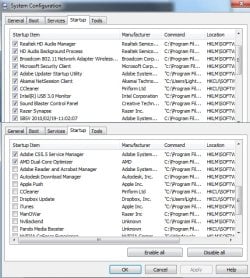
Ok Kat now what have you got set in the start up tab in msconfig? To do that (I am assuming here you haven't looked) hit Start type msconfig > it will come as a box with System Configuration Utility in it > right click that and then clcik on run as admin > you can then uncheck what is set to start at power up.

Personally I uncheck everything except CCleaner as you can see in the pic. Now just because you uncheck something doesn't mean it will not load - for example your AV system things that are required for the system will eventually load. Now if you have Creative as a start up item then try just leaving that checked at start up.

See if this makes any difference before we move on to something like a memtest.

By the by the board I am on right now in my Ivy Bridge is the same as yours only not the De Luxe version and I would be tempted to think about updating the audio for it if only out of curiosity. It might not help at all but stranger things happen at sea P8Z77-V DELUXE | Motherboards | ASUS Global

Just an example was my USB ports dropping out for whatever I thought at the time and it turned out to be the Samsung Magician software that was the culprit - now I would never have thought that but only for a turned on senior member saw my issue and knew what it was so simple uninstall and all was good;)
 

My Computer My Computer

At a glance

Desk1 7 Home Prem / Desk2 10 Pro / Main lap A...Desk1 i5 3750K / Laptop i7 GTX 860M / Desk2 i...Desk1 8GB (1866) / Desk2 16GB (1333) / Laptop...Desk 1& 2NVidia GTX 650 & Laptops on board Intel
Computer type
PC/Desktop
Computer Manufacturer/Model Number
Own build (new) Desk1 / Asus ROG Win 7 / Desk2 1st build
OS
Desk1 7 Home Prem / Desk2 10 Pro / Main lap Asus ROG 10 Pro 2 laptop Toshiba 7 Pro Asus P2520 7 & 10
CPU
Desk1 i5 3750K / Laptop i7 GTX 860M / Desk2 i5 2500
Motherboard
Desk1 Asus P877-V / Desk2 Gigabyte H67 UD3H / Laptop ?
Memory
Desk1 8GB (1866) / Desk2 16GB (1333) / Laptop 8Gb DDR3
Graphics Card(s)
Desk 1& 2NVidia GTX 650 & Laptops on board Intel
Sound Card
Desk 1 & 2 -XONAR DG Realtek High Def audio Laptop
Monitor(s) Displays
Desk 1 Benq HD 2450 / Desk2 Philips 24" / Laptop 17.5"
Screen Resolution
1920x1080 D1 & D2 & Laptop 1
Hard Drives
Desk1 Samsung 120GB 830 SSD
Asus ROG 256GB 850 Pro SSD
Desk2 Samsung 840 256 SSD
Toshiba 120GB EVO
PSU
Desk 1 Corsair HX 1050/ Laptop ? / Desk 2 Corsair HX 650
Case
Desk 1 Cooler HAF XM ? Toshiba laptop / Desk2 Coolermaster
Cooling
Fans on all Desk1 -2 Desk2 - all Coolermasters 5 Laptop ?
Keyboard
Desk 1 MS Sidewinder X6 Desk 2 MS Sidewinder X 4
Mouse
Desk 1&2 - Gigabyte MS 900 gamer - laptop - Logitec wireless
Internet Speed
ADSL2+
Other Info
One other Desktop (tester) and spare Toshba laptop both with SSD's
Running Kaspersky 2016 ISS on all machines config'd identically
Logitec audio stereo systems on each machine (x3)
Canon MG5250MFC
Router/modem TP-Link running WPA2SK
I have a checkmark next to SoundBlaster Control Panel and then the realtek stuff. It seems like on the initial startup like I said soundblaster is rarely detected. If I reboot it's working. I have had no problems playing games or anything else other than this sound issue and the computer starting up slow. Actually I can screenshot the startup -


Is there no log file or something that might explain what is going on? The best description of the startup, is that it shows the windows logo for maybe 40 seconds, then the windows welcome screen is where it hangs for maybe 1-2 minutes, then it loads windows and at first it looks fine but then the soundcard icon turns into a red X with the no speakers or headphones message if I click it. In the device manager is just says Audio Device on High Definition Audio Bus. Since CC was run all the icons load slower and it feels a bit delayed. Then it starts and runs fine as normal, and doesn't feel slow or anything bad. To get the sound to work I have to reboot the pc and then soundblaster is recognized. Everything else runs fine. I have updated the drivers and it still does the same thing.

For awhile windows update wouldn't work after the windows 10 anytime upgrade happened. I finally got that working fine but that's around the time this strange sound card issue started happening.
 

Attachments

  • startup.jpg
    startup.jpg
    111.6 KB · Views: 13

My Computer My Computer

At a glance

Windows 7 Pro 64Intel Core i7 3770K @ 3.50GHz16.0GBNVIDIA GeForce GTX 980 Ti
Computer type
PC/Desktop
Computer Manufacturer/Model Number
Origin PC
OS
Windows 7 Pro 64
CPU
Intel Core i7 3770K @ 3.50GHz
Motherboard
ASUSTeK COMPUTER INC. P8Z77-V DELUXE (LGA1155
Memory
16.0GB
Graphics Card(s)
NVIDIA GeForce GTX 980 Ti
Hard Drives
1863GB Seagate ST2000DM001-9YN164 ATA Device (SATA)
Antivirus
Microsoft Security Essentials
Browser
Firefox
I suggest you disable the first two items shown - Realtek, which relates to the M/B Internal Sound, and HD Audio Which is likely related to HDMI sound Driver.

The sound blaster control and the Razer Synapse should be all you need to run your sound and multiple options can confuse things

If this does work you can probably disable the realtek in the Bios - The HDMI sound may be OK once the realtek is disabled ( I run nVidia HDMI sound with my Add-On Sound Card without issues) BTW I would not bother with the CCleaner entry in startup, unless you are running a pro version for the free version it is just a strtup shortcut
 

My Computers My Computers

  • At a glance

    Windows 11 Pro x64 [Latest Release and Releas...Ryzen 9 5950X, 3.8 - 5.2 MHz64GB [2 x 32GB] DDR4 3200MHz4GB NVIDIA GEFORCE GTX 1650 Ti
    Computer type
    PC/Desktop
    Computer Manufacturer/Model Number
    ChillBlast - Custom to my design
    OS
    Windows 11 Pro x64 [Latest Release and Release Preview]
    CPU
    Ryzen 9 5950X, 3.8 - 5.2 MHz
    Motherboard
    Asus Prime X570-Pro
    Memory
    64GB [2 x 32GB] DDR4 3200MHz
    Graphics Card(s)
    4GB NVIDIA GEFORCE GTX 1650 Ti
    Sound Card
    On-board SPDIF to 5.1 System + HDMI [5.1 system]
    Monitor(s) Displays
    32" UHD 32 Bit HDR Monitor + 43" UHD 4K 32Bit HDR TV
    Screen Resolution
    2 x 3840 x 2160 @60Hz
    Hard Drives
    1TB M2 SSD OS, 500GB Fast Access SSD, 2 x 8TB Data + Various Externals from 1TB to 4TB, 10TB NAS
    PSU
    NZXT C750 80 PLUS Gold 750W Modular PSU
    Case
    Workstation Case [Matt Black]
    Cooling
    NZXT Kraken X63 280mm CPU Cooler +2x Quiet Case fans
    Keyboard
    Logitech Wireless MX Keys & K400 + others
    Mouse
    Logitech Wireless MX Master 3S
    Internet Speed
    920 MB Down 50 MB Up
    Antivirus
    BitDefender Total Security Pro
    Browser
    Chrome (always run latest Non-Beta)
    Other Info
    Also run ...
    Laptop - Quad 8GB - Windows 10 Pro x64
    Nexus 7 Android tablet x2
    Samsung 10.2" tablet
    Blackview TAB 8 4G Android Tablet c/w Keyboard
    Wacom Intuos Pro Medium Pen Pad
    Wacom Intuos Pro Small Pen Pad
    Wacom Expresskeys Remote
    Loopdeck+ Graphics Controller
    Shuttle Pro v2 Control
  • At a glance

    Windows 11 Pro x64 Latest RPIntel I7 10750H 5.0GHz32GB [2x16GB] DDR4 2933 MHznVidia GTX1650Ti 4 GB GDDR6
    Computer type
    Laptop
    System Manufacturer/Model Number
    Dell XPS 17 10750H
    OS
    Windows 11 Pro x64 Latest RP
    CPU
    Intel I7 10750H 5.0GHz
    Motherboard
    Dell XPS
    Memory
    32GB [2x16GB] DDR4 2933 MHz
    Graphics Card(s)
    nVidia GTX1650Ti 4 GB GDDR6
    Sound Card
    Stock [Realtek] 4 Speaker
    Monitor(s) Displays
    17" IPS UHD+ Infinity Edge Touchscreen
    Screen Resolution
    3840 x 2400
    Hard Drives
    2TB M2 NVMe, 4TB External + various 500GB & 1TB External NVMe (also have access to spinner HDD from
    PSU
    Stock
    Case
    Stock XPS Aluminium & Carbon Fibre
    Cooling
    Stock - Active Fan Control
    Keyboard
    Backlit + Various Logitech
    Mouse
    Stock Track Pad + Logitech MX Trackball
    Internet Speed
    72 MB Down 18MB Up
    Browser
    Chrome
    Other Info
    Also run ...
    Laptop - Quad 8GB - Windows 10 Pro x64
    Nexus 7 Android tablet x2
    10.2" tablet
    Sony Z3 Android Smartphone
    Wacom Intuos Pro Medium Pen Pad
    Wacom Intuos Pro Small Pen Pad
    Wacom Expresskeys Remote
    Loopdeck+ Graphics Controller
    Shuttle Pro v2 Control Pad
    10TB NAS
It does seem to boot faster with those two disabled, the sound though either works or doesn't. if I reboot it does. I guess I may have to disable the realtek part you mentioned? I have no idea how to do that with this ASUS motherboard though. it is kind of confusing how it works.
 

My Computer My Computer

At a glance

Windows 7 Pro 64Intel Core i7 3770K @ 3.50GHz16.0GBNVIDIA GeForce GTX 980 Ti
Computer type
PC/Desktop
Computer Manufacturer/Model Number
Origin PC
OS
Windows 7 Pro 64
CPU
Intel Core i7 3770K @ 3.50GHz
Motherboard
ASUSTeK COMPUTER INC. P8Z77-V DELUXE (LGA1155
Memory
16.0GB
Graphics Card(s)
NVIDIA GeForce GTX 980 Ti
Hard Drives
1863GB Seagate ST2000DM001-9YN164 ATA Device (SATA)
Antivirus
Microsoft Security Essentials
Browser
Firefox
Sorry late reply - yes as Barman has suggested Kat and you still have an awful lot of things starting up in that tab but that is your choice. CC can be taken away I only keep it because it reminds when updates are available.

Now not being that familiar with the Soundblaster and please forgive my ignorance because their site is not that helpful - just how is your system set up is this an external system or a card with HDMI cabling to an external system.

I think I said a while back another member had a problems with the product/s and while I know you have paid out for the system would you consider a change of sound systems?
 

My Computer My Computer

At a glance

Desk1 7 Home Prem / Desk2 10 Pro / Main lap A...Desk1 i5 3750K / Laptop i7 GTX 860M / Desk2 i...Desk1 8GB (1866) / Desk2 16GB (1333) / Laptop...Desk 1& 2NVidia GTX 650 & Laptops on board Intel
Computer type
PC/Desktop
Computer Manufacturer/Model Number
Own build (new) Desk1 / Asus ROG Win 7 / Desk2 1st build
OS
Desk1 7 Home Prem / Desk2 10 Pro / Main lap Asus ROG 10 Pro 2 laptop Toshiba 7 Pro Asus P2520 7 & 10
CPU
Desk1 i5 3750K / Laptop i7 GTX 860M / Desk2 i5 2500
Motherboard
Desk1 Asus P877-V / Desk2 Gigabyte H67 UD3H / Laptop ?
Memory
Desk1 8GB (1866) / Desk2 16GB (1333) / Laptop 8Gb DDR3
Graphics Card(s)
Desk 1& 2NVidia GTX 650 & Laptops on board Intel
Sound Card
Desk 1 & 2 -XONAR DG Realtek High Def audio Laptop
Monitor(s) Displays
Desk 1 Benq HD 2450 / Desk2 Philips 24" / Laptop 17.5"
Screen Resolution
1920x1080 D1 & D2 & Laptop 1
Hard Drives
Desk1 Samsung 120GB 830 SSD
Asus ROG 256GB 850 Pro SSD
Desk2 Samsung 840 256 SSD
Toshiba 120GB EVO
PSU
Desk 1 Corsair HX 1050/ Laptop ? / Desk 2 Corsair HX 650
Case
Desk 1 Cooler HAF XM ? Toshiba laptop / Desk2 Coolermaster
Cooling
Fans on all Desk1 -2 Desk2 - all Coolermasters 5 Laptop ?
Keyboard
Desk 1 MS Sidewinder X6 Desk 2 MS Sidewinder X 4
Mouse
Desk 1&2 - Gigabyte MS 900 gamer - laptop - Logitec wireless
Internet Speed
ADSL2+
Other Info
One other Desktop (tester) and spare Toshba laptop both with SSD's
Running Kaspersky 2016 ISS on all machines config'd identically
Logitec audio stereo systems on each machine (x3)
Canon MG5250MFC
Router/modem TP-Link running WPA2SK
What I think is happening is as you have two different sets of sound hardware when you cold boot the system uses the first one that it finds and due to the way it boots this can vary between the Onboard Realtek and the additional Creative card

You need to enter your System BIOS in order to disable the on board audio. [Am Assuming from here on that you are not familiar with working with the BIOS so excuse the hand holding If You are more aware of the systems ]

With ASUS this is normally a case of tapping the F2 or DEL key during initial start-up ( which one will either be in your user Guide or will flash on screen during the First Logo Screen). You may need a few goes to get the timing right. I have also read that Holding the F2 key down and booting is a better way to ensure it works ( keep the F2 pressed until the bios screen appears).

In the BIOS you will probably find that you do not have Mouse options but need to use the Keyboard to navigate ( the options should be displayed on the screen)

These are some instructions direct from the Internet on how to proceed from the point when you enter the BIOS to disable the onboard Sound ...

Click on the advance tab to go into the advance settings of the bios. When you do you see an ai tab and advance tab.click on the advance tab then click on onboard devices. It say audio manager or audio device. Click on the enabled button to disable it
My advice is take your time and check any on screen instructions and options - There may even be an option to set the order of Sound devices used rather than disable it. If so, look for an option such as External or PCI and set that to preferred or First

   Warning
Working is the BIOS can cause system boot and running issues if you press the wrong options so by all means have a look around to check the options available to you Especially the reset to defaults, or Initial, option which if something should go seriously wrong will get you back to the optimal settings


You may decide that you are willing to put up with the situation you now have which is I believe usable rather than mess around with something you are not sure of but The BIOS is often a last resort option but it can also be a source of the full control you need
 

My Computers My Computers

  • At a glance

    Windows 11 Pro x64 [Latest Release and Releas...Ryzen 9 5950X, 3.8 - 5.2 MHz64GB [2 x 32GB] DDR4 3200MHz4GB NVIDIA GEFORCE GTX 1650 Ti
    Computer type
    PC/Desktop
    Computer Manufacturer/Model Number
    ChillBlast - Custom to my design
    OS
    Windows 11 Pro x64 [Latest Release and Release Preview]
    CPU
    Ryzen 9 5950X, 3.8 - 5.2 MHz
    Motherboard
    Asus Prime X570-Pro
    Memory
    64GB [2 x 32GB] DDR4 3200MHz
    Graphics Card(s)
    4GB NVIDIA GEFORCE GTX 1650 Ti
    Sound Card
    On-board SPDIF to 5.1 System + HDMI [5.1 system]
    Monitor(s) Displays
    32" UHD 32 Bit HDR Monitor + 43" UHD 4K 32Bit HDR TV
    Screen Resolution
    2 x 3840 x 2160 @60Hz
    Hard Drives
    1TB M2 SSD OS, 500GB Fast Access SSD, 2 x 8TB Data + Various Externals from 1TB to 4TB, 10TB NAS
    PSU
    NZXT C750 80 PLUS Gold 750W Modular PSU
    Case
    Workstation Case [Matt Black]
    Cooling
    NZXT Kraken X63 280mm CPU Cooler +2x Quiet Case fans
    Keyboard
    Logitech Wireless MX Keys & K400 + others
    Mouse
    Logitech Wireless MX Master 3S
    Internet Speed
    920 MB Down 50 MB Up
    Antivirus
    BitDefender Total Security Pro
    Browser
    Chrome (always run latest Non-Beta)
    Other Info
    Also run ...
    Laptop - Quad 8GB - Windows 10 Pro x64
    Nexus 7 Android tablet x2
    Samsung 10.2" tablet
    Blackview TAB 8 4G Android Tablet c/w Keyboard
    Wacom Intuos Pro Medium Pen Pad
    Wacom Intuos Pro Small Pen Pad
    Wacom Expresskeys Remote
    Loopdeck+ Graphics Controller
    Shuttle Pro v2 Control
  • At a glance

    Windows 11 Pro x64 Latest RPIntel I7 10750H 5.0GHz32GB [2x16GB] DDR4 2933 MHznVidia GTX1650Ti 4 GB GDDR6
    Computer type
    Laptop
    System Manufacturer/Model Number
    Dell XPS 17 10750H
    OS
    Windows 11 Pro x64 Latest RP
    CPU
    Intel I7 10750H 5.0GHz
    Motherboard
    Dell XPS
    Memory
    32GB [2x16GB] DDR4 2933 MHz
    Graphics Card(s)
    nVidia GTX1650Ti 4 GB GDDR6
    Sound Card
    Stock [Realtek] 4 Speaker
    Monitor(s) Displays
    17" IPS UHD+ Infinity Edge Touchscreen
    Screen Resolution
    3840 x 2400
    Hard Drives
    2TB M2 NVMe, 4TB External + various 500GB & 1TB External NVMe (also have access to spinner HDD from
    PSU
    Stock
    Case
    Stock XPS Aluminium & Carbon Fibre
    Cooling
    Stock - Active Fan Control
    Keyboard
    Backlit + Various Logitech
    Mouse
    Stock Track Pad + Logitech MX Trackball
    Internet Speed
    72 MB Down 18MB Up
    Browser
    Chrome
    Other Info
    Also run ...
    Laptop - Quad 8GB - Windows 10 Pro x64
    Nexus 7 Android tablet x2
    10.2" tablet
    Sony Z3 Android Smartphone
    Wacom Intuos Pro Medium Pen Pad
    Wacom Intuos Pro Small Pen Pad
    Wacom Expresskeys Remote
    Loopdeck+ Graphics Controller
    Shuttle Pro v2 Control Pad
    10TB NAS
In the BIOS you will probably find that you do not have Mouse options but need to use the Keyboard to navigate
Yes this is so right I have almost an identical board to Kat have done things in my BIOS which I know I want to happen but there are heaps of things that I still have no idea of what they actually do so I leave most things alone except for a bit of clocking and boot management.
 

My Computer My Computer

At a glance

Desk1 7 Home Prem / Desk2 10 Pro / Main lap A...Desk1 i5 3750K / Laptop i7 GTX 860M / Desk2 i...Desk1 8GB (1866) / Desk2 16GB (1333) / Laptop...Desk 1& 2NVidia GTX 650 & Laptops on board Intel
Computer type
PC/Desktop
Computer Manufacturer/Model Number
Own build (new) Desk1 / Asus ROG Win 7 / Desk2 1st build
OS
Desk1 7 Home Prem / Desk2 10 Pro / Main lap Asus ROG 10 Pro 2 laptop Toshiba 7 Pro Asus P2520 7 & 10
CPU
Desk1 i5 3750K / Laptop i7 GTX 860M / Desk2 i5 2500
Motherboard
Desk1 Asus P877-V / Desk2 Gigabyte H67 UD3H / Laptop ?
Memory
Desk1 8GB (1866) / Desk2 16GB (1333) / Laptop 8Gb DDR3
Graphics Card(s)
Desk 1& 2NVidia GTX 650 & Laptops on board Intel
Sound Card
Desk 1 & 2 -XONAR DG Realtek High Def audio Laptop
Monitor(s) Displays
Desk 1 Benq HD 2450 / Desk2 Philips 24" / Laptop 17.5"
Screen Resolution
1920x1080 D1 & D2 & Laptop 1
Hard Drives
Desk1 Samsung 120GB 830 SSD
Asus ROG 256GB 850 Pro SSD
Desk2 Samsung 840 256 SSD
Toshiba 120GB EVO
PSU
Desk 1 Corsair HX 1050/ Laptop ? / Desk 2 Corsair HX 650
Case
Desk 1 Cooler HAF XM ? Toshiba laptop / Desk2 Coolermaster
Cooling
Fans on all Desk1 -2 Desk2 - all Coolermasters 5 Laptop ?
Keyboard
Desk 1 MS Sidewinder X6 Desk 2 MS Sidewinder X 4
Mouse
Desk 1&2 - Gigabyte MS 900 gamer - laptop - Logitec wireless
Internet Speed
ADSL2+
Other Info
One other Desktop (tester) and spare Toshba laptop both with SSD's
Running Kaspersky 2016 ISS on all machines config'd identically
Logitec audio stereo systems on each machine (x3)
Canon MG5250MFC
Router/modem TP-Link running WPA2SK
Okay thanks both of you for the information about that. I may change it but I still notice to day a slight hang when windows is starting in the welcome screen, unless it is just the realtek or soundblaster issue and it wanting to choose?
 

My Computer My Computer

At a glance

Windows 7 Pro 64Intel Core i7 3770K @ 3.50GHz16.0GBNVIDIA GeForce GTX 980 Ti
Computer type
PC/Desktop
Computer Manufacturer/Model Number
Origin PC
OS
Windows 7 Pro 64
CPU
Intel Core i7 3770K @ 3.50GHz
Motherboard
ASUSTeK COMPUTER INC. P8Z77-V DELUXE (LGA1155
Memory
16.0GB
Graphics Card(s)
NVIDIA GeForce GTX 980 Ti
Hard Drives
1863GB Seagate ST2000DM001-9YN164 ATA Device (SATA)
Antivirus
Microsoft Security Essentials
Browser
Firefox
Well just recently after a few months of odd issues with the Ivy Bridge and a slow start up with he hanging you describe I acted on a tip from a member and found my CMOS battery near dead - 1.03v and replacing it fixed the problem. Of course I had to do the BIOS settings all over again but it was certainly worth it.
 

My Computer My Computer

At a glance

Desk1 7 Home Prem / Desk2 10 Pro / Main lap A...Desk1 i5 3750K / Laptop i7 GTX 860M / Desk2 i...Desk1 8GB (1866) / Desk2 16GB (1333) / Laptop...Desk 1& 2NVidia GTX 650 & Laptops on board Intel
Computer type
PC/Desktop
Computer Manufacturer/Model Number
Own build (new) Desk1 / Asus ROG Win 7 / Desk2 1st build
OS
Desk1 7 Home Prem / Desk2 10 Pro / Main lap Asus ROG 10 Pro 2 laptop Toshiba 7 Pro Asus P2520 7 & 10
CPU
Desk1 i5 3750K / Laptop i7 GTX 860M / Desk2 i5 2500
Motherboard
Desk1 Asus P877-V / Desk2 Gigabyte H67 UD3H / Laptop ?
Memory
Desk1 8GB (1866) / Desk2 16GB (1333) / Laptop 8Gb DDR3
Graphics Card(s)
Desk 1& 2NVidia GTX 650 & Laptops on board Intel
Sound Card
Desk 1 & 2 -XONAR DG Realtek High Def audio Laptop
Monitor(s) Displays
Desk 1 Benq HD 2450 / Desk2 Philips 24" / Laptop 17.5"
Screen Resolution
1920x1080 D1 & D2 & Laptop 1
Hard Drives
Desk1 Samsung 120GB 830 SSD
Asus ROG 256GB 850 Pro SSD
Desk2 Samsung 840 256 SSD
Toshiba 120GB EVO
PSU
Desk 1 Corsair HX 1050/ Laptop ? / Desk 2 Corsair HX 650
Case
Desk 1 Cooler HAF XM ? Toshiba laptop / Desk2 Coolermaster
Cooling
Fans on all Desk1 -2 Desk2 - all Coolermasters 5 Laptop ?
Keyboard
Desk 1 MS Sidewinder X6 Desk 2 MS Sidewinder X 4
Mouse
Desk 1&2 - Gigabyte MS 900 gamer - laptop - Logitec wireless
Internet Speed
ADSL2+
Other Info
One other Desktop (tester) and spare Toshba laptop both with SSD's
Running Kaspersky 2016 ISS on all machines config'd identically
Logitec audio stereo systems on each machine (x3)
Canon MG5250MFC
Router/modem TP-Link running WPA2SK
I did a few things got tired of this problem then thought i'd just reinstall windows, but I decided to try windows 10 instead of going back to 7. The problem remained too but another different problem happened, on startup I noticed the realtek Ethernet 2 would not work then after about 2-5 minutes it would work great. I reconnected to Ethernet 1 which is gigabyte and on start it works great and the sound issue is never there. So I'm kind of confused what to do with this. The whole thing seems tied to realtek maybe but soundblaster is working fine now. It's that realtek ethernet port that was doing something. I've been using that realtek Ethernet 2 port since 2012 with no issues, but now it seems like not plugging it in there makes things work better.
 

My Computer My Computer

At a glance

Windows 7 Pro 64Intel Core i7 3770K @ 3.50GHz16.0GBNVIDIA GeForce GTX 980 Ti
Computer type
PC/Desktop
Computer Manufacturer/Model Number
Origin PC
OS
Windows 7 Pro 64
CPU
Intel Core i7 3770K @ 3.50GHz
Motherboard
ASUSTeK COMPUTER INC. P8Z77-V DELUXE (LGA1155
Memory
16.0GB
Graphics Card(s)
NVIDIA GeForce GTX 980 Ti
Hard Drives
1863GB Seagate ST2000DM001-9YN164 ATA Device (SATA)
Antivirus
Microsoft Security Essentials
Browser
Firefox
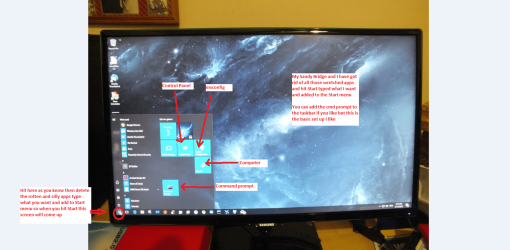
To be honest Kat I would try 10 mate because it will set up a lot of drivers through Windows and it isn't as bad as it used to be see the pic of my Sandy Bridge set up - you just need to go through the settings as in letting them see stuff you don't want anyone else seeing - although I am betting they have a way around that ;)
 

Attachments

  • KAT.PNG
    KAT.PNG
    309.4 KB · Views: 1

My Computer My Computer

At a glance

Desk1 7 Home Prem / Desk2 10 Pro / Main lap A...Desk1 i5 3750K / Laptop i7 GTX 860M / Desk2 i...Desk1 8GB (1866) / Desk2 16GB (1333) / Laptop...Desk 1& 2NVidia GTX 650 & Laptops on board Intel
Computer type
PC/Desktop
Computer Manufacturer/Model Number
Own build (new) Desk1 / Asus ROG Win 7 / Desk2 1st build
OS
Desk1 7 Home Prem / Desk2 10 Pro / Main lap Asus ROG 10 Pro 2 laptop Toshiba 7 Pro Asus P2520 7 & 10
CPU
Desk1 i5 3750K / Laptop i7 GTX 860M / Desk2 i5 2500
Motherboard
Desk1 Asus P877-V / Desk2 Gigabyte H67 UD3H / Laptop ?
Memory
Desk1 8GB (1866) / Desk2 16GB (1333) / Laptop 8Gb DDR3
Graphics Card(s)
Desk 1& 2NVidia GTX 650 & Laptops on board Intel
Sound Card
Desk 1 & 2 -XONAR DG Realtek High Def audio Laptop
Monitor(s) Displays
Desk 1 Benq HD 2450 / Desk2 Philips 24" / Laptop 17.5"
Screen Resolution
1920x1080 D1 & D2 & Laptop 1
Hard Drives
Desk1 Samsung 120GB 830 SSD
Asus ROG 256GB 850 Pro SSD
Desk2 Samsung 840 256 SSD
Toshiba 120GB EVO
PSU
Desk 1 Corsair HX 1050/ Laptop ? / Desk 2 Corsair HX 650
Case
Desk 1 Cooler HAF XM ? Toshiba laptop / Desk2 Coolermaster
Cooling
Fans on all Desk1 -2 Desk2 - all Coolermasters 5 Laptop ?
Keyboard
Desk 1 MS Sidewinder X6 Desk 2 MS Sidewinder X 4
Mouse
Desk 1&2 - Gigabyte MS 900 gamer - laptop - Logitec wireless
Internet Speed
ADSL2+
Other Info
One other Desktop (tester) and spare Toshba laptop both with SSD's
Running Kaspersky 2016 ISS on all machines config'd identically
Logitec audio stereo systems on each machine (x3)
Canon MG5250MFC
Router/modem TP-Link running WPA2SK
Back
Top