ikjadoon
New member
Hi! I need some help with a batch file I'm writing.
Here's what I've got so far:
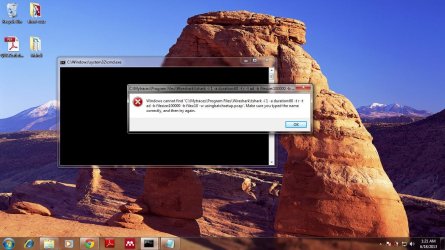
The first line works great; it terminates sidebar.exe fine. But, the next line is the problem. It doesn't open up the sidebar.exe, but instead opens up a useless command prompt window:

What am I doing wrong? I tried "....sidebar.exe \showgadgets" (some random argument I found online), but that does not work either. I also tried running the command via CMD, no luck. Tried CMD "Run As Administrator", no luck either.
EDIT: If I navigate to the Windows Sidebar folder with cd, then from there I can just type "sidebar.exe" and it will run. But how do I do that in a batch file?
Any ideas?
~Ibrahim~
P.S. Also...if anyone knows how to run a batch command automatically when on battery, that'd be lovely. Any powercfg gurus here?
Here's what I've got so far:
Code:
taskkill /F /IM sidebar.exe
START "C:\Program Files (x86)\Windows Sidebar\sidebar.exe"What am I doing wrong? I tried "....sidebar.exe \showgadgets" (some random argument I found online), but that does not work either. I also tried running the command via CMD, no luck. Tried CMD "Run As Administrator", no luck either.
EDIT: If I navigate to the Windows Sidebar folder with cd, then from there I can just type "sidebar.exe" and it will run. But how do I do that in a batch file?
Any ideas?
~Ibrahim~
P.S. Also...if anyone knows how to run a batch command automatically when on battery, that'd be lovely. Any powercfg gurus here?
My Computer
- Computer Manufacturer/Model Number
- Dell SXPS 1645
- OS
- Windows 7 Ultimate 64-bit
- CPU
- i7-720QM
- Memory
- 6GB DDR3-1.333GHz
- Graphics Card(s)
- ATI 4670 1GB
- Sound Card
- IDT Integ.
- Monitor(s) Displays
- RGBLED
- Screen Resolution
- 1920x1080
- Hard Drives
- Samsung PM800 256GB SSD
- PSU
- Dell 90W w/ 9-cell


 That works perfectly.