Batch file: how to start a program [sidebar.exe]

ikjadoon

New member
Power User
VIP
Local time
10:29 AM
Messages
94
Hi! I need some help with a batch file I'm writing.

Here's what I've got so far:

Code:
taskkill /F /IM sidebar.exe
START "C:\Program Files (x86)\Windows Sidebar\sidebar.exe"
The first line works great; it terminates sidebar.exe fine. But, the next line is the problem. It doesn't open up the sidebar.exe, but instead opens up a useless command prompt window:
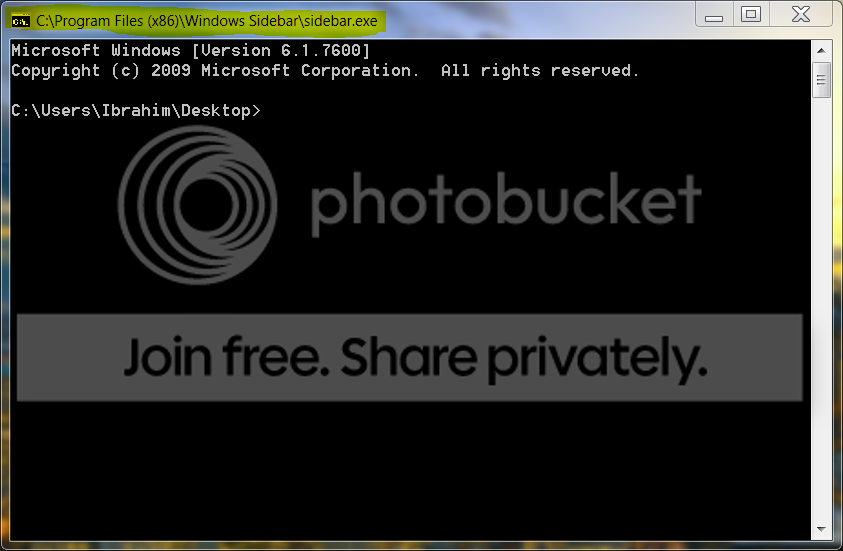
sidebarissue.png


What am I doing wrong? I tried "....sidebar.exe \showgadgets" (some random argument I found online), but that does not work either. I also tried running the command via CMD, no luck. Tried CMD "Run As Administrator", no luck either.

EDIT: If I navigate to the Windows Sidebar folder with cd, then from there I can just type "sidebar.exe" and it will run. But how do I do that in a batch file?

Any ideas?

~Ibrahim~

P.S. Also...if anyone knows how to run a batch command automatically when on battery, that'd be lovely. Any powercfg gurus here?
 

My Computer

Computer Manufacturer/Model Number
Dell SXPS 1645
OS
Windows 7 Ultimate 64-bit
CPU
i7-720QM
Memory
6GB DDR3-1.333GHz
Graphics Card(s)
ATI 4670 1GB
Sound Card
IDT Integ.
Monitor(s) Displays
RGBLED
Screen Resolution
1920x1080
Hard Drives
Samsung PM800 256GB SSD
PSU
Dell 90W w/ 9-cell
change this line here:
START "C:\Program Files (x86)\Windows Sidebar\sidebar.exe"

to this line:
"C:\Program Files (x86)\Windows Sidebar\sidebar.exe"

zzz2496
 

My Computer

Computer Manufacturer/Model Number
Self Built
OS
Windows7 Ultimate 64bit
CPU
Intel Core 2 Quad Q6600
Motherboard
Abit IN9-32X-MMAX
Memory
DDR2 Adata 4GB
Graphics Card(s)
Nvidia GeForce GTX 285 1024 and Nvidia GeForce 8800GT 512
Sound Card
Asus Xonar HDAV 1.3
Monitor(s) Displays
Dell 2407WFP and BenQ 2400v and Philips 150v3
Screen Resolution
3840x1200 and 1024x768
Hard Drives
2 WDC 1TB
1 WDC 1.5TB
1 WDC 640GB
1 WDC 320GB
1 Seagate 200GB
PSU
Corsair TX 850W
Case
Cooler Master HAF932
Cooling
Arctic Cooling Freezer Extreme and plenty of fans...
Keyboard
MicrosoftNaturalKeyboard 4000/Apple Alu keyboard/Dinovo mini
Mouse
Logitech G5/MarbleMouseTrackball/PerformanceMX/SpacePilotPRO
Internet Speed
1.5Mbps down/384Kbps up
Other Info
APC SURT 1000XL
Logitech Z-560
Wiimote
Mikrotik Router
Linksys (now Cisco) SD2008 8 port Gigabit switch
Linksys WRT54G (acting as AP)
Apple wireless Aluminium keyboard
Apple Magic Mouse
Xbox360 wired controller
change this line here:
START "C:\Program Files (x86)\Windows Sidebar\sidebar.exe"

to this line:
"C:\Program Files (x86)\Windows Sidebar\sidebar.exe"

zzz2496

Oh, crap, that does work! :)

One little issue: it leaves a CMD prompt open. Any way to get it to auto-close?
 

My Computer

Computer Manufacturer/Model Number
Dell SXPS 1645
OS
Windows 7 Ultimate 64-bit
CPU
i7-720QM
Memory
6GB DDR3-1.333GHz
Graphics Card(s)
ATI 4670 1GB
Sound Card
IDT Integ.
Monitor(s) Displays
RGBLED
Screen Resolution
1920x1080
Hard Drives
Samsung PM800 256GB SSD
PSU
Dell 90W w/ 9-cell
Add --> @echo off
at the start of the file.

zzz2496
 

My Computer

Computer Manufacturer/Model Number
Self Built
OS
Windows7 Ultimate 64bit
CPU
Intel Core 2 Quad Q6600
Motherboard
Abit IN9-32X-MMAX
Memory
DDR2 Adata 4GB
Graphics Card(s)
Nvidia GeForce GTX 285 1024 and Nvidia GeForce 8800GT 512
Sound Card
Asus Xonar HDAV 1.3
Monitor(s) Displays
Dell 2407WFP and BenQ 2400v and Philips 150v3
Screen Resolution
3840x1200 and 1024x768
Hard Drives
2 WDC 1TB
1 WDC 1.5TB
1 WDC 640GB
1 WDC 320GB
1 Seagate 200GB
PSU
Corsair TX 850W
Case
Cooler Master HAF932
Cooling
Arctic Cooling Freezer Extreme and plenty of fans...
Keyboard
MicrosoftNaturalKeyboard 4000/Apple Alu keyboard/Dinovo mini
Mouse
Logitech G5/MarbleMouseTrackball/PerformanceMX/SpacePilotPRO
Internet Speed
1.5Mbps down/384Kbps up
Other Info
APC SURT 1000XL
Logitech Z-560
Wiimote
Mikrotik Router
Linksys (now Cisco) SD2008 8 port Gigabit switch
Linksys WRT54G (acting as AP)
Apple wireless Aluminium keyboard
Apple Magic Mouse
Xbox360 wired controller
Sweet. Well, I'm almost there:

No "@echo off" gives this command prompt
Code:
C:\Users\Ibrahim\Desktop>taskkill /F /IM sidebar.exe
SUCCESS: The process "sidebar.exe" with PID 3724 has been terminated.

C:\Users\Ibrahim\Desktop>"C:\Program Files (x86)\Windows Sidebar\sidebar.exe"
@echo off in the first line unfortunately still gives a command prompt, but the output is a bit different:

Code:
SUCCESS: The process "sidebar.exe" with PID 6040 has been terminated.
With @echo off, it looks like this:
Code:
@echo off
taskkill /F /IM sidebar.exe
"C:\Program Files (x86)\Windows Sidebar\sidebar.exe"
But, right...I still get that "echo" from taskkill.

EDIT: Adding ">nul" after the taskkill command stops any output. I can hide the whole window later. :) Thanks for the help!
 

My Computer

Computer Manufacturer/Model Number
Dell SXPS 1645
OS
Windows 7 Ultimate 64-bit
CPU
i7-720QM
Memory
6GB DDR3-1.333GHz
Graphics Card(s)
ATI 4670 1GB
Sound Card
IDT Integ.
Monitor(s) Displays
RGBLED
Screen Resolution
1920x1080
Hard Drives
Samsung PM800 256GB SSD
PSU
Dell 90W w/ 9-cell
add an 'exit' command at the very last line. Without the comma's of course.
 

My Computer

OS
Windows 7 Enterprise
CPU
Intel Pentium Dual E2200 @2.2GHz
Motherboard
Gigabyte II-G31
Memory
4GB
Graphics Card(s)
Palit GForce 9500GT 1GB
Sound Card
onBoard
Hard Drives
WesternDigital: 250GB + 1TB + 1TB + 2TB
PSU
450W
Case
CoolerMaster CM690
Cooling
Corsair H50
Mouse
Logitech MX518
Here:
Code:
@echo off
taskkill /F /IM sidebar.exe > NUL
start "" "C:\Program Files (x86)\Windows Sidebar\sidebar.exe"
 

My Computer

Computer Manufacturer/Model Number
Self Built
OS
Windows7 Ultimate 64bit
CPU
Intel Core 2 Quad Q6600
Motherboard
Abit IN9-32X-MMAX
Memory
DDR2 Adata 4GB
Graphics Card(s)
Nvidia GeForce GTX 285 1024 and Nvidia GeForce 8800GT 512
Sound Card
Asus Xonar HDAV 1.3
Monitor(s) Displays
Dell 2407WFP and BenQ 2400v and Philips 150v3
Screen Resolution
3840x1200 and 1024x768
Hard Drives
2 WDC 1TB
1 WDC 1.5TB
1 WDC 640GB
1 WDC 320GB
1 Seagate 200GB
PSU
Corsair TX 850W
Case
Cooler Master HAF932
Cooling
Arctic Cooling Freezer Extreme and plenty of fans...
Keyboard
MicrosoftNaturalKeyboard 4000/Apple Alu keyboard/Dinovo mini
Mouse
Logitech G5/MarbleMouseTrackball/PerformanceMX/SpacePilotPRO
Internet Speed
1.5Mbps down/384Kbps up
Other Info
APC SURT 1000XL
Logitech Z-560
Wiimote
Mikrotik Router
Linksys (now Cisco) SD2008 8 port Gigabit switch
Linksys WRT54G (acting as AP)
Apple wireless Aluminium keyboard
Apple Magic Mouse
Xbox360 wired controller
Here:
Code:
@echo off
taskkill /F /IM sidebar.exe > NUL
start "" "C:\Program Files (x86)\Windows Sidebar\sidebar.exe"

Woohoo!! :D That works perfectly.

Thanks, man. +rep! Should've repped you from the first post, but I forgot and now I can only do it once. :(

~Ibrahim~
 

My Computer

Computer Manufacturer/Model Number
Dell SXPS 1645
OS
Windows 7 Ultimate 64-bit
CPU
i7-720QM
Memory
6GB DDR3-1.333GHz
Graphics Card(s)
ATI 4670 1GB
Sound Card
IDT Integ.
Monitor(s) Displays
RGBLED
Screen Resolution
1920x1080
Hard Drives
Samsung PM800 256GB SSD
PSU
Dell 90W w/ 9-cell
You're welcome :) and thanks for the rep :D

zzz2496
 

My Computer

Computer Manufacturer/Model Number
Self Built
OS
Windows7 Ultimate 64bit
CPU
Intel Core 2 Quad Q6600
Motherboard
Abit IN9-32X-MMAX
Memory
DDR2 Adata 4GB
Graphics Card(s)
Nvidia GeForce GTX 285 1024 and Nvidia GeForce 8800GT 512
Sound Card
Asus Xonar HDAV 1.3
Monitor(s) Displays
Dell 2407WFP and BenQ 2400v and Philips 150v3
Screen Resolution
3840x1200 and 1024x768
Hard Drives
2 WDC 1TB
1 WDC 1.5TB
1 WDC 640GB
1 WDC 320GB
1 Seagate 200GB
PSU
Corsair TX 850W
Case
Cooler Master HAF932
Cooling
Arctic Cooling Freezer Extreme and plenty of fans...
Keyboard
MicrosoftNaturalKeyboard 4000/Apple Alu keyboard/Dinovo mini
Mouse
Logitech G5/MarbleMouseTrackball/PerformanceMX/SpacePilotPRO
Internet Speed
1.5Mbps down/384Kbps up
Other Info
APC SURT 1000XL
Logitech Z-560
Wiimote
Mikrotik Router
Linksys (now Cisco) SD2008 8 port Gigabit switch
Linksys WRT54G (acting as AP)
Apple wireless Aluminium keyboard
Apple Magic Mouse
Xbox360 wired controller
Hi! I need some help with a batch file I'm writing.

Here's what I've got so far:

Code:
taskkill /F /IM sidebar.exe
START "C:\Program Files (x86)\Windows Sidebar\sidebar.exe"
The first line works great; it terminates sidebar.exe fine. But, the next line is the problem. It doesn't open up the sidebar.exe, but instead opens up a useless command prompt window:

sidebarissue.png


What am I doing wrong? I tried "....sidebar.exe \showgadgets" (some random argument I found online), but that does not work either. I also tried running the command via CMD, no luck. Tried CMD "Run As Administrator", no luck either.

EDIT: If I navigate to the Windows Sidebar folder with cd, then from there I can just type "sidebar.exe" and it will run. But how do I do that in a batch file?

Any ideas?

~Ibrahim~

P.S. Also...if anyone knows how to run a batch command automatically when on battery, that'd be lovely. Any powercfg gurus here?


Sidebar folder may not be included in your path statement
 

My Computer

Computer Manufacturer/Model Number
HP Pavillion dv-7 1005 Tx
OS
Win 8 Release candidate 8400
CPU
[email protected]
Memory
4 gigs
Graphics Card(s)
Nvidia 9600M
Sound Card
HD built-in
Monitor(s) Displays
17" Wxga
Screen Resolution
1440x900
Cooling
none
Internet Speed
45Mb down 5Mb up
Will somebody PLEASE me tell what's the difference between these two lines?

change this line here:
START "C:\Program Files (x86)\Windows Sidebar\sidebar.exe"

to this line:
"C:\Program Files (x86)\Windows Sidebar\sidebar.exe"

FyrmnJ
 

My Computer

Computer Manufacturer/Model Number
White Box
OS
Dual Booting Windows Vista32 bit And Windows 7 Home premium (x64) (build 7600)
CPU
ntel(R) Core(TM)2 Quad CPU Q6700 @ 2.66GHz (4 CPUs),
Motherboard
Board: ASUSTeK Computer INC. P5B-Premium Rev 1.xx Bus Clock:
Memory
3072MB RAM Available OS Memory: 2816MB RAM
Graphics Card(s)
MSI RX1600Pro (MS-V040);VisionTek RADEON X1300 PCI SFF
Sound Card
SoundMAX Integrated Digital HD Audio
Monitor(s) Displays
Envision SP2107W [Monitor] (22.0"vis, s/n B7976JA007061, Jun
Screen Resolution
1680x1050
Hard Drives
PLEXTOR DVDR PX-712A ATA Device [CD-ROM drive]
3.5" format removeable media [Floppy drive]

INTEL SSDSA2MH080G1GC [Hard drive] (80.03 GB) -- drive 2, s/n CVEM926000FK080DGN, rev 045C8820, SMART Status: Healthy
IOMEGA ZIP 100 SCSI Disk Device -- d
PSU
Have 2 PSU's Installed
Case
Coolmaster
Keyboard
Microsoft Internet Keyboard Pro Hot Keys
Mouse
Logitec MX500
Internet Speed
DSL
Other Info
Rollback Rx system repair software by Horizon Data Systems
Texas Instruments 1394 OHCI Compliant Host Controller
Acronis True Image Backup Archive Explorer
HID-compliant device
Microsoft PS/2 Mouse
General Purpose USB Hub
Microsoft Internet Keyboard Pro Composite Device
USB Mass Storage Device
USB Root Hub (7x)
B:\
The first line uses "start", the second line doesn't....

zzz2496
 

My Computer

Computer Manufacturer/Model Number
Self Built
OS
Windows7 Ultimate 64bit
CPU
Intel Core 2 Quad Q6600
Motherboard
Abit IN9-32X-MMAX
Memory
DDR2 Adata 4GB
Graphics Card(s)
Nvidia GeForce GTX 285 1024 and Nvidia GeForce 8800GT 512
Sound Card
Asus Xonar HDAV 1.3
Monitor(s) Displays
Dell 2407WFP and BenQ 2400v and Philips 150v3
Screen Resolution
3840x1200 and 1024x768
Hard Drives
2 WDC 1TB
1 WDC 1.5TB
1 WDC 640GB
1 WDC 320GB
1 Seagate 200GB
PSU
Corsair TX 850W
Case
Cooler Master HAF932
Cooling
Arctic Cooling Freezer Extreme and plenty of fans...
Keyboard
MicrosoftNaturalKeyboard 4000/Apple Alu keyboard/Dinovo mini
Mouse
Logitech G5/MarbleMouseTrackball/PerformanceMX/SpacePilotPRO
Internet Speed
1.5Mbps down/384Kbps up
Other Info
APC SURT 1000XL
Logitech Z-560
Wiimote
Mikrotik Router
Linksys (now Cisco) SD2008 8 port Gigabit switch
Linksys WRT54G (acting as AP)
Apple wireless Aluminium keyboard
Apple Magic Mouse
Xbox360 wired controller
Awaiting a smart-ass comment about stating the obvious...

But to answer FyrmnJ's question,
Echoes Hello world in the current cmd window:
Code:
echo Hello World

Echoes Hello World in a new cmd window:
Code:
start echo Hello World

I dont think it matters if your going to call an external program.
 

My Computer

OS
Windows 7 Enterprise
CPU
Intel Pentium Dual E2200 @2.2GHz
Motherboard
Gigabyte II-G31
Memory
4GB
Graphics Card(s)
Palit GForce 9500GT 1GB
Sound Card
onBoard
Hard Drives
WesternDigital: 250GB + 1TB + 1TB + 2TB
PSU
450W
Case
CoolerMaster CM690
Cooling
Corsair H50
Mouse
Logitech MX518
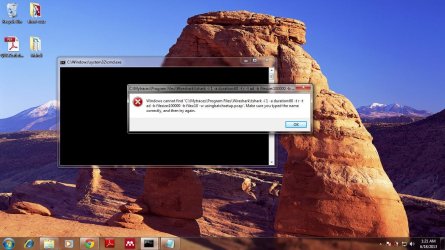
Batch script execution error

Please I need help!
I have been on this stuff for over hours now..and no headway out.

I want to write a batch script that can run tshark as shown below
................................................................................................................................................................
@echo off

Start "" "C:\Mytraces\Program Files\Wireshark\tshark -i 1 -a duration:60 -t r -t ad -b filesize:100000 -b files:10 -w usingbatchsetup.pcap
.................................................................................................................................................................

But I got errors and the final one being...

....................................................................................................................................................................
windows cannot find "C:\Mytraces\Program Files\Wireshark\tshark -i 1 -a duration:60 -t r -t ad -b filesize:100000 -b files:10 -w usingbatchsetup.pcap" make sure you type the name correctly, then try again.
....................................................................................................................................................................
Please what can I do....?
 

Attachments

  • error.jpg
    error.jpg
    169.5 KB · Views: 1

My Computer

Computer type
PC/Desktop
Computer Manufacturer/Model Number
Compaq
OS
Window 7 Ultimate 64bits
CPU
2.16
Hard Drives
500GB
Antivirus
Nil
Browser
Chrome
Awaiting a smart-ass comment about stating the obvious...

But to answer FyrmnJ's question,
Echoes Hello world in the current cmd window:
Code:
echo Hello World
Echoes Hello World in a new cmd window:
Code:
start echo Hello World
I dont think it matters if your going to call an external program.
For the sake of others that might find this tread:
It matters if you want one batch file to start more than one program at a time.
e.g.
start notepad
winword

If I did not use start in front of notepad, MS Word would not start until I closed notepad.


Please I need help!
I have been on this stuff for over hours now..and no headway out.

I want to write a batch script that can run tshark as shown below
................................................................................................................................................................
@echo off

Start "" "C:\Mytraces\Program Files\Wireshark\tshark -i 1 -a duration:60 -t r -t ad -b filesize:100000 -b files:10 -w usingbatchsetup.pcap
.................................................................................................................................................................

But I got errors and the final one being...

....................................................................................................................................................................
windows cannot find "C:\Mytraces\Program Files\Wireshark\tshark -i 1 -a duration:60 -t r -t ad -b filesize:100000 -b files:10 -w usingbatchsetup.pcap" make sure you type the name correctly, then try again.
....................................................................................................................................................................
Please what can I do....?
Welcome to the Seven Forums.

I'll comment on your issue in your thread:
http://www.sevenforums.com/performance-maintenance/294224-batch-file-execution-error.html
 

My Computer

Computer type
Laptop
Computer Manufacturer/Model Number
Employer provided Dell Latitude
OS
W7 Pro SP1 64bit
CPU
i7
Memory
8GB
Graphics Card(s)
Intel HD Graphics
Hard Drives
crappy SSD
Antivirus
Employer mandated Symantec Endpoint Protection
Browser
Pale Moon 64bit, IE11 64bit & Chrome 64bit
If anyone still interest I found a away to turn off DOS window after batch file run.

@echo off
start /d "C:\Program Files (x86)\Windows Sidebar\" sidebar.exe
 

My Computer

Computer Manufacturer/Model Number
DELL
OS
Windows Seven build 7600
CPU
Intel Core 2 Duo T6600
Memory
2GB
Graphics Card(s)
NVIDIA Geforce 9300M GS
Back
Top