Want to make Win 7 System Partition DualBoot

Oldroser

New member
I have two hard drives and have each of them partitioned.

I have Vista on C: and did a custom install of Win 7 on the first partition of my second hard drive, which is F.

I wanted to create a backup image of Win 7 on the first hard drive's other partition but kept being told there was no room, because it was imaging C and F.

I found this from technet.microsoft.com's library
http://technet.microsoft.com/en-us/library/ee829683(WS.10,printer).aspx#BKMK_Step1

I made the 200 mg partition at the end of my second partition on my second hard drive with Windows 7 on the first partition. However, I can't mark the 200 mg partition as active, evidently because I already have one active partion.

Any advice as to how I can achieve my goal without messing everything up? I thought Win 7 automatically made this partition, but it didn't. I have programs installed on Win 7 so hate to re-install it, if there is some way to do so and get the 200 mg partition. Would a repair installation fix it?
 

My Computer

Computer Manufacturer/Model Number
HP HDX18, HP DV7 Quad Edition to arrive soon
OS
Vista Windows 7 each 64 bit Home Premium
Monitor(s) Displays
Acer H233H External Monitor
Hard Drives
2 Hard Drives on both computers
Let me try to understand

1. on disk drive #1 you have Vista
2. on disk drive # 2 you have Win7
3. on disk drive #2 you also have another partition of 200MB to which you want to image Win7

Well, you need a much bigger partition to image Win7. To be safe, I suggest you create a 20GB partition. That should be enough for 1 image or use an external disk which is usually the preferred solution. This can be any partition type and need not (must not) be active. Since you are double booting, you have a little complication though. The MBR is most likely on your Vista partition. So whenever you are in a need to restore the Win7 partition, you have to hope that this MBR still functions - and during the restore you must NOT replace the MBR (that would be different if you were imaging the Vista partition).

Here are 2 tutorials:

1. How to create a partition: http://www.sevenforums.com/tutorials/72427-data-partition.html
2. Imaging with free Macrium: http://www.sevenforums.com/tutorials/73828-imaging-free-macrium.html?ltr=I
 

My Computer

Computer Manufacturer/Model Number
HP, Dell, Gateway, Toshiba - 4 laptops and 2 desktops
OS
Vista, Windows7, Mint Mate, Zorin, Windows 8
CPU
from 1.6GHz Duo to i7
Monitor(s) Displays
2x HP w2207
Hard Drives
5x HDD, 7x SSD, 12x Externals
Keyboard
with trackball - no mices
Mouse
Trackball mice
Internet Speed
DSL 6000
It will depend on two things for what you are trying to do there.
1)How large is the image for the 7 drive?
2)How large is the second partition on the Vista host drive?

With one image for 7 here as well as the files already on the image was 131gb in size. That is with files like icons, wallpapers, updates, and other things being stored locally bringing up the total.

If the second partition on the Vista drive is too small to begin with that will see the backup stall immediately. The size of the image was simply too large for the amount of drive space available. If the second part on the 7 drive was added in that would result in seeing a larger image then simply creating one from the 7 primary by itself.
 

My Computers

System One System Two

  • Computer type
    PC/Desktop
    Computer Manufacturer/Model Number
    Custom builds = 2
    OS
    W7 Ultimate x64/W10 Pro x64/W11 Pro Triple Boot - Main PC W7 Remote PC Micro ATX W7 Pro x64/W11 Pro
    CPU
    AMD Phenom II X4 975 Deneb 3.6ghz - 965 2nd remote pc
    Motherboard
    Gigabyte GA-790XTA-UD4-Gigabyte GA-880GM-D2H remote pc
    Memory
    Kingston Hyper X DDR3 1600 1.5v 16gb - Hyper X Fury 8gb 2nd
    Graphics Card(s)
    MSI HD Radeon 5750 1gb - MSI HD Radeon 6450 on mini tower
    Sound Card
    Creative Labs X-Fi Xtreme Audio P - Realtek onooard 2nd case
    Monitor(s) Displays
    ASUS VW199T-P 19" HP 2082a Main-HP 2082a 20" remote pc
    Screen Resolution
    Asus 1440x900 - HP 1600x900
    Hard Drives
    WD Black 1TB HD per OS W7, W10, and pending W11 presently on 500gb OS Drive - Pending Triple 1TB HDs for Spanned Storage/backup volume
    Single 2TB external USB enclosure, single 1TB System 7 Host/Boot drive, Pending 8TB external HD for system image b
    PSU
    Corsair 750TX - primary / Corsair CX600 - second
    Case
    Antec 900-2 - SSD compatible / NZXT Vulcan mini tower
    Cooling
    Zalman CNPS9900A
    Keyboard
    AZIO L70 Backlit Letters Gaming - ONN Cordless/USB
    Mouse
    MSI DS200 Programmable, Logitech Cordless
    Internet Speed
    30mbps upgrade - primary hard wired - mini tower usb WiFi
    Antivirus
    GFI VIPRE Internet Security 2014 on W7 2016 beta on W10,
    Browser
    Cyberfox, WaterFox 64bit FF variants, FireFox x64, Pale Moon
    Other Info
    Accomdata fan cooled usb 2.0 PIDE/Sata II, III external enclosure.
    Sambient usb/eSata PATA/Sata II, III external enclosure.
  • Computer type
    PC/Desktop
    System Manufacturer/Model Number
    CUSTOM ASSEMBLY
    OS
    W7 Pro x64/W11 Pro
    CPU
    AMD Deneb 3.6ghz - 965
    Motherboard
    Gigabyte GA-880GM-D2H remote pc
    Memory
    Kingston Hyper X Fury 8gb
    Graphics Card(s)
    MSI HD Radeon 6450 DVI Output
    Sound Card
    Realtek onooard Creative or Other separate PENDING
    Monitor(s) Displays
    VIZIO 32" LCD TV Separate LCD Pending
    Screen Resolution
    1600x1080
    Hard Drives
    WD 500GB OS Host/Boot WD Green 1TB Storage/Backup
    PSU
    Corsair 600W - THERMALTAKE 600W spare case
    Case
    NZXT Vulcan mini tower
    Cooling
    Twin 120mm Top Fans - 240mm Side Cover
    Keyboard
    ONN Cordless/USB Logitech Cordless
    Mouse
    ONN USB/Cordless - Logitech Cordless
    Internet Speed
    DSL 5G
    Browser
    MS Edge, FireFox, WaterFox x64, FireFox Nightly
    Other Info
    OS Testing-Remote Access to Main TeamViewer
The reason Win7 Backup Imaging wants to include both OS's is because Vista is the System Active OS containing the MBR for both OS's in the Dual Boot, as is expected when you install Win7 after Vista.

The solution to this is to create a better Dual Boot via the BIOS so that both HD's become independent and can come and go as you please. You can then image Win7 by itself and store it wisely on the Vista HD in a Primary partition so it is easily detected for reimage.

The way to accomplish this is to install each OS with the other one unplugged, however since you didn't do that you can now do this by marking Win7 active in Vista Disk Mgmt, power down to unplug Vista HD, set Win7 HD as first HD to boot in BIOS setup (after DVD drive), then boot the Win7 DVD Repair console or Repair CD, click through to Recovery Tools list to run Startup Repair up to 3 separate times with reboots to write the System MBR to Win7 and start it up.

Once Win7 starts, power down to replug Vista HD, set your preferred HD first to boot in BIOS setup, then trigger the other HD when you want to boot it using the FKey given on first BIOS boot screen for one-time Boot Menu, normally ESC on HP's.

Now you can save just the Win7 backup image to a Primary formatted partition on the other HD.
 
It appears Vista is the system partition.

Is your new 200mb partition a logical drive ?

You can only mark a Primary partition Active.

I would make the Win7 partition into the system partition. (Assuming it is a Primary partition )

Rt click and run as admin on sispar.cmd

View attachment sisparV6.zip

Enter the drive letter you want to make into the new system partition - the win 7 drive letter ( that will probably be C if you are booted into 7 ).

Enter Y to include the existing boot menu items ( assuming you want the Vista entry to still appear).

Enter Y to mark partition INACTIVE, and enter the letter of your Vista partition.

Restart.


After that, you might want to make the HD containing 7 the first HD in bios boot order. Not essential, but saves bios checking the other HD first.

To do that, you can enter bios setup and change the bios boot order so the HD containing 7 is first in the HD boot order. Alternatively, you could just swap the cables from the HD to the mobo, so the win 7 drive is now plugged in where the Vista drive used to be and vice versa.


I have two hard drives and have each of them partitioned.

I have Vista on C: and did a custom install of Win 7 on the first partition of my second hard drive, which is F.

I wanted to create a backup image of Win 7 on the first hard drive's other partition but kept being told there was no room, because it was imaging C and F.

I found this from technet.microsoft.com's library
http://technet.microsoft.com/en-us/library/ee829683(WS.10,printer).aspx#BKMK_Step1

I made the 200 mg partition at the end of my second partition on my second hard drive with Windows 7 on the first partition. However, I can't mark the 200 mg partition as active, evidently because I already have one active partion.

Any advice as to how I can achieve my goal without messing everything up? I thought Win 7 automatically made this partition, but it didn't. I have programs installed on Win 7 so hate to re-install it, if there is some way to do so and get the 200 mg partition. Would a repair installation fix it?
 

My Computers

System One System Two

  • Computer type
    PC/Desktop
    OS
    7 X64
    CPU
    i5 8400
    Motherboard
    gigabyte b365m ds3h
    Memory
    2x8gb 3200mhz
    Hard Drives
    various
    PSU
    pure power 11 400w cm
    Case
    Coolermaster
    Cooling
    cryorig m9i
  • Computer type
    PC/Desktop
    OS
    7x64
    CPU
    g5400
    Motherboard
    ga b365m ds3h
    Memory
    8gb ddr4 2400
    PSU
    xfx pro 450w
What I ended up doing for the XP/Vista dual boot prior to 7 would work the same for a Vista/7 stand alone OS install on each drive while dual booting across by way of the EasyBCD program. You could perform a repair install if not able to rebuild the 7 BCD and mbr entries on the second drive there while the first Vista drive was temporarily unplugged making it a stand alone drive.

Once the 7 boot information was set you would add Vista in as the second OS with the change of the default boot order to the 7 drive as suggested. From there 7 takes over as the default OS and enables you to create and store an image on any other drive.
 

My Computers

System One System Two

  • Computer type
    PC/Desktop
    Computer Manufacturer/Model Number
    Custom builds = 2
    OS
    W7 Ultimate x64/W10 Pro x64/W11 Pro Triple Boot - Main PC W7 Remote PC Micro ATX W7 Pro x64/W11 Pro
    CPU
    AMD Phenom II X4 975 Deneb 3.6ghz - 965 2nd remote pc
    Motherboard
    Gigabyte GA-790XTA-UD4-Gigabyte GA-880GM-D2H remote pc
    Memory
    Kingston Hyper X DDR3 1600 1.5v 16gb - Hyper X Fury 8gb 2nd
    Graphics Card(s)
    MSI HD Radeon 5750 1gb - MSI HD Radeon 6450 on mini tower
    Sound Card
    Creative Labs X-Fi Xtreme Audio P - Realtek onooard 2nd case
    Monitor(s) Displays
    ASUS VW199T-P 19" HP 2082a Main-HP 2082a 20" remote pc
    Screen Resolution
    Asus 1440x900 - HP 1600x900
    Hard Drives
    WD Black 1TB HD per OS W7, W10, and pending W11 presently on 500gb OS Drive - Pending Triple 1TB HDs for Spanned Storage/backup volume
    Single 2TB external USB enclosure, single 1TB System 7 Host/Boot drive, Pending 8TB external HD for system image b
    PSU
    Corsair 750TX - primary / Corsair CX600 - second
    Case
    Antec 900-2 - SSD compatible / NZXT Vulcan mini tower
    Cooling
    Zalman CNPS9900A
    Keyboard
    AZIO L70 Backlit Letters Gaming - ONN Cordless/USB
    Mouse
    MSI DS200 Programmable, Logitech Cordless
    Internet Speed
    30mbps upgrade - primary hard wired - mini tower usb WiFi
    Antivirus
    GFI VIPRE Internet Security 2014 on W7 2016 beta on W10,
    Browser
    Cyberfox, WaterFox 64bit FF variants, FireFox x64, Pale Moon
    Other Info
    Accomdata fan cooled usb 2.0 PIDE/Sata II, III external enclosure.
    Sambient usb/eSata PATA/Sata II, III external enclosure.
  • Computer type
    PC/Desktop
    System Manufacturer/Model Number
    CUSTOM ASSEMBLY
    OS
    W7 Pro x64/W11 Pro
    CPU
    AMD Deneb 3.6ghz - 965
    Motherboard
    Gigabyte GA-880GM-D2H remote pc
    Memory
    Kingston Hyper X Fury 8gb
    Graphics Card(s)
    MSI HD Radeon 6450 DVI Output
    Sound Card
    Realtek onooard Creative or Other separate PENDING
    Monitor(s) Displays
    VIZIO 32" LCD TV Separate LCD Pending
    Screen Resolution
    1600x1080
    Hard Drives
    WD 500GB OS Host/Boot WD Green 1TB Storage/Backup
    PSU
    Corsair 600W - THERMALTAKE 600W spare case
    Case
    NZXT Vulcan mini tower
    Cooling
    Twin 120mm Top Fans - 240mm Side Cover
    Keyboard
    ONN Cordless/USB Logitech Cordless
    Mouse
    ONN USB/Cordless - Logitech Cordless
    Internet Speed
    DSL 5G
    Browser
    MS Edge, FireFox, WaterFox x64, FireFox Nightly
    Other Info
    OS Testing-Remote Access to Main TeamViewer
Gregrocker, you have understood my problem exactly. I've printed out your solution and will try to find time to implement it in the next few days.

No one seems to have read the Microsoft article which is supposed to allow "Using a disk configuration with a separate System partition for boot files supports a multiple boot configuration and allows a system image backup of Windows 7 without Windows Vista files." This was to be done by:

Using bcdboot.exe to copy the Windows 7 boot files to the 200 mg partition that I was unable to make active, once I'd made it active.

Rebooting, then importing the Vista boot files to the 200 mg partition.

Then updating the Windows Boot Manager to the 200 mg partition.

This still would mean both Vista and Windows 7 dependent on the small partition on the second hard drive, I think the idea of each being separate, which I think is what gregrocker's method accomplishes will be better.

No, I was not intending to install or to image to this little partition, only to make a new System partition so I could image Windows 7 to a much larger partition on the first drive with Vista.

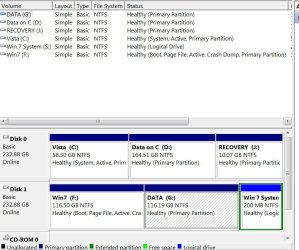
It is marked as a logical not a primary partition, and I don't understand why. A third partition I made on the first hard drive is marked as primary. I'd appreciate it if someone would explain why it is marked as logical.

SIW2 I don't understand what you mean by "make the Windows 7 partition into the system partition. (Assuming it is a Primary partition )" Windows 7 is on the first partition on the second hard drive, a primary partition and is active. It has my swap files. I don't know that I could swap cables, but I could switch positions of the hard drives in the laptop which I would think would accomplish the same end.

Perhaps when I am performing gregrocker's method I should put the second hard drive in the slot of the first, Vista, hard drive once I have removed the Vista drive.

Night Hawk, I don't know what you did "for the XP/Vista dual boot prior to 7", but I gather that if gregrocker's method doesn't work I can do a repair install of Windows 7 and once that is successfull, then reinsert the Vista hard drive.

Maybe the Tutorial for installing Windows 7 as dual boot when you have two hard drives should be amended since I gather that as it is, should Vista fail, I wouldn't have Windows 7 working either.
 

My Computer

Computer Manufacturer/Model Number
HP HDX18, HP DV7 Quad Edition to arrive soon
OS
Vista Windows 7 each 64 bit Home Premium
Monitor(s) Displays
Acer H233H External Monitor
Hard Drives
2 Hard Drives on both computers
Once you have the Vista drive unplugged you may want to notes on the MS article "How to use the Bootrec.exe tool in the Windows Recovery Environment to troubleshoot and repair startup issues in Windows".

This applies to both Vista and 7 as fixing startup problems as well as rebuilding the bcd. How to use the Bootrec.exe tool in the Windows Recovery Environment to troubleshoot and repair startup issues in Windows

When having the RCs as stand alones on 3 separate drives at one point I just happened to toss the 32bit disk in instead of the 64bit for fixing a minor Grub issue on the 64bit host drive at the time and .... The 32bit repair tools actually turned around and added the second 64bit install on another drive(stand alone) into the boot options.

The boot options menu following listed "Windows 7(recovered)" until the entry was renamed later. But what happened was the 32bit tools detected that 64bit installation and added the wrong installation into the 32bit bcd and not the host install that would later remain. Surprizingly however the host drive became bootable again showing that these repair methods do work.

The repair install or even clean install most often preferred for any new or recent install will automatically create the bcd store and mbr entries. The option for performing an upgrade to repair install using that instead is to preserve all the present files and software installations while some things may still need to be redone over.
 

My Computers

System One System Two

  • Computer type
    PC/Desktop
    Computer Manufacturer/Model Number
    Custom builds = 2
    OS
    W7 Ultimate x64/W10 Pro x64/W11 Pro Triple Boot - Main PC W7 Remote PC Micro ATX W7 Pro x64/W11 Pro
    CPU
    AMD Phenom II X4 975 Deneb 3.6ghz - 965 2nd remote pc
    Motherboard
    Gigabyte GA-790XTA-UD4-Gigabyte GA-880GM-D2H remote pc
    Memory
    Kingston Hyper X DDR3 1600 1.5v 16gb - Hyper X Fury 8gb 2nd
    Graphics Card(s)
    MSI HD Radeon 5750 1gb - MSI HD Radeon 6450 on mini tower
    Sound Card
    Creative Labs X-Fi Xtreme Audio P - Realtek onooard 2nd case
    Monitor(s) Displays
    ASUS VW199T-P 19" HP 2082a Main-HP 2082a 20" remote pc
    Screen Resolution
    Asus 1440x900 - HP 1600x900
    Hard Drives
    WD Black 1TB HD per OS W7, W10, and pending W11 presently on 500gb OS Drive - Pending Triple 1TB HDs for Spanned Storage/backup volume
    Single 2TB external USB enclosure, single 1TB System 7 Host/Boot drive, Pending 8TB external HD for system image b
    PSU
    Corsair 750TX - primary / Corsair CX600 - second
    Case
    Antec 900-2 - SSD compatible / NZXT Vulcan mini tower
    Cooling
    Zalman CNPS9900A
    Keyboard
    AZIO L70 Backlit Letters Gaming - ONN Cordless/USB
    Mouse
    MSI DS200 Programmable, Logitech Cordless
    Internet Speed
    30mbps upgrade - primary hard wired - mini tower usb WiFi
    Antivirus
    GFI VIPRE Internet Security 2014 on W7 2016 beta on W10,
    Browser
    Cyberfox, WaterFox 64bit FF variants, FireFox x64, Pale Moon
    Other Info
    Accomdata fan cooled usb 2.0 PIDE/Sata II, III external enclosure.
    Sambient usb/eSata PATA/Sata II, III external enclosure.
  • Computer type
    PC/Desktop
    System Manufacturer/Model Number
    CUSTOM ASSEMBLY
    OS
    W7 Pro x64/W11 Pro
    CPU
    AMD Deneb 3.6ghz - 965
    Motherboard
    Gigabyte GA-880GM-D2H remote pc
    Memory
    Kingston Hyper X Fury 8gb
    Graphics Card(s)
    MSI HD Radeon 6450 DVI Output
    Sound Card
    Realtek onooard Creative or Other separate PENDING
    Monitor(s) Displays
    VIZIO 32" LCD TV Separate LCD Pending
    Screen Resolution
    1600x1080
    Hard Drives
    WD 500GB OS Host/Boot WD Green 1TB Storage/Backup
    PSU
    Corsair 600W - THERMALTAKE 600W spare case
    Case
    NZXT Vulcan mini tower
    Cooling
    Twin 120mm Top Fans - 240mm Side Cover
    Keyboard
    ONN Cordless/USB Logitech Cordless
    Mouse
    ONN USB/Cordless - Logitech Cordless
    Internet Speed
    DSL 5G
    Browser
    MS Edge, FireFox, WaterFox x64, FireFox Nightly
    Other Info
    OS Testing-Remote Access to Main TeamViewer
Hi Olroser,

Yes , everyone here understands how to make /change a system partition.

The system partition contains the boot critical files and needs to marked Active.

It can be a separate small partition if you wish, but it is not a requirement.

You could make an o/s partition into to the system partition instead of having a small separate one.

It seems that you currently have your Vista partition as system .

Very easy to make the 7 partition system instead.

That little app. I posted is written specifically for that purpose.

The boot critical files would then also be on the 7 partition - it will become the system partition if it the first Active partition in bios boot order.

( The boot critical files currently on the Vista partition stay where they are - they will not be used, but you could always make the Vista partition the first Active partition in the boot order again - then you would boot through the Vista partition again - if you ever want to do that. )

The advantage of this is they are not both dependent on the single 100mb partition.

You will be able to make a windows system image of each partition separately if you wish.

Each partition can be restored and will be bootable without also having to rely on yet another ( small ) partition to boot up.
 

My Computers

System One System Two

  • Computer type
    PC/Desktop
    OS
    7 X64
    CPU
    i5 8400
    Motherboard
    gigabyte b365m ds3h
    Memory
    2x8gb 3200mhz
    Hard Drives
    various
    PSU
    pure power 11 400w cm
    Case
    Coolermaster
    Cooling
    cryorig m9i
  • Computer type
    PC/Desktop
    OS
    7x64
    CPU
    g5400
    Motherboard
    ga b365m ds3h
    Memory
    8gb ddr4 2400
    PSU
    xfx pro 450w
better to use Norton Ghost to backup win7 :D
 

My Computer

Computer Manufacturer/Model Number
ECS Elite group
OS
Windows 7 + Windows Xp Pro + Ubuntu 10.04 + openSUSE 11.2
CPU
Intel C2D 2.0 GHz
Motherboard
ECS
Memory
2.0 GB
Graphics Card(s)
Intel Chipset 945GCT m2
Sound Card
Realtek
Monitor(s) Displays
Samsung LCD
Screen Resolution
1280*1024
Hard Drives
Samsung Sata - 80gb
Samsung Sata - 500gb
Hitachi - 160 gb
External - WD - 500 gb
Keyboard
Logitech
Mouse
Logitech Mx 518
Internet Speed
2mbps broadband

My Computers

System One System Two

  • Computer type
    PC/Desktop
    OS
    7 X64
    CPU
    i5 8400
    Motherboard
    gigabyte b365m ds3h
    Memory
    2x8gb 3200mhz
    Hard Drives
    various
    PSU
    pure power 11 400w cm
    Case
    Coolermaster
    Cooling
    cryorig m9i
  • Computer type
    PC/Desktop
    OS
    7x64
    CPU
    g5400
    Motherboard
    ga b365m ds3h
    Memory
    8gb ddr4 2400
    PSU
    xfx pro 450w
If WIndows 7 is on a logical partition, you cannot mark it Active to recover the MBR into it. The partition must be converted to Primary using free Partition Wizard bootable CD.

I should have asked you for a screenshot of your full Disk Management drive map and listings. Use the Snipping Tool in Start Menu, attach file using Paper Clip in Reply Box.

Then we can confirm the steps to make the drives independent booted via BIOS if that is what you still want.
 
Since the two drives each see a second partition you can take advantage of the Windows Easy Transfer tool to first make a backup of files and settings you can store on either secondary partition. From there you swap data cables between drives making the 7 HD into Drive #0 then being plugged into the first sata port and set that as the default hard drive.

The Vista HD would be seen as Drive #1 and second in line where once you performed a clean install of 7 the entry to boot into Vista would added in automatically or you can then use the EasyBCD program. By deleting the first primary on the 7 drive following the backup you then let the 7 drive tools create the 100mb system part at the beginning of the drive and proceed to restore the files and settings with the W.Easy Transfer option once a fcesh install of 7 was on.

Once everything was set you then use any method to create images of the new 7 install with that then being the default OS. When recently restoring an image made in december that brought everything back to that but saw no problems with restoration.

Note that prior to restoing one with any program make sure you first backup any new files added on since. Restoring an image will first wipe the drive clean as part of the process in order to unpack the image. The drawback found with Macrium's Reflect over the MS tool is that if anything changes like a drive letter or which drive you first toss a clean install on you may run into the "invalid system image" error.

The system image restored was actually in a folder that have been renamed where you simply browsed to it and still saw the restoration take place. Reflect can be fussy at times.
 

My Computers

System One System Two

  • Computer type
    PC/Desktop
    Computer Manufacturer/Model Number
    Custom builds = 2
    OS
    W7 Ultimate x64/W10 Pro x64/W11 Pro Triple Boot - Main PC W7 Remote PC Micro ATX W7 Pro x64/W11 Pro
    CPU
    AMD Phenom II X4 975 Deneb 3.6ghz - 965 2nd remote pc
    Motherboard
    Gigabyte GA-790XTA-UD4-Gigabyte GA-880GM-D2H remote pc
    Memory
    Kingston Hyper X DDR3 1600 1.5v 16gb - Hyper X Fury 8gb 2nd
    Graphics Card(s)
    MSI HD Radeon 5750 1gb - MSI HD Radeon 6450 on mini tower
    Sound Card
    Creative Labs X-Fi Xtreme Audio P - Realtek onooard 2nd case
    Monitor(s) Displays
    ASUS VW199T-P 19" HP 2082a Main-HP 2082a 20" remote pc
    Screen Resolution
    Asus 1440x900 - HP 1600x900
    Hard Drives
    WD Black 1TB HD per OS W7, W10, and pending W11 presently on 500gb OS Drive - Pending Triple 1TB HDs for Spanned Storage/backup volume
    Single 2TB external USB enclosure, single 1TB System 7 Host/Boot drive, Pending 8TB external HD for system image b
    PSU
    Corsair 750TX - primary / Corsair CX600 - second
    Case
    Antec 900-2 - SSD compatible / NZXT Vulcan mini tower
    Cooling
    Zalman CNPS9900A
    Keyboard
    AZIO L70 Backlit Letters Gaming - ONN Cordless/USB
    Mouse
    MSI DS200 Programmable, Logitech Cordless
    Internet Speed
    30mbps upgrade - primary hard wired - mini tower usb WiFi
    Antivirus
    GFI VIPRE Internet Security 2014 on W7 2016 beta on W10,
    Browser
    Cyberfox, WaterFox 64bit FF variants, FireFox x64, Pale Moon
    Other Info
    Accomdata fan cooled usb 2.0 PIDE/Sata II, III external enclosure.
    Sambient usb/eSata PATA/Sata II, III external enclosure.
  • Computer type
    PC/Desktop
    System Manufacturer/Model Number
    CUSTOM ASSEMBLY
    OS
    W7 Pro x64/W11 Pro
    CPU
    AMD Deneb 3.6ghz - 965
    Motherboard
    Gigabyte GA-880GM-D2H remote pc
    Memory
    Kingston Hyper X Fury 8gb
    Graphics Card(s)
    MSI HD Radeon 6450 DVI Output
    Sound Card
    Realtek onooard Creative or Other separate PENDING
    Monitor(s) Displays
    VIZIO 32" LCD TV Separate LCD Pending
    Screen Resolution
    1600x1080
    Hard Drives
    WD 500GB OS Host/Boot WD Green 1TB Storage/Backup
    PSU
    Corsair 600W - THERMALTAKE 600W spare case
    Case
    NZXT Vulcan mini tower
    Cooling
    Twin 120mm Top Fans - 240mm Side Cover
    Keyboard
    ONN Cordless/USB Logitech Cordless
    Mouse
    ONN USB/Cordless - Logitech Cordless
    Internet Speed
    DSL 5G
    Browser
    MS Edge, FireFox, WaterFox x64, FireFox Nightly
    Other Info
    OS Testing-Remote Access to Main TeamViewer
You might also consider this command from SIW2 to image only Win7 partition. However the partition will need to have MBR recovered into it after reimaging to HD, and it will hold its current offset (disk position).

I still recommend the BIOS-managed Dual Boot method to solve the issue, and make your OS HD's independent at the same time. It works every time and avoids Windows-managed Dual Boot complications.
 
Last edited:
With the latest EasyBCD builds you can have it both ways for adding Vista into the 7 bcd store once each drive is made bootable as stand alones. The MS page shows how to use the recovery console when booting live off of the 7 dvd in order to rebuild or actually build a new bcd store for the present 7 installation.

The other options would have been preferred when first planning out the dual boot with 7 being the newer version and still seeing each drive able to operate independently. With 5 satas and testing 7 along with Vista and XP last I had plenty of mbr and other things to plan out then! :D
 

My Computers

System One System Two

  • Computer type
    PC/Desktop
    Computer Manufacturer/Model Number
    Custom builds = 2
    OS
    W7 Ultimate x64/W10 Pro x64/W11 Pro Triple Boot - Main PC W7 Remote PC Micro ATX W7 Pro x64/W11 Pro
    CPU
    AMD Phenom II X4 975 Deneb 3.6ghz - 965 2nd remote pc
    Motherboard
    Gigabyte GA-790XTA-UD4-Gigabyte GA-880GM-D2H remote pc
    Memory
    Kingston Hyper X DDR3 1600 1.5v 16gb - Hyper X Fury 8gb 2nd
    Graphics Card(s)
    MSI HD Radeon 5750 1gb - MSI HD Radeon 6450 on mini tower
    Sound Card
    Creative Labs X-Fi Xtreme Audio P - Realtek onooard 2nd case
    Monitor(s) Displays
    ASUS VW199T-P 19" HP 2082a Main-HP 2082a 20" remote pc
    Screen Resolution
    Asus 1440x900 - HP 1600x900
    Hard Drives
    WD Black 1TB HD per OS W7, W10, and pending W11 presently on 500gb OS Drive - Pending Triple 1TB HDs for Spanned Storage/backup volume
    Single 2TB external USB enclosure, single 1TB System 7 Host/Boot drive, Pending 8TB external HD for system image b
    PSU
    Corsair 750TX - primary / Corsair CX600 - second
    Case
    Antec 900-2 - SSD compatible / NZXT Vulcan mini tower
    Cooling
    Zalman CNPS9900A
    Keyboard
    AZIO L70 Backlit Letters Gaming - ONN Cordless/USB
    Mouse
    MSI DS200 Programmable, Logitech Cordless
    Internet Speed
    30mbps upgrade - primary hard wired - mini tower usb WiFi
    Antivirus
    GFI VIPRE Internet Security 2014 on W7 2016 beta on W10,
    Browser
    Cyberfox, WaterFox 64bit FF variants, FireFox x64, Pale Moon
    Other Info
    Accomdata fan cooled usb 2.0 PIDE/Sata II, III external enclosure.
    Sambient usb/eSata PATA/Sata II, III external enclosure.
  • Computer type
    PC/Desktop
    System Manufacturer/Model Number
    CUSTOM ASSEMBLY
    OS
    W7 Pro x64/W11 Pro
    CPU
    AMD Deneb 3.6ghz - 965
    Motherboard
    Gigabyte GA-880GM-D2H remote pc
    Memory
    Kingston Hyper X Fury 8gb
    Graphics Card(s)
    MSI HD Radeon 6450 DVI Output
    Sound Card
    Realtek onooard Creative or Other separate PENDING
    Monitor(s) Displays
    VIZIO 32" LCD TV Separate LCD Pending
    Screen Resolution
    1600x1080
    Hard Drives
    WD 500GB OS Host/Boot WD Green 1TB Storage/Backup
    PSU
    Corsair 600W - THERMALTAKE 600W spare case
    Case
    NZXT Vulcan mini tower
    Cooling
    Twin 120mm Top Fans - 240mm Side Cover
    Keyboard
    ONN Cordless/USB Logitech Cordless
    Mouse
    ONN USB/Cordless - Logitech Cordless
    Internet Speed
    DSL 5G
    Browser
    MS Edge, FireFox, WaterFox x64, FireFox Nightly
    Other Info
    OS Testing-Remote Access to Main TeamViewer
My head is reeling

So much good advice, where do I start?

Well, greggrocker, your method leads me to what I was trying to do, so that is what I will be trying in a few days (I fell asleep last night in the middle of writing this.) I have used the sniping tool to attach a picture that should help everyone, such as:


  • Second hard drive Windows 7 is activated, what 100 mg partition before Windows 7? I don't have one, etc., and, hopefully, help you figure out and tell me why it made the 200 mg partition logical. I will be deleting it.
  • J is HP's Recovery, I temporarily changed it to J for some reason and now E has disappeared as an option for it to be named.
I haven't yet copied data from the Win7 data drive to the Vista data drive area. I plan to shrink it to make a partition to store the Windows image of Win 7 only, about how big should that be? It is, by the way, "belt and suspenders."

I have Macrium Reflect Free and have/will have images of Vista and Windows 7 on the data drive, which is copied to a similar drive on my other HDX18 whenever both are open and then to the external drive, which usual lives with the other HDX18. However, the last rescue disk doesn't work on these two HDX18's...and it used to! And of course I'd already thrown out the trash with the old one that worked. Yes, I added the two supplementary doohickeys which did zilch. One line mentioning Linux loads, then cursor sits at second line and nothing happens.

I assume when you talked about reinstalling Windows you mean in a worst case scenarios.

This is a laptop, I can switch the position of the hard drives, but if it will confuse Macrium perhaps it is best not to.
 

Attachments

  • TWIN Computer Mgmt.JPG
    TWIN Computer Mgmt.JPG
    114.1 KB · Views: 13
Last edited:

My Computer

Computer Manufacturer/Model Number
HP HDX18, HP DV7 Quad Edition to arrive soon
OS
Vista Windows 7 each 64 bit Home Premium
Monitor(s) Displays
Acer H233H External Monitor
Hard Drives
2 Hard Drives on both computers
Hi Olroser,

Is that a new type of screenshot - the invisible type? LOL
 

My Computers

System One System Two

  • Computer type
    PC/Desktop
    OS
    7 X64
    CPU
    i5 8400
    Motherboard
    gigabyte b365m ds3h
    Memory
    2x8gb 3200mhz
    Hard Drives
    various
    PSU
    pure power 11 400w cm
    Case
    Coolermaster
    Cooling
    cryorig m9i
  • Computer type
    PC/Desktop
    OS
    7x64
    CPU
    g5400
    Motherboard
    ga b365m ds3h
    Memory
    8gb ddr4 2400
    PSU
    xfx pro 450w
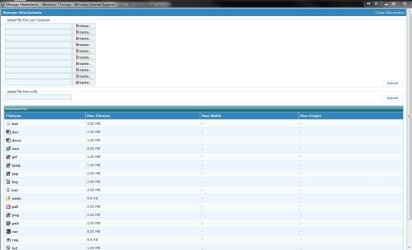
The images here will show you how to upload and attach an image file like the snipping you took of the DM.
 

Attachments

  • Attach Image at SF1.jpg
    Attach Image at SF1.jpg
    33.5 KB · Views: 2
  • Attach Image at SF2.jpg
    Attach Image at SF2.jpg
    126.1 KB · Views: 2

My Computers

System One System Two

  • Computer type
    PC/Desktop
    Computer Manufacturer/Model Number
    Custom builds = 2
    OS
    W7 Ultimate x64/W10 Pro x64/W11 Pro Triple Boot - Main PC W7 Remote PC Micro ATX W7 Pro x64/W11 Pro
    CPU
    AMD Phenom II X4 975 Deneb 3.6ghz - 965 2nd remote pc
    Motherboard
    Gigabyte GA-790XTA-UD4-Gigabyte GA-880GM-D2H remote pc
    Memory
    Kingston Hyper X DDR3 1600 1.5v 16gb - Hyper X Fury 8gb 2nd
    Graphics Card(s)
    MSI HD Radeon 5750 1gb - MSI HD Radeon 6450 on mini tower
    Sound Card
    Creative Labs X-Fi Xtreme Audio P - Realtek onooard 2nd case
    Monitor(s) Displays
    ASUS VW199T-P 19" HP 2082a Main-HP 2082a 20" remote pc
    Screen Resolution
    Asus 1440x900 - HP 1600x900
    Hard Drives
    WD Black 1TB HD per OS W7, W10, and pending W11 presently on 500gb OS Drive - Pending Triple 1TB HDs for Spanned Storage/backup volume
    Single 2TB external USB enclosure, single 1TB System 7 Host/Boot drive, Pending 8TB external HD for system image b
    PSU
    Corsair 750TX - primary / Corsair CX600 - second
    Case
    Antec 900-2 - SSD compatible / NZXT Vulcan mini tower
    Cooling
    Zalman CNPS9900A
    Keyboard
    AZIO L70 Backlit Letters Gaming - ONN Cordless/USB
    Mouse
    MSI DS200 Programmable, Logitech Cordless
    Internet Speed
    30mbps upgrade - primary hard wired - mini tower usb WiFi
    Antivirus
    GFI VIPRE Internet Security 2014 on W7 2016 beta on W10,
    Browser
    Cyberfox, WaterFox 64bit FF variants, FireFox x64, Pale Moon
    Other Info
    Accomdata fan cooled usb 2.0 PIDE/Sata II, III external enclosure.
    Sambient usb/eSata PATA/Sata II, III external enclosure.
  • Computer type
    PC/Desktop
    System Manufacturer/Model Number
    CUSTOM ASSEMBLY
    OS
    W7 Pro x64/W11 Pro
    CPU
    AMD Deneb 3.6ghz - 965
    Motherboard
    Gigabyte GA-880GM-D2H remote pc
    Memory
    Kingston Hyper X Fury 8gb
    Graphics Card(s)
    MSI HD Radeon 6450 DVI Output
    Sound Card
    Realtek onooard Creative or Other separate PENDING
    Monitor(s) Displays
    VIZIO 32" LCD TV Separate LCD Pending
    Screen Resolution
    1600x1080
    Hard Drives
    WD 500GB OS Host/Boot WD Green 1TB Storage/Backup
    PSU
    Corsair 600W - THERMALTAKE 600W spare case
    Case
    NZXT Vulcan mini tower
    Cooling
    Twin 120mm Top Fans - 240mm Side Cover
    Keyboard
    ONN Cordless/USB Logitech Cordless
    Mouse
    ONN USB/Cordless - Logitech Cordless
    Internet Speed
    DSL 5G
    Browser
    MS Edge, FireFox, WaterFox x64, FireFox Nightly
    Other Info
    OS Testing-Remote Access to Main TeamViewer
I would delete that attempt at a System Partition and recover the MBR into Win7 while Vista is temporarily unplugged if you are able to unplug laptop HD ok.

Set Win7 as first HD to boot in BIOS setup, boot the Win7 DVD Repair console or Repair CD, click through to Recovery Tools list to run Startup Repair up to 3 separate times with reboots until Win7 starts on its own.

Now plug Vista back in, set preferred HD as first HD to boot in BIOS, then if you want to trigger the other HD to boot use the key given on first bootup screen for one-time Boot Menu, which is normally ESC on an HP.

Now you can store your Win7 image in the D: partition on the other HD. If you've made your HP recovery disks, you might even want to delete Recov partition to extend D: http://www.sevenforums.com/tutorials/2670-partition-volume-extend.html
 
Another thing is the system reserved partition is only 100mb in size and is created by the 7 installer itself to see that work out.
 

My Computers

System One System Two

  • Computer type
    PC/Desktop
    Computer Manufacturer/Model Number
    Custom builds = 2
    OS
    W7 Ultimate x64/W10 Pro x64/W11 Pro Triple Boot - Main PC W7 Remote PC Micro ATX W7 Pro x64/W11 Pro
    CPU
    AMD Phenom II X4 975 Deneb 3.6ghz - 965 2nd remote pc
    Motherboard
    Gigabyte GA-790XTA-UD4-Gigabyte GA-880GM-D2H remote pc
    Memory
    Kingston Hyper X DDR3 1600 1.5v 16gb - Hyper X Fury 8gb 2nd
    Graphics Card(s)
    MSI HD Radeon 5750 1gb - MSI HD Radeon 6450 on mini tower
    Sound Card
    Creative Labs X-Fi Xtreme Audio P - Realtek onooard 2nd case
    Monitor(s) Displays
    ASUS VW199T-P 19" HP 2082a Main-HP 2082a 20" remote pc
    Screen Resolution
    Asus 1440x900 - HP 1600x900
    Hard Drives
    WD Black 1TB HD per OS W7, W10, and pending W11 presently on 500gb OS Drive - Pending Triple 1TB HDs for Spanned Storage/backup volume
    Single 2TB external USB enclosure, single 1TB System 7 Host/Boot drive, Pending 8TB external HD for system image b
    PSU
    Corsair 750TX - primary / Corsair CX600 - second
    Case
    Antec 900-2 - SSD compatible / NZXT Vulcan mini tower
    Cooling
    Zalman CNPS9900A
    Keyboard
    AZIO L70 Backlit Letters Gaming - ONN Cordless/USB
    Mouse
    MSI DS200 Programmable, Logitech Cordless
    Internet Speed
    30mbps upgrade - primary hard wired - mini tower usb WiFi
    Antivirus
    GFI VIPRE Internet Security 2014 on W7 2016 beta on W10,
    Browser
    Cyberfox, WaterFox 64bit FF variants, FireFox x64, Pale Moon
    Other Info
    Accomdata fan cooled usb 2.0 PIDE/Sata II, III external enclosure.
    Sambient usb/eSata PATA/Sata II, III external enclosure.
  • Computer type
    PC/Desktop
    System Manufacturer/Model Number
    CUSTOM ASSEMBLY
    OS
    W7 Pro x64/W11 Pro
    CPU
    AMD Deneb 3.6ghz - 965
    Motherboard
    Gigabyte GA-880GM-D2H remote pc
    Memory
    Kingston Hyper X Fury 8gb
    Graphics Card(s)
    MSI HD Radeon 6450 DVI Output
    Sound Card
    Realtek onooard Creative or Other separate PENDING
    Monitor(s) Displays
    VIZIO 32" LCD TV Separate LCD Pending
    Screen Resolution
    1600x1080
    Hard Drives
    WD 500GB OS Host/Boot WD Green 1TB Storage/Backup
    PSU
    Corsair 600W - THERMALTAKE 600W spare case
    Case
    NZXT Vulcan mini tower
    Cooling
    Twin 120mm Top Fans - 240mm Side Cover
    Keyboard
    ONN Cordless/USB Logitech Cordless
    Mouse
    ONN USB/Cordless - Logitech Cordless
    Internet Speed
    DSL 5G
    Browser
    MS Edge, FireFox, WaterFox x64, FireFox Nightly
    Other Info
    OS Testing-Remote Access to Main TeamViewer
Back
Top