SSD's-Are they really worth it?


Ok, well this is the first SSD drive that I have seen which actually exceeded the SATA 3.0Gbps interface. So, I guess with the right drive, SATA 6.0Gbps might be a valid concern now..but with almost every other hard drive (including nearly all SSD's)...SATA 3.0Gbps is still not the bottleneck.
 

My Computer My Computer

At a glance

Windows 7 Ultimate x64Intel Q9550 2.83Ghz OC'd to 3.40Ghz8GB G.Skill PI DDR2-800, 4-4-4-12 timingsEVGA 1280MB Nvidia GeForce GTX570
Computer Manufacturer/Model Number
Self-Built in July 2009
OS
Windows 7 Ultimate x64
CPU
Intel Q9550 2.83Ghz OC'd to 3.40Ghz
Motherboard
Gigabyte GA-EP45-UD3R rev. 1.1, F12 BIOS
Memory
8GB G.Skill PI DDR2-800, 4-4-4-12 timings
Graphics Card(s)
EVGA 1280MB Nvidia GeForce GTX570
Sound Card
Realtek ALC899A 8 channel onboard audio
Monitor(s) Displays
23" Acer x233H
Screen Resolution
1920x1080
Hard Drives
Intel X25-M 80GB Gen 2 SSD
Western Digital 1TB Caviar Black, 32MB cache. WD1001FALS
PSU
Corsair 620HX modular
Case
Antec P182
Cooling
stock
Keyboard
ABS M1 Mechanical
Mouse
Logitech G9 Laser Mouse
Internet Speed
15/2 cable modem
Other Info
Windows and Linux enthusiast. Logitech G35 Headset.

My Computer My Computer

At a glance

Win7 x64 UltIntel i7-95012 GB DDR3NVIDIA 9800GT+
Computer Manufacturer/Model Number
24c Built
OS
Win7 x64 Ult
CPU
Intel i7-950
Motherboard
ASUS PT6
Memory
12 GB DDR3
Graphics Card(s)
NVIDIA 9800GT+
Sound Card
none
Monitor(s) Displays
2 Samsung SyncMaster 2343bwx
Screen Resolution
2048X1152
Hard Drives
1st-4 OCZ Vertex Turbos 32GB RAID 0
2nd-2 WD 640GB RAID 1
PSU
Thermaltake Toughpower XT W0229RU 750W
Case
Antec 900
Cooling
case fans
Keyboard
Logitech cordless
Mouse
Logitech cordless
Internet Speed
up to 15 MB/s
yeah.. thanks for the info
 

My Computer My Computer

At a glance

Windows 7 Ultimate x86 bitAMd Phenom X4 9950V-GEN DDR2 2GBPower Collor 3600 ATI Radeon 512 MB
OS
Windows 7 Ultimate x86 bit
CPU
AMd Phenom X4 9950
Motherboard
MSI
Memory
V-GEN DDR2 2GB
Graphics Card(s)
Power Collor 3600 ATI Radeon 512 MB
Sound Card
On Board
Monitor(s) Displays
Samsung LCD 18"
Screen Resolution
1360 x 768
Hard Drives
Seagate Barracude 250GB
PSU
Simbadda
Case
Simbadda
Cooling
On Board
Keyboard
Logitech USB Port
Mouse
Logitech Optical USB Port
Can anyone suggest which of these SSDs might the best .. Western Digital ... Kingston

Seems to me, The lower cost WD (after price reduction) has the best performance and the negative reviews for the WD has nothing to do with performance.
 

My Computer My Computer

At a glance

XP MCE .... XP Pro 64 .... W7 U x64E6750, 2.67GHz C2D4GB, PC2 6400GeForce 9400GT
Computer Manufacturer/Model Number
HP d4996t (upgraded)
OS
XP MCE .... XP Pro 64 .... W7 U x64
CPU
E6750, 2.67GHz C2D
Memory
4GB, PC2 6400
Graphics Card(s)
GeForce 9400GT
Monitor(s) Displays
Twin Samsung 2443BWT
Screen Resolution
1920x1200
Hard Drives
Many .. 3 Installed
PSU
460W
Internet Speed
Cable
P/P wise the WD looks the best. It is amazingly cheap. There is little to loose.
 

My Computer My Computer

At a glance

Vista, Windows7, Mint Mate, Zorin, Windows 8from 1.6GHz Duo to i7
Computer Manufacturer/Model Number
HP, Dell, Gateway, Toshiba - 4 laptops and 2 desktops
OS
Vista, Windows7, Mint Mate, Zorin, Windows 8
CPU
from 1.6GHz Duo to i7
Monitor(s) Displays
2x HP w2207
Hard Drives
5x HDD, 7x SSD, 12x Externals
Keyboard
with trackball - no mices
Mouse
Trackball mice
Internet Speed
DSL 6000
Many Thanks .. But I kinda wish you hadn't said that ..
(Looks like you're going to cost me :)

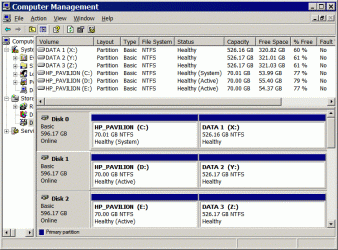
I've been thinking about moving my C drive to a SSD .. And sticking it on top of my JBOD stack .. (attached)

I've been wondering if using a SSD for a working C drive ..
Is Not the way to go with the deterioration in performance with the write cycles.
Don't see any sense in spending big bucks for an experiment.
 

Attachments

  • Clip.gif
    Clip.gif
    64 KB · Views: 4

My Computer My Computer

At a glance

XP MCE .... XP Pro 64 .... W7 U x64E6750, 2.67GHz C2D4GB, PC2 6400GeForce 9400GT
Computer Manufacturer/Model Number
HP d4996t (upgraded)
OS
XP MCE .... XP Pro 64 .... W7 U x64
CPU
E6750, 2.67GHz C2D
Memory
4GB, PC2 6400
Graphics Card(s)
GeForce 9400GT
Monitor(s) Displays
Twin Samsung 2443BWT
Screen Resolution
1920x1200
Hard Drives
Many .. 3 Installed
PSU
460W
Internet Speed
Cable
...I've been wondering if using a SSD for a working C drive ..
Is Not the way to go with the deterioration in performance with the write cycles...
My 80GB Intel X-25M came with a three-year warranty, which is about what most HD manufacturers are offering these days. With Windows 7's TRIM function I think longevity concerns are overstated these days, provided you follow a few simple guidelines. Including, but not limited to, don't try and defrag it, store your data elsewhere (pretty much a given since the drives themselves are still so relatively small), and move things like your temp folder to another drive.


...Don't see any sense in spending big bucks for an experiment.
Yeah, the cost per GB is enough to give anyone who is not rich a reason to hesitate when it comes to making a move. Throw in the fact that early adopters always pay a hefty premium for any new tech and and you'll probably need a few deep breaths before coughing up the dough.

For me, once the price got down to the $200 level and I was convinced that SSD is going to become the norm, taking the plunge was doable. For what it's worth, a month later I'm glad I did. :)
 

My Computer My Computer

At a glance

Main - Windows 7 Pro SP1 64-Bit; 2nd - Window...Main - Core i7 2600K; 2nd - Core i7 920Main - 16GB Corsair Vengeance; 2nd - 12GB Cor...Main - XFX Radeon 6870 1GB; 2nd - XFX Radeon ...
Computer Manufacturer/Model Number
Self
OS
Main - Windows 7 Pro SP1 64-Bit; 2nd - Windows Server 2008 R2
CPU
Main - Core i7 2600K; 2nd - Core i7 920
Motherboard
Main - Asus P8Z68-V Pro/Gen3; 2nd - Gigabyte GA-EX58-UDR3
Memory
Main - 16GB Corsair Vengeance; 2nd - 12GB Corsair Vengeance
Graphics Card(s)
Main - XFX Radeon 6870 1GB; 2nd - XFX Radeon 4870 1GB
Sound Card
Both: Onboard Realtek Azalia
Monitor(s) Displays
Main - Hann 25" + I-INC 25" + Acer 23"; 2nd - Upgrading Soon
Screen Resolution
Main - 1920x1080 (All Three Monitors); 2nd - Upgrading Soon
Hard Drives
Main - (1) Crucial M4 128GB (Boot)
Main - (1) Seagate 2TB 64MB Cache (Data)
Main - (1) Seagate 2TB 64MB Cache (Data Backup)
2nd - (1) Intel X25-M SSD 80GB (Boot)
2nd - (3) Seagate 1TB 32MB Cache (Data Backup)
2nd - (1) Seagate 320GB (Because)
PSU
Main - OCZ 600W Modular; 2nd - OCZ 600W
Case
Main - Thermaltake Element G; 2nd - NZXT something or other
Cooling
Main - Corsair H80; 2nd - Prolimatech Megahalems
Keyboard
Main - Razer Reclusa; 2nd - Old MS Keyboard
Mouse
Main - Logitech MX Revolution; 2nd - Old MS Mouse
Internet Speed
20Mbps Time-Warner Cable
With Windows 7's TRIM function ....
This'll be on XP .. W7 is too crippled for me to use for serious work.
I've read that Trim is also available in XP ???

Not sure yet what Trim does ..
The only thing in my C drive is my System and work in progress on the desktop.

I usually do a fresh install of my working C drive about every two or three months.
I'm wondering what impact this'll have on the SSD ??

I'm wondering about 6 months (or more) down the road
 

My Computer My Computer

At a glance

XP MCE .... XP Pro 64 .... W7 U x64E6750, 2.67GHz C2D4GB, PC2 6400GeForce 9400GT
Computer Manufacturer/Model Number
HP d4996t (upgraded)
OS
XP MCE .... XP Pro 64 .... W7 U x64
CPU
E6750, 2.67GHz C2D
Memory
4GB, PC2 6400
Graphics Card(s)
GeForce 9400GT
Monitor(s) Displays
Twin Samsung 2443BWT
Screen Resolution
1920x1200
Hard Drives
Many .. 3 Installed
PSU
460W
Internet Speed
Cable
I haven't checked ALL of them, but most SSD manufacturers have a TRIM-like utility available.

TRIM - Wikipedia, the free encyclopedia

As for the reload every two or three months, if another half-dozen writes a year are going to kill the drive then a LOT of us are in trouble. ;)
 

My Computer My Computer

At a glance

Main - Windows 7 Pro SP1 64-Bit; 2nd - Window...Main - Core i7 2600K; 2nd - Core i7 920Main - 16GB Corsair Vengeance; 2nd - 12GB Cor...Main - XFX Radeon 6870 1GB; 2nd - XFX Radeon ...
Computer Manufacturer/Model Number
Self
OS
Main - Windows 7 Pro SP1 64-Bit; 2nd - Windows Server 2008 R2
CPU
Main - Core i7 2600K; 2nd - Core i7 920
Motherboard
Main - Asus P8Z68-V Pro/Gen3; 2nd - Gigabyte GA-EX58-UDR3
Memory
Main - 16GB Corsair Vengeance; 2nd - 12GB Corsair Vengeance
Graphics Card(s)
Main - XFX Radeon 6870 1GB; 2nd - XFX Radeon 4870 1GB
Sound Card
Both: Onboard Realtek Azalia
Monitor(s) Displays
Main - Hann 25" + I-INC 25" + Acer 23"; 2nd - Upgrading Soon
Screen Resolution
Main - 1920x1080 (All Three Monitors); 2nd - Upgrading Soon
Hard Drives
Main - (1) Crucial M4 128GB (Boot)
Main - (1) Seagate 2TB 64MB Cache (Data)
Main - (1) Seagate 2TB 64MB Cache (Data Backup)
2nd - (1) Intel X25-M SSD 80GB (Boot)
2nd - (3) Seagate 1TB 32MB Cache (Data Backup)
2nd - (1) Seagate 320GB (Because)
PSU
Main - OCZ 600W Modular; 2nd - OCZ 600W
Case
Main - Thermaltake Element G; 2nd - NZXT something or other
Cooling
Main - Corsair H80; 2nd - Prolimatech Megahalems
Keyboard
Main - Razer Reclusa; 2nd - Old MS Keyboard
Mouse
Main - Logitech MX Revolution; 2nd - Old MS Mouse
Internet Speed
20Mbps Time-Warner Cable
if another half-dozen writes a year are going to kill the drive then a LOT of us are in trouble. ;)

What has me wondering .. a system drive is Writing all the time ??
or is most of this activity in RAM ??
 

My Computer My Computer

At a glance

XP MCE .... XP Pro 64 .... W7 U x64E6750, 2.67GHz C2D4GB, PC2 6400GeForce 9400GT
Computer Manufacturer/Model Number
HP d4996t (upgraded)
OS
XP MCE .... XP Pro 64 .... W7 U x64
CPU
E6750, 2.67GHz C2D
Memory
4GB, PC2 6400
Graphics Card(s)
GeForce 9400GT
Monitor(s) Displays
Twin Samsung 2443BWT
Screen Resolution
1920x1200
Hard Drives
Many .. 3 Installed
PSU
460W
Internet Speed
Cable
What has me wondering .. a system drive is Writing all the time ??
or is most of this activity in RAM ??
Most of the writes are in RAM. Most HD activity is just READ stuff, which won't degrade the drive. An exception would be your TEMP Folder, which in my case is redirected to another drive. I also have Firefox save all my downloads to a separate drive. The only thing which I haven't figured out yet is what impact all the email I get each day is having, since most of that is read-and-delete stuff. If I find out that this is significant I may try to move my email profile to another drive as well. Since most of these are very small (3kb, plus slack for cluster size) I doubt they are a problem.

The Wikipedia article I linked to listed a figure of "10,000 cycles" as being the normal life expectancy of Flash RAM. With Wear leveling taken into account I expect the SSD to last roughly as long as most of my mechanical drives, almost all of which go clickety-clack at some point anyway. Even if I get my three-years under warranty and that's it, by then I would bet that 80GB SSDs will be in the same bargain bin that 250GB mechanical drives were sent to once 1TB and 2TB mechanical drives became widely available at a reasonable price. By then, I could probably afford a 500GB SSD for what I paid for my 80GB SSD last month.

PS: Anyone else feel weird describing an 80GB drive as "puny"? It wasn't so long ago that I thought I was set for life with that kind of capacity... :eek:
 

My Computer My Computer

At a glance

Main - Windows 7 Pro SP1 64-Bit; 2nd - Window...Main - Core i7 2600K; 2nd - Core i7 920Main - 16GB Corsair Vengeance; 2nd - 12GB Cor...Main - XFX Radeon 6870 1GB; 2nd - XFX Radeon ...
Computer Manufacturer/Model Number
Self
OS
Main - Windows 7 Pro SP1 64-Bit; 2nd - Windows Server 2008 R2
CPU
Main - Core i7 2600K; 2nd - Core i7 920
Motherboard
Main - Asus P8Z68-V Pro/Gen3; 2nd - Gigabyte GA-EX58-UDR3
Memory
Main - 16GB Corsair Vengeance; 2nd - 12GB Corsair Vengeance
Graphics Card(s)
Main - XFX Radeon 6870 1GB; 2nd - XFX Radeon 4870 1GB
Sound Card
Both: Onboard Realtek Azalia
Monitor(s) Displays
Main - Hann 25" + I-INC 25" + Acer 23"; 2nd - Upgrading Soon
Screen Resolution
Main - 1920x1080 (All Three Monitors); 2nd - Upgrading Soon
Hard Drives
Main - (1) Crucial M4 128GB (Boot)
Main - (1) Seagate 2TB 64MB Cache (Data)
Main - (1) Seagate 2TB 64MB Cache (Data Backup)
2nd - (1) Intel X25-M SSD 80GB (Boot)
2nd - (3) Seagate 1TB 32MB Cache (Data Backup)
2nd - (1) Seagate 320GB (Because)
PSU
Main - OCZ 600W Modular; 2nd - OCZ 600W
Case
Main - Thermaltake Element G; 2nd - NZXT something or other
Cooling
Main - Corsair H80; 2nd - Prolimatech Megahalems
Keyboard
Main - Razer Reclusa; 2nd - Old MS Keyboard
Mouse
Main - Logitech MX Revolution; 2nd - Old MS Mouse
Internet Speed
20Mbps Time-Warner Cable
With Windows 7's TRIM function ....
This'll be on XP .. W7 is too crippled for me to use for serious work.
I've read that Trim is also available in XP ???

Not sure yet what Trim does ..
The only thing in my C drive is my System and work in progress on the desktop.

I usually do a fresh install of my working C drive about every two or three months.
I'm wondering what impact this'll have on the SSD ??

I'm wondering about 6 months (or more) down the road

"garbage collection" is not TRIM, to get it you need win7

What "cripples" win7 for your purposes?

I went to a SSD (OCZ Vertex Limited Edition) and couldn't be happier. Its OMG fast.
 

My Computer My Computer

At a glance

windows 7 RTM x64Phenom II 965 Quad Core 3.4GhzMushkin Blackline 8GB (4x2gb)XFX Radeon 5970 Black Edition
Computer Manufacturer/Model Number
Black_Box (homebuilt)
OS
windows 7 RTM x64
CPU
Phenom II 965 Quad Core 3.4Ghz
Motherboard
Asus M4A79T Deluxe
Memory
Mushkin Blackline 8GB (4x2gb)
Graphics Card(s)
XFX Radeon 5970 Black Edition
Sound Card
onboard
Monitor(s) Displays
Dell 2408WPF-main Dell E248WFP-secondary
Screen Resolution
1920x1200-main 1920x1200-secondary
Hard Drives
OCZ Vertex Limited Edition 100GB (OS)
x1 WD Black Edition 500GB drive (Storage)
PSU
XFX 850w Black Edition (Modular)
Case
Mountian Mods H2go
Cooling
CoolITSystems ECO A.L.C.
Keyboard
Logitech MX 5500 wireless keyboard
Mouse
Razor Copperhead
Internet Speed
16Mb down/2Mb up Wowway Cable Internet
Worth it: considering what?

I suggest a little window shopping at Amazon. Based on my brief observations, the per GB cost of an SATA HDD is $0.24. For the same size SSD, that cost is $2.61. Is 10 times the cost per GB worth it to you under any circumstance? It's not to me but then again, I am poor old man whose money goes for motorcycle gas (and superfluous pieces of chrome, and the blue-eyed . . . oh never mind).

Monk

there's also the noise aspect (or lack thereof)


on a sidenote: I have this vision of 530 million tons of chrome on a HOG with additional pages dogeared in the Harley catalog :cool:
 

My Computer My Computer

At a glance

Win 7 64 ProE44002GB - G.Skill DDR2 800 F2-6400CL5D-2GBNQSapphire 100172L Radeon X1550 256mb
Computer Manufacturer/Model Number
Danpass 642
OS
Win 7 64 Pro
CPU
E4400
Motherboard
P5N-E SLI
Memory
2GB - G.Skill DDR2 800 F2-6400CL5D-2GBNQ
Graphics Card(s)
Sapphire 100172L Radeon X1550 256mb
Sound Card
built-in
Monitor(s) Displays
Viewsonic 19"
Screen Resolution
1440x900
PSU
Ultra ULT-VX600
Case
Antec Three Hundred
Cooling
Stock Antec 120 and 140 fans on low plus two 120s for intake
Can anyone suggest which of these SSDs might the best .. Western Digital ... Kingston

Seems to me, The lower cost WD (after price reduction) has the best performance and the negative reviews for the WD has nothing to do with performance.

Thanks. Price alert set on the WD :D
 

My Computer My Computer

At a glance

Win 7 64 ProE44002GB - G.Skill DDR2 800 F2-6400CL5D-2GBNQSapphire 100172L Radeon X1550 256mb
Computer Manufacturer/Model Number
Danpass 642
OS
Win 7 64 Pro
CPU
E4400
Motherboard
P5N-E SLI
Memory
2GB - G.Skill DDR2 800 F2-6400CL5D-2GBNQ
Graphics Card(s)
Sapphire 100172L Radeon X1550 256mb
Sound Card
built-in
Monitor(s) Displays
Viewsonic 19"
Screen Resolution
1440x900
PSU
Ultra ULT-VX600
Case
Antec Three Hundred
Cooling
Stock Antec 120 and 140 fans on low plus two 120s for intake
What "cripples" win7 for your purposes?
Can’t choose to see ICONS on the desktop .. ONLY
Can’t manually sort the contents of a folder ..
Can’t work with my twin screens and my KVM setup ..
Can’t create a new taskbar and park it on any edge of my Screens ..
Can’t customize the file type context menus
Doesn’t like Office 2003 files on the desktop.
… etc …

Haven’t found anything new that W7 gives me that I’d use ..
Except for maybe Trim now.

I keep reading something about the WD SSD has wear leveling firmware.
One of the unique features Western Digital talked about with this new SSD is its internal TRIM support. Unlike normal garbage collection which requires support from the operating system or an outside utility, the SiliconEdge Blue can process this in the background on its own. For users still running Windows XP or Vista this means you get many of the benefits of TRIM which is native to Windows 7.
 

My Computer My Computer

At a glance

XP MCE .... XP Pro 64 .... W7 U x64E6750, 2.67GHz C2D4GB, PC2 6400GeForce 9400GT
Computer Manufacturer/Model Number
HP d4996t (upgraded)
OS
XP MCE .... XP Pro 64 .... W7 U x64
CPU
E6750, 2.67GHz C2D
Memory
4GB, PC2 6400
Graphics Card(s)
GeForce 9400GT
Monitor(s) Displays
Twin Samsung 2443BWT
Screen Resolution
1920x1200
Hard Drives
Many .. 3 Installed
PSU
460W
Internet Speed
Cable
PS: Anyone else feel weird describing an 80GB drive as "puny"? It wasn't so long ago that I thought I was set for life with that kind of capacity... :eek:

Yep. I remember ordering the Dell P75 with the upgrade to the 540mb drive and there was a plenty of room outside the WfW311 install :geek:
 

My Computer My Computer

At a glance

Win 7 64 ProE44002GB - G.Skill DDR2 800 F2-6400CL5D-2GBNQSapphire 100172L Radeon X1550 256mb
Computer Manufacturer/Model Number
Danpass 642
OS
Win 7 64 Pro
CPU
E4400
Motherboard
P5N-E SLI
Memory
2GB - G.Skill DDR2 800 F2-6400CL5D-2GBNQ
Graphics Card(s)
Sapphire 100172L Radeon X1550 256mb
Sound Card
built-in
Monitor(s) Displays
Viewsonic 19"
Screen Resolution
1440x900
PSU
Ultra ULT-VX600
Case
Antec Three Hundred
Cooling
Stock Antec 120 and 140 fans on low plus two 120s for intake
If you really want to stay on XP (which is kind of odd in my book), you will have a lot of work to make the SSD work halfway reasonably. First you have to make all the tweaks that the Win7 installer does for you automatically (alignment, disabling certain services, etc.). Then you have to run a wiper type program all the time (including the constant backup/restore) to keep the write performance up since Trim is not supported by XP. I wonder though whether WD even provides such a program.

On one of my systems with Vista I installed a SSD G1 (which has no Trim). My main motivation was to fight a heat problem on that laptop. But in terms of performance it is a mixed result. E.g. program installations are slower than on a HDD because of the slower writes. Calling programs is faster though. If I had to pay good money for the SSD, I would not do it again. But I had the SSD sitting around so I thought I might as well use it.

PS: It is an Intel X25 80GB which is ample for what my wife uses it. On the original HDD she had only used about 45GBs - after 3 years of operation.
 

My Computer My Computer

At a glance

Vista, Windows7, Mint Mate, Zorin, Windows 8from 1.6GHz Duo to i7
Computer Manufacturer/Model Number
HP, Dell, Gateway, Toshiba - 4 laptops and 2 desktops
OS
Vista, Windows7, Mint Mate, Zorin, Windows 8
CPU
from 1.6GHz Duo to i7
Monitor(s) Displays
2x HP w2207
Hard Drives
5x HDD, 7x SSD, 12x Externals
Keyboard
with trackball - no mices
Mouse
Trackball mice
Internet Speed
DSL 6000
PS: Anyone else feel weird describing an 80GB drive as "puny"? It wasn't so long ago that I thought I was set for life with that kind of capacity... :eek:
Not really. With anything times change....and so do the sizes of things. It does seem that the size of data files have really exploded...but then again....the size of drives has increased dramatically and prices are crazy low....so it's hardly an issue.
 

My Computer My Computer

At a glance

Windows 7 Ultimate x64Intel Q9550 2.83Ghz OC'd to 3.40Ghz8GB G.Skill PI DDR2-800, 4-4-4-12 timingsEVGA 1280MB Nvidia GeForce GTX570
Computer Manufacturer/Model Number
Self-Built in July 2009
OS
Windows 7 Ultimate x64
CPU
Intel Q9550 2.83Ghz OC'd to 3.40Ghz
Motherboard
Gigabyte GA-EP45-UD3R rev. 1.1, F12 BIOS
Memory
8GB G.Skill PI DDR2-800, 4-4-4-12 timings
Graphics Card(s)
EVGA 1280MB Nvidia GeForce GTX570
Sound Card
Realtek ALC899A 8 channel onboard audio
Monitor(s) Displays
23" Acer x233H
Screen Resolution
1920x1080
Hard Drives
Intel X25-M 80GB Gen 2 SSD
Western Digital 1TB Caviar Black, 32MB cache. WD1001FALS
PSU
Corsair 620HX modular
Case
Antec P182
Cooling
stock
Keyboard
ABS M1 Mechanical
Mouse
Logitech G9 Laser Mouse
Internet Speed
15/2 cable modem
Other Info
Windows and Linux enthusiast. Logitech G35 Headset.
Just ordered the WD .. Guess I have some learning to do .. I May be back for help :)
Don't think I have to worry about installing programs ...
I'll be Cloning the SSD with Acronis from one of my Fresh Install (Backup System Partitions) ..
Or from an ATI Image ... Wiper & Backups should not be a problem.

If I can get it working good on XP .. The next test will be to see how fast I can wear it out ..
And If the 3 year warranty will be good if it wears out sooner.
64gig sounds huge to me for an XP system only drive.
 

My Computer My Computer

At a glance

XP MCE .... XP Pro 64 .... W7 U x64E6750, 2.67GHz C2D4GB, PC2 6400GeForce 9400GT
Computer Manufacturer/Model Number
HP d4996t (upgraded)
OS
XP MCE .... XP Pro 64 .... W7 U x64
CPU
E6750, 2.67GHz C2D
Memory
4GB, PC2 6400
Graphics Card(s)
GeForce 9400GT
Monitor(s) Displays
Twin Samsung 2443BWT
Screen Resolution
1920x1200
Hard Drives
Many .. 3 Installed
PSU
460W
Internet Speed
Cable
As far as lifespan goes, I believe that Intel has stated numerous times that users could write 100GB of data per day to their SSD drives for the next five years and all of their data would remain intact.

So, expect that it's going to take you quite a long time to wear out the drive.
 

My Computer My Computer

At a glance

Windows 7 Ultimate x64Intel Q9550 2.83Ghz OC'd to 3.40Ghz8GB G.Skill PI DDR2-800, 4-4-4-12 timingsEVGA 1280MB Nvidia GeForce GTX570
Computer Manufacturer/Model Number
Self-Built in July 2009
OS
Windows 7 Ultimate x64
CPU
Intel Q9550 2.83Ghz OC'd to 3.40Ghz
Motherboard
Gigabyte GA-EP45-UD3R rev. 1.1, F12 BIOS
Memory
8GB G.Skill PI DDR2-800, 4-4-4-12 timings
Graphics Card(s)
EVGA 1280MB Nvidia GeForce GTX570
Sound Card
Realtek ALC899A 8 channel onboard audio
Monitor(s) Displays
23" Acer x233H
Screen Resolution
1920x1080
Hard Drives
Intel X25-M 80GB Gen 2 SSD
Western Digital 1TB Caviar Black, 32MB cache. WD1001FALS
PSU
Corsair 620HX modular
Case
Antec P182
Cooling
stock
Keyboard
ABS M1 Mechanical
Mouse
Logitech G9 Laser Mouse
Internet Speed
15/2 cable modem
Other Info
Windows and Linux enthusiast. Logitech G35 Headset.
Back
Top