
Hi there
Hope u can help me. But before I go on, I have searched high and low and can't find the answer to my question anywhere here. Hecne why I am starting a new thread:
I have a PC, with 2 hard drives: Primary HDD, 250Mb, and a secondary drive, 1Tb.
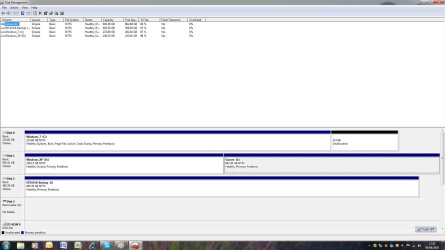
The primary is labelled as 'C''Windows 7'. I have partitioned the secondary drive, into 2 drives: D and E. Called 'D' Windows XP and E my Games drive. D again is about 250Mb and E the rest.
I then proceeded to install windows XP 64bit over my windows 7 64bit. Followed the tutorial here and it all went ok. I have the XP installed, operating fine and my 7 is also working fine. However, I can't get the dual boot display to work correctly at the moment. To boot into XP, I have to hit F12 during boot up and select my second hard drive to boot up. and if I want 7, it boots up by default.
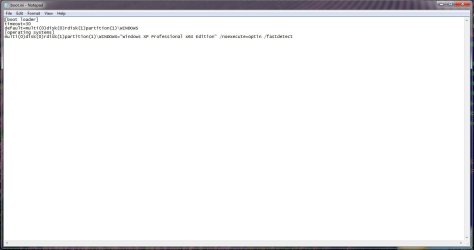
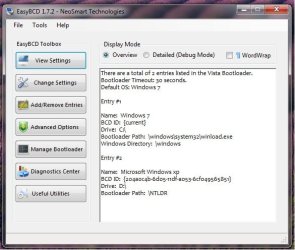
I have modified my BCD registry per tutorial, both in XP and windows7. I get the dual boot message at the beginnig, but when I click on XP, it tells me boot.ini is not correct, failed to detect NTLDR.
Can someone please help me and tell me what to do.
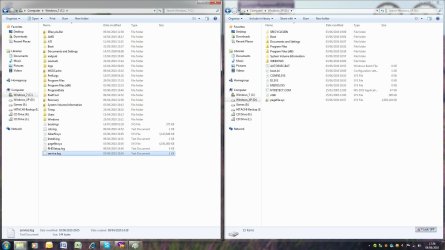
One thing I have noticed is that when 7 loads up, the drives are as they are. But when XP loads up, it renames my C drive to D and my D drive to C. So even though 7 is installed on C drive, when loading XP, it says C is the XP drive! Wierd!
PLease see the attached screnshots. They are pretty much self explanatory, they where all taken with 7 loaded up and not XP.
I woulds appreciate the help in trying to sort my dual boot out.
Thanks very much.
Hope u can help me. But before I go on, I have searched high and low and can't find the answer to my question anywhere here. Hecne why I am starting a new thread:
I have a PC, with 2 hard drives: Primary HDD, 250Mb, and a secondary drive, 1Tb.
The primary is labelled as 'C''Windows 7'. I have partitioned the secondary drive, into 2 drives: D and E. Called 'D' Windows XP and E my Games drive. D again is about 250Mb and E the rest.
I then proceeded to install windows XP 64bit over my windows 7 64bit. Followed the tutorial here and it all went ok. I have the XP installed, operating fine and my 7 is also working fine. However, I can't get the dual boot display to work correctly at the moment. To boot into XP, I have to hit F12 during boot up and select my second hard drive to boot up. and if I want 7, it boots up by default.
I have modified my BCD registry per tutorial, both in XP and windows7. I get the dual boot message at the beginnig, but when I click on XP, it tells me boot.ini is not correct, failed to detect NTLDR.
Can someone please help me and tell me what to do.
One thing I have noticed is that when 7 loads up, the drives are as they are. But when XP loads up, it renames my C drive to D and my D drive to C. So even though 7 is installed on C drive, when loading XP, it says C is the XP drive! Wierd!
PLease see the attached screnshots. They are pretty much self explanatory, they where all taken with 7 loaded up and not XP.
I woulds appreciate the help in trying to sort my dual boot out.
Thanks very much.
Attachments
My Computer
- OS
- 7 Pro 64bit
- CPU
- AMD Phenom 965
- Motherboard
- Gigabyte
- Memory
- Kingston Hyper, 4Gb
- Graphics Card(s)
- Nvidia HD5770
- Hard Drives
- 1TB, 250Gb

