Hello,
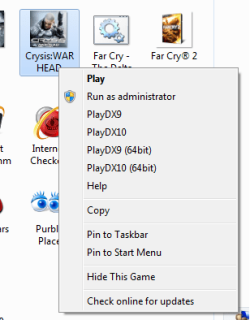
I have a problem with games explorer that is a little complicated ( for me ).
Crysis Warhead opens the 32 bit version on default, and there is nothing on regedit that i can do to do edit that, since it has its gameux configs. on a dll.
So my workaround would be to make an Exe that opens the 64 bit, and overwrite the 32 bit exe.
So, what i have to do is create an exe that opens another.
Can anybody help me?
I have a problem with games explorer that is a little complicated ( for me ).
Crysis Warhead opens the 32 bit version on default, and there is nothing on regedit that i can do to do edit that, since it has its gameux configs. on a dll.
So my workaround would be to make an Exe that opens the 64 bit, and overwrite the 32 bit exe.
So, what i have to do is create an exe that opens another.
Can anybody help me?
My Computer
At a glance
Windows 7 Professional x64Intel Core i7 2600k - 3.4 GHz4x4 Ripjaws X79 Series 2133 MHz (9-11-10-28)1x eVGA GTX 580 - 3GB Classified
- Computer Manufacturer/Model Number
- Custom Built
- OS
- Windows 7 Professional x64
- CPU
- Intel Core i7 2600k - 3.4 GHz
- Motherboard
- Asus Maximus IV Z68 - Extreme
- Memory
- 4x4 Ripjaws X79 Series 2133 MHz (9-11-10-28)
- Graphics Card(s)
- 1x eVGA GTX 580 - 3GB Classified
- Sound Card
- Realtek ALC 889 HD Audio
- Monitor(s) Displays
- Full HD Philips TV 32"
- Screen Resolution
- 1920x1080
- Hard Drives
- 1x Crucial m4 SSD 512 GB
- PSU
- 800W Coolermaster Silentpro Gold
- Case
- Sentey - Renegade GS-6200
- Cooling
- Stock
- Keyboard
- Logitech K800 Wireless
- Mouse
- Logitech Performance MX Laser
- Internet Speed
- 10MB Internet Connection