Dangers of Overclocking?

smartman

New member
Local time
12:54 AM
Messages
6
Hi, I was wondering what some of the dangers were of overclocking? I have a laptop, and I know overclocking would produce a lot of heat... = laptop overheating...

Would overclocking a Acer Aspire 5520 laptop, with AMD Athlon 64 x2 Dual Core Processor, be worth it?

Would it be worth it if I bought one of those cooling stations?

Thanks, Smart (or not so smart) man
 

My Computer My Computer

Computer Manufacturer/Model Number
Acer Aspire 5520
OS
Windows 7 Home Premium 64x
Graphics Card(s)
Nvidia GeForce 7000m
Hi

Some of the experts on this forum will provide some feedback on whether you can overclock your laptop.
As a starter - have a look at this thread

Regards
 

My Computer My Computer

Computer Manufacturer/Model Number
Custom
OS
Win7 HP (x64)/Win7 Ultimate (x64)
CPU
Core i7 920
Motherboard
Intel X58
Memory
6 x 2GB Corsair XMS3
Graphics Card(s)
CF HD4890
Sound Card
Asus Xonar
Monitor(s) Displays
Dell 2408WFP
Screen Resolution
1920 x 1200
Hard Drives
2 x 150GB WDC Velociraptors (Raid 0)
1 x 1TB Seagate
1 x 1.5TB Seagate
PSU
Corsair HX1000W
Case
Antec 1200
Keyboard
Razer Lycosa/N52te
Mouse
Razer Lachesis
Hi, I was wondering what some of the dangers were of overclocking? I have a laptop, and I know overclocking would produce a lot of heat... = laptop overheating...

Would overclocking a Acer Aspire 5520 laptop, with AMD Athlon 64 x2 Dual Core Processor, be worth it?

Would it be worth it if I bought one of those cooling stations?

Thanks, Smart (or not so smart) man


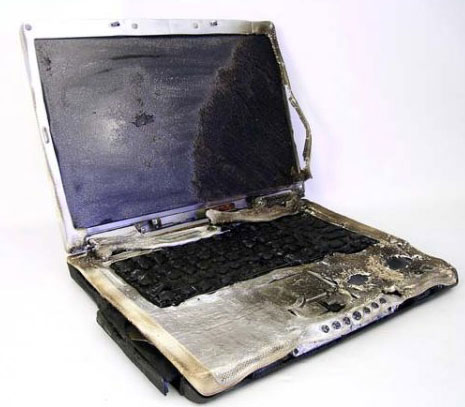
Laptops are not ideal candidates for overclocking. There have been far too many melted and ruined laptops from the heat. DONT

Then there is the shortened life span, and the instability. again DONT


Ken
 

My Computer My Computer

Computer Manufacturer/Model Number
HP Pavillion dv-7 1005 Tx
OS
Win 8 Release candidate 8400
CPU
[email protected]
Memory
4 gigs
Graphics Card(s)
Nvidia 9600M
Sound Card
HD built-in
Monitor(s) Displays
17" Wxga
Screen Resolution
1440x900
Cooling
none
Internet Speed
45Mb down 5Mb up
Chances are the bios are locked.
The only way around that is with software COing and I would highly advise against it.

The bios are locked for a reason, being its not designed for the additional stress or heat.
Being a laptop its even more so of an issue.


If looki g to increase performance, have you thought about upgrading to a SSD drive?
Likely will improve perf. far more than OCing the CPU a little bit w/out any risk.
 

My Computer My Computer

Computer Manufacturer/Model Number
Custom (Self Build)
OS
Windows 7 Home Premium 64bit
CPU
Intel Core i7 2700k
Motherboard
eVGA P67 SLI
Memory
8GB Mushkin Redline Ridgebacks @1866
Graphics Card(s)
EVGA GTX570 SC
Sound Card
XiFi Titanium HD
Monitor(s) Displays
LG W2453V
Screen Resolution
1920x1080
Hard Drives
Intel 320 80GB -- Intel X25-V 40GB --WD Black 1TB x2 -- WD Blue 640GB
PSU
Seasonic x750
Case
Corsair 600T SE White
Cooling
eVGA Superclocked CPU Cooler
Keyboard
Saitek Cyborg
Antivirus
Kaspersky
Browser
IE
Other Info
LG BD/DVD
Have to agree with Ken and Wishmaster. Laptops are bad candidates for overclocking, and software overclocking is generally a bad idea. I know "everyone is doing it", but prepare for it if you want to do it...on your next PC :)

A Guy
 

My Computer My Computer

Computer type
PC/Desktop
OS
Windows 10 Home x64
CPU
INTEL Core i5-750 Quad-Core 3.37GHz
Motherboard
ASUS P7P55D
Memory
HyperX Fury Black Series 8GB (2 x 4GB) 1866Mhz
Graphics Card(s)
EVGA GeForce GTX 750 Superclocked 1GB 128-Bit GDDR5
Monitor(s) Displays
LG 32MA68HY 32" IPS
Screen Resolution
1920 x 1080
Hard Drives
Samsung 840 Evo 120GB, SEAGATE 500GB Barracuda® 7200.12, SATA 3 Gb/s, 7200 RPM, 16MB cache
PSU
ANTEC TruePower New TP-550, 80 PLUS, 550W
Case
ANTEC Three Hundred Illusion
Cooling
COOLER MASTER Hyper 212 Plus, 4 x 120mm 1 x 140mm Noctua's
Internet Speed
85 + Mbps
Antivirus
Avast
Browser
Vivaldi
Basically, overheating is the only issue. And I'm not downplaying it when I say "only issue".
 

My Computer My Computer

OS
Windows 7 Enterprise 64-bit
CPU
AMD Phenom II X4 3.0GHz
Motherboard
ASUS M5A97
Memory
8GB G-Skill Ripjaws DDR3 1333
Graphics Card(s)
PNY GeForce 460 GTX 1GB OC - Enthusiast Edition
Sound Card
VIA High Definition Audio
Monitor(s) Displays
Dell 19"
Screen Resolution
1280x1024
Hard Drives
1TB - Primary
160GB - Secondary
250GB - External backup for important files
PSU
OCZ Fata1ty 700W Modular PSU
Case
ASUS
Keyboard
Microsoft Wireless Keyboard 2000
Mouse
Microsoft Wireless Mouse 2000
Internet Speed
3 Mbps/768 kbps
Basically, overheating is the only issue. And I'm not downplaying it when I say "only issue".
Uh...

What about system stability? Chip life and performance? OCing affects all of these, and not positively.

When you overclock, you run the FSB and/or clock multiplier at a higher rating. (so 333MHz FSB and 9x Clock for 3GHz to a 400MHz and 10x clocck for 4GHz). You can also (have to sometimes) raise the voltage put into the CPU (1.2V standard up to around 1.5V I think).

This increased work generates more heat. The more work, the more heat. At a certain point, a few things can happen:
1. System Failure. Your computer will crash (BSoD) because the CPU cannot handle the settings you have put it up to, and the motherboard shuts it down to prevent serious hardware damage
2. Overheating. If your system is stable, OCing will produce more heat regardless. This WILL shorten the lifespan of your hardware, and (especially in a laptop) cause the rest of your system to heat up (thus decreasing their life)
3. Total Catastrophic Failure. This is not an official name, but it sounded cool. This is also really really hard to do. This is where your CPU basically melts by going WAY outside of its safe ranges. And no, it's not a joke. You can LITERALLY melt your CPU. While this will probably never happen (other things would break WAY before this), it is the ultimate failure.

Now, OCing can (ironically), in some cases, cause lowered performance and glitching. This may or may not be noticable, but had been known to happen (read the gaming/graphics cards forum). Certain programs may not work properly on an OCed system, or it may cause problems with the OS itself.
Because every part (even the same one) is different, there are different OC ranges per part and different reactions. Some can even be backwards and perform worse at non-stock settings.

In the end, OCing a laptop is just stupid (decreased battery life and heat being major factors).
Desktops are ideal, but you still need to know what you are doing.

Hope this helps.

~Lordbob

 

My Computer My Computer

Computer Manufacturer/Model Number
Hera
OS
Windows 7 Ultimate x64, Mint 9
CPU
Intel i5-2500k
Motherboard
ASUS P8P67 Pro
Memory
2x 4Gb Corsair VENGEANCE DDR3-1600
Graphics Card(s)
NVidia GeForce N260GTX Twin Frozr
Sound Card
Realtek HD OnBoard Audio
Monitor(s) Displays
ASUS 24" Monitor
Screen Resolution
1920x1080
Hard Drives
G.SKILL Phoenix Series 60GB SATA II MLC Internal Solid State Drive (SSD)
SAMSUNG Spinpoint F3R 1TB 7200 RPM 32MB Cache SATA II
PSU
Cooler Master Real Power Pro 750W
Case
Cooler Master Haf 932
Cooling
Fans
Keyboard
Razer Tarantula
Mouse
Razer Lachesis
Internet Speed
not fast enough
Hi, I was wondering what some of the dangers were of overclocking? I have a laptop, and I know overclocking would produce a lot of heat... = laptop overheating...

Would overclocking a Acer Aspire 5520 laptop, with AMD Athlon 64 x2 Dual Core Processor, be worth it?

Would it be worth it if I bought one of those cooling stations?

Thanks, Smart (or not so smart) man


Basically, overheating is the only issue. And I'm not downplaying it when I say "only issue".
Uh...

What about system stability? Chip life and performance? OCing affects all of these, and not positively.

When you overclock, you run the FSB and/or clock multiplier at a higher rating. (so 333MHz FSB and 9x Clock for 3GHz to a 400MHz and 10x clocck for 4GHz). You can also (have to sometimes) raise the voltage put into the CPU (1.2V standard up to around 1.5V I think).

This increased work generates more heat. The more work, the more heat. At a certain point, a few things can happen:
1. System Failure. Your computer will crash (BSoD) because the CPU cannot handle the settings you have put it up to, and the motherboard shuts it down to prevent serious hardware damage
2. Overheating. If your system is stable, OCing will produce more heat regardless. This WILL shorten the lifespan of your hardware, and (especially in a laptop) cause the rest of your system to heat up (thus decreasing their life)
3. Total Catastrophic Failure. This is not an official name, but it sounded cool. This is also really really hard to do. This is where your CPU basically melts by going WAY outside of its safe ranges. And no, it's not a joke. You can LITERALLY melt your CPU. While this will probably never happen (other things would break WAY before this), it is the ultimate failure.

Now, OCing can (ironically), in some cases, cause lowered performance and glitching. This may or may not be noticable, but had been known to happen (read the gaming/graphics cards forum). Certain programs may not work properly on an OCed system, or it may cause problems with the OS itself.
Because every part (even the same one) is different, there are different OC ranges per part and different reactions. Some can even be backwards and perform worse at non-stock settings.

In the end, OCing a laptop is just stupid (decreased battery life and heat being major factors).
Desktops are ideal, but you still need to know what you are doing.

Hope this helps.

~Lordbob

Please heed Lordbob's sage advice here. The gains are too small and the risks too large to even consider overclocking a laptop; there simply isn't enough space to dissipate the heat you will generate.
 

My Computer My Computer

OS
7 Ultimate x64
CPU
i5-2500k
Motherboard
Asus P8P67 Pro
Memory
8GB G.Skill Ripjaws X F3-12800CL7D-8GBXH 1866MHz 8-9-8-24
Graphics Card(s)
EVGA GTX 570 SC
Sound Card
X-Fi Titanium Fatality
Monitor(s) Displays
Samsung S27A550H 27" LED
Screen Resolution
1920x1080
Hard Drives
OCZ Vertex 3 120GB.
1TB Samsung F3.
2TB Samsung F4.
PSU
PC Power & Cooling Silencer 760
Case
Lian Li Lancool K62
Cooling
Thermalright Venomous X Black/Scythe S-Flex/Shin-Etsu X23
Keyboard
MS Natural Elite 4000 Ergonomic
Mouse
Logitech G500
Internet Speed
6MB/768
Other Info
Logitech Z-5500 505 watts.
D-Link DGL-4500.
Tripp-Lite Smart Pro 1500.
As Wishmaster said your BIOS is likely locked, and as Lordbob75 mentioned it's really not a good idea for a laptop.

+1 for Wishmaster's suggestion to get a SSD. You will see noticeable performance improvement and the prices have been coming down, that will be your best bet.
 

My Computer My Computer

Computer type
PC/Desktop
Computer Manufacturer/Model Number
76~2.0
OS
Windows 7 Ult x64 - SP1/ Windows 8 Pro x64
CPU
Intel Core i5-3570K 4.6GHz
Motherboard
Gigabyte GA-Z77X UD3H, f18
Memory
8GB (2X4GB) DDR3 1600 Corsair Vengeance CL8 1.5v
Graphics Card(s)
Sapphire HD 7770 Vapor-X OC 1GB DDR5
Sound Card
Onboard VIA VT2021
Monitor(s) Displays
22" LCD Dell
Screen Resolution
1680x1050
Hard Drives
Samsung 840Pro 128GB SSD,
Seagate Barracuda 500GB SATA2 7200rpm 32MB cache, Seagate Barracuda 1TB SATA2 7200rpm 32MB cache,
PSU
Corsair HX650W
Case
Cooler Master Storm Scout
Cooling
Corsair H80 2x12cm Noctua NF P12 , 2x14cm case fans
Keyboard
Logitech Wave
Mouse
CM Sentinel
Internet Speed
Dismal
Antivirus
Avast
Browser
Opera Next
Other Info
Haswell laptop: HP Envy 17t-j, i7-4700MQ, GeForce 740M 2GB DDR3, 17.3" Full HD 1920x1080, 16GB RAM, Samsung 840 Pro 128GB, 1TB Hitachi 7200 HDD,
Desktop: eSATA ports,
External eSATA Seagate 500GB SATA2 7200rpm,
External WD USB 500GB
Basically, overheating is the only issue. And I'm not downplaying it when I say "only issue".
Uh...

What about system stability? Chip life and performance? OCing affects all of these, and not positively.

When you overclock, you run the FSB and/or clock multiplier at a higher rating. (so 333MHz FSB and 9x Clock for 3GHz to a 400MHz and 10x clocck for 4GHz). You can also (have to sometimes) raise the voltage put into the CPU (1.2V standard up to around 1.5V I think).

This increased work generates more heat. The more work, the more heat. At a certain point, a few things can happen:
1. System Failure. Your computer will crash (BSoD) because the CPU cannot handle the settings you have put it up to, and the motherboard shuts it down to prevent serious hardware damage
2. Overheating. If your system is stable, OCing will produce more heat regardless. This WILL shorten the lifespan of your hardware, and (especially in a laptop) cause the rest of your system to heat up (thus decreasing their life)
3. Total Catastrophic Failure. This is not an official name, but it sounded cool. This is also really really hard to do. This is where your CPU basically melts by going WAY outside of its safe ranges. And no, it's not a joke. You can LITERALLY melt your CPU. While this will probably never happen (other things would break WAY before this), it is the ultimate failure.

Now, OCing can (ironically), in some cases, cause lowered performance and glitching. This may or may not be noticable, but had been known to happen (read the gaming/graphics cards forum). Certain programs may not work properly on an OCed system, or it may cause problems with the OS itself.
Because every part (even the same one) is different, there are different OC ranges per part and different reactions. Some can even be backwards and perform worse at non-stock settings.

In the end, OCing a laptop is just stupid (decreased battery life and heat being major factors).
Desktops are ideal, but you still need to know what you are doing.

Hope this helps.

~Lordbob

I'm aware. I was summarizing. Hence I said not trying to
downplay it.
 

My Computer My Computer

OS
Windows 7 Enterprise 64-bit
CPU
AMD Phenom II X4 3.0GHz
Motherboard
ASUS M5A97
Memory
8GB G-Skill Ripjaws DDR3 1333
Graphics Card(s)
PNY GeForce 460 GTX 1GB OC - Enthusiast Edition
Sound Card
VIA High Definition Audio
Monitor(s) Displays
Dell 19"
Screen Resolution
1280x1024
Hard Drives
1TB - Primary
160GB - Secondary
250GB - External backup for important files
PSU
OCZ Fata1ty 700W Modular PSU
Case
ASUS
Keyboard
Microsoft Wireless Keyboard 2000
Mouse
Microsoft Wireless Mouse 2000
Internet Speed
3 Mbps/768 kbps
I'm aware. I was summarizing. Hence I said not trying to
downplay it.
My point is that you made it sound like it was literally the only issue, which is wasn't.

~Lordbob
 

My Computer My Computer

Computer Manufacturer/Model Number
Hera
OS
Windows 7 Ultimate x64, Mint 9
CPU
Intel i5-2500k
Motherboard
ASUS P8P67 Pro
Memory
2x 4Gb Corsair VENGEANCE DDR3-1600
Graphics Card(s)
NVidia GeForce N260GTX Twin Frozr
Sound Card
Realtek HD OnBoard Audio
Monitor(s) Displays
ASUS 24" Monitor
Screen Resolution
1920x1080
Hard Drives
G.SKILL Phoenix Series 60GB SATA II MLC Internal Solid State Drive (SSD)
SAMSUNG Spinpoint F3R 1TB 7200 RPM 32MB Cache SATA II
PSU
Cooler Master Real Power Pro 750W
Case
Cooler Master Haf 932
Cooling
Fans
Keyboard
Razer Tarantula
Mouse
Razer Lachesis
Internet Speed
not fast enough
For what it's worth, will add my comments as well ...

I overclocked for YEARS -- but that was back in the days when you could get really enormous speed gains and the heat issue was easily addressed with aftermarket coolers.

I still continue to follow the overclocking community (see the HardOCP website, for an example), and while they CAN get amazing results, it is a lot more work these days, and really outstanding results require radical solutions like LN2 cooling.

Given the rapid advancement in hardware performance gains, I would have to join with the others here and say that today, it's general not worth the risk of damage from overheating and system instability to gain a very small increase in performance.
 

My Computer My Computer

Computer type
PC/Desktop
Computer Manufacturer/Model Number
Custom
OS
Win7 Pro 32-bit, Win8 Pro 32-bit
CPU
AMD Phenom II X6 1090T
Motherboard
Gigabyte
Memory
4GB ddr3 1300
Graphics Card(s)
AMD HD 4290 onboard
Sound Card
Builtin Realtek HD Audio
Monitor(s) Displays
Samsung 24" widescreen, LG 23" widescreen
Screen Resolution
1920x1200/1920x1080
Hard Drives
Kingston 256GB SSD
Keyboard
Logitech Illuminated Keyboard
Mouse
Logitech M705 wireless mouse
Antivirus
Norton Av 2013
Browser
IE v10
 

My Computer My Computer

Computer type
PC/Desktop
Computer Manufacturer/Model Number
Custom
OS
Win 10 Home Premium 64 Bit
CPU
I7 5930K @ 4.5
Motherboard
Asus X99 s
Memory
16GB Kingston Hyper X Fury DDR4
Graphics Card(s)
EVGA 980ti SC + ACX 2.0
Sound Card
Onboard
Monitor(s) Displays
ROG Swift PG278Q
Screen Resolution
2560x1440
Hard Drives
Kingston Hyper X 250gb SSD
Samsung 2TB mechanical
PSU
Corsair RM 850
Case
NZXT H440 Red
Cooling
Corsair H100i GTX
Keyboard
Razer Reclusa
Mouse
Logitech G5 Gamer
Internet Speed
34mb
Antivirus
Eset Smart Security
Browser
Firefox

My Computer My Computer

Computer Manufacturer/Model Number
Hera
OS
Windows 7 Ultimate x64, Mint 9
CPU
Intel i5-2500k
Motherboard
ASUS P8P67 Pro
Memory
2x 4Gb Corsair VENGEANCE DDR3-1600
Graphics Card(s)
NVidia GeForce N260GTX Twin Frozr
Sound Card
Realtek HD OnBoard Audio
Monitor(s) Displays
ASUS 24" Monitor
Screen Resolution
1920x1080
Hard Drives
G.SKILL Phoenix Series 60GB SATA II MLC Internal Solid State Drive (SSD)
SAMSUNG Spinpoint F3R 1TB 7200 RPM 32MB Cache SATA II
PSU
Cooler Master Real Power Pro 750W
Case
Cooler Master Haf 932
Cooling
Fans
Keyboard
Razer Tarantula
Mouse
Razer Lachesis
Internet Speed
not fast enough
I overclocked for YEARS -- but that was back in the days when you could get really enormous speed gains and the heat issue was easily addressed with aftermarket coolers.

It guess it depends on what constitutes as 'enormous'.

I personally notice the difference between 2.6ghz and 4.0ghz, but that's not what I'd consider 'enormous' - however it's still easy to achieve and keep cool on air alone.

Then again, it's a desktop and not a lappy.


Um, hi - I'm having trouble getting to the desktop...
 

My Computer My Computer

Computer type
PC/Desktop
Computer Manufacturer/Model Number
Systems by SmartEyeball
OS
8 Pro x64
CPU
i7 3770K 4.6GHz
Motherboard
ASUS P8Z77 WS
Memory
16GB G.Skill Trident X 2666mhz
Graphics Card(s)
x2 EVGA 780 Ti Superclocked SLI
Sound Card
SB X-FI Surround 5.1 PRO USB / ATH-AD900 Headphones
Monitor(s) Displays
x3 Dell U2410 / 58" Samsung
Screen Resolution
5760*1200/ 1920*1200
Hard Drives
2x Intel 520 240GB (RAID 0) * 2x WD Caviar Blacks 2TB (RAID 0) * 2TB WD Caviar Black * Sony Optirac DVD
PSU
Silverstone Strider Evolution 1200W
Case
Thermaltake Level 10 GT Snow Edition
Cooling
Noctua NH-D14
Keyboard
Topre Realforce // Ducky Shine MX Black // Filco Ninja TKL
Mouse
Thermaltake Theron (Highly Recommended) + Razer Imperator
Antivirus
MSE
Browser
IE, FF, WaterFox
Other Info
GT Extreme V2 Sim Racing Cockpit + 40" LCD and K/B Mouse stand ▼
Fanatec CSR Elite Wheel + Clubsport V1 Pedals + CSR shifter/7G-H ▼Saitek X52 Pro ▼ TrackIR 5 Pro
Buttkicker v2 Seat Rumbler with Dedicated 5.1 and Sub Woofer attached to frame ▼
=
Bloody Big Grin

My Computer My Computer

Computer Manufacturer/Model Number
Custom
OS
Win7 HP (x64)/Win7 Ultimate (x64)
CPU
Core i7 920
Motherboard
Intel X58
Memory
6 x 2GB Corsair XMS3
Graphics Card(s)
CF HD4890
Sound Card
Asus Xonar
Monitor(s) Displays
Dell 2408WFP
Screen Resolution
1920 x 1200
Hard Drives
2 x 150GB WDC Velociraptors (Raid 0)
1 x 1TB Seagate
1 x 1.5TB Seagate
PSU
Corsair HX1000W
Case
Antec 1200
Keyboard
Razer Lycosa/N52te
Mouse
Razer Lachesis
That's one hot laptop :hot:

It's smok'in :p
 

My Computer My Computer

Computer type
PC/Desktop
Computer Manufacturer/Model Number
76~2.0
OS
Windows 7 Ult x64 - SP1/ Windows 8 Pro x64
CPU
Intel Core i5-3570K 4.6GHz
Motherboard
Gigabyte GA-Z77X UD3H, f18
Memory
8GB (2X4GB) DDR3 1600 Corsair Vengeance CL8 1.5v
Graphics Card(s)
Sapphire HD 7770 Vapor-X OC 1GB DDR5
Sound Card
Onboard VIA VT2021
Monitor(s) Displays
22" LCD Dell
Screen Resolution
1680x1050
Hard Drives
Samsung 840Pro 128GB SSD,
Seagate Barracuda 500GB SATA2 7200rpm 32MB cache, Seagate Barracuda 1TB SATA2 7200rpm 32MB cache,
PSU
Corsair HX650W
Case
Cooler Master Storm Scout
Cooling
Corsair H80 2x12cm Noctua NF P12 , 2x14cm case fans
Keyboard
Logitech Wave
Mouse
CM Sentinel
Internet Speed
Dismal
Antivirus
Avast
Browser
Opera Next
Other Info
Haswell laptop: HP Envy 17t-j, i7-4700MQ, GeForce 740M 2GB DDR3, 17.3" Full HD 1920x1080, 16GB RAM, Samsung 840 Pro 128GB, 1TB Hitachi 7200 HDD,
Desktop: eSATA ports,
External eSATA Seagate 500GB SATA2 7200rpm,
External WD USB 500GB

My Computer My Computer

Computer type
PC/Desktop
OS
Windows 10 Home x64
CPU
INTEL Core i5-750 Quad-Core 3.37GHz
Motherboard
ASUS P7P55D
Memory
HyperX Fury Black Series 8GB (2 x 4GB) 1866Mhz
Graphics Card(s)
EVGA GeForce GTX 750 Superclocked 1GB 128-Bit GDDR5
Monitor(s) Displays
LG 32MA68HY 32" IPS
Screen Resolution
1920 x 1080
Hard Drives
Samsung 840 Evo 120GB, SEAGATE 500GB Barracuda® 7200.12, SATA 3 Gb/s, 7200 RPM, 16MB cache
PSU
ANTEC TruePower New TP-550, 80 PLUS, 550W
Case
ANTEC Three Hundred Illusion
Cooling
COOLER MASTER Hyper 212 Plus, 4 x 120mm 1 x 140mm Noctua's
Internet Speed
85 + Mbps
Antivirus
Avast
Browser
Vivaldi
3. Total Catastrophic Failure. This is not an official name, but it sounded cool. This is also really really hard to do. This is where your CPU basically melts by going WAY outside of its safe ranges. And no, it's not a joke. You can LITERALLY melt your CPU. While this will probably never happen (other things would break WAY before this), it is the ultimate failure.


~Lordbob

LOL I (on purpose) did this to my old laptop (gift of my dad). Was an old HP from the 1999's :) After 5 Months trying to sell it on eBay @ $$75.00, just decided to kill it. I OC'd it sooooo CRAZY!!!! OC'ed EVERYTHING and set XXXX off(whatever the setting that allows the laptop to turn off when it reaches max heat point) so it just... died... And it didn't turn on again :)
 

My Computer My Computer

Computer Manufacturer/Model Number
HP dv6000t CTO Entertainment Lappy |My Desktop @ Bottom
OS
7 x64/ Back-Track 4
CPU
Intel Core 2 Duo CPU 8300@ 2.4 Ghz
Motherboard
HP's Own
Memory
4096 MB DDR2
Graphics Card(s)
Nvidia 8400M GS
Sound Card
Altec Lansing (The usual on Laptops )
Monitor(s) Displays
Laptop Screen. 17' Wide.
Screen Resolution
1280 x 800
Hard Drives
150 GB HDD.
Cooling
2 External Fans, Undervolted, Coolant
Keyboard
Norm. Cheap Random Keyboard
Mouse
Norm. Cheap Random Mouse
Other Info
This is my Homemade Desktop :)
HDD: Western Digital Caviar Blue 320GB 16MB 7200RPM SATA2
And more to come in a bit! :D
3. Total Catastrophic Failure. This is not an official name, but it sounded cool. This is also really really hard to do. This is where your CPU basically melts by going WAY outside of its safe ranges. And no, it's not a joke. You can LITERALLY melt your CPU. While this will probably never happen (other things would break WAY before this), it is the ultimate failure.


~Lordbob

LOL I (on purpose) did this to my old laptop (gift of my dad). Was an old HP from the 1999's :) After 5 Months trying to sell it on eBay @ $$75.00, just decided to kill it. I OC'd it sooooo CRAZY!!!! OC'ed EVERYTHING and set XXXX off(whatever the setting that allows the laptop to turn off when it reaches max heat point) so it just... died... And it didn't turn on again :)
:roflmao:

~Lordbob
 

My Computer My Computer

Computer Manufacturer/Model Number
Hera
OS
Windows 7 Ultimate x64, Mint 9
CPU
Intel i5-2500k
Motherboard
ASUS P8P67 Pro
Memory
2x 4Gb Corsair VENGEANCE DDR3-1600
Graphics Card(s)
NVidia GeForce N260GTX Twin Frozr
Sound Card
Realtek HD OnBoard Audio
Monitor(s) Displays
ASUS 24" Monitor
Screen Resolution
1920x1080
Hard Drives
G.SKILL Phoenix Series 60GB SATA II MLC Internal Solid State Drive (SSD)
SAMSUNG Spinpoint F3R 1TB 7200 RPM 32MB Cache SATA II
PSU
Cooler Master Real Power Pro 750W
Case
Cooler Master Haf 932
Cooling
Fans
Keyboard
Razer Tarantula
Mouse
Razer Lachesis
Internet Speed
not fast enough
Back
Top