DVD drives not showing as removable devices

steveci

New member
Local time
9:35 PM
Messages
2
The DVD drives in my machine do not show up in the removable devices section of Explorer under Computer. They are listed under the hard drives section and there is no removable devices section shown.
Some of my applications cannot detect that there is a DVD drive attached to the system because of this.
As an related problem, USB devices do not show as removable storage also.
I've tried re-installing the devices for the DVD drives but no change to the situation.
Can anyone suggest a solution? The problem has persisted since I did a clean install of Win 7 Pro.
 

My Computer My Computer

At a glance

Windows 7 Pro
OS
Windows 7 Pro
The DVD drives in my machine do not show up in the removable devices section of Explorer under Computer. They are listed under the hard drives section and there is no removable devices section shown.
Some of my applications cannot detect that there is a DVD drive attached to the system because of this.
As an related problem, USB devices do not show as removable storage also.
I've tried re-installing the devices for the DVD drives but no change to the situation.
Can anyone suggest a solution? The problem has persisted since I did a clean install of Win 7 Pro.


Hi Steve and welcome


This might be as simple as a driver. Can you go into device manager (type device manager is search) and check the dvd drive tab. Is your device listed? does it have a yellow explanation on top?
 

My Computer My Computer

At a glance

Win 8 Release candidate 8400[email protected]4 gigsNvidia 9600M
Computer Manufacturer/Model Number
HP Pavillion dv-7 1005 Tx
OS
Win 8 Release candidate 8400
CPU
[email protected]
Memory
4 gigs
Graphics Card(s)
Nvidia 9600M
Sound Card
HD built-in
Monitor(s) Displays
17" Wxga
Screen Resolution
1440x900
Cooling
none
Internet Speed
45Mb down 5Mb up
Devices OK

Dear zigzag3143,

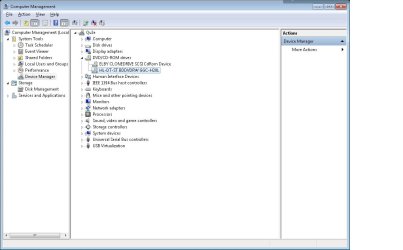
definitely no problems in device manager. Both my BDROM drive and a virtual drive show up under the DVD/CD-ROM Section of device manager.

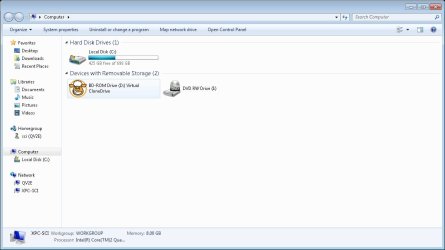
Neither device appears in Explorer as "Devices with Removable Storage"
The Virtual Drive and BDROM appear as Local Disk E: & G:

Please see attached JPEGS

On my second machine, both my Virtual Drive and an external USB DVD drive appear in Explorer as devices with removable storage.


Thanks.
 

Attachments

  • device manager.jpg
    device manager.jpg
    58.1 KB · Views: 179
  • explorer.jpg
    explorer.jpg
    48.1 KB · Views: 167
  • Explorer - second machine.jpg
    Explorer - second machine.jpg
    50 KB · Views: 141

My Computer My Computer

At a glance

Windows 7 Pro
OS
Windows 7 Pro
Back
Top