What is the best method to update drivers??

TheAslan

Banned
Local time
5:37 AM
Messages
25
Hiya!!

I need your help, i'm just wondering that what is the best and most reliable method to update computer drivers, is it absolute necessary to update all the drivers with 3rd party softwares, like Driver Genious Professional, or is there any other methods available??

Here's what i want to update in my computer:
Intel Chipset
Intel Framework

Here's my computer's details:
HP Pavilion DV7-3197.eo
Intel Core i7 CPU Q720 1.60GHZ @ 1.60GHZ
Nvidia GeForce GT 230M (i always update this driver in nvidia's homepage)
Windows 7 Nvidia Edition 2010 x64

So can you please help me with this??
 

My Computer My Computer

Computer Manufacturer/Model Number
HP Pavilion DV7-3197.eo
OS
Windows 7 NVIDIA Edition x64
CPU
Intel Core i7 Q720 1,60GHZ @ 1,60GHZ
Memory
6GB DDR3
Graphics Card(s)
NVIDIA GeForce GT 230M
Screen Resolution
1600 x 900
Hard Drives
500GB + 1000GB
Internet Speed
10 megabyte ADSL
Other Info
Current Windows 7 visual style:

Dark Soft
I don't recommend that you use third party software for updating drivers. I suggest you go the the HP site for your chipset drivers. If you do not find them there, go to the Intel site. I update my Nvida drivers from the Nvidia website.
 

My Computer My Computer

Computer Manufacturer/Model Number
Home built
OS
Windows 7 Ultimate 32 bit
CPU
Intel(R) Pentium(R) 4 CPU 3.00GHz
Motherboard
ASUS P4P800-VM Motherboard Chipset: Intel 865G + ICH5
Memory
2.50 GB RAM
Graphics Card(s)
NVIDIA GeForce 7600 GS
Sound Card
SoundMax Integrated Digital Audio (Chip)
Monitor(s) Displays
ViewSonic VX 1962 wm
Screen Resolution
1680 X 1050
Hard Drives
Seagate Barracuda 7200.10 80 GB
ST380215A ATA Device 18.6 GB
Western Digital "My Book" external hard drive 750 GB
Cooling
Fan based
Keyboard
Microsoft Comfort Curve Keyboard 2000 v10 USB
Mouse
Logitec optic USB
Internet Speed
3.01 Mb/s download 0.64 Mb/s upload
By going to NVIDIA Website and get the appropriate driver.
 

My Computer My Computer

Computer Manufacturer/Model Number
SONY VAIO Laptop
OS
Windows® 7 Home Basic 64bit, Build 7600
CPU
Inter Core 2 Duo CPU T6600 @ 2.20GHz
Memory
4GB
Graphics Card(s)
nVidia GeForce G210M
Sound Card
Realtek HD Integrated Audio
Monitor(s) Displays
LG TV-1 (NVIDIA High Definition Audio)
Screen Resolution
1366 x 768 (Wide)
Hard Drives
320GB HDD - Internal
360GB - External
500GB (x2) - External
1TB - External
PSU
Internal
Keyboard
Integrated
Mouse
Synaptic Keypad & A4tech Cordless MOuse
Internet Speed
LAN, T1
Other Info
A4tech Analog Joypad
Seeing as it is a laptop I wouldn't get the drivers from anywhere but the laptop manufacturer*, as they have a tendency to change them (or have then changed) depending on what modifications may have been done from the reference specs for the hardware. As far as updating goes, I also wouldn't recommend updating more than teh video and/or sound drivers, and if everything else is working as it should leave the chipset drivers alone (unless there is a fix in them that pertains to a specific issue you may be having).

Nvidia GeForce GT 230M (i always update this driver in nvidia's homepage)

*You got lucky with your laptop video card as there are still some of the manufacturers that won't allow the use of reference drivers (applies to both ATI and Nvidia laptop graphics, with Sony being one of the main culprits of this sort of thing). As long as the reference Nvidia drivers work for you, go ahead and update them as you see fit, or again if there is a fix in the new that you are having a problem with.

is it absolute necessary to update all the drivers with 3rd party softwares, like Driver Genious Professional

To me programs like that are nothing more than comfort-ware at best, and a way to make you pay for something that is free anyway. There are a couple of freeware version of these types of programs, but they still are needed or necessary.
 

My Computer My Computer

Computer type
PC/Desktop
Computer Manufacturer/Model Number
Me
OS
Win 7 Ultimate x64
CPU
FX-8350 @ 4.6 GHz so far
Motherboard
Asus M5A97 EVO
Memory
ADATA XPG V1 Series Black 8GB DDR3 1600
Graphics Card(s)
Sapphire R9 270x Dual-X
Sound Card
Xonar DGX w/ Corsair Vengence 1300
Monitor(s) Displays
Acer S232HL Abid
Screen Resolution
1920x1080
Hard Drives
120 GB OCZ Vertex 3
500 GB Seagate 7200.12
PSU
Antec Earthwatts 650W Green
Case
Antec Three Hundred
Cooling
Cooler Master 212 EVO
Keyboard
Logitech G510
Mouse
Logitech G500s
Internet Speed
35000/3000
Ok, thanx you for all the replies! But i didn't find the right drivers in Intel homepage...can you please help me with these...

intel chipset
intel framework

If i understood correctly there's no sense to update those drivers above when its working correctly already??
 

My Computer My Computer

Computer Manufacturer/Model Number
HP Pavilion DV7-3197.eo
OS
Windows 7 NVIDIA Edition x64
CPU
Intel Core i7 Q720 1,60GHZ @ 1,60GHZ
Memory
6GB DDR3
Graphics Card(s)
NVIDIA GeForce GT 230M
Screen Resolution
1600 x 900
Hard Drives
500GB + 1000GB
Internet Speed
10 megabyte ADSL
Other Info
Current Windows 7 visual style:

Dark Soft
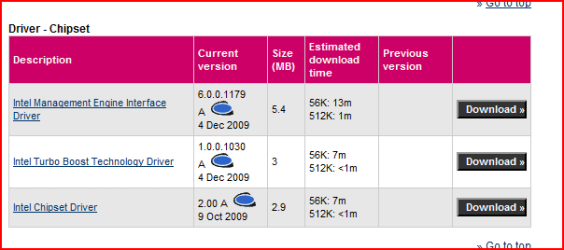
From the the HP web site.

Capturehp.PNG
 

My Computer My Computer

OS
ME/XP/Vista/Win7
Hiya!!

I need your help, i'm just wondering that what is the best and most reliable method to update computer drivers, is it absolute necessary to update all the drivers with 3rd party softwares, like Driver Genious Professional, or is there any other methods available??

Here's what i want to update in my computer:
Intel Chipset
Intel Framework

Here's my computer's details:
HP Pavilion DV7-3197.eo
Intel Core i7 CPU Q720 1.60GHZ @ 1.60GHZ
Nvidia GeForce GT 230M (i always update this driver in nvidia's homepage)
Windows 7 Nvidia Edition 2010 x64

So can you please help me with this??

Hi , For drivers update, I recommand driver genuis 9 (shareware) or a very good French website: Mes Drivers - détection en ligne automatique de la configuration matérielle et des drivers compatibles
, just clic on "Lancer la détection" > install the plugin (you have choice between 32 and 64bit system) > when the plugin is downloaded and installed > Refresh the Page and A system scan will begin, So Will see the drivers to be installed ... :)
 

My Computer My Computer

Computer Manufacturer/Model Number
Acer Aspire 5920G
OS
Windows 7
Ok, thanx you for all the replies! But i didn't find the right drivers in Intel homepage...can you please help me with these...

intel chipset
intel framework

If i understood correctly there's no sense to update those drivers above when its working correctly already??

Yes it is right , but sometimes it's also better to update those drivers as you might update the system with other new drivers...So the all lot will be aswell updated.

On laptop it is true manufacturer have a certain tendency to modified their drivers for their needs.
The best exemple when you own two graphics cards on same laptop system, then nearly impossible to update without the manufacturer drivers.
 

My Computer My Computer

Computer type
PC/Desktop
Computer Manufacturer/Model Number
Custom Build
OS
Windows 7 Professional SP1 - x64 [Non-UEFI Boot]
CPU
Ivy Bridge Core i5 3570K (Delidded)
Motherboard
Asus P8Z77-V LE PLUS
Memory
G.Skill "Ares" DDR3 PC3-12800 - 1600MHz (16Gb)
Graphics Card(s)
Asus Dual-RX480-O4G
Sound Card
Creative Sound Blaster Z w/5.1 sound system
Monitor(s) Displays
Asus IPS 23"
Screen Resolution
16/9
Hard Drives
Internal:
500Go Sata 6Gb/s (x2)
500Go Sata 3Gb/s (x2)
SSD 60Go Sata 6Gb/s
PSU
In Win C 900W Series 80+ Platinum
Case
Thermaltake Chaser A71
Cooling
Custom Water Cooling Loop
Keyboard
Cooler Master QuickFire XTi
Mouse
Razer Imperator 2012 (4G)
Antivirus
MSE
Browser
IE 11.0.xxx Rtm
Other Info
"Raid0" with Intel Smart Response Technology (HDD/SSD)
Ok, thanx you for all the replies! But i didn't find the right drivers in Intel homepage...can you please help me with these...

intel chipset
intel framework

If i understood correctly there's no sense to update those drivers above when its working correctly already??
That is correct. If you aren't having problems, don't mess with the chipsets unless the manufacturer has a bulletin suggesting you do so.
 

My Computer My Computer

Computer Manufacturer/Model Number
Home built
OS
Windows 7 Ultimate 32 bit
CPU
Intel(R) Pentium(R) 4 CPU 3.00GHz
Motherboard
ASUS P4P800-VM Motherboard Chipset: Intel 865G + ICH5
Memory
2.50 GB RAM
Graphics Card(s)
NVIDIA GeForce 7600 GS
Sound Card
SoundMax Integrated Digital Audio (Chip)
Monitor(s) Displays
ViewSonic VX 1962 wm
Screen Resolution
1680 X 1050
Hard Drives
Seagate Barracuda 7200.10 80 GB
ST380215A ATA Device 18.6 GB
Western Digital "My Book" external hard drive 750 GB
Cooling
Fan based
Keyboard
Microsoft Comfort Curve Keyboard 2000 v10 USB
Mouse
Logitec optic USB
Internet Speed
3.01 Mb/s download 0.64 Mb/s upload
  • Like
Reactions: JMH
I just use the device manager and right click on update driver.
That is the way MS tells you to do it.
I also vist the manufacturers site for the hardware.
Do not use third party software it is a scam. If you notice after running it they want money
for the drivers. Updated drivers are always free.

Jimmy
 

My Computer My Computer

Computer Manufacturer/Model Number
Power Spec- Micro Electronics,Inc.
OS
Windows 7 64-bit
CPU
Intel i7
Motherboard
Intel
Memory
12 gigs
Graphics Card(s)
AMD Radeon HD 6900 series
Sound Card
AMD High Definition Audio Device
Monitor(s) Displays
Gateway FHX2300
Screen Resolution
1920x1080
Hard Drives
Samsung HD204UI 2 terabytes used for storage
SSD G2 Series 64 GB System drive
To resume...Yes it is not always a real need to update drivers, but it always depend of the computer shape.

Many manufacturers try to improve their drivers, but looks like experimental business.

Some suceed very well to update, some bad.

If you look at a typical thread like "Realtek High Definition Audio", you'll see manies complaining that the previous drivers were better or vice-versa!!!

It is always good to ask an opinion to a forum, but remember that you're the only one in front your computer, minding what's up! You'll have to learn listen at, and sometimes you"ll get wrong.
Some enjoy optimizing their computer a lot and are ready to test their drivers and do like spend time, searching what could be the best for their engine.

A least some here will help to resolve manies of encountered probs even if you do not tell straight away that you did messed it up yourself.

If you're on production machine i can perfectly understand your needs...but for some at home based, enjoy!
 

My Computer My Computer

Computer type
PC/Desktop
Computer Manufacturer/Model Number
Custom Build
OS
Windows 7 Professional SP1 - x64 [Non-UEFI Boot]
CPU
Ivy Bridge Core i5 3570K (Delidded)
Motherboard
Asus P8Z77-V LE PLUS
Memory
G.Skill "Ares" DDR3 PC3-12800 - 1600MHz (16Gb)
Graphics Card(s)
Asus Dual-RX480-O4G
Sound Card
Creative Sound Blaster Z w/5.1 sound system
Monitor(s) Displays
Asus IPS 23"
Screen Resolution
16/9
Hard Drives
Internal:
500Go Sata 6Gb/s (x2)
500Go Sata 3Gb/s (x2)
SSD 60Go Sata 6Gb/s
PSU
In Win C 900W Series 80+ Platinum
Case
Thermaltake Chaser A71
Cooling
Custom Water Cooling Loop
Keyboard
Cooler Master QuickFire XTi
Mouse
Razer Imperator 2012 (4G)
Antivirus
MSE
Browser
IE 11.0.xxx Rtm
Other Info
"Raid0" with Intel Smart Response Technology (HDD/SSD)
Back
Top