No Sound in my lap-top

kallib85

New member
Local time
6:06 PM
Messages
39
Location
Iceland
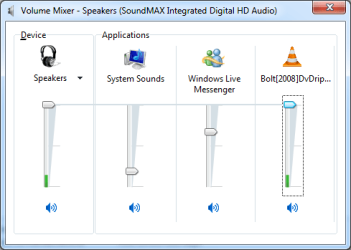
Hello, I have a IBM T61 laptop computer with Windows 7 build 7077, and I can't hear any music or anything, but my wolume control shows me some activity. Can anyone help me.

ps I have updated everything but nothing works
 

My Computer My Computer

At a glance

Windows 7 Build 7201 X64 bitIntel(R) Core(TM)2 Duo CPU Y7500 @ 2.20GHZ 2....3.00 GBNVIDIA Quadro NVS 140M (Prerelease - WDDM 1.1)
OS
Windows 7 Build 7201 X64 bit
CPU
Intel(R) Core(TM)2 Duo CPU Y7500 @ 2.20GHZ 2.20 GHz
Memory
3.00 GB
Graphics Card(s)
NVIDIA Quadro NVS 140M (Prerelease - WDDM 1.1)
Monitor(s) Displays
ThinkPad Display 1440x900
Keyboard
Standard PS/2 Keybord
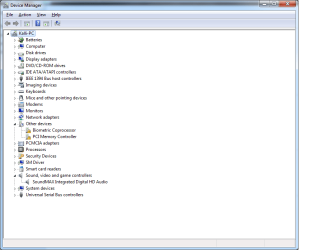
Check device manager for any problem devices: Open Start, type devmgmt.msc, press Enter. Look for yellow icons. Post back.
 

My Computer My Computer

At a glance

El Capitan / Windows 10i7-4980HQ16GBIris 5200
Computer type
Laptop
Computer Manufacturer/Model Number
Apple
OS
El Capitan / Windows 10
CPU
i7-4980HQ
Memory
16GB
Graphics Card(s)
Iris 5200
Well the T61 has a soundmax audio card I would try a older driver either a 32bit or a 64bit. I know with my lappy I had to run a differant Realtek driver to get the audio work. Windows supplied driver used a HD output driver not a Analog output driver.
 

My Computer My Computer

At a glance

Windows 7 Build 7201Intel Q6600 @ 2.73Corsair XMS2 4GB CM2X1024-6400C4NVIDIA GeForce 9800 GTX+
Computer Manufacturer/Model Number
Custom
OS
Windows 7 Build 7201
CPU
Intel Q6600 @ 2.73
Motherboard
Asus P5H-DH Deluxe
Memory
Corsair XMS2 4GB CM2X1024-6400C4
Graphics Card(s)
NVIDIA GeForce 9800 GTX+
Sound Card
Creative SB X-Fi XtremeMusic
Monitor(s) Displays
Acer AL2216W 22" LCD
Screen Resolution
1680x1050
Hard Drives
SAMSUNG Spins 640GB x2 Raid 0
SAMSUNG HD501LJ 500 GB
WD 10EAVS External 1Tb x 2
PSU
OCZ 500
Case
Intec 900
Cooling
Fatality Fan
Keyboard
Microsoft 4000 Curve
Mouse
Microsoft Trackball
Internet Speed
8841 Down/2913 UP
Well the T61 has a soundmax audio card I would try a older driver either a 32bit or a 64bit. I know with my lappy I had to run a differant Realtek driver to get the audio work. Windows supplied driver used a HD output driver not a Analog output driver.

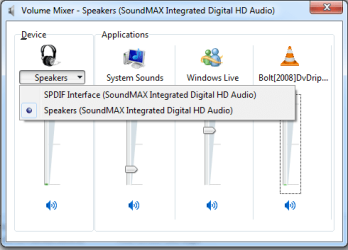
This description is consistent with the described behavior. I don't think I would try an older driver as thats prone to failure as usually only the newest drivers are WHQL-certified for Windows 7. I'd start by looking at the mixer device:

1.jpg
 

My Computer My Computer

At a glance

El Capitan / Windows 10i7-4980HQ16GBIris 5200
Computer type
Laptop
Computer Manufacturer/Model Number
Apple
OS
El Capitan / Windows 10
CPU
i7-4980HQ
Memory
16GB
Graphics Card(s)
Iris 5200
Okey,

Device Manager
Device manager.png

And the audio when playing a movie
audio1.png audio2.png

Just let me know if you need anything else
 

My Computer My Computer

At a glance

Windows 7 Build 7201 X64 bitIntel(R) Core(TM)2 Duo CPU Y7500 @ 2.20GHZ 2....3.00 GBNVIDIA Quadro NVS 140M (Prerelease - WDDM 1.1)
OS
Windows 7 Build 7201 X64 bit
CPU
Intel(R) Core(TM)2 Duo CPU Y7500 @ 2.20GHZ 2.20 GHz
Memory
3.00 GB
Graphics Card(s)
NVIDIA Quadro NVS 140M (Prerelease - WDDM 1.1)
Monitor(s) Displays
ThinkPad Display 1440x900
Keyboard
Standard PS/2 Keybord
Perhaps elmopio is on the right track then. Apparently there is a specific version of these drivers that outputs to the analog port connected to the speakers. This one apparently does not even though it shows that it does in the volume mixer. Here's the latest SoundMax Integrated Digital HD Audio Driver from the Microsoft Update Catalog. It's a manual install so you'll have to right click the SoundMAX device in the device manager, select Update and don't let it search, show it right where the extracted driver is.

http://dl.getdropbox.com/u/561353/X..._1b5841eade1ffba84176ae4f7b3fd2b0d8d26057.cab
 
Last edited:

My Computer My Computer

At a glance

El Capitan / Windows 10i7-4980HQ16GBIris 5200
Computer type
Laptop
Computer Manufacturer/Model Number
Apple
OS
El Capitan / Windows 10
CPU
i7-4980HQ
Memory
16GB
Graphics Card(s)
Iris 5200
Perhaps elmopio is on the right track then. Apparently there is a specific version of these drivers that outputs to the analog port connected to the speakers. This one apparently does not even though it shows that it does in the volume mixer. Here's the latest SoundMax Integrated Digital HD Audio Driver from the Microsoft Update Catalog. It's a manual install so you'll have to right click the SoundMAX device in the device manager, select Update and don't let it search, show it right where the extracted driver is.


Where is the link???
 

My Computer My Computer

At a glance

Windows 7 Build 7201 X64 bitIntel(R) Core(TM)2 Duo CPU Y7500 @ 2.20GHZ 2....3.00 GBNVIDIA Quadro NVS 140M (Prerelease - WDDM 1.1)
OS
Windows 7 Build 7201 X64 bit
CPU
Intel(R) Core(TM)2 Duo CPU Y7500 @ 2.20GHZ 2.20 GHz
Memory
3.00 GB
Graphics Card(s)
NVIDIA Quadro NVS 140M (Prerelease - WDDM 1.1)
Monitor(s) Displays
ThinkPad Display 1440x900
Keyboard
Standard PS/2 Keybord

My Computer My Computer

At a glance

El Capitan / Windows 10i7-4980HQ16GBIris 5200
Computer type
Laptop
Computer Manufacturer/Model Number
Apple
OS
El Capitan / Windows 10
CPU
i7-4980HQ
Memory
16GB
Graphics Card(s)
Iris 5200

My Computer My Computer

At a glance

Windows 7 Build 7201 X64 bitIntel(R) Core(TM)2 Duo CPU Y7500 @ 2.20GHZ 2....3.00 GBNVIDIA Quadro NVS 140M (Prerelease - WDDM 1.1)
OS
Windows 7 Build 7201 X64 bit
CPU
Intel(R) Core(TM)2 Duo CPU Y7500 @ 2.20GHZ 2.20 GHz
Memory
3.00 GB
Graphics Card(s)
NVIDIA Quadro NVS 140M (Prerelease - WDDM 1.1)
Monitor(s) Displays
ThinkPad Display 1440x900
Keyboard
Standard PS/2 Keybord
Did you mean that i have to look for the driver or,what are you trying to tell me :o

There's a link up there now. Scroll up...
 

My Computer My Computer

At a glance

El Capitan / Windows 10i7-4980HQ16GBIris 5200
Computer type
Laptop
Computer Manufacturer/Model Number
Apple
OS
El Capitan / Windows 10
CPU
i7-4980HQ
Memory
16GB
Graphics Card(s)
Iris 5200
There's a link up there now. Scroll up...

Thank you, and do you want me to got to device manager, and update driver???
 

My Computer My Computer

At a glance

Windows 7 Build 7201 X64 bitIntel(R) Core(TM)2 Duo CPU Y7500 @ 2.20GHZ 2....3.00 GBNVIDIA Quadro NVS 140M (Prerelease - WDDM 1.1)
OS
Windows 7 Build 7201 X64 bit
CPU
Intel(R) Core(TM)2 Duo CPU Y7500 @ 2.20GHZ 2.20 GHz
Memory
3.00 GB
Graphics Card(s)
NVIDIA Quadro NVS 140M (Prerelease - WDDM 1.1)
Monitor(s) Displays
ThinkPad Display 1440x900
Keyboard
Standard PS/2 Keybord
Thank you, and do you want me to got to device manager, and update driver???

Yes. Expand the cab file to a folder on your desktop, update driver in device manager and browse to the driver. If it says the best driver is installed then force it. You can always roll it back later.
 

My Computer My Computer

At a glance

El Capitan / Windows 10i7-4980HQ16GBIris 5200
Computer type
Laptop
Computer Manufacturer/Model Number
Apple
OS
El Capitan / Windows 10
CPU
i7-4980HQ
Memory
16GB
Graphics Card(s)
Iris 5200
Yes. Expand the cab file to a folder on your desktop, update driver in device manager and browse to the driver. If it says the best driver is installed then force it. You can always roll it back later.


Well well this worked very well, and it made the volume buttons enbled again :)

Thank you very much :)
 

My Computer My Computer

At a glance

Windows 7 Build 7201 X64 bitIntel(R) Core(TM)2 Duo CPU Y7500 @ 2.20GHZ 2....3.00 GBNVIDIA Quadro NVS 140M (Prerelease - WDDM 1.1)
OS
Windows 7 Build 7201 X64 bit
CPU
Intel(R) Core(TM)2 Duo CPU Y7500 @ 2.20GHZ 2.20 GHz
Memory
3.00 GB
Graphics Card(s)
NVIDIA Quadro NVS 140M (Prerelease - WDDM 1.1)
Monitor(s) Displays
ThinkPad Display 1440x900
Keyboard
Standard PS/2 Keybord

My Computer My Computer

At a glance

El Capitan / Windows 10i7-4980HQ16GBIris 5200
Computer type
Laptop
Computer Manufacturer/Model Number
Apple
OS
El Capitan / Windows 10
CPU
i7-4980HQ
Memory
16GB
Graphics Card(s)
Iris 5200
Back
Top