Clean Install W7 Home Premium_Prep

The X15-65733.iso part is right......
Doing some double checking.
:D


If you downloaded your version Home Premium then you need to check against the HASH for that and not Ultimate: Windows 7 RTM SHA-1 hash / checksums

If not, then you need to unlock all versions in the ISO (using tool I posted earlier) to burn an all-version DVD so you can install your licensed version which will activate with the Product Key on COA.

Use the drivers given by the installer unless there are any missing in Device Manager, or performance dictates otherwise.

During the avalanche of complaints about DR failing to provide student download, MS corrected the situation here: Microsoft Fixes Windows 7 Student Edition Upgrade Problems

Acer has several useless utility partiitons and often a hidden EISA partition which need to be cleaned from HD before install. Boot DVD Repair console or Repair CD, press Shift F10 at first screen or click through to Recovery Tools list to open a Command Line, type:
DISKPART
LIST DISK
SELECT DISK # (win 7 HD)
CLEAN ALL
CREATE PARTITION PRIMARY
SELECT PARTITION 1
ACTIVE
FORMAT=NTFS
ASSIGN
EXIT

This sets you up with one partition. If you want more, or want the 100mb Sys Reserved boot partition provided on unformatted HD's, then use the DVD to create partitions and format.

To get rid of EISA: http://www.mydigitallife.info/2008/02/29/delete-and-remove-to-unlock-eisa-hidden-recovery-or-diagnostic-partition-in-vista/

Be sure to make your Recovery Disks first so you have a path back to Factory Condition, or save a Win7 backup image of all partitions. You can order Recov Disk set for free from Acer in first 90 days.

OOPS:doh:!!!!!!!!

Sorry for that 7 Ultimate Keys.................:confused:

Windows 7 Home Premium 64-bit:
Name: en_windows_7_home_premium_x64_dvd_x15-65733.iso
SHA-1: 336779EA6B65F63E11A609B4D021439C47AB315B
CRC: 56D954E4

Windows 7 Home Premium 32-bit:
Name: en_windows_7_home_premium_x86_dvd_x15-65732.iso
SHA-1: CC9D8220B2179E784D85BF1EA98D2EE2190D534F
CRC: 5DF6DBA0

They missing the Md5 checksum....it still doesn't match your screenshot, try again with CRC and SHA-1!


PS: post #28 corrected :p
 

My Computer My Computer

Computer Manufacturer/Model Number
Acer Aspire 5517-5427 Notebook
OS
MS Windows 7 Home Premium 64-bit
CPU
AMD K8/AMD Athlon(tm) Processor TF-20 @1.6G
Motherboard
Acer Aspire 5517 (Socket S1G1)
Memory
2.0GB Dual-Channel DDR2 @ 319MHz 5-5-5-15
Graphics Card(s)
ATI Radeon HD 3200 Graphics (Acer Incorporated [ALI])
Sound Card
Realtek High Definition Audio
Monitor(s) Displays
Generic PnP Monitor @ 1366x768
Hard Drives
244.20GB Western Digital WDC WD2500BEVT-22A23T0 ATA Device (IDE)
PSU
Stock
Case
Stock
Cooling
Stock
Mouse
Gigaware-Wireless
Internet Speed
HA!
Hi,NoN!
 

My Computer My Computer

Computer Manufacturer/Model Number
Acer Aspire 5517-5427 Notebook
OS
MS Windows 7 Home Premium 64-bit
CPU
AMD K8/AMD Athlon(tm) Processor TF-20 @1.6G
Motherboard
Acer Aspire 5517 (Socket S1G1)
Memory
2.0GB Dual-Channel DDR2 @ 319MHz 5-5-5-15
Graphics Card(s)
ATI Radeon HD 3200 Graphics (Acer Incorporated [ALI])
Sound Card
Realtek High Definition Audio
Monitor(s) Displays
Generic PnP Monitor @ 1366x768
Hard Drives
244.20GB Western Digital WDC WD2500BEVT-22A23T0 ATA Device (IDE)
PSU
Stock
Case
Stock
Cooling
Stock
Mouse
Gigaware-Wireless
Internet Speed
HA!
I obtained a copy of the W764-bit Home Premium .iso from what was supposedly DigitalRiver.Removed the eicfg-per your post;)-and used imageburn to create a bootable DVD.It was veryfied.I went as far as running the .exe and it went strightway to the W7 install screen.Just as if I were performing a recovery.I got a little nervouse,though,and got out before it was too late.:confused:

The problem I have with this .iso is that it in fact did not come from DigitalRiver,but a site with digitalriver content.My dialog with digitalriver has led me to contact MS directly,for I did not attain my copy from Online Store.Of course it was preinstalled.My 90 days are up from Acer,but I've got the ext. warranty.Yet I loathe letting someone else digging around in my Laptop.Banish the thought!

I have made repair disk,system-image ,and a couple other back-up things.

I will study the rest of your post for a while.I am going to contact MS in the AM.Even though I believe I have an unlocked bootable W7 .iso,I really want to make sure it's also legitamate.Call me old fashioned.

:warn:So, are you telling me that practically all drivers needed are on this .iso disk?And that I should only need to use ACER drivers if I need to?I wish I could run all MS.Then as the time passes,tweak here and there to my needs.

Hi There!

Yes, that's what he meant! Good that you got it working.

It is pretty late here, i'm dying of:sleep: !
See you later, and have a good end of day!
 

My Computer My Computer

Computer type
PC/Desktop
Computer Manufacturer/Model Number
Custom Build
OS
Windows 7 Professional SP1 - x64 [Non-UEFI Boot]
CPU
Ivy Bridge Core i5 3570K (Delidded)
Motherboard
Asus P8Z77-V LE PLUS
Memory
G.Skill "Ares" DDR3 PC3-12800 - 1600MHz (16Gb)
Graphics Card(s)
Asus Dual-RX480-O4G
Sound Card
Creative Sound Blaster Z w/5.1 sound system
Monitor(s) Displays
Asus IPS 23"
Screen Resolution
16/9
Hard Drives
Internal:
500Go Sata 6Gb/s (x2)
500Go Sata 3Gb/s (x2)
SSD 60Go Sata 6Gb/s
PSU
In Win C 900W Series 80+ Platinum
Case
Thermaltake Chaser A71
Cooling
Custom Water Cooling Loop
Keyboard
Cooler Master QuickFire XTi
Mouse
Razer Imperator 2012 (4G)
Antivirus
MSE
Browser
IE 11.0.xxx Rtm
Other Info
"Raid0" with Intel Smart Response Technology (HDD/SSD)
Acer has several useless utility partiitons and often a hidden EISA partition which need to be cleaned from HD before install. Boot DVD Repair console or Repair CD, press Shift F10 at first screen or click through to Recovery Tools list to open a Command Line, type:
DISKPART
LIST DISK
SELECT DISK # (win 7 HD)
CLEAN ALL
CREATE PARTITION PRIMARY
SELECT PARTITION 1
ACTIVE
FORMAT=NTFS
ASSIGN
EXIT


If I use this,and something goes wrong,can I use a Sysyem-Image to get back to previous state?And if I had to use said Image,woulld I be able to Recover to factory condition from within this Image?

I looked at a reply of yours in another thread dealing with ACER eRecovery,yet when I went to this target,it said that this factory image needs to be created before using computer.

Thank you all for your assistance and patience in this matter.:cool:
 

My Computer My Computer

Computer Manufacturer/Model Number
Acer Aspire 5517-5427 Notebook
OS
MS Windows 7 Home Premium 64-bit
CPU
AMD K8/AMD Athlon(tm) Processor TF-20 @1.6G
Motherboard
Acer Aspire 5517 (Socket S1G1)
Memory
2.0GB Dual-Channel DDR2 @ 319MHz 5-5-5-15
Graphics Card(s)
ATI Radeon HD 3200 Graphics (Acer Incorporated [ALI])
Sound Card
Realtek High Definition Audio
Monitor(s) Displays
Generic PnP Monitor @ 1366x768
Hard Drives
244.20GB Western Digital WDC WD2500BEVT-22A23T0 ATA Device (IDE)
PSU
Stock
Case
Stock
Cooling
Stock
Mouse
Gigaware-Wireless
Internet Speed
HA!
Since you have Win7, you can save externally a Win7 Backup image of your entire HD so you can reimage it back exactly as it is if you need to:
http://www.sevenforums.com/tutorials/663-backup-complete-computer-create-image-backup.html
http://www.sevenforums.com/tutorials/675-system-image-recovery.html

Or you can use the Recovery Disks to restore Vista to factory condition should that ever become necessary. I believe you said you have that disk set, correct?

This makes wiping the HD completely safe and reversible. But feel free to take all the time you want to ask any questions so you are confident it is what you want to do, and fully clear on how to do it. There is no time limit on our help.
 
Acer has several useless utility partiitons and often a hidden EISA partition which need to be cleaned from HD before install. Boot DVD Repair console or Repair CD, press Shift F10 at first screen or click through to Recovery Tools list to open a Command Line, type:
DISKPART
LIST DISK
SELECT DISK # (win 7 HD)
CLEAN ALL
CREATE PARTITION PRIMARY
SELECT PARTITION 1
ACTIVE
FORMAT=NTFS
ASSIGN
EXIT


If I use this,and something goes wrong,can I use a Sysyem-Image to get back to previous state?And if I had to use said Image,woulld I be able to Recover to factory condition from within this Image?

I looked at a reply of yours in another thread dealing with ACER eRecovery,yet when I went to this target,it said that this factory image needs to be created before using computer.

Thank you all for your assistance and patience in this matter.:cool:


Few hours later....

Hi!

Some threads are talking about that and could be useful for your needs:

-http://www.sevenforums.com/general-discussion/19281-acer-recovery-partition.html

-http://www.sevenforums.com/general-...overy-issue-after-installing-windows-7-a.html

-http://www.sevenforums.com/installation-setup/47838-cant-install-7-acer-laptop-recovery-manager.html

-http://www.sevenforums.com/performa...-creating-recovery-disc-recovery-manager.html
 

My Computer My Computer

Computer type
PC/Desktop
Computer Manufacturer/Model Number
Custom Build
OS
Windows 7 Professional SP1 - x64 [Non-UEFI Boot]
CPU
Ivy Bridge Core i5 3570K (Delidded)
Motherboard
Asus P8Z77-V LE PLUS
Memory
G.Skill "Ares" DDR3 PC3-12800 - 1600MHz (16Gb)
Graphics Card(s)
Asus Dual-RX480-O4G
Sound Card
Creative Sound Blaster Z w/5.1 sound system
Monitor(s) Displays
Asus IPS 23"
Screen Resolution
16/9
Hard Drives
Internal:
500Go Sata 6Gb/s (x2)
500Go Sata 3Gb/s (x2)
SSD 60Go Sata 6Gb/s
PSU
In Win C 900W Series 80+ Platinum
Case
Thermaltake Chaser A71
Cooling
Custom Water Cooling Loop
Keyboard
Cooler Master QuickFire XTi
Mouse
Razer Imperator 2012 (4G)
Antivirus
MSE
Browser
IE 11.0.xxx Rtm
Other Info
"Raid0" with Intel Smart Response Technology (HDD/SSD)
Almost There

I appreciate your posts,gregrocker.

Will clean-install void my warranty?

Maybe I should look for that answer elsewhere.


Since you have Win7, you can save externally a Win7 Backup image of your entire HD so you can reimage it back exactly as it is if you need to:
http://www.sevenforums.com/tutorials/663-backup-complete-computer-create-image-backup.html
http://www.sevenforums.com/tutorials/675-system-image-recovery.html

Or you can use the Recovery Disks to restore Vista to factory condition should that ever become necessary. I believe you said you have that disk set, correct?

This makes wiping the HD completely safe and reversible. But feel free to take all the time you want to ask any questions so you are confident it is what you want to do, and fully clear on how to do it. There is no time limit on our help.
 

My Computer My Computer

Computer Manufacturer/Model Number
Acer Aspire 5517-5427 Notebook
OS
MS Windows 7 Home Premium 64-bit
CPU
AMD K8/AMD Athlon(tm) Processor TF-20 @1.6G
Motherboard
Acer Aspire 5517 (Socket S1G1)
Memory
2.0GB Dual-Channel DDR2 @ 319MHz 5-5-5-15
Graphics Card(s)
ATI Radeon HD 3200 Graphics (Acer Incorporated [ALI])
Sound Card
Realtek High Definition Audio
Monitor(s) Displays
Generic PnP Monitor @ 1366x768
Hard Drives
244.20GB Western Digital WDC WD2500BEVT-22A23T0 ATA Device (IDE)
PSU
Stock
Case
Stock
Cooling
Stock
Mouse
Gigaware-Wireless
Internet Speed
HA!
Update
mad.png

I've been on the phone with ACER and MS several times in the last couple of hours.

ACER wants money to help me uninstall bloatware remotely.
roflmao2.gif

MS tells me that my OS is OEM licsensed and that the only way to do a clean install is if I can get ACER to unlock the system lock on preloaded software(Which they acted like they knew nothing about).And that if I wanted a clean-install,I would have to purchase a retail version of OS.That if I tried to do a clean-install any other way,I would not be able to use my product-key to activate OS-by reason of the producy-key can only activate the OEM version of Windows 7.

I did find out that my warranty wouldn't be affected.
biggrin.gif


I've created 4 bootable .iso's,yet I am deeply concerned of the matter that they have different checksums.Is this normal?

I'm tempted to do the clean-install anyway,and if things go south,re-image.I just hope it is that easy.

If anyone has insight to share on this it is greatly appreciated as usual.
tongue.gif


Oh,yeah-----Good Morning From S.C.
thumbs.gif
 

My Computer My Computer

Computer Manufacturer/Model Number
Acer Aspire 5517-5427 Notebook
OS
MS Windows 7 Home Premium 64-bit
CPU
AMD K8/AMD Athlon(tm) Processor TF-20 @1.6G
Motherboard
Acer Aspire 5517 (Socket S1G1)
Memory
2.0GB Dual-Channel DDR2 @ 319MHz 5-5-5-15
Graphics Card(s)
ATI Radeon HD 3200 Graphics (Acer Incorporated [ALI])
Sound Card
Realtek High Definition Audio
Monitor(s) Displays
Generic PnP Monitor @ 1366x768
Hard Drives
244.20GB Western Digital WDC WD2500BEVT-22A23T0 ATA Device (IDE)
PSU
Stock
Case
Stock
Cooling
Stock
Mouse
Gigaware-Wireless
Internet Speed
HA!
Update
mad.png

I've been on the phone with ACER and MS several times in the last couple of hours.

ACER wants money to help me uninstall bloatware remotely.
roflmao2.gif

MS tells me that my OS is OEM licsensed and that the only way to do a clean install is if I can get ACER to unlock the system lock on preloaded software(Which they acted like they knew nothing about).And that if I wanted a clean-install,I would have to purchase a retail version of OS.That if I tried to do a clean-install any other way,I would not be able to use my product-key to activate OS-by reason of the producy-key can only activate the OEM version of Windows 7.

I did find out that my warranty wouldn't be affected.
biggrin.gif


I've created 4 bootable .iso's,yet I am deeply concerned of the matter that they have different checksums.Is this normal?

If anyone has insight to share on this it is greatly appreciated as usual.
tongue.gif


Oh,yeah-----Good Morning From S.C.
thumbs.gif


Good Morning!

Haven't slept much either...ain't you? :zip:

One thing....Why do want to uninstall all the bloatwares now as if your doing a "clean install" it gonna be wiped. You might need to reinstall anyway some of them because the Acer system will need it, but i guess that those gonna be the most useful first.

Any of the 4 Dvds Checksums match the Home Premium hash? Don't think it will be a major issue if you know where you got them.

I'm tempted to do the clean-install anyway,and if things go south,re-image.I just hope it is that easy.

You could give it try as you have done a long way now and if you feel enough confident to re-image.

I mean i did many Windows 7 install since the RC on a laptop...it always went smooth, with the MS key asked to them. Why shouldn't be the same with the key on your OEM sticker.
Just give it a try and see if it does activate.

Call them in case, and explain you had to reinstall!
 

My Computer My Computer

Computer type
PC/Desktop
Computer Manufacturer/Model Number
Custom Build
OS
Windows 7 Professional SP1 - x64 [Non-UEFI Boot]
CPU
Ivy Bridge Core i5 3570K (Delidded)
Motherboard
Asus P8Z77-V LE PLUS
Memory
G.Skill "Ares" DDR3 PC3-12800 - 1600MHz (16Gb)
Graphics Card(s)
Asus Dual-RX480-O4G
Sound Card
Creative Sound Blaster Z w/5.1 sound system
Monitor(s) Displays
Asus IPS 23"
Screen Resolution
16/9
Hard Drives
Internal:
500Go Sata 6Gb/s (x2)
500Go Sata 3Gb/s (x2)
SSD 60Go Sata 6Gb/s
PSU
In Win C 900W Series 80+ Platinum
Case
Thermaltake Chaser A71
Cooling
Custom Water Cooling Loop
Keyboard
Cooler Master QuickFire XTi
Mouse
Razer Imperator 2012 (4G)
Antivirus
MSE
Browser
IE 11.0.xxx Rtm
Other Info
"Raid0" with Intel Smart Response Technology (HDD/SSD)
Hi,NoN.
Always good to hear from you.:)
I've been rid of the bloatware since I got this thing.It's just that I've had a couple of instances where whatever was left behind-reg entries,files,folders,hidden drivers,etc. adnauseum-has caused minor irritations.:sick:

No,the checksums don't match.The file sizes even vary.Just slightly,but there you have it.

And no,I havn't gotten any sleep.I am so peturbed I couldn't sleep if I wanted to.(d)
I am in the proccess of burning important files and whatnot just in case.

I think I am going to give it a try later on.

I know I have some good System-Images,I have used one already and it went well.So I do feel confident that I can do this at least.I just need to do it with a cool attitude so I am less likely to overlook the small print.

Good Morning to you,too.Or is it afternoon or evening where you are?

PEACE!
 

My Computer My Computer

Computer Manufacturer/Model Number
Acer Aspire 5517-5427 Notebook
OS
MS Windows 7 Home Premium 64-bit
CPU
AMD K8/AMD Athlon(tm) Processor TF-20 @1.6G
Motherboard
Acer Aspire 5517 (Socket S1G1)
Memory
2.0GB Dual-Channel DDR2 @ 319MHz 5-5-5-15
Graphics Card(s)
ATI Radeon HD 3200 Graphics (Acer Incorporated [ALI])
Sound Card
Realtek High Definition Audio
Monitor(s) Displays
Generic PnP Monitor @ 1366x768
Hard Drives
244.20GB Western Digital WDC WD2500BEVT-22A23T0 ATA Device (IDE)
PSU
Stock
Case
Stock
Cooling
Stock
Mouse
Gigaware-Wireless
Internet Speed
HA!
Hi,NoN.
Always good to hear from you.:)
I've been rid of the bloatware since I got this thing.It's just that I've had a couple of instances where whatever was left behind-reg entries,files,folders,hidden drivers,etc. adnauseum-has caused minor irritations.:sick:

Humm i think i saw your trojan post....

No,the checksums don't match.The file sizes even vary.Just slightly,but there you have it.

Should be allright!

And no,I havn't gotten any sleep.I am so peturbed I couldn't sleep if I wanted to.(d)

Saw that you've got already your Coffee!:D


I am in the proccess of burning important files and whatnot just in case.

I think I am going to give it a try later on.

I know I have some good System-Images,I have used one already and it went well.So I do feel confident that I can do this at least.I just need to do it with a cool attitude so I am less likely to overlook the small print.
PEACE!

Yeah backup some, then do it smoothly!


Good Morning to you,too.Or is it afternoon or evening where you are?

End of afternoon, here!
 

My Computer My Computer

Computer type
PC/Desktop
Computer Manufacturer/Model Number
Custom Build
OS
Windows 7 Professional SP1 - x64 [Non-UEFI Boot]
CPU
Ivy Bridge Core i5 3570K (Delidded)
Motherboard
Asus P8Z77-V LE PLUS
Memory
G.Skill "Ares" DDR3 PC3-12800 - 1600MHz (16Gb)
Graphics Card(s)
Asus Dual-RX480-O4G
Sound Card
Creative Sound Blaster Z w/5.1 sound system
Monitor(s) Displays
Asus IPS 23"
Screen Resolution
16/9
Hard Drives
Internal:
500Go Sata 6Gb/s (x2)
500Go Sata 3Gb/s (x2)
SSD 60Go Sata 6Gb/s
PSU
In Win C 900W Series 80+ Platinum
Case
Thermaltake Chaser A71
Cooling
Custom Water Cooling Loop
Keyboard
Cooler Master QuickFire XTi
Mouse
Razer Imperator 2012 (4G)
Antivirus
MSE
Browser
IE 11.0.xxx Rtm
Other Info
"Raid0" with Intel Smart Response Technology (HDD/SSD)
You are quite a treasure,NoN.

I will certainly keep you posted as things progress-or regress.Ha!

Coffee,coffee.coffee!

See ya around.;)
 

My Computer My Computer

Computer Manufacturer/Model Number
Acer Aspire 5517-5427 Notebook
OS
MS Windows 7 Home Premium 64-bit
CPU
AMD K8/AMD Athlon(tm) Processor TF-20 @1.6G
Motherboard
Acer Aspire 5517 (Socket S1G1)
Memory
2.0GB Dual-Channel DDR2 @ 319MHz 5-5-5-15
Graphics Card(s)
ATI Radeon HD 3200 Graphics (Acer Incorporated [ALI])
Sound Card
Realtek High Definition Audio
Monitor(s) Displays
Generic PnP Monitor @ 1366x768
Hard Drives
244.20GB Western Digital WDC WD2500BEVT-22A23T0 ATA Device (IDE)
PSU
Stock
Case
Stock
Cooling
Stock
Mouse
Gigaware-Wireless
Internet Speed
HA!
You are quite a treasure,NoN.

I will certainly keep you posted as things progress-or regress.Ha!

Coffee,coffee.coffee!

See ya around.;)

So, i mean if i haven't hear from you for a while...you're doing it!;)

Well, i feel you'll be around anyway digging that tweak!:D
 

My Computer My Computer

Computer type
PC/Desktop
Computer Manufacturer/Model Number
Custom Build
OS
Windows 7 Professional SP1 - x64 [Non-UEFI Boot]
CPU
Ivy Bridge Core i5 3570K (Delidded)
Motherboard
Asus P8Z77-V LE PLUS
Memory
G.Skill "Ares" DDR3 PC3-12800 - 1600MHz (16Gb)
Graphics Card(s)
Asus Dual-RX480-O4G
Sound Card
Creative Sound Blaster Z w/5.1 sound system
Monitor(s) Displays
Asus IPS 23"
Screen Resolution
16/9
Hard Drives
Internal:
500Go Sata 6Gb/s (x2)
500Go Sata 3Gb/s (x2)
SSD 60Go Sata 6Gb/s
PSU
In Win C 900W Series 80+ Platinum
Case
Thermaltake Chaser A71
Cooling
Custom Water Cooling Loop
Keyboard
Cooler Master QuickFire XTi
Mouse
Razer Imperator 2012 (4G)
Antivirus
MSE
Browser
IE 11.0.xxx Rtm
Other Info
"Raid0" with Intel Smart Response Technology (HDD/SSD)
I appreciate your posts,gregrocker.

Will clean-install void my warranty?

Maybe I should look for that answer elsewhere.

Clean install will not void your warranty, only possibly the tech support for an unsupported OS. You dont' even need to tell them you have Win7 if you call in, and if you need hardware warranty serviced you can use Recovery disks to restore just before sending it in.

I'm not sure why you called MS, as they have no role in this at all. Since your model included Upgrade Kits for qualifying purchasers then we already know it will work.

Again, I do not tell them if I upgrade with my own retail disk when I talk to them about any issues, only speaking in hypotheticals or telling them I have Vista if I need help - but you will get better help here.
 
Doing what?;),,,,,,Just kidding.

I'll be burning and verifying for a while.I will be browsing around in the forums,though.I may be a little distracted.I'll let you know when I go off-line.I don't know if it will happen today,but it's gonna happen.This being my first clean-install attempt,I want to make sure all bases are covered.

Maybe I'm being too paranoid?:eek:

Much Love.
 

My Computer My Computer

Computer Manufacturer/Model Number
Acer Aspire 5517-5427 Notebook
OS
MS Windows 7 Home Premium 64-bit
CPU
AMD K8/AMD Athlon(tm) Processor TF-20 @1.6G
Motherboard
Acer Aspire 5517 (Socket S1G1)
Memory
2.0GB Dual-Channel DDR2 @ 319MHz 5-5-5-15
Graphics Card(s)
ATI Radeon HD 3200 Graphics (Acer Incorporated [ALI])
Sound Card
Realtek High Definition Audio
Monitor(s) Displays
Generic PnP Monitor @ 1366x768
Hard Drives
244.20GB Western Digital WDC WD2500BEVT-22A23T0 ATA Device (IDE)
PSU
Stock
Case
Stock
Cooling
Stock
Mouse
Gigaware-Wireless
Internet Speed
HA!
Hi,gregrocker.

I contacted MS to see if they could help me with the .iso.I really wanted to be 100% legitamate.

I certainly know which side of my bread has butter on it.I am extremely grateful to 7 Forums.I got the feeling tha everyone I talked to was in the sales department!

Thank all of you for your support.:D

I have read your posts over and over.I shall continue to do so.

Only hardware is under warranty.Software support is the money-maker.


I appreciate your posts,gregrocker.

Will clean-install void my warranty?

Maybe I should look for that answer elsewhere.

Clean install will not void your warranty, only possibly the tech support for an unsupported OS. You dont' even need to tell them you have Win7 if you call in, and if you need hardware warranty serviced you can use Recovery disks to restore just before sending it in.

I'm not sure why you called MS, as they have no role in this at all. Since your model included Upgrade Kits for qualifying purchasers then we already know it will work.

Again, I do not tell them if I upgrade with my own retail disk when I talk to them about any issues, only speaking in hypotheticals or telling them I have Vista if I need help - but you will get better help here.
 

My Computer My Computer

Computer Manufacturer/Model Number
Acer Aspire 5517-5427 Notebook
OS
MS Windows 7 Home Premium 64-bit
CPU
AMD K8/AMD Athlon(tm) Processor TF-20 @1.6G
Motherboard
Acer Aspire 5517 (Socket S1G1)
Memory
2.0GB Dual-Channel DDR2 @ 319MHz 5-5-5-15
Graphics Card(s)
ATI Radeon HD 3200 Graphics (Acer Incorporated [ALI])
Sound Card
Realtek High Definition Audio
Monitor(s) Displays
Generic PnP Monitor @ 1366x768
Hard Drives
244.20GB Western Digital WDC WD2500BEVT-22A23T0 ATA Device (IDE)
PSU
Stock
Case
Stock
Cooling
Stock
Mouse
Gigaware-Wireless
Internet Speed
HA!
Loaded For Bear!

If you downloaded your version Home Premium then you need to check against the HASH for that and not Ultimate: Windows 7 RTM SHA-1 hash / checksums

If not, then you need to unlock all versions in the ISO (using tool I posted earlier) to burn an all-version DVD so you can install your licensed version which will activate with the Product Key on COA.

Use the drivers given by the installer unless there are any missing in Device Manager, or performance dictates otherwise.

During the avalanche of complaints about DR failing to provide student download, MS corrected the situation here: Microsoft Fixes Windows 7 Student Edition Upgrade Problems

Acer has several useless utility partiitons and often a hidden EISA partition which need to be cleaned from HD before install. Boot DVD Repair console or Repair CD, press Shift F10 at first screen or click through to Recovery Tools list to open a Command Line, type:
DISKPART
LIST DISK
SELECT DISK # (win 7 HD)
CLEAN ALL
CREATE PARTITION PRIMARY
SELECT PARTITION 1
ACTIVE
FORMAT=NTFS
ASSIGN
EXIT


This sets you up with one partition. If you want more, or want the 100mb Sys Reserved boot partition provided on unformatted HD's, then use the DVD to create partitions and format.

To get rid of EISA: http://www.mydigitallife.info/2008/02/29/delete-and-remove-to-unlock-eisa-hidden-recovery-or-diagnostic-partition-in-vista/

Be sure to make your Recovery Disks first so you have a path back to Factory Condition, or save a Win7 backup image of all partitions. You can order Recov Disk set for free from Acer in first 90 days.


OK,guys,Here we go!:p
I have successfully removed recovery partition-"To get rid of EISA" above.
I'm not exactly sure how to do this" mmand Line, type:
DISKPART
LIST DISK
SELECT DISK # (win 7 HD)
CLEAN ALL
CREATE PARTITION PRIMARY
SELECT PARTITION 1
ACTIVE
FORMAT=NTFS
ASSIGN
EXIT


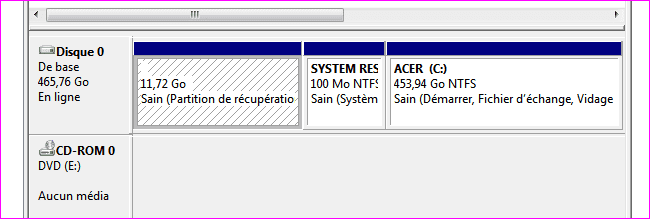
I got as far as SELECT DISK and got a little nervous-Do I choose disk 0,or disk 1?
I couldn't take a screen shot,but I think you know what I'm refering to.

This has got me a little edgy.I hope to be able to talk to you guys before the day is out(EST).:)

I know you've got (W7 HD) typed in your posst,but I have Acer C:.I WANT a W7 HD.How do I get this?I had a choice of either disk 0,or disk 1.I know if I choose the wrong one I wont be typing for a while:D.
 

My Computer My Computer

Computer Manufacturer/Model Number
Acer Aspire 5517-5427 Notebook
OS
MS Windows 7 Home Premium 64-bit
CPU
AMD K8/AMD Athlon(tm) Processor TF-20 @1.6G
Motherboard
Acer Aspire 5517 (Socket S1G1)
Memory
2.0GB Dual-Channel DDR2 @ 319MHz 5-5-5-15
Graphics Card(s)
ATI Radeon HD 3200 Graphics (Acer Incorporated [ALI])
Sound Card
Realtek High Definition Audio
Monitor(s) Displays
Generic PnP Monitor @ 1366x768
Hard Drives
244.20GB Western Digital WDC WD2500BEVT-22A23T0 ATA Device (IDE)
PSU
Stock
Case
Stock
Cooling
Stock
Mouse
Gigaware-Wireless
Internet Speed
HA!

Attachments

  • Capture.PNG
    Capture.PNG
    5.2 KB · Views: 1

My Computer My Computer

Computer type
PC/Desktop
Computer Manufacturer/Model Number
Custom Build
OS
Windows 7 Professional SP1 - x64 [Non-UEFI Boot]
CPU
Ivy Bridge Core i5 3570K (Delidded)
Motherboard
Asus P8Z77-V LE PLUS
Memory
G.Skill "Ares" DDR3 PC3-12800 - 1600MHz (16Gb)
Graphics Card(s)
Asus Dual-RX480-O4G
Sound Card
Creative Sound Blaster Z w/5.1 sound system
Monitor(s) Displays
Asus IPS 23"
Screen Resolution
16/9
Hard Drives
Internal:
500Go Sata 6Gb/s (x2)
500Go Sata 3Gb/s (x2)
SSD 60Go Sata 6Gb/s
PSU
In Win C 900W Series 80+ Platinum
Case
Thermaltake Chaser A71
Cooling
Custom Water Cooling Loop
Keyboard
Cooler Master QuickFire XTi
Mouse
Razer Imperator 2012 (4G)
Antivirus
MSE
Browser
IE 11.0.xxx Rtm
Other Info
"Raid0" with Intel Smart Response Technology (HDD/SSD)
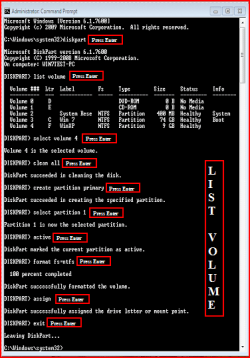
In this shot, the Recovery Partition is Volume 2.

List Volume.PNG
 

My Computer My Computer

OS
ME/XP/Vista/Win7
Back
Top