Is My Laptop Toast?

just curious guys...can anyone explain what happened to alkie's problem?......I mean why all the sudden it just boot up normally?
 

My Computer My Computer

At a glance

MS Windows 8Intel Core i5 @ 2.27GHz Arrandale 32nm Techno...8.0GB Dual-Channel DDR3 @ 532MHz (7-7-7-20)ATI Mobility Radeon HD 4300 Series (Dell)
Computer type
PC/Desktop
Computer Manufacturer/Model Number
Dell inspiron 1564
OS
MS Windows 8
CPU
Intel Core i5 @ 2.27GHz Arrandale 32nm Technology
Motherboard
Dell Inc. 0M9XW4 (U2E1)
Memory
8.0GB Dual-Channel DDR3 @ 532MHz (7-7-7-20)
Graphics Card(s)
ATI Mobility Radeon HD 4300 Series (Dell)
Sound Card
Realtek High Definition Audio
Monitor(s) Displays
Generic PnP Monitor on ATI Mobility Radeon HD 4330
Screen Resolution
1366x768 pixels
Hard Drives
1 tb TOSHIBA (SATA)
PSU
built-in
Case
Dell Laptop
Cooling
built-in
Keyboard
built-in
Mouse
Dell Touchpad/Microsoft Arc Mouse
Other Info
Snake Laptop Skin, Detachable Alfa USB wifi with custom 15dbi antenna (for better signal range)
just curious guys...can anyone explain what happened to alkie's problem?......I mean why all the sudden it just boot up normally?
Just got lucky I guess, pc's are like women sometimes:

Most of the time you can't understand them,
Some of the time you can't live with them,
But you definitely can't live without them!! ;)

(Apologies to all our female members)
 

My Computer My Computer

At a glance

Windows 7 UltimateIntel Core 2 Duo 2ghz3GB DDR2Mobile Intel 965 Express Chipset Family
Computer Manufacturer/Model Number
Toshiba Satellite A300 1J1
OS
Windows 7 Ultimate
CPU
Intel Core 2 Duo 2ghz
Motherboard
Intel GM965
Memory
3GB DDR2
Graphics Card(s)
Mobile Intel 965 Express Chipset Family
Sound Card
Realtek High Definition Audio
Monitor(s) Displays
Generic
Screen Resolution
1280x800
Hard Drives
250GB
Thanks if this hotfix indeed solves the problem, how can I download and install it onto a laptop that refuses to boot?

Now you booted, perhaps try to install this patch/fix to avoid this to happen again

I had the same probs as you and the only way to booted up, was to try three or four time to start/stop wildly on the button! :( been a month and few weeks that had never happen again..but now patched it.
 

My Computer My Computer

At a glance

Windows 7 Professional SP1 - x64 [Non-UEFI Boot]Ivy Bridge Core i5 3570K (Delidded)G.Skill "Ares" DDR3 PC3-12800 - 1600MHz (16Gb)Asus Dual-RX480-O4G
Computer type
PC/Desktop
Computer Manufacturer/Model Number
Custom Build
OS
Windows 7 Professional SP1 - x64 [Non-UEFI Boot]
CPU
Ivy Bridge Core i5 3570K (Delidded)
Motherboard
Asus P8Z77-V LE PLUS
Memory
G.Skill "Ares" DDR3 PC3-12800 - 1600MHz (16Gb)
Graphics Card(s)
Asus Dual-RX480-O4G
Sound Card
Creative Sound Blaster Z w/5.1 sound system
Monitor(s) Displays
Asus IPS 23"
Screen Resolution
16/9
Hard Drives
Internal:
500Go Sata 6Gb/s (x2)
500Go Sata 3Gb/s (x2)
SSD 60Go Sata 6Gb/s
PSU
In Win C 900W Series 80+ Platinum
Case
Thermaltake Chaser A71
Cooling
Custom Water Cooling Loop
Keyboard
Cooler Master QuickFire XTi
Mouse
Razer Imperator 2012 (4G)
Antivirus
MSE
Browser
IE 11.0.xxx Rtm
Other Info
"Raid0" with Intel Smart Response Technology (HDD/SSD)
he he he nice one alkie.....I just hope I got the same luck when that happened to me...:)
 

My Computer My Computer

At a glance

MS Windows 8Intel Core i5 @ 2.27GHz Arrandale 32nm Techno...8.0GB Dual-Channel DDR3 @ 532MHz (7-7-7-20)ATI Mobility Radeon HD 4300 Series (Dell)
Computer type
PC/Desktop
Computer Manufacturer/Model Number
Dell inspiron 1564
OS
MS Windows 8
CPU
Intel Core i5 @ 2.27GHz Arrandale 32nm Technology
Motherboard
Dell Inc. 0M9XW4 (U2E1)
Memory
8.0GB Dual-Channel DDR3 @ 532MHz (7-7-7-20)
Graphics Card(s)
ATI Mobility Radeon HD 4300 Series (Dell)
Sound Card
Realtek High Definition Audio
Monitor(s) Displays
Generic PnP Monitor on ATI Mobility Radeon HD 4330
Screen Resolution
1366x768 pixels
Hard Drives
1 tb TOSHIBA (SATA)
PSU
built-in
Case
Dell Laptop
Cooling
built-in
Keyboard
built-in
Mouse
Dell Touchpad/Microsoft Arc Mouse
Other Info
Snake Laptop Skin, Detachable Alfa USB wifi with custom 15dbi antenna (for better signal range)
One thing you might want to do now that it booted is to grab something like Speccy,

Speccy - Download

and check what make of hard drive is in your laptop and run the manufacturer's diagnostic program on it (SeaTools for Seagate, Data lifeGuard Tools for WD, HUTIL for Samsung), and check the hard drive as a duff drive can stop the computer from booting.

That hotfix might be a good idea but in this case it won't help,

I switch on, a get a black screen for longer than normal then the Toshiba screen appears, (pressing F2 or F12 gets me nowhere), it remains there for a while and then returns to the black screen again.
at that point the computer hasn't gotten as far as to be loading Windows, it is hung at the bios. The only way i can see it helping is if for some reason Windows is parking the hard drive, and it then takes several attempts at booting for it to unlock.
 

My Computer My Computer

At a glance

Win 7 Ultimate x64FX-8350 @ 4.6 GHz so farADATA XPG V1 Series Black 8GB DDR3 1600Sapphire R9 270x Dual-X
Computer type
PC/Desktop
Computer Manufacturer/Model Number
Me
OS
Win 7 Ultimate x64
CPU
FX-8350 @ 4.6 GHz so far
Motherboard
Asus M5A97 EVO
Memory
ADATA XPG V1 Series Black 8GB DDR3 1600
Graphics Card(s)
Sapphire R9 270x Dual-X
Sound Card
Xonar DGX w/ Corsair Vengence 1300
Monitor(s) Displays
Acer S232HL Abid
Screen Resolution
1920x1080
Hard Drives
120 GB OCZ Vertex 3
500 GB Seagate 7200.12
PSU
Antec Earthwatts 650W Green
Case
Antec Three Hundred
Cooling
Cooler Master 212 EVO
Keyboard
Logitech G510
Mouse
Logitech G500s
Internet Speed
35000/3000
One thing you might want to do now that it booted is to grab something like Speccy,

Speccy - Download

and check what make of hard drive is in your laptop and run the manufacturer's diagnostic program on it (SeaTools for Seagate, Data lifeGuard Tools for WD, HUTIL for Samsung), and check the hard drive as a duff drive can stop the computer from booting.

That's what i did either when feeling i can reboot safely, with the Bios Tool & Windows Integrated Tools.

That hotfix might be a good idea but in this case it won't help,

Should he do it after the repair, i recon! If not already done.

I switch on, a get a black screen for longer than normal then the Toshiba screen appears, (pressing F2 or F12 gets me nowhere), it remains there for a while and then returns to the black screen again. at that point the computer hasn't gotten as far as to be loading Windows, it is hung at the bios. The only way i can see it helping is if for some reason Windows is parking the hard drive, and it then takes several attempts at booting for it to unlock.

That's exactly what happenned!
 

My Computer My Computer

At a glance

Windows 7 Professional SP1 - x64 [Non-UEFI Boot]Ivy Bridge Core i5 3570K (Delidded)G.Skill "Ares" DDR3 PC3-12800 - 1600MHz (16Gb)Asus Dual-RX480-O4G
Computer type
PC/Desktop
Computer Manufacturer/Model Number
Custom Build
OS
Windows 7 Professional SP1 - x64 [Non-UEFI Boot]
CPU
Ivy Bridge Core i5 3570K (Delidded)
Motherboard
Asus P8Z77-V LE PLUS
Memory
G.Skill "Ares" DDR3 PC3-12800 - 1600MHz (16Gb)
Graphics Card(s)
Asus Dual-RX480-O4G
Sound Card
Creative Sound Blaster Z w/5.1 sound system
Monitor(s) Displays
Asus IPS 23"
Screen Resolution
16/9
Hard Drives
Internal:
500Go Sata 6Gb/s (x2)
500Go Sata 3Gb/s (x2)
SSD 60Go Sata 6Gb/s
PSU
In Win C 900W Series 80+ Platinum
Case
Thermaltake Chaser A71
Cooling
Custom Water Cooling Loop
Keyboard
Cooler Master QuickFire XTi
Mouse
Razer Imperator 2012 (4G)
Antivirus
MSE
Browser
IE 11.0.xxx Rtm
Other Info
"Raid0" with Intel Smart Response Technology (HDD/SSD)
It could be something like this (sorry for the direct link, can't find the proper page at WD),

http://www.wdc.com/en/library/eide/79-880134.pdf

that was the problem, and the multiple reboots finally caused it to unlock. Which if I understand how it works, it is all on the hard drive and nothing from within the OS can affect it.
 

My Computer My Computer

At a glance

Win 7 Ultimate x64FX-8350 @ 4.6 GHz so farADATA XPG V1 Series Black 8GB DDR3 1600Sapphire R9 270x Dual-X
Computer type
PC/Desktop
Computer Manufacturer/Model Number
Me
OS
Win 7 Ultimate x64
CPU
FX-8350 @ 4.6 GHz so far
Motherboard
Asus M5A97 EVO
Memory
ADATA XPG V1 Series Black 8GB DDR3 1600
Graphics Card(s)
Sapphire R9 270x Dual-X
Sound Card
Xonar DGX w/ Corsair Vengence 1300
Monitor(s) Displays
Acer S232HL Abid
Screen Resolution
1920x1080
Hard Drives
120 GB OCZ Vertex 3
500 GB Seagate 7200.12
PSU
Antec Earthwatts 650W Green
Case
Antec Three Hundred
Cooling
Cooler Master 212 EVO
Keyboard
Logitech G510
Mouse
Logitech G500s
Internet Speed
35000/3000
Take out the battery, disconnect the power supply, remove the HDD and the memory, then hold down the power button for 10 seconds to remove any residual power from the system. Then reinstall the battery and the memory, connect the power supply and try to start it up. That should get you to the bios. Disconnect power again and reinstall the HDD and you should be back to normal.
 
That's what i learned while ago on my first laptop, but thought that was only to make the Hdd stop running as it doesn't stop right away when computer's stop when you change Ram Stick for exemple. Never really thought it had to be with the drive to be reset that way when need booted...
 

My Computer My Computer

At a glance

Windows 7 Professional SP1 - x64 [Non-UEFI Boot]Ivy Bridge Core i5 3570K (Delidded)G.Skill "Ares" DDR3 PC3-12800 - 1600MHz (16Gb)Asus Dual-RX480-O4G
Computer type
PC/Desktop
Computer Manufacturer/Model Number
Custom Build
OS
Windows 7 Professional SP1 - x64 [Non-UEFI Boot]
CPU
Ivy Bridge Core i5 3570K (Delidded)
Motherboard
Asus P8Z77-V LE PLUS
Memory
G.Skill "Ares" DDR3 PC3-12800 - 1600MHz (16Gb)
Graphics Card(s)
Asus Dual-RX480-O4G
Sound Card
Creative Sound Blaster Z w/5.1 sound system
Monitor(s) Displays
Asus IPS 23"
Screen Resolution
16/9
Hard Drives
Internal:
500Go Sata 6Gb/s (x2)
500Go Sata 3Gb/s (x2)
SSD 60Go Sata 6Gb/s
PSU
In Win C 900W Series 80+ Platinum
Case
Thermaltake Chaser A71
Cooling
Custom Water Cooling Loop
Keyboard
Cooler Master QuickFire XTi
Mouse
Razer Imperator 2012 (4G)
Antivirus
MSE
Browser
IE 11.0.xxx Rtm
Other Info
"Raid0" with Intel Smart Response Technology (HDD/SSD)
I learned that trick will start about 8 of 10 laptops that have the same problem, regardless of make or model, although sometimes you also have to disconnect the CMOS battery.
 
This sounds liker one of those features that is great in theory but not so good in practice.
 

My Computer My Computer

At a glance

Win 7 Ultimate x64FX-8350 @ 4.6 GHz so farADATA XPG V1 Series Black 8GB DDR3 1600Sapphire R9 270x Dual-X
Computer type
PC/Desktop
Computer Manufacturer/Model Number
Me
OS
Win 7 Ultimate x64
CPU
FX-8350 @ 4.6 GHz so far
Motherboard
Asus M5A97 EVO
Memory
ADATA XPG V1 Series Black 8GB DDR3 1600
Graphics Card(s)
Sapphire R9 270x Dual-X
Sound Card
Xonar DGX w/ Corsair Vengence 1300
Monitor(s) Displays
Acer S232HL Abid
Screen Resolution
1920x1080
Hard Drives
120 GB OCZ Vertex 3
500 GB Seagate 7200.12
PSU
Antec Earthwatts 650W Green
Case
Antec Three Hundred
Cooling
Cooler Master 212 EVO
Keyboard
Logitech G510
Mouse
Logitech G500s
Internet Speed
35000/3000
I learned that trick will start about 8 of 10 laptops that have the same problem, regardless of make or model, although sometimes you also have to disconnect the CMOS battery.

I've done that lately, it had only reseted date & time to factory date made.

Thanks for that little trick when stuck with an unbootable hard drive!:)
 

My Computer My Computer

At a glance

Windows 7 Professional SP1 - x64 [Non-UEFI Boot]Ivy Bridge Core i5 3570K (Delidded)G.Skill "Ares" DDR3 PC3-12800 - 1600MHz (16Gb)Asus Dual-RX480-O4G
Computer type
PC/Desktop
Computer Manufacturer/Model Number
Custom Build
OS
Windows 7 Professional SP1 - x64 [Non-UEFI Boot]
CPU
Ivy Bridge Core i5 3570K (Delidded)
Motherboard
Asus P8Z77-V LE PLUS
Memory
G.Skill "Ares" DDR3 PC3-12800 - 1600MHz (16Gb)
Graphics Card(s)
Asus Dual-RX480-O4G
Sound Card
Creative Sound Blaster Z w/5.1 sound system
Monitor(s) Displays
Asus IPS 23"
Screen Resolution
16/9
Hard Drives
Internal:
500Go Sata 6Gb/s (x2)
500Go Sata 3Gb/s (x2)
SSD 60Go Sata 6Gb/s
PSU
In Win C 900W Series 80+ Platinum
Case
Thermaltake Chaser A71
Cooling
Custom Water Cooling Loop
Keyboard
Cooler Master QuickFire XTi
Mouse
Razer Imperator 2012 (4G)
Antivirus
MSE
Browser
IE 11.0.xxx Rtm
Other Info
"Raid0" with Intel Smart Response Technology (HDD/SSD)
Run the maker's full HD diagnostics/repair CD scan from their Support Downloads webpage. Then test your memory for 5-6 passes or overnight with memtest86 bootable CD.

The procedure when Windows will not start is to boot the Win7 DVD Repair console or Repair CD, let if find an installation and offer the repair - if not or if that fails, then again boot and click through to Recovery Tools list to run Startup Repair repeatedly with reboots until it starts up. You may need to try marking Win7 active for it to repair or rewrite the MBR.

There are links in theog's first post to the Repair CD download, Startup Repair tutorial, Repair CD screenshots, Marking Win7 active, etc.

If Repair fails, seek help here in the forums while testing HD with diagnostics (above) and Memory with memtest86.

If all fails, use free Paragon Rescue CD to attempt to recover the Win7 partition. If not, it will copy off your files if they are recoverable.

You can then run Recovery or reinstall. It is much better to have an externally stored Win7 Backup Image to reimage your HD in 15 minutes, with your latest files backed up separately, so you needn't worry if your OS fails to start.
 
Thanks

Many thanks for all these suggestions guys, I appreciate it, unfortunately you guys have, on this occasion, been too helpful, all these different ideas I just dunno which one to try, if this ever happens again.

I have at least made a Windows 7 repair disc now but as I have my pc up and running again I am not sure whether I should install any fixes, as you know what they say:

"If it aint broke, don't fix it"

What do you think?
 

My Computer My Computer

At a glance

Windows 7 UltimateIntel Core 2 Duo 2ghz3GB DDR2Mobile Intel 965 Express Chipset Family
Computer Manufacturer/Model Number
Toshiba Satellite A300 1J1
OS
Windows 7 Ultimate
CPU
Intel Core 2 Duo 2ghz
Motherboard
Intel GM965
Memory
3GB DDR2
Graphics Card(s)
Mobile Intel 965 Express Chipset Family
Sound Card
Realtek High Definition Audio
Monitor(s) Displays
Generic
Screen Resolution
1280x800
Hard Drives
250GB
Many thanks for all these suggestions guys, I appreciate it, unfortunately you guys have, on this occasion, been too helpful, all these different ideas I just dunno which one to try, if this ever happens again.

I have at least made a Windows 7 repair disc now but as I have my pc up and running again I am not sure whether I should install any fixes, as you know what they say:

"If it aint broke, don't fix it"

What do you think?

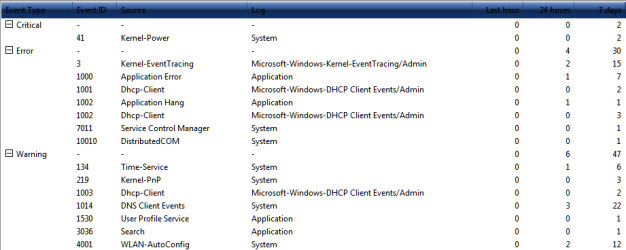
Just have a quick look at the "Events Viewer"...just to list if everything is running smooth for you.

Control Panel=>Administration Tools=>Events Viewer
 

My Computer My Computer

At a glance

Windows 7 Professional SP1 - x64 [Non-UEFI Boot]Ivy Bridge Core i5 3570K (Delidded)G.Skill "Ares" DDR3 PC3-12800 - 1600MHz (16Gb)Asus Dual-RX480-O4G
Computer type
PC/Desktop
Computer Manufacturer/Model Number
Custom Build
OS
Windows 7 Professional SP1 - x64 [Non-UEFI Boot]
CPU
Ivy Bridge Core i5 3570K (Delidded)
Motherboard
Asus P8Z77-V LE PLUS
Memory
G.Skill "Ares" DDR3 PC3-12800 - 1600MHz (16Gb)
Graphics Card(s)
Asus Dual-RX480-O4G
Sound Card
Creative Sound Blaster Z w/5.1 sound system
Monitor(s) Displays
Asus IPS 23"
Screen Resolution
16/9
Hard Drives
Internal:
500Go Sata 6Gb/s (x2)
500Go Sata 3Gb/s (x2)
SSD 60Go Sata 6Gb/s
PSU
In Win C 900W Series 80+ Platinum
Case
Thermaltake Chaser A71
Cooling
Custom Water Cooling Loop
Keyboard
Cooler Master QuickFire XTi
Mouse
Razer Imperator 2012 (4G)
Antivirus
MSE
Browser
IE 11.0.xxx Rtm
Other Info
"Raid0" with Intel Smart Response Technology (HDD/SSD)
Just have a quick look at the "Events Viewer"...just to list if everything is running smooth for you.

Control Panel=>Administration Tools=>Events Viewer
Well this is what it says, now I dunno if I am out of the woods, what do you guys make of this?
 

Attachments

  • Capture.PNG
    Capture.PNG
    11.5 KB · Views: 11

My Computer My Computer

At a glance

Windows 7 UltimateIntel Core 2 Duo 2ghz3GB DDR2Mobile Intel 965 Express Chipset Family
Computer Manufacturer/Model Number
Toshiba Satellite A300 1J1
OS
Windows 7 Ultimate
CPU
Intel Core 2 Duo 2ghz
Motherboard
Intel GM965
Memory
3GB DDR2
Graphics Card(s)
Mobile Intel 965 Express Chipset Family
Sound Card
Realtek High Definition Audio
Monitor(s) Displays
Generic
Screen Resolution
1280x800
Hard Drives
250GB
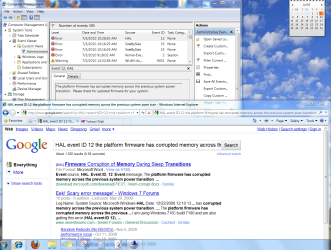
Use Administrative View to Google repeat errors to learn about them and see how others have fixed them:

Capture.PNG
 
Thanks again for the info
 

My Computer My Computer

At a glance

Windows 7 UltimateIntel Core 2 Duo 2ghz3GB DDR2Mobile Intel 965 Express Chipset Family
Computer Manufacturer/Model Number
Toshiba Satellite A300 1J1
OS
Windows 7 Ultimate
CPU
Intel Core 2 Duo 2ghz
Motherboard
Intel GM965
Memory
3GB DDR2
Graphics Card(s)
Mobile Intel 965 Express Chipset Family
Sound Card
Realtek High Definition Audio
Monitor(s) Displays
Generic
Screen Resolution
1280x800
Hard Drives
250GB
Back
Top