USB Wireless Adapter (AWUS036H) Can't Connect

bamowo

New member
Local time
12:10 PM
Messages
6
Hi,

I have an interesting issue that I'm wondering if anyone can set me straight on. To preface, I am computer literate. I am not asking for basic step by step instructions here.

I installed the Alfa AWUS036H 802.11b/g wireless adapter. Initially, I used the drivers contained on the included CD for my OS (Win7 x64 Ultimate). The drivers installed correctly according to the feedback I was given. From there, I was immediately able to see the available networks through the Windows wireless function as no third party utility was installed. However, I could not connect to any of the wireless networks that I have the credentials for (2 different networks). One is an open network, and one is WEP. It could not connect to either, I verified my credentials were correct as well.

At this point, I tried the adapter on another computer running WinXP (32 bit), the corresponding winxp drivers were used and I was able to see AND connect to these two networks. Therefore, I verified that the adapter is not defective.

After this, I went online and downloaded the most recent drivers. Uninstalled the previously installed drivers and installed the new package two separate ways. Way 1: Installed only the drivers and tried with Windows managing the connection. Didn't work. Way 2: Uninstalled drivers and reinstalled complete package which included Realtek wireless utility. Again, able to see the networks but not able to connect to any.

I am at a loss at this point as to what may be the problem. I have never installed a wireless adapter to this computer before but do not have another usb adapter to try on it to verify it's not a function of the system/OS itself.

Has anyone had similar issues or could help me troubleshoot?

Thanks.

EDIT: Added breaks.
 
Last edited:

My Computer My Computer

At a glance

Win7x64 Ult.i7-920ATI 4890
Computer Manufacturer/Model Number
N/A
OS
Win7x64 Ult.
CPU
i7-920
Motherboard
GA-EX58-EXTREME
Graphics Card(s)
ATI 4890
Sound Card
N/A
Monitor(s) Displays
Dell 2407 WFP
Hi, I have an interesting issue that I'm wondering if anyone can set me straight on. To preface, I am computer literate. I am not asking for basic step by step instructions here. I installed the Alfa AWUS036H 802.11b/g wireless adapter. Initially, I used the drivers contained on the included CD for my OS (Win7 x64 Ultimate). The drivers installed correctly according to the feedback I was given. From there, I was immediately able to see the available networks through the Windows wireless function as no third party utility was installed. However, I could not connect to any of the wireless networks that I have the credentials for (2 different networks). One is an open network, and one is WEP. It could not connect to either, I verified my credentials were correct as well. At this point, I tried the adapter on another computer running WinXP (32 bit), the corresponding winxp drivers were used and I was able to see AND connect to these two networks. Therefore, I verified that the adapter is not defective. After this, I went online and downloaded the most recent drivers. Uninstalled the previously installed drivers and installed the new package two separate ways. Way 1: Installed only the drivers and tried with Windows managing the connection. Didn't work. Way 2: Uninstalled drivers and reinstalled complete package which included Realtek wireless utility. Again, able to see the networks but not able to connect to any. I am at a loss at this point as to what may be the problem. I have never installed a wireless adapter to this computer before but do not have another usb adapter to try on it to verify it's not a function of the system/OS itself. Has anyone had similar issues or could help me troubleshoot? Thanks.


Great first post.

Are you by chance using "homegroup"? sometimes (on some systems) homegroup has connectivity issues. It uses IPv6 and that gives some hardware (esp 64 bit and older hardware) fits. You can check by creating a new network connection using "workgroup".

Let us know if you need help

Ken
 

My Computer My Computer

At a glance

Win 8 Release candidate 8400[email protected]4 gigsNvidia 9600M
Computer Manufacturer/Model Number
HP Pavillion dv-7 1005 Tx
OS
Win 8 Release candidate 8400
CPU
[email protected]
Memory
4 gigs
Graphics Card(s)
Nvidia 9600M
Sound Card
HD built-in
Monitor(s) Displays
17" Wxga
Screen Resolution
1440x900
Cooling
none
Internet Speed
45Mb down 5Mb up
I will check this when I get home. I did look into disabling homegroup when I googled for a solution initially, what came back didn't help though because in the Network and Sharing Center there is no Homegroup listed. I believe, recalling from memory, that there is an option to join a Homegroup but it reported that I could not because I was not in a Home/Work location but in a Public location. I must've set this location originally but it is no longer correct as I am using the computer at Home. From this point, I couldn't figure out how to change my network location because it seemed like I had to be connected to a network to do so...

Regardless, I will try this and report back. Thanks.
 

My Computer My Computer

At a glance

Win7x64 Ult.i7-920ATI 4890
Computer Manufacturer/Model Number
N/A
OS
Win7x64 Ult.
CPU
i7-920
Motherboard
GA-EX58-EXTREME
Graphics Card(s)
ATI 4890
Sound Card
N/A
Monitor(s) Displays
Dell 2407 WFP
I will check this when I get home. I did look into disabling homegroup when I googled for a solution initially, what came back didn't help though because in the Network and Sharing Center there is no Homegroup listed. I believe, recalling from memory, that there is an option to join a Homegroup but it reported that I could not because I was not in a Home/Work location but in a Public location. I must've set this location originally but it is no longer correct as I am using the computer at Home. From this point, I couldn't figure out how to change my network location because it seemed like I had to be connected to a network to do so...

Regardless, I will try this and report back. Thanks.

You can check by typing cmd in search then ipconfig /all. If there is an IPv6 address that is the problem.

ken
 

My Computer My Computer

At a glance

Win 8 Release candidate 8400[email protected]4 gigsNvidia 9600M
Computer Manufacturer/Model Number
HP Pavillion dv-7 1005 Tx
OS
Win 8 Release candidate 8400
CPU
[email protected]
Memory
4 gigs
Graphics Card(s)
Nvidia 9600M
Sound Card
HD built-in
Monitor(s) Displays
17" Wxga
Screen Resolution
1440x900
Cooling
none
Internet Speed
45Mb down 5Mb up
aaaggh!

Ken,

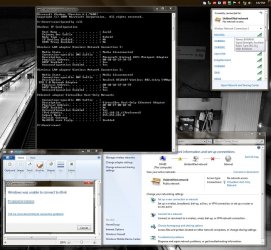
This screenshot shows what I see. I disabled IPv6 via two ways, first just unchecking it in the adapter protocols, then using the registry (Disable & Turn Off IPv6 in Windows Vista, windows 7 | Best Tutorials, Tips, Tricks For You). Neither has helped. I didn't forget to reboot either.

As you can see, I can see plenty of APs but can't connect to anything. I was convinced when looking more into IPv6 and homegroup issues that that was my issue... until I got home and tried it. Didn't work.

Also, your first comment about connecting through a "workgroup" vs. a "homegroup," can you elaborate? I can't find that.
 

Attachments

  • Untitled.jpg
    Untitled.jpg
    132.6 KB · Views: 268

My Computer My Computer

At a glance

Win7x64 Ult.i7-920ATI 4890
Computer Manufacturer/Model Number
N/A
OS
Win7x64 Ult.
CPU
i7-920
Motherboard
GA-EX58-EXTREME
Graphics Card(s)
ATI 4890
Sound Card
N/A
Monitor(s) Displays
Dell 2407 WFP
bump.
 

My Computer My Computer

At a glance

Win7x64 Ult.i7-920ATI 4890
Computer Manufacturer/Model Number
N/A
OS
Win7x64 Ult.
CPU
i7-920
Motherboard
GA-EX58-EXTREME
Graphics Card(s)
ATI 4890
Sound Card
N/A
Monitor(s) Displays
Dell 2407 WFP
One thing I would try is if you have an Ethernet adapter in the PC and a Ethernet Cable that can reach the router try connecting it and see if it resolves, I'm 100% sure it will. After it resolves have the wireless try again and see what happens, I'm guessing it will resolve and when you remove the Ethernet cable it will continue to work, this is known as a lazy wireless connection and can often eliminate many days of frustration, had a DELL XPS 600 that did this.
 

My Computer My Computer

At a glance

Vista 64 Ultimate, Windows 7 64 Ultimate, Ubu...i7 975 3.3 GHz Extreme (Factory OC'd to 3.6 GHz)18 Gb Tri-Channel 1066ATI 5970 2048 Mb
Computer Manufacturer/Model Number
DELL XPS Studio 435T
OS
Vista 64 Ultimate, Windows 7 64 Ultimate, Ubuntu 9.10
CPU
i7 975 3.3 GHz Extreme (Factory OC'd to 3.6 GHz)
Motherboard
DELL provided
Memory
18 Gb Tri-Channel 1066
Graphics Card(s)
ATI 5970 2048 Mb
Sound Card
X-Fi Extreme Gamer
Monitor(s) Displays
Vizio 37" HD-TV
Screen Resolution
1920 x 1080
Hard Drives
1.5 Tb HDD
1.5 Tb HDD
2.0 Tb Network Drive
512 Gb Crucial SSD
PSU
DELL Provided 475 watts
Case
DELL
Cooling
3 fans
Keyboard
Logitech Performance K350 Wireless
Mouse
Logitech Performance MX Wireless
Internet Speed
3 Mb up 750 Kb down
Other Info
Bamboo Fun Tablet, Belkin N+ Wireless router, Pioneer Dolby System Wireless Headphones, Bose 5.1 Dolby Surround Sound System, LifeCam VX 3000 Webcam, Blu-Ray/Hi Def DVD +RW combo and Blu-ray +RW,l 15 in 1 media card reader, Logitech Rumblepad 2, Hauppauge 2250 DTV Tuner with MS Media Center Remote

Laptop:Alienware M17x, Q9100 CPU, 8Gb RAM, 1920x1200 WUXGA LCD driven by 4870's in CrossFireX, Bl
One thing I would try is if you have an Ethernet adapter in the PC and a Ethernet Cable that can reach the router try connecting it and see if it resolves, I'm 100% sure it will. After it resolves have the wireless try again and see what happens, I'm guessing it will resolve and when you remove the Ethernet cable it will continue to work, this is known as a lazy wireless connection and can often eliminate many days of frustration, had a DELL XPS 600 that did this.

I do agree, the first time i activated Windows 7 rtm, i had a hell time to connect to the wireless network. I used instead an ethernet cable and after few times (looks like it tooks me half a day),the wireless hooked the network.

Might help for Workgroup settings:
http://www.sevenforums.com/tutorials/51711-workgroup-name-view-change.html
 

My Computer My Computer

At a glance

Windows 7 Professional SP1 - x64 [Non-UEFI Boot]Ivy Bridge Core i5 3570K (Delidded)G.Skill "Ares" DDR3 PC3-12800 - 1600MHz (16Gb)Asus Dual-RX480-O4G
Computer type
PC/Desktop
Computer Manufacturer/Model Number
Custom Build
OS
Windows 7 Professional SP1 - x64 [Non-UEFI Boot]
CPU
Ivy Bridge Core i5 3570K (Delidded)
Motherboard
Asus P8Z77-V LE PLUS
Memory
G.Skill "Ares" DDR3 PC3-12800 - 1600MHz (16Gb)
Graphics Card(s)
Asus Dual-RX480-O4G
Sound Card
Creative Sound Blaster Z w/5.1 sound system
Monitor(s) Displays
Asus IPS 23"
Screen Resolution
16/9
Hard Drives
Internal:
500Go Sata 6Gb/s (x2)
500Go Sata 3Gb/s (x2)
SSD 60Go Sata 6Gb/s
PSU
In Win C 900W Series 80+ Platinum
Case
Thermaltake Chaser A71
Cooling
Custom Water Cooling Loop
Keyboard
Cooler Master QuickFire XTi
Mouse
Razer Imperator 2012 (4G)
Antivirus
MSE
Browser
IE 11.0.xxx Rtm
Other Info
"Raid0" with Intel Smart Response Technology (HDD/SSD)
Similar situation

I have contacted Alfa Networks, downloaded, installed the latest driver/utility, disabled the HP Wireless assistant and but still cannot connect (but can see APS) . BTW, I am in workgroup and BIOS was updated two months ago. Thanks for any suggestions
 

My Computer My Computer

At a glance

Windows 7 Home Premium 32bitIntel Atom 270 1.6 ghz2GBNvidia Ion
Computer Manufacturer/Model Number
HP 311-1000
OS
Windows 7 Home Premium 32bit
CPU
Intel Atom 270 1.6 ghz
Memory
2GB
Graphics Card(s)
Nvidia Ion

My Computer My Computer

At a glance

windows 72.8 Core 2 DUO2GBNVIDIA 8500GT
Computer Manufacturer/Model Number
Intel DG31PR
OS
windows 7
CPU
2.8 Core 2 DUO
Motherboard
Intel DG31PR
Memory
2GB
Graphics Card(s)
NVIDIA 8500GT
Sound Card
Onboard
Monitor(s) Displays
HP 2009f widescreen
Hard Drives
200 GB sata 2, 16MB Cache
PSU
400 watts
Case
Pro Media Gaming PC
Cooling
Cooler master
Back
Top