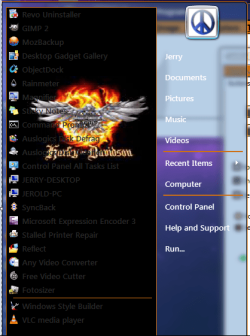
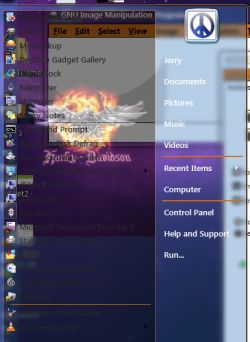
How does Aero Works - Some questions about Windows 7 skinning

capri435

New member
Hi

I am working on a windows 7 theme and have certain issues and doubts.If someone could give me some clues and insight in to how aero works would be really great

1.Drop shadow in Start menu


The image i made for start menu has a drop shadow of about 3 pixels which is not coming as it should be in windows style builder

I have done some research and the result is the image does not have any problem........it works fine in one of the themes called Mac 7

Mac 7 Theme

there has to be a setting that makes it work related to transparency in images or shadow fill etc

Here are the two images that show the difference
71593288.jpg


26274485.jpg


2.How to make a theme that changes color when hue is changed from Personalization

How does Aero work ??? what do i need to create for the color system to work

There is one more issue here , I normally turn off the transparency as I like the solid colorfill.But when transparency is turned off all the smooth drop shadows around windows and start menu turn into ugly borders.

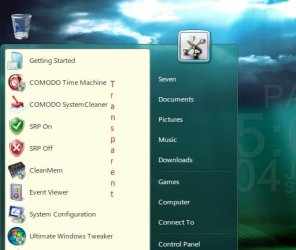
3.When i make a Semi transparent image for start menu this how it turns out to be in the theme.What is that dark color coming below the program list??

48991636.jpg


Thanks
 

My Computer

OS
Windows 7
Hi Capri435 & Welcome to the forum...!

I'm not pro enough to tell you about the shadows (i only made 3 vs, so i'm still a novice...)
but i think i can help you about the start menu (i had the same issue).

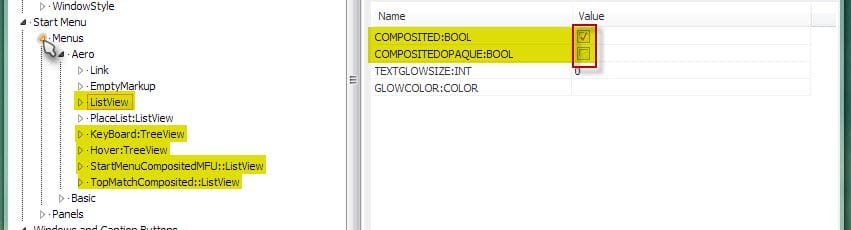
By comparing with other visual styles i understood i had to set some parameters...
So, see my screenshot and do the same setting on the right column for each marked point on the left...
I'm not sure if they are all necessary, but it works for me like that...

I hope it will help you...

Note : if needed, i show you how to add the property...
 

Attachments

  • 4-07-2010 11-05-12.jpg
    4-07-2010 11-05-12.jpg
    51.4 KB · Views: 33
  • 4-07-2010 11-08-26.jpg
    4-07-2010 11-08-26.jpg
    43.6 KB · Views: 38

My Computer

Computer Manufacturer/Model Number
Home Made 00x
OS
7Home64
CPU
AMD Phenom II x4 965 - 3,4GHz
Motherboard
Gigabyte GA-880GMA-UD2H
Memory
DDR3 1333Mhz, 8Gb (Corsair xms3 : 9, 9, 9, 24)
Graphics Card(s)
GeForce GTX550Ti 1024mb GDDR5 (Gainward)
Sound Card
Creative X-Fi ExtremeGamer
Monitor(s) Displays
Acer 27", led, full hd
Screen Resolution
1920x1080
Hard Drives
G-Skill SSD 80Gb + Kingston SSD 64Gb + WD sata 500Mb + Hitachi sata 1Tb
PSU
CombatPower 750W, 12cm fan
Case
Antec "Three Hundred", 12 + 14 cm fans
Cooling
Noctua NH-U12P (CPU) + 2xNF-B9 (HDD's) + NF-P12 (case side)
Keyboard
Logitech + Saitek "Cyborg Command Unit"
Mouse
Logitech LS1 laser
Internet Speed
4Mb/s
Other Info
6-fan-&-temp controller Scythe Kase Master Pro 5.25
Hi Capri435 & Welcome to the forum...!

I'm not pro enough to tell you about the shadows (i only made 3 vs, so i'm still a novice...)
but i think i can help you about the start menu (i had the same issue).

By comparing with other visual styles i understood i had to set some parameters...
So, see my screenshot and do the same setting on the right column for each marked point on the left...
I'm not sure if they are all necessary, but it works for me like that...

I hope it will help you...

Note : if needed, i show you how to add the property...

If i understood correctly I added composited:Bool property to all the properties shown in yellow on the left side.compositedopaque: bool was already there but check marke so I unchecked compositedopaque: bool and check marked composited:Bool

But it did not work and I also chcked the Mac7 theme where it works even without the composited:Bool property and the changes you mentioned

Am I missing something??
 

My Computer

OS
Windows 7
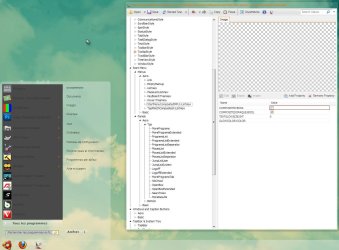
Damned, sorry... In my case it worked... but maybe i am missing something other...

I don't understand, look at these...
 

Attachments

  • 4-07-2010 13-01-06.jpg
    4-07-2010 13-01-06.jpg
    245.2 KB · Views: 48
  • 4-07-2010 13-01-29.jpg
    4-07-2010 13-01-29.jpg
    219.3 KB · Views: 40

My Computer

Computer Manufacturer/Model Number
Home Made 00x
OS
7Home64
CPU
AMD Phenom II x4 965 - 3,4GHz
Motherboard
Gigabyte GA-880GMA-UD2H
Memory
DDR3 1333Mhz, 8Gb (Corsair xms3 : 9, 9, 9, 24)
Graphics Card(s)
GeForce GTX550Ti 1024mb GDDR5 (Gainward)
Sound Card
Creative X-Fi ExtremeGamer
Monitor(s) Displays
Acer 27", led, full hd
Screen Resolution
1920x1080
Hard Drives
G-Skill SSD 80Gb + Kingston SSD 64Gb + WD sata 500Mb + Hitachi sata 1Tb
PSU
CombatPower 750W, 12cm fan
Case
Antec "Three Hundred", 12 + 14 cm fans
Cooling
Noctua NH-U12P (CPU) + 2xNF-B9 (HDD's) + NF-P12 (case side)
Keyboard
Logitech + Saitek "Cyborg Command Unit"
Mouse
Logitech LS1 laser
Internet Speed
4Mb/s
Other Info
6-fan-&-temp controller Scythe Kase Master Pro 5.25
Damned, sorry... In my case it worked... but maybe i am missing something other...

I don't understand, look at these...


Yeah that works mate I thought it was a fix for the drop shadow

the black thing below the program list is gone now

Thanks alot mate!!

How did you find it man....any reference or desciption of all these properties somewhere on the internet??
 

My Computer

OS
Windows 7
No really referencies but the WSB forum is pretty good and you get answers really fastly... (you must have received the link in the mail with your serial number, you need it to subscribe to the forum...).
For the start menu here, i compared with another VS which was right... a long work of trying, comparing, trying again... :sick:

Well, i'm glad to have helped you finally!
Do not hesitate to PM me, i'll help you again (if i can...) ;)
 

My Computer

Computer Manufacturer/Model Number
Home Made 00x
OS
7Home64
CPU
AMD Phenom II x4 965 - 3,4GHz
Motherboard
Gigabyte GA-880GMA-UD2H
Memory
DDR3 1333Mhz, 8Gb (Corsair xms3 : 9, 9, 9, 24)
Graphics Card(s)
GeForce GTX550Ti 1024mb GDDR5 (Gainward)
Sound Card
Creative X-Fi ExtremeGamer
Monitor(s) Displays
Acer 27", led, full hd
Screen Resolution
1920x1080
Hard Drives
G-Skill SSD 80Gb + Kingston SSD 64Gb + WD sata 500Mb + Hitachi sata 1Tb
PSU
CombatPower 750W, 12cm fan
Case
Antec "Three Hundred", 12 + 14 cm fans
Cooling
Noctua NH-U12P (CPU) + 2xNF-B9 (HDD's) + NF-P12 (case side)
Keyboard
Logitech + Saitek "Cyborg Command Unit"
Mouse
Logitech LS1 laser
Internet Speed
4Mb/s
Other Info
6-fan-&-temp controller Scythe Kase Master Pro 5.25
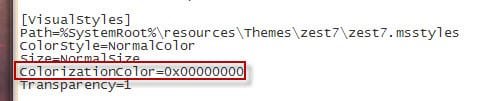
BTW i see you asked for the system colour... Do you mean the color of the windows in the personalization section (as shown)?
If this is it, you have to open your ".theme" file with Notepad and find the line shown in the attachment.
I can't tell you the colour codes, go & see in a file which have the colour you want to copy it...
"0x00000000" here is for "no colour" (totally white, which means in reality every colours, but this is not the debate...:sleepy:);

I hope this will help you...
 

Attachments

  • 4-07-2010 19-21-54.jpg
    4-07-2010 19-21-54.jpg
    26.2 KB · Views: 13
  • 4-07-2010 19-24-19.jpg
    4-07-2010 19-24-19.jpg
    26 KB · Views: 10

My Computer

Computer Manufacturer/Model Number
Home Made 00x
OS
7Home64
CPU
AMD Phenom II x4 965 - 3,4GHz
Motherboard
Gigabyte GA-880GMA-UD2H
Memory
DDR3 1333Mhz, 8Gb (Corsair xms3 : 9, 9, 9, 24)
Graphics Card(s)
GeForce GTX550Ti 1024mb GDDR5 (Gainward)
Sound Card
Creative X-Fi ExtremeGamer
Monitor(s) Displays
Acer 27", led, full hd
Screen Resolution
1920x1080
Hard Drives
G-Skill SSD 80Gb + Kingston SSD 64Gb + WD sata 500Mb + Hitachi sata 1Tb
PSU
CombatPower 750W, 12cm fan
Case
Antec "Three Hundred", 12 + 14 cm fans
Cooling
Noctua NH-U12P (CPU) + 2xNF-B9 (HDD's) + NF-P12 (case side)
Keyboard
Logitech + Saitek "Cyborg Command Unit"
Mouse
Logitech LS1 laser
Internet Speed
4Mb/s
Other Info
6-fan-&-temp controller Scythe Kase Master Pro 5.25
Damned, sorry... In my case it worked... but maybe i am missing something other...

I don't understand, look at these...

Can you define the steps used to get the left side of start menu to be semi-transparent? I've added a color to mine which did away with the bright white color but in trying what I think you are saying to do, it doesn't appear that way for me. Granted, I applied the theme after saving it to the desktop which never really implements all the changes correctly so that may have been the reason. Still better yet, details please.
 

My Computer

Computer Manufacturer/Model Number
Averatec 6130HS-20
OS
Windows 7 Professional 32-bit (6.1, Build 7600)
CPU
Intel(R) Pentium(R) 4 3.00 GHz HT
Memory
2.0 GB
Graphics Card(s)
ATI Mobility Radeon 9600 64MB
Sound Card
Realtek AC'97 Audio
Screen Resolution
1280 x 800
Hard Drives
Seagate 96023A 60GB 7200RPM -
Seagate FreeAgentDesktop 250GB
Cooling
20 Inch Box Fan
Mouse
Targus PAWM10 Wireless Optical Laptop Mouse
Oops, sorry but it's a bit confused for me... :confused:
Could you please be just a little clearer cause i'm lost...
Where did you add color? To your theme? And the code i gave doesn't make the theme appear white...? Is that the issue?
And you would like the detailled way to make your left side of start menu transparent...
Is that right, two requests, so...

Edit : Maybe you can add some images of your problem... ;)
Edit 2 : One thing, according to me, is that you have to copy your theme file and folder in the windows/resources folder (C:\Windows\Resources\Themes)
cause it is the path ordered by the "xxxx.theme" file, see the second line in the pic 2 of post #7...
Logically it could'nt work properly if you apply it from the desktop... But maybe i'm wrong...
 

My Computer

Computer Manufacturer/Model Number
Home Made 00x
OS
7Home64
CPU
AMD Phenom II x4 965 - 3,4GHz
Motherboard
Gigabyte GA-880GMA-UD2H
Memory
DDR3 1333Mhz, 8Gb (Corsair xms3 : 9, 9, 9, 24)
Graphics Card(s)
GeForce GTX550Ti 1024mb GDDR5 (Gainward)
Sound Card
Creative X-Fi ExtremeGamer
Monitor(s) Displays
Acer 27", led, full hd
Screen Resolution
1920x1080
Hard Drives
G-Skill SSD 80Gb + Kingston SSD 64Gb + WD sata 500Mb + Hitachi sata 1Tb
PSU
CombatPower 750W, 12cm fan
Case
Antec "Three Hundred", 12 + 14 cm fans
Cooling
Noctua NH-U12P (CPU) + 2xNF-B9 (HDD's) + NF-P12 (case side)
Keyboard
Logitech + Saitek "Cyborg Command Unit"
Mouse
Logitech LS1 laser
Internet Speed
4Mb/s
Other Info
6-fan-&-temp controller Scythe Kase Master Pro 5.25
Oops, sorry but it's a bit confused for me... :confused:
Could you please be just a little clearer cause i'm lost...
Where did you add color? To your theme? And the code i gave doesn't make the theme appear white...? Is that the issue?
And you would like the detailled way to make your left side of start menu transparent...
Is that right, two requests, so...

Edit : Maybe you can add some images of your problem... ;)
Edit 2 : One thing, according to me, is that you have to copy your theme file and folder in the windows/resources folder (C:\Windows\Resources\Themes)
cause it is the path ordered by the "xxxx.theme" file, see the second line in the pic 2 of post #7...
Logically it could'nt work properly if you apply it from the desktop... But maybe i'm wrong...

Left side transparent is the one I'm looking for. I added a color background to it way back yonder a long time ago. Instead of the default white, I made more of a white cream color. Yes, I know about adding it to resources/theme. Most of the time, I only add it there when I see that my edits have worked.
Thanks


Untitled.jpg
 

My Computer

Computer Manufacturer/Model Number
Averatec 6130HS-20
OS
Windows 7 Professional 32-bit (6.1, Build 7600)
CPU
Intel(R) Pentium(R) 4 3.00 GHz HT
Memory
2.0 GB
Graphics Card(s)
ATI Mobility Radeon 9600 64MB
Sound Card
Realtek AC'97 Audio
Screen Resolution
1280 x 800
Hard Drives
Seagate 96023A 60GB 7200RPM -
Seagate FreeAgentDesktop 250GB
Cooling
20 Inch Box Fan
Mouse
Targus PAWM10 Wireless Optical Laptop Mouse
Ok, sorry for the confuse...:o
So did you made it graphically, by editing the image in Windows Syle Builder? Or another way?
 

My Computer

Computer Manufacturer/Model Number
Home Made 00x
OS
7Home64
CPU
AMD Phenom II x4 965 - 3,4GHz
Motherboard
Gigabyte GA-880GMA-UD2H
Memory
DDR3 1333Mhz, 8Gb (Corsair xms3 : 9, 9, 9, 24)
Graphics Card(s)
GeForce GTX550Ti 1024mb GDDR5 (Gainward)
Sound Card
Creative X-Fi ExtremeGamer
Monitor(s) Displays
Acer 27", led, full hd
Screen Resolution
1920x1080
Hard Drives
G-Skill SSD 80Gb + Kingston SSD 64Gb + WD sata 500Mb + Hitachi sata 1Tb
PSU
CombatPower 750W, 12cm fan
Case
Antec "Three Hundred", 12 + 14 cm fans
Cooling
Noctua NH-U12P (CPU) + 2xNF-B9 (HDD's) + NF-P12 (case side)
Keyboard
Logitech + Saitek "Cyborg Command Unit"
Mouse
Logitech LS1 laser
Internet Speed
4Mb/s
Other Info
6-fan-&-temp controller Scythe Kase Master Pro 5.25
Ok, sorry for the confuse...:o
So did you made it graphically, by editing the image in Windows Syle Builder? Or another way?

ColorFill option in WSB. Do I need to make it an image?
 

My Computer

Computer Manufacturer/Model Number
Averatec 6130HS-20
OS
Windows 7 Professional 32-bit (6.1, Build 7600)
CPU
Intel(R) Pentium(R) 4 3.00 GHz HT
Memory
2.0 GB
Graphics Card(s)
ATI Mobility Radeon 9600 64MB
Sound Card
Realtek AC'97 Audio
Screen Resolution
1280 x 800
Hard Drives
Seagate 96023A 60GB 7200RPM -
Seagate FreeAgentDesktop 250GB
Cooling
20 Inch Box Fan
Mouse
Targus PAWM10 Wireless Optical Laptop Mouse
Yes, i think so...
But first have a look in the properties, there's a "color/transparentcolor" but i don't know about this property.
My method is to edit the image in the panel section so i can set my transparency exactly as i wish
and apply the properties described above in the menu section...
 

Attachments

  • 5-07-2010 00-21-34.jpg
    5-07-2010 00-21-34.jpg
    76.9 KB · Views: 10

My Computer

Computer Manufacturer/Model Number
Home Made 00x
OS
7Home64
CPU
AMD Phenom II x4 965 - 3,4GHz
Motherboard
Gigabyte GA-880GMA-UD2H
Memory
DDR3 1333Mhz, 8Gb (Corsair xms3 : 9, 9, 9, 24)
Graphics Card(s)
GeForce GTX550Ti 1024mb GDDR5 (Gainward)
Sound Card
Creative X-Fi ExtremeGamer
Monitor(s) Displays
Acer 27", led, full hd
Screen Resolution
1920x1080
Hard Drives
G-Skill SSD 80Gb + Kingston SSD 64Gb + WD sata 500Mb + Hitachi sata 1Tb
PSU
CombatPower 750W, 12cm fan
Case
Antec "Three Hundred", 12 + 14 cm fans
Cooling
Noctua NH-U12P (CPU) + 2xNF-B9 (HDD's) + NF-P12 (case side)
Keyboard
Logitech + Saitek "Cyborg Command Unit"
Mouse
Logitech LS1 laser
Internet Speed
4Mb/s
Other Info
6-fan-&-temp controller Scythe Kase Master Pro 5.25
Oops, sorry but it's a bit confused for me... :confused:
Could you please be just a little clearer cause i'm lost...
Where did you add color? To your theme? And the code i gave doesn't make the theme appear white...? Is that the issue?
And you would like the detailled way to make your left side of start menu transparent...
Is that right, two requests, so...

Edit : Maybe you can add some images of your problem... ;)
Edit 2 : One thing, according to me, is that you have to copy your theme file and folder in the windows/resources folder (C:\Windows\Resources\Themes)
cause it is the path ordered by the "xxxx.theme" file, see the second line in the pic 2 of post #7...
Logically it could'nt work properly if you apply it from the desktop... But maybe i'm wrong...

Left side transparent is the one I'm looking for. I added a color background to it way back yonder a long time ago. Instead of the default white, I made more of a white cream color. Yes, I know about adding it to resources/theme. Most of the time, I only add it there when I see that my edits have worked.
Thanks


View attachment 83251


You need to give your images some transparency at
Start Menu > Panels > Aero > Top > ProgramsList
Start Menu > Panels > Aero > Top > ProgramsListExtended
just did what scoopeeedoo said to do
hope this helps
Jerry
 

Attachments

  • Capture4.PNG
    Capture4.PNG
    169.8 KB · Views: 2
  • Capture5.PNG
    Capture5.PNG
    286 KB · Views: 3

My Computer

Computer type
Laptop
Computer Manufacturer/Model Number
Sager NP9170
OS
Win 7 Pro x64 / Win 10 Pro
CPU
Intel(R) Core(TM) i7-3630QM CPU @ 2.40GHz
Motherboard
CLEVO P170EM
Memory
12 GB
Graphics Card(s)
(1) Intel(R) HD Graphics 4000 (2) NVIDIA GeForce GTX 675M
Sound Card
(1) Realtek High Definition Audio (2) Intel(R) Display Aud
Monitor(s) Displays
17.3
Screen Resolution
1920x1080
Hard Drives
(1) Samsung 860 EVO 500GB(OS) (1) Samsung 860 EVO 500GB(Data)
Keyboard
Backlite
Antivirus
MSE, Malwarebytes Pro
Browser
Firefox
Other Info
DESKTOP: Custom-built.
OS: Win 10 Pro x64.
CASE: Rosewill R5.
CPU: Intel I5 4670K CPU @ 3.40GHz.
CPU COOLER: Cool Master Hyper 212 EVO.
MOTHERBOARD: Asus Z87-A.
MEMORY: Kingston HyperX 2x4 GB.
GPU: Nvidia Geforce 650 TI.
PSU: Corsair TX750.
DRIVES: (1) Samsung 840 120 GB SSD (2) Western Digital blue 500 GB 7200 RPM.
I had a look at that Mac theme you said had the shadow and it still doesn't have a proper shadow like normal windows, he just added the shadow to the start menu image but there is still a blur effect behind the shadow when it gets applied so there is no trick to it, it's just not possible to add a proper shadow for the start menu.

And yes if you want to have a transparent start menu your images need to be transparent to start off with.
 

My Computer

Computer Manufacturer/Model Number
Home Brew
OS
Windows 7 Ultimate Vista Ultimate x64
CPU
Core 2 Duo E8500 3.16Ghz @ 3.8Ghz
Motherboard
eVGA 750i FTW
Memory
2x2Gigs Patriot PC2-6400 LL
Graphics Card(s)
Inno3D GeForce GTX260 216 SP
Monitor(s) Displays
ASUS VW222U 22" 2ms Response time
Screen Resolution
1680x1050
Hard Drives
SATA 150GB
SATA II 250GB
USB IDE 750GB Ext.
PSU
HYTEC 600W & Thermaltake 650W Toughpower Power Exp
Case
Thermaltake Armor LCS (Liquid Cooling System)
Cooling
Liquid Cooling System
Keyboard
Logitech G15 Gaming Keyboard
Mouse
Logitech G9 Gaming Mouse
And you can trust Mr Grim! Big up, dude!
I feel like going & see some themes @ Creative... ;)
 

My Computer

Computer Manufacturer/Model Number
Home Made 00x
OS
7Home64
CPU
AMD Phenom II x4 965 - 3,4GHz
Motherboard
Gigabyte GA-880GMA-UD2H
Memory
DDR3 1333Mhz, 8Gb (Corsair xms3 : 9, 9, 9, 24)
Graphics Card(s)
GeForce GTX550Ti 1024mb GDDR5 (Gainward)
Sound Card
Creative X-Fi ExtremeGamer
Monitor(s) Displays
Acer 27", led, full hd
Screen Resolution
1920x1080
Hard Drives
G-Skill SSD 80Gb + Kingston SSD 64Gb + WD sata 500Mb + Hitachi sata 1Tb
PSU
CombatPower 750W, 12cm fan
Case
Antec "Three Hundred", 12 + 14 cm fans
Cooling
Noctua NH-U12P (CPU) + 2xNF-B9 (HDD's) + NF-P12 (case side)
Keyboard
Logitech + Saitek "Cyborg Command Unit"
Mouse
Logitech LS1 laser
Internet Speed
4Mb/s
Other Info
6-fan-&-temp controller Scythe Kase Master Pro 5.25
I had a look at that Mac theme you said had the shadow and it still doesn't have a proper shadow like normal windows, he just added the shadow to the start menu image but there is still a blur effect behind the shadow when it gets applied so there is no trick to it, it's just not possible to add a proper shadow for the start menu.

And yes if you want to have a transparent start menu your images need to be transparent to start off with.

Yeah I know that and thats what am trying to do aswell

My image also has a drop shadow but when used in the theme it shows patchy border instead of smooth shadow as shown in these pictures

71593288.jpg


26274485.jpg


i want to know the settings that will will make it look like the second image

I have tried to replace the start menu image in about 15 themes and it appears patchy in all except that Mac theme so there must be some setting that is required to make it work
 

My Computer

OS
Windows 7
Yeah I know that and thats what am trying to do aswell

My image also has a drop shadow but when used in the theme it shows patchy border instead of smooth shadow as shown in these pictures


i want to know the settings that will will make it look like the second image

I have tried to replace the start menu image in about 15 themes and it appears patchy in all except that Mac theme so there must be some setting that is required to make it work

I used to help themers debug alot of problems with early Firefox Themes. One thing that helped other than trial and error was to take the two cascading style sheets and use an app to compare the two and see what the differences were. I'm not to up and up on WSB and don't particualrly like it but if it had an option to export to a file for comparison/differences it might help. I doubt if it does but just wanted to mention just in case.
 

My Computer

Computer Manufacturer/Model Number
Averatec 6130HS-20
OS
Windows 7 Professional 32-bit (6.1, Build 7600)
CPU
Intel(R) Pentium(R) 4 3.00 GHz HT
Memory
2.0 GB
Graphics Card(s)
ATI Mobility Radeon 9600 64MB
Sound Card
Realtek AC'97 Audio
Screen Resolution
1280 x 800
Hard Drives
Seagate 96023A 60GB 7200RPM -
Seagate FreeAgentDesktop 250GB
Cooling
20 Inch Box Fan
Mouse
Targus PAWM10 Wireless Optical Laptop Mouse
You need to give your images some transparency at
Start Menu > Panels > Aero > Top > ProgramsList
Start Menu > Panels > Aero > Top > ProgramsListExtended
just did what scoopeeedoo said to do
hope this helps
Jerry

And yes if you want to have a transparent start menu your images need to be transparent to start off with.
Thanks Bongo and Mark. I will keep this in mind for the future. Presently I'm happy with the solid color background but will eventually change just for the experience as well as an alternate style. I will ask a favor if someone can do it for me, make the semi transparent images that I would need and post here. I have PSP over in XP but probably will not boot back into it for another week or so. I haven't installed PSP in Win 7 because my drive space is limited at the moment. I really need another drive or if possible, shrink the XP partition and expand Win 7 which I'm sure isn't possible so more than likely will need another drive.
Thanks
 

My Computer

Computer Manufacturer/Model Number
Averatec 6130HS-20
OS
Windows 7 Professional 32-bit (6.1, Build 7600)
CPU
Intel(R) Pentium(R) 4 3.00 GHz HT
Memory
2.0 GB
Graphics Card(s)
ATI Mobility Radeon 9600 64MB
Sound Card
Realtek AC'97 Audio
Screen Resolution
1280 x 800
Hard Drives
Seagate 96023A 60GB 7200RPM -
Seagate FreeAgentDesktop 250GB
Cooling
20 Inch Box Fan
Mouse
Targus PAWM10 Wireless Optical Laptop Mouse
Back
Top