What don't you like about Windows 7?

Status
Not open for further replies.

My Computer My Computer

At a glance

Windows 7 64-bitCore Duo8.00 GBNVIDIA Quadro FX 370
Computer Manufacturer/Model Number
DELL D630 T7500
OS
Windows 7 64-bit
CPU
Core Duo
Memory
8.00 GB
Graphics Card(s)
NVIDIA Quadro FX 370
Monitor(s) Displays
Dual DELL 2007WPF 22" displays
Screen Resolution
1680 x 1050 (recommended)
Actually I like almost everything in Windows 7, but maybe startup time could be faster, although I am pleased to my current startup time, but I would like it to be under 10 sec.

Another thing actually doesn't involve Win 7. I just miss Win XP :D but Windows XP time is over for me, Windows 7 makes things so much easier, for example, homegroup.
 

My Computer My Computer

At a glance

Windows 7 Home Premium x64AMD Athlon II 2406GBAti Radeon HD 4650
Computer Manufacturer/Model Number
Acer M3201
OS
Windows 7 Home Premium x64
CPU
AMD Athlon II 240
Memory
6GB
Graphics Card(s)
Ati Radeon HD 4650
Sound Card
Realtek Audio HD
Monitor(s) Displays
HP w1907v
Screen Resolution
1400x900
Hard Drives
Buffalo External USB 1000GB
Seagate SATA 1000 GB
Keyboard
Acer SK-9625
Mouse
Microsoft Habu Gaming Mouse
Internet Speed
100/5 Mbit/s
Actually I like almost everything in Windows 7, but maybe startup time could be faster, although I am pleased to my current startup time, but I would like it to be under 10 sec.

Another thing actually doesn't involve Win 7. I just miss Win XP :D but Windows XP time is over for me, Windows 7 makes things so much easier, for example, homegroup.

Install a SSD and you will get a much faster boot time. :)
 

My Computer My Computer

At a glance

Windows 7 Enterprise (x64); Windows Server 20...16GB
Computer type
PC/Desktop
Computer Manufacturer/Model Number
Dell OP7010
OS
Windows 7 Enterprise (x64); Windows Server 2008 R2 (x64)
Memory
16GB
Monitor(s) Displays
4 Dell 24" LCD
Screen Resolution
1280x1024
Keyboard
Dell
Mouse
Dell Optical
Internet Speed
40meg
Install a SSD and you will get a much faster boot time. :)

Actually, I have been thinking SSD a lot, but I am still waiting for them to have more GB and cost less $$ ;)
 

My Computer My Computer

At a glance

Windows 7 Home Premium x64AMD Athlon II 2406GBAti Radeon HD 4650
Computer Manufacturer/Model Number
Acer M3201
OS
Windows 7 Home Premium x64
CPU
AMD Athlon II 240
Memory
6GB
Graphics Card(s)
Ati Radeon HD 4650
Sound Card
Realtek Audio HD
Monitor(s) Displays
HP w1907v
Screen Resolution
1400x900
Hard Drives
Buffalo External USB 1000GB
Seagate SATA 1000 GB
Keyboard
Acer SK-9625
Mouse
Microsoft Habu Gaming Mouse
Internet Speed
100/5 Mbit/s
You should really move on from such old games though.
i.e. Spend your money.

No, there are a lot of games that are actually free.

Software from Windows 95/98 and MS-DOS days aren't even supported by their developers anymore for those operating systems. Why would you use software like that?
 

My Computer My Computer

At a glance

Windows 7 Home Premium x64Intel Core 2 Quad Q9450 @ 3.2GHz4GB DDR2-800MSI Radeon HD 5850
OS
Windows 7 Home Premium x64
CPU
Intel Core 2 Quad Q9450 @ 3.2GHz
Motherboard
Asus P5Q PRO Turbo
Memory
4GB DDR2-800
Graphics Card(s)
MSI Radeon HD 5850
Sound Card
Creative Labs Audigy2 ZS
Monitor(s) Displays
Samsung 225BW
Hard Drives
(2) 1TB Samsung F1, (2) 1.5TB Samsung F2, 1TB Samsung F2, 2TB Samsung F3
PSU
Corsair HX650
Case
Antec Nine Hundred
Games & Boot Times

Windows 7 is very slow.Bitter but very much true..& to me its worst feature is that it does not support all games.....For office related works its very much handy.But compare its speed or compatibilitu feature its runs behind XP......East or West XP is the Best........

Windows 7 is actually very fast, even on older systems.

It does support all games. There's this thing called "Compatibility Mode" that you should try out. Well, there are some old Windows 95/98 games or MS-DOS games that just won't work on it. You should really move on from such old games though.

You should really move on from such old games though.
i.e. Spend your money.

No, there are a lot of games that are actually free.

Software from Windows 95/98 and MS-DOS days aren't even supported by their developers anymore for those operating systems. Why would you use software like that?

I can't play the latest games, because my PC doesn't have enough grunt (CPU & Graphics).

There is more to a good game, than just pretty graphics.
A lot of new games are like new Hollywood pictures; great graphics, garbage story. :(
A lot of new games seem to be designed for consoles (i.e. they require chaotic button "mashing" for no reason).

If you want to run old games, I suggest you try DOSBox. :geek:
It can be a little bit tricky to set up sometimes, but the very first time I tried it, it worked without a hitch.

Actually I like almost everything in Windows 7, but maybe startup time could be faster, although I am pleased to my current startup time, but I would like it to be under 10 sec.

Another thing actually doesn't involve Win 7. I just miss Win XP :D but Windows XP time is over for me, Windows 7 makes things so much easier, for example, homegroup.

It only takes about 55 seconds to boot up, on my "piece of junk" PC.:)
That is about 10 seconds longer than XP.
Unless you are using a laptop, why not just put your PC to sleep instead of shutting it down?


Some of the control interfaces are poorly/strangely designed (i.e. the earlier complaints about the network access/interface).

The Network is a pain to setup, if you have a mixed OS setup.
The XP "Network Wizard" created our connections, in the time it took to click on the various "Next" buttons.

Windows 7 took about an hour of random button clicking, before it mysteriously set itself up.
The Help instructions were useless, they just said to do, what we had been doing anyway.
After basically doing the same thing 6 times in a row, the Network just came on! :confused:

Once it was working,I took screenshots of all the relevant settings (screenshots are so handy) and stored them in my personal help files.
I would recommend that everyone do that (experts excepted, of course).


However, when my friend ran Windows 7 in a virtual PC (on his Linux box), it did automatically set itself up first attempt. :shock:
 
Last edited:

My Computer My Computer

At a glance

W7 Ultimate SP1, LM19.2 MATE, W10 Home 1703, ...AMD Phenom II x6 1100T, 3.3 GHz12GB DDR3 1333 G-Skill (4GB x 2), G-Skill (2G...NVIDIA GeForce GTX 660
Computer type
PC/Desktop
Computer Manufacturer/Model Number
n/a
OS
W7 Ultimate SP1, LM19.2 MATE, W10 Home 1703, W10 Pro 1703 VM, #All 64 bit
CPU
AMD Phenom II x6 1100T, 3.3 GHz
Motherboard
ASUS M4A88T-M/USB3 (AM3)
Memory
12GB DDR3 1333 G-Skill (4GB x 2), G-Skill (2GB x 2)
Graphics Card(s)
NVIDIA GeForce GTX 660
Sound Card
Realtek?
Monitor(s) Displays
Samsung S23B350
Screen Resolution
1920x1080
Hard Drives
WD Green 2TB (SATA), WD Green 3TB (SATA), WD Blue 4TB (SATA), WD Blue 6TB (SATA)
PSU
Cooler Master
Case
Antec GX300 Tower
Cooling
3x Antec TRICOOL 120mm Fans
Mouse
Wired Optical
Internet Speed
DSL
Antivirus
Avast
Browser
Pale Moon (64 bit)
Other Info
2018-12-27 Upgraded HDDs
2015-12-10 Upgraded case, graphics card, storage
2015-08-15 Upgraded motherboard & RAM
2015-07-15 Upgraded LM17.1 to LM17.2
Battlefield 2 does not play on windows 7 64 bit at all even with compatibility mode. I have tried and tried to no avail. I would just use WINE in Linux, but the securerom thing doesn't work in Linux.
 

My Computer My Computer

At a glance

Window 7 Home Premium Dual Boot Ubuntu LinuxPhenom x34 gigsN260GTX OCV4
OS
Window 7 Home Premium Dual Boot Ubuntu Linux
CPU
Phenom x3
Memory
4 gigs
Graphics Card(s)
N260GTX OCV4
Sound Card
built in HD
Monitor(s) Displays
CRT
Case
fish aquarium
Cooling
oil cooled

My Computer My Computer

At a glance

Window 7 Home Premium Dual Boot Ubuntu LinuxPhenom x34 gigsN260GTX OCV4
OS
Window 7 Home Premium Dual Boot Ubuntu Linux
CPU
Phenom x3
Memory
4 gigs
Graphics Card(s)
N260GTX OCV4
Sound Card
built in HD
Monitor(s) Displays
CRT
Case
fish aquarium
Cooling
oil cooled
I dislike the fact that i am unable to view a dll's "Driver revision" in the properties dialog.
XP used to have it in the default properties dialog under the version tab.

Windows7 simply does not allow you to view this. First of all, it doesn't have a "version" tab. The closest we get is "details". There is absolutely no way of selecting and viewing a column called driver revision.

Quite annoying...

I hope i'm simply missing something somewhere, as i now need to run XP on a VM in order to check this with clients...
 

My Computer My Computer

At a glance

Windows 7 Enterprise 32bitIntel(R) Core (TM)2 Duo E6550 @2.33GHz2 GBRadeon X300/X550/X1050 series
Computer Manufacturer/Model Number
Gigabyte G31M-S2L
OS
Windows 7 Enterprise 32bit
CPU
Intel(R) Core (TM)2 Duo E6550 @2.33GHz
Memory
2 GB
Graphics Card(s)
Radeon X300/X550/X1050 series
Screen Resolution
1280 X 1024 & 1440 X 900
I dislike the fact that i am unable to view a dll's "Driver revision" in the properties dialog.
XP used to have it in the default properties dialog under the version tab.

Windows7 simply does not allow you to view this. First of all, it doesn't have a "version" tab. The closest we get is "details". There is absolutely no way of selecting and viewing a column called driver revision.

Quite annoying...

I hope i'm simply missing something somewhere, as i now need to run XP on a VM in order to check this with clients...

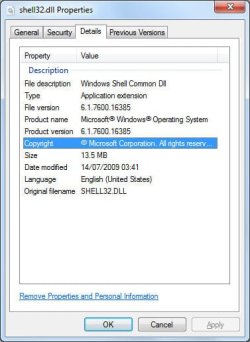
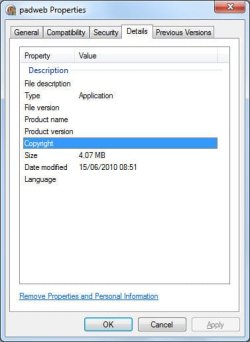
Actually, Windows 7 does report version information of EXe and DLL files: IF that file in question contains version information.

The following two screenshots show this (one for "shell32.dll", and the other for one of my own applications).
versions_info.jpg
"shell32.dll"
Version Info

versions_info2.jpg
"padweb.exe"
VersionInfo​
 

My Computer My Computer

At a glance

Windows 7 Professional 32-bit SP1AMD A4/A63.00GB EDOVMware SVGA 3D
Computer type
PC/Desktop
Computer Manufacturer/Model Number
Virtual Machine
OS
Windows 7 Professional 32-bit SP1
CPU
AMD A4/A6
Motherboard
Intel Corporation 440BX Desktop Reference Platform
Memory
3.00GB EDO
Graphics Card(s)
VMware SVGA 3D
Sound Card
High Definition Audio Device
Monitor(s) Displays
Generic Non-PnP Monitor on VMware SVGA 3D
Screen Resolution
1440x900
Hard Drives
1 x 60GB VMware Virtual SATA Hard Drive ATA Device
Antivirus
Kaspersky Total Security
I dislike the fact that i am unable to view a dll's "Driver revision" in the properties dialog.
XP used to have it in the default properties dialog under the version tab.

Windows7 simply does not allow you to view this. First of all, it doesn't have a "version" tab. The closest we get is "details". There is absolutely no way of selecting and viewing a column called driver revision.

Quite annoying...

I hope i'm simply missing something somewhere, as i now need to run XP on a VM in order to check this with clients...

Actually, Windows 7 does report version information of EXe and DLL files: IF that file in question contains version information.

The following two screenshots show this (one for "shell32.dll", and the other for one of my own applications).
View attachment 83316
"shell32.dll"
Version Info

View attachment 83317
"padweb.exe"
VersionInfo​

Here are screen grabs of the exact same dll first in XP and then in 7.
To prove that the information does indeed exist in the file...

View attachment 83320
View attachment 83324

In other words, the version information is definitely there, its just a question of how on earth to display it??
 

My Computer My Computer

At a glance

Windows 7 Enterprise 32bitIntel(R) Core (TM)2 Duo E6550 @2.33GHz2 GBRadeon X300/X550/X1050 series
Computer Manufacturer/Model Number
Gigabyte G31M-S2L
OS
Windows 7 Enterprise 32bit
CPU
Intel(R) Core (TM)2 Duo E6550 @2.33GHz
Memory
2 GB
Graphics Card(s)
Radeon X300/X550/X1050 series
Screen Resolution
1280 X 1024 & 1440 X 900
Software from Windows 95/98 and MS-DOS days aren't even supported by their developers anymore for those operating systems. Why would you use software like that?
Games take a long time to learn, especially with all of the buttons required to perform survival moves quickly enough. The last time I had a chance to just sit around and spend hours learning fast fingered game moves was back on Quake 2.

Personally, I felt Quake 2 was a fantastic game. It appealed to me like no other game has since. And it would be nice whenever the family went away on a trip or something to just sit down and load up my old game and play one of the add-on packs that I never got around to trying. But now, it isn't really compatible.
It only takes about 55 seconds to boot up, on my "piece of junk" PC. :)
That is about 10 seconds longer than XP.
Unless you are using a laptop, why not just put your PC to sleep instead of shutting it down? :confused:
Easy on the emotion icons, brother. It is annoying. I think he is comparing the OS to Mac or any modern cell phone. They are almost instantly ON. He's saying Win7 isn't really slower than XP, but with all the time that passed between XP and 7, we thought this would have been a given. And Sleep Mode? Half the time my PCs come out of Sleep Mode, something doesn't work properly. (perhaps the Network Card does not come back on, maybe the USB ports never come back online, etc.)
Install a SSD and you will get a much faster boot time. :)
If we are talking "Just Spend a Lot of Money", why not get a Mac? In other words, why do I have to replace all this hardware and go extreme to get a fast boot and startup time? Other OSes are capable of it and leave Microsoft in the dust.
 
Last edited:

My Computer My Computer

At a glance

Windows 7 64-bitCore Duo8.00 GBNVIDIA Quadro FX 370
Computer Manufacturer/Model Number
DELL D630 T7500
OS
Windows 7 64-bit
CPU
Core Duo
Memory
8.00 GB
Graphics Card(s)
NVIDIA Quadro FX 370
Monitor(s) Displays
Dual DELL 2007WPF 22" displays
Screen Resolution
1680 x 1050 (recommended)
Sorry about that

It only takes about 55 seconds to boot up, on my "piece of junk" PC. :)
That is about 10 seconds longer than XP.
Unless you are using a laptop, why not just put your PC to sleep instead of shutting it down? :confused:
Easy on the emotion icons, brother. It is annoying. I think he is comparing the OS to Mac or any modern cell phone. They are almost instantly ON. He's saying Win7 isn't really slower than XP, but with all the time that passed between XP and 7, we thought this would have been a given. And Sleep Mode? Half the time my PCs come out of Sleep Mode, something doesn't work properly. (perhaps the Network Card does not come back on, maybe the USB ports never come back online, etc.).


Sorry.
I did "carpet bomb" that last post, didn't I. I'll go back and cull some.
My only excuse is, that I have been posting on an opinion forum and rather than typing, "This is a joke", "I am not attacking you" or "I am embarrassed" every few sentences, it is easier to use the Emoticons.

It's weird that your hardware randomly glitches, when you put your PC to Sleep.

My keyboard doesn't respond to the second key press after waking from Sleep (even though I use the keyboard to wake my PC).:confused:
It's only a very minor annoyance.

I did have problems with Sleep in the earlier Windows 7 builds though.
 
Last edited:

My Computer My Computer

At a glance

W7 Ultimate SP1, LM19.2 MATE, W10 Home 1703, ...AMD Phenom II x6 1100T, 3.3 GHz12GB DDR3 1333 G-Skill (4GB x 2), G-Skill (2G...NVIDIA GeForce GTX 660
Computer type
PC/Desktop
Computer Manufacturer/Model Number
n/a
OS
W7 Ultimate SP1, LM19.2 MATE, W10 Home 1703, W10 Pro 1703 VM, #All 64 bit
CPU
AMD Phenom II x6 1100T, 3.3 GHz
Motherboard
ASUS M4A88T-M/USB3 (AM3)
Memory
12GB DDR3 1333 G-Skill (4GB x 2), G-Skill (2GB x 2)
Graphics Card(s)
NVIDIA GeForce GTX 660
Sound Card
Realtek?
Monitor(s) Displays
Samsung S23B350
Screen Resolution
1920x1080
Hard Drives
WD Green 2TB (SATA), WD Green 3TB (SATA), WD Blue 4TB (SATA), WD Blue 6TB (SATA)
PSU
Cooler Master
Case
Antec GX300 Tower
Cooling
3x Antec TRICOOL 120mm Fans
Mouse
Wired Optical
Internet Speed
DSL
Antivirus
Avast
Browser
Pale Moon (64 bit)
Other Info
2018-12-27 Upgraded HDDs
2015-12-10 Upgraded case, graphics card, storage
2015-08-15 Upgraded motherboard & RAM
2015-07-15 Upgraded LM17.1 to LM17.2
And Sleep Mode? Half the time my PCs come out of Sleep Mode, something doesn't work properly. (perhaps the Network Card does not come back on, maybe the USB ports never come back online, etc.)
Those are problems that are relatively easily solved.
 

My Computer My Computer

At a glance

Windows 7 Ultimate 32 bitIntel(R) Pentium(R) 4 CPU 3.00GHz2.50 GB RAMNVIDIA GeForce 7600 GS
Computer Manufacturer/Model Number
Home built
OS
Windows 7 Ultimate 32 bit
CPU
Intel(R) Pentium(R) 4 CPU 3.00GHz
Motherboard
ASUS P4P800-VM Motherboard Chipset: Intel 865G + ICH5
Memory
2.50 GB RAM
Graphics Card(s)
NVIDIA GeForce 7600 GS
Sound Card
SoundMax Integrated Digital Audio (Chip)
Monitor(s) Displays
ViewSonic VX 1962 wm
Screen Resolution
1680 X 1050
Hard Drives
Seagate Barracuda 7200.10 80 GB
ST380215A ATA Device 18.6 GB
Western Digital "My Book" external hard drive 750 GB
Cooling
Fan based
Keyboard
Microsoft Comfort Curve Keyboard 2000 v10 USB
Mouse
Logitec optic USB
Internet Speed
3.01 Mb/s download 0.64 Mb/s upload
Battlefield 2 does not play on windows 7 64 bit at all even with compatibility mode. I have tried and tried to no avail. I would just use WINE in Linux, but the securerom thing doesn't work in Linux.

There is no CD required with the latest 1.5 patch.

I gotta admit, that game was buggy as hell even on Windows XP. I played that game extensively from the day it came out. I remember all the crazy patches that EA would release, some would nerf the missiles so badly that they would fire and spin in mid air. Sometimes a patch would go and even though it was successful it would still corrupt the game. There was no way to uninstall the patch, I'd have to uninstall the entire game and reinstall it from scratch.

BF2 was a nightmare on a player's perspective with having to adjust to all the changes, the poor hit detection and the base raping with airplanes (although I admit I was one of those people that did that). Once EA dropped all of their official servers (EA US, etc) the game was ran by clan admins that were out of control children, kicking and banning people at a whim.

Even if Battlefield 2 worked in Windows 7 x64 I would not waste my time playing it.

Anyway, try these instructions out. It might work for you if you try reinstalling it a few dozen times.
 

My Computer My Computer

At a glance

Windows 7 Home Premium x64Intel Core 2 Quad Q9450 @ 3.2GHz4GB DDR2-800MSI Radeon HD 5850
OS
Windows 7 Home Premium x64
CPU
Intel Core 2 Quad Q9450 @ 3.2GHz
Motherboard
Asus P5Q PRO Turbo
Memory
4GB DDR2-800
Graphics Card(s)
MSI Radeon HD 5850
Sound Card
Creative Labs Audigy2 ZS
Monitor(s) Displays
Samsung 225BW
Hard Drives
(2) 1TB Samsung F1, (2) 1.5TB Samsung F2, 1TB Samsung F2, 2TB Samsung F3
PSU
Corsair HX650
Case
Antec Nine Hundred
i can't run some portable apps on windows 7. :) also the user account control option.
 

My Computer My Computer

At a glance

Windows 7 Ultimate, Windows XP sp3 & Linux Mi...
OS
Windows 7 Ultimate, Windows XP sp3 & Linux Mint 8 [Helena]
....But Is it too much new?

Windows XP is from the year 2000 era, it is now 2010. Technology advances ever 6 months (even faster these days). Windows 7 is very much new just like every computer sold today. Old software will always end up breaking sooner or later. Because the old ways of doing things do not last. A lot has changed since Windows XP was released, a lot.
 

My Computer My Computer

At a glance

Windows 10 Pro (x64)Intel Core i7-3930K (3.2GHz - 4.5GHz)4x Samsung 4GB PC3-12800 DDR3 (16GB 1600MHz)Nvidia Geforce GTX 690
Computer type
PC/Desktop
Computer Manufacturer/Model Number
Alienware Aurora ALX R4
OS
Windows 10 Pro (x64)
CPU
Intel Core i7-3930K (3.2GHz - 4.5GHz)
Motherboard
Alienware Aurora-R4 x79
Memory
4x Samsung 4GB PC3-12800 DDR3 (16GB 1600MHz)
Graphics Card(s)
Nvidia Geforce GTX 690
Sound Card
SteelSeries Siberia Elite
Monitor(s) Displays
Dell UltraSharp U3011
Screen Resolution
2560x1600
Hard Drives
Samsung 850 Pro 256 GB, Seagate 1TB Desktop Hybrid HDD, 2x Western Digital 4TB Green HDD
PSU
875W Some Dell PSU <.<
Case
Alienware Aurora ALX
Cooling
Custom Liquid Cooling (EK CPU & GPU blocks) dual EK 480RAD
Keyboard
Logitech G710+ Mechanical
Mouse
Logitech G700s
Internet Speed
Verizon Fios (50 mbps average)
Other Info
Server: Intel NUC D54250WYK: i5-4250U, 16GB, 256 GB mSATA, Windows Server 2012 R2
Of course we should not forget that many games are not running properly in Win7 whereas XP doesnot suffer from this problem.....though I know this problem may arise due to the fact that Win 7 is new....But Is it too much new?that EA Games still releases a long list of games saying these game may not be played in Win 7 Environment.We can find the list in http://support.ea.com/ :devil:

Then that's EA for not supporting their software to bring it up to standards to work properly with Windows 7.
 

My Computer My Computer

At a glance

Windows 7 Home Premium x64Intel Core 2 Quad Q9450 @ 3.2GHz4GB DDR2-800MSI Radeon HD 5850
OS
Windows 7 Home Premium x64
CPU
Intel Core 2 Quad Q9450 @ 3.2GHz
Motherboard
Asus P5Q PRO Turbo
Memory
4GB DDR2-800
Graphics Card(s)
MSI Radeon HD 5850
Sound Card
Creative Labs Audigy2 ZS
Monitor(s) Displays
Samsung 225BW
Hard Drives
(2) 1TB Samsung F1, (2) 1.5TB Samsung F2, 1TB Samsung F2, 2TB Samsung F3
PSU
Corsair HX650
Case
Antec Nine Hundred
Windows 7 is very slow.Bitter but very much true..& to me its worst feature is that it does not support all games.....For office related works its very much handy.But compare its speed or compatibilitu feature its runs behind XP......East or West XP is the Best........
Windows 7 as preinstalled from HP is very slow on some computers. It becomes very fast if you reinstall windows 7 without all the factory bloat. XP is great platform, but technology will make it obsolete within a few years.
I, along with many others, still need functions/options/apps that were native in XP, Stripped out in Vista, and never returned in win 7 despite input to MS. I like quite a bit about Win 7, It boots faster (On my newer machine), runs smoother, and admittedly fixed quite a few problems XP has. I will however, keep a dedicated XP machine. Third party apps to replace what was once native to the OS are not the answer. Nor is ignoring minority user groups. It's a sad day when mere hundreds of thousands have become a minority. Most of the people who I hear complain loudly in the field, never even bothered to try to be heard by MS. Obsolete??? Yeah..... in time.... along with some very good options/Apps/Functions. What a shame. I monitor this thread because there are some very good/talented people here, with terrific answers. I try not to post, because most of what I have to say is rehashing the same old theme, and snipeing after I have aired my dislikes (Many times), dosn't help anyone. the last comment just tweaked me. sorry. While I don't want to grow backwards, I like a lot of things in XP, that have vanished, probably never to return. This input was not constructive, it's just rehashing what I don't like. Apologies to everyone. Thank you for listening to me whine (Again) :)
 
Last edited:

My Computer My Computer

At a glance

XP Media Edition / Vista /Win 7 Home PremiumWin 7 Machine: Intel Core 2 Duo T5850 @ 2.16G...4GB Dual Channel DDR2 @ 333MHz 5-5-5-15Nvidia Defaul 1920X1200 256MB GeForce 9300M
Computer Manufacturer/Model Number
HP Touchsmart
OS
XP Media Edition / Vista /Win 7 Home Premium
CPU
Win 7 Machine: Intel Core 2 Duo T5850 @ 2.16GHz Merom 65nm
Motherboard
Pegatron Corp. EVE Model
Memory
4GB Dual Channel DDR2 @ 333MHz 5-5-5-15
Graphics Card(s)
Nvidia Defaul 1920X1200 256MB GeForce 9300M
Sound Card
SoundMAX Integrated Digital HD Audio
Monitor(s) Displays
HP 25" Flat Panel Touch Screen
Screen Resolution
1900X1200
Hard Drives
500 GB Seagate ST3500620as (Sata) 1.5 TB Seagate External
Keyboard
HP Model RK713A
Internet Speed
3.0Gb
Our Network Administrator is on a power trip, I think. Isn't that typical of Network Administrators, though? They feel they must control everything, right?


Ok this one just really pisses me off. Obviously you are not an IT person nor do you have to maintain many computer systems. We (Network Administrator, Security Administrators, Network Engineers, System Engineers, or any of the IT support staff are NOT on a POWER TRIP!!)

We have to lock everything down to keep uneducated (I am being polite) users from messing computer systems up. We have to lock everything down because many people have the idea in their head that their work computer can be used to experiment on and if it crashes or breaks “oh well we have an IT department to fix it, at least I did not try that on my home computer”. Users figure if a software works at home it will function at work so let’s load that P2P software and have some fun. Come on quit being so ignorant. We have to lock the computers down so the computers work and users can get the work that needs to be done without issues. Installing software as in P2P does not have ANYTHING to do with work, nor does it help in anyway. The other downside to this is that it takes up network bandwidth and makes other legitimate users suffer trying to get work done. If end users would just get it through their head that a work computer is: 1) for work only, 2) it is NOT their computer but owned by the company, 3) installing some software that you use at home will not necessarily function on your work computer nor will it improve your efficiency to get work done, 4) your computer at work and your computer at home have ABSOLUTLY nothing in common accept they may both be running Windows 7. The better off everyone would be.

We ran some statics to prove locking users out of settings and installing software etc. Does many things: 1) in the long run makes the end user much happier because their computer is always working and they never have to contact IT for repairs. 2) management is much happier because their employees are working 3) support calls to IT went down an amazing 89.4%!!!! 4) it gives the IT staff a small amount of their life back so they can see their spouse, kids, and maybe take a vacation because they are NOT at work fixing 10,000 stupid user problems. – Enough said!
Well said!
 

My Computer My Computer

At a glance

XP Media Edition / Vista /Win 7 Home PremiumWin 7 Machine: Intel Core 2 Duo T5850 @ 2.16G...4GB Dual Channel DDR2 @ 333MHz 5-5-5-15Nvidia Defaul 1920X1200 256MB GeForce 9300M
Computer Manufacturer/Model Number
HP Touchsmart
OS
XP Media Edition / Vista /Win 7 Home Premium
CPU
Win 7 Machine: Intel Core 2 Duo T5850 @ 2.16GHz Merom 65nm
Motherboard
Pegatron Corp. EVE Model
Memory
4GB Dual Channel DDR2 @ 333MHz 5-5-5-15
Graphics Card(s)
Nvidia Defaul 1920X1200 256MB GeForce 9300M
Sound Card
SoundMAX Integrated Digital HD Audio
Monitor(s) Displays
HP 25" Flat Panel Touch Screen
Screen Resolution
1900X1200
Hard Drives
500 GB Seagate ST3500620as (Sata) 1.5 TB Seagate External
Keyboard
HP Model RK713A
Internet Speed
3.0Gb
Status
Not open for further replies.
Back
Top