
Solved Should I prepare my HDD for a fresh install of 7 Ultimate?

RoloDman

HWIC
Pro User
Local time
5:53 AM
Messages
634
Location
New York City, New York
I currently have Windows 7 Home Premium. I just got the Windows 7 Ultimate 64 bit cd and I plan to install it.

Do I need to do anything to my HDD or can I just boot from the CD and install?


P.S. I do not care to save anything that is on my HDD, I am fine with a full overwrite. :geek:
 

My Computer My Computer

At a glance

7 Ultimate 64 bit Service Pack 1Intel Core 2 Duo P9500 @ 2.53GHz (lower watta...4.0GB Dual-Channel DDR 2 @ 398MHz (5-5-5-18)512MB GeForce 9600M GT
Computer Manufacturer/Model Number
Sager NP2096
OS
7 Ultimate 64 bit Service Pack 1
CPU
Intel Core 2 Duo P9500 @ 2.53GHz (lower wattage chip)
Motherboard
JHL 90 (U2E1)
Memory
4.0GB Dual-Channel DDR 2 @ 398MHz (5-5-5-18)
Graphics Card(s)
512MB GeForce 9600M GT
Sound Card
Realtek High Definition Audio
Monitor(s) Displays
Generic PnP Monitor
Screen Resolution
1680x1050
Hard Drives
Hitachi 244GB @ 7200rpm (IDE)
Cooling
nature
Keyboard
generic
Mouse
Microsoft Wireless Mobile Mouse 3500
Internet Speed
30 megabits down, 5 megabits up
Other Info
1.)Staples 4-Port USB 2.0 Mobile Hub
2.)WNDR3700 - NETGEAR RangeMax Dual Band Wireless-N Gigabit Router
3.)Logitech Webcam C250
4.)Logitech M570
No. Just dive in.
 

My Computer My Computer

At a glance

Windows 7 Home Premium SP1, 64-bitIntel Skylake i5-6600K, not overclocked8 GB HyperX DDR4-2666 (2 x 4 GB)none; graphics are integrated on CPU
Computer type
PC/Desktop
Computer Manufacturer/Model Number
Ignatz Special; 4 speed manual gearbox; factory air conditioning; one of one
OS
Windows 7 Home Premium SP1, 64-bit
CPU
Intel Skylake i5-6600K, not overclocked
Motherboard
AsRock Z170M Extreme 4, micro ATX
Memory
8 GB HyperX DDR4-2666 (2 x 4 GB)
Graphics Card(s)
none; graphics are integrated on CPU
Sound Card
onboard: Realtek ALC1150; external: USB Behringer UF0-202
Monitor(s) Displays
Dell S2340M 23 inch IPS
Screen Resolution
1600 x 900
Hard Drives
System: Crucial MX100 series SSD, 128 GB;
Data: Samsung Spinpoint 103SJ, 1 TB;
Backup: WD Caviar Green WD30EZRX-00D8PB0, 3 TB
PSU
Rosewill SilentNight 500 watt fanless, semi-modular
Case
Antec Solo II
Cooling
Noctua NH-U12S; Noctua F12 intake, Noctua S12A exhaust
Keyboard
Microsoft 200 6JH-00001 USB
Mouse
Dell or Microsoft optical wired; USB
Antivirus
Microsoft Security Essentials and Malwarebytes Premium
Browser
Pale Moon
Other Info
All fans PWM; speeds at idle: CPU circa 500 rpm; intake circa 600 rpm; exhaust circa 600 rpm; CPU temps 27 idle and 47 C load in a warm room (27 C/81 F) when running Intel Extreme Tuning Utility stress test.
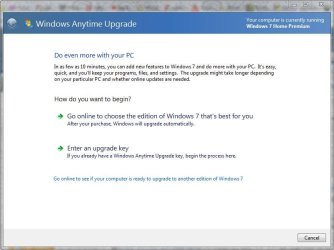
I remember reading on another thread that you can type you product key into the anytime update thing and unlock the features only available in Ultimate without having to reinstall windows.
 

My Computer My Computer

At a glance

Windows 7 Professional SP1 64-bitIntel Core i5-2450M @2.5 GHz6 GB DDR3 1333MHzIntel HD 3000
Computer type
Laptop
Computer Manufacturer/Model Number
Toshiba P775-S7100
OS
Windows 7 Professional SP1 64-bit
CPU
Intel Core i5-2450M @2.5 GHz
Memory
6 GB DDR3 1333MHz
Graphics Card(s)
Intel HD 3000
Monitor(s) Displays
Built-in 17.3" LED; 22" Insignia NS-L22Q-10A
Screen Resolution
1600x900; 1360x768
Hard Drives
750 GB Hitachi
1TB Seagate FreeAgent External
Internet Speed
Verizon DSL Speed(Down/Up): 3360 Kbps / 800 Kbps
Antivirus
MSE and MBAM Pro
Browser
IE10
I currently have Windows 7 Home Premium. I just got the Windows 7 Ultimate 64 bit cd and I plan to install it.

Do I need to do anything to my HDD or can I just boot from the CD and install?


P.S. I do not care to save anything that is on my HDD, I am fine with a full overwrite. :geek:

You're fine as long as your existing os is in good shape.
 

My Computer My Computer

At a glance

Windows 7 Enterprise x64 SP1Intel Core i3-2100 @ 3.10GHz10 GB DDR3Asus EAH5450 series (Radeon)
Computer Manufacturer/Model Number
ATX Custom Build 2012
OS
Windows 7 Enterprise x64 SP1
CPU
Intel Core i3-2100 @ 3.10GHz
Motherboard
Intel DH67CL desktop ATX
Memory
10 GB DDR3
Graphics Card(s)
Asus EAH5450 series (Radeon)
Monitor(s) Displays
Samsung SyncMaster 226BW, Samsung Syncmaster P2450H
Screen Resolution
226BW: 1680 x 1050 & P2450H: 1920 x 1080
Hard Drives
Western Digital 320 GB sata (boot), Samsung 640 GB sata, Seagate 2 TB sata (data)
PSU
Cooler Master Extreme Power Plus 500W
Case
Thermaltake V3 Black Edition
Cooling
stock cooling with added intake fan
Keyboard
HP Wireless Elite Keyboard Wireless Keyboard
Mouse
Microsoft Touch
Internet Speed
Comcast Cable business class <=18Mb {averages 12Mb}
Other Info
Optical drives: LG SuperMulti Blue, HP DVD 1260T
Other: Kensington Bluetooth Receiver
Network: Buffalo Wireless N USB, DLink N router/DLink Ethernet Switch/DLink Xtreme N wireless bridge
Printer: HP Photosmart Plus, HP Officejet Pro 8600 Plus
PCs: HP dv6-3040us (7 x64 SP1), HP DM4-2165dx (7 x64 SP1), HP Pavilion zv6130us (7 x86), Apple Macbook Air (Lion)
************

Attachments

  • anytime.JPG
    anytime.JPG
    49.3 KB · Views: 9

My Computer My Computer

At a glance

Win 10 Pro x64Intel I5-2500K @3.3GHz16GB G.Skill Ripjaws X (4x4GB)EVGA GeForce 750 Ti SC 2GB
Computer type
PC/Desktop
Computer Manufacturer/Model Number
Self Built
OS
Win 10 Pro x64
CPU
Intel I5-2500K @3.3GHz
Motherboard
Asrock P67 Extreme4
Memory
16GB G.Skill Ripjaws X (4x4GB)
Graphics Card(s)
EVGA GeForce 750 Ti SC 2GB
Sound Card
ASUS Xonar DG 5.1 Channels 24-bit 96KHz PCI Interface Sound
Monitor(s) Displays
auria eq2367
Screen Resolution
1920 x 1080
Hard Drives
250GB Samsung 850 EVO SSD
1TB WD Blue
1TB Hitachi
PSU
SeaSonic X 650W 80 Plus Gold
Case
Corsair Obsidian 750D
Cooling
Corsair H60, Three 140mm case fans
Keyboard
Logitech Wireless Keyboard K520
Mouse
Logitech Wireless Mouse M310
Internet Speed
Wave Broadband ~ 100 dn 5 up
Antivirus
Windows Defender, Malwarebytes Premium
Browser
Edge, IE11, Chrome
Other Info
Laptop specs: HP g7-1365dx /
CPU: AMD A6-3420M APU with Radeon(tm) HD Graphics /
RAM: Crucial 8Gb (2x4Gb) /
SSD: Crucial M4-CT128M4SSD2 ATA Device/ FW 000F /
GFX: AMD Radeon HD 6520G /
OS: Windows 10 Pro x64
Depends on whether you feel you need a clean reinstall. If you're happy with your present install's performance, then you can simply unlock Ultimate features by inserting your Ultimate Product Key into Windows Anytime Upgrade.

But if you feel your rig can perform better with a clean reinstall, boot from the Ultimate DVD and clean your HD first before install: http://www.sevenforums.com/tutorials/91339-ssd-hdd-optimize-windows-reinstallation.html

http://www.sevenforums.com/tutorials/1649-clean-install-windows-7-a.html

Then you know you've gotten as clean as you can get.
 
Why do you feel the need to upgrade from home premium to Ultimate? Are there some particular features that you miss in Home premium that you can think Ultimate can provide?

If not, save the Ultimate license for another machine or another time. OTOH, if its a considered decision, make sure you image your current install to an external media. That'll let you revert to home premium at a later date with all your apps and windows activation intact. If its an OEM machine, create the recovery dvds before switching.

Also remember that an upgrade install obsoletes the license for the underlying OS (unless you have a full version Ultimate disk).
 

My Computer My Computer

At a glance

Windows 7 x64 pro/ Windows 7 x86 Pro/ XP SP3 x86
Computer Manufacturer/Model Number
Too many to describe...
OS
Windows 7 x64 pro/ Windows 7 x86 Pro/ XP SP3 x86
Hi, RoloDman.

Before you jump right in, you should be aware of one thing. If you're currently running the Windows 7 Home Premium 32-bit version, and you wish to use an upgrade CD to get Windows 7 Ultimate 64-bit version, I don't think it'll work.

When I was running Windows Vista 32-bit, and tried to upgrade to Windows 7 64-bit through an upgrade CD, it wouldn't let me. I believe if you're going from 32-bit to 64-bit, you're going to have to get a full installation CD. I can't be 100% sure on this, so by all means go ahead and give it a go. I don't know whether you're running a 64-bit operating system now or not, that's all.

Obviously, you're going to have to confirm that your hardware is all compatible with 64-bit software before making the transition (if you are).

Another thing to consider, also, is what you use your computer for. Some software isn't compatible with 64-bit operating systems, which is why you're going to have to check that any applications you currently use on a regular basis are compatible with your new operating system.

Thanks,
Harvey Meale
 

My Computer My Computer

At a glance

Windows 7 Home Premium 32-bit, BackTrack 4, U...
Computer Manufacturer/Model Number
Dell Inspiron 1545
OS
Windows 7 Home Premium 32-bit, BackTrack 4, Ubuntu
  • Like
Reactions: JMH
When I was running Windows Vista 32-bit, and tried to upgrade to Windows 7 64-bit through an upgrade CD, it wouldn't let me. I believe if you're going from 32-bit to 64-bit, you're going to have to get a full installation CD. I can't be 100% sure on this, so by all means go ahead and give it a go. I don't know whether you're running a 64-bit operating system now or not, that's all.

Hi Harvey.

I wish you'd found us earlier, as we could have told you that you don't need to buy a full version to upgrade to Win7 from Vista, even while changing from 32 to 64 bit. You're entitled to either 32- or 64-bit with each Win7 license, and having Vista qualifies you for Upgrade version even if you have to format the HD before install to change bit version.

When you boot Win7 DVD it scans the HD to see any OS, which passes a flag to allow Upgrade version key - even if you then go on to repartition and format using Custom>Drive Options. This is how you would change from 32 bit Vista to 64 bit Win7 using the Upgrade version you qualify for.
 
Hi, RoloDman.


When I was running Windows Vista 32-bit, and tried to upgrade to Windows 7 64-bit through an upgrade CD, it wouldn't let me. I believe if you're going from 32-bit to 64-bit, you're going to have to get a full installation CD. I can't be 100% sure on this, so by all means go ahead and give it a go. I don't know whether you're running a 64-bit operating system now or not, that's all.

Hi Harvey.

I wish you'd found us earlier, as we could have told you that you don't need to buy a full version to upgrade to Win7 from Vista, even while changing from 32 to 64 bit. You're entitled to either 32- or 64-bit with each Win7 license, and having Vista qualifies you for Upgrade version even if you have to format the HD before install to change bit version.

When you boot Win7 DVD, it scans the HD to see any OS which passes a flag to allow Upgrade version key - even if you then go on to repartition and format using Custom>Drive Options. This is how you would change from 32 bit Vista to 64 bit Win7 using the Upgrade version you qualify for.

Thanks for clarifying this with me, gregrocker!
 

My Computer My Computer

At a glance

Windows 7 Home Premium 32-bit, BackTrack 4, U...
Computer Manufacturer/Model Number
Dell Inspiron 1545
OS
Windows 7 Home Premium 32-bit, BackTrack 4, Ubuntu
solved
 

My Computer My Computer

At a glance

7 Ultimate 64 bit Service Pack 1Intel Core 2 Duo P9500 @ 2.53GHz (lower watta...4.0GB Dual-Channel DDR 2 @ 398MHz (5-5-5-18)512MB GeForce 9600M GT
Computer Manufacturer/Model Number
Sager NP2096
OS
7 Ultimate 64 bit Service Pack 1
CPU
Intel Core 2 Duo P9500 @ 2.53GHz (lower wattage chip)
Motherboard
JHL 90 (U2E1)
Memory
4.0GB Dual-Channel DDR 2 @ 398MHz (5-5-5-18)
Graphics Card(s)
512MB GeForce 9600M GT
Sound Card
Realtek High Definition Audio
Monitor(s) Displays
Generic PnP Monitor
Screen Resolution
1680x1050
Hard Drives
Hitachi 244GB @ 7200rpm (IDE)
Cooling
nature
Keyboard
generic
Mouse
Microsoft Wireless Mobile Mouse 3500
Internet Speed
30 megabits down, 5 megabits up
Other Info
1.)Staples 4-Port USB 2.0 Mobile Hub
2.)WNDR3700 - NETGEAR RangeMax Dual Band Wireless-N Gigabit Router
3.)Logitech Webcam C250
4.)Logitech M570

My Computer My Computer

At a glance

Win 10 Pro x64Intel I5-2500K @3.3GHz16GB G.Skill Ripjaws X (4x4GB)EVGA GeForce 750 Ti SC 2GB
Computer type
PC/Desktop
Computer Manufacturer/Model Number
Self Built
OS
Win 10 Pro x64
CPU
Intel I5-2500K @3.3GHz
Motherboard
Asrock P67 Extreme4
Memory
16GB G.Skill Ripjaws X (4x4GB)
Graphics Card(s)
EVGA GeForce 750 Ti SC 2GB
Sound Card
ASUS Xonar DG 5.1 Channels 24-bit 96KHz PCI Interface Sound
Monitor(s) Displays
auria eq2367
Screen Resolution
1920 x 1080
Hard Drives
250GB Samsung 850 EVO SSD
1TB WD Blue
1TB Hitachi
PSU
SeaSonic X 650W 80 Plus Gold
Case
Corsair Obsidian 750D
Cooling
Corsair H60, Three 140mm case fans
Keyboard
Logitech Wireless Keyboard K520
Mouse
Logitech Wireless Mouse M310
Internet Speed
Wave Broadband ~ 100 dn 5 up
Antivirus
Windows Defender, Malwarebytes Premium
Browser
Edge, IE11, Chrome
Other Info
Laptop specs: HP g7-1365dx /
CPU: AMD A6-3420M APU with Radeon(tm) HD Graphics /
RAM: Crucial 8Gb (2x4Gb) /
SSD: Crucial M4-CT128M4SSD2 ATA Device/ FW 000F /
GFX: AMD Radeon HD 6520G /
OS: Windows 10 Pro x64

Thanks for posting back, just out of curiosity, what method did you use?

I decided to just install from the CD, becuase I bought it already :p.

I erased everything and did a fresh install.

Things seem to be working well, better than before actually.

Since I just did a fresh install and did not do anything else to prepare my HDD, do you think I made a mistake?
 

My Computer My Computer

At a glance

7 Ultimate 64 bit Service Pack 1Intel Core 2 Duo P9500 @ 2.53GHz (lower watta...4.0GB Dual-Channel DDR 2 @ 398MHz (5-5-5-18)512MB GeForce 9600M GT
Computer Manufacturer/Model Number
Sager NP2096
OS
7 Ultimate 64 bit Service Pack 1
CPU
Intel Core 2 Duo P9500 @ 2.53GHz (lower wattage chip)
Motherboard
JHL 90 (U2E1)
Memory
4.0GB Dual-Channel DDR 2 @ 398MHz (5-5-5-18)
Graphics Card(s)
512MB GeForce 9600M GT
Sound Card
Realtek High Definition Audio
Monitor(s) Displays
Generic PnP Monitor
Screen Resolution
1680x1050
Hard Drives
Hitachi 244GB @ 7200rpm (IDE)
Cooling
nature
Keyboard
generic
Mouse
Microsoft Wireless Mobile Mouse 3500
Internet Speed
30 megabits down, 5 megabits up
Other Info
1.)Staples 4-Port USB 2.0 Mobile Hub
2.)WNDR3700 - NETGEAR RangeMax Dual Band Wireless-N Gigabit Router
3.)Logitech Webcam C250
4.)Logitech M570
I erased everything and did a fresh install.

Things seem to be working well, better than before actually.

Since I just did a fresh install and did not do anything else to prepare my HDD, do you think I made a mistake?

Not if performance is ok.

If you deleted all partitions, repartitioned and then formatted this is enough.

Remember you can move that retail Ultimate anywhere and go back to using the Home Premium using the Product Key stickered to your machine. Unless you need the extra features Ultimate provides on that machine you are wasting a $100+ HP license as long as you're not using it.
 

Since I just did a fresh install and did not do anything else to prepare my HDD, do you think I made a mistake?

Hi, RoloDman.

You'll be fine. When doing a fresh install, the disk is sanitized and you should see no problems. Best of luck!

Thanks,
Harvey Meale
 
Last edited:

My Computer My Computer

At a glance

Windows 7 Home Premium 32-bit, BackTrack 4, U...
Computer Manufacturer/Model Number
Dell Inspiron 1545
OS
Windows 7 Home Premium 32-bit, BackTrack 4, Ubuntu

Thanks for posting back, just out of curiosity, what method did you use?

I decided to just install from the CD, becuase I bought it already :p.

I erased everything and did a fresh install.

Things seem to be working well, better than before actually.

Since I just did a fresh install and did not do anything else to prepare my HDD, do you think I made a mistake?

Not at all, sounds like you're good to go. I was just curious. :D

Enjoy your fresh install, you should make an image as soon as you get it all set up

that way you've got a clean setup to roll back to if you ever need it.;)
 

My Computer My Computer

At a glance

Win 10 Pro x64Intel I5-2500K @3.3GHz16GB G.Skill Ripjaws X (4x4GB)EVGA GeForce 750 Ti SC 2GB
Computer type
PC/Desktop
Computer Manufacturer/Model Number
Self Built
OS
Win 10 Pro x64
CPU
Intel I5-2500K @3.3GHz
Motherboard
Asrock P67 Extreme4
Memory
16GB G.Skill Ripjaws X (4x4GB)
Graphics Card(s)
EVGA GeForce 750 Ti SC 2GB
Sound Card
ASUS Xonar DG 5.1 Channels 24-bit 96KHz PCI Interface Sound
Monitor(s) Displays
auria eq2367
Screen Resolution
1920 x 1080
Hard Drives
250GB Samsung 850 EVO SSD
1TB WD Blue
1TB Hitachi
PSU
SeaSonic X 650W 80 Plus Gold
Case
Corsair Obsidian 750D
Cooling
Corsair H60, Three 140mm case fans
Keyboard
Logitech Wireless Keyboard K520
Mouse
Logitech Wireless Mouse M310
Internet Speed
Wave Broadband ~ 100 dn 5 up
Antivirus
Windows Defender, Malwarebytes Premium
Browser
Edge, IE11, Chrome
Other Info
Laptop specs: HP g7-1365dx /
CPU: AMD A6-3420M APU with Radeon(tm) HD Graphics /
RAM: Crucial 8Gb (2x4Gb) /
SSD: Crucial M4-CT128M4SSD2 ATA Device/ FW 000F /
GFX: AMD Radeon HD 6520G /
OS: Windows 10 Pro x64
:o a lot of love in this thread
 

My Computer My Computer

At a glance

7 Ultimate 64 bit Service Pack 1Intel Core 2 Duo P9500 @ 2.53GHz (lower watta...4.0GB Dual-Channel DDR 2 @ 398MHz (5-5-5-18)512MB GeForce 9600M GT
Computer Manufacturer/Model Number
Sager NP2096
OS
7 Ultimate 64 bit Service Pack 1
CPU
Intel Core 2 Duo P9500 @ 2.53GHz (lower wattage chip)
Motherboard
JHL 90 (U2E1)
Memory
4.0GB Dual-Channel DDR 2 @ 398MHz (5-5-5-18)
Graphics Card(s)
512MB GeForce 9600M GT
Sound Card
Realtek High Definition Audio
Monitor(s) Displays
Generic PnP Monitor
Screen Resolution
1680x1050
Hard Drives
Hitachi 244GB @ 7200rpm (IDE)
Cooling
nature
Keyboard
generic
Mouse
Microsoft Wireless Mobile Mouse 3500
Internet Speed
30 megabits down, 5 megabits up
Other Info
1.)Staples 4-Port USB 2.0 Mobile Hub
2.)WNDR3700 - NETGEAR RangeMax Dual Band Wireless-N Gigabit Router
3.)Logitech Webcam C250
4.)Logitech M570
My Computer My Computer

At a glance

Win 10 Pro x64Intel I5-2500K @3.3GHz16GB G.Skill Ripjaws X (4x4GB)EVGA GeForce 750 Ti SC 2GB
Computer type
PC/Desktop
Computer Manufacturer/Model Number
Self Built
OS
Win 10 Pro x64
CPU
Intel I5-2500K @3.3GHz
Motherboard
Asrock P67 Extreme4
Memory
16GB G.Skill Ripjaws X (4x4GB)
Graphics Card(s)
EVGA GeForce 750 Ti SC 2GB
Sound Card
ASUS Xonar DG 5.1 Channels 24-bit 96KHz PCI Interface Sound
Monitor(s) Displays
auria eq2367
Screen Resolution
1920 x 1080
Hard Drives
250GB Samsung 850 EVO SSD
1TB WD Blue
1TB Hitachi
PSU
SeaSonic X 650W 80 Plus Gold
Case
Corsair Obsidian 750D
Cooling
Corsair H60, Three 140mm case fans
Keyboard
Logitech Wireless Keyboard K520
Mouse
Logitech Wireless Mouse M310
Internet Speed
Wave Broadband ~ 100 dn 5 up
Antivirus
Windows Defender, Malwarebytes Premium
Browser
Edge, IE11, Chrome
Other Info
Laptop specs: HP g7-1365dx /
CPU: AMD A6-3420M APU with Radeon(tm) HD Graphics /
RAM: Crucial 8Gb (2x4Gb) /
SSD: Crucial M4-CT128M4SSD2 ATA Device/ FW 000F /
GFX: AMD Radeon HD 6520G /
OS: Windows 10 Pro x64
Disk Image made!

I used Reflect free (Macrium) or something like that. It also asked me if I want to make the disk image XML and I said yes. That ok?
 

My Computer My Computer

At a glance

7 Ultimate 64 bit Service Pack 1Intel Core 2 Duo P9500 @ 2.53GHz (lower watta...4.0GB Dual-Channel DDR 2 @ 398MHz (5-5-5-18)512MB GeForce 9600M GT
Computer Manufacturer/Model Number
Sager NP2096
OS
7 Ultimate 64 bit Service Pack 1
CPU
Intel Core 2 Duo P9500 @ 2.53GHz (lower wattage chip)
Motherboard
JHL 90 (U2E1)
Memory
4.0GB Dual-Channel DDR 2 @ 398MHz (5-5-5-18)
Graphics Card(s)
512MB GeForce 9600M GT
Sound Card
Realtek High Definition Audio
Monitor(s) Displays
Generic PnP Monitor
Screen Resolution
1680x1050
Hard Drives
Hitachi 244GB @ 7200rpm (IDE)
Cooling
nature
Keyboard
generic
Mouse
Microsoft Wireless Mobile Mouse 3500
Internet Speed
30 megabits down, 5 megabits up
Other Info
1.)Staples 4-Port USB 2.0 Mobile Hub
2.)WNDR3700 - NETGEAR RangeMax Dual Band Wireless-N Gigabit Router
3.)Logitech Webcam C250
4.)Logitech M570
Disk Image made!

I used Reflect free (Macrium) or something like that. It also asked me if I want to make the disk image XML and I said yes. That ok?

Excellent!!!:thumbsup:

Did you make the rescue cd too?
 

My Computer My Computer

At a glance

Win 10 Pro x64Intel I5-2500K @3.3GHz16GB G.Skill Ripjaws X (4x4GB)EVGA GeForce 750 Ti SC 2GB
Computer type
PC/Desktop
Computer Manufacturer/Model Number
Self Built
OS
Win 10 Pro x64
CPU
Intel I5-2500K @3.3GHz
Motherboard
Asrock P67 Extreme4
Memory
16GB G.Skill Ripjaws X (4x4GB)
Graphics Card(s)
EVGA GeForce 750 Ti SC 2GB
Sound Card
ASUS Xonar DG 5.1 Channels 24-bit 96KHz PCI Interface Sound
Monitor(s) Displays
auria eq2367
Screen Resolution
1920 x 1080
Hard Drives
250GB Samsung 850 EVO SSD
1TB WD Blue
1TB Hitachi
PSU
SeaSonic X 650W 80 Plus Gold
Case
Corsair Obsidian 750D
Cooling
Corsair H60, Three 140mm case fans
Keyboard
Logitech Wireless Keyboard K520
Mouse
Logitech Wireless Mouse M310
Internet Speed
Wave Broadband ~ 100 dn 5 up
Antivirus
Windows Defender, Malwarebytes Premium
Browser
Edge, IE11, Chrome
Other Info
Laptop specs: HP g7-1365dx /
CPU: AMD A6-3420M APU with Radeon(tm) HD Graphics /
RAM: Crucial 8Gb (2x4Gb) /
SSD: Crucial M4-CT128M4SSD2 ATA Device/ FW 000F /
GFX: AMD Radeon HD 6520G /
OS: Windows 10 Pro x64
Back
Top