ANN: Classic Shell 2.8.1 is out (cascading All Programs and more)

Ivo

New member
Local time
1:55 AM
Messages
398
Location
Washington
This is a beta version of the 3rd generation of Classic Shell. Get it from here: http://classicshell.sourceforge.net/


The new features are:
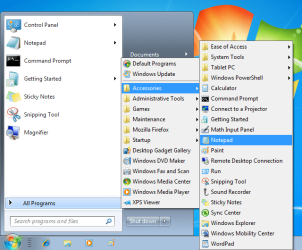
  • Added an option for cascading All Programs in the Windows start menu
  • Added an option to open the start menu when hovering over the start button
  • Added a possibility for the skins to include the user name in the start menu
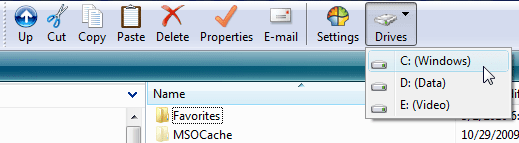
  • Added support for dropdown menus and chevrons in the Explorer toolbar
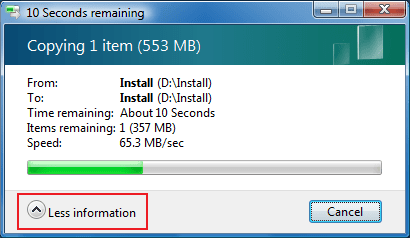
  • Added an option to automatically open progress dialogs to show more details
  • Converted the help to CHM file format
  • A much better installer using WiX
  • The settings no longer have semicolon in front of them. Just enter the new value. Leave the value blank to use the default
  • Changes to StartMenu.ini no longer require the start menu to be restarted
Report any problems on the Source Forge bug tracker, or post in this forum.
 

Attachments

  • cascading_menu.png
    cascading_menu.png
    37.3 KB · Views: 56
  • DrivesMenu.png
    DrivesMenu.png
    9.3 KB · Views: 18
  • details.png
    details.png
    9.3 KB · Views: 13

My Computer My Computer

Computer Manufacturer/Model Number
Me :) I build all my PCs
OS
Windows 7 Home 64, Vista Ultimate 64
Need help with translations

Hey, everybody. Currently Classic Shell does not support translations for its Settings UI. It has been one of the more frequiently requested feature. I'd like to provide translations but I need help (since I'm not that good at foreign languages).

Judging by the download counts, the languages that will be most popular are German, French and Dutch. If you are fluent in any of these languages and you want to help, please contact me. There are about 30 lines of text and 2 dialogs that need to be translated.

Regards
Ivo
 

My Computer My Computer

Computer Manufacturer/Model Number
Me :) I build all my PCs
OS
Windows 7 Home 64, Vista Ultimate 64
So it replaces the 7 start menu.
Are there still icons on desktop or they will be hidden like with Litestep and other similiar shells?
 

My Computer My Computer

OS
7
Classic Shell does not do anything with the desktop or the taskbar. It is not a full shell replacement - just a new start menu and some Explorer enhancements.
 

My Computer My Computer

Computer Manufacturer/Model Number
Me :) I build all my PCs
OS
Windows 7 Home 64, Vista Ultimate 64
Hi, and thanks for this great Software :)

...

The new features are:
  • Added an option for cascading All Programs in the Windows start menu
...

Can i sort the Menus the way i want them or are they always in alphabetical order?
 
Last edited:

My Computer My Computer

OS
Win7x32 Home Premium
Ivo, If I upgrade does it remember all the previous hard work settings?
The settings that are kept in the registry (the ones you can edit from the Settings dialogs) are preserved and backwards-compatible.
The ini files will be reset. I do this because I change the format of the ini files often and it is not possible to be backwards-compatible with older INIs. So back up your ini files before you uninstall your old version (depending how recent it is, the uninstaller may offer to back them up for you).

Can i sort the Menus the way i want them or are they always in alphabetical order?

The cascading All Programs menu lets you reorder the programs as you wish (drag and drop). The order is independent from the classic start menu. So if you ordered your programs for the classic start menu, you will have to order them again in the new menu.
 

My Computer My Computer

Computer Manufacturer/Model Number
Me :) I build all my PCs
OS
Windows 7 Home 64, Vista Ultimate 64
Cheers for the reply Ivo, from reading the description sounds like a different deal anyway (the ; ) I just knew that would turn into a Smiley without the space!!
 

My Computer My Computer

OS
Windows 7 Ultimatum
above theme is not working still old style theme like 1.9.8
 

My Computer My Computer

Computer Manufacturer/Model Number
AMD PC
OS
XP,Windows 7 Home Basic
above theme is not working still old style theme like 1.9.8
What theme? How is it not working? Do you believe somebody can read your post and figure out what you are trying to say?
 

My Computer My Computer

Computer Manufacturer/Model Number
Me :) I build all my PCs
OS
Windows 7 Home 64, Vista Ultimate 64
Whoo Hooo!!!

Classic Shell = My FAVORITE 7 appy! :D
 

My Computer My Computer

Computer Manufacturer/Model Number
HomeBrew
OS
Win7/XP
CPU
INTEL E8600 @ 4.2GHz
Motherboard
Asus P5E w/Formula Rampage BIOS
Memory
8GB PC8500 Corsiar Dominator
Graphics Card(s)
nVidia GTX 280
Sound Card
Asus FXII (SoundMax controlled)
Monitor(s) Displays
2 x I-INC 28'
Screen Resolution
1920x1200
Hard Drives
2 x Seagate 1.5TB
PSU
Ultra 700W
Case
Something..with alot of air
Cooling
Tuniq 120 CPU - Several 80mm and one 120MM fan
Keyboard
IBM MODEL M - YA BABY!!! NEVER SAY DIE!
Mouse
MS Intellimouse
Internet Speed
50/5
Update: the new version 2.8.2 is out

Version 2.8.2 fixes all bugs found in the previous version. The biggest one was that the Windows start menu may freeze and become unresponsive if you use the "cascading All Programs" option.

There are also some new features:
  • Few new commands to use in your custom toolbars for picking different Explorer views - Details, List, Icons, etc
  • A setting in Explorer.ini to control the spacing of the folders in the navigation pane tree
  • A setting in StartMenu.ini to show Shutdown even in Remote Desktop sessions
  • The Hibernate command in the start menu will be hidden if hibernation is disabled
 

My Computer My Computer

Computer Manufacturer/Model Number
Me :) I build all my PCs
OS
Windows 7 Home 64, Vista Ultimate 64
Hi. I needed to report a major problem with 2.8.2 - it is erasing registry entries! The ones I have seen it erase are ALL entries under

HKLM\SOFTWARE\MICROSOFT\WINDOWS\CURRENTVERSION\RUN\

But I don't know what (if any) others it is altering/erasing.

A system restore fixed the problem, but only after I noticed startup programs not running down by the clock!

Please look into this asap!! :eek: Otherwise thank you for this most magnificent program! :D
 

My Computer My Computer

OS
W7, XP
Oh-oh. That would be a problem :)
Did you upgrade from an older version? Which one?
Did you try to uninstall 2.8.2 and then you noticed the problem?
 

My Computer My Computer

Computer Manufacturer/Model Number
Me :) I build all my PCs
OS
Windows 7 Home 64, Vista Ultimate 64
Hello Ivo

The new Version 2.8.1 and 2.8.2 will not my StartMenuItems.ini in the version 2.0.0 hat this funktionality perfect why ??? :cry::cry::cry:

Here my StartMenuItems.ini:

; MAIN_MENU.Items - the structure of the main menu. You can add or remove items here
; REMOVE THE SEMICOLON FROM THE BEGINNING OF THE NEXT LINE TO ENABLE THE CUSTOM MENU STRUCTURE
MAIN_MENU.Items=PROGRAMS, MyKlooItem, MyComputerItem, SettingsMenu, SEPARATOR, DisconnectItem, RestartItem, ShutdownItem

; SettingsMenu - the name, icon and structure of the Settings menu
SettingsMenu.Items=CONTROL_PANEL, SEPARATOR, PRINTERS, TaskbarSettingsItem, SEPARATOR, ClassicSettingsItem
SettingsMenu.Name=$Menu.Settings
SettingsMenu.Icon=shell32.dll,330

; And so on. You get the idea.
MyComputerItem.Link=::{20D04FE0-3AEA-1069-A2D8-08002B30309D}

MyKlooItem.Link=::{645FF040-5081-101B-9F08-00AA002F954E}
MyKlooItem.Name=Datenkloo

RestartItem.Command=restart
RestartItem.Name=Neustart
RestartItem.Icon=C:\KOPIER.PRG\XP EXIT + REBOOT\ICON085.ICO

ShutdownItem.Command=shutdown
ShutdownItem.Name=Beenden
ShutdownItem.Icon=C:\KOPIER.PRG\XP EXIT + REBOOT\ICON086.ICO

TaskbarSettingsItem.Command=taskbar_settings
TaskbarSettingsItem.Name=$Menu.Taskbar
TaskbarSettingsItem.Icon=shell32.dll,40
TaskbarSettingsItem.Tip=$Menu.TaskbarTip

ClassicSettingsItem.Command=menu_settings
ClassicSettingsItem.Name=$Menu.ClassicSettings
ClassicSettingsItem.Icon=ClassicStartMenuDLL.dll,103
ClassicSettingsItem.Tip=$Menu.SettingsTip
 

My Computer My Computer

OS
Windows 7 64 Bit
The format of the ini file has changed. It often changes between versions so it is not recommended to reuse ini files. The breaking change is the introduction of the property EnableCustomMenu. You have to set it to 1.
Since you probably overwrote your ini file, you will have to download the original from Source Forge. Go to the Files section and look for ClassicShellIniFiles_2_8_2.zip.
 

My Computer My Computer

Computer Manufacturer/Model Number
Me :) I build all my PCs
OS
Windows 7 Home 64, Vista Ultimate 64
Oh-oh. That would be a problem :)
Did you upgrade from an older version? Which one?
Did you try to uninstall 2.8.2 and then you noticed the problem?
Yes it was an upgrade over 2.8.1.
See what happens from your end when you do the same thing. I am in IT so I am 99.9% sure it was 2.8.2 that did it. I tried it a second time to test (after the first restore), and the same thing happened. 2.8.1 works fine tho, except for one thing- the cascading menus sometimes don't show at all on the start menu, nor does 'shut down' work. 2.8.2 seemed to solve this, albeit with the other unfortunate side-effect mentioned. :p
 

My Computer My Computer

OS
W7, XP
I know what is happening. When 2.8.1 (also 2.8.2) is uninstalled, it deleted the Run registry key. This is a bug in the installer. I know how to fix it for the next version, but unfortunately it is too late as the damage is already done.
I am currently developing a fix, so at least when you upgrade from 2.8.1/2.8.2 to 2.8.3 it will do some tricks to try and preserve the Run key. I hope to release it in the next day or 2.
 

My Computer My Computer

Computer Manufacturer/Model Number
Me :) I build all my PCs
OS
Windows 7 Home 64, Vista Ultimate 64
The format of the ini file has changed. It often changes between versions so it is not recommended to reuse ini files. The breaking change is the introduction of the property EnableCustomMenu. You have to set it to 1.
Since you probably overwrote your ini file, you will have to download the original from Source Forge. Go to the Files section and look for ClassicShellIniFiles_2_8_2.zip.

Thanks Ivo you are the BEST !!! :geek::geek::geek:
 

My Computer My Computer

OS
Windows 7 64 Bit
Ivo,

I can translate it into Chinese. Tell me the way now.
Also I can translate your site into Chinese. So more and more Chinese people will know this software.
 

My Computer My Computer

OS
Windows 7 Ultimate
Back
Top