BSOD Windows 7 RC 7100 x64 at Clean Install

Julson

New member
hey guys!

i just downloaded windows 7 rc x64.
at first i wanted to upgrade from 7000, but after the first reboot i saw blue... (BSOD) :huh:

then i thought, it would be better to do a clean install, burned the ISO on DVD and again saw BSOD even before installation progress has started (after Windows had collected information and first boot)... :sarc:

now to my question:

is the BSOD caused by a bad ISO, or is anything wrong with my system?
by the way: Beta 1 Build 7000 x64 works fine...

thanks for your answers! :D

Julson

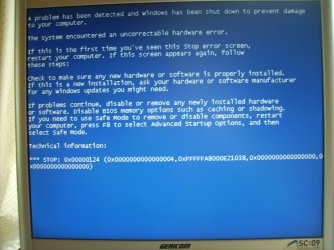
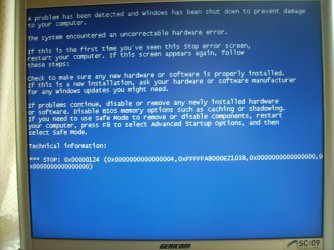
EDIT: bluescreen-code was 0x00000124
- also see attachment
 

Attachments
  • 9447d1241276960-bsod-windows-7-rc-7100-x64-clean-install-pict0897.jpg
    9447d1241276960-bsod-windows-7-rc-7100-x64-clean-install-pict0897.jpg
    934.3 KB · Views: 574
Last edited:

My Computer

OS
Windows 7
now to my question:

is the BSOD caused by a bad ISO, or is anything wrong with my system?
by the way: Beta 1 Build 7000 x64 works fine...

thanks for your answers! :D

Julson

If build 7000x64 works then its not your hardware, try burning again using imgburn


My Computer

Computer type
PC/Desktop
Computer Manufacturer/Model Number
Self Build
OS
MS Windows 7 Professional 64-bit SP1
CPU
AMD FX(tm)-6100 Six-Core Processor Socket AM3+ (942)
Motherboard
ASUSTeK COMPUTER INC. SABERTOOTH 990FX (AM3r2)
Memory
8.00 GB Dual-Channel DDR3 @ 802MHz (11-11-11-36) 1.5Volts
Graphics Card(s)
NVIDIA GeForce GTX 560 Ti
Sound Card
Onboard Realtek HD
Monitor(s) Displays
shimian (1920x1080@60Hz)
Screen Resolution
1920*1080
Hard Drives
OCZ-AGIL ITY3 SATA Disk Device 120GB
PSU
Corsair TX 750
Case
Corsair
Cooling
WaterCooled
Keyboard
Microsoft Wired
Mouse
Logitech USB Optical TiltWheel Mouse
Internet Speed
Realtek PCIe GBE Family Controller 20MB*1MB
Antivirus
Avast
Browser
Firefox
Other Info
150GB Internal Hard Drive for Backing Up Important Files -
Hauppauge Nova-DT Dual DVB-T Tuner Device (+IR) -
USB PC Camera with Mic (SN9C105)
thanks for your answer, but the same problem also appeared with mounted iso (extracted and not yet burned...). :(
as i said at first i tried to upgrade, but interestingly it was exactly the same error... both after the first boot between bootscreen and logon (or better say continue of install). :huh:

bluescreen-code was:

0x00000124

also see attachment...

thanks! :)
 

Attachments

  • PICT0897.JPG
    PICT0897.JPG
    934.3 KB · Views: 1,766

My Computer

OS
Windows 7
Are you installing the OS with AHCI mode & windows not able to find the driver. I remember this happening to me on Vista x64 I then had to integrate the AHCI drivers.

Check your BIOS settings or make the setting to default.
 

My Computer

Computer Manufacturer/Model Number
Custom Built
OS
Windows 7 Ultimate x64 build 7600
CPU
Intel C2D 6300 1.86MHz
Motherboard
Asus P5B-dlx wifi
Memory
4x1Gb Transcend JetRAM DDR2 PC2-6400 800MHz
Graphics Card(s)
XFX 7600GT
Sound Card
Creative Audigy Value
Monitor(s) Displays
Lenovo 20"
Screen Resolution
1680x1050
Hard Drives
4 x 1.5TB Seagate barracuda
PSU
Zebronics Platinum 450Watts
Case
Zebronics Peace
Cooling
stock cooling
Keyboard
silicon keyboard
Mouse
Logitech 3 button mouse
Internet Speed
1mbps
Hello Julson,
i am leaning towards bad ISO, where did obtain it? i had to redownload my RC, something about missing files :shock:.
I eventually found a working one, its great ;).
My advise, find another ISO and try that one
GL

ENZO.
 

My Computer

Computer Manufacturer/Model Number
Custom Build
OS
W7 RTM Ultimate x64
CPU
Intel Q8400 @ 2.66GHZ
Motherboard
Gigabyte GA-EG45M-UD2H
Memory
4GB DDR2-800
Graphics Card(s)
Gainward GTS 450 GLH 1GB Edition
Sound Card
Integrated 8 Channel
Monitor(s) Displays
AOC 23.6 Inch Widescreen LCD
Screen Resolution
1920x1080
Hard Drives
Seagate 500GB Internal
Western Digital 1TB Internal

Hitachi 1TB External
PSU
Apevia Java Power 500W
Case
Cooler Master HAF 922 Black
Cooling
Stock Intel CPU Fan
Keyboard
HP SK-2960 Multimedia Keyboard
Mouse
Logitech M350 Wireless Gaming Mouse
Internet Speed
1.5MB
Same Problems

Hi,

I got the same problems.

On my notebook I could install Windows 7 RC x86, but a high cpu usage and imediate blue screen after installation.
I had installed windows 7 beta installed befor which were working perfectly the whole time.
By the way, same happen to windows server 2008 r2 beta and windows server 2008 r2 rc also on my notebook.

Another problem, but still refereing to remarkable difference between beta and rc I noted on my desktop.
I could install windows 7 beta and windows server 2008 r2 beta without any problems having installed 6GB of RAM.
As i tried to install windows 7 rc and windows server 2008 r2 rc it hung up during setup. I even could not select country settings, nothing.
As I donwgraded my system to 4GB of RAM I could install the OS. After putting the RAM into OS did not start up again.
I don't know what windows has done to RC, but it seems that they have made some things more instable than stable.

No way to change it except of the windows develpement team.

What do you guys think about?
 

My Computer

Computer Manufacturer/Model Number
Dell Inspirion 9400
OS
Windows 7 RC 7100
Memory
4GB (did not get it running with more than 4gb, and you?)
Graphics Card(s)
Nvidia Go 7900 GS (get's always a little hot, any idea?)
Monitor(s) Displays
17"
Screen Resolution
1920 x 1200
Hard Drives
30 GB SSD from OCZ Technologies (core series V2) - for me seems to be a good performance price relation compared to other competitors. Wo do you think?
thanks to all of you for the answers. :D

i'm now just downloading another iso.
if this one doesn't work, i will check my drivers and bios settings (AHCI...). :)

due to the fact that the install of the beta worked fine, i suppose that the bios doesn't cause the BSOD.
but - as RiderInTheSky said - maybe MS changed a lot between Beta and RC. anyway, i will also check the bios then...

@ Enzo: It was a split up *.rar-file (500 MB parts).
Now i'm trying torrent.

kind regards,

Julson
 

My Computer

OS
Windows 7
Gl with that mate, will be worth it in the end, this could be the savior of vista ;), vista aint that bad tho so yeah, well see :)

Enzo.
 

My Computer

Computer Manufacturer/Model Number
Custom Build
OS
W7 RTM Ultimate x64
CPU
Intel Q8400 @ 2.66GHZ
Motherboard
Gigabyte GA-EG45M-UD2H
Memory
4GB DDR2-800
Graphics Card(s)
Gainward GTS 450 GLH 1GB Edition
Sound Card
Integrated 8 Channel
Monitor(s) Displays
AOC 23.6 Inch Widescreen LCD
Screen Resolution
1920x1080
Hard Drives
Seagate 500GB Internal
Western Digital 1TB Internal

Hitachi 1TB External
PSU
Apevia Java Power 500W
Case
Cooler Master HAF 922 Black
Cooling
Stock Intel CPU Fan
Keyboard
HP SK-2960 Multimedia Keyboard
Mouse
Logitech M350 Wireless Gaming Mouse
Internet Speed
1.5MB
okay guys... bad news. :(

BSOD is not caused by bad iso or something because the new one also causes bluescreen (both upgrade and clean install).
i also checked BIOS and there is no option AHCI or IDE available. It's only IDE.

by the way: my pc is divided into 4 partitions (C:\ [Windows XP], D:\ [Recovery], E:\ [DATA], W:\ [Windows 7].

same error code: 0x00000124 :confused:

System:
IntelCore 2 Dual 1,86 GHz
1024 MB RAM
nVidia Grafics 256 MB
320 GB Disc


what to do? :cry:


EDIT: tried x86: after booting from DVD: same BSOD! :confused:
seems like my PC wanna kid me! :mad:
 
Last edited:

My Computer

OS
Windows 7
Hmmm, ever thought there could be some sort of HDD protection software, maybe limits dual booting or something arather?
I had this happen with my hp once before, i couldnt install a second OS because software limited it to 1 OS.
Stupid if you ask me..

GL
Enzo.
 

My Computer

Computer Manufacturer/Model Number
Custom Build
OS
W7 RTM Ultimate x64
CPU
Intel Q8400 @ 2.66GHZ
Motherboard
Gigabyte GA-EG45M-UD2H
Memory
4GB DDR2-800
Graphics Card(s)
Gainward GTS 450 GLH 1GB Edition
Sound Card
Integrated 8 Channel
Monitor(s) Displays
AOC 23.6 Inch Widescreen LCD
Screen Resolution
1920x1080
Hard Drives
Seagate 500GB Internal
Western Digital 1TB Internal

Hitachi 1TB External
PSU
Apevia Java Power 500W
Case
Cooler Master HAF 922 Black
Cooling
Stock Intel CPU Fan
Keyboard
HP SK-2960 Multimedia Keyboard
Mouse
Logitech M350 Wireless Gaming Mouse
Internet Speed
1.5MB
Got it working

Hi Julson,
i got it installed but i had to installed on a plane new disk, but after installation screen refresh was very slow so installed the graphic card driver. After that it worked fine.
But if I understand right, your problem already is during installation process!?

Only by the way, on my desktop pc I had more then 4gb of ram installed which caused exactly the same error message as you posted. After reduced it to 4gb it was working. But I saw that you have only 1gb installed, so that ist not the problem neither.

I only can say that for me the RC seems to be more instable then the beta.

So MS still has to do some efforts the get things running well.

Perhpas you can tell us what steps in the installation process you can handel or if the blue screen comes right at the beginning.

I will try to use setup for a while and then post my experiences of stability, because only by using one can tell. And ybout beta i can say it is working fine. My daughter and my girl frind are working on there pc's all the day on it without problems, so let's see.

Good look for you furter testings Julson.
 

My Computer

Computer Manufacturer/Model Number
Dell Inspirion 9400
OS
Windows 7 RC 7100
Memory
4GB (did not get it running with more than 4gb, and you?)
Graphics Card(s)
Nvidia Go 7900 GS (get's always a little hot, any idea?)
Monitor(s) Displays
17"
Screen Resolution
1920 x 1200
Hard Drives
30 GB SSD from OCZ Technologies (core series V2) - for me seems to be a good performance price relation compared to other competitors. Wo do you think?
@ Enzo: I already have dual-boot and it actually always worked fine...

@ RiderInTheSky:
The BSOD comes right in the beginning just after Windows has collected files from DVD and the first bootscreen which prepares the installation (at clean install).
At the Upgrade BSOD appears after the bootscreen of the first reboot during install.
To say it all in once: Everytime after Windows had its first time to boot -> BSOD.

Maybe the BSOD itself helps us further: What does all the following numbers actually mean? :sarc:

0x00000124 (0x0000000000000004, 0xFFFFFA8000E21038, 0x0000000000000000, 0x0000000000000000)

(there was another person here who had a similar problem. he updated the BIOS and all worked fine... I have just updated my BIOS and nothing works fine... still exact the same problem.) :cry:

hope, we'll find the solution of the prob...

regards.
 

My Computer

OS
Windows 7
hmmm, think this is beyond my knowledge, hope someone knows the solution.

GL

Enzo.
 

My Computer

Computer Manufacturer/Model Number
Custom Build
OS
W7 RTM Ultimate x64
CPU
Intel Q8400 @ 2.66GHZ
Motherboard
Gigabyte GA-EG45M-UD2H
Memory
4GB DDR2-800
Graphics Card(s)
Gainward GTS 450 GLH 1GB Edition
Sound Card
Integrated 8 Channel
Monitor(s) Displays
AOC 23.6 Inch Widescreen LCD
Screen Resolution
1920x1080
Hard Drives
Seagate 500GB Internal
Western Digital 1TB Internal

Hitachi 1TB External
PSU
Apevia Java Power 500W
Case
Cooler Master HAF 922 Black
Cooling
Stock Intel CPU Fan
Keyboard
HP SK-2960 Multimedia Keyboard
Mouse
Logitech M350 Wireless Gaming Mouse
Internet Speed
1.5MB
I am having the same problem, Windows 7 64Bit. I have worked through the beta program and have had less problems than most I read on these pages. The RC has produced this shutdown error. In my case, it happens when I have left the computer idling for, say, more than an hour. I have tried playing with the sleep and hibernate options, without any change.
 

My Computer

Computer Manufacturer/Model Number
Three desktops and one laptop with good specs..
OS
Vista and now 7 in 32 and 64 bit.
@ Enzo: I already have dual-boot and it actually always worked fine...

@ RiderInTheSky:
The BSOD comes right in the beginning just after Windows has collected files from DVD and the first bootscreen which prepares the installation (at clean install).
At the Upgrade BSOD appears after the bootscreen of the first reboot during install.
To say it all in once: Everytime after Windows had its first time to boot -> BSOD.

Maybe the BSOD itself helps us further: What does all the following numbers actually mean? :sarc:

0x00000124 (0x0000000000000004, 0xFFFFFA8000E21038, 0x0000000000000000, 0x0000000000000000)

(there was another person here who had a similar problem. he updated the BIOS and all worked fine... I have just updated my BIOS and nothing works fine... still exact the same problem.) :cry:

hope, we'll find the solution of the prob...

regards.

Not sure if it applies but Google suggests.

1. Go to the BIOS by pressing during POST.
2. Go to Advanced Chipset Features.
3. Go to CPU Configuration
4. Select C1E Enhanced Halt State and set it to Disabled
5. Press [F10] to save the changes and exit.
 

My Computer

OS
Win 7
Mine sometimes, when i got to restart it, comes up with some memory referencing error, but i never get to read it, cuz it closes and continues the restart.. :S

Enzo.
 

My Computer

Computer Manufacturer/Model Number
Custom Build
OS
W7 RTM Ultimate x64
CPU
Intel Q8400 @ 2.66GHZ
Motherboard
Gigabyte GA-EG45M-UD2H
Memory
4GB DDR2-800
Graphics Card(s)
Gainward GTS 450 GLH 1GB Edition
Sound Card
Integrated 8 Channel
Monitor(s) Displays
AOC 23.6 Inch Widescreen LCD
Screen Resolution
1920x1080
Hard Drives
Seagate 500GB Internal
Western Digital 1TB Internal

Hitachi 1TB External
PSU
Apevia Java Power 500W
Case
Cooler Master HAF 922 Black
Cooling
Stock Intel CPU Fan
Keyboard
HP SK-2960 Multimedia Keyboard
Mouse
Logitech M350 Wireless Gaming Mouse
Internet Speed
1.5MB
Hey guys I'm new to the forum but I've been struggling with the same problem for the last two days with RC1 both 32 and 64 bit...I may have made some headway in my case.

My system specs are:

MSI K9VGM-V mainboard
Athlon X2 3800+
2GB DDR2 800 RAM - GSKILL
EVGA GeForce 8600GT 256MB PCIx

I Tried several burns and now am installing from a USB Stick.

I was having the same BSOD with uncorrectable hardware error after loading installation files, it would show the starting windows screen....then BSOD 15 seconds later. I noticed it would restart right after my optical mouse would flash I figured it was loading device drivers.

I pulled the PCIx video card and installed using integrated graphics and IT WORKED! Installed fine booted right up. So I shut it down and reinstalled the graphics card and it immediatly blue screened again in the same spot. I started in Safe Mode and it would blue screen right after trying to load a driver file, I can't remember the name of it because I had to reinstall an operating system that would work....it started with pnp*** and it had a .sys extension IIRC.

I've tried disabling C1E Enhanced Halt State, and I've spent the last 6 hours messing around in the BIOS seeing if any other options would allow me to install or run it with the video card.

I'm curious if anybody else who has had this problem has an NVIDIA card or even what type their using....AGP, PCIx, PCI....if this is just in my case or maybe it's the problem that's causing the BSOD for everyone?? :huh:

I've googled myself to death with this problem, I used the first beta release no problem, this has only come up since trying to install RC1...
 

My Computer

Computer Manufacturer/Model Number
Custom
OS
Windows 7 build 7229 x86
CPU
AMD Athlon X2 3800+ @ 2.0Ghz
Motherboard
MSI K9VGM-V bios v1.8
Memory
2GB GSKILL DDR2 800Mhz Dual Channel
Graphics Card(s)
EVGA GeForce 8600GT 256MB PCIx (O.C. 700/1540/850)
Sound Card
Realtek HD Integrated
Monitor(s) Displays
18" Gateway LCD
Screen Resolution
1280x1024
Hard Drives
320GB Western Digital SATA 3.0 - OS and Software---2x100GB Western Digital PATA - Entertainment
PSU
Thermaltake 430Watt
Case
Antec
Cooling
Artic Cooling
Keyboard
Logitech
Mouse
Logitech
Internet Speed
10Mbps down/1Mbps up
Other Info
And one janky, picky Emprex 16x DVD burner
Interesting, does "hotplugging" mean installing the card while the system is running or to install the card without drivers and then boot and install afterwards. Also I've run Vista for quite some time and never had an issue, what are the chances of this hotfix working with 7? I assume slim to none. :)

I've found something that has to do with the STOP error in the BSOD that the code refers to a PCI Express error so maybe something will come of that, rather frustrating though that this problem is still in 7 if thats the case considering its in RC release now and it's still not fixed...grrr
 

My Computer

Computer Manufacturer/Model Number
Custom
OS
Windows 7 build 7229 x86
CPU
AMD Athlon X2 3800+ @ 2.0Ghz
Motherboard
MSI K9VGM-V bios v1.8
Memory
2GB GSKILL DDR2 800Mhz Dual Channel
Graphics Card(s)
EVGA GeForce 8600GT 256MB PCIx (O.C. 700/1540/850)
Sound Card
Realtek HD Integrated
Monitor(s) Displays
18" Gateway LCD
Screen Resolution
1280x1024
Hard Drives
320GB Western Digital SATA 3.0 - OS and Software---2x100GB Western Digital PATA - Entertainment
PSU
Thermaltake 430Watt
Case
Antec
Cooling
Artic Cooling
Keyboard
Logitech
Mouse
Logitech
Internet Speed
10Mbps down/1Mbps up
Other Info
And one janky, picky Emprex 16x DVD burner
I am having the same problem, Windows 7 64Bit. I have worked through the beta program and have had less problems than most I read on these pages. The RC has produced this shutdown error. In my case, it happens when I have left the computer idling for, say, more than an hour. I have tried playing with the sleep and hibernate options, without any change.

Adding to this:
For once, I have had a positive exchnage with Microsoft feedback on this. They are putting me through the hoop with a couple of experiments, with subsequent uploading of my dump files. If they come up with a solution, I will repost.
 

My Computer

Computer Manufacturer/Model Number
Three desktops and one laptop with good specs..
OS
Vista and now 7 in 32 and 64 bit.
Back
Top